30.8 CHISQ.TEST in Brief: Comparing Conversion Rates and Counts
Example first. In a second test, 1,200 visitors saw page A and 96 placed an order (8.0%); 1,180 saw page B and 118 ordered (10.0%). B looks two points better. But these are counts (ordered / did not order), not amounts, so T.TEST is the wrong tool. CHISQ.TEST compares the observed counts with the counts you would expect if both pages converted equally. Here it returns 0.0881: above 0.05, so the difference is not yet proven.
CHISQ.TEST — in 30 seconds
What: CHISQ.TEST compares a table of observed counts with a table of expected counts and returns a p-value. For a yes/no outcome in two groups, the expected count of each cell is row total × column total ÷ grand total.
Why: Conversion, click-through, defect and survey questions are counts. CHISQ.TEST tells you whether the differences between groups are bigger than chance.
Tiny example: Observed in B2:C3, expected in F2:G3 (each =row total*column total/grand total). =CHISQ.TEST(B2:C3,F2:G3) = 0.0881, not significant at 5%.
CHISQ.TEST — 30 सेकंदात
काय: CHISQ.TEST observed counts ची table expected counts च्या table शी तुलना करून p-value देतो. दोन groups मधल्या हो/नाही result साठी प्रत्येक cell चा expected count = row total × column total ÷ grand total.
का: Conversion, click-through, defect आणि survey प्रश्न counts असतात. Groups मधले फरक chance पेक्षा मोठे आहेत का ते CHISQ.TEST सांगतो.
छोटं उदाहरण: Observed B2:C3 मध्ये, expected F2:G3 मध्ये (प्रत्येक =row total*column total/grand total). =CHISQ.TEST(B2:C3,F2:G3) = 0.0881, 5% वर significant नाही.
CHISQ.TEST — 30 सेकंड में
क्या: CHISQ.TEST observed counts की table की expected counts की table से तुलना करके p-value देता है. दो groups में हाँ/ना result के लिए हर cell का expected count = row total × column total ÷ grand total.
क्यों: Conversion, click-through, defect और survey सवाल counts होते हैं. Groups के फ़र्क़ chance से बड़े हैं या नहीं, यह CHISQ.TEST बताता है.
छोटा उदाहरण: Observed B2:C3 में, expected F2:G3 में (हर एक =row total*column total/grand total). =CHISQ.TEST(B2:C3,F2:G3) = 0.0881, 5% पर significant नहीं.
First look at the data (before → after):
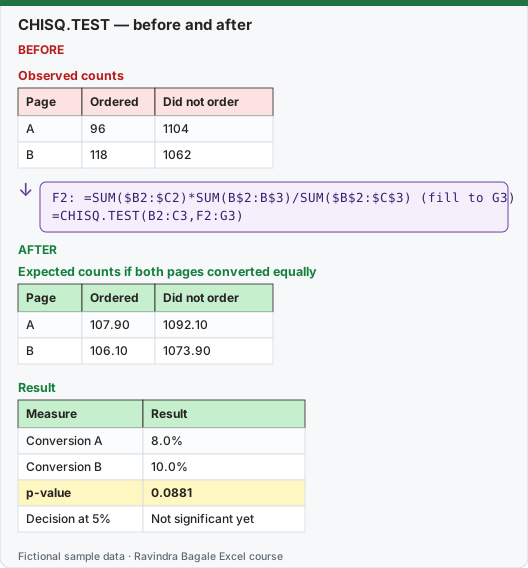
Expected result — Expected counts if both pages converted equally
| Page | Ordered | Did not order |
|---|---|---|
| A | 107.90 | 1092.10 |
| B | 106.10 | 1073.90 |
Expected result — Result
| Measure | Result |
|---|---|
| Conversion A | 8.0% |
| Conversion B | 10.0% |
| p-value | 0.0881 |
| Decision at 5% | Not significant yet |
Before table and formula as text
Before — Observed counts
| Page | Ordered | Did not order |
|---|---|---|
| A | 96 | 1104 |
| B | 118 | 1062 |
Formula / click path
F2: =SUM($B2:$C2)*SUM(B$2:B$3)/SUM($B$2:$C$3)   (fill to G3)
=CHISQ.TEST(B2:C3,F2:G3)
Do it step by step:
- Put the observed counts in B2:C3: rows A and B, columns Ordered and Did not order.
- In F2 type
=SUM($B2:$C2)*SUM(B$2:B$3)/SUM($B$2:$C$3)and fill it to G3 for the expected counts. - Check: the expected table has the same row and column totals as the observed table.
- In I2 type
=CHISQ.TEST(B2:C3,F2:G3). Result 0.0881. - Compare with 0.05: 0.0881 is larger, so the difference could be chance.
- Report: "B converted 10.0% vs 8.0% for A; not yet significant (p = 0.088). Continue the test."
स्टेप बाय स्टेप करून बघा:
- Observed counts B2:C3 मध्ये ठेवा: rows A आणि B, columns Ordered आणि Did not order.
- Expected counts साठी F2 मध्ये
=SUM($B2:$C2)*SUM(B$2:B$3)/SUM($B$2:$C$3)type करून G3 पर्यंत fill करा. - तपासा: expected table चे row आणि column totals observed table एवढेच आहेत.
- I2 मध्ये
=CHISQ.TEST(B2:C3,F2:G3)type करा. Result 0.0881. - 0.05 शी तुलना करा: 0.0881 मोठा आहे, म्हणून फरक chance असू शकतो.
- Report: "B ने 10.0% convert केलं, A ने 8.0%; अजून significant नाही (p = 0.088). Test चालू ठेवा."
स्टेप बाय स्टेप करके देखें:
- Observed counts B2:C3 में रखें: rows A और B, columns Ordered और Did not order.
- Expected counts के लिए F2 में
=SUM($B2:$C2)*SUM(B$2:B$3)/SUM($B$2:$C$3)type करके G3 तक fill करें. - जाँचें: expected table के row और column totals observed table जितने ही हैं.
- I2 में
=CHISQ.TEST(B2:C3,F2:G3)type करें. Result 0.0881. - 0.05 से तुलना करें: 0.0881 बड़ा है, इसलिए फ़र्क़ chance हो सकता है.
- Report: "B ने 10.0% convert किया, A ने 8.0%; अभी significant नहीं (p = 0.088). Test जारी रखें."
What happens inside. For each cell Excel computes (observed − expected)² ÷ expected and adds them up. That total is the chi-square statistic, 2.9082 here. With (rows − 1) × (columns − 1) = 1 degree of freedom, the p-value is =CHISQ.DIST.RT(2.9082,1) = 0.0881, the same number CHISQ.TEST returns. To show the statistic itself in one cell: =SUMPRODUCT((B2:C3-F2:G3)^2/F2:G3).
Reading this result honestly. Not significant does not mean "A and B are the same". It means this sample is too small to tell. A difference of 2 percentage points on about 1,200 visitors per page is within normal chance variation. Roughly doubling the visitors with the same rates would make it significant, so the right decision is "keep testing", not "B failed".
Rules for CHISQ.TEST
- Use counts, never percentages or averages.
- Expected counts should be at least 5 in every cell; with smaller counts the p-value is unreliable.
- The two ranges must have the same shape. Bigger tables work too (for example 3 cities × 2 outcomes, df = 2).
- Excel's CHISQ.TEST does not apply the "Yates continuity correction". Python's
scipy.stats.chi2_contingencyapplies it by default to 2 × 2 tables and gives a larger p-value; usecorrection=Falsein Python to match Excel.
Percentage points, not percent. 8.0% to 10.0% is +2.0 percentage points, which is a +25% relative increase. Say which one you mean; mixing them up is one of the most common report errors.
Every number on this page was computed with Excel's documented formulas and re-checked twice: in LibreOffice Calc 25.2 with the same formulas, and in Python with scipy and statsmodels.
Microsoft sources (checked 7 October 2026): CHISQ.TEST function.
Practice task (try it before you open the answer):
- A third page C had 1,150 visitors and 81 orders. What is its conversion rate?
- Build a 2 × 2 table for A vs C. Is the difference significant at 5%?
- In your own words, why is T.TEST the wrong tool for conversion?
Answer
- 81 ÷ 1,150 = 7.0%.
- Observed A: 96 / 1,104; C: 81 / 1,069.
=CHISQ.TEST(observed,expected)= 0.3798. Not significant: A and C convert at similar rates. - Each visitor either ordered or not (a count of yes/no), not an amount with an average and spread, so the test for counts, CHISQ.TEST, is the right one.
Ravindra Bagale's Tip
Before any conversion test, estimate how many visitors you need. A two-point difference needs thousands of visitors per page; deciding after a few hundred is reading tea leaves.
Ravindra Bagale's Tip – मराठी
कोणत्याही conversion test आधी किती visitors लागतील याचा अंदाज घ्या. दोन points च्या फरकासाठी प्रत्येक page ला हजारो visitors लागतात; काहीशे वर निर्णय घेणं म्हणजे अंदाजपंचे.
Ravindra Bagale's Tip – हिंदी
किसी भी conversion test से पहले अंदाज़ा लगाएँ कि कितने visitors चाहिए. दो points के फ़र्क़ के लिए हर page पर हज़ारों visitors चाहिए; कुछ सौ पर फ़ैसला करना अटकलबाज़ी है.
Loading practice tasks...
- Rate A (Easy): B2 ÷ D2.
- Rate B (Easy): B3 ÷ D3.
- Overall rate (Easy): Total bought ÷ total visitors.
- Expected buyers A (Medium): D2 × pooled rate.
- Expected non-buyers A (Medium): D2 × total did-not-buy ÷ all visitors.
- Expected table (spill) (Medium): Row totals D2:D3 × column totals of B2:C3 ÷ grand total.
- p-value (Hard): CHISQ.TEST of B2:C3 against the expected table, rounded to 4 decimals.
- Significant? (Hard): Is that p-value below 0.05? (TRUE or FALSE)
- Relative lift (Hard): Rate B ÷ rate A − 1, rounded to 2 decimals.
- Extra buyers per 1,000 (Hard): (Rate B − rate A) × 1000.