24. Power Pivot and the Data Model
24.5 A Date Table (Calendar)
Example first. A PivotTable by a text month column puts Nov before Oct (alphabetical) and has no place for a month with no orders. A Calendar table with one row per day from 01-10-2026 to 30-11-2026 (61 rows), a Month Number column and "Mark as Date Table" fixes both.
Date table — in 30 seconds
What: A date table has one row for every date in the period, with no gaps, plus columns such as Year, Month Number and Month. It is related to the Date column of the fact table.
Why: Months sort correctly, every month appears even with no sales, and time-intelligence functions such as DATEADD and TOTALYTD need a proper date table to work.
Tiny example: Calendar from 01-10-2026 to 30-11-2026 = 61 rows. Month sorted by Month Number gives Oct ₹1,005, Nov ₹1,310.
Date table — 30 सेकंदात
काय: Date table मध्ये कालावधीतल्या प्रत्येक date साठी एक row असते, gap शिवाय, आणि Year, Month Number, Month सारखे columns असतात. ती fact table च्या Date column शी relate केलेली असते.
का: Months बरोबर क्रमाने येतात, sales नसलेला month पण दिसतो, आणि DATEADD, TOTALYTD सारखी time-intelligence functions चालायला नीट date table लागते.
छोटं उदाहरण: 01-10-2026 ते 30-11-2026 Calendar = 61 rows. Month Number ने sort केलेला Month: Oct ₹1,005, Nov ₹1,310.
Date table — 30 सेकंड में
क्या: Date table में अवधि की हर date की एक row होती है, बिना gap के, और Year, Month Number, Month जैसे columns होते हैं. वह fact table के Date column से relate होती है.
क्यों: Months सही क्रम में आते हैं, बिना sales वाला month भी दिखता है, और DATEADD, TOTALYTD जैसी time-intelligence functions को ठीक से चलने के लिए सही date table चाहिए.
छोटा उदाहरण: 01-10-2026 से 30-11-2026 तक Calendar = 61 rows. Month Number से sort किया Month: Oct ₹1,005, Nov ₹1,310.
First look at the data (before → after):
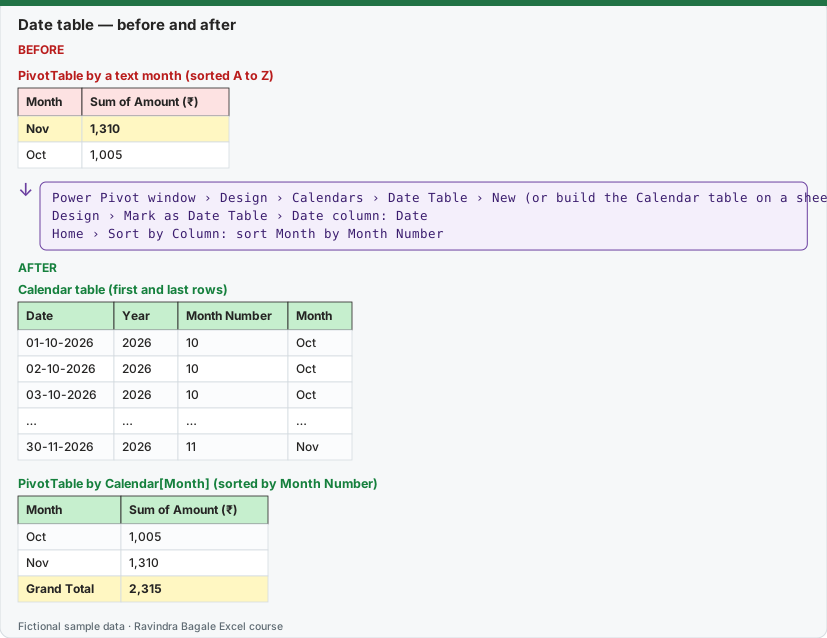
Expected result — Calendar table (first and last rows)
| Date | Year | Month Number | Month |
|---|---|---|---|
| 01-10-2026 | 2026 | 10 | Oct |
| 02-10-2026 | 2026 | 10 | Oct |
| 03-10-2026 | 2026 | 10 | Oct |
| … | … | … | … |
| 30-11-2026 | 2026 | 11 | Nov |
Expected result — PivotTable by Calendar[Month] (sorted by Month Number)
| Month | Sum of Amount (₹) |
|---|---|
| Oct | 1,005 |
| Nov | 1,310 |
| Grand Total | 2,315 |
Before table and formula as text
Before — PivotTable by a text month (sorted A to Z)
| Month | Sum of Amount (₹) |
|---|---|
| Nov | 1,310 |
| Oct | 1,005 |
Formula / click path
Power Pivot window › Design › Calendars › Date Table › New   (or build the Calendar table on a sheet)
Design › Mark as Date Table › Date column: Date
Home › Sort by Column: sort Month by Month Number
Do it step by step:
- On a new sheet type
Datein A1,01-10-2026in A2, and fill down to30-11-2026with Home › Fill › Series (Step value 1). - In B2 type
=YEAR(A2), in C2=MONTH(A2), in D2=TEXT(A2,"mmm"). Make it a Table namedCalendar. - Add Calendar to the Data Model and relate Orders[Date] to Calendar[Date] in Diagram View.
- In the Power Pivot window, select the Calendar table and click Design › Mark as Date Table, choose the Date column.
- Select the Month column and click Home › Sort by Column, sort by Month Number.
- In the PivotTable use Calendar[Month] (not the Orders date). Oct now comes before Nov.
स्टेप बाय स्टेप करून बघा:
- नवीन sheet वर A1 मध्ये
Date, A2 मध्ये01-10-2026type करा, आणि Home › Fill › Series (Step value 1) ने30-11-2026पर्यंत fill करा. - B2 मध्ये
=YEAR(A2), C2 मध्ये=MONTH(A2), D2 मध्ये=TEXT(A2,"mmm")type करा. तीCalendarनावाची Table बनवा. - Calendar Data Model मध्ये add करा आणि Diagram View मध्ये Orders[Date] ला Calendar[Date] शी जोडा.
- Power Pivot window मध्ये Calendar table निवडा आणि Design › Mark as Date Table वर click करून Date column निवडा.
- Month column select करा आणि Home › Sort by Column ने Month Number प्रमाणे sort करा.
- PivotTable मध्ये Calendar[Month] वापरा (Orders ची date नाही). आता Oct, Nov च्या आधी येतो.
स्टेप बाय स्टेप करके देखें:
- नई sheet पर A1 में
Date, A2 में01-10-2026type करें, और Home › Fill › Series (Step value 1) से30-11-2026तक fill करें. - B2 में
=YEAR(A2), C2 में=MONTH(A2), D2 में=TEXT(A2,"mmm")type करें. इसेCalendarनाम की Table बनाएँ. - Calendar को Data Model में add करें और Diagram View में Orders[Date] को Calendar[Date] से जोड़ें.
- Power Pivot window में Calendar table चुनें और Design › Mark as Date Table पर click करके Date column चुनें.
- Month column select करें और Home › Sort by Column से Month Number के हिसाब से sort करें.
- PivotTable में Calendar[Month] इस्तेमाल करें (Orders की date नहीं). अब Oct, Nov से पहले आता है.
Date table checklist
- One row per day, no gaps, covering every date in the fact table (whole months or whole years is best).
- A real date column (not text) that is unique.
- Related to the fact table's date column (one-to-many).
- Marked as the date table.
- Text columns such as Month sorted by a number column (Sort by Column).
You can also let Excel build it: in the Power Pivot window, Design › Calendars › Date Table › New creates a Calendar table covering the dates in your model, with Year, Month and more already filled in.
Practice task (try it before you open the answer):
- Build the Calendar table for October–November 2026 and relate it.
- Count the rows.
- Make a PivotTable with Calendar[Month] in Rows and Distinct Count of CustomerID (Orders) in Values.
Answer
61 rows (31 + 30). Distinct customers: Oct 5, Nov 5; Grand Total 6 (a customer who bought in both months is counted once in the total).
Ravindra Bagale's Tip
Make the Calendar cover whole years, even if your data starts mid-year. Year-to-date and last-year measures give strange answers when the calendar starts in the middle.
Ravindra Bagale's Tip – मराठी
Data वर्षाच्या मध्यातून सुरू झाला तरी Calendar पूर्ण वर्षांचा बनवा. Calendar मधूनच सुरू झाला की year-to-date आणि last-year measures विचित्र उत्तरं देतात.
Ravindra Bagale's Tip – हिंदी
Data साल के बीच से शुरू हो तब भी Calendar पूरे सालों का बनाएँ. Calendar बीच से शुरू हो तो year-to-date और last-year measures अजीब जवाब देते हैं.