24. Power Pivot and the Data Model
24.4 Fact and Dimension Tables: the Star Schema
Example first. Orders holds events with numbers (Qty, Amount): that is a fact table. Stores, Products and Calendar describe those events: they are dimension tables. Draw the fact in the middle and the dimensions around it, and the diagram looks like a star.
Fact and dimension tables — in 30 seconds
What: A fact table has one row per event and the numbers you add up. A dimension table has one row per thing (store, product, date) and the words you filter and group by.
Why: A star schema keeps every relationship simple (one dimension to one fact), makes measures short and keeps the file small, because city and category names are stored once, not on every order.
Tiny example: Orders (fact, 12 rows) in the centre; Stores (4), Products (4) and Calendar (61 days) around it, each linked by one key.
Fact and dimension tables — 30 सेकंदात
काय: Fact table मध्ये प्रत्येक event साठी एक row आणि बेरीज करायचे आकडे असतात. Dimension table मध्ये प्रत्येक गोष्टीसाठी (store, product, date) एक row आणि filter, group करायचे शब्द असतात.
का: Star schema प्रत्येक relationship सोपा ठेवतो (एक dimension ते एक fact), measures छोटे ठेवतो आणि file लहान ठेवतो, कारण city आणि category ची नावं प्रत्येक order वर नाही, एकदाच साठवली जातात.
छोटं उदाहरण: मध्यभागी Orders (fact, 12 rows); भोवती Stores (4), Products (4) आणि Calendar (61 दिवस), प्रत्येक एका key ने जोडलेला.
Fact and dimension tables — 30 सेकंड में
क्या: Fact table में हर event की एक row और जोड़ने वाले आँकड़े होते हैं. Dimension table में हर चीज़ (store, product, date) की एक row और filter व group करने वाले शब्द होते हैं.
क्यों: Star schema हर relationship को आसान रखता है (एक dimension से एक fact), measures छोटे रखता है और file छोटी रखता है, क्योंकि city और category के नाम हर order पर नहीं, एक बार रखे जाते हैं.
छोटा उदाहरण: बीच में Orders (fact, 12 rows); चारों ओर Stores (4), Products (4) और Calendar (61 दिन), हर एक एक key से जुड़ा.
First look at the data (before → after):
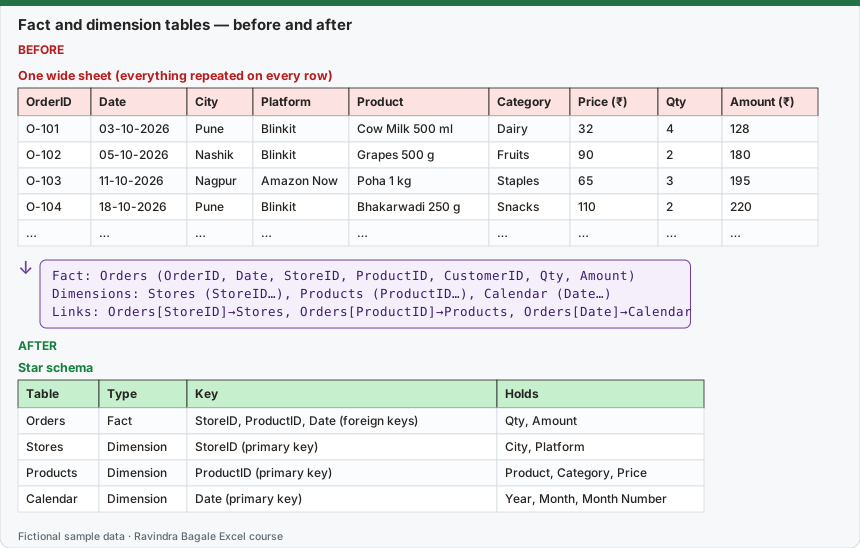
Expected result — Star schema
| Table | Type | Key | Holds |
|---|---|---|---|
| Orders | Fact | StoreID, ProductID, Date (foreign keys) | Qty, Amount |
| Stores | Dimension | StoreID (primary key) | City, Platform |
| Products | Dimension | ProductID (primary key) | Product, Category, Price |
| Calendar | Dimension | Date (primary key) | Year, Month, Month Number |
Before table and formula as text
Before — One wide sheet (everything repeated on every row)
| OrderID | Date | City | Platform | Product | Category | Price (₹) | Qty | Amount (₹) |
|---|---|---|---|---|---|---|---|---|
| O-101 | 03-10-2026 | Pune | Blinkit | Cow Milk 500 ml | Dairy | 32 | 4 | 128 |
| O-102 | 05-10-2026 | Nashik | Blinkit | Grapes 500 g | Fruits | 90 | 2 | 180 |
| O-103 | 11-10-2026 | Nagpur | Amazon Now | Poha 1 kg | Staples | 65 | 3 | 195 |
| O-104 | 18-10-2026 | Pune | Blinkit | Bhakarwadi 250 g | Snacks | 110 | 2 | 220 |
| … | … | … | … | … | … | … | … | … |
Formula / click path
Fact:       Orders (OrderID, Date, StoreID, ProductID, CustomerID, Qty, Amount)
Dimensions: Stores (StoreID…), Products (ProductID…), Calendar (Date…)
Links:      Orders[StoreID]→Stores, Orders[ProductID]→Products, Orders[Date]→Calendar
Do it step by step:
- List every column of your wide sheet.
- Put columns that describe a store (City, Platform) in a Stores table with a StoreID.
- Put columns that describe a product in a Products table with a ProductID.
- Keep only keys, dates and numbers in Orders.
- Load all tables to the Data Model and relate each dimension to Orders in Diagram View.
- Arrange the boxes: Orders in the middle, dimensions around it.
स्टेप बाय स्टेप करून बघा:
- तुमच्या रुंद sheet चे सगळे columns लिहून काढा.
- Store चं वर्णन करणारे columns (City, Platform) StoreID सह Stores table मध्ये ठेवा.
- Product चं वर्णन करणारे columns ProductID सह Products table मध्ये ठेवा.
- Orders मध्ये फक्त keys, dates आणि आकडे ठेवा.
- सगळ्या tables Data Model मध्ये load करा आणि Diagram View मध्ये प्रत्येक dimension Orders शी जोडा.
- Boxes मांडा: मध्यभागी Orders, भोवती dimensions.
स्टेप बाय स्टेप करके देखें:
- अपनी चौड़ी sheet के सारे columns लिखें.
- Store का वर्णन करने वाले columns (City, Platform) StoreID के साथ Stores table में रखें.
- Product का वर्णन करने वाले columns ProductID के साथ Products table में रखें.
- Orders में सिर्फ़ keys, dates और आँकड़े रखें.
- सारी tables Data Model में load करें और Diagram View में हर dimension को Orders से जोड़ें.
- Boxes सजाएँ: बीच में Orders, चारों ओर dimensions.
How to tell fact from dimension
| Question | Fact | Dimension |
|---|---|---|
| What is one row? | One event: an order, a payment, a visit | One thing: a store, a product, a day |
| Does it grow fast? | Yes, every day | Slowly |
| Typical columns | Keys, date, quantities, amounts | Names, categories, cities, groupings |
| Used in a PivotTable as | Values (Sum, Count) | Rows, Columns, Slicers |
Avoid these shapes: one giant flat table (works, but big and slow); two fact tables related to each other directly (relate both to shared dimensions instead); dimensions chained several levels deep (flatten small dimensions where you can). The Power BI course explains the same ideas in Data Modelling.
Practice task (try it before you open the answer):
- Take the one wide sheet (9 columns) and split it into Orders, Stores and Products.
- Count how many times the word "Pune" is stored before and after.
Answer
Before: "Pune" is typed on every Pune order (5 times). After: once, in the Stores table. Totals do not change: ₹2,315.
Ravindra Bagale's Tip
If you are not sure whether a column belongs in the fact or a dimension, ask: "would I ever filter by it?" Filter columns go to dimensions; columns you add up stay in the fact.
Ravindra Bagale's Tip – मराठी
Column fact मध्ये ठेवायचा की dimension मध्ये ते कळत नसेल तर विचारा: "मी कधी याने filter करेन का?" Filter चे columns dimensions मध्ये; बेरीज करायचे columns fact मध्येच.
Ravindra Bagale's Tip – हिंदी
Column fact में रखें या dimension में, समझ न आए तो पूछें: "क्या मैं कभी इससे filter करूँगा?" Filter वाले columns dimensions में; जोड़ने वाले columns fact में ही.