31.7 Forecast Accuracy: MAE, MAPE, RMSE and a Holdout Test
Example first. Salman now has four forecasting methods and one question: which one should he trust? He hides the last week of data (21 to 27 September), forecasts it with each method using only the 7 weeks before, and compares with what really happened. The straight line misses by 30.4 orders a day on average. Trend + weekday offsets misses by 7.7. ETS misses by only about 4. This is a holdout test, and MAE, MAPE and RMSE are the scores.
Forecast accuracy — in 30 seconds
What: Accuracy measures compare forecasts with actuals on data the model did not see: MAE (average size of the miss), MAPE (average miss as a percentage of the actual), RMSE (punishes big misses more) and bias (average over- or under-forecast).
Why: A forecast method is only as good as its errors on new data. A holdout test turns "this model looks good" into a number you can compare and report.
Tiny example: Actuals in B2:B8, forecasts in C2:C8. =AVERAGE(ABS(B2:B8-C2:C8)) gives MAE and =AVERAGE(ABS((B2:B8-C2:C8)/B2:B8)) gives MAPE (format as %).
Forecast accuracy — 30 सेकंदात
काय: Accuracy measures model ने न पाहिलेल्या data वर forecasts ची actuals शी तुलना करतात: MAE (चुकीचा सरासरी आकार), MAPE (actual च्या टक्केवारीत सरासरी चूक), RMSE (मोठ्या चुकांना जास्त शिक्षा) आणि bias (सरासरी जास्त किंवा कमी forecast).
का: Forecast पद्धत नवीन data वरच्या तिच्या errors एवढीच चांगली असते. Holdout test "हा model चांगला दिसतो" ला तुलना आणि report करता येणाऱ्या आकड्यात बदलतो.
छोटं उदाहरण: Actuals B2:B8 मध्ये, forecasts C2:C8 मध्ये. =AVERAGE(ABS(B2:B8-C2:C8)) MAE देतो आणि =AVERAGE(ABS((B2:B8-C2:C8)/B2:B8)) MAPE देतो (% म्हणून format करा).
Forecast accuracy — 30 सेकंड में
क्या: Accuracy measures model के न देखे data पर forecasts की actuals से तुलना करते हैं: MAE (चूक का औसत आकार), MAPE (actual के प्रतिशत में औसत चूक), RMSE (बड़ी चूकों को ज़्यादा सज़ा) और bias (औसतन ज़्यादा या कम forecast).
क्यों: Forecast का तरीक़ा नए data पर उसकी errors जितना ही अच्छा होता है. Holdout test "यह model अच्छा दिखता है" को तुलना और report करने लायक़ आँकड़े में बदलता है.
छोटा उदाहरण: Actuals B2:B8 में, forecasts C2:C8 में. =AVERAGE(ABS(B2:B8-C2:C8)) MAE देता है और =AVERAGE(ABS((B2:B8-C2:C8)/B2:B8)) MAPE देता है (% में format करें).
First look at the data (before → after):
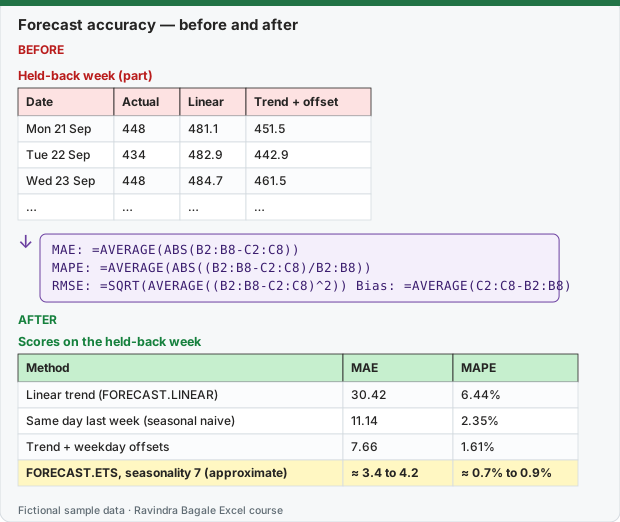
Expected result — Scores on the held-back week
| Method | MAE | MAPE |
|---|---|---|
| Linear trend (FORECAST.LINEAR) | 30.42 | 6.44% |
| Same day last week (seasonal naive) | 11.14 | 2.35% |
| Trend + weekday offsets | 7.66 | 1.61% |
| FORECAST.ETS, seasonality 7 (approximate) | ≈ 3.4 to 4.2 | ≈ 0.7% to 0.9% |
Before table and formula as text
Before — Held-back week (part)
| Date | Actual | Linear | Trend + offset |
|---|---|---|---|
| Mon 21 Sep | 448 | 481.1 | 451.5 |
| Tue 22 Sep | 434 | 482.9 | 442.9 |
| Wed 23 Sep | 448 | 484.7 | 461.5 |
| … | … | … | … |
Formula / click path
MAE:  =AVERAGE(ABS(B2:B8-C2:C8))
MAPE: =AVERAGE(ABS((B2:B8-C2:C8)/B2:B8))
RMSE: =SQRT(AVERAGE((B2:B8-C2:C8)^2))   Bias: =AVERAGE(C2:C8-B2:B8)
Do it step by step:
- Split the data: training = 3 Aug to 20 Sep (49 days, B2:B50); test = 21 to 27 Sep (7 days, B51:B57). Copy the 7 test actuals to a new sheet in B2:B8.
- Make each forecast for 21 to 27 Sep using only B2:B50 (for example
=FORECAST.ETS(A51,$B$2:$B$50,$A$2:$A$50,7)) and put it in C2:C8. - In E2 type
=AVERAGE(ABS(B2:B8-C2:C8))for MAE (orders per day). - In E3 type
=AVERAGE(ABS((B2:B8-C2:C8)/B2:B8))for MAPE and format it as a percentage. - In E4 type
=SQRT(AVERAGE((B2:B8-C2:C8)^2))for RMSE and in E5=AVERAGE(C2:C8-B2:B8)for bias (positive = over-forecast). - Repeat for each method, put the scores in one table and choose the method with the lowest MAE that you can still explain.
स्टेप बाय स्टेप करून बघा:
- Data विभागा: training = 3 Aug ते 20 Sep (49 दिवस, B2:B50); test = 21 ते 27 Sep (7 दिवस, B51:B57). 7 test actuals नवीन sheet मध्ये B2:B8 मध्ये copy करा.
- 21 ते 27 Sep चा प्रत्येक forecast फक्त B2:B50 वापरून बनवा (उदा.
=FORECAST.ETS(A51,$B$2:$B$50,$A$2:$A$50,7)) आणि C2:C8 मध्ये ठेवा. - MAE (दिवसाला orders) साठी E2 मध्ये
=AVERAGE(ABS(B2:B8-C2:C8))type करा. - MAPE साठी E3 मध्ये
=AVERAGE(ABS((B2:B8-C2:C8)/B2:B8))type करून percentage म्हणून format करा. - RMSE साठी E4 मध्ये
=SQRT(AVERAGE((B2:B8-C2:C8)^2))आणि bias साठी E5 मध्ये=AVERAGE(C2:C8-B2:B8)type करा (positive = जास्त forecast). - प्रत्येक पद्धतीसाठी हेच करा, scores एका table मध्ये ठेवा आणि तुम्ही समजावू शकता अशी सर्वात कमी MAE ची पद्धत निवडा.
स्टेप बाय स्टेप करके देखें:
- Data बाँटें: training = 3 Aug से 20 Sep (49 दिन, B2:B50); test = 21 से 27 Sep (7 दिन, B51:B57). 7 test actuals नई sheet में B2:B8 में copy करें.
- 21 से 27 Sep का हर forecast सिर्फ़ B2:B50 से बनाएँ (जैसे
=FORECAST.ETS(A51,$B$2:$B$50,$A$2:$A$50,7)) और C2:C8 में रखें. - MAE (प्रति दिन orders) के लिए E2 में
=AVERAGE(ABS(B2:B8-C2:C8))type करें. - MAPE के लिए E3 में
=AVERAGE(ABS((B2:B8-C2:C8)/B2:B8))type करके percentage format करें. - RMSE के लिए E4 में
=SQRT(AVERAGE((B2:B8-C2:C8)^2))और bias के लिए E5 में=AVERAGE(C2:C8-B2:B8)type करें (positive = ज़्यादा forecast). - हर तरीक़े के लिए यही करें, scores एक table में रखें और वह तरीक़ा चुनें जिसकी MAE सबसे कम हो और जिसे आप समझा सकें.
The held-back week: actuals and four forecasts (each made from the first 49 days only)
| Date | Actual | Linear trend | Same day last week | Trend + offsets | ETS (approximate) |
|---|---|---|---|---|---|
| Mon 21 Sep | 448 | 481.1 | 434 | 451.5 | ≈ 443 |
| Tue 22 Sep | 434 | 482.9 | 420 | 442.9 | ≈ 434 |
| Wed 23 Sep | 448 | 484.7 | 444 | 461.5 | ≈ 454 |
| Thu 24 Sep | 472 | 486.5 | 452 | 476.1 | ≈ 467 |
| Fri 25 Sep | 498 | 488.3 | 495 | 508.8 | ≈ 502 |
| Sat 26 Sep | 536 | 490.1 | 528 | 545.5 | ≈ 537 |
| Sun 27 Sep | 516 | 491.9 | 501 | 519.2 | ≈ 511 |
The scores
| Method | MAE (orders) | MAPE | RMSE (orders) | Bias (orders) |
|---|---|---|---|---|
| Linear trend (FORECAST.LINEAR) | 30.42 | 6.44% | 33.44 | 7.66 |
| Same day last week (seasonal naive) | 11.14 | 2.35% | 12.57 | -11.14 |
| Trend + weekday offsets | 7.66 | 1.61% | 8.53 | 7.66 |
| FORECAST.ETS, seasonality 7 (approximate) | ≈ 3.4 to 4.2 | ≈ 0.7% to 0.9% | ≈ 3.8 to 4.7 | ≈ −0.6 |
Exact scores for the first three methods were re-checked in LibreOffice. The ETS row is a range, because it was computed with LibreOffice and statsmodels, not with Excel's own ETS (see lesson 31.3).
Reading the table
- MAE is the easiest to explain: "on an average day of the test week, the straight line missed by 30.4 orders; ETS missed by about 4".
- MAPE puts it in percent: 6.44% for the line vs under 1% for ETS. Useful when comparing stores of different sizes.
- RMSE is always at least as large as MAE. A big gap between them means a few large misses. For the line, RMSE 33.4 vs MAE 30.4: the weekend misses are large.
- Bias shows the direction. Trend + offsets over-forecast by 7.7 orders a day: it is too optimistic because it weights old weeks equally. Same day last week under-forecast by 11.1, because it ignores the growth.
The ranking here: ETS (about 4) < trend + offsets (7.7) < same day last week (11.1) < straight line (30.4). For this store, Salman uses FORECAST.ETS for the rider plan and keeps the offset table to explain it.
Formula notes
=AVERAGE(ABS(B2:B8-C2:C8))works directly in Microsoft 365 and Excel 2021 or later (dynamic arrays). In Excel 2019 and older, use=SUMPRODUCT(ABS(B2:B8-C2:C8))/COUNT(B2:B8)or confirm with Ctrl+Shift+Enter.- MAPE breaks when an actual is 0 (division by zero) and exaggerates errors on small actuals. For data with zero days, use MAE or "weighted MAPE":
=SUM(ABS(B2:B8-C2:C8))/SUM(B2:B8). - MASE (FORECAST.ETS.STAT type 4) compares a method with the seasonal naive forecast; below 1 means the method beats "same as last season".
- One test week is a small test. Repeat the holdout for several weeks ("rolling origin") before you trust a ranking for a long time.
The holdout rules
- The test period must be after the training period and never used to fit the model.
- Test as far ahead as you will really forecast (one week ahead for a weekly rider plan).
- Compare with a simple baseline (straight line, same day last week). A complex method must beat it to earn its place.
- After choosing the method, re-fit it on all the data (56 days) for the real forecast.
Microsoft sources (checked 7 October 2026): FORECAST.ETS function; FORECAST.ETS.STAT function; Create a forecast in Excel for Windows.
Practice task (try it before you open the answer):
- Calculate the MAE of the seasonal-naive forecast by hand for the first three test days only.
- A store has a day with 0 actual orders (closed for a festival). Which measure should you avoid and why?
- Trend + offsets has a bias of about +7.7. What would you tell the operations team?
Answer
- Misses: |448−434| = 14, |434−420| = 14, |448−444| = 4. MAE = 10.67.
- MAPE: dividing by an actual of 0 gives #DIV/0!. Use MAE, or weighted MAPE (
=SUM(ABS(actual-forecast))/SUM(actual)), or leave the closed day out of both actuals and forecasts. - "This method has been forecasting about 8 orders a day too many recently; if we use it, plan slightly below its numbers, or prefer ETS, which had almost no bias."
Ravindra Bagale's Tip
Never choose a forecast method by how good its chart looks. Hide the last period, forecast it, and let MAE decide. It takes ten minutes and ends most arguments.
Ravindra Bagale's Tip – मराठी
Forecast पद्धत तिचा chart किती छान दिसतो यावरून कधी निवडू नका. शेवटचा period लपवा, त्याचा forecast करा, आणि MAE ला ठरवू द्या. दहा मिनिटं लागतात आणि बहुतेक वाद संपतात.
Ravindra Bagale's Tip – हिंदी
Forecast का तरीक़ा उसका chart कितना अच्छा दिखता है, इससे कभी न चुनें. आख़िरी period छुपाएँ, उसका forecast करें, और MAE को तय करने दें. दस मिनट लगते हैं और ज़्यादातर बहसें ख़त्म हो जाती हैं.
Loading practice tasks...
- Week 1 error (Easy): B2 − C2.
- Errors (spill) (Easy): B2:B9 − C2:C9.
- Total actual (Easy): Sum of B2:B9.
- MAE (Medium): Average of the absolute errors, rounded to 2 decimals.
- Bias (Medium): Average of B2:B9 − C2:C9, rounded to 2 decimals.
- MAPE (Medium): Average of |error| ÷ actual, rounded to 4 decimals.
- RMSE (Hard): Square root of the average squared error, rounded to 2 decimals.
- Weighted error % (Hard): Sum of absolute errors ÷ sum of B2:B9, rounded to 4 decimals.
- Weeks within 5% (Hard): How many weeks have |error| ÷ actual at most 0.05?
- Worst miss (Hard): Largest absolute error.