31.2 FORECAST.LINEAR and TREND: Straight-Line Forecasts
Example first. Zoya has monthly orders for a Nashik dark store from October 2025 to September 2026: 8,200 in the first month, 10,350 in the last, with steady growth and no clear repeating pattern. Her manager wants October to December 2026. With the months numbered 1 to 12, =FORECAST.LINEAR(13,C2:C13,B2:B13) returns 10659.85, about 10,660 orders for October. This lesson covers FORECAST.LINEAR for one value, TREND for many values at once, and how to tell when a straight line is the wrong tool.
FORECAST.LINEAR and TREND — in 30 seconds
What: FORECAST.LINEAR(x, known_y's, known_x's) predicts y for a new x on the least-squares straight line. TREND returns the same line for many x values at once, and without new x values it returns the fitted line for the existing data.
Why: For steady growth with no repeating pattern, a straight line is simple, explainable and hard to beat. It is also the baseline every fancier forecast must beat.
Tiny example: Months 1 to 12 in B2:B13 and orders in C2:C13. =FORECAST.LINEAR(13,C2:C13,B2:B13) = 10659.85 and =TREND(C2:C13,B2:B13,{13;14;15}) spills October, November and December.
FORECAST.LINEAR and TREND — 30 सेकंदात
काय: FORECAST.LINEAR(x, known_y's, known_x's) least-squares सरळ रेषेवर नवीन x साठी y predict करतो. TREND तीच रेषा अनेक x values साठी एकदम देतो, आणि नवीन x न दिल्यास existing data साठी fitted रेषा देतो.
का: Repeat होणारा pattern नसलेल्या स्थिर वाढीसाठी सरळ रेषा सोपी, समजावता येणारी आणि हरवायला कठीण असते. प्रत्येक fancy forecast ला हरवावी लागणारी ती baseline आहे.
छोटं उदाहरण: B2:B13 मध्ये months 1 ते 12 आणि C2:C13 मध्ये orders. =FORECAST.LINEAR(13,C2:C13,B2:B13) = 10659.85 आणि =TREND(C2:C13,B2:B13,{13;14;15}) October, November आणि December spill करतो.
FORECAST.LINEAR and TREND — 30 सेकंड में
क्या: FORECAST.LINEAR(x, known_y's, known_x's) least-squares सीधी रेखा पर नए x के लिए y predict करता है. TREND वही रेखा कई x values के लिए एक साथ देता है, और नए x न दें तो existing data के लिए fitted रेखा देता है.
क्यों: बिना दोहराने वाले pattern की स्थिर बढ़त के लिए सीधी रेखा आसान, समझाने लायक़ और हराने में मुश्किल होती है. हर fancy forecast को जिसे हराना पड़ता है, वह baseline यही है.
छोटा उदाहरण: B2:B13 में months 1 से 12 और C2:C13 में orders. =FORECAST.LINEAR(13,C2:C13,B2:B13) = 10659.85 और =TREND(C2:C13,B2:B13,{13;14;15}) October, November और December spill करता है.
First look at the data (before → after):
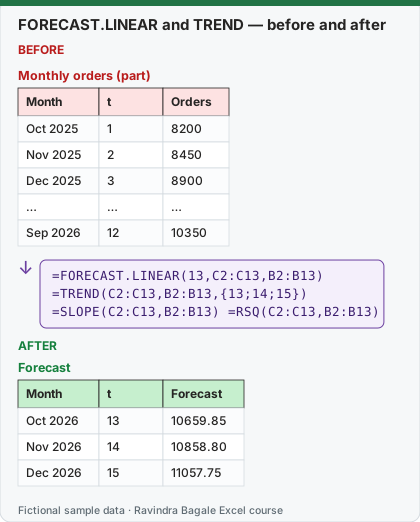
Expected result — Forecast
| Month | t | Forecast |
|---|---|---|
| Oct 2026 | 13 | 10659.85 |
| Nov 2026 | 14 | 10858.80 |
| Dec 2026 | 15 | 11057.75 |
Before table and formula as text
Before — Monthly orders (part)
| Month | t | Orders |
|---|---|---|
| Oct 2025 | 1 | 8200 |
| Nov 2025 | 2 | 8450 |
| Dec 2025 | 3 | 8900 |
| … | … | … |
| Sep 2026 | 12 | 10350 |
Formula / click path
=FORECAST.LINEAR(13,C2:C13,B2:B13)
=TREND(C2:C13,B2:B13,{13;14;15})
=SLOPE(C2:C13,B2:B13)   =RSQ(C2:C13,B2:B13)
Do it step by step:
- Put the months in A2:A13, the numbers 1 to 12 in B2:B13 (or
=SEQUENCE(12)in B2), and the orders in C2:C13. - In E2 type
=FORECAST.LINEAR(13,C2:C13,B2:B13). Result 10659.85 for October 2026. - In F2 type
=TREND(C2:C13,B2:B13,{13;14;15}). Three forecasts spill: October, November, December. - In G2 type
=SLOPE(C2:C13,B2:B13): growth of 198.95 orders per month. - In G3 type
=RSQ(C2:C13,B2:B13): 0.968, so the straight line fits the history well. - Chart actuals and forecasts together and say it as a range, for example "about 10,660 orders in October".
स्टेप बाय स्टेप करून बघा:
- A2:A13 मध्ये months, B2:B13 मध्ये 1 ते 12 आकडे (किंवा B2 मध्ये
=SEQUENCE(12)), आणि C2:C13 मध्ये orders ठेवा. - E2 मध्ये
=FORECAST.LINEAR(13,C2:C13,B2:B13)type करा. October 2026 साठी result 10659.85. - F2 मध्ये
=TREND(C2:C13,B2:B13,{13;14;15})type करा. तीन forecasts spill होतात: October, November, December. - G2 मध्ये
=SLOPE(C2:C13,B2:B13)type करा: दर महिन्याला 198.95 orders ची वाढ. - G3 मध्ये
=RSQ(C2:C13,B2:B13)type करा: 0.968, म्हणजे सरळ रेषा history ला छान बसते. - Actuals आणि forecasts एकत्र chart करा आणि range म्हणून सांगा, उदा. "October मध्ये साधारण 10,660 orders".
स्टेप बाय स्टेप करके देखें:
- A2:A13 में months, B2:B13 में 1 से 12 आँकड़े (या B2 में
=SEQUENCE(12)), और C2:C13 में orders रखें. - E2 में
=FORECAST.LINEAR(13,C2:C13,B2:B13)type करें. October 2026 के लिए result 10659.85. - F2 में
=TREND(C2:C13,B2:B13,{13;14;15})type करें. तीन forecasts spill होते हैं: October, November, December. - G2 में
=SLOPE(C2:C13,B2:B13)type करें: हर महीने 198.95 orders की बढ़त. - G3 में
=RSQ(C2:C13,B2:B13)type करें: 0.968, यानी सीधी रेखा history पर अच्छी बैठती है. - Actuals और forecasts साथ में chart करें और range के रूप में बताएँ, जैसे "October में लगभग 10,660 orders".
The data: monthly orders, Nashik dark store (fictional)
| Month | Oct 2025 | Nov 2025 | Dec 2025 | Jan 2026 | Feb 2026 | Mar 2026 |
|---|---|---|---|---|---|---|
| Orders | 8200 | 8450 | 8900 | 8700 | 9100 | 9350 |
| Month | Apr 2026 | May 2026 | Jun 2026 | Jul 2026 | Aug 2026 | Sep 2026 |
|---|---|---|---|---|---|---|
| Orders | 9300 | 9800 | 9750 | 10100 | 10400 | 10350 |
FORECAST.LINEAR, step by step. The line is Orders = 8073.48 + 198.95 × t. For t = 13: 8073.48 + 198.95 × 13 = 10659.85. Check it with =INTERCEPT(C2:C13,B2:B13)+SLOPE(C2:C13,B2:B13)*13. Microsoft's syntax: FORECAST.LINEAR(x, known_y's, known_x's). The y range comes before the x range. The older FORECAST function has the same syntax and result and is kept for compatibility; use FORECAST.LINEAR in new work.
TREND for several values, and for the fitted line
| Formula | Returns |
|---|---|
=TREND(C2:C13,B2:B13,{13;14;15}) |
10659.85, 10858.80, 11057.75 (a vertical spill; use {13,14,15} for a horizontal one) |
=TREND(C2:C13,B2:B13) |
The 12 fitted values for the history, from 8272.44 to 10460.90: chart them as a trend line |
=TREND(C2:C13,B2:B13,SEQUENCE(3,1,13)) |
The same three forecasts, with the new t values made by SEQUENCE |
Month numbers or real dates as x? You can use the dates themselves: =FORECAST.LINEAR(DATE(2026,10,1),C2:C13,A2:A13) returns 10662.70, slightly different from 10659.85, because months have 28 to 31 days and Excel measures x in days. For monthly data, month numbers (1, 2, 3…) give a cleaner line. For daily or weekly data with no gaps, dates work fine.
How good is the line? =RSQ(C2:C13,B2:B13) = 0.9681: the straight line explains about 97% of the month-to-month variation. =STEYX(C2:C13,B2:B13) = 136.57 is the typical miss in orders, which is a fair "±" for the forecast.
When a straight line is the wrong tool. Try it on the daily Pune data from lesson 31.1: =FORECAST.LINEAR(57,B2:B57,SEQUENCE(56)) predicts 491.0 for Monday 28 September and 499.7 for Saturday 3 October, almost the same number, because a straight line cannot know that Saturdays are busy. Real Saturdays in this data are about 59 orders above average. For data with a repeating pattern use FORECAST.ETS (lesson 31.3) or add weekday offsets (lesson 31.6).
Exact values on this page were computed with Excel's documented formulas and re-checked in LibreOffice Calc 25.2 with the same formulas.
Microsoft sources (checked 7 October 2026): FORECAST and FORECAST.LINEAR functions; TREND function.
Practice task (try it before you open the answer):
- Forecast March 2027 (t = 18) with FORECAST.LINEAR.
- What does
=TREND(C2:C13,B2:B13,{16;17})return? - The actual October 2026 turns out to be 10,520. By how much did the forecast miss, in orders and in percent?
Answer
=FORECAST.LINEAR(18,C2:C13,B2:B13)= 11654.60. This is 6 months beyond the data, so treat it with care.- 11256.70 and 11455.65 (January and February 2027).
- 10,520 − 10659.85 = -139.85 orders; 1.33% of the actual (
=ABS(10520-E2)/10520).
Ravindra Bagale's Tip
Always keep the straight-line forecast as a baseline, even when you use ETS. If a fancy model cannot beat FORECAST.LINEAR on held-back data, use the simple one and explain it in one sentence.
Ravindra Bagale's Tip – मराठी
ETS वापरत असलात तरी सरळ रेषेचा forecast baseline म्हणून नेहमी ठेवा. Held-back data वर fancy model FORECAST.LINEAR ला हरवू शकत नसेल तर सोपा वापरा आणि एका वाक्यात समजवा.
Ravindra Bagale's Tip – हिंदी
ETS इस्तेमाल करें तब भी सीधी रेखा वाला forecast baseline के रूप में हमेशा रखें. Held-back data पर fancy model FORECAST.LINEAR को हरा न सके तो आसान वाला इस्तेमाल करें और एक वाक्य में समझाएँ.
Loading practice tasks...
- Month 11 forecast (Easy): Forecast revenue for month 11, rounded to 1 decimal.
- Month 12 forecast (Easy): Forecast for month 12, rounded to 1 decimal.
- Monthly growth (Easy): Slope of B2:B11 on A2:A11, rounded to 3 decimals.
- Starting level (Medium): Intercept of B2:B11 on A2:A11, rounded to 2 decimals.
- Fit quality (Medium): R squared, rounded to 4 decimals.
- Year-end forecast (Medium): FORECAST for 12, rounded to 1 decimal.
- Fitted month 10 (Medium): Forecast for A11, rounded to 1 decimal.
- Next 3 months total (Hard): Sum of forecasts for months 11, 12, 13, rounded to 1 decimal.
- When does it pass $130k? (Hard): (130 − intercept) ÷ slope, rounded up to a whole month.
- Growth % per month (Hard): Slope ÷ average of B2:B11, rounded to 4 decimals.