31.6 Seasonality by Hand: Trend plus Weekday Offsets with TREND and AVERAGEIFS
Example first. The operations head likes the ETS forecast but asks: "Why is Saturday 103 orders higher than Tuesday? Show me." ETS hides its pattern inside the formula. Salman rebuilds the forecast in four visible columns: the straight-line trend, the distance of each day from the trend, the average distance per weekday (the weekday offset: Saturday +55.3, Tuesday -40.3), and finally trend + offset for next week. Every number can be pointed at. This is the classic "decomposition" method, built only with TREND, WEEKDAY and AVERAGEIFS.
Trend plus weekday offsets — in 30 seconds
What: A seasonal forecast you can see: fit a straight-line trend, subtract it to get the detrended values, average them by weekday to get seven offsets, then forecast = future trend + that weekday's offset.
Why: It explains the seasonal pattern in plain numbers ("Saturdays are 55 orders above trend"), works in every Excel version including the web, and is a good check on FORECAST.ETS.
Tiny example: Trend for Monday 28 Sep: =TREND($B$2:$B$57,$C$2:$C$57,57) = 490.99. Monday offset −29.27. Forecast = 461.72, about 462 orders.
Trend plus weekday offsets — 30 सेकंदात
काय: दिसणारा seasonal forecast: सरळ रेषेचा trend बसवा, तो वजा करून detrended values मिळवा, weekday नुसार त्यांचा average घेऊन सात offsets मिळवा, मग forecast = भविष्यातला trend + त्या weekday चा offset.
का: तो seasonal pattern साध्या आकड्यांत समजावतो ("Saturdays trend पेक्षा 55 orders जास्त"), web सह प्रत्येक Excel version मध्ये चालतो, आणि FORECAST.ETS ची चांगली तपासणी आहे.
छोटं उदाहरण: Monday 28 Sep चा trend: =TREND($B$2:$B$57,$C$2:$C$57,57) = 490.99. Monday offset −29.27. Forecast = 461.72, साधारण 462 orders.
Trend plus weekday offsets — 30 सेकंड में
क्या: दिखने वाला seasonal forecast: सीधी रेखा का trend बैठाएँ, उसे घटाकर detrended values पाएँ, weekday के हिसाब से उनका average लेकर सात offsets पाएँ, फिर forecast = भविष्य का trend + उस weekday का offset.
क्यों: यह seasonal pattern को सादे आँकड़ों में समझाता है ("Saturdays trend से 55 orders ज़्यादा"), web समेत हर Excel version में चलता है, और FORECAST.ETS की अच्छी जाँच है.
छोटा उदाहरण: Monday 28 Sep का trend: =TREND($B$2:$B$57,$C$2:$C$57,57) = 490.99. Monday offset −29.27. Forecast = 461.72, लगभग 462 orders.
First look at the data (before → after):
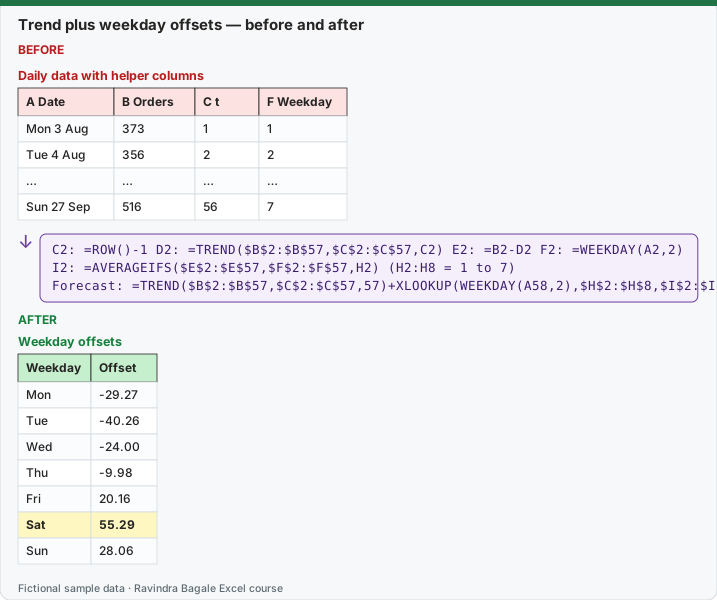
Expected result — Weekday offsets
| Weekday | Offset |
|---|---|
| Mon | -29.27 |
| Tue | -40.26 |
| Wed | -24.00 |
| Thu | -9.98 |
| Fri | 20.16 |
| Sat | 55.29 |
| Sun | 28.06 |
Before table and formula as text
Before — Daily data with helper columns
| A Date | B Orders | C t | F Weekday |
|---|---|---|---|
| Mon 3 Aug | 373 | 1 | 1 |
| Tue 4 Aug | 356 | 2 | 2 |
| … | … | … | … |
| Sun 27 Sep | 516 | 56 | 7 |
Formula / click path
C2: =ROW()-1   D2: =TREND($B$2:$B$57,$C$2:$C$57,C2)   E2: =B2-D2   F2: =WEEKDAY(A2,2)
I2: =AVERAGEIFS($E$2:$E$57,$F$2:$F$57,H2)   (H2:H8 = 1 to 7)
Forecast: =TREND($B$2:$B$57,$C$2:$C$57,57)+XLOOKUP(WEEKDAY(A58,2),$H$2:$H$8,$I$2:$I$8)
Do it step by step:
- In C2 type
=ROW()-1and fill to C57 to number the days 1 to 56. - In D2 type
=TREND($B$2:$B$57,$C$2:$C$57,C2)(the trend for that day) and in E2=B2-D2(how far the day is from the trend). Fill both down. - In F2 type
=WEEKDAY(A2,2)and fill down: 1 = Monday … 7 = Sunday. - Type 1 to 7 in H2:H8. In I2 type
=AVERAGEIFS($E$2:$E$57,$F$2:$F$57,H2)and fill to I8. These are the seven weekday offsets. - In C58 type
=TREND($B$2:$B$57,$C$2:$C$57,57)+XLOOKUP(WEEKDAY(A58,2),$H$2:$H$8,$I$2:$I$8)for Monday 28 September (461.72). Change 57 to 58, 59… for the next days. - Compare with FORECAST.ETS from lesson 31.3: the two methods should tell the same story.
स्टेप बाय स्टेप करून बघा:
- Days ना 1 ते 56 क्रमांक देण्यासाठी C2 मध्ये
=ROW()-1type करून C57 पर्यंत fill करा. - D2 मध्ये
=TREND($B$2:$B$57,$C$2:$C$57,C2)(त्या दिवसाचा trend) आणि E2 मध्ये=B2-D2(दिवस trend पासून किती दूर) type करा. दोन्ही खाली fill करा. - F2 मध्ये
=WEEKDAY(A2,2)type करून खाली fill करा: 1 = Monday … 7 = Sunday. - H2:H8 मध्ये 1 ते 7 type करा. I2 मध्ये
=AVERAGEIFS($E$2:$E$57,$F$2:$F$57,H2)type करून I8 पर्यंत fill करा. हे सात weekday offsets आहेत. - Monday 28 September साठी C58 मध्ये
=TREND($B$2:$B$57,$C$2:$C$57,57)+XLOOKUP(WEEKDAY(A58,2),$H$2:$H$8,$I$2:$I$8)type करा (461.72). पुढच्या दिवसांसाठी 57 चे 58, 59… करा. - Lesson 31.3 मधल्या FORECAST.ETS शी तुलना करा: दोन्ही पद्धतींनी तीच गोष्ट सांगायला हवी.
स्टेप बाय स्टेप करके देखें:
- Days को 1 से 56 नंबर देने के लिए C2 में
=ROW()-1type करके C57 तक fill करें. - D2 में
=TREND($B$2:$B$57,$C$2:$C$57,C2)(उस दिन का trend) और E2 में=B2-D2(दिन trend से कितना दूर) type करें. दोनों नीचे fill करें. - F2 में
=WEEKDAY(A2,2)type करके नीचे fill करें: 1 = Monday … 7 = Sunday. - H2:H8 में 1 से 7 type करें. I2 में
=AVERAGEIFS($E$2:$E$57,$F$2:$F$57,H2)type करके I8 तक fill करें. ये सात weekday offsets हैं. - Monday 28 September के लिए C58 में
=TREND($B$2:$B$57,$C$2:$C$57,57)+XLOOKUP(WEEKDAY(A58,2),$H$2:$H$8,$I$2:$I$8)type करें (461.72). अगले दिनों के लिए 57 को 58, 59… करें. - Lesson 31.3 वाले FORECAST.ETS से तुलना करें: दोनों तरीक़ों को एक ही कहानी बतानी चाहिए.
The seven offsets (average distance from the trend, by weekday)
| WEEKDAY(…,2) | Day | Offset (orders) |
|---|---|---|
| 1 | Mon | -29.27 |
| 2 | Tue | -40.26 |
| 3 | Wed | -24.00 |
| 4 | Thu | -9.98 |
| 5 | Fri | 20.16 |
| 6 | Sat | 55.29 |
| 7 | Sun | 28.06 |
The offsets add up to about 0 (0.00), because the trend line already passes through the middle of the data. Saturday is about 55 orders above the trend and Tuesday about 40 below it. That is the weekly pattern in one small table you can show to anyone.
Next week: trend + offset, next to ETS
| Date | Trend (TREND) | Offset | Trend + offset | FORECAST.ETS (approximate) |
|---|---|---|---|---|
| Mon 28 Sep | 490.99 | -29.27 | 461.7 | ≈ 455 |
| Tue 29 Sep | 492.73 | -40.26 | 452.5 | ≈ 445 |
| Wed 30 Sep | 494.46 | -24.00 | 470.5 | ≈ 463 |
| Thu 1 Oct | 496.20 | -9.98 | 486.2 | ≈ 479 |
| Fri 2 Oct | 497.94 | 20.16 | 518.1 | ≈ 511 |
| Sat 3 Oct | 499.67 | 55.29 | 555.0 | ≈ 548 |
| Sun 4 Oct | 501.41 | 28.06 | 529.5 | ≈ 522 |
Exact values on this page were computed with Excel's documented formulas and re-checked in LibreOffice Calc 25.2 with the same formulas.
The trend line is Orders = 391.98 + 1.74 × t, so each day adds about 1.74 orders. Both methods agree on the shape (Saturday highest, Tuesday lowest). The trend-plus-offset forecast is about 7 orders higher than ETS on every day, because the straight trend gives the same weight to all 8 weeks, while ETS follows the most recent weeks more closely. Lesson 31.7 tests which one was more accurate on a held-back week.
Additive or multiplicative? Offsets in orders (+55 on Saturday) assume the weekly swing stays the same size as the business grows. If the swing grows with the level (Saturday is always about 12% above the trend), use a ratio instead: =B2/D2 in column E and forecast = trend × ratio. Excel's FORECAST.ETS uses the additive version (AAA).
Two quick seasonal baselines
- Same day last week (seasonal naive): forecast for Monday 28 September = the actual of Monday 21 September (448). In C58:
=B51. It is crude but often hard to beat over one week. - Average of the same weekday over the last 4 weeks:
=AVERAGE(B30,B37,B44,B51)for Monday = 428.50. Safer than one week, but it ignores the trend.
Why build this when ETS exists? It works in every Excel, including Excel for the web where FORECAST.ETS is missing. It explains the pattern in a table a manager understands, and when it and ETS disagree strongly, something in the data needs a look.
Microsoft sources (checked 7 October 2026): TREND function.
Practice task (try it before you open the answer):
- What is the forecast for Saturday 3 October with trend + offset? Write the formula.
- Which weekday has an offset closest to 0, and what does that mean?
- The seasonal-naive forecast for Saturday 3 October is which cell, and what value?
Answer
=TREND($B$2:$B$57,$C$2:$C$57,62)+XLOOKUP(WEEKDAY(A63,2),$H$2:$H$8,$I$2:$I$8)= 499.67 + 55.29 ≈ 554.97 (the cell keeps all decimals, so it is not exactly the sum of the two rounded numbers), about 555 orders.- Thursday (-9.98): Thursdays are close to the trend, neither busy nor quiet.
=B56, the actual of Saturday 26 September: 536 orders.
Ravindra Bagale's Tip
Put the seven weekday offsets on the first page of any forecast deck. "Saturday +55, Tuesday −40" explains a staffing plan better than any chart.
Ravindra Bagale's Tip – मराठी
प्रत्येक forecast deck च्या पहिल्या page वर सात weekday offsets ठेवा. "Saturday +55, Tuesday −40" कोणत्याही chart पेक्षा staffing plan चांगला समजावतं.
Ravindra Bagale's Tip – हिंदी
हर forecast deck के पहले page पर सात weekday offsets रखें. "Saturday +55, Tuesday −40" किसी भी chart से बेहतर staffing plan समझाता है.
Loading practice tasks...
- Average covers (Easy): Average of C2:C15, rounded to 1 decimal.
- Saturday average (Easy): Average covers where Weekday is "Sat".
- Monday average (Easy): Average covers where Weekday is "Mon".
- Saturday offset (Medium): Saturday average minus overall average, rounded to 1 decimal.
- Daily trend (Medium): Slope of C2:C15 on A2:A15, rounded to 3 decimals.
- Trend value day 20 (Medium): Forecast for day 20, rounded to 1 decimal.
- Day 20 (Sat) forecast (Hard): Forecast for day 20 + Saturday offset, rounded to 0 decimals.
- Day 16 (Tue) forecast (Hard): Forecast for day 16 + Tuesday offset, rounded to 0 decimals.
- Weekend share (Hard): Covers on Fri, Sat, Sun ÷ all covers, rounded to 3 decimals.
- Seasonal index Fri (Hard): Friday average ÷ overall average, rounded to 3 decimals.