12.10 Loops: For, For Each and Do
VBA For loop with example — in 30 seconds
What: A For loop repeats the same lines for every row number, from the first row to the last.
Why: Checking 5,000 rows by hand is impossible. A loop does it in a second, the same way every time.
Tiny example: Loop rows 2 to 11, add Amount when City is Pune. The message box shows 544.
VBA For loop with example — 30 सेकंदात
काय: For loop पहिल्या row पासून शेवटच्या row पर्यंत प्रत्येक row number साठी त्याच lines परत परत चालवतो.
का: 5,000 rows हाताने तपासणं अशक्य आहे. Loop ते एका second मध्ये, दर वेळी त्याच पद्धतीने करतो.
छोटं उदाहरण: Rows 2 ते 11 वर loop करा, City Pune असेल तेव्हा Amount add करा. Message box 544 दाखवतो.
VBA For loop with example — 30 सेकंड में
क्या: For loop पहली row से आख़िरी row तक हर row number के लिए वही lines दोहराता है.
क्यों: 5,000 rows हाथ से जाँचना नामुमकिन है. Loop यह एक second में, हर बार एक ही तरीके से करता है.
छोटा उदाहरण: Rows 2 से 11 पर loop करें, City Pune हो तो Amount जोड़ें. Message box 544 दिखाता है.
First look at the data (before → after):
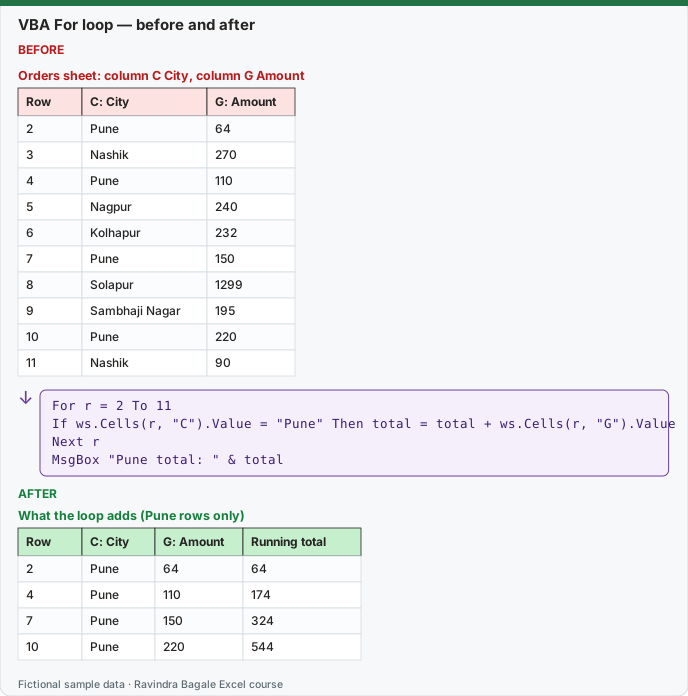
Expected result — What the loop adds (Pune rows only)
| Row | C: City | G: Amount | Running total |
|---|---|---|---|
| 2 | Pune | 64 | 64 |
| 4 | Pune | 110 | 174 |
| 7 | Pune | 150 | 324 |
| 10 | Pune | 220 | 544 |
About this data: Teaching sample for a fictional shop “Skyline Clinics”. Figures and names (e.g. Rohan Patil) are made up for this lesson on loops for for each and do.
Before table and formula as text
Before — Orders sheet: column C City, column G Amount
| Row | C: City | G: Amount |
|---|---|---|
| 2 | Pune | 64 |
| 3 | Nashik | 270 |
| 4 | Pune | 110 |
| 5 | Nagpur | 240 |
| 6 | Kolhapur | 232 |
| 7 | Pune | 150 |
| 8 | Solapur | 1299 |
| 9 | Sambhaji Nagar | 195 |
| 10 | Pune | 220 |
| 11 | Nashik | 90 |
About this data: Demo table only — not real customer or company data. Built to practise loops for for each and do.
Formula / click path
For r = 2 To 11
    If ws.Cells(r, "C").Value = "Pune" Then total = total + ws.Cells(r, "G").Value
Next r
MsgBox "Pune total: " & total
Do it step by step:
- Press Alt + F11 and click Insert › Module.
- Type
Sub PuneTotal()and press Enter. - Declare
Dim ws As Worksheet, r As Long, total As Doubleand setSet ws = Worksheets("Orders"). - Type the For … Next loop shown in the box above, then the MsgBox line.
- Press F5. The message shows 544. Compare with
=SUMIF(C2:C11,"Pune",G2:G11).
स्टेप बाय स्टेप करून बघा:
- Alt + F11 दाबा आणि Insert › Module वर click करा.
Sub PuneTotal()type करा आणि Enter दाबा.Dim ws As Worksheet, r As Long, total As Doubledeclare करा आणिSet ws = Worksheets("Orders")लिहा.- वरच्या box मधला For … Next loop type करा, मग MsgBox ची line.
- F5 दाबा. Message 544 दाखवतो.
=SUMIF(C2:C11,"Pune",G2:G11)शी जुळवून बघा.
स्टेप बाय स्टेप करके देखें:
- Alt + F11 दबाएँ और Insert › Module पर click करें.
Sub PuneTotal()type करें और Enter दबाएँ.Dim ws As Worksheet, r As Long, total As Doubledeclare करें औरSet ws = Worksheets("Orders")लिखें.- ऊपर वाले box का For … Next loop type करें, फिर MsgBox वाली line.
- F5 दबाएँ. Message 544 दिखाता है.
=SUMIF(C2:C11,"Pune",G2:G11)से मिलाएँ.
Sub LoopExamples()
    Dim ws As Worksheet
    Dim r As Long
    Dim cell As Range
    Dim total As Double

    Set ws = ThisWorkbook.Worksheets("Orders")

    ' 1) For...Next with a counter: mark late deliveries
    For r = 2 To 11
        If ws.Cells(r, 8).Value > 15 Then
            ws.Cells(r, 10).Value = "Late"
        Else
            ws.Cells(r, 10).Value = "On time"
        End If
    Next r

    ' 2) For Each over cells: add up delivered amounts
    For Each cell In ws.Range("G2:G11")
        If cell.Offset(0, 2).Value = "Delivered" Then total = total + cell.Value
    Next cell
    Debug.Print "Delivered sales: "; total

    ' 3) Do While: move down until an empty cell
    r = 2
    Do While ws.Cells(r, 1).Value <> ""
        r = r + 1
    Loop
    Debug.Print "First empty row: "; r
End Sub
On the mini dataset: rows 6, 8 and 11 are "Late"; the Immediate window prints Delivered sales: 2215 and First empty row: 12. Other forms: For r = lastRow To 2 Step -1 (loop backwards – needed when deleting rows), Do Until … Loop, and Exit For / Exit Do to leave early.
Ravindra Bagale's Tip
A loop that deletes rows should run from the bottom up (Step -1) – many students run it from the top down, so when a row is deleted the row below moves up and the loop skips it. And if you forget to increase the counter (r = r + 1) in a Do While, you get an infinite loop – press Esc or Ctrl + Break to stop it.
Ravindra Bagale's Tip – मराठी
Rows delete करणारा loop खालून वरती (Step -1) चालवायचा – बरेच students वरून खाली चालवतात, मग row delete झाली की खालची row वरती येते आणि loop ती skip करतो. आणि Do While मध्ये counter वाढवायला (r = r + 1) विसरलं तर infinite loop होतो – थांबवायला Esc किंवा Ctrl + Break दाबा.
Ravindra Bagale's Tip – हिंदी
Rows delete करने वाला loop नीचे से ऊपर (Step -1) चलाना चाहिए – बहुत से students ऊपर से नीचे चलाते हैं, फिर row delete होते ही नीचे की row ऊपर आ जाती है और loop उसे skip कर देता है. और Do While में counter बढ़ाना (r = r + 1) भूल गए तो infinite loop बन जाता है – रोकने के लिए Esc या Ctrl + Break दबाओ.
Practice tasks (10+)
Try these on a blank sheet. Open a hint only if you are stuck. No quiz — just practice.
1. Rebuild the smallest example of loops for for each and do on a blank sheet for HomeNest Supplies.
Hint: Use only the steps on this page. Keep numbers numeric.
2. Change one input for Aarti Kulkarni and confirm the result updates.
Hint: If the result is stuck, check absolute vs relative references.
3. Repeat the same steps with a £ or € value for Anna Kowalski.
Hint: Formatting must not break SUM.
4. Write the result meaning in one plain sentence next to the cell.
Hint: Imagine explaining it to a new joiners.
5. Add a second row and fill the method down.
Hint: Double-click the fill handle if the pattern is consistent.
6. Break the example on purpose, then fix it using this lesson.
Hint: Common break: text instead of a number.
7. Apply loops for for each and do to a 5-row made-up HomeNest Supplies table.
Hint: Keep column headers clear.
8. Check your answer with a simple total or COUNT.
Hint: A wrong total usually means a format or key mismatch.
9. Swap ₹ and $ on one column and re-check totals.
Hint: Stored values stay the same; only the display changes.
10. List two mistakes beginners make with loops for for each and do.
Hint: Look back at the tip box on this page.
11. Teach the steps out loud in under one minute.
Hint: Why → What → How.
12. Save the sheet as HomeNestSup_practice.xlsx.
Hint: Use a clear file name for class.
Loading practice tasks...
- Last used row (Easy): Which row number is the last filled row? The headings are in row 1.
- Late orders (Easy): How many rows have Status "Late"?
- Total amount (Easy): Add up the Amount column.
- Worst delay (Easy): What is the largest number in the Days late column?
- Late orders in Pune (Medium): How many orders are Late and in City "Pune"?
- Customer for an order (Medium): Find the Customer for Order ID "DL-704".
- Money stuck in late orders (Medium): Add up the Amount column for rows where Status is "Late".
- Big orders (Medium): How many rows have an Amount of 2000 or more?
- Message text (Medium): Build the text "N late orders", where N is the count of Late rows.
- Average delay of late orders (Hard): What is the average Days late for rows with Status "Late"? Round to 1 decimal.
- Tag for the first row (Hard): For the first row, return "Chase" if Days late is 3 or more, else "OK".
- Warning or all clear (Hard): Return "Warning" if any order is 3 or more days late, else "All clear".
Quick revision cards
Three standalone cards. Each one explains the idea with its own example. Scan the QR to open this lesson.