28.6 Prompt Patterns for Analysts
Example first. Raja types "analyse this" and gets a polite paragraph about "interesting trends". Rani types "In tblOrders, sum Amount by City for Delivered orders only, sorted largest first, as a table on a new sheet called City Sales. Show the formula you used." She gets exactly the table she needs and a formula she can check. The difference is not luck. It is a pattern: say where, what, which filter, what shape, and how you will check it.
Prompt patterns — in 30 seconds
What: A good analyst prompt names the data (table and columns), the task, any filter or definition, the output shape and place, and asks for the formula so you can check it.
Why: Copilot fills every gap with a guess. Each detail you add removes one guess, so the first answer is closer and easier to verify.
Tiny example: Weak: "Make a chart". Strong: "Column chart of Delivered Amount by City from tblOrders, title Delivered sales by city". Expected bars: Solapur 1299, Nashik 360, Pune 324, Kolhapur 232.
Prompt patterns — 30 सेकंदात
काय: चांगल्या analyst prompt मध्ये data (table आणि columns), काम, filter किंवा definition, output चा आकार आणि जागा असते, आणि तपासता यावा म्हणून formula मागितलेला असतो.
का: Copilot प्रत्येक रिकामी जागा अंदाजाने भरतो. तुम्ही जोडलेला प्रत्येक तपशील एक अंदाज कमी करतो, त्यामुळे पहिलंच उत्तर जवळचं आणि तपासायला सोपं असतं.
छोटं उदाहरण: कमकुवत: "Make a chart". मजबूत: "Column chart of Delivered Amount by City from tblOrders, title Delivered sales by city". अपेक्षित bars: Solapur 1299, Nashik 360, Pune 324, Kolhapur 232.
Prompt patterns — 30 सेकंड में
क्या: अच्छे analyst prompt में data (table और columns), काम, filter या definition, output का आकार और जगह होती है, और जाँच के लिए formula माँगा जाता है.
क्यों: Copilot हर खाली जगह अंदाज़े से भरता है. आपका जोड़ा हर detail एक अंदाज़ा कम करता है, इसलिए पहला जवाब ही क़रीब और जाँचने में आसान होता है.
छोटा उदाहरण: कमज़ोर: "Make a chart". मज़बूत: "Column chart of Delivered Amount by City from tblOrders, title Delivered sales by city". अपेक्षित bars: Solapur 1299, Nashik 360, Pune 324, Kolhapur 232.
First look at the data (before → after):
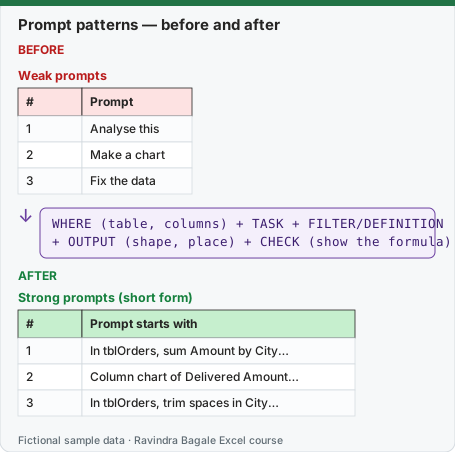
Expected result — Strong prompts (short form)
| # | Prompt starts with |
|---|---|
| 1 | In tblOrders, sum Amount by City… |
| 2 | Column chart of Delivered Amount… |
| 3 | In tblOrders, trim spaces in City… |
Before table and formula as text
Before — Weak prompts
| # | Prompt |
|---|---|
| 1 | Analyse this |
| 2 | Make a chart |
| 3 | Fix the data |
Formula / click path
WHERE (table, columns) + TASK + FILTER/DEFINITION
+ OUTPUT (shape, place) + CHECK (show the formula)
Do it step by step:
- Start with WHERE: name the Table and the exact column headers, for example
tblOrders[Amount]. - Say the TASK with one verb: sum, count, average, compare, highlight, chart, clean.
- Add the FILTER or DEFINITION in words: Delivered only, Late means Mins more than 15, November 2026 only.
- Say the OUTPUT: table or chart, sort order, new sheet name, number format (₹, 1 decimal).
- Ask for the CHECK: Show the formula you used, or List the rows you counted.
- Read the answer, then refine with one follow-up instead of rewriting everything.
स्टेप बाय स्टेप करून बघा:
- WHERE ने सुरुवात करा: Table आणि अचूक column headers चं नाव घ्या, उदा.
tblOrders[Amount]. - TASK एका क्रियापदाने सांगा: sum, count, average, compare, highlight, chart, clean.
- FILTER किंवा DEFINITION शब्दांत जोडा: फक्त Delivered, Late म्हणजे Mins 15 पेक्षा जास्त, फक्त November 2026.
- OUTPUT सांगा: table की chart, sort order, नवीन sheet चं नाव, number format (₹, 1 decimal).
- CHECK मागा: Show the formula you used, किंवा List the rows you counted.
- उत्तर वाचा, आणि सगळं पुन्हा लिहिण्याऐवजी एका follow-up ने सुधारा.
स्टेप बाय स्टेप करके देखें:
- WHERE से शुरू करें: Table और सही column headers का नाम लें, जैसे
tblOrders[Amount]. - TASK एक क्रिया से बताएँ: sum, count, average, compare, highlight, chart, clean.
- FILTER या DEFINITION शब्दों में जोड़ें: सिर्फ़ Delivered, Late यानी Mins 15 से ज़्यादा, सिर्फ़ November 2026.
- OUTPUT बताएँ: table या chart, sort order, नई sheet का नाम, number format (₹, 1 decimal).
- CHECK माँगें: Show the formula you used, या List the rows you counted.
- जवाब पढ़ें, और सब कुछ दोबारा लिखने के बजाय एक follow-up से सुधारें.
The pattern: WHERE + TASK + FILTER + OUTPUT + CHECK
This follows Microsoft's own tips (be specific, name the columns or ranges, start broad then refine, ask follow-up questions) and adds the one habit analysts need most: ask for something you can check.
| Part | Question it answers | Example words |
|---|---|---|
| WHERE | Which data? | In tblOrders … the Amount and City columns … |
| TASK | What to do? | sum / count / average / compare / highlight / chart / clean |
| FILTER / DEFINITION | Which rows? What does a word mean? | Delivered only … Late means Mins more than 15 … |
| OUTPUT | What shape, where, what format? | as a table on a new sheet called City Sales, largest first, in ₹ |
| CHECK | How will I verify it? | Show the formula you used. List the order IDs you counted. |
Weak to strong: ten prompts analysts actually need
| Weak | Strong (copy and adapt) |
|---|---|
| Analyse this | Summarise tblOrders in 5 bullets: total Amount, top city, cancelled share of orders and of Amount, average Mins. Show the formulas. |
| Make a chart | Column chart of Delivered Amount by City from tblOrders, largest first, title "Delivered sales by city", on a new sheet. |
| Fix the data | In tblOrders, trim extra spaces in City and convert Amount stored as text to numbers. Do not change other columns. |
| Find problems | List rows in tblOrders where Amount is blank, zero or more than 1000, or Mins is more than 30. Do not edit anything. |
| Add a formula | Add a column Net = Amount for Delivered orders, else 0. Use a structured reference formula and show it. |
| Compare cities | Make a table of City, Orders, Amount, Average Mins from tblOrders, one row per city, sorted by Amount. |
| Highlight late ones | Fill rows of tblOrders yellow where Mins is more than 15. Tell me how many rows you coloured. |
| Explain this | Explain the formula in H2 step by step in simple English, then give one example with the numbers in row 2. |
| Make a dashboard | Plan first: a one-page dashboard from tblOrders with 3 KPI cards and 2 charts. Show the plan before editing. |
| Is this right? | Recalculate the Pune total in tblOrders with SUMIFS and tell me if it matches cell K2. |
Expected chart for the strong chart prompt (Delivered only, computed from the fictional data): Solapur ₹1,299, Nashik ₹360, Pune ₹324, Kolhapur ₹232. Nagpur and Sambhaji Nagar have no Delivered orders, so they have no bar (or a zero bar).
Follow-ups beat rewrites. After the first answer, add one detail at a time: "Now only Blinkit", "Show it as % of total", "Round to whole rupees", "Put the chart next to the table". Each follow-up builds on the last result.
Simple English works best. Microsoft notes Copilot supports prompts in many languages but was trained mostly on English sources and may do less well in other languages. Keep column names and the key words of the prompt in English, as this course does.
Microsoft sources (checked 7 October 2026): Copilot in Excel tips; Frequently asked questions about Copilot in Excel.
Practice task (try it before you open the answer):
- Rewrite the weak prompt "Who is slow?" as a strong prompt using the five parts.
- Say what the correct answer is on the Orders table.
- Write the check formula.
Answer
- "In tblOrders, list the Order ID, City and Mins of orders where Mins is more than 15, slowest first. Do not edit anything. Show the formula you used to filter."
- BLK-1007 (Solapur, 18 min), BLK-1010 (Nashik, 17 min), AMN-1005 (Kolhapur, 16 min).
=SORT(FILTER(tblOrders[[Order ID]:[Mins]],tblOrders[Mins]>15),8,-1)or simply=COUNTIFS(tblOrders[Mins],">15")to confirm there are 3.
Ravindra Bagale's Tip
Keep a prompts sheet in your workbook with the five-part prompts that worked. Next month you paste, change the month, and check.
Ravindra Bagale's Tip – मराठी
Workbook मध्ये चाललेल्या five-part prompts ची एक prompts sheet ठेवा. पुढच्या महिन्यात paste करा, महिना बदला, आणि तपासा.
Ravindra Bagale's Tip – हिंदी
Workbook में काम कर चुके five-part prompts की एक prompts sheet रखें. अगले महीने paste करें, महीना बदलें, और जाँचें.