28.1 What Copilot in Excel Is and Who Can Use It
Example first. Shraddha has the Orders table from Module 3 open: 10 fictional Blinkit and Amazon Now orders. Instead of building a SUMIFS, she opens the Copilot pane and types "Show total Amount by City as a PivotTable on a new sheet". A few seconds later the PivotTable is there, built with Excel's own PivotTable feature, so she can still click into it and change it. That is Copilot in Excel: an AI assistant inside Excel that answers questions about your workbook and, when you allow it, edits the workbook for you using normal Excel tools.
Copilot in Excel — in 30 seconds
What: Copilot in Excel is an AI assistant in a side pane. You describe a task in your own words; Copilot answers in the pane or edits the workbook with tables, formulas, PivotTables, charts and formatting.
Why: It turns a question in plain English into Excel work, which is fast for first drafts. Because the results are normal Excel objects, you can inspect and correct every one of them.
Tiny example: Prompt: "Show total Amount by City". Copilot can answer with a PivotTable or a formula such as =SUMIFS(tblOrders[Amount],tblOrders[City],"Pune"), which gives 544 for Pune.
Copilot in Excel — 30 सेकंदात
काय: Copilot in Excel हा side pane मधला AI assistant आहे. तुम्ही काम तुमच्या शब्दांत सांगता; Copilot pane मध्ये उत्तर देतो किंवा tables, formulas, PivotTables, charts आणि formatting वापरून workbook edit करतो.
का: साध्या English मधला प्रश्न Excel च्या कामात बदलतो, त्यामुळे पहिला draft पटकन होतो. Results नेहमीचे Excel objects असल्याने प्रत्येक गोष्ट तपासता आणि दुरुस्त करता येते.
छोटं उदाहरण: Prompt: "Show total Amount by City". Copilot PivotTable ने किंवा =SUMIFS(tblOrders[Amount],tblOrders[City],"Pune") सारख्या formula ने उत्तर देऊ शकतो, जो Pune साठी 544 देतो.
Copilot in Excel — 30 सेकंड में
क्या: Copilot in Excel side pane में एक AI assistant है. आप काम अपने शब्दों में बताते हैं; Copilot pane में जवाब देता है या tables, formulas, PivotTables, charts और formatting से workbook edit करता है.
क्यों: सादी English का सवाल Excel के काम में बदल जाता है, इसलिए पहला draft जल्दी बनता है. Results आम Excel objects होते हैं, इसलिए हर चीज़ जाँची और सुधारी जा सकती है.
छोटा उदाहरण: Prompt: "Show total Amount by City". Copilot PivotTable से या =SUMIFS(tblOrders[Amount],tblOrders[City],"Pune") जैसे formula से जवाब दे सकता है, जो Pune के लिए 544 देता है.
First look at the data (before → after):
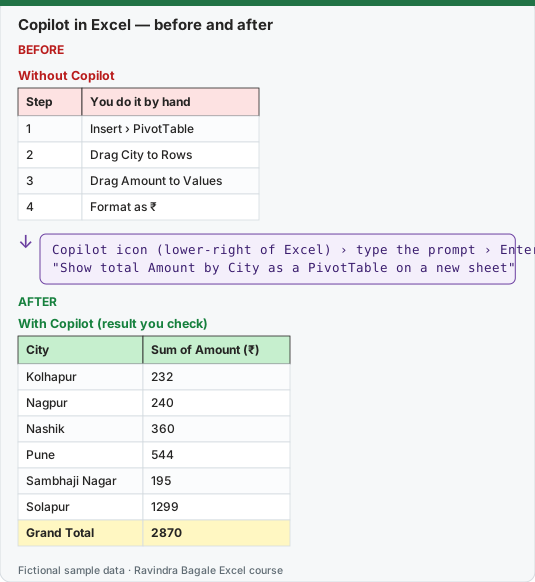
Expected result — With Copilot (result you check)
| City | Sum of Amount (₹) |
|---|---|
| Kolhapur | 232 |
| Nagpur | 240 |
| Nashik | 360 |
| Pune | 544 |
| Sambhaji Nagar | 195 |
| Solapur | 1299 |
| Grand Total | 2870 |
Before table and formula as text
Before — Without Copilot
| Step | You do it by hand |
|---|---|
| 1 | Insert › PivotTable |
| 2 | Drag City to Rows |
| 3 | Drag Amount to Values |
| 4 | Format as ₹ |
Formula / click path
Copilot icon (lower-right of Excel) › type the prompt › Enter
"Show total Amount by City as a PivotTable on a new sheet"
Do it step by step:
- Open the Orders workbook. Use a recent Microsoft 365 version of Excel and sign in with the account that has a Copilot licence.
- Select the Copilot icon in the lower-right corner of Excel. The Copilot pane opens on the right.
- Look above the prompt box: Allow editing is the default. Leave it on for this first try.
- Type
Show total Amount by City as a PivotTable on a new sheetand press Enter. - Watch the pane: Copilot shows its plan and then builds the PivotTable on a new sheet.
- Check the Grand Total against
=SUM(tblOrders[Amount])on the Orders sheet. Both must show 2870.
स्टेप बाय स्टेप करून बघा:
- Orders workbook उघडा. Microsoft 365 चं नवीन Excel वापरा आणि Copilot licence असलेल्या account ने sign in करा.
- Excel च्या खालच्या उजव्या कोपऱ्यातला Copilot icon निवडा. उजवीकडे Copilot pane उघडतो.
- Prompt box च्या वर बघा: Allow editing default असतो. पहिल्या प्रयत्नासाठी तो चालू ठेवा.
Show total Amount by City as a PivotTable on a new sheettype करा आणि Enter दाबा.- Pane बघा: Copilot आधी plan दाखवतो आणि मग नवीन sheet वर PivotTable बनवतो.
- Grand Total, Orders sheet वरच्या
=SUM(tblOrders[Amount])शी जुळवा. दोन्ही 2870 दाखवायला हवेत.
स्टेप बाय स्टेप करके देखें:
- Orders workbook खोलें. Microsoft 365 का नया Excel इस्तेमाल करें और Copilot licence वाले account से sign in करें.
- Excel के नीचे दाएँ कोने का Copilot icon चुनें. दाईं ओर Copilot pane खुलता है.
- Prompt box के ऊपर देखें: Allow editing default होता है. पहली कोशिश के लिए इसे चालू रखें.
Show total Amount by City as a PivotTable on a new sheettype करें और Enter दबाएँ.- Pane देखें: Copilot पहले plan दिखाता है और फिर नई sheet पर PivotTable बनाता है.
- Grand Total को Orders sheet के
=SUM(tblOrders[Amount])से मिलाएँ. दोनों 2870 दिखाने चाहिए.
Version note
Copilot in Excel is a Microsoft 365 feature, not part of Excel 2024 or 2021. Microsoft lists four ways to get it: a Microsoft 365 Personal or Family subscription with an AI credits plan, a Microsoft 365 Premium subscription, a commercial Microsoft Copilot subscription, or a Copilot Chat-eligible Microsoft 365 / Office 365 business or enterprise subscription. Edit, plan and chat modes work in Excel for Windows, Mac and the web; iPad and iPhone have fewer modes and Android has chat only. Features change month to month: everything here was checked against Microsoft's pages on 7 October 2026.
What Copilot in Excel can do (Microsoft's list, in simple words)
| Area | What it means | Example on our Orders table |
|---|---|---|
| Edit worksheets | Add, rename and delete sheets; change cells and ranges; apply conditional formatting, data validation, borders and styles. | Colour the rows where Mins is more than 15. |
| Generate data and formulas | Write formulas, apply them across sheets, summarise data. | Add a column with Amount including 5% delivery fee. |
| Charts, PivotTables and shapes | Build charts and PivotTables that stay linked to the source data; even make dashboards and templates. | Column chart of Amount by City. |
| Insights | Answer questions about the data with charts, PivotTables, summaries, trends or outliers. | Which city has the highest Amount? |
| Highlight, sort and filter | Sort, filter and highlight to focus on what matters. | Sort by Amount, largest first. |
| Web search | Fetch facts from the web, with citations. | Look up the GST rate for a product (then check the source yourself). |
| Import from other workbooks | Pull data from other workbooks in OneDrive, SharePoint or on your computer. | Bring the Stores list in from Stores.xlsx. |
| Repeatable tasks | Custom skills tell Copilot how to do a process you repeat. | Every Monday: clean the export the same way. |
Three modes, one pane
Microsoft describes three modes. You switch between them with the menu above the prompt box.
- Edit (shown as Allow editing, the default). Copilot plans the task, changes the workbook directly, reviews the result and tells you what it did. This is what Microsoft first called Agent Mode; today Microsoft simply calls it editing with Copilot. Lesson 28.4 goes deep into it.
- Plan. Copilot writes a plan first and waits for you to confirm before it changes anything. Use it when the task is big or the file matters.
- Chat only. Copilot reads the workbook and answers in the pane, without changing anything. Lesson 28.3 uses this mode.
Where it runs
| Platform | Modes (Microsoft, October 2026) |
|---|---|
| Excel for Windows | Edit, plan, chat |
| Excel for Mac | Edit, plan, chat |
| Excel on the web | Edit, plan, chat |
| Excel for iPad | Chat and plan; edit is rolling out |
| Excel for iPhone | Chat; edit is rolling out |
| Excel for Android | Chat |
Which AI model answers? Microsoft says Copilot in Excel can use GPT models from OpenAI and Claude models from Anthropic. A model picker at the top right of the pane is set to Auto by default. Choosing a model yourself needs a commercial Microsoft Copilot subscription or Microsoft 365 Premium, and in a company the admin must first allow Anthropic models. Your choice lasts only for the current session.
Labels you may see. In a work account the pane may show M365 Copilot (Premium) (you have the Microsoft Copilot add-on licence, with priority access) or M365 Copilot (Basic) (standard access without the add-on).
If you do not see the Copilot icon, Microsoft lists four reasons: app version, licence, network and privacy settings. In a company, the admin settings for Microsoft Copilot Chat control it; Copilot in Excel cannot be switched off separately. On a home plan, turning off Experiences that analyze content or All connected experiences in the privacy settings removes Copilot from Excel.
Microsoft sources (checked 7 October 2026): Get started with Copilot in Excel; Frequently asked questions about Copilot in Excel.
Practice task (try it before you open the answer):
- Open the Copilot pane and find the three modes in the menu above the prompt box.
- In Chat only mode, ask: "How many rows are in tblOrders?"
- Check the answer with a formula.
Answer
- The menu above the prompt box offers Allow editing (edit, the default), plan and Chat only.
- Copilot should say 10 rows (orders BLK-1001 to BLK-1010).
=ROWS(tblOrders)returns 10. If Copilot says 11, it counted the header row, so ask it again and name the table.
Ravindra Bagale's Tip
Treat Copilot like a smart new joiner: fast, willing and sometimes confidently wrong. Let it draft, then check its work before your manager sees it.
Ravindra Bagale's Tip – मराठी
Copilot ला हुशार नव्या सहकाऱ्यासारखं वागवा: जलद, तयार, आणि कधी कधी आत्मविश्वासाने चुकीचा. त्याला draft करू द्या, आणि manager पाहण्याआधी त्याचं काम तपासा.
Ravindra Bagale's Tip – हिंदी
Copilot को एक होशियार नए साथी की तरह मानें: तेज़, तैयार और कभी कभी पूरे भरोसे से ग़लत. उसे draft करने दें, और manager के देखने से पहले उसका काम जाँचें.