Poultry Farm Management System in Excel: Flocks, Daily Deaths and Feed, Bird Sales, Mortality %, FCR and Profit
Shraddha Poultry near Kolhapur raises broilers in three sheds. Deaths and feed bags were written on the shed wall, and nobody knew how much feed each kilo of bird took until the trader paid. This page builds a 7-sheet Excel system: each flock is set up once, the daily log adds deaths and feed by flock, sales record birds and live weight, and the flock report works out mortality, FCR and profit with an alert.
What you'll learn on this page
- Set up flocks with shed, placement date, chicks and chick price
- Log deaths, feed and sample weight with the age worked out
- Record bird sales by live weight and rate per kg
- Work out mortality %, birds in shed and FCR per flock
- Add chick, feed and other costs to find profit
- Flag high mortality and a poor FCR
- Print a flock card and show the farm on a dashboard
Download the template: poultry-farm-management-system-template.xlsx: a 7-sheet system with example data and real formulas (Read me, Setup, Daily log, Sales, Flock report, Flock card, Dashboard). Yellow cells are inputs you can type over; green cells hold formulas; blue rows are headers and totals. Replace the example data with your own and every report and the dashboard recalculate.
Made-up data: every name, amount, business and date on this page is made up for practice. Cities are used only to make the examples feel real.
1. The business story
Shraddha Poultry, Kolhapur, as of 17 October 2026 (made-up data). Feed ₹38 a kg; mortality alert 5%; target FCR 1.7.
| Question | Where the system answers it |
|---|---|
| How did flock FL01 do? | 4,820 birds, 11,250 kg sold for ₹11,23,740; profit ₹1,63,216 |
| Was feed used well? | FL01 FCR 1.75 against a target of 1.7: Check FCR |
| Which flock is losing birds? | FL02: 219 deaths of 4,000, 5.5%: High mortality |
| How many birds are in the sheds? | 8,359 across three flocks |
Every rupee of chick, feed and other cost is in the flock report, so the profit is known the day the last bird is lifted.
Figure 1. Setup holds flocks; Daily log and Sales are the entry sheets; Flock report, Flock card and Dashboard read from them.
2. Build it sheet by sheet
Step 1. Setup: flocks and prices
- B4 feed price per kg (₹38), B5 mortality alert (5%), B6 target FCR (1.7).
- Flocks in A9:F11: Flock, Shed, Placed on, Chicks placed, Chick price, Other cost (vaccines, litter, power).
Step 2. Daily log
- One row per check: Date, Flock, Deaths, Feed (kg), Avg weight (g). Pick the flock from a drop-down.
- C5 age:
=A5-XLOOKUP(B5,Setup!$A$9:$A$11,Setup!$C$9:$C$11)+1, so day 1 is the placement day (dates).
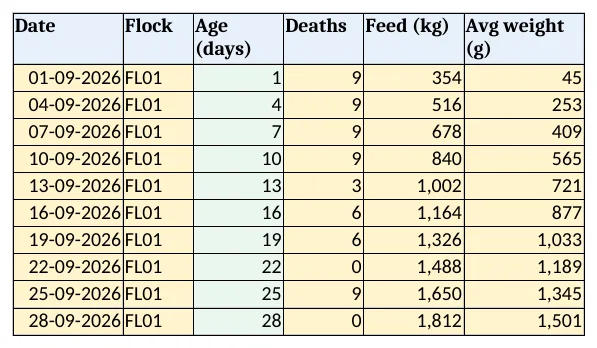
Figure 2. Daily log: deaths, feed and sample weight with age worked out from the placement date
Step 3. Sales
- One row per lifting: Date, Flock, Birds, Live weight (kg), Rate per kg.
- F5 amount
=D5*E5and G5 average weight=ROUND(D5/C5,2).
Step 4. Flock report
- C5 deaths
=SUMIFS('Daily log'!$D$5:$D$3000,'Daily log'!$B$5:$B$3000,A5)(SUMIFS), D5 mortality=C5/B5. - F5 birds in shed
=B5-C5-E5; I5 FCR=IF(H5=0,0,ROUND(G5/H5,2)), feed ÷ kg sold. - J5 cost
=B5*Setup!E9+G5*Setup!$B$4+Setup!F9, L5 profit=K5-J5. - M5:
=IF(D5>Setup!$B$5,"High mortality",IF(I5>Setup!$B$6,"Check FCR","OK"))with conditional formatting.

Figure 3. Flock report: mortality, birds in shed, FCR, cost, sales, profit and alert per flock
Step 5. Flock card and Dashboard
- Flock card: type a flock in B4; rows 6 to 16 bring its numbers with XLOOKUP. Set the print area.
- KPI cards: birds in shed, mortality overall, feed used, FCR of FL01, sales and flocks with alerts. Charts: birds sold and in shed by flock, and feed by flock.
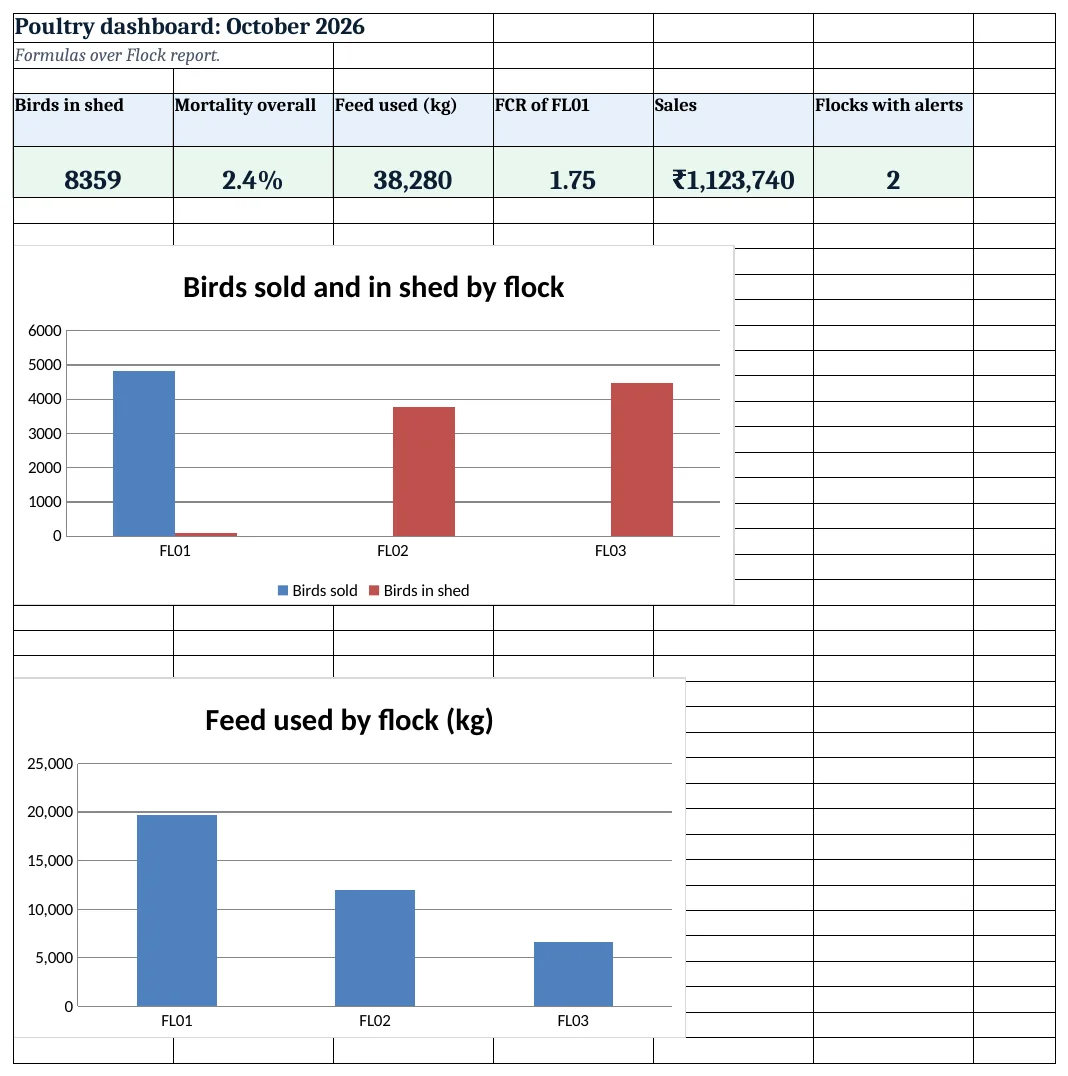
Figure 4. Poultry dashboard: birds in shed, mortality, feed used, FCR, sales and alerts
Ravindra Bagale's Tip
Write deaths every morning before feeding. A sudden rise for two days is the time to call the vet, not after a week.
Ravindra Bagale's Tip – मराठी
रोज सकाळी खाद्य देण्याआधी मरतुक लिहा. दोन दिवस अचानक वाढ दिसली तर लगेच डॉक्टरांना बोलवा.
Ravindra Bagale's Tip – हिंदी
हर सुबह दाना देने से पहले मौतें लिखें. दो दिन अचानक बढ़त दिखे तो तुरंत डॉक्टर को बुलाएं.
3. Formulas used
| Cell | Formula | What it does |
|---|---|---|
| Daily log!C5 | =A5-XLOOKUP(B5,Setup!$A$9:$A$11,Setup!$C$9:$C$11)+1 |
Age in days |
| Sales!F5 | =D5*E5 |
Sale amount |
| Sales!G5 | =ROUND(D5/C5,2) |
Average weight per bird |
| Flock report!C5 | =SUMIFS('Daily log'!$D$5:$D$3000,'Daily log'!$B$5:$B$3000,A5) |
Deaths per flock |
| Flock report!D5 | =C5/B5 |
Mortality % |
| Flock report!F5 | =B5-C5-E5 |
Birds in shed |
| Flock report!G5 | =SUMIFS('Daily log'!$E$5:$E$3000,'Daily log'!$B$5:$B$3000,A5) |
Feed per flock |
| Flock report!I5 | =IF(H5=0,0,ROUND(G5/H5,2)) |
FCR |
| Flock report!J5 | =B5*Setup!E9+G5*Setup!$B$4+Setup!F9 |
Flock cost |
| Flock report!L5 | =K5-J5 |
Profit |
| Flock report!M5 | =IF(D5>Setup!$B$5,"High mortality",IF(I5>Setup!$B$6,"Check FCR","OK")) |
Alert |
| Flock card!B6 | =XLOOKUP($B$4,'Flock report'!$A$5:$A$7,'Flock report'!$B$5:$B$7,"Not found") |
Chicks on the card |
| Dashboard!B5 | ='Flock report'!C8/'Flock report'!B8 |
Mortality overall |
Every formula above is written in the template, so you can click a cell and see it in the formula bar. All values on this page were recalculated in LibreOffice with zero errors.
4. Common mistakes
- FCR on a half-sold flock. Feed for birds still in the shed has no sale weight yet. Read FCR when the flock is lifted.
- Writing feed by bag count only. Convert bags to kg (bags × bag weight) so FCR and cost are right.
- Leaving out early deaths. The first week's deaths are the main sign of chick quality. Log them every day.
- Other costs left out. Vaccines, litter, power and labour belong in Other cost, or the profit looks too good.
- Profit on an unsold flock. Flocks still growing show cost only. Judge them when sold.
Ravindra Bagale's Tip
Weigh a sample of 20 birds twice a week. Weight against age tells you if feed is turning into meat.
Ravindra Bagale's Tip – मराठी
आठवड्यातून दोनदा 20 पक्ष्यांचे वजन करा. वयानुसार वजन पाहून खाद्याचा उपयोग कळतो.
Ravindra Bagale's Tip – हिंदी
हफ्ते में दो बार 20 पक्षियों का वज़न करें. उम्र के हिसाब से वज़न से दाने का असर पता चलता है.
5. More real examples
Example 1: Layer farm. Track eggs per day and hen-day production % instead of live weight sold.
Example 2: Goat farm. Animals instead of birds, weight gain per month and sale by head; see the dairy collection system for milk.
Example 3: Hatchery. Eggs set, hatched and hatch % per setting, with chick sales.
Quick revision cards
Quick revision
Each card shows formulas from this page, each with an example and its answer from the template. Scan the QR code on a card to open this lesson. All names and numbers are made up for practice.
झटपट उजळणी
प्रत्येक card वर या page मधले formulas, त्यांचं example आणि template मधलं उत्तर आहे. Card वरचा QR code scan केला की हा lesson उघडतो. सगळी नावं आणि आकडे सरावासाठी काल्पनिक आहेत.
झटपट दोहराई
हर card पर इस page के formulas, उनका example और template का उत्तर है. Card का QR code scan करें तो यह lesson खुलेगा. सभी नाम और आंकड़े अभ्यास के लिए काल्पनिक हैं.
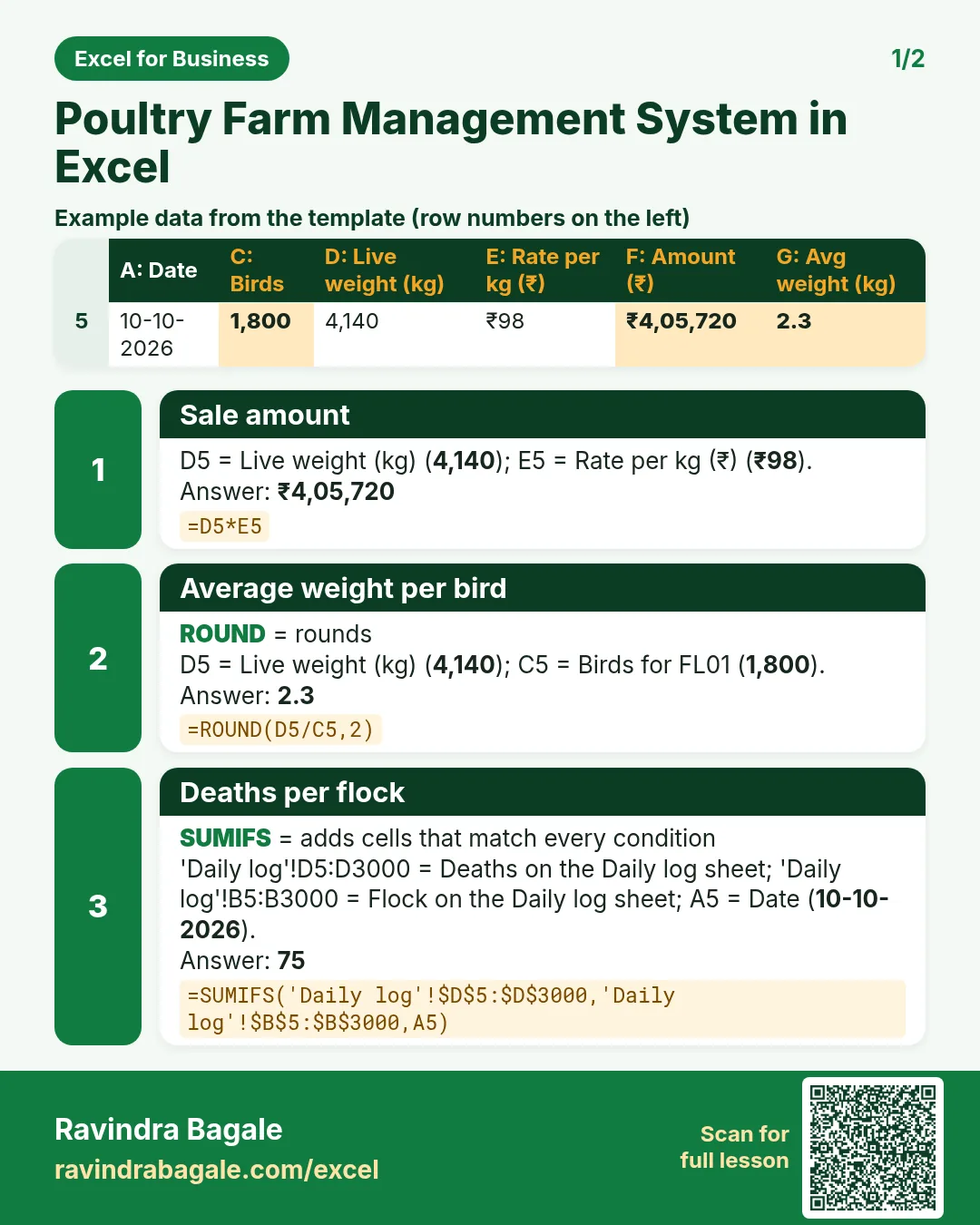

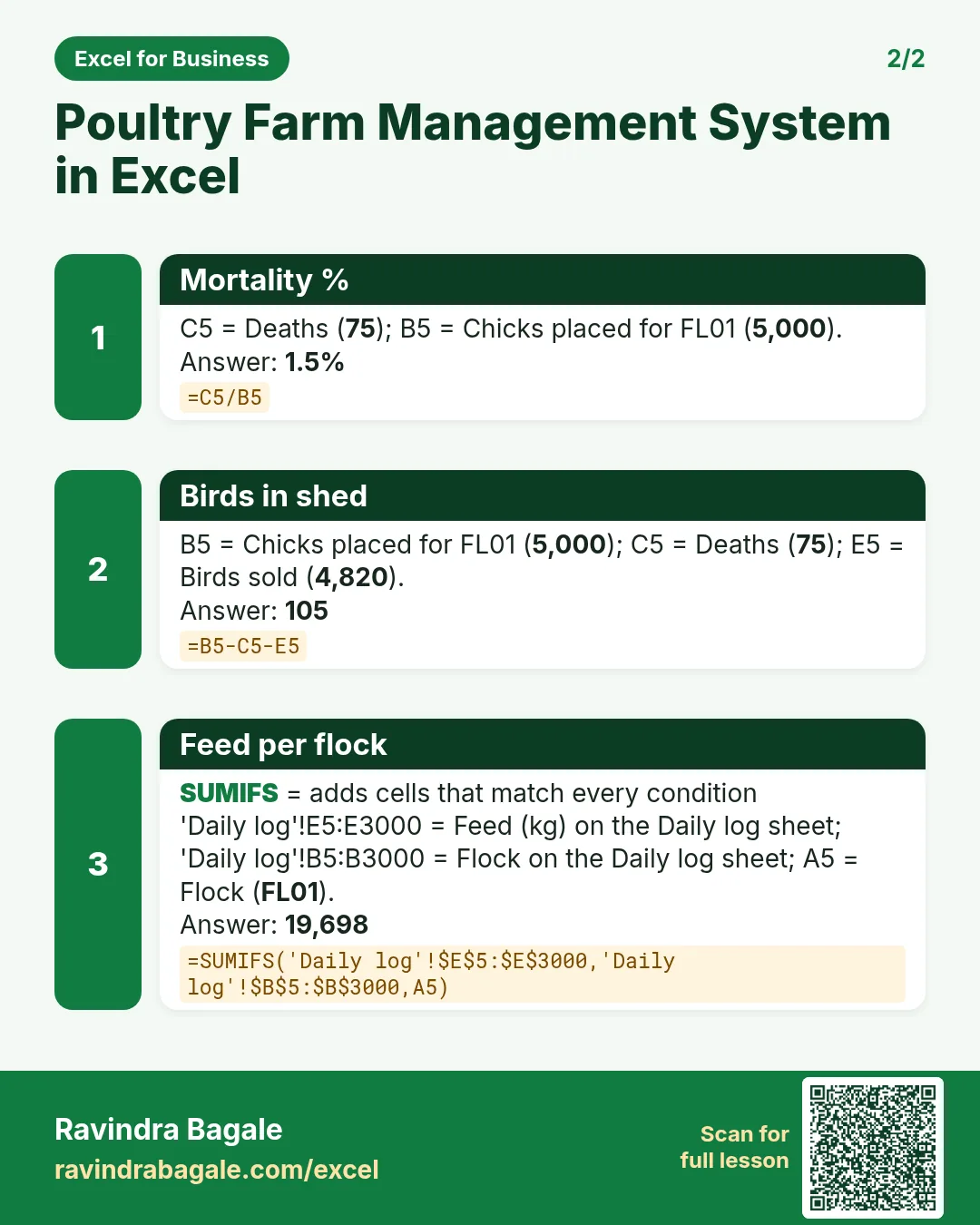

More cards: Ravi Sir's Cards.
6. Frequently asked questions
How do I calculate FCR in Excel?
Feed used ÷ live weight sold, as in Flock report I5: =IF(H5=0,0,ROUND(G5/H5,2)).
How do I calculate mortality %?
Total deaths ÷ chicks placed, with deaths added by SUMIFS from the daily log.
How do I find the age of a flock?
Today or the record date − placement date + 1.
How do I work out profit per flock?
Sales − (chicks × chick price + feed kg × feed price + other cost).
What FCR is good for broilers?
Lower is better. Set your own target on Setup from your feed supplier's guide and your past flocks.
7. Quick quiz
Ten questions on this page. Sign in to save your score.
Loading practice tasks...
- Total quintals (Easy): Add up Quintals in D2:D11.
- Average rate per quintal (Easy): Average of E2:E11, rounded to 2 decimals.
- Rows in Wheat (Easy): How many rows have Crop "Wheat"?
- Largest quintals (Easy): The largest value in D2:D11.
- Quintals for Wheat (Medium): Total of D2:D11 where B is "Wheat".
- Wheat in Pune (Medium): Total of D2:D11 where B is "Wheat" and C is "Pune".
- Best in Wheat (Medium): Largest E2:E11 value where B is "Wheat".
- Value of row 2 (Medium): D2 times E2.
- Look up Mateo Garcia (Medium): The Quintals for "Mateo Garcia" (use a lookup on column A).
- Total value (Hard): Sum of D times E for all rows.
- Share of Wheat (Hard): Share of D2:D11 that is "Wheat", rounded to 3 decimals.
- Rank of row 2 (Hard): Rank of D2 among D2:D11 (largest = 1).
- Above average? (Hard): "Above" if E2 is above the average of E2:E11, else "Below".