6. Tables, Sorting and Filtering
6.13 Slicers on an Excel Table (Not a Pivot)
Example first. Slicers are not only for PivotTables. Put a City slicer and a Platform slicer next to tblMini, click Pune, and the Table and its Total Row show Pune only. A manager who has never used a filter button can do this.
Slicer on a Table — in 30 seconds
What: A slicer is a panel of buttons that filters a Table. Each button is one value of a column, like Pune or Nashik.
Why: Filter buttons are small and hidden in the header. Slicers are big, visible and show which filter is on, so they are perfect for a sheet you hand to a manager.
Tiny example: Click Pune on the City slicer: 4 rows stay and the Total Row shows ₹544.
Slicer on a Table — 30 सेकंदात
काय: Slicer म्हणजे buttons चा panel जो Table filter करतो. प्रत्येक button म्हणजे column ची एक value, जसं Pune किंवा Nashik.
का: Filter buttons छोटे असतात आणि header मध्ये लपलेले असतात. Slicers मोठे, दिसणारे असतात आणि कोणता filter लागलाय ते दाखवतात, म्हणून manager ला द्यायच्या sheet साठी perfect.
छोटं उदाहरण: City slicer वर Pune click करा: 4 rows राहतात आणि Total Row ₹544 दाखवतो.
Slicer on a Table — 30 सेकंड में
क्या: Slicer यानी buttons का panel जो Table को filter करता है. हर button column की एक value है, जैसे Pune या Nashik.
क्यों: Filter buttons छोटे होते हैं और header में छिपे रहते हैं. Slicers बड़े, दिखने वाले होते हैं और बताते हैं कौन सा filter लगा है, इसलिए manager को देने वाली sheet के लिए perfect हैं.
छोटा उदाहरण: City slicer पर Pune click करें: 4 rows बचती हैं और Total Row ₹544 दिखाता है.
First look at the data (before → after):
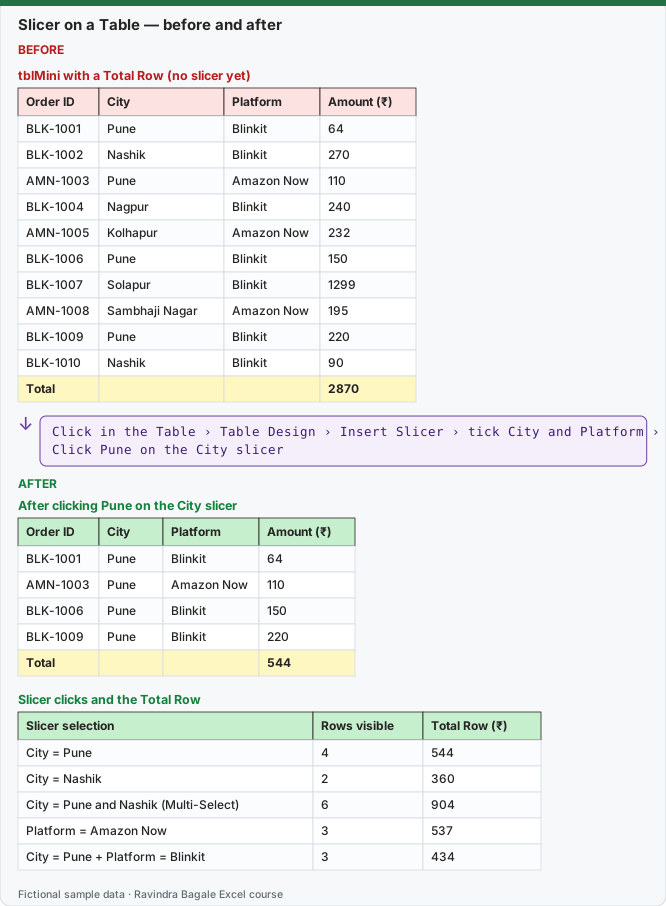
Expected result — After clicking Pune on the City slicer
| Order ID | City | Platform | Amount (₹) |
|---|---|---|---|
| BLK-1001 | Pune | Blinkit | 64 |
| AMN-1003 | Pune | Amazon Now | 110 |
| BLK-1006 | Pune | Blinkit | 150 |
| BLK-1009 | Pune | Blinkit | 220 |
| Total | — | — | 544 |
Expected result — Slicer clicks and the Total Row
| Slicer selection | Rows visible | Total Row (₹) |
|---|---|---|
| City = Pune | 4 | 544 |
| City = Nashik | 2 | 360 |
| City = Pune and Nashik (Multi-Select) | 6 | 904 |
| Platform = Amazon Now | 3 | 537 |
| City = Pune + Platform = Blinkit | 3 | 434 |
Before table and formula as text
Before — tblMini with a Total Row (no slicer yet)
| Order ID | City | Platform | Amount (₹) |
|---|---|---|---|
| BLK-1001 | Pune | Blinkit | 64 |
| BLK-1002 | Nashik | Blinkit | 270 |
| AMN-1003 | Pune | Amazon Now | 110 |
| BLK-1004 | Nagpur | Blinkit | 240 |
| AMN-1005 | Kolhapur | Amazon Now | 232 |
| BLK-1006 | Pune | Blinkit | 150 |
| BLK-1007 | Solapur | Blinkit | 1299 |
| AMN-1008 | Sambhaji Nagar | Amazon Now | 195 |
| BLK-1009 | Pune | Blinkit | 220 |
| BLK-1010 | Nashik | Blinkit | 90 |
| Total | — | — | 2870 |
Formula / click path
Click in the Table › Table Design › Insert Slicer › tick City and Platform › OK
Click Pune on the City slicer
Do it step by step:
- Click any cell in
tblMini. - Click Table Design › Insert Slicer.
- Tick City and Platform and click OK.
- Click Pune on the City slicer and read the Total Row.
- Click the Multi-Select button at the top of the slicer, then click Nashik to add it.
- Click the Clear Filter button (funnel with a red cross) to show all rows again.
स्टेप बाय स्टेप करून बघा:
tblMiniमधल्या कोणत्याही cell वर click करा.- Table Design › Insert Slicer वर click करा.
- City आणि Platform tick करा आणि OK करा.
- City slicer वर Pune click करा आणि Total Row बघा.
- Slicer च्या वरचं Multi-Select button दाबा, मग Nashik click करून तोही घ्या.
- सगळ्या rows परत दाखवायला Clear Filter button (लाल cross असलेलं funnel) दाबा.
स्टेप बाय स्टेप करके देखें:
tblMiniकी किसी भी cell पर click करें.- Table Design › Insert Slicer पर click करें.
- City और Platform tick करें और OK करें.
- City slicer पर Pune click करें और Total Row देखें.
- Slicer के ऊपर वाला Multi-Select button दबाएँ, फिर Nashik click करके उसे भी जोड़ें.
- सारी rows वापस दिखाने के लिए Clear Filter button (लाल cross वाला funnel) दबाएँ.
Good to know about slicers on a Table
| Question | Answer |
|---|---|
| Which Excel versions? | Slicers on Tables work in Excel 2013 and later, including Microsoft 365. |
| Two slicers at once | They combine with AND: City = Pune and Platform = Blinkit. |
| Several values in one slicer | Click Multi-Select (or hold Ctrl and click). |
| Style and size | Select the slicer › Slicer tab › Slicer Styles, Columns, Height and Width. |
| Slicer and formulas | Formulas outside the Table such as =SUM(tblMini[Amount]) ignore the slicer. Use the Total Row or =SUBTOTAL(109,tblMini[Amount]) for "what I see". |
| One slicer for two Tables | Not possible. A slicer belongs to one Table. To drive several reports with one slicer, use a PivotTable and Report Connections (Module 7). |
| Remove a slicer | Click it and press Delete. The filter it applied is removed too. |
Practice task (try it before you open the answer):
- Insert City and Platform slicers on
tblMini. - Try each selection in the table above.
- Put
=SUBTOTAL(109,tblMini[Amount])and=SUM(tblMini[Amount])in two cells beside the Table and compare them while you click.
Answer
The Total Row and the SUBTOTAL cell follow the slicer (for Pune + Blinkit both show ₹434). The SUM cell stays at ₹2,870 whatever you click.
Ravindra Bagale's Tip
Put slicers above the Table, not on top of it. When the Table grows, rows slide under a slicer that sits on the data and nobody sees them.
Ravindra Bagale's Tip – मराठी
Slicers Table च्या वर ठेवा, Table वर नाही. Table वाढली की data वर बसलेल्या slicer खाली rows जातात आणि त्या कोणालाच दिसत नाहीत.
Ravindra Bagale's Tip – हिंदी
Slicers Table के ऊपर रखें, Table पर नहीं. Table बढ़ने पर data पर रखे slicer के नीचे rows चली जाती हैं और किसी को नहीं दिखतीं.