NGO Donor and Fund Management System in Excel: Donors, Donations, 80G Checks, Fund-wise Spending, Balance and Receipt
Zoya Foundation in Sambhaji Nagar runs education support, health camps and tree plantation with money from individuals and local companies. Donations went into one bank account, so nobody could say how much of the health camp money was left or which receipts were missing a PAN. This page builds an 8-sheet Excel system: every donation and payment is tagged to a fund, receipts are checked for 80G basics, and the Fund report shows money in, money out and balance.
What you'll learn on this page
- Set funds with budgets and payment modes
- Keep donors with PAN, number of donations and total given
- Record donations with an 80G check for cash and PAN
- Book spending against a fund
- Compare received, spent and budget per fund
- Flag overspent and near-budget funds
- Print a donation receipt and show the year on a dashboard
Download the template: ngo-donor-fund-management-system-template.xlsx: a 8-sheet system with example data and real formulas (Read me, Setup, Donors, Donations, Spending, Fund report, Receipt, Dashboard). Yellow cells are inputs you can type over; green cells hold formulas; blue rows are headers and totals. Replace the example data with your own and every report and the dashboard recalculate.
Made-up data: every name, amount, business and date on this page is made up for practice. Cities are used only to make the examples feel real.
1. The business story
Zoya Foundation, Sambhaji Nagar, FY 2026-27 to 17 October 2026 (made-up data). 80G cash limit ₹2,000 (section 80G does not allow a deduction for cash donations above ₹2,000).
| Question | Where the system answers it |
|---|---|
| How much has come in? | ₹5,55,000 across 15 receipts from 8 donors |
| Which fund is overspent? | Tree plantation: ₹54,000 spent, ₹42,000 received |
| Which receipts need attention? | ZF-008 has no PAN; ZF-012 is cash above ₹2,000 |
| Who gives the most? | Bagale Foods Pvt Ltd: ₹3,00,000 |
Every rupee given for a purpose can be shown spent on that purpose.
Figure 1. Setup holds funds and budgets; Donors, Donations and Spending are the entry sheets; Fund report, Receipt and Dashboard read from them.
2. Build it sheet by sheet
Step 1. Setup: funds
- B5 cash limit for 80G (₹2,000), B6 budget alert (90%).
- Funds with budgets in A9:B12; modes in D9:D12.
Step 2. Donors and Donations
- Donors: ID, Name, Type, PAN. F5 total given with SUMIFS and G5 last donation with MAXIFS.
- Donations: A5
="ZF-"&TEXT(ROW()-4,"000"), donor, fund and mode from drop-downs. H5 PAN looked up from Donors. - I5:
=IF(AND(G5="Cash",F5>Setup!$B$5),"Not eligible: cash above limit",IF(H5="","PAN missing","OK")).
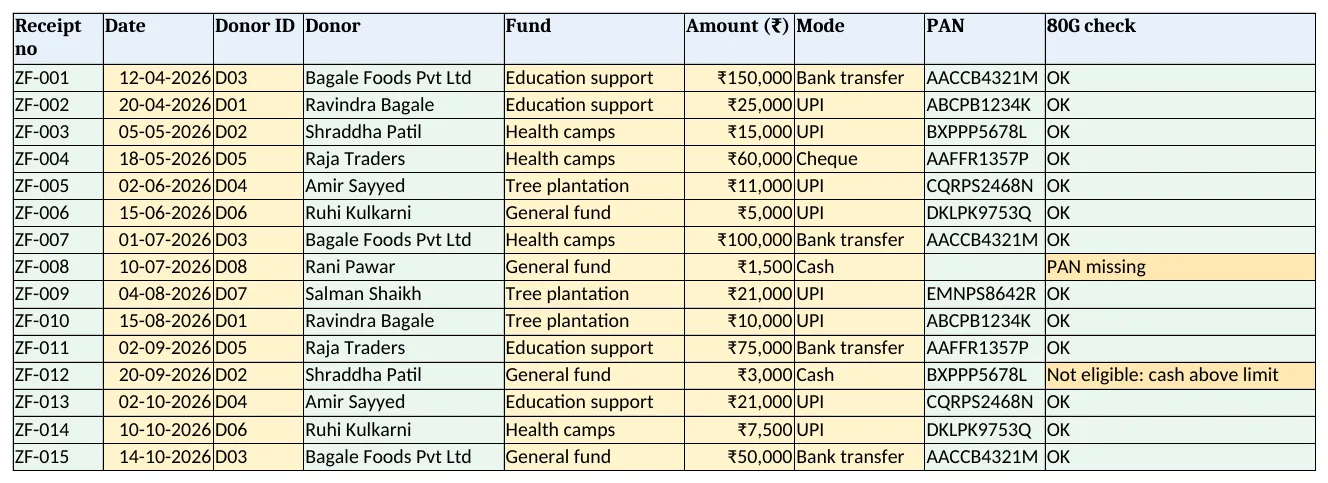
Figure 2. Donations: donor, fund, amount, mode, PAN and 80G check for each receipt
Step 3. Spending and Fund report
- Spending: Date, Fund, Purpose, Amount.
- Fund report C5 received and D5 spent by fund, E5 balance
=C5-D5, F5 budget used=D5/B5. - G5:
=IF(D5>C5,"Overspent",IF(F5>Setup!$B$6,"Near budget","OK"))with conditional formatting.
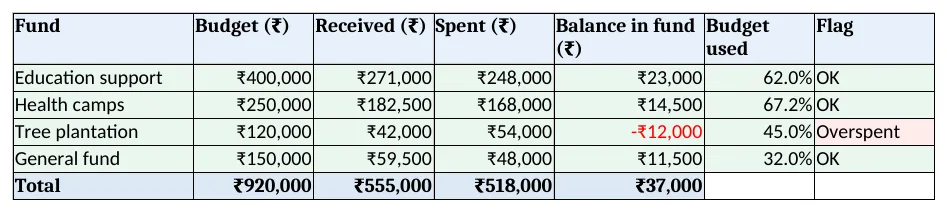
Figure 3. Fund report: budget, received, spent, balance, budget used and flag per fund
Step 4. Receipt
- Type a receipt no in B4; rows 6 to 12 bring date, donor, PAN, fund, amount, mode and the 80G check. Type your 80G registration number in B13. Set the print area.
Step 5. Dashboard
- KPI cards: received, spent, balance in funds, donors, receipts to check and funds flagged.
- Charts: received and spent by fund, and total given by donor.
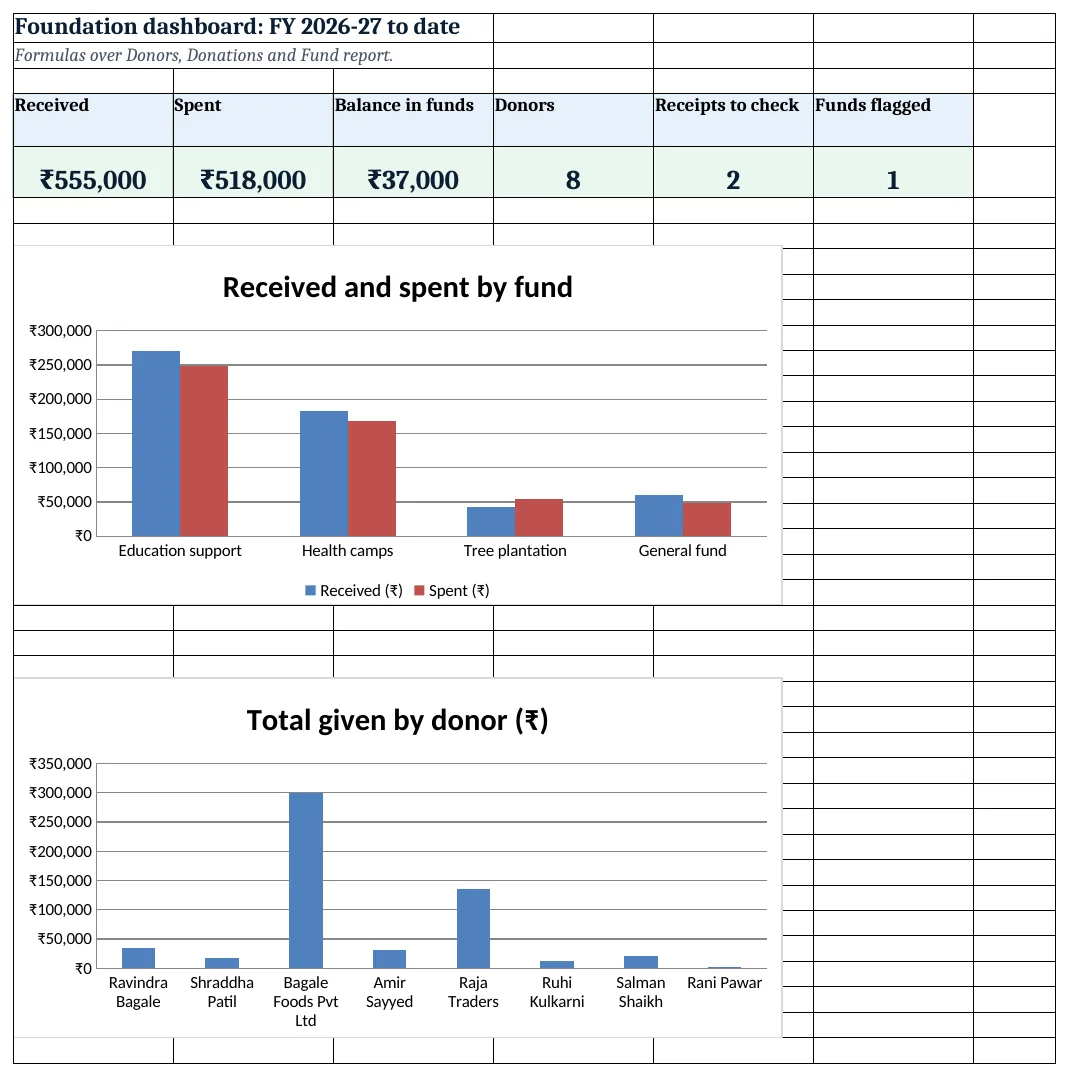
Figure 4. Foundation dashboard: received, spent, balance, donors, receipts to check and funds flagged
Ravindra Bagale's Tip
Thank every donor within a day with the receipt. Donors who get a quick receipt give again.
Ravindra Bagale's Tip – मराठी
प्रत्येक देणगीदाराला एका दिवसात पावती पाठवून आभार माना. लवकर पावती मिळाली की ते पुन्हा देतात.
Ravindra Bagale's Tip – हिंदी
हर दानदाता को एक दिन में रसीद भेजकर धन्यवाद दें. जल्दी रसीद मिले तो वे फिर देते हैं.
3. Formulas used
| Cell | Formula | What it does |
|---|---|---|
| Donors!E5 | =COUNTIFS(Donations!$C$5:$C$3000,A5) |
Number of donations |
| Donors!F5 | =SUMIFS(Donations!$F$5:$F$3000,Donations!$C$5:$C$3000,A5) |
Total given |
| Donors!G5 | =MAXIFS(Donations!$B$5:$B$3000,Donations!$C$5:$C$3000,A5) |
Last donation date |
| Donations!A5 | ="ZF-"&TEXT(ROW()-4,"000") |
Receipt number |
| Donations!D5 | =XLOOKUP(C5,Donors!$A$5:$A$500,Donors!$B$5:$B$500,"Check ID") |
Donor name |
| Donations!H5 | =XLOOKUP(C5,Donors!$A$5:$A$500,Donors!$D$5:$D$500,"")&"" |
Donor PAN |
| Donations!I5 | =IF(AND(G5="Cash",F5>Setup!$B$5),"Not eligible: cash above limit",IF(H5="","PAN missing","OK")) |
80G check |
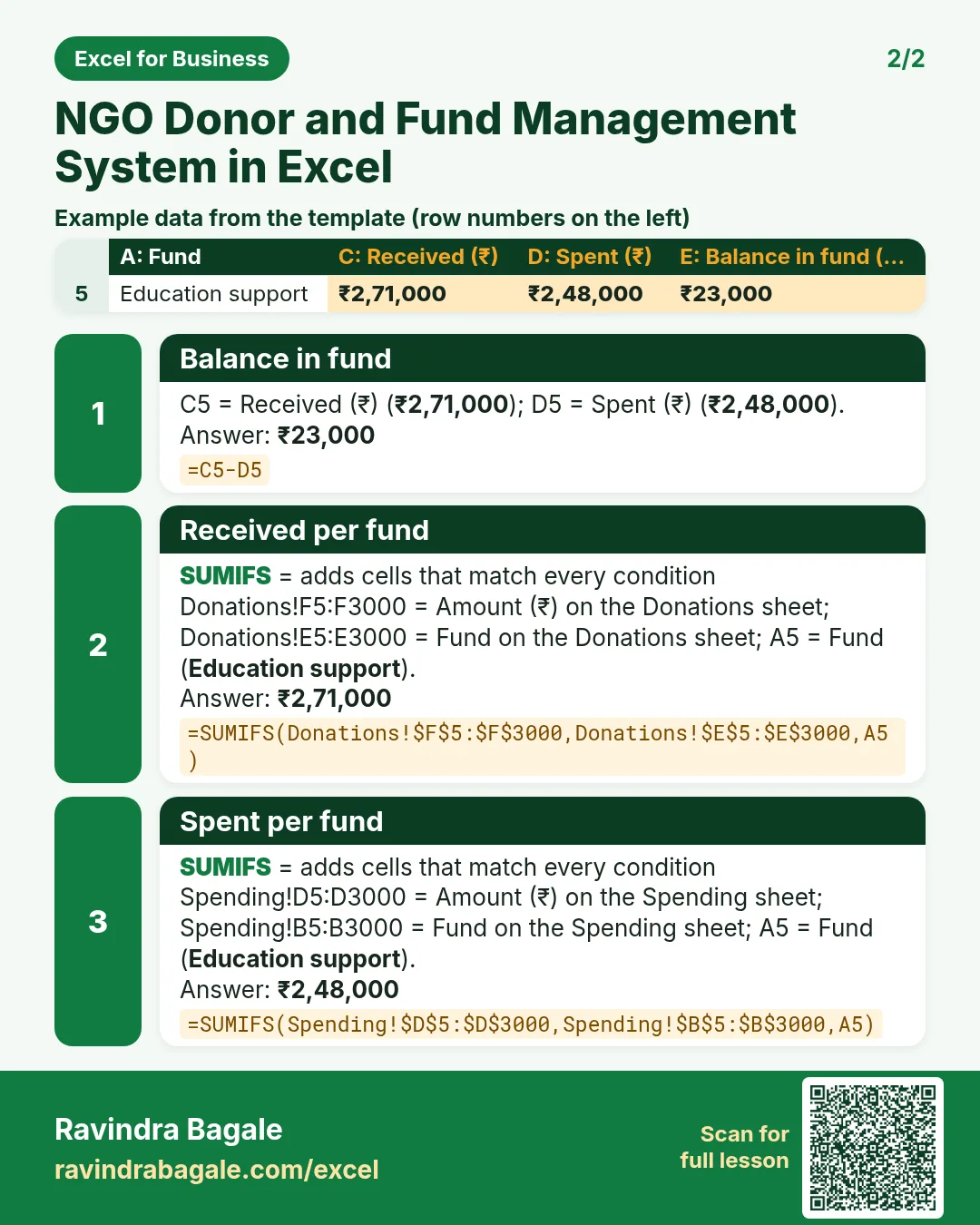
| Fund report!C5 | =SUMIFS(Donations!$F$5:$F$3000,Donations!$E$5:$E$3000,A5) |
Received per fund |
| Fund report!D5 | =SUMIFS(Spending!$D$5:$D$3000,Spending!$B$5:$B$3000,A5) |
Spent per fund |
| Fund report!E5 | =C5-D5 |
Balance in fund |
| Fund report!F5 | =D5/B5 |
Budget used |
| Fund report!G5 | =IF(D5>C5,"Overspent",IF(F5>Setup!$B$6,"Near budget","OK")) |
Fund flag |
| Dashboard!E5 | =COUNTIFS(Donations!I5:I3000,"<>OK",Donations!C5:C3000,"<>") |
Receipts to check |
Every formula above is written in the template, so you can click a cell and see it in the formula bar. All values on this page were recalculated in LibreOffice with zero errors.
4. Common mistakes
- One pot for all money. Tag every donation and payment to a fund, or you cannot show donors where their money went.
- Cash above ₹2,000 on an 80G receipt. Such cash donations do not qualify. Ask for UPI, cheque or bank transfer.
- No PAN on the receipt. Collect PAN with the donation; it is also needed for your yearly statement of donations.
- Spending before money comes in. Overspent means another fund paid for it. Fix it with the board's approval.
- Editing old receipt numbers. Keep numbers in order with no gaps. Cancel a receipt with a note instead of deleting.
Ravindra Bagale's Tip
Share the Fund report with the board every month. Overspent funds are easier to fix early.
Ravindra Bagale's Tip – मराठी
Fund report दर महिन्याला समितीला दाखवा. Overspent fund लवकर सुधारता येतो.
Ravindra Bagale's Tip – हिंदी
Fund report हर महीने समिति को दिखाएं. Overspent fund जल्दी सुधरता है.
5. More real examples
Example 1: Temple or mandal. Funds become festivals and building work, with the same receipts and fund balance.
Example 2: Housing society sinking fund. Track collections and spending per fund, like the housing society system.
Example 3: Alumni or club fund. Members pay yearly; projects are funds with budgets.
Quick revision cards
Quick revision
Each card shows formulas from this page, each with an example and its answer from the template. Scan the QR code on a card to open this lesson. All names and numbers are made up for practice.
झटपट उजळणी
प्रत्येक card वर या page मधले formulas, त्यांचं example आणि template मधलं उत्तर आहे. Card वरचा QR code scan केला की हा lesson उघडतो. सगळी नावं आणि आकडे सरावासाठी काल्पनिक आहेत.
झटपट दोहराई
हर card पर इस page के formulas, उनका example और template का उत्तर है. Card का QR code scan करें तो यह lesson खुलेगा. सभी नाम और आंकड़े अभ्यास के लिए काल्पनिक हैं.
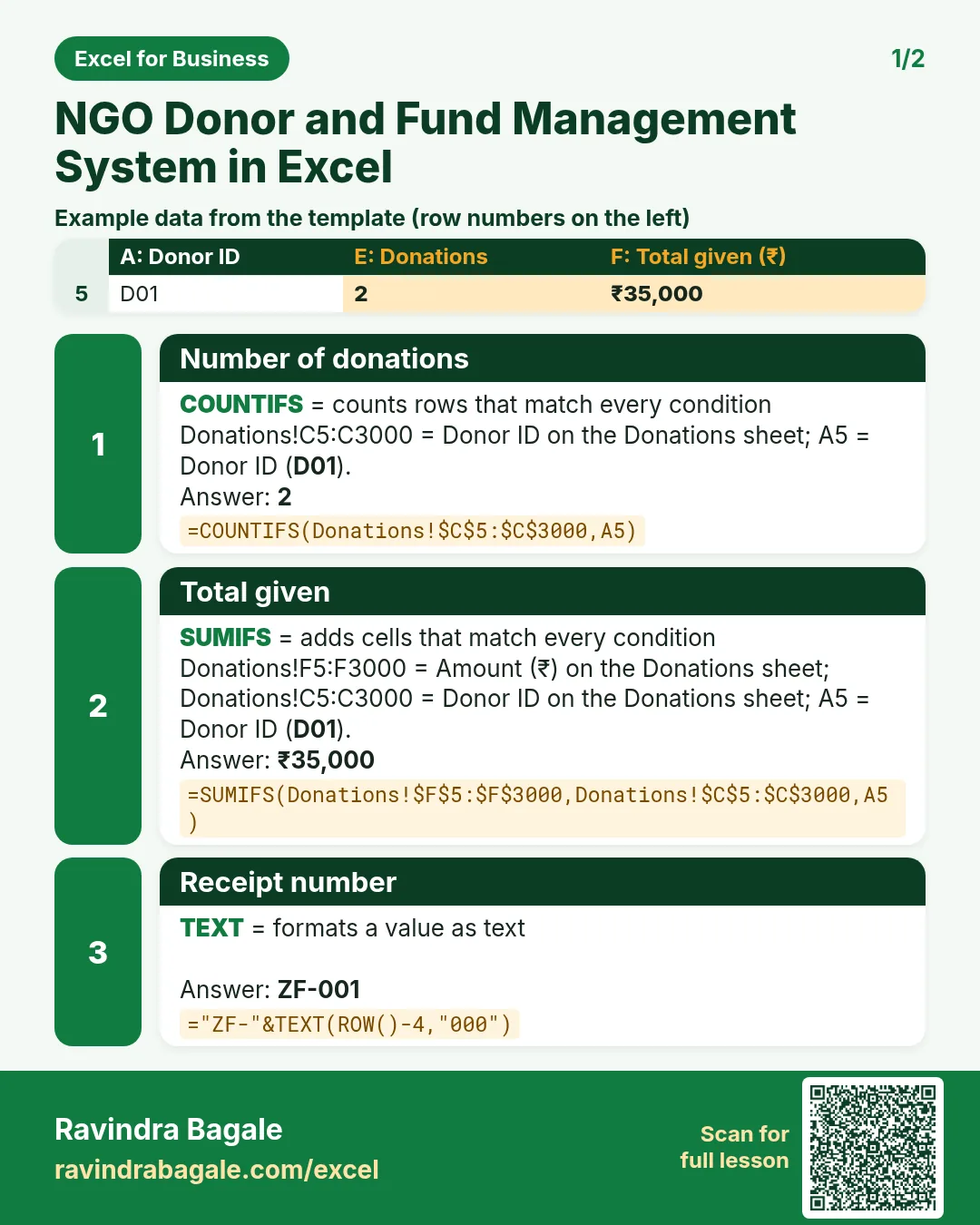


More cards: Ravi Sir's Cards.
6. Frequently asked questions
How do I track fund-wise balance in Excel?
SUMIFS donations by fund minus SUMIFS spending by fund, as in Fund report E5.
Which donations do not qualify under 80G?
Cash donations above ₹2,000 are not deductible. The receipt needs the donor's PAN and your 80G details; confirm current rules with your CA.
Do NGOs need to report donations each year?
Organisations registered under 80G file a statement of donations (Form 10BD) and issue certificates (Form 10BE). Confirm dates with your CA.
How do I show a donor's total?
SUMIFS amount by donor ID on the Donors sheet.
How do I flag overspending?
Compare spent with received per fund; spent above received means Overspent.
7. Quick quiz
Ten questions on this page. Sign in to save your score.
Loading practice tasks...
- Total donations (Easy): Add up Donations in D2:D11.
- Average amount (Easy): Average of E2:E11, rounded to 2 decimals.
- Rows in Education (Easy): How many rows have Fund "Education"?
- Largest donations (Easy): The largest value in D2:D11.
- Donations for Education (Medium): Total of D2:D11 where B is "Education".
- Education in Pune (Medium): Total of D2:D11 where B is "Education" and C is "Pune".
- Best in Education (Medium): Largest E2:E11 value where B is "Education".
- Value of row 2 (Medium): D2 times E2.
- Look up Mateo Garcia (Medium): The Donations for "Mateo Garcia" (use a lookup on column A).
- Total value (Hard): Sum of D times E for all rows.
- Share of Education (Hard): Share of D2:D11 that is "Education", rounded to 3 decimals.
- Rank of row 2 (Hard): Rank of D2 among D2:D11 (largest = 1).
- Above average? (Hard): "Above" if E2 is above the average of E2:E11, else "Below".