Milk Bill Calculator in Excel: Daily Litres Calendar, Monthly Bill and Missed Days
On the 1st of every month the milkman in Pune tells Shraddha Bagale the bill, and every month there is the same small argument. "We were out of town for three days." "But you took extra on Sundays." A one-page calendar in Excel ends it: type the litres each day, and the total, missed days and extra days are counted for you.
What you'll learn on this page
- A date column that fills itself for the month
- The weekday name with TEXT
- Amount per day and the monthly bill
- Missed days and extra days with COUNTIF
- Sunday litres with SUMIF
- Advance paid and balance to pay
Download the template: milk-bill-calculator-template.xlsx: example data with real formulas. Yellow cells are inputs you can type over; green cells hold formulas; blue rows are headers and totals. Replace the example data with your own and everything recalculates.
Made-up data: every name, amount, shop and date on this page is made up for practice. Cities are used only to make the examples feel real.
1. The example
October 2026 at ₹56 a litre (made-up rate). The usual order is 1 litre a day, 1.5 litres on Sundays, nothing on 6 to 8 October (out of town) and 2 litres on 20 and 21 October (guests).
| Value | |
|---|---|
| Total litres | 32.0 |
| Bill | ₹1,792 |
| Days with no delivery | 3 |
| Days with extra milk | 6 (four Sundays + two guest days) |
| Sunday litres | 6.0 |
| Bill if every day were usual | ₹1,736 |
| Advance paid | ₹500 |
| Balance to pay | ₹1,292 |
Both sides can see that the three missed days saved ₹168, but the extra days added ₹224, so the bill is ₹56 more than a usual month.
Figure 1. One row per day: litres × rate gives the day's amount; SUM gives the ₹1,792 bill; COUNTIF counts 3 missed and 6 extra days; the advance leaves ₹1,292 to pay.
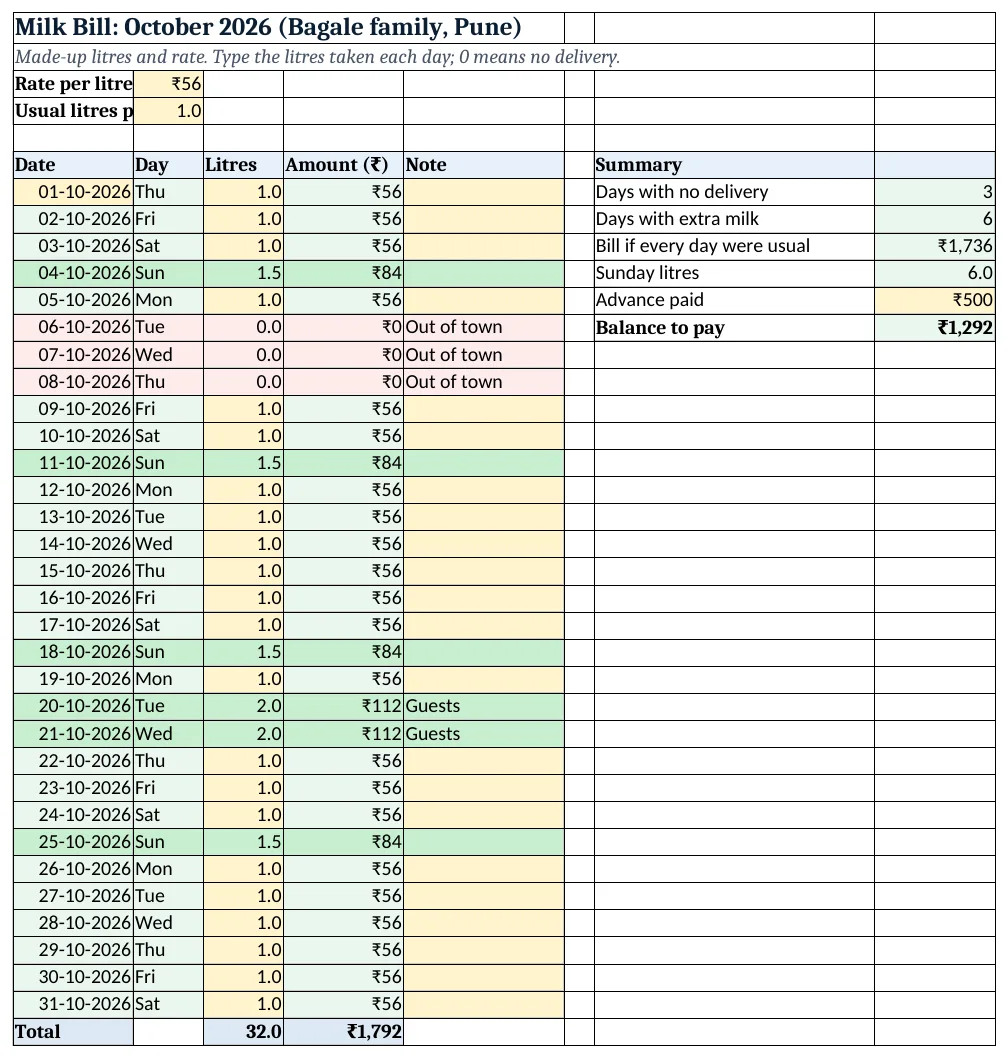
Figure 2. The template sheet, recalculated with its example data. Download it above and replace the yellow cells with your own numbers.
2. Build it step by step
Step 1. Rate and usual litres
- In B3 type the rate per litre (₹56) and in B4 the usual litres per day (1).
Step 2. Dates that fill themselves
- In A6:E6 type Date, Day, Litres, Amount, Note.
- In A7 type 01-10-2026.
- In A8 type
=A7+1and copy down to A37 (31 days). Next month you change only A7 (dates). - In B7 type
=TEXT(A7,"ddd")and copy down: Thu, Fri, Sat … (TEXT).
Step 3. Litres and amount
- Type the litres taken each day in C7:C37 (yellow). Type 0 when no milk came.
- In D7 type
=C7*$B$3and copy down. - Select E7:E37 > Data > Data Validation > List:
Out of town,Guests,Festival,Milkman on leave(drop-down lists).
Step 4. Totals
- In C38 type
=SUM(C7:C37): 32 litres. - In D38 type
=SUM(D7:D37): ₹1,792.
Step 5. Missed, extra and Sunday
- In H7 type
=COUNTIF(C7:C37,0): 3 days with no delivery. - In H8 type
=COUNTIF(C7:C37,">"&B4): 6 days with more than the usual litre (COUNTIF). - In H9 type
=B4*COUNT(C7:C37)*B3: ₹1,736, the bill for a usual month. - In H10 type
=SUMIF(B7:B37,"Sun",C7:C37): 6 litres on Sundays.
Step 6. Advance and balance
- Type the advance paid in H11 (₹500).
- In H12 type
=D38-H11: ₹1,292 to pay.
Step 7. Colours
- Select A7:E37 > Conditional Formatting > New Rule > Use a formula:
=$C7=0, light red (formula rules). - Add
=$C7>$B$4with light green for extra days.
Ravindra Bagale's Tip
Fill the litres every night, or at least every Sunday. Remembering 31 days at month-end is exactly where the arguments start.
Ravindra Bagale's Tip – मराठी
Litres रोज रात्री भरा, निदान दर रविवारी तरी. महिन्याच्या शेवटी 31 दिवस आठवायला गेलं की तिथूनच वाद सुरू होतात.
Ravindra Bagale's Tip – हिंदी
Litres रोज़ रात भरो, कम से कम हर रविवार. महीने के आखिर में 31 दिन याद करने बैठो तो वहीं से बहस शुरू होती है.
3. Formulas used
| Cell | Formula | What it does |
|---|---|---|
| A8 | =A7+1 |
Next date (copied down the month) |
| B7 | =TEXT(A7,"ddd") |
Weekday name |
| D7 | =C7*$B$3 |
Amount for the day |
| C38 | =SUM(C7:C37) |
Total litres |
| D38 | =SUM(D7:D37) |
Monthly bill |
| H7 | =COUNTIF(C7:C37,0) |
Days with no delivery |
| H8 | =COUNTIF(C7:C37,">"&B4) |
Days with more than the usual litres |
| H9 | =B4*COUNT(C7:C37)*B3 |
Bill for a usual month |
| H10 | =SUMIF(B7:B37,"Sun",C7:C37) |
Litres taken on Sundays |
| H12 | =D38-H11 |
Balance to pay |
Every formula above is written in the template, so you can click a cell and see it in the formula bar. All values on this page were recalculated in the file.
4. Common mistakes
- Leaving a missed day blank. A blank is not counted by
COUNTIF(...,0). Type 0 for days with no milk. - Typing the rate in every row. Keep the rate once in B3 and use
$B$3. When the rate changes, you change one cell. - Typing every date by hand. Type only the 1st and let
=A7+1fill the rest, so no date is skipped or repeated. - "Sun" spelt differently. SUMIF looks for the exact text the TEXT formula makes. Type "Sun", not "Sunday".
- Using the 31-row sheet for a 30-day month. Clear row 37 in a 30-day month, or the 1st of the next month is billed.
Ravindra Bagale's Tip
Show the sheet on your phone when you pay. Missed and extra days are coloured, so the bill is clear in a few seconds.
Ravindra Bagale's Tip – मराठी
पैसे देताना sheet phone वर दाखवा. Missed आणि extra दिवस रंगीत आहेत, त्यामुळे काही सेकंदात हिशोब पटतो.
Ravindra Bagale's Tip – हिंदी
पैसे देते समय sheet phone पर दिखाओ. Missed और extra दिन रंगीन हैं, तो हिसाब कुछ सेकंड में साफ़ हो जाता है.
5. More real examples
Example 1: Newspaper bill. Same sheet: copies per day in column C and the price per copy in B3. Sunday papers often cost more, so add a Sunday price with =IF(B7="Sun",price2,price1).
Example 2: Two milk types. Add columns for cow and buffalo milk with their own rates, and add both amounts in the total.
Example 3: Rate change mid-month. Add a Rate column, type the new rate from the change date, and use =C7*F7 instead of $B$3.
Quick revision cards
Quick revision
Each card shows formulas from this page, each with an example and its answer from the template. Scan the QR code on a card to open this lesson. All names and numbers are made up for practice.
झटपट उजळणी
प्रत्येक card वर या page मधले formulas, त्यांचं example आणि template मधलं उत्तर आहे. Card वरचा QR code scan केला की हा lesson उघडतो. सगळी नावं आणि आकडे सरावासाठी काल्पनिक आहेत.
झटपट दोहराई
हर card पर इस page के formulas, उनका example और template का उत्तर है. Card का QR code scan करें तो यह lesson खुलेगा. सभी नाम और आंकड़े अभ्यास के लिए काल्पनिक हैं.
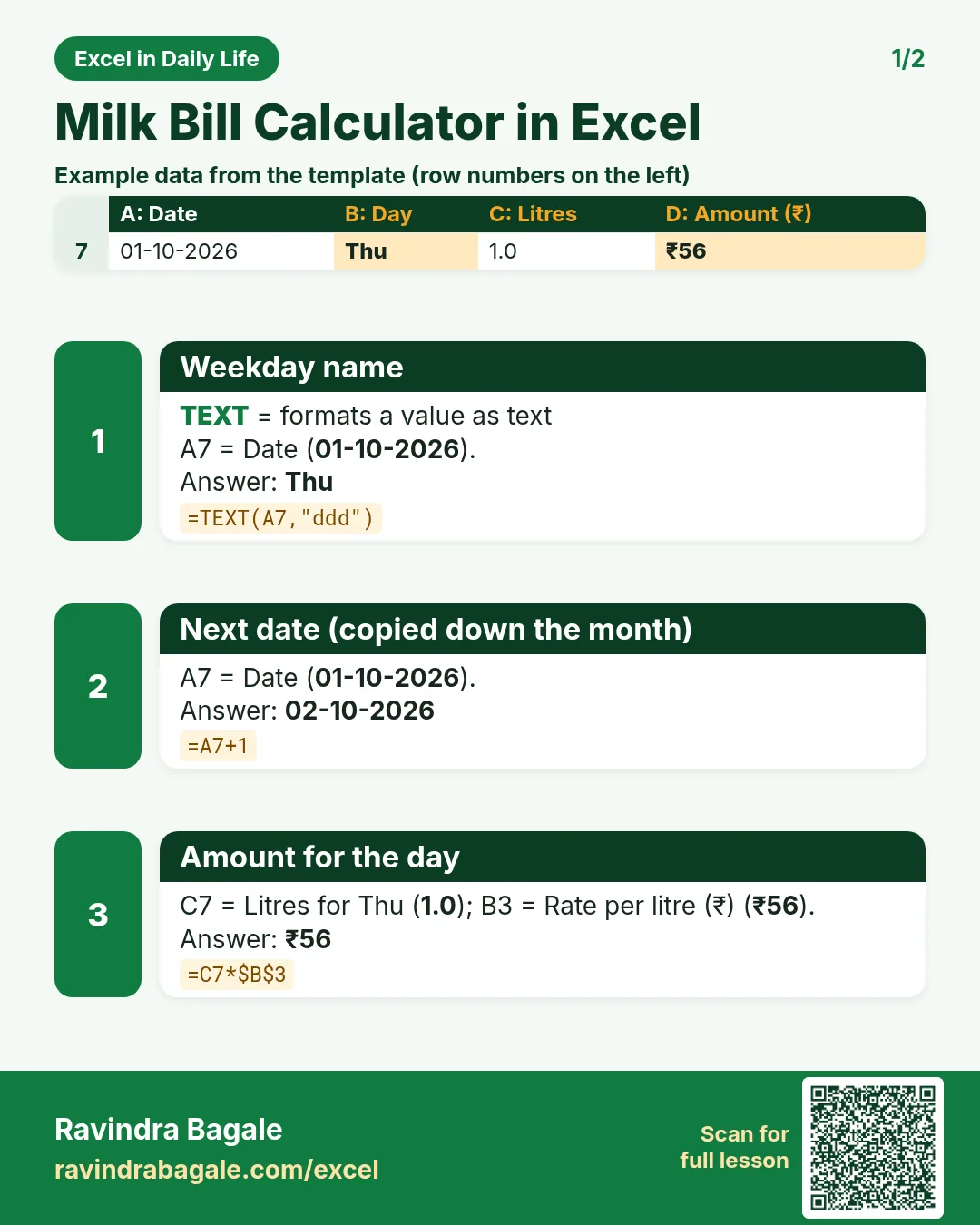

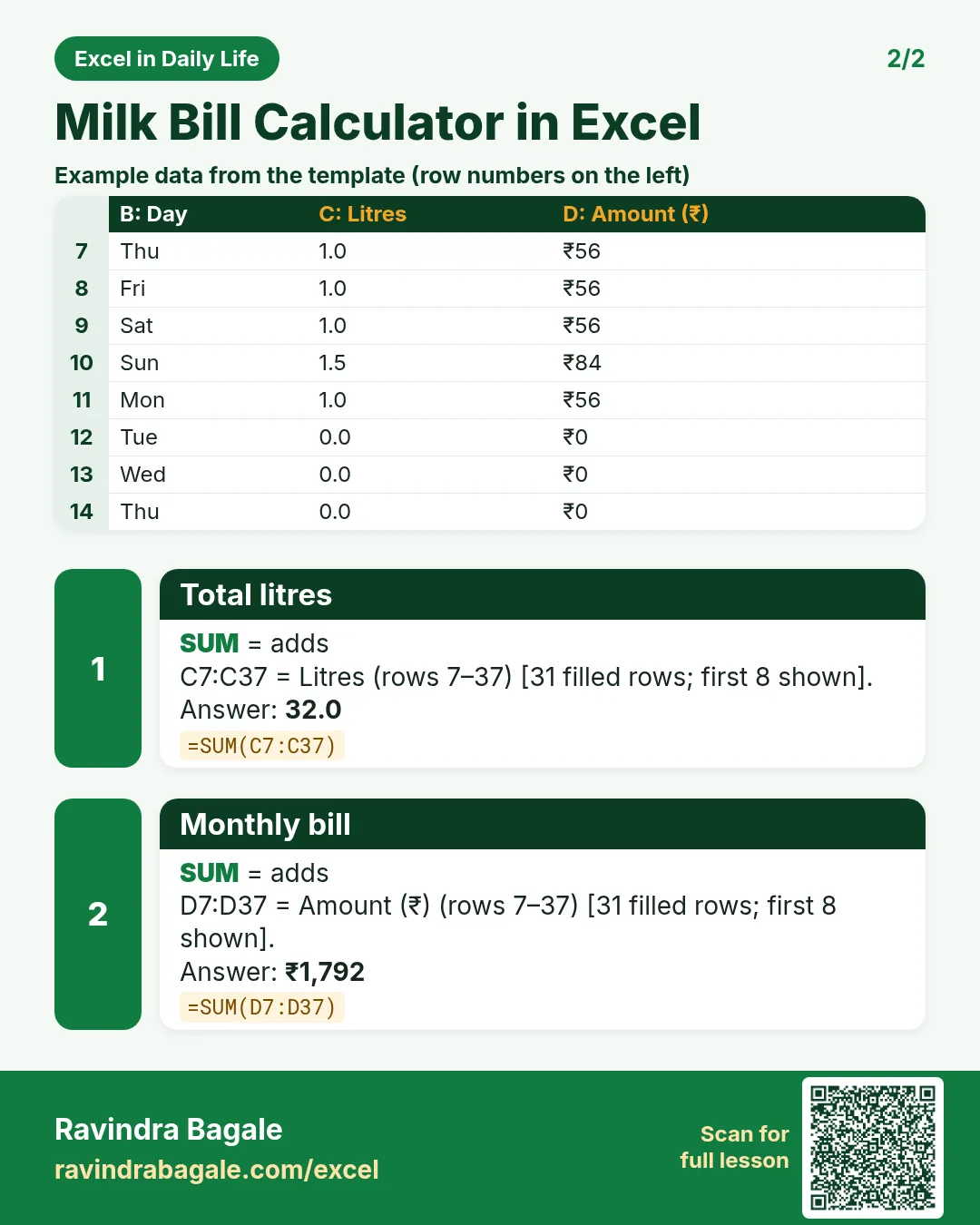

More cards: Ravi Sir's Cards.
6. Frequently asked questions
How do I calculate a monthly milk bill in Excel?
Type the litres for each date, multiply by the rate (=C7*$B$3) and SUM the amounts. This month: 32 litres × ₹56 = ₹1,792.
How do I count the days milk was not delivered?
=COUNTIF(C7:C37,0) counts the days with 0 litres.
How do I show the day name next to a date?
=TEXT(A7,"ddd") gives Mon, Tue and so on; "dddd" gives the full name.
How do I add only Sunday litres?
=SUMIF(B7:B37,"Sun",C7:C37) adds the litres where the day is Sun.
Can I reuse the sheet next month?
Yes. Copy the sheet, change A7 to the 1st of the new month and type the new litres.
7. Quick quiz
Ten questions on this page. Sign in to save your score.
Loading practice tasks...
- Total clicks (Easy): Add up Clicks in D2:D11. (sheet "Data")
- Average spend (Easy): Average of E2:E11, rounded to 2 decimals. (sheet "Data")
- Rows in Google (Easy): How many rows have Platform "Google"? (sheet "Data")
- Largest clicks (Easy): The largest value in D2:D11. (sheet "Data")
- Days taken (Easy): C2 minus B2. (sheet "Dates")
- Start year (Easy): Year of B3. (sheet "Dates")
- Due month (Easy): Month number of C3. (sheet "Dates")
- Earliest start (Easy): Earliest date in B2:B9 (as a date number). (sheet "Dates")
- Clicks for Google (Medium): Total of D2:D11 where B is "Google". (sheet "Data")
- Google in Paris (Medium): Total of D2:D11 where B is "Google" and C is "Paris". (sheet "Data")
- Working days (Medium): Working days from B2 to C2. (sheet "Dates")
- Weekday of due (Medium): Weekday number of C4 (Sunday = 1). (sheet "Dates")