Gym Workout Log in Excel: Sets, Reps, Volume and Personal Bests with MAXIFS
Shahrukh in Pune lifts three days a week: squat, bench press and deadlift. He knows the weight on the bar today, but not whether he is actually getting stronger. A simple log answers that: every set is one row, Excel works out the volume, marks his best weights and shows week-on-week progress.
What you'll learn on this page
- One row per exercise per session
- Volume = sets × reps × weight
- An estimated 1-rep max with the Epley formula
- Best weight per exercise with MAXIFS
- Total volume per exercise and per week with SUMIFS
- Highlight the best rows
Download the template: gym-workout-log-template.xlsx: example data with real formulas. Yellow cells are inputs you can type over; green cells hold formulas; blue rows are headers and totals. Replace the example data with your own and everything recalculates.
Made-up data: every name, amount, shop and date on this page is made up for practice. Cities are used only to make the examples feel real.
1. The example
Shahrukh's two weeks from 5 to 16 October 2026 (made-up values):
| Exercise | Sessions | Best weight | Best estimated 1RM | Total volume |
|---|---|---|---|---|
| Squat | 4 | 70 kg | 84.0 kg | 5,760 kg |
| Bench press | 4 | 45 kg | 57.0 kg | 3,870 kg |
| Deadlift | 4 | 95 kg | 105.0 kg | 4,680 kg |
Week 1 volume: 7,395 kg. Week 2: 6,915 kg (−6.5%). The weights went up in week 2, but on heavier days he did fewer reps (squat 3 × 6 at 70 kg, deadlift 3 × 3 at 95 kg). Volume dropped while strength rose. The log shows both.
Figure 1. Sets × reps × weight gives volume; the Epley estimate gives a 1-rep max; MAXIFS finds the best weight per exercise and SUMIFS totals volume by exercise and by week.
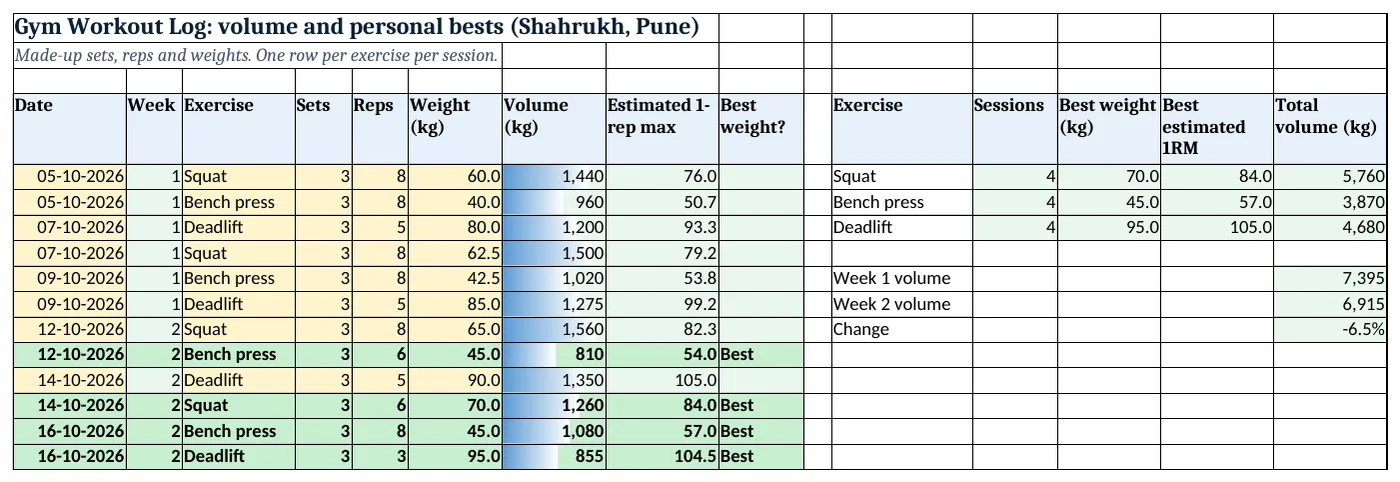
Figure 2. The template sheet, recalculated with its example data. Download it above and replace the yellow cells with your own numbers.
2. Build it step by step
Step 1. The log
- In A4:I4 type Date, Week, Exercise, Sets, Reps, Weight, Volume, Estimated 1-rep max, Best weight?.
- Pick the exercise from a drop-down in C5:C200:
Squat,Bench press,Deadlift(drop-down lists). - In B5 type
=INT((A5-$A$5)/7)+1for the week number.
Step 2. Volume
- In G5 type
=D5*E5*F5: 3 × 8 × 60 = 1,440 kg.
Step 3. Estimated 1-rep max
- In H5 type
=ROUND(F5*(1+E5/30),1). This is the Epley estimate: 60 kg for 8 reps ≈ 76 kg for one rep. - It is an estimate only; it is less accurate above about 10 reps.
Step 4. Best weight per exercise
- MAXIFS(max_range, criteria_range, criteria) returns the largest value that matches (MAXIFS).
- In I5 type
=IF(F5=MAXIFS($F$5:$F$16,$C$5:$C$16,C5),"Best","")and copy down.
Step 5. Summary per exercise and week
- In L5 type
=COUNTIF($C$5:$C$16,K5), in M5=MAXIFS($F$5:$F$16,$C$5:$C$16,K5), in N5 the same on column H, and in O5=SUMIFS($G$5:$G$16,$C$5:$C$16,K5)(SUMIFS). - In O9 type
=SUMIFS(G5:G16,B5:B16,1)and in O10 the same with 2. In O11 type=O10/O9-1.
Step 6. Colours
- Select A5:I16 > New Rule > Use a formula
=$I5="Best", green and bold (formula rules). Add data bars on G5:G16.
Ravindra Bagale's Tip
Add only a little weight each week. Steady small jumps keep you going longer than one big jump.
Ravindra Bagale's Tip – मराठी
दर आठवड्याला थोडंच वजन वाढवा. एकदम मोठ्या उडीपेक्षा थोडं थोडं वाढवणं जास्त टिकतं.
Ravindra Bagale's Tip – हिंदी
हर हफ्ते थोड़ा ही वज़न बढ़ाओ. एक बड़ी छलांग से छोटे-छोटे कदम ज़्यादा टिकते हैं.
3. Formulas used
| Cell | Formula | What it does |
|---|---|---|
| B5 | =INT((A5-$A$5)/7)+1 |
Week number |
| G5 | =D5*E5*F5 |
Volume |
| H5 | =ROUND(F5*(1+E5/30),1) |
Estimated 1-rep max |
| I5 | =IF(F5=MAXIFS($F$5:$F$16,$C$5:$C$16,C5),"Best","") |
Best weight? |
| M5 | =MAXIFS($F$5:$F$16,$C$5:$C$16,K5) |
Best squat weight |
| N7 | =MAXIFS($H$5:$H$16,$C$5:$C$16,K7) |
Best deadlift 1RM |
| O5 | =SUMIFS($G$5:$G$16,$C$5:$C$16,K5) |
Total squat volume |
| O9 | =SUMIFS(G5:G16,B5:B16,1) |
Week 1 volume |
| O11 | =O10/O9-1 |
Change |
Every formula above is written in the template, so you can click a cell and see it in the formula bar. All values on this page were recalculated in the file.
4. Common mistakes
- Logging only the heaviest set. Type sets, reps and weight for the working sets, or volume will be wrong.
- Mixing kg and lb. Pick one unit for the whole log.
- Judging progress by volume alone. Here volume fell 6.5% while best weights rose. Look at both.
- Treating the estimated 1RM as a target to test. It is a guide. Never test a true maximum without a spotter and proper warm-up.
- Different exercise spellings. "Bench" and "Bench press" are different to MAXIFS. Use the drop-down.
Ravindra Bagale's Tip
Type the log right after the workout, on your phone. Next week's weights come from this week's rows.
Ravindra Bagale's Tip – मराठी
Workout झाल्यावर लगेच phone वर log टाका. पुढच्या आठवड्याचं वजन याच rows वरून ठरतं.
Ravindra Bagale's Tip – हिंदी
Workout के तुरंत बाद phone पर log डालो. अगले हफ्ते का वज़न इन्हीं rows से तय होता है.
5. More real examples
Example 1: Walking or running. Replace sets × reps × weight with km and minutes; MAXIFS finds the longest run.
Example 2: Home workouts. Use body-weight reps (push-ups, squats) with weight 1, so volume = sets × reps.
Example 3: Ravina's yoga practice. Log minutes per session and SUMIFS by week to see consistency.
Quick revision cards
Quick revision
Each card shows formulas from this page, each with an example and its answer from the template. Scan the QR code on a card to open this lesson. All names and numbers are made up for practice.
झटपट उजळणी
प्रत्येक card वर या page मधले formulas, त्यांचं example आणि template मधलं उत्तर आहे. Card वरचा QR code scan केला की हा lesson उघडतो. सगळी नावं आणि आकडे सरावासाठी काल्पनिक आहेत.
झटपट दोहराई
हर card पर इस page के formulas, उनका example और template का उत्तर है. Card का QR code scan करें तो यह lesson खुलेगा. सभी नाम और आंकड़े अभ्यास के लिए काल्पनिक हैं.
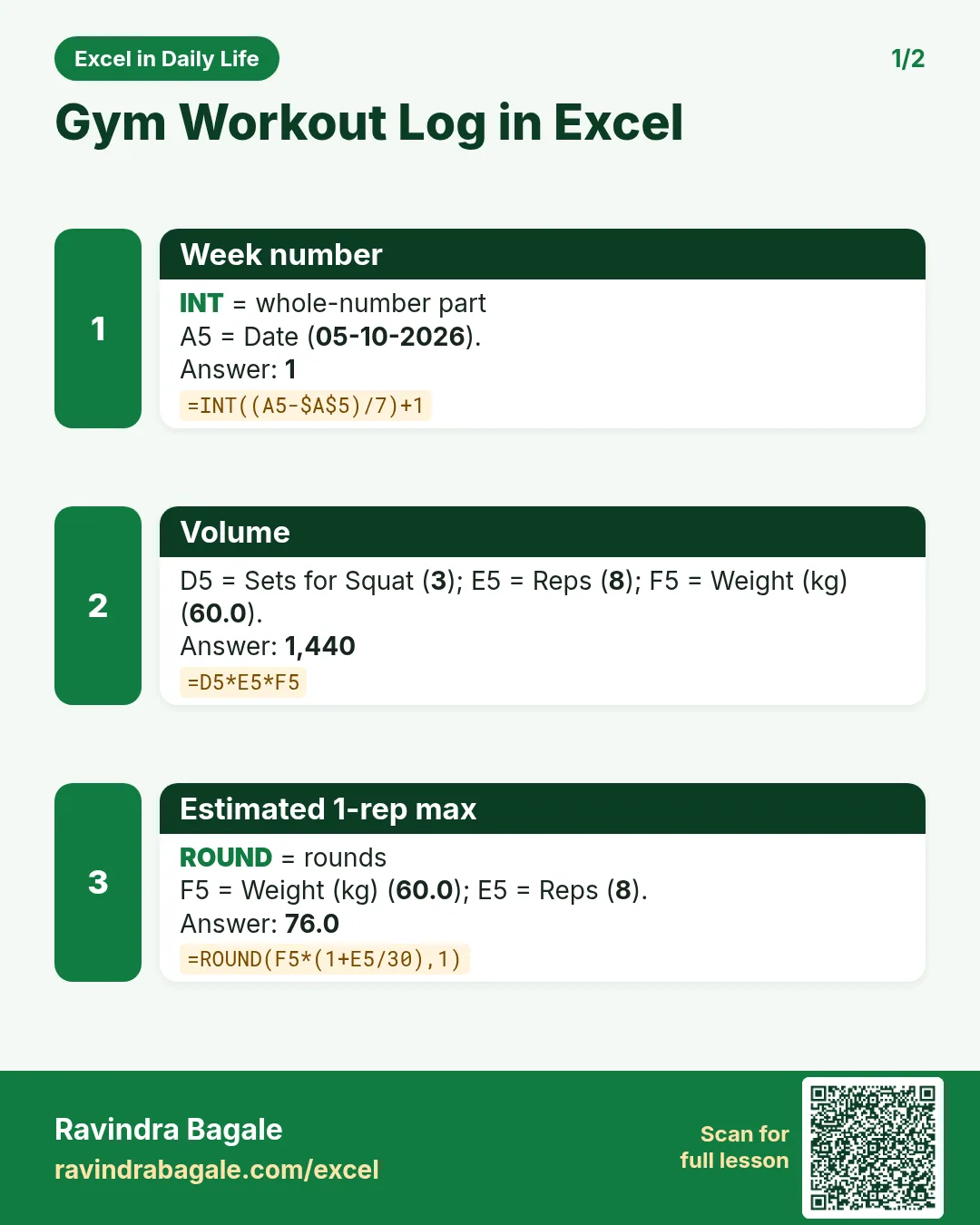

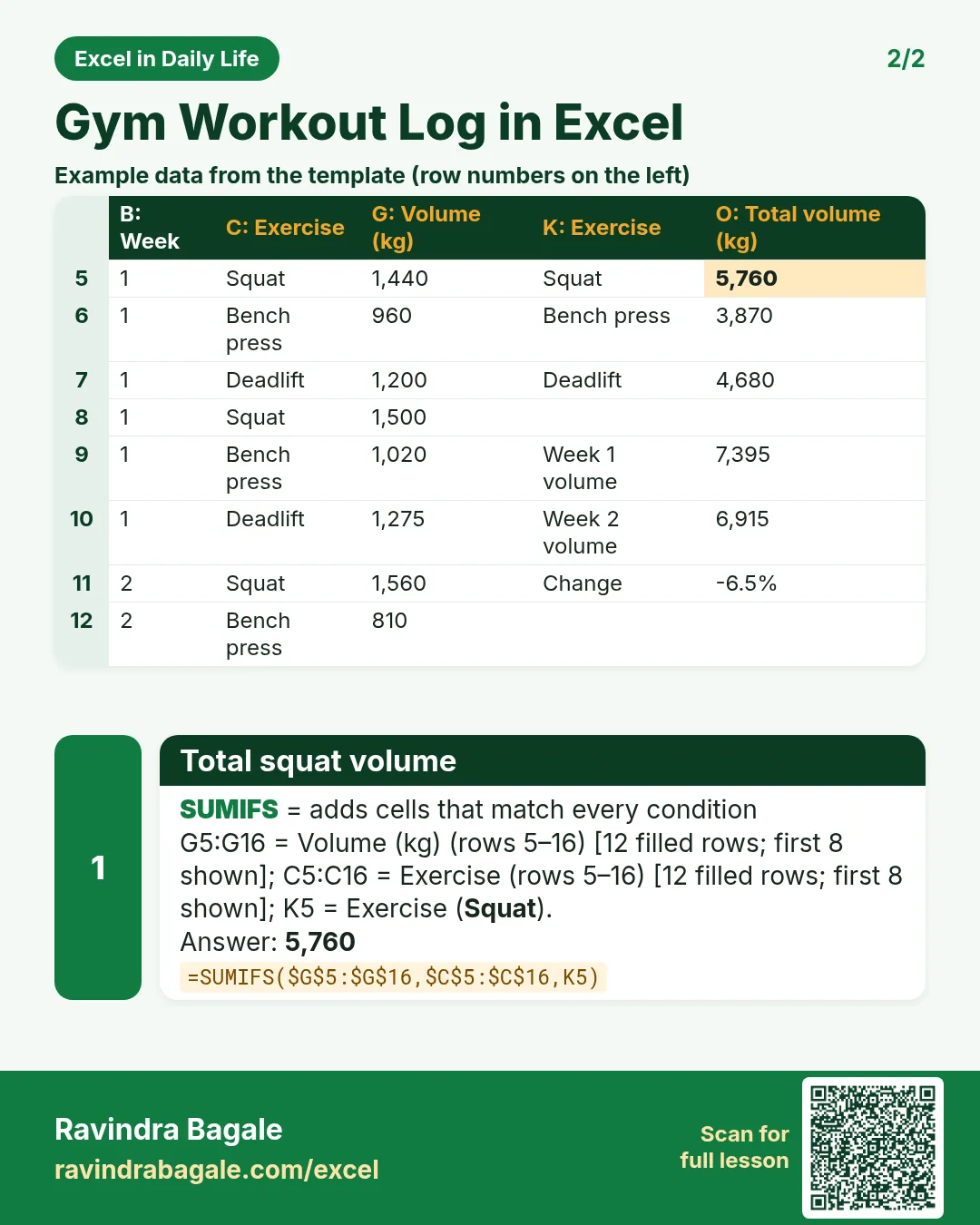

More cards: Ravi Sir's Cards.
6. Frequently asked questions
How do I calculate training volume in Excel?
Volume = sets × reps × weight: =D5*E5*F5.
How do I find my personal best for each exercise?
=MAXIFS(weight_column, exercise_column, "Squat").
What is the Epley formula?
An estimate of the weight you could lift once: weight × (1 + reps ÷ 30).
How do I compare weeks?
Add a week number and use SUMIFS on volume by week.
Which Excel versions have MAXIFS?
Excel 2019, Excel 2021 and Microsoft 365.
7. Quick quiz
Ten questions on this page. Sign in to save your score.
Loading practice tasks...
- Total stock units (Easy): Add up Stock units in D2:D11.
- Average unit cost (Easy): Average of E2:E11, rounded to 2 decimals.
- Rows in Antibiotic (Easy): How many rows have Category "Antibiotic"?
- Largest stock units (Easy): The largest value in D2:D11.
- Stock units for Antibiotic (Medium): Total of D2:D11 where B is "Antibiotic".
- Antibiotic in Berlin (Medium): Total of D2:D11 where B is "Antibiotic" and C is "Berlin".
- Best in Antibiotic (Medium): Largest E2:E11 value where B is "Antibiotic".
- Value of row 2 (Medium): D2 times E2.
- Look up Chloe Dubois (Medium): The Stock units for "Chloe Dubois" (use a lookup on column A).
- Total value (Hard): Sum of D times E for all rows.
- Share of Antibiotic (Hard): Share of D2:D11 that is "Antibiotic", rounded to 3 decimals.
- Rank of row 2 (Hard): Rank of D2 among D2:D11 (largest = 1).
- Above average? (Hard): "Above" if E2 is above the average of E2:E11, else "Below".