Complaint Ticket Management System in Excel: Priorities, Due-by Time, Hours Taken, Met or Breached and Agent Report
Salman Appliances Service in Solapur repairs and installs air conditioners and refrigerators. Customers called again and again because nobody knew which complaints were late. This page builds a 6-sheet Excel system: each complaint gets a due-by time from its priority, closing it records the hours taken, and the status shows at a glance whether the promise was met, broken or is about to be.
What you'll learn on this page
- Set priorities with resolve-within hours, categories and agents
- Log tickets with opened date and time
- Work out the due-by time from the priority
- Find hours taken and Met or Breached
- Show Open and Overdue for tickets still pending, with hours open
- Report by agent and category with COUNTIFS and AVERAGEIFS
- Print a ticket slip and show service on a dashboard
Download the template: complaint-ticket-management-system-template.xlsx: a 6-sheet system with example data and real formulas (Read me, Setup, Tickets, Report, Ticket slip, Dashboard). Yellow cells are inputs you can type over; green cells hold formulas; blue rows are headers and totals. Replace the example data with your own and every report and the dashboard recalculate.
Made-up data: every name, amount, business and date on this page is made up for practice. Cities are used only to make the examples feel real.
1. The business story
Salman Appliances Service, Solapur, as of 17 October 2026, 10:00 am (made-up data). High 24 hours, Medium 48, Low 72.
| Question | Where the system answers it |
|---|---|
| How many complaints are pending? | 5: 4 open and 1 overdue (TK-011, billing, 95 hours) |
| How often do we keep the promise? | 8 of 11 resolved tickets met, 73% |
| Which tickets broke the promise? | TK-003, TK-005 and TK-012 |
| Who is fastest? | Ravina: 26.7 hours on average, all met |
Average time to resolve: 32 hours across 11 closed tickets.
Figure 1. Setup holds priorities and lists; Tickets is the entry sheet; Report, Ticket slip and Dashboard read from it.
2. Build it sheet by sheet
Step 1. Setup: priorities
- B3 as-of date and time. Priorities with hours in A6:B8; categories in D6:D10; agents in F6:F8.
Step 2. Tickets: due by and status
- A5
="TK-"&TEXT(ROW()-4,"000"). Type opened date and time, customer, category, priority and agent from drop-downs. - G5 due by
=B5+XLOOKUP(E5,Setup!$A$6:$A$8,Setup!$B$6:$B$8,0)/24: hours ÷ 24 turns them into days (time calculations). - I5 hours taken
=IF(H5="","",ROUND((H5-B5)*24,1)). - J5:
=IF(H5<>"",IF(H5<=G5,"Met","Breached"),IF(Setup!$B$3>G5,"Overdue","Open")), red for Breached and Overdue.
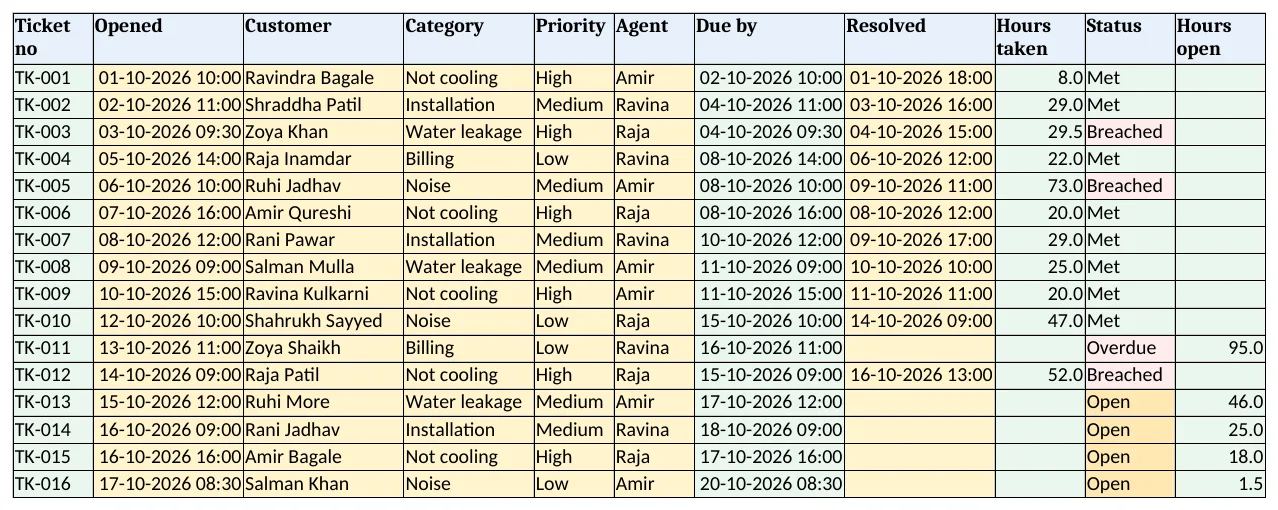
Figure 2. Tickets: due-by time, resolved time, hours taken, status and hours open
Step 3. Hours open
- K5
=IF(H5="",ROUND((Setup!$B$3-B5)*24,1),"")shows how long a pending complaint has waited.
Step 4. Report
- By agent: tickets, open, overdue, resolved and met with COUNTIFS; G5 met %
=IFERROR(F5/E5,0); H5 average hours with AVERAGEIFS. - By category: tickets, open or overdue, breached.
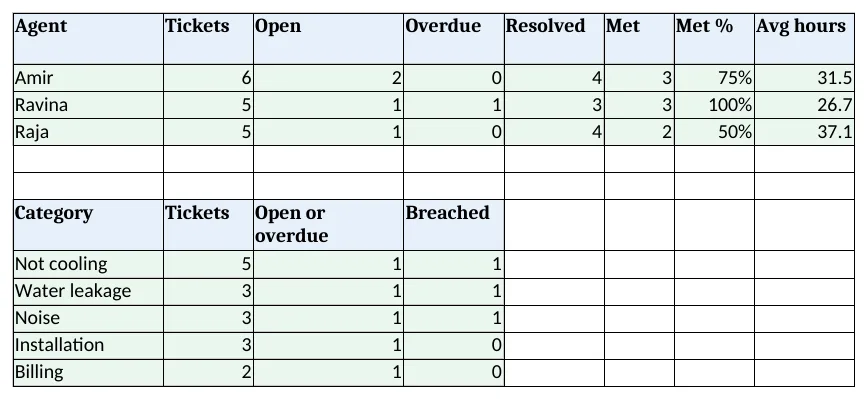
Figure 3. Report: tickets, open, overdue, met % and average hours by agent; tickets by category
Step 5. Ticket slip and Dashboard
- Ticket slip: type a ticket no in B4. Set the print area.
- KPI cards: tickets, open, overdue, met %, average hours and breached. Charts: tickets by category and average hours by agent.
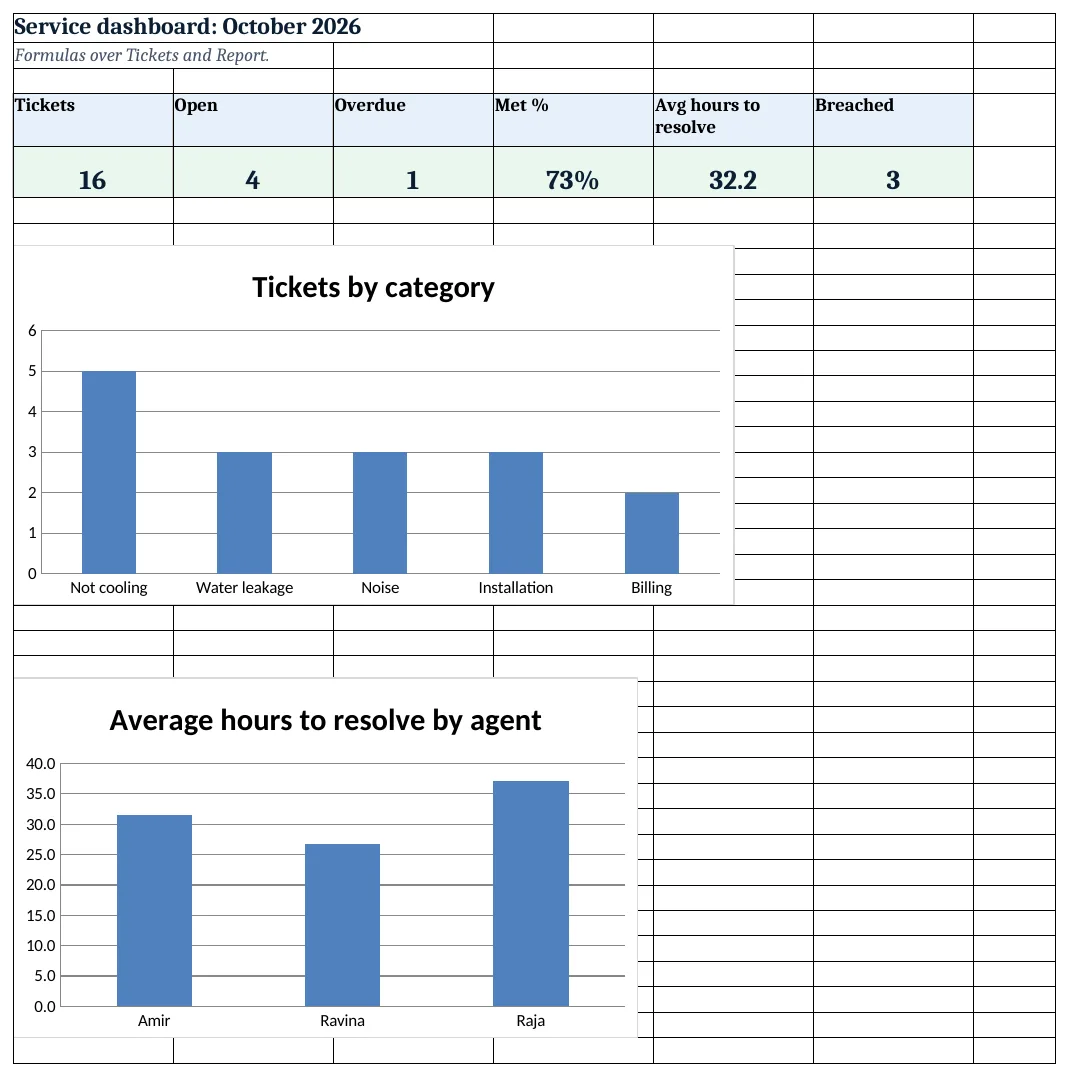
Figure 4. Service dashboard: tickets, open, overdue, met %, average hours and breached
Ravindra Bagale's Tip
Call the customer when you close the ticket, not just when you open it. Most repeat complaints come from jobs closed without a check.
Ravindra Bagale's Tip – मराठी
ticket बंद करताना ग्राहकाला फोन करा, फक्त उघडताना नाही. बहुतेक पुन्हा येणाऱ्या तक्रारी न तपासता बंद केलेल्या कामांच्या असतात.
Ravindra Bagale's Tip – हिंदी
ticket बंद करते समय ग्राहक को फोन करें, सिर्फ खोलते समय नहीं. ज़्यादातर दोबारा आने वाली शिकायतें बिना जांच बंद कामों की होती हैं.
3. Formulas used
| Cell | Formula | What it does |
|---|---|---|
| Tickets!A5 | ="TK-"&TEXT(ROW()-4,"000") |
Ticket number |
| Tickets!G5 | =B5+XLOOKUP(E5,Setup!$A$6:$A$8,Setup!$B$6:$B$8,0)/24 |
Due by |
| Tickets!I5 | =IF(H5="","",ROUND((H5-B5)*24,1)) |
Hours taken |
| Tickets!J5 | =IF(H5<>"",IF(H5<=G5,"Met","Breached"),IF(Setup!$B$3>G5,"Overdue","Open")) |
Ticket status |
| Tickets!K5 | =IF(H5="",ROUND((Setup!$B$3-B5)*24,1),"") |
Hours open |
| Report!B5 | =COUNTIFS(Tickets!$F$5:$F$3000,A5) |
Tickets per agent |
| Report!D5 | =COUNTIFS(Tickets!$F$5:$F$3000,A5,Tickets!$J$5:$J$3000,"Overdue") |
Overdue per agent |
| Report!G5 | =IFERROR(F5/E5,0) |
Met % |
| Report!H5 | =IFERROR(AVERAGEIFS(Tickets!$I$5:$I$3000,Tickets!$F$5:$F$3000,A5),0) |
Average hours |
| Report!B11 | =COUNTIFS(Tickets!$D$5:$D$3000,A11) |
Tickets per category |
| Ticket slip!B12 | =XLOOKUP($B$4,Tickets!$A$5:$A$3000,Tickets!$J$5:$J$3000,"Not found") |
Due by on the slip |
| Dashboard!D5 | =COUNTIFS(Tickets!$J$5:$J$3000,"Met")/COUNTIFS(Tickets!$H$5:$H$3000,"<>") |
Met % overall |
| Dashboard!E5 | =AVERAGE(Tickets!$I$5:$I$3000) |
Average hours to resolve |
Every formula above is written in the template, so you can click a cell and see it in the formula bar. All values on this page were recalculated in LibreOffice with zero errors.
4. Common mistakes
- Typing only the date. Type date and time (17-10-2026 10:00). Hours need the time.
- Adding hours to a date directly. Dates count days. Divide hours by 24 before adding.
- As-of time left old. Update Setup B3 before review, or Open and Overdue are out of date.
- Closing a ticket without a time. Type the resolved date and time; it decides Met or Breached.
- Average over open tickets. AVERAGEIFS over hours taken skips blanks, so open tickets do not drag it down.
Ravindra Bagale's Tip
Look at hours open each morning and move the oldest ticket first, whatever its priority.
Ravindra Bagale's Tip – मराठी
रोज सकाळी hours open पहा आणि सर्वात जुने ticket आधी हलवा.
Ravindra Bagale's Tip – हिंदी
हर सुबह hours open देखें और सबसे पुराना ticket पहले निपटाएं.
5. More real examples
Example 1: IT help desk. Priorities by impact; categories become hardware, software, network, access.
Example 2: Housing society complaints. Plumbing, lift, security; agents are staff or vendors, like the housing society system.
Example 3: Courier claims. Lost or damaged shipments with a response time, beside the courier system.
Quick revision cards
Quick revision
Each card shows formulas from this page, each with an example and its answer from the template. Scan the QR code on a card to open this lesson. All names and numbers are made up for practice.
झटपट उजळणी
प्रत्येक card वर या page मधले formulas, त्यांचं example आणि template मधलं उत्तर आहे. Card वरचा QR code scan केला की हा lesson उघडतो. सगळी नावं आणि आकडे सरावासाठी काल्पनिक आहेत.
झटपट दोहराई
हर card पर इस page के formulas, उनका example और template का उत्तर है. Card का QR code scan करें तो यह lesson खुलेगा. सभी नाम और आंकड़े अभ्यास के लिए काल्पनिक हैं.
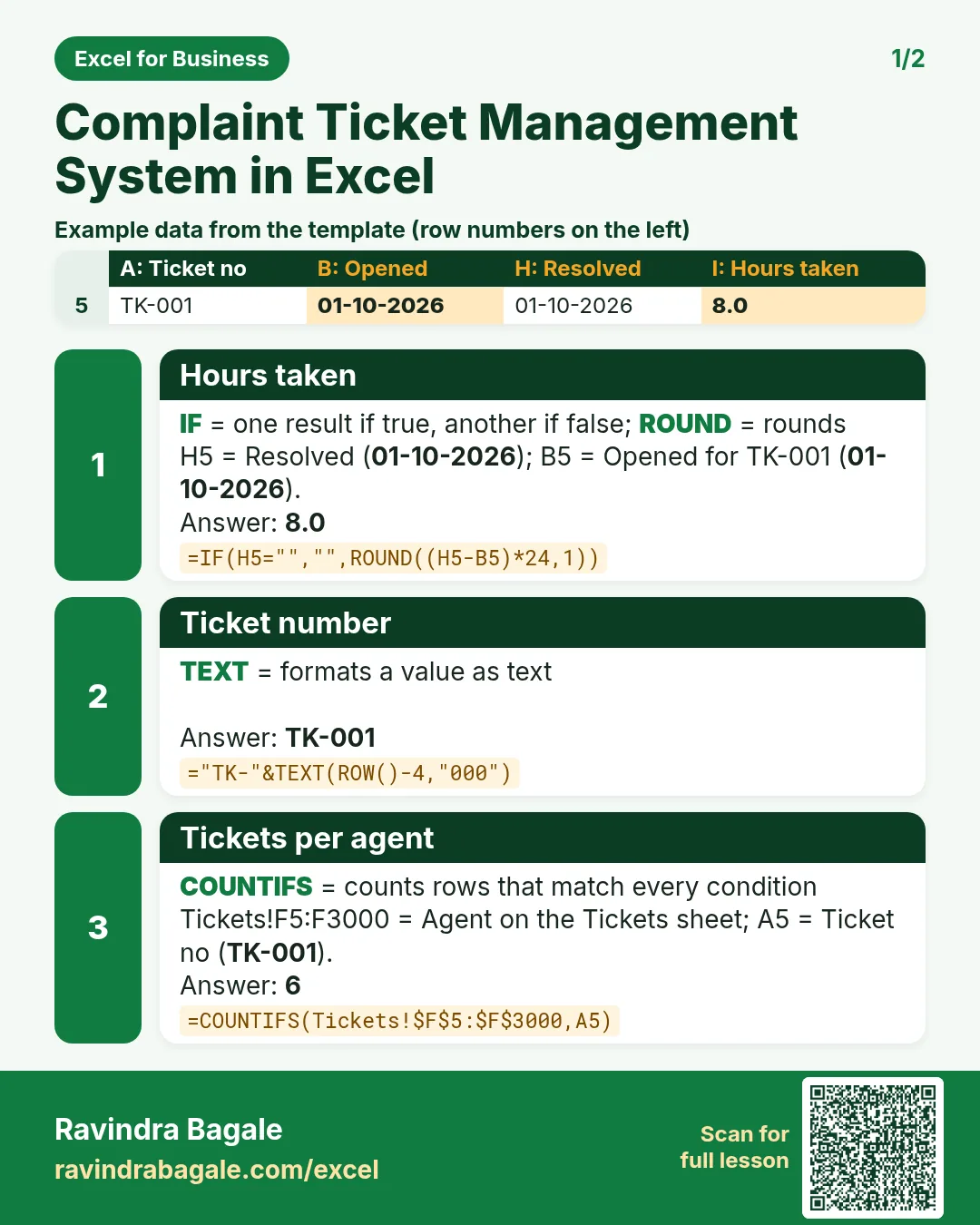

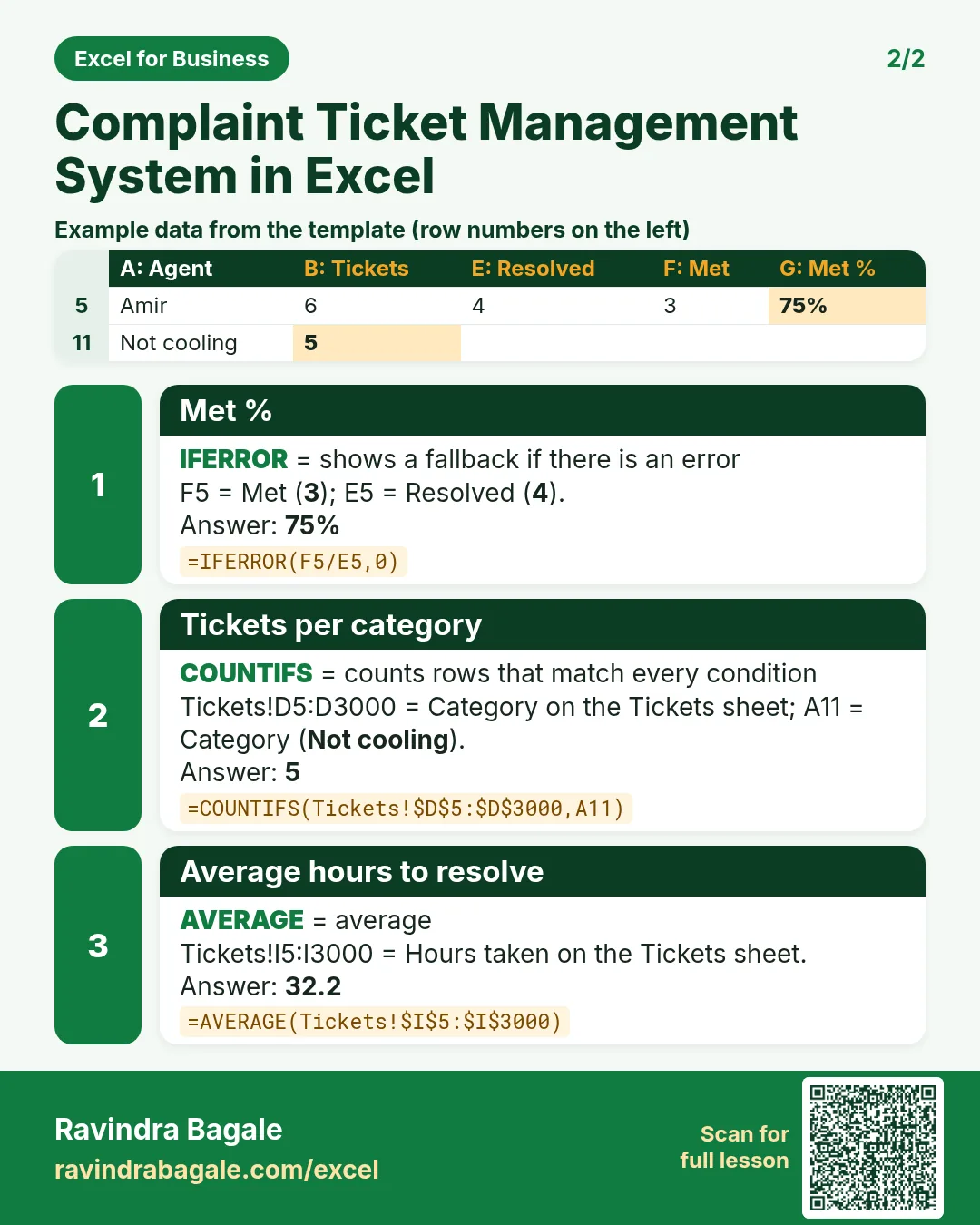

More cards: Ravi Sir's Cards.
6. Frequently asked questions
How do I add hours to a date-time in Excel?
Add hours ÷ 24: =B5+24/24 adds one day.
How do I calculate hours between two date-times?
=(end − start)*24, rounded to one decimal.
How do I show Met or Breached?
Compare resolved with due by: on or before is Met, after is Breached.
How do I show overdue open complaints?
No resolved time and the as-of time after due by means Overdue.
How do I find average resolution time per agent?
AVERAGEIFS over hours taken where the agent matches.
7. Quick quiz
Ten questions on this page. Sign in to save your score.
Loading practice tasks...
- Total invoices (Easy): Add up Invoices in D2:D11. (sheet "Data")
- Average amount (Easy): Average of E2:E11, rounded to 2 decimals. (sheet "Data")
- Rows in Admin (Easy): How many rows have Department "Admin"? (sheet "Data")
- Largest invoices (Easy): The largest value in D2:D11. (sheet "Data")
- Days taken (Easy): C2 minus B2. (sheet "Dates")
- Start year (Easy): Year of B3. (sheet "Dates")
- Due month (Easy): Month number of C3. (sheet "Dates")
- Earliest start (Easy): Earliest date in B2:B9 (as a date number). (sheet "Dates")
- Invoices for Admin (Medium): Total of D2:D11 where B is "Admin". (sheet "Data")
- Admin in Madrid (Medium): Total of D2:D11 where B is "Admin" and C is "Madrid". (sheet "Data")
- Working days (Medium): Working days from B2 to C2. (sheet "Dates")
- Weekday of due (Medium): Weekday number of C4 (Sunday = 1). (sheet "Dates")