CAGR Calculator in Excel: Compare Investment Returns with a Formula and the RRI Function
Ravindra Bagale in Pune has gold bought seven years ago, an index fund from five years ago, some shares, an FD ladder and a plot of land. "Gold gave 162%!" sounds great, but it took seven years. To compare investments held for different lengths of time you need one number: CAGR, the steady yearly growth rate. Excel works it out with one formula, or with the RRI function.
What you'll learn on this page
- Years held with YEARFRAC
- Total return vs CAGR
- CAGR with the formula (end ÷ start)^(1 ÷ years) − 1
- The same answer with the RRI function
- What the same money would be in an FD
- Best investment and years to double
Download the template: cagr-calculator-investment-returns-template.xlsx: example data with real formulas. Yellow cells are inputs you can type over; green cells hold formulas; blue rows are headers and totals. Replace the example data with your own and everything recalculates.
Made-up data: every name, amount, shop and date on this page is made up for practice. Cities are used only to make the examples feel real.
1. The example
Ravindra's lump-sum investments on 17 October 2026 (made-up values; FD comparison at 7%):
| Investment | Start value | Value today | Years | Total return | CAGR | Same money in FD | Beat FD? |
|---|---|---|---|---|---|---|---|
| Index fund | ₹1,00,000 | ₹1,76,000 | 5.0 | 76.0% | 11.97% | ₹1,40,255 | Yes |
| Gold | ₹80,000 | ₹2,10,000 | 7.0 | 162.5% | 14.78% | ₹1,28,463 | Yes |
| Shares | ₹50,000 | ₹61,000 | 3.5 | 22.0% | 5.85% | ₹63,360 | No |
| FD ladder | ₹1,50,000 | ₹1,95,000 | 4.0 | 30.0% | 6.78% | ₹1,96,619 | No |
| Plot of land | ₹9,00,000 | ₹18,50,000 | 10.0 | 105.6% | 7.47% | ₹17,70,436 | Yes |
The plot more than doubled (105.6%), but over 10 years that is only 7.47% a year, just above the 7% FD. Gold has the best CAGR and the biggest total return. Total gain across all five: ₹12,12,000.
Figure 1. Start value, today's value and years (YEARFRAC) give CAGR = (end ÷ start)^(1 ÷ years) − 1, the same as RRI; the start value at the FD rate shows whether the investment beat a safe option.
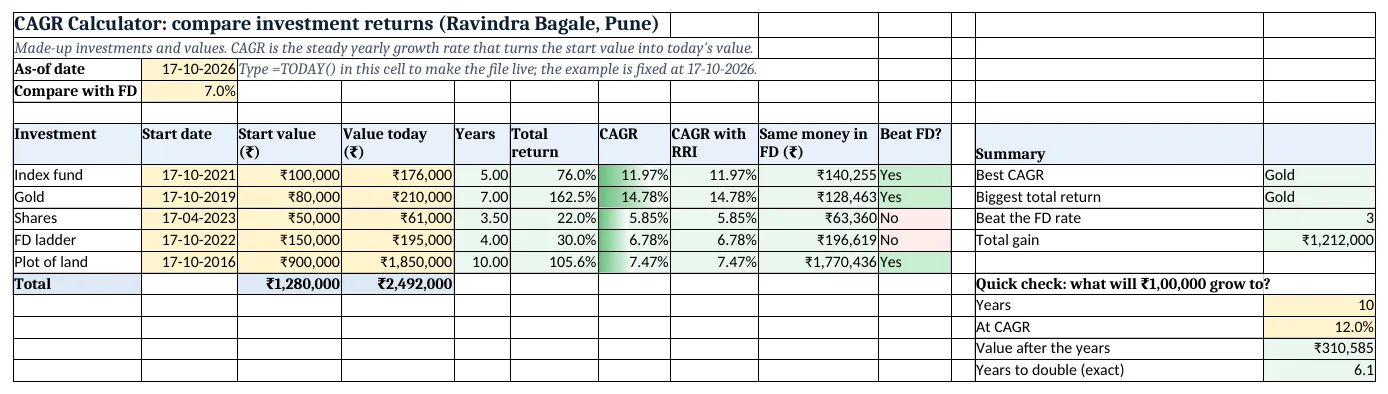
Figure 2. The template sheet, recalculated with its example data. Download it above and replace the yellow cells with your own numbers.
2. Build it step by step
Step 1. Type the investments
- In A6:J6 type Investment, Start date, Start value, Value today, Years, Total return, CAGR, CAGR with RRI, Same money in FD, Beat FD?.
- In B3 type the as-of date and in B4 the FD rate to compare with (7%).
Step 2. Years held
- In E7 type
=YEARFRAC(B7,$B$3). YEARFRAC(start_date, end_date) gives the years between two dates, including part years: 3.5 for the shares (date functions).
Step 3. Total return and CAGR
- In F7 type
=D7/C7-1: 76.0% in total. - In G7 type
=(D7/C7)^(1/E7)-1: 11.97% a year. ^ means "to the power of" (operators).
Step 4. The RRI function
- RRI(number_of_periods, present_value, future_value) returns the same growth rate. In H7 type
=RRI(E7,C7,D7): 11.97%, same as G7.
Step 5. Compare with an FD
- In I7 type
=C7*(1+$B$4)^E7: what the money would be at 7% a year. - In J7 type
=IF(D7>I7,"Yes","No"). Copy row 7 down to row 11. - In M7 type
=INDEX(A7:A11,MATCH(MAX(G7:G11),G7:G11,0)): Gold (INDEX and MATCH).
Step 6. Quick check and colours
- In M15 type
=100000*(1+M14)^M13: ₹1,00,000 at 12% for 10 years becomes ₹3,10,585. In M16 type=LN(2)/LN(1+M14): money doubles in 6.1 years. - Add data bars on G7:G11 and green/red for "Yes"/"No" in J7:J11, and Insert > Column chart of CAGR (column charts).
Ravindra Bagale's Tip
Compare every investment with a safe option like an FD. A risky one should beat it clearly to be worth the risk.
Ravindra Bagale's Tip – मराठी
प्रत्येक investment ची तुलना FD सारख्या safe पर्यायाशी करा. Risky investment ने ते स्पष्टपणे मागे टाकलं पाहिजे.
Ravindra Bagale's Tip – हिंदी
हर investment की तुलना FD जैसे safe विकल्प से करो. Risky investment को उसे साफ़ तौर पर पीछे छोड़ना चाहिए.
3. Formulas used
| Cell | Formula | What it does |
|---|---|---|
| E7 | =YEARFRAC(B7,$B$3) |
Years held |
| F7 | =D7/C7-1 |
Total return |
| G7 | =(D7/C7)^(1/E7)-1 |
CAGR |
| H7 | =RRI(E7,C7,D7) |
CAGR with RRI |
| I7 | =C7*(1+$B$4)^E7 |
Same money in FD |
| J7 | =IF(D7>I7,"Yes","No") |
Beat FD? |
| M7 | =INDEX(A7:A11,MATCH(MAX(G7:G11),G7:G11,0)) |
Best CAGR |
| M10 | =D12-C12 |
Total gain |
| M15 | =100000*(1+M14)^M13 |
Value after the years |
| M16 | =LN(2)/LN(1+M14) |
Years to double |
Every formula above is written in the template, so you can click a cell and see it in the formula bar. All values on this page were recalculated in the file.
4. Common mistakes
- Dividing total return by years. 162.5% ÷ 7 = 23.2% is wrong because returns compound. CAGR for gold is 14.78%.
- Using CAGR for monthly SIPs. CAGR is for one lump sum. For regular investments use XIRR with the dates and amounts.
- Forgetting the brackets.
=D7/C7^(1/E7)-1raises only C7 to the power. Write(D7/C7)^(1/E7). - Counting years by hand. YEARFRAC handles part years; 3.5 years typed as 3 or 4 gives a very different CAGR.
- Ignoring costs and tax. Brokerage, making charges on gold, stamp duty on land and tax on gains all lower the real return.
Ravindra Bagale's Tip
Big total returns over long periods can hide a small yearly rate. Always look at the CAGR column first.
Ravindra Bagale's Tip – मराठी
मोठा total return बऱ्याच वर्षांत मिळाला असेल तर वर्षाचा दर कमी असू शकतो. आधी CAGR column बघा.
Ravindra Bagale's Tip – हिंदी
लंबे समय का बड़ा total return कम सालाना दर छिपा सकता है. पहले CAGR column देखो.
5. More real examples
Example 1: Business revenue growth. Revenue was ₹12 lakh in 2021 and ₹20 lakh in 2026: =RRI(5,1200000,2000000) gives the yearly growth.
Example 2: House price growth. Bought for ₹40 lakh 8 years ago, worth ₹62 lakh today: CAGR shows whether it beat an FD.
Example 3: Salary growth. Starting salary and today's salary with the years between give your average yearly raise.
Quick revision cards
Quick revision
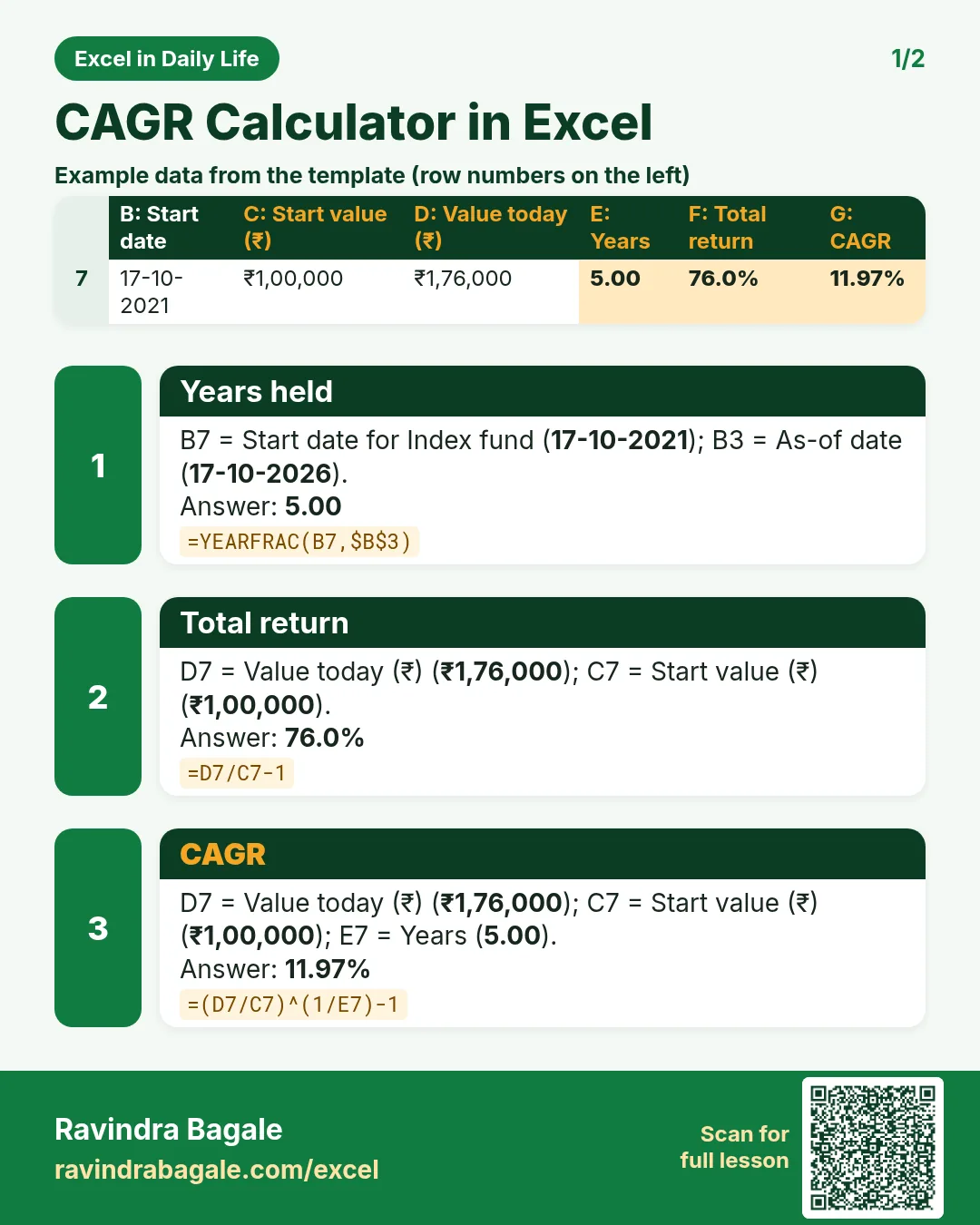
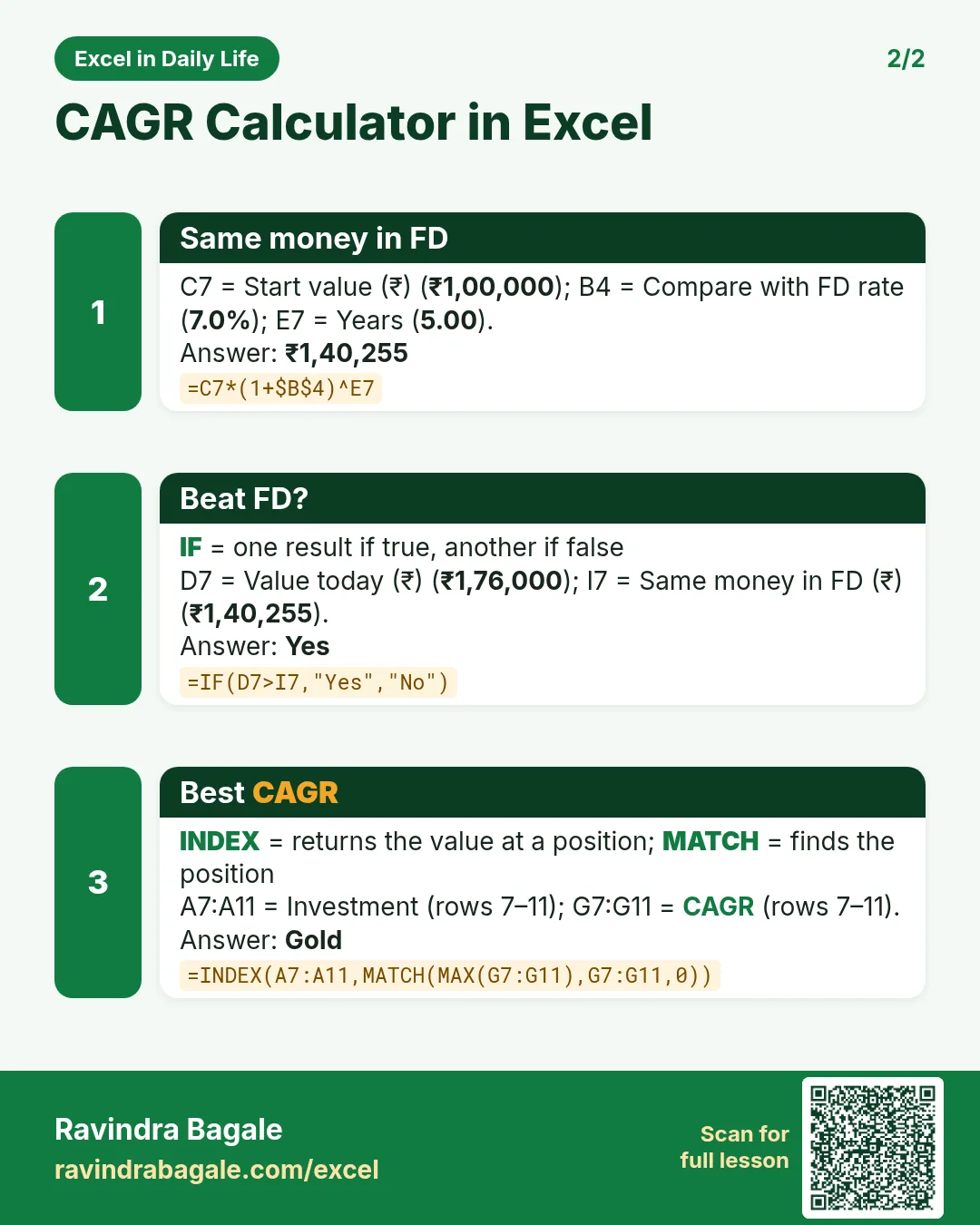
Each card shows formulas from this page, each with an example and its answer from the template. Scan the QR code on a card to open this lesson. All names and numbers are made up for practice.
झटपट उजळणी
प्रत्येक card वर या page मधले formulas, त्यांचं example आणि template मधलं उत्तर आहे. Card वरचा QR code scan केला की हा lesson उघडतो. सगळी नावं आणि आकडे सरावासाठी काल्पनिक आहेत.
झटपट दोहराई
हर card पर इस page के formulas, उनका example और template का उत्तर है. Card का QR code scan करें तो यह lesson खुलेगा. सभी नाम और आंकड़े अभ्यास के लिए काल्पनिक हैं.


More cards: Ravi Sir's Cards.
6. Frequently asked questions
What is the CAGR formula in Excel?
=(End/Start)^(1/Years)-1. For ₹1,00,000 growing to ₹1,76,000 in 5 years: 11.97%.
What does the RRI function do?
=RRI(years, start value, end value) returns the same compound yearly rate as the CAGR formula. It is in Excel 2013 and later.
What is the difference between total return and CAGR?
Total return is the overall growth (76%); CAGR spreads it over the years as a steady yearly rate (11.97%).
Can I use CAGR for SIPs?
No. Money goes in on many dates; use XIRR for SIPs. CAGR fits a single lump sum.
How do I find years to double?
Exact: =LN(2)/LN(1+rate). The rule of 72 gives a quick estimate: 72 ÷ 12 = 6 years.
7. Quick quiz
Ten questions on this page. Sign in to save your score.
Loading practice tasks...
- Monthly rate (Easy): Yearly rate B3 divided by 12.
- Months (Easy): B4 times 12.
- Monthly EMI (Easy): EMI on amount B2 at B3 for B4 years, as a positive number, rounded to 2 decimals.
- Total repaid (Medium): Total paid over the loan, rounded to 0 decimals.
- Total interest (Medium): Total paid minus B2, rounded to 0 decimals.
- Processing fee (Medium): B2 times B6.
- Savings value (Medium): Value after B4 years of saving B5 each month at B3, positive, rounded to 0 decimals.
- Interest earned (Hard): Savings value minus B5 times months, rounded to 0 decimals.
- Months to repay at double EMI (Hard): Months to clear B2 at B3 paying twice the EMI, rounded up.
- Loan you can afford (Hard): Loan size for an EMI equal to B5 over B4 years at B3, positive, rounded to 0 decimals.
- Interest share (Hard): Total interest ÷ total paid, rounded to 3 decimals.