Vendor Management System in Excel: Purchase Orders, Bills, Payments, Payable Ageing and Vendor Scorecard
Bagale Engineering Works buys steel, packaging, transport, electricals and tools from five vendors. Shraddha in accounts keeps getting two calls: a vendor asking why a bill is unpaid, and the floor asking why material is late. This 7-sheet system puts purchase orders, bills and payments in one place, works out due dates from each vendor's terms, shows what is overdue by age, and scores each vendor on delivery and quality so the next order goes to the right one.
What you'll learn on this page
- Keep vendors with payment terms and a quality rating in Setup
- Mark purchase orders On time, Late or pending against the expected date
- Calculate bill due dates from payment terms
- Add part payments to each bill with SUMIFS
- Group unpaid balances into ageing buckets with nested IF
- Score and grade vendors in one report
Download the template: vendor-management-system-template.xlsx: a 7-sheet system with example data and real formulas (Read me, Setup, Purchase orders, Bills, Payments, Report, Dashboard). Yellow cells are inputs you can type over; green cells hold formulas; blue rows are headers and totals. Replace the example data with your own and every report and the dashboard recalculate.
Made-up data: every name, amount, business and date on this page is made up for practice. Cities are used only to make the examples feel real.
1. The business story
Bagale Engineering Works, as of 17 October 2026 (made-up vendors and amounts).
| What | Value |
|---|---|
| Billed so far | ₹6,29,500 |
| Outstanding (all unpaid) | ₹3,60,000 |
| Overdue | ₹95,000 |
| Ageing | Not due ₹2,65,000 · 1-30 days ₹63,000 · 31-60 days ₹32,000 |
| Deliveries on time | 6 of 8 received (75%) |
| Grade C vendors | 2 (Zoya Electricals, Amir Tools) |
Bill due date = bill date + the vendor's payment terms; a payment is typed once against its bill number. For a simple personal version of due-date tracking see the bill payment reminder.
Figure 1. Vendors and terms in Setup; POs, bills and payments are the three entry logs; the Report scores vendors and ages what is owed.
2. Build it sheet by sheet
Step 1. Setup: vendors and terms
- On Setup, type the as-of date in B3. In A6:F10 list Vendor ID, Vendor, City, Category, Payment terms (days), Quality rating (1-5).
- Keep the categories and payment modes as lists in columns G and H for drop-downs (drop-down lists).
Step 2. Purchase orders
- On Purchase orders, type PO no, PO date, Vendor ID, Item, Amount, Expected by, Received on. The vendor name D5:
=XLOOKUP(C5,Setup!$A$6:$A$10,Setup!$B$6:$B$10,"Check ID")(XLOOKUP). - Status I5:
=IF(H5="",IF(G5<Setup!$B$3,"Late, pending","Pending"),IF(H5<=G5,"On time","Late")). - Days late J5:
=IF(H5="",MAX(0,Setup!$B$3-G5),MAX(0,H5-G5)).
Step 3. Bills: due date, paid and ageing
- On Bills, type bill no, date, vendor ID, PO no and amount. Due date G5:
=B5+XLOOKUP(C5,Setup!$A$6:$A$10,Setup!$E$6:$E$10). - Paid H5:
=SUMIFS(Payments!$D$5:$D$80,Payments!$B$5:$B$80,A5): all part payments against this bill (SUMIFS). Balance I5:=F5-H5. - Days overdue J5:
=IF(I5>0,MAX(0,Setup!$B$3-G5),0)and ageing K5:=IF(I5=0,"Paid",IF(J5=0,"Not due",IF(J5<=30,"1-30",IF(J5<=60,"31-60","60+"))))(nested IF). - Colour 31-60 and 60+ red. B-201 from Amir Tools is 32 days overdue: 31-60.
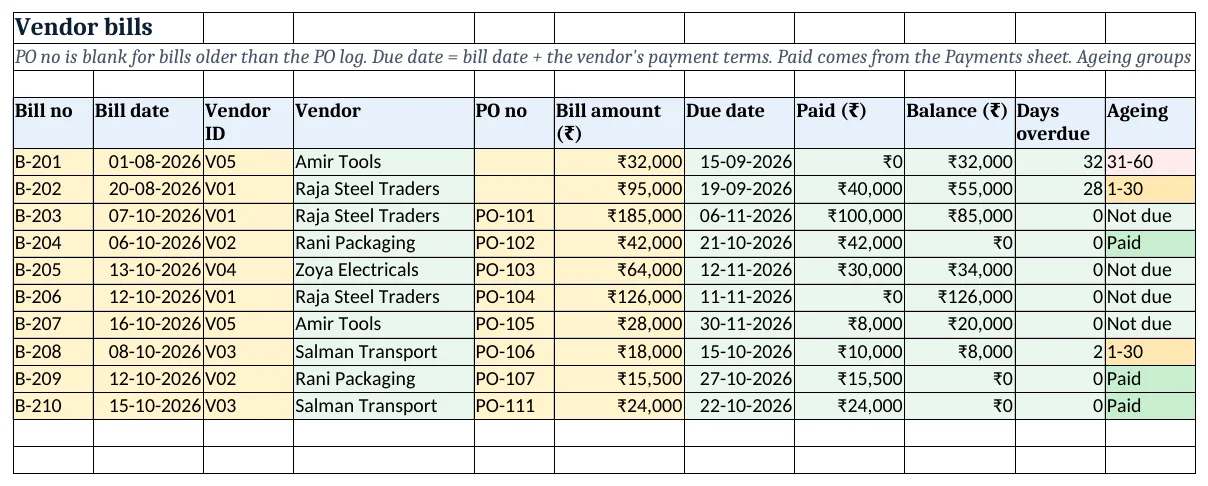
Figure 2. The Bills sheet: due date from payment terms, paid from Payments, balance, days overdue and ageing bucket
Step 4. Payments
- On Payments, one row per payment: date, bill no, amount, mode. The vendor C5 is found through the bill:
=XLOOKUP(XLOOKUP(B5,Bills!$A$5:$A$60,Bills!$C$5:$C$60),Setup!$A$6:$A$10,Setup!$B$6:$B$10,"Check bill"). - A bill paid in two parts gets two rows; the Bills sheet adds them up.
Step 5. Report: scorecard and ageing
- On Report, per vendor: billed
=SUMIFS(Bills!$F$5:$F$60,Bills!$C$5:$C$60,A5), paid, outstanding=C5-D5, overdue=SUMIFS(Bills!$I$5:$I$60,Bills!$C$5:$C$60,A5,Bills!$J$5:$J$60,">0"). - POs
=COUNTIF(...), on-time=COUNTIFS('Purchase orders'!$C$5:$C$60,A5,'Purchase orders'!$I$5:$I$60,"On time")and on-time % in I5 (COUNTIFS). - Score K5:
=ROUND(50*I5+10*J5,0)(half delivery, half quality) and grade L5:=IF(K5>=80,"A",IF(K5>=60,"B","C")). - Ageing table from row 12:
=SUMIFS(Bills!$I$5:$I$60,Bills!$K$5:$K$60,A13)and a COUNTIF of bills per bucket.
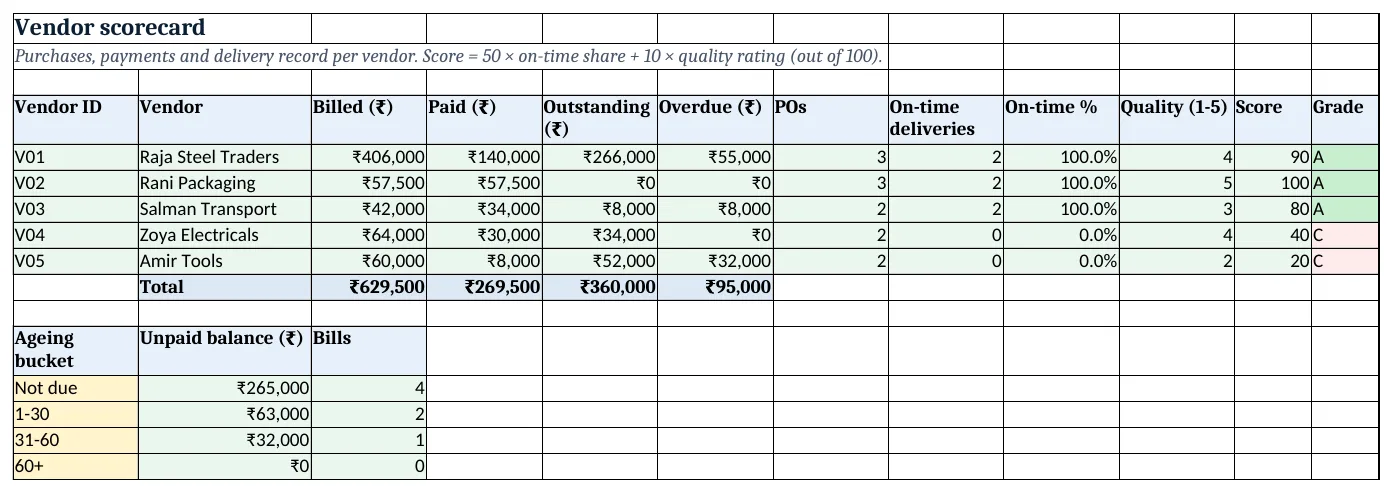
Figure 3. The vendor scorecard and the ageing table
Step 6. Dashboard
- KPI cards: billed A5
=Report!C10, outstanding B5, overdue C5, on-time share D5, open POs E5=COUNTIFS('Purchase orders'!$A$5:$A$60,"<>",'Purchase orders'!$H$5:$H$60,"")and grade C vendors F5 (KPI cards). - Add a column chart of the ageing table and one of outstanding by vendor.
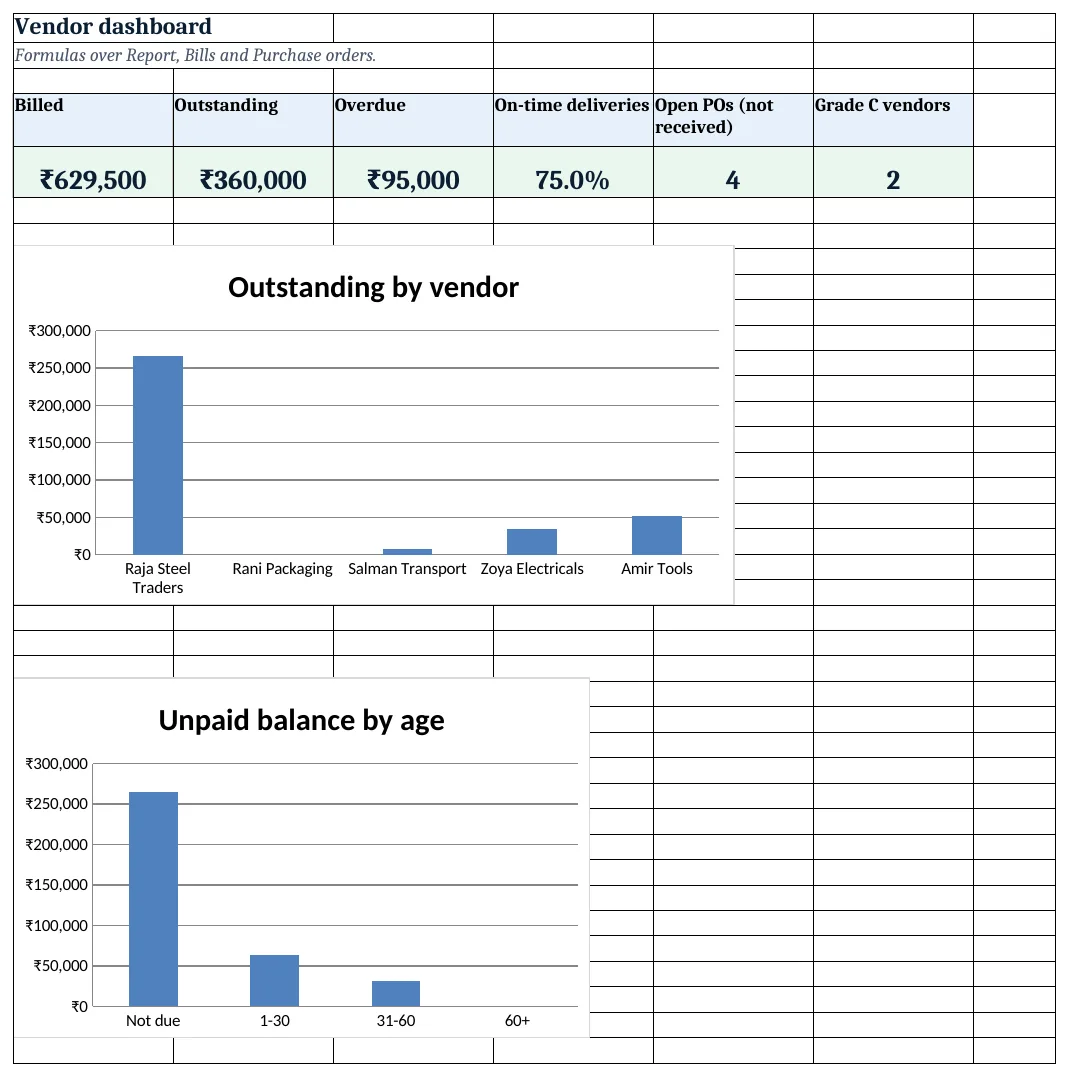
Figure 4. The vendor dashboard with KPI cards and charts
Ravindra Bagale's Tip
Every Friday, sort Bills by ageing and pay the oldest first. Vendors remember who pays on time, and so do their delivery trucks.
Ravindra Bagale's Tip – मराठी
दर शुक्रवारी Bills ageing ने sort करा आणि सर्वात जुनी आधी भरा. वेळेवर पैसे देणारे vendors लक्षात ठेवतात, आणि त्यांचे delivery trucks सुद्धा.
Ravindra Bagale's Tip – हिंदी
हर शुक्रवार Bills को ageing से sort करो और सबसे पुराना पहले चुकाओ. समय पर पैसे देने वालों को vendors याद रखते हैं, और उनके delivery trucks भी.
3. Formulas used
| Cell | Formula | What it does |
|---|---|---|
| Purchase orders!D5 | =XLOOKUP(C5,Setup!$A$6:$A$10,Setup!$B$6:$B$10,"Check ID") |
Vendor name from the ID |
| Purchase orders!I5 | =IF(H5="",IF(G5<Setup!$B$3,"Late, pending","Pending"),IF(H5<=G5,"On time","Late")) |
Delivery status |
| Purchase orders!J5 | =IF(H5="",MAX(0,Setup!$B$3-G5),MAX(0,H5-G5)) |
Days late |
| Bills!G5 | =B5+XLOOKUP(C5,Setup!$A$6:$A$10,Setup!$E$6:$E$10) |
Due date from payment terms |
| Bills!H5 | =SUMIFS(Payments!$D$5:$D$80,Payments!$B$5:$B$80,A5) |
Paid so far (all part payments) |
| Bills!I5 | =F5-H5 |
Unpaid balance |
| Bills!J5 | =IF(I5>0,MAX(0,Setup!$B$3-G5),0) |
Days overdue |
| Bills!K5 | =IF(I5=0,"Paid",IF(J5=0,"Not due",IF(J5<=30,"1-30",IF(J5<=60,"31-60","60+")))) |
Ageing bucket |
| Payments!C5 | =XLOOKUP(XLOOKUP(B5,Bills!$A$5:$A$60,Bills!$C$5:$C$60),Setup!$A$6:$A$10,Setup!$B$6:$B$10,"Check bill") |
Vendor found through the bill |
| Report!C5 | =SUMIFS(Bills!$F$5:$F$60,Bills!$C$5:$C$60,A5) |
Billed by vendor |
| Report!F5 | =SUMIFS(Bills!$I$5:$I$60,Bills!$C$5:$C$60,A5,Bills!$J$5:$J$60,">0") |
Overdue by vendor |
| Report!I5 | =IFERROR(H5/(H5+COUNTIFS('Purchase orders'!$C$5:$C$60,A5,'Purchase orders'!$I$5:$I$60,"Late")),0) |
On-time delivery % |
| Report!K5 | =ROUND(50*I5+10*J5,0) |
Vendor score |
| Report!L5 | =IF(K5>=80,"A",IF(K5>=60,"B","C")) |
Vendor grade |
| Report!B13 | =SUMIFS(Bills!$I$5:$I$60,Bills!$K$5:$K$60,A13) |
Unpaid in the bucket |
| Dashboard!D5 | =COUNTIF('Purchase orders'!$I$5:$I$60,"On time")/(COUNTIF('Purchase orders'!$I$5:$I$60,"On time")+COUNTIF('Purchase orders'!$I$5:$I$60,"Late")) |
On-time share of received POs |
| Dashboard!E5 | =COUNTIFS('Purchase orders'!$A$5:$A$60,"<>",'Purchase orders'!$H$5:$H$60,"") |
Open POs not yet received |
Every formula above is written in the template, so you can click a cell and see it in the formula bar. All values on this page were recalculated in LibreOffice with zero errors.
4. Common mistakes
- Typing the due date by hand. Due dates should come from the vendor's terms; one typed date with a wrong month makes a bill look overdue or safe.
- Changing the bill amount when paying part. Never reduce the bill. Add a Payments row; the balance falls by itself and the history stays.
- Counting pending POs as late deliveries. A PO not yet received is Pending or Late, pending; the on-time % uses only received POs.
- Ageing from the bill date. Ageing for payables counts days past the due date, not since the bill date; a bill with 45-day terms is not overdue on day 30.
- Scoring only on price. Late material stops the floor. The score weighs delivery and quality; keep price in your purchase decision separately.
Ravindra Bagale's Tip
Type the Received on date the day material arrives, not when the bill comes. The on-time score is only as good as that date.
Ravindra Bagale's Tip – मराठी
माल आला त्या दिवशी Received on date टाका, bill आल्यावर नाही. On-time score त्या date इतकाच खरा असतो.
Ravindra Bagale's Tip – हिंदी
माल आए उसी दिन Received on date डालो, bill आने पर नहीं. On-time score उस date जितना ही सच्चा होता है.
5. More real examples
Example 1: Restaurant buying vegetables daily. Use one PO per day per supplier and terms of 7 days; the ageing shows which supplier waits longest.
Example 2: Builder with 20 sub-contractors. Add a Site column to POs and Bills and a SUMIFS by site in the Report.
Example 3: Shop with credit suppliers. Keep only Bills and Payments; the ageing table alone tells you whom to pay this week.
Quick revision cards
Quick revision
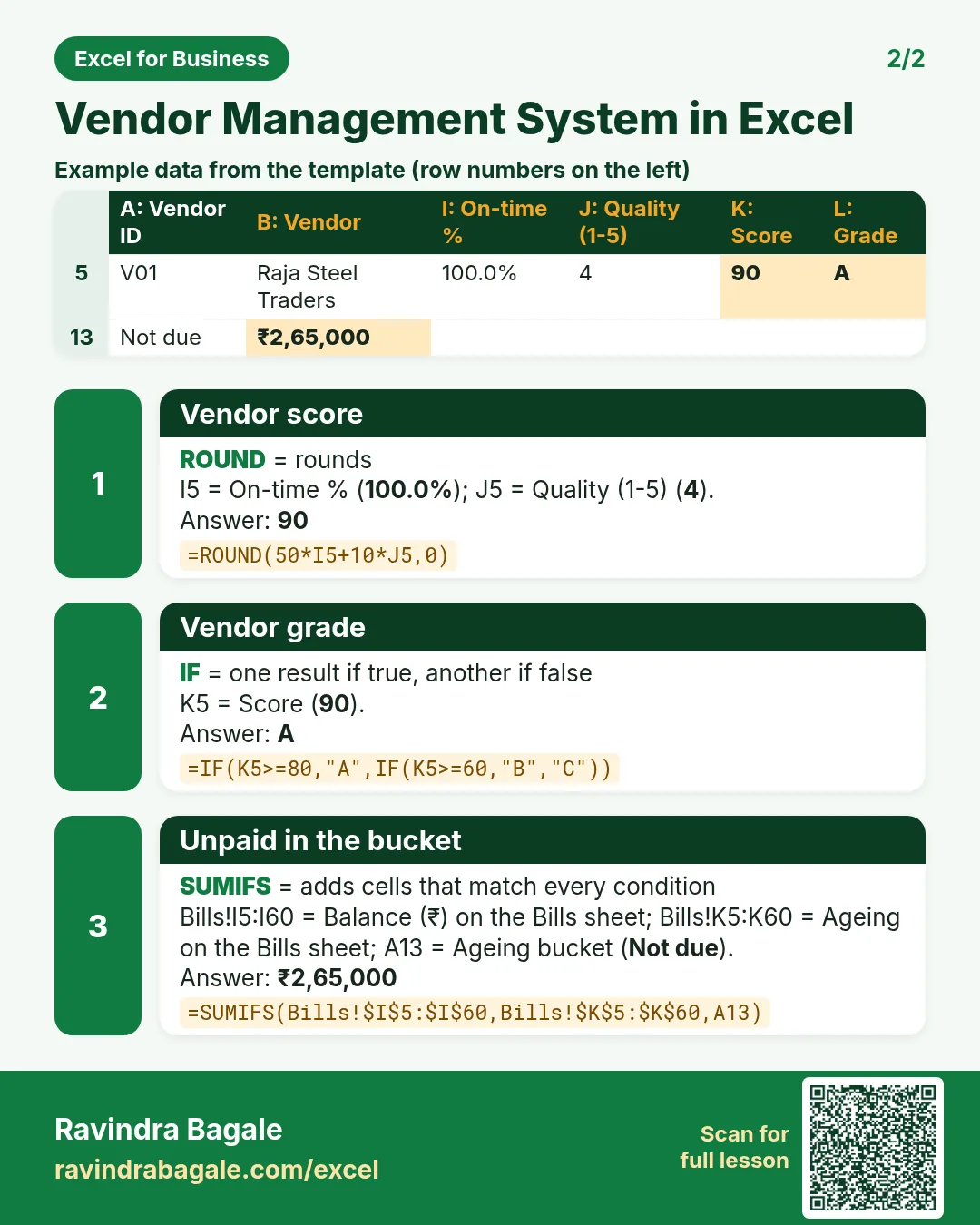
Each card shows formulas from this page, each with an example and its answer from the template. Scan the QR code on a card to open this lesson. All names and numbers are made up for practice.
झटपट उजळणी
प्रत्येक card वर या page मधले formulas, त्यांचं example आणि template मधलं उत्तर आहे. Card वरचा QR code scan केला की हा lesson उघडतो. सगळी नावं आणि आकडे सरावासाठी काल्पनिक आहेत.
झटपट दोहराई
हर card पर इस page के formulas, उनका example और template का उत्तर है. Card का QR code scan करें तो यह lesson खुलेगा. सभी नाम और आंकड़े अभ्यास के लिए काल्पनिक हैं.
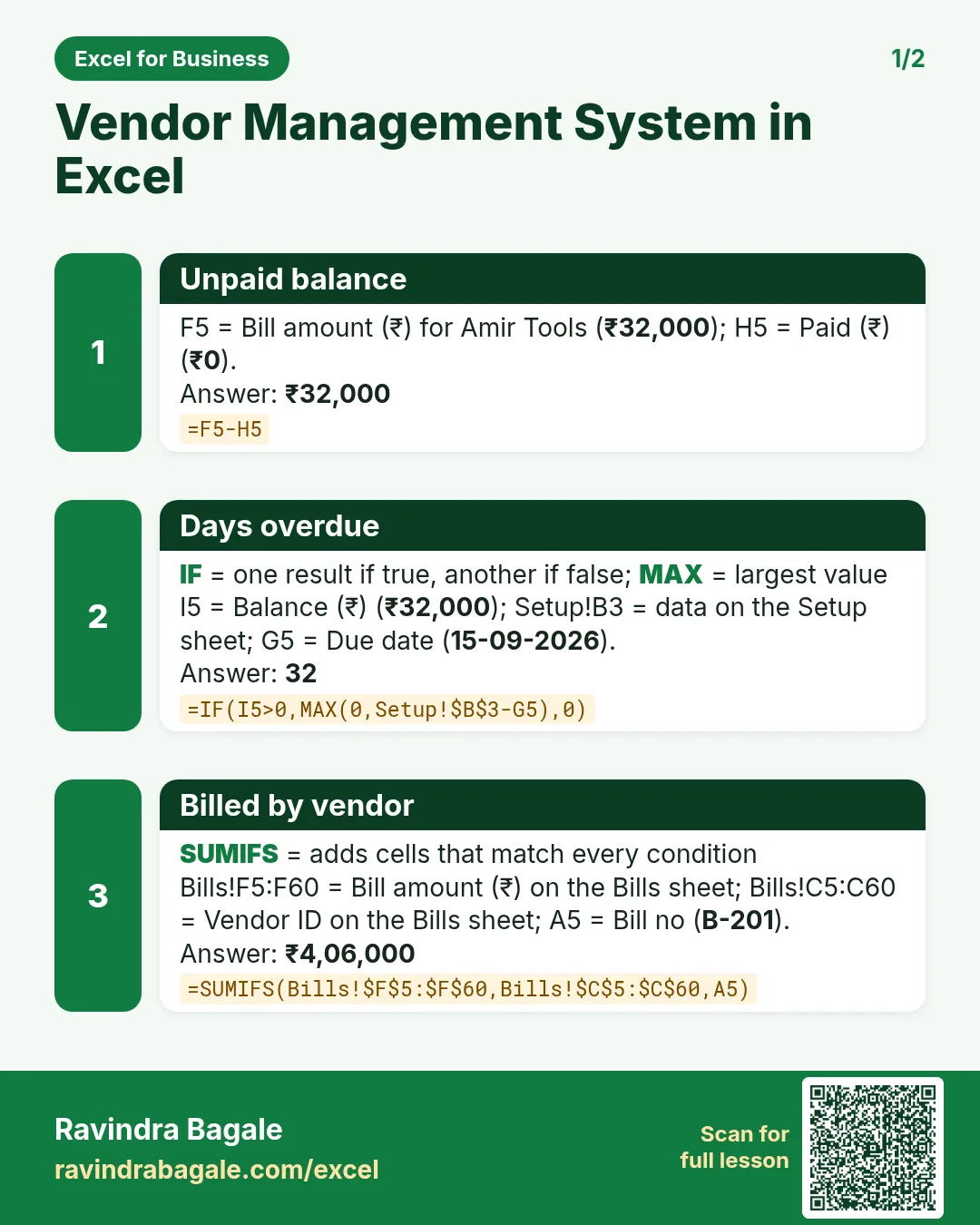


More cards: Ravi Sir's Cards.
6. Frequently asked questions
How do I make an ageing report in Excel?
Compute days overdue = as-of date − due date for unpaid bills, then bucket with nested IF (Not due, 1-30, 31-60, 60+) and total each bucket with SUMIFS.
How do I handle part payments?
Log each payment with its bill number and use SUMIFS on the Payments sheet to total what is paid against each bill.
How is the due date calculated?
Bill date + the vendor's payment terms in days, looked up from Setup: =B5+XLOOKUP(C5,...terms...).
How do I score vendors?
Here score = 50 × on-time share + 10 × quality rating (1-5), out of 100; 80+ is A, 60-79 B, below 60 C. Change the weights to suit you.
Can I use this for customers instead of vendors?
Yes: rename Bills to Invoices and Payments to Receipts; the same ageing gives receivables.
7. Quick quiz
Ten questions on this page. Sign in to save your score.
Loading practice tasks...
- Total stock units (Easy): Add up Stock units in D2:D11. (sheet "Data")
- Average unit cost (Easy): Average of E2:E11, rounded to 2 decimals. (sheet "Data")
- Rows in Antibiotic (Easy): How many rows have Category "Antibiotic"? (sheet "Data")
- Largest stock units (Easy): The largest value in D2:D11. (sheet "Data")
- Days taken (Easy): C2 minus B2. (sheet "Dates")
- Start year (Easy): Year of B3. (sheet "Dates")
- Due month (Easy): Month number of C3. (sheet "Dates")
- Earliest start (Easy): Earliest date in B2:B9 (as a date number). (sheet "Dates")
- Stock units for Antibiotic (Medium): Total of D2:D11 where B is "Antibiotic". (sheet "Data")
- Antibiotic in Paris (Medium): Total of D2:D11 where B is "Antibiotic" and C is "Paris". (sheet "Data")
- Working days (Medium): Working days from B2 to C2. (sheet "Dates")
- Weekday of due (Medium): Weekday number of C4 (Sunday = 1). (sheet "Dates")