Unit Price Comparison in Excel: Which Pack Size Is Cheaper per Kg or Litre?
Shraddha Bagale in Pune stands in front of the shelf: rice in 1 kg, 5 kg and 10 kg packs, oil in 500 ml, 1 litre and 5 litre. The bigger pack is usually cheaper per kg, but not always. Tea and detergent prove it. Type the sizes and prices into Excel once and it marks the best value pack for every item and adds up the yearly saving.
What you'll learn on this page
- Price per kg or litre from pack size and price
- Mark the best value pack per item with MINIFS
- Find the costliest per kg with MAXIFS
- Monthly cost with the best and worst pack
- Saving per month and per year
- Colours that show the winner
Download the template: unit-price-comparison-template.xlsx: example data with real formulas. Yellow cells are inputs you can type over; green cells hold formulas; blue rows are headers and totals. Replace the example data with your own and everything recalculates.
Made-up data: every name, amount, shop and date on this page is made up for practice. Cities are used only to make the examples feel real.
1. The example
Shelf prices in Pune (made-up values):
| Item | Packs (price per kg or litre) | Best value |
|---|---|---|
| Rice | 1 kg ₹78, 5 kg ₹73, 10 kg ₹71 | 10 kg |
| Oil | 500 ml ₹176, 1 litre ₹165, 5 litre ₹158 | 5 litre |
| Tea | 250 g ₹580, 500 g ₹540, 1 kg ₹560 | 500 g |
| Detergent | 1 kg ₹120, 2 kg ₹112.50, 4 kg ₹117.50 | 2 kg |
For tea and detergent the biggest pack is not the cheapest. With her monthly use (8 kg rice, 3 litres oil, 500 g tea, 2 kg detergent), the best packs cost ₹1,537 a month against ₹1,682 for the worst. That is ₹145 a month, ₹1,740 a year, just from reading prices properly.
Figure 1. Price ÷ size × 1000 gives price per kg or litre; MINIFS finds the lowest for each item and marks it Best value; best and worst prices × monthly use give the saving.
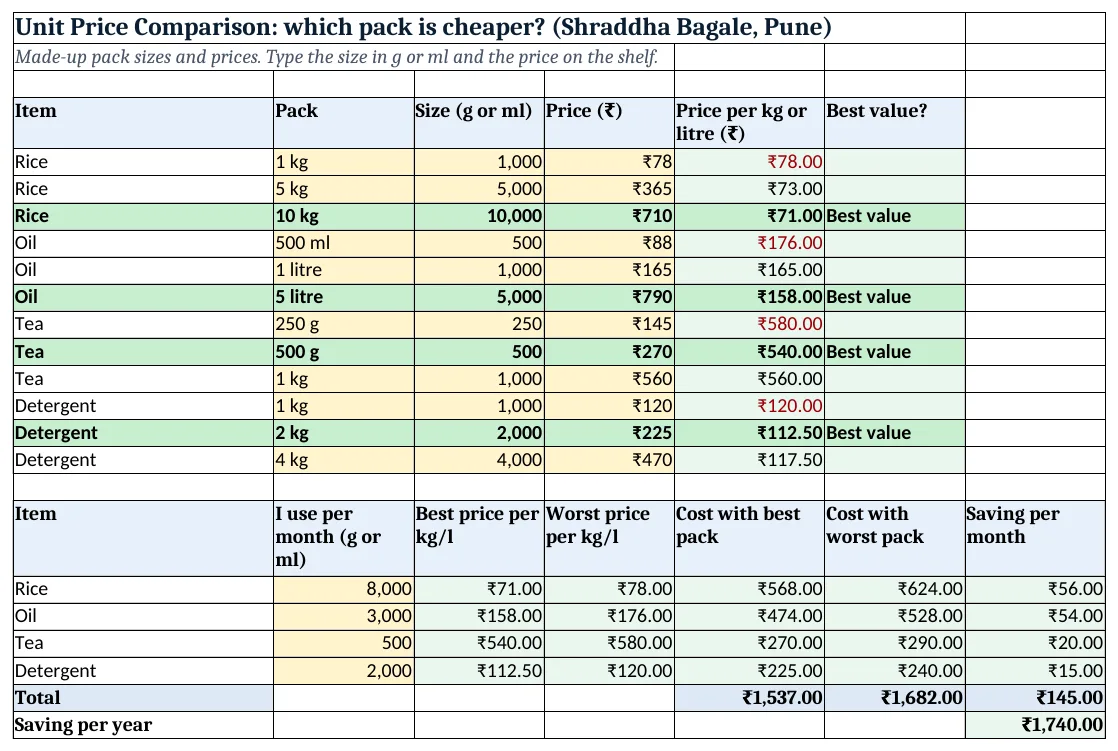
Figure 2. The template sheet, recalculated with its example data. Download it above and replace the yellow cells with your own numbers.
2. Build it step by step
Step 1. Type every pack
- In A4:F4 type Item, Pack, Size (g or ml), Price, Price per kg or litre, Best value?.
- One row per pack you see: item, pack name, size in grams or ml (1 kg = 1000), and price (yellow).
Step 2. Price per kg or litre
- In E5 type
=D5/C5*1000: ₹78 ÷ 1000 g × 1000 = ₹78 per kg. Copy down. - Always type the size in the small unit (g or ml), so every row is compared the same way.
Step 3. Mark the best value
- MINIFS(min_range, criteria_range, criteria) returns the smallest value that matches (MINIFS and MAXIFS).
- In F5 type
=IF(E5=MINIFS($E$5:$E$16,$A$5:$A$16,A5),"Best value","")and copy down.
Step 4. Monthly saving table
- In A18:G18 type Item, I use per month, Best price per kg/l, Worst price per kg/l, Cost with best pack, Cost with worst pack, Saving per month.
- In C19 type
=MINIFS($E$5:$E$16,$A$5:$A$16,A19)and in D19=MAXIFS($E$5:$E$16,$A$5:$A$16,A19). - In E19 type
=B19/1000*C19, in F19=B19/1000*D19and in G19=F19-E19.
Step 5. Totals
- In G23 type
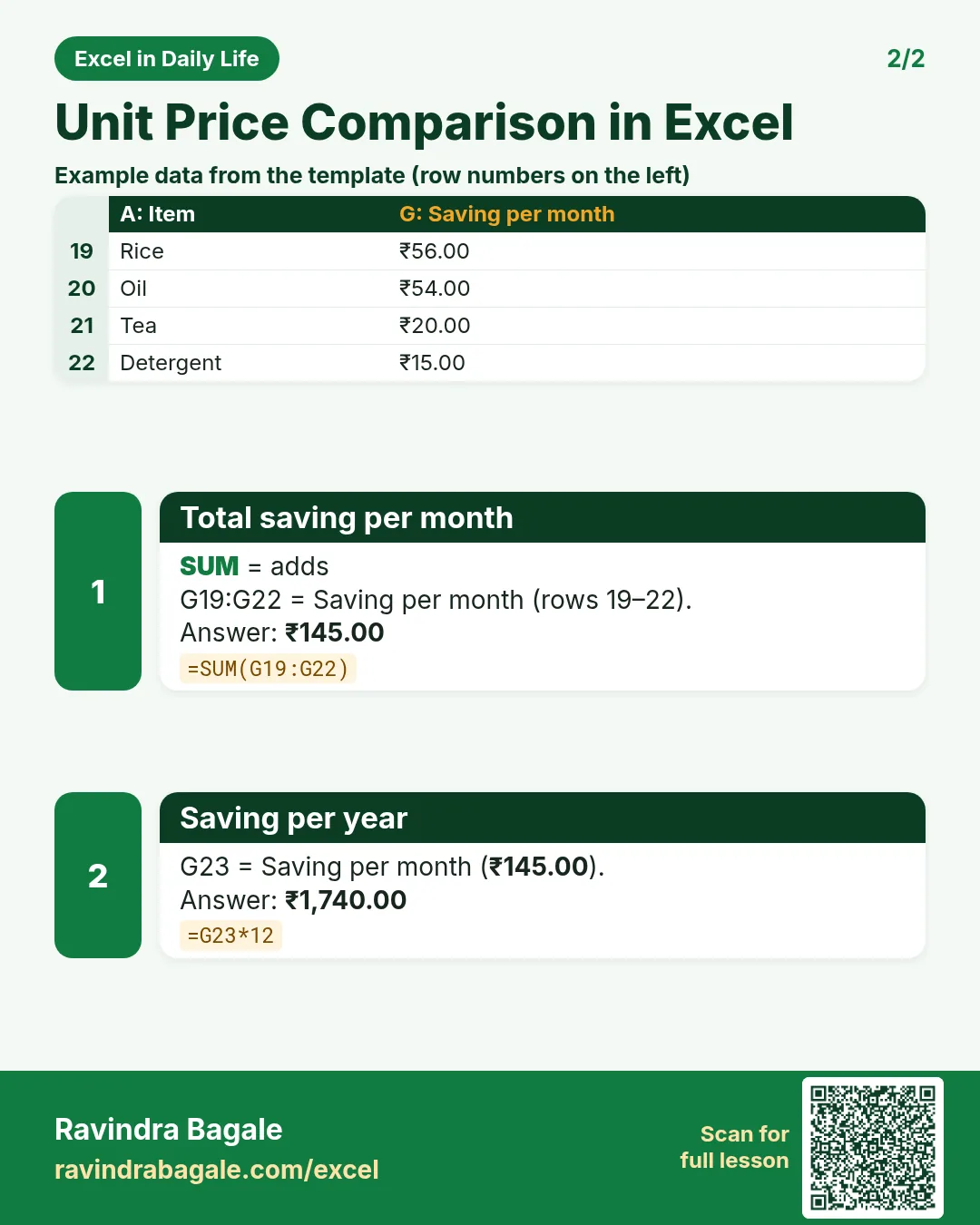
=SUM(G19:G22): ₹145 a month. In G24 type=G23*12: ₹1,740 a year.
Step 6. Colours
- Select A5:F16 > Conditional Formatting > New Rule > Use a formula:
=$F5="Best value"green and bold (formula rules). - Select E5:E16 and add
=E5=MAXIFS($E$5:$E$16,$A$5:$A$16,$A5)with red text for the costliest pack.
Ravindra Bagale's Tip
Most shops print the unit price small on the shelf label. When they do not, this sheet does it for you.
Ravindra Bagale's Tip – मराठी
बरेच दुकानदार shelf label वर unit price बारीक अक्षरात छापतात. नसेल तर ही sheet ते काम करते.
Ravindra Bagale's Tip – हिंदी
ज़्यादातर दुकानें shelf label पर unit price छोटे अक्षरों में छापती हैं. न हो तो यह sheet वो काम करती है.
3. Formulas used
| Cell | Formula | What it does |
|---|---|---|
| E5 | =D5/C5*1000 |
Price per kg or litre |
| F5 | =IF(E5=MINIFS($E$5:$E$16,$A$5:$A$16,A5),"Best value","") |
Best value? |
| C19 | =MINIFS($E$5:$E$16,$A$5:$A$16,A19) |
Best price per kg/l |
| D19 | =MAXIFS($E$5:$E$16,$A$5:$A$16,A19) |
Worst price per kg/l |
| E19 | =B19/1000*C19 |
Cost with best pack |
| G19 | =F19-E19 |
Saving per month |
| G23 | =SUM(G19:G22) |
Total saving per month |
| G24 | =G23*12 |
Saving per year |
Every formula above is written in the template, so you can click a cell and see it in the formula bar. All values on this page were recalculated in the file.
4. Common mistakes
- Mixing kg and g. Typing 1 for a 1 kg pack and 500 for a 500 g pack makes the kg pack look 1,000 times dearer. Use g or ml for all.
- Assuming bigger is always cheaper. Here the 1 kg tea and the 4 kg detergent cost more per kg than a smaller pack.
- Buying more than you can use. A big pack that expires or goes stale is not a saving. Check the use-by date.
- Ignoring offers. A "buy 2 get 1" offer changes the price. Type the effective price for the quantity you get.
- Comparing different qualities. Compare the same product in different sizes, not two different grades of rice.
Ravindra Bagale's Tip
Update prices once a month. Big packs go on offer at different times, and the best value changes.
Ravindra Bagale's Tip – मराठी
महिन्यातून एकदा prices update करा. मोठ्या packs वर offer वेगवेगळ्या वेळी येते, best value बदलतं.
Ravindra Bagale's Tip – हिंदी
महीने में एक बार prices update करो. बड़े packs पर offer अलग-अलग समय आते हैं, best value बदलती है.
5. More real examples
Example 1: Pieces instead of weight. For eggs or soap bars, type the count as the size and multiply by 1 instead of 1000 to get price per piece.
Example 2: Two shops. Add a Shop column; MINIFS with two conditions finds the cheapest shop for each item.
Example 3: Wholesale buying with Rani. Split a 10 kg rice pack between two homes: price per kg stays ₹71 and each pays for their half.
Quick revision cards
Quick revision
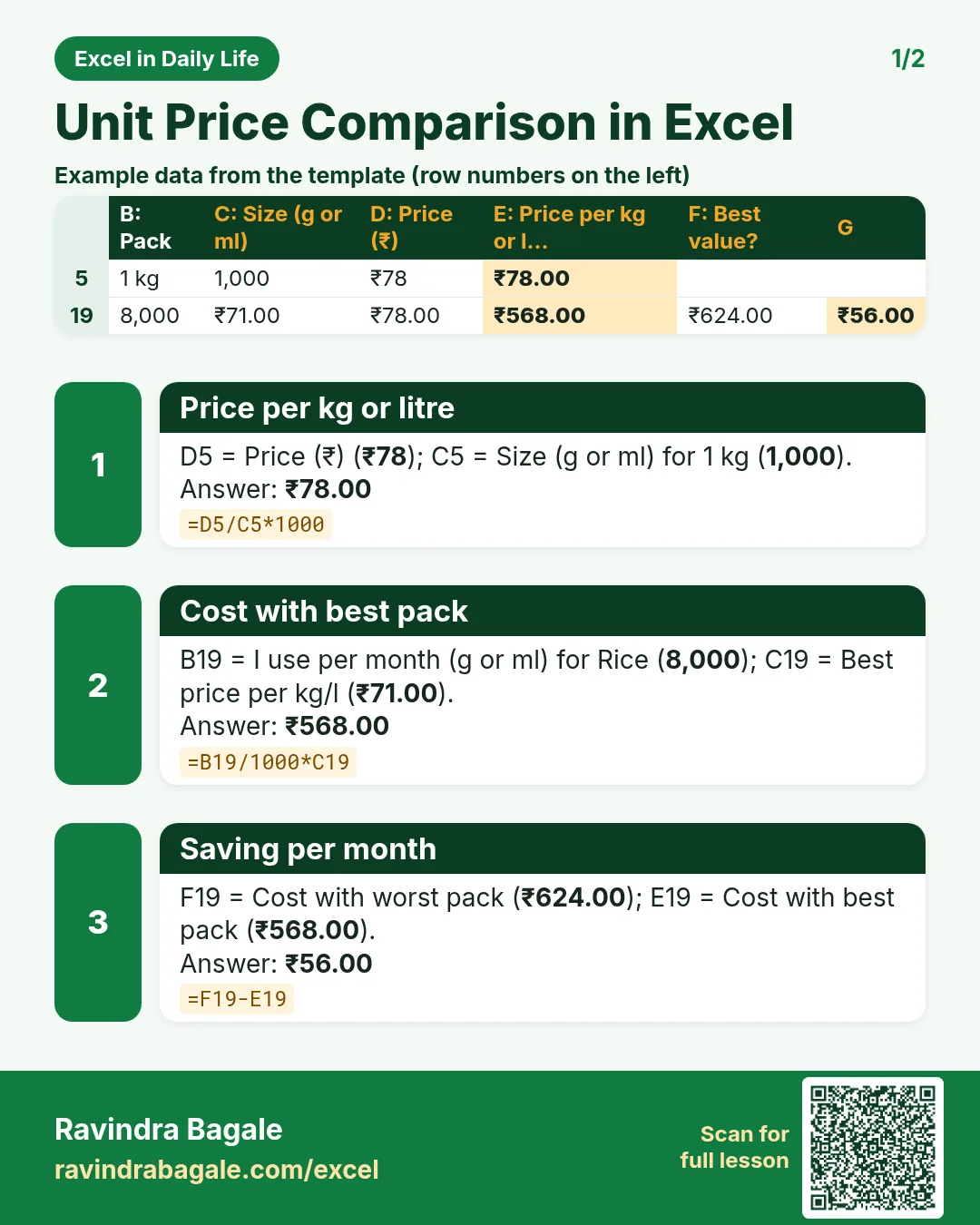
Each card shows formulas from this page, each with an example and its answer from the template. Scan the QR code on a card to open this lesson. All names and numbers are made up for practice.
झटपट उजळणी
प्रत्येक card वर या page मधले formulas, त्यांचं example आणि template मधलं उत्तर आहे. Card वरचा QR code scan केला की हा lesson उघडतो. सगळी नावं आणि आकडे सरावासाठी काल्पनिक आहेत.
झटपट दोहराई
हर card पर इस page के formulas, उनका example और template का उत्तर है. Card का QR code scan करें तो यह lesson खुलेगा. सभी नाम और आंकड़े अभ्यास के लिए काल्पनिक हैं.


More cards: Ravi Sir's Cards.
6. Frequently asked questions
How do I calculate price per kg in Excel?
Price ÷ size in grams × 1000: =D5/C5*1000.
How do I find the cheapest option per item?
Use =MINIFS(price_per_kg, item_column, item) and compare each row with it.
Is the biggest pack always the best value?
No. In this example the 500 g tea and the 2 kg detergent beat the biggest packs.
Which Excel versions have MINIFS?
MINIFS and MAXIFS are in Excel 2019, Excel 2021 and Microsoft 365. In older versions use a filter and MIN.
How much can I save?
It depends on what you buy. Here the best packs save ₹145 a month, ₹1,740 a year.
7. Quick quiz
Ten questions on this page. Sign in to save your score.
Loading practice tasks...
- Total quantity (Easy): Add up Quantity in D2:D11.
- Average unit price (Easy): Average of E2:E11, rounded to 2 decimals.
- Rows in Website (Easy): How many rows have Channel "Website"?
- Largest quantity (Easy): The largest value in D2:D11.
- Quantity for Website (Medium): Total of D2:D11 where B is "Website".
- Website in Chicago (Medium): Total of D2:D11 where B is "Website" and C is "Chicago".
- Best in Website (Medium): Largest E2:E11 value where B is "Website".
- Value of row 2 (Medium): D2 times E2.
- Look up Priya Kulkarni (Medium): The Quantity for "Priya Kulkarni" (use a lookup on column A).
- Total value (Hard): Sum of D times E for all rows.
- Share of Website (Hard): Share of D2:D11 that is "Website", rounded to 3 decimals.
- Rank of row 2 (Hard): Rank of D2 among D2:D11 (largest = 1).
- Above average? (Hard): "Above" if E2 is above the average of E2:E11, else "Below".