Transport and Fleet Management System in Excel: Trips, Km per Litre, Cost per Km, Document Expiry and Profit
Amir Logistics in Sambhaji Nagar runs two 10-tonne trucks and two pickups to Pune, Nashik, Nagpur, Solapur and nearby towns. Amir knew total diesel bills but not which truck earned money, and a pickup ran a week on an expired fitness certificate before anyone checked. This page builds an 8-sheet system: a trip log from odometer readings, km per litre, cost per km and profit per vehicle, and a document expiry board.
What you'll learn on this page
- Hold each vehicle's four document expiry dates and flag the earliest
- Log trips from odometer readings, not typed km
- Work out km per litre per trip and per vehicle
- Add diesel, tolls, maintenance and driver cost into cost per km
- Compare freight with cost to get profit per vehicle
- Print a trip sheet from a trip ID
- Show cost per km and alerts on a dashboard
Download the template: transport-fleet-management-system-template.xlsx: a 8-sheet system with example data and real formulas (Read me, Setup, Vehicles, Trips, Maintenance, Vehicle report, Trip sheet, Dashboard). Yellow cells are inputs you can type over; green cells hold formulas; blue rows are headers and totals. Replace the example data with your own and every report and the dashboard recalculate.
Made-up data: every name, amount, business and date on this page is made up for practice. Cities are used only to make the examples feel real.
1. The business story
Amir Logistics, Sambhaji Nagar, 1 to 17 October 2026 (made-up data). Diesel at an example ₹90 a litre and a driver allowance of ₹500 per trip.
| Question | Where the system answers it |
|---|---|
| Which documents need action? | Vehicles: 3 alerts. Fitness of MH20-CD-2201 expired on 12 October; insurance of MH20-AB-1102 ends in 8 days; PUC of MH20-AB-1101 in 19 |
| What does a km cost us? | Vehicle report: ₹27.52 a km across the fleet |
| Which vehicle earns least per km? | Truck MH20-AB-1102 at ₹34.64 a km, because of a ₹38,000 tyre bill |
| Are we profitable? | 30 trips, 11,114 km, freight ₹4,95,200, profit ₹1,89,350 |
Trucks give about 4.2 km a litre and pickups about 9.5. For a single car or bike, the fuel mileage tracker is enough; on-time delivery by route is in the logistics project.
Figure 1. Vehicles holds documents; Trips and Maintenance are logs; Vehicle report adds up cost and freight; Trip sheet and Dashboard read.
2. Build it sheet by sheet
Step 1. Setup
- B3 as-of date, B4 diesel price (an example; update it when the price changes), B5 document warning days (30), B6 driver allowance per trip (500).
- Maintenance types in D3:D6 for a drop-down.
Step 2. Vehicles: document expiry
- Row 4: Vehicle, Type, Driver, Insurance expiry, PUC expiry, Fitness expiry, Permit expiry, Next expiry, Days left, Document flag.
- H5
=MIN(D5:G5)finds the earliest date, I5=H5-Setup!$B$3. - J5
=IF(I5<0,"Expired",IF(I5<=Setup!$B$5,"Renew soon","OK")). - Colour each date cell with formula rules: red when
D5<Setup!$B$3, amber when within 30 days. The same idea for one car is in the service log.
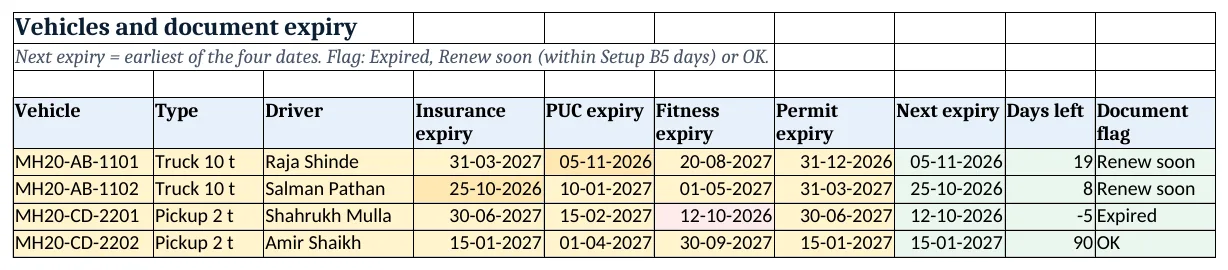
Figure 2. Vehicles: four expiry dates, the next one, days left and the document flag
Step 3. Trips: one row per round trip
- Row 4: Date, Vehicle, From, To, Start km, End km, Km, Diesel (L), Km per litre, Freight, Tolls, Trip ID.
- Type odometer readings. G5
=F5-E5, I5=IFERROR(G5/H5,0)with a colour scale so a strange km per litre stands out. - L5 trip ID
="T-"&TEXT(ROW()-4,"000").
Step 4. Maintenance and vehicle report
- Maintenance: Date, Vehicle, Type, Amount, one row per bill.
- On Vehicle report, B5 trips
=COUNTIF(Trips!$B$5:$B$1000,A5), C5 km and D5 litres with SUMIFS. - F5 diesel cost
=D5*Setup!$B$4, G5 tolls, H5 maintenance, I5 driver=B5*Setup!$B$6, J5 total. - K5 cost per km
=IFERROR(J5/C5,0), L5 freight, M5 profit=L5-J5. K9 is the fleet cost per km, total cost ÷ total km.
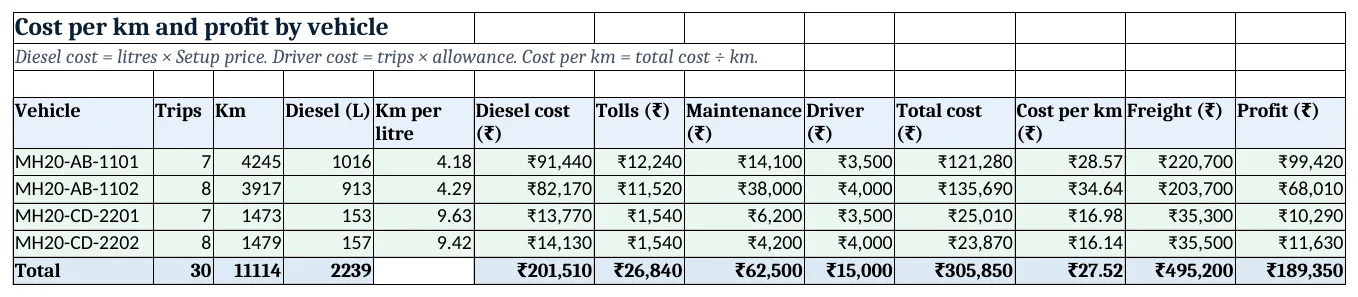
Figure 3. Vehicle report: km, km per litre, all costs, cost per km, freight and profit
Step 5. Trip sheet
- Type a trip ID in B4 (T-005). Rows 6 to 15 pull date, vehicle, route, odometer, km, diesel, freight and tolls with XLOOKUP.
- B16 finds the driver from the vehicle. Print A1:D18 for the driver to sign.
Step 6. Dashboard
- Cards: trips, km run, cost per km, freight, profit and vehicles with a document alert
=COUNTIF(Vehicles!J5:J8,"<>OK"). - Chart 1 at A8: cost per km by vehicle. Chart 2 at A25: profit by vehicle.
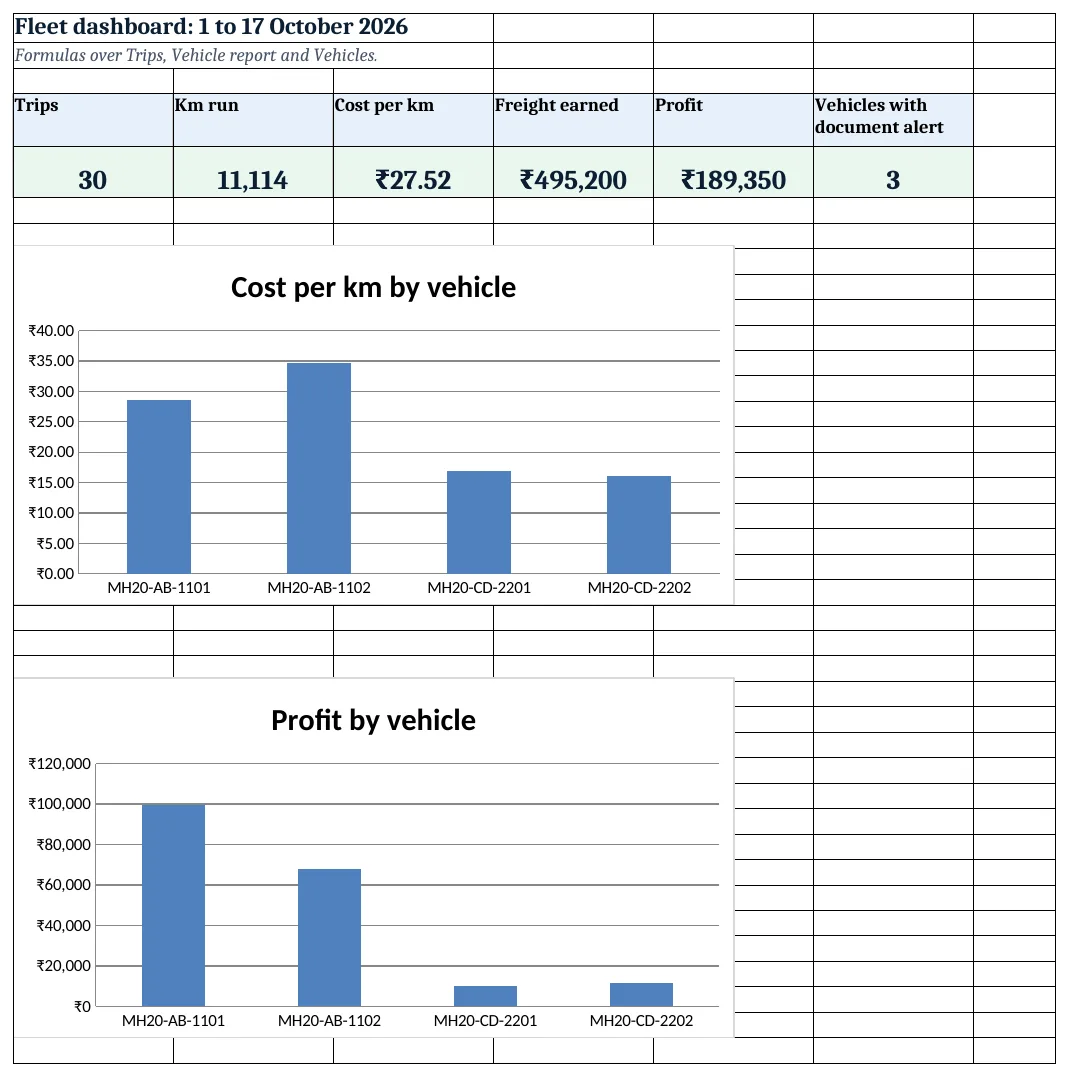
Figure 4. Fleet dashboard: KPI cards and charts
Ravindra Bagale's Tip
Check the Vehicles sheet every Monday. A vehicle stopped at a check post for an expired paper costs more than the renewal fee.
Ravindra Bagale's Tip – मराठी
दर सोमवारी Vehicles sheet पहा. कागदपत्र expire झाल्यामुळे check post वर अडकलेली गाडी renewal fee पेक्षा जास्त खर्च करते.
Ravindra Bagale's Tip – हिंदी
हर सोमवार Vehicles sheet देखो. कागज़ expire होने से check post पर रुकी गाड़ी renewal fee से ज़्यादा खर्च करती है.
3. Formulas used
| Cell | Formula | What it does |
|---|---|---|
| Vehicles!H5 | =MIN(D5:G5) |
Earliest of the four expiry dates |
| Vehicles!I5 | =H5-Setup!$B$3 |
Days to that expiry |
| Vehicles!J5 | =IF(I5<0,"Expired",IF(I5<=Setup!$B$5,"Renew soon","OK")) |
Expired, Renew soon or OK |
| Trips!G5 | =F5-E5 |
Km from odometer |
| Trips!I5 | =IFERROR(G5/H5,0) |
Km per litre |
| Trips!L5 | ="T-"&TEXT(ROW()-4,"000") |
Trip ID |
| Vehicle report!B5 | =COUNTIF(Trips!$B$5:$B$1000,A5) |
Trips by the vehicle |
| Vehicle report!E5 | =IFERROR(C5/D5,0) |
Km per litre for the vehicle |
| Vehicle report!F5 | =D5*Setup!$B$4 |
Diesel cost |
| Vehicle report!I5 | =B5*Setup!$B$6 |
Driver allowance |
| Vehicle report!K5 | =IFERROR(J5/C5,0) |
Cost per km |
| Vehicle report!M5 | =L5-J5 |
Profit |
| Vehicle report!K9 | =J9/C9 |
Fleet cost per km |
| Trip sheet!B16 | =XLOOKUP(B7,Vehicles!$A$5:$A$50,Vehicles!$C$5:$C$50,"") |
Driver of the vehicle |
| Dashboard!F5 | =COUNTIF(Vehicles!J5:J8,"<>OK") |
Vehicles with a document alert |
Every formula above is written in the template, so you can click a cell and see it in the formula bar. All values on this page were recalculated in LibreOffice with zero errors.
4. Common mistakes
- Typing km instead of odometer readings. Typed km hide mistakes. From odometer readings a typo shows up as 40 km a litre.
- Averaging km per litre of trips. A short trip at 12 km/l and a long one at 4 km/l do not average to 8. Use total km ÷ total litres.
- Leaving maintenance out of cost per km. Diesel alone makes the truck with new tyres look cheapest. Add every cost.
- Tracking one expiry date. Insurance, PUC, fitness and permit each expire on their own date. MIN shows the next one to act on.
- Old diesel price. Update Setup B4 when the price changes, or keep a price column on Trips for exact cost.
Ravindra Bagale's Tip
Quote freight from your own cost per km plus a margin, not from what others charge. Here a truck costs about ₹29 to ₹35 a km to run.
Ravindra Bagale's Tip – मराठी
Freight दुसऱ्यांच्या दरावर नाही तर स्वतःच्या cost per km वर margin लावून ठरवा. इथे truck चालवायला सुमारे ₹29 ते ₹35 प्रति km लागतात.
Ravindra Bagale's Tip – हिंदी
Freight दूसरों के रेट से नहीं, अपनी cost per km पर margin जोड़कर तय करो. यहाँ truck चलाने में करीब ₹29 से ₹35 प्रति km लगता है.
5. More real examples
Example 1: School or staff bus. Freight becomes fee or contract amount per month; cost per km stays the same and helps price the next route.
Example 2: Two-wheeler delivery fleet. Replace diesel with petrol, drop tolls and add Orders delivered to get cost per order.
Example 3: Tanker with load in litres. Add Load (kL) on Trips and freight per kL-km to compare routes fairly.
Quick revision cards
Quick revision
Each card shows formulas from this page, each with an example and its answer from the template. Scan the QR code on a card to open this lesson. All names and numbers are made up for practice.
झटपट उजळणी
प्रत्येक card वर या page मधले formulas, त्यांचं example आणि template मधलं उत्तर आहे. Card वरचा QR code scan केला की हा lesson उघडतो. सगळी नावं आणि आकडे सरावासाठी काल्पनिक आहेत.
झटपट दोहराई
हर card पर इस page के formulas, उनका example और template का उत्तर है. Card का QR code scan करें तो यह lesson खुलेगा. सभी नाम और आंकड़े अभ्यास के लिए काल्पनिक हैं.
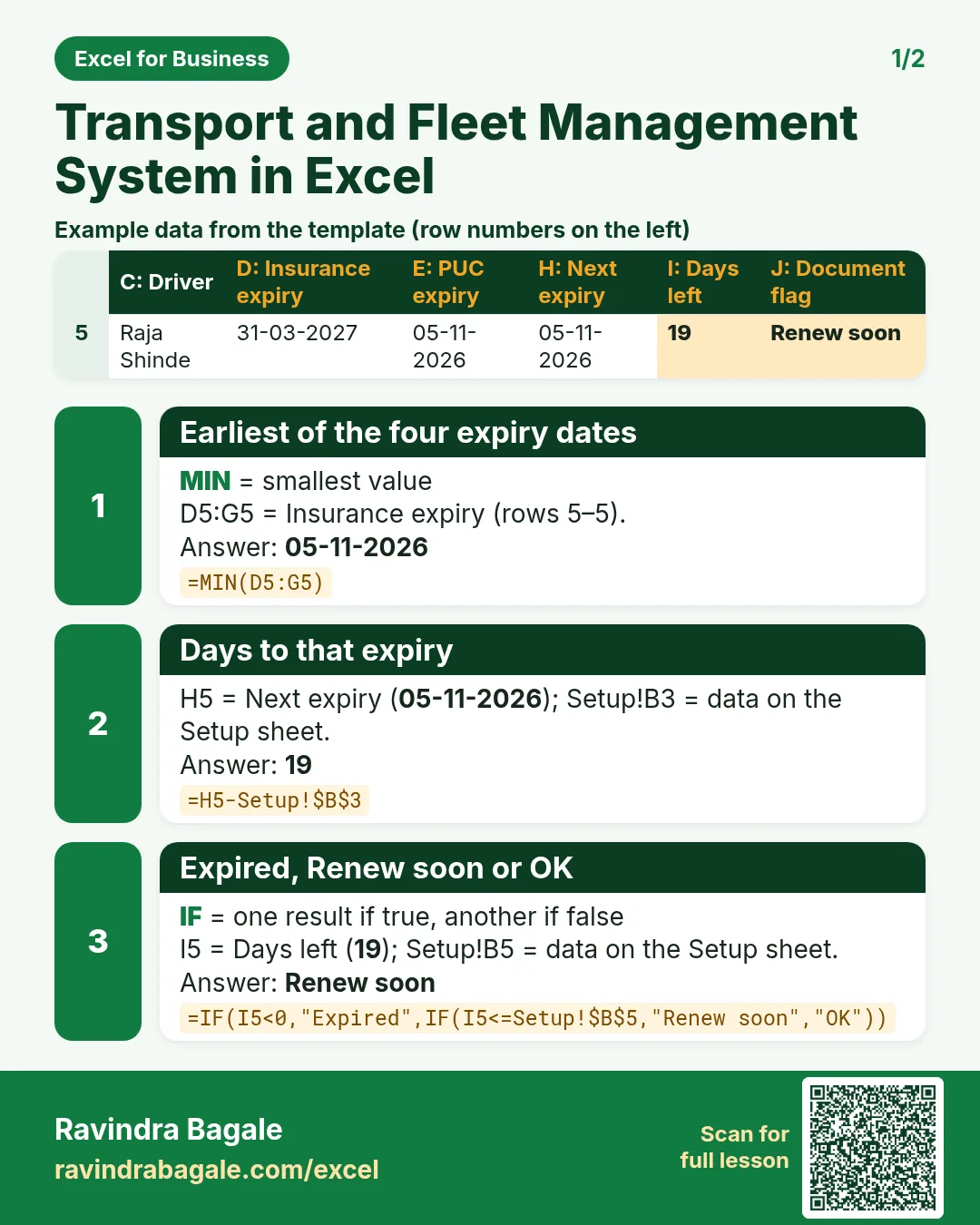

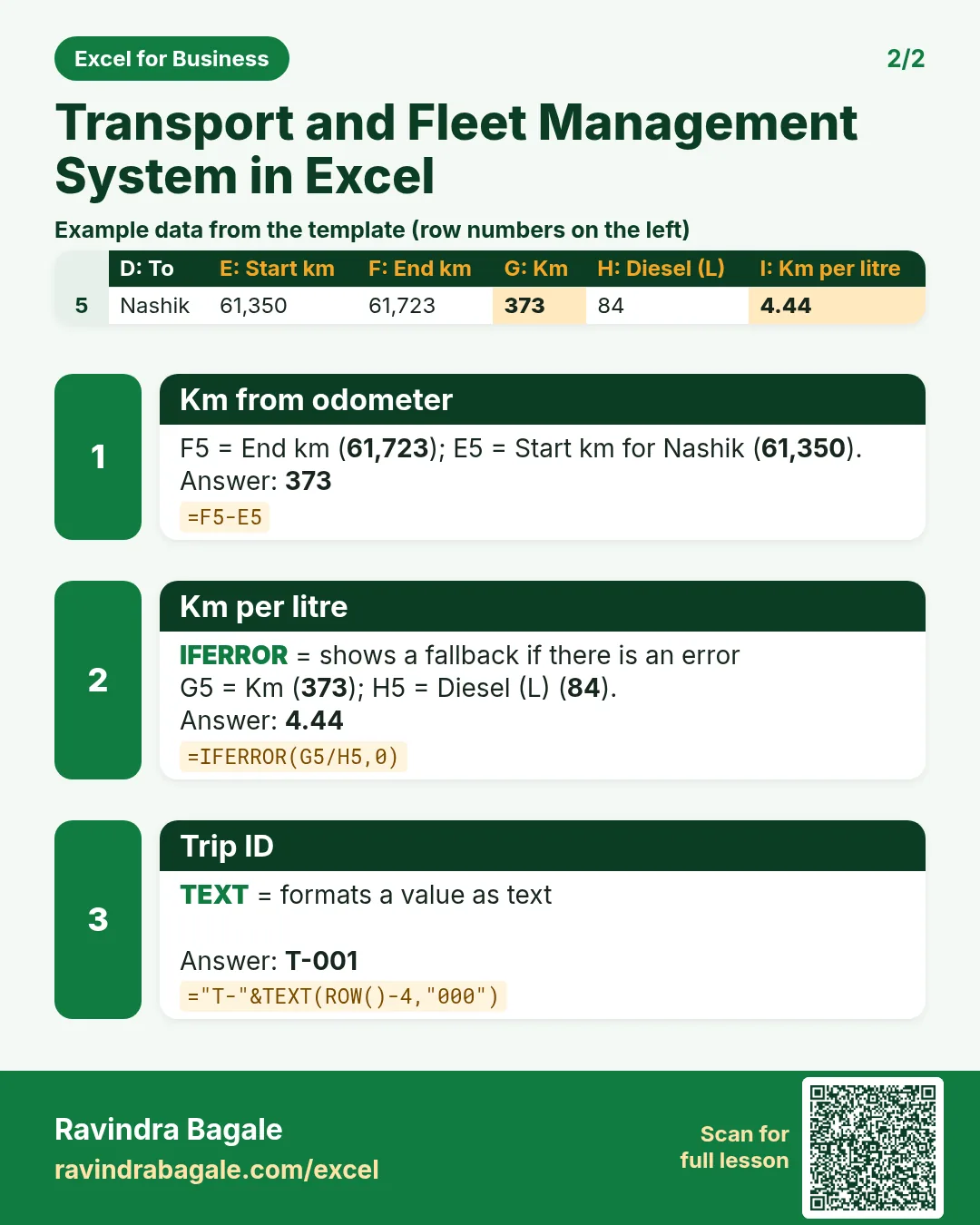

More cards: Ravi Sir's Cards.
6. Frequently asked questions
How do I calculate cost per km in Excel?
Add every cost of the vehicle (diesel, tolls, maintenance, driver) and divide by km run: =IFERROR(J5/C5,0).
How do I calculate km per litre?
Km ÷ litres. For a vehicle, use total km ÷ total litres from SUMIFS, not the average of trips.
How do I track vehicle document expiry?
Keep the four dates in columns, take =MIN(D5:G5) as the next expiry and flag it within 30 days.
Should I log each fill-up or each trip?
Each trip with litres used is simplest. If you fill up irregularly, log fill-ups on a separate sheet and use full-tank to full-tank km.
Can I add a GPS km column?
Yes. Add it next to odometer km and a difference column; large gaps point to meter or entry errors.
7. Quick quiz
Ten questions on this page. Sign in to save your score.
Loading practice tasks...
- Total stock units (Easy): Add up Stock units in D2:D11.
- Average unit cost (Easy): Average of E2:E11, rounded to 2 decimals.
- Rows in Antibiotic (Easy): How many rows have Category "Antibiotic"?
- Largest stock units (Easy): The largest value in D2:D11.
- Stock units for Antibiotic (Medium): Total of D2:D11 where B is "Antibiotic".
- Antibiotic in Paris (Medium): Total of D2:D11 where B is "Antibiotic" and C is "Paris".
- Best in Antibiotic (Medium): Largest E2:E11 value where B is "Antibiotic".
- Value of row 2 (Medium): D2 times E2.
- Look up Vikram Singh (Medium): The Stock units for "Vikram Singh" (use a lookup on column A).
- Total value (Hard): Sum of D times E for all rows.
- Share of Antibiotic (Hard): Share of D2:D11 that is "Antibiotic", rounded to 3 decimals.
- Rank of row 2 (Hard): Rank of D2 among D2:D11 (largest = 1).
- Above average? (Hard): "Above" if E2 is above the average of E2:E11, else "Below".