Small Business Accounts Receivable System in Excel: Invoices, Part Payments, Due Dates, Ageing Buckets, Credit Limits and Statement
Ravindra Trading Co in Solapur supplies shops on credit: 15 to 60 days, depending on the customer. Money came in as part payments, and the owner could not tell which invoices were still open or who was past 60 days. This page builds an 8-sheet Excel system: every invoice gets a due date from the customer's credit days, receipts are booked against invoice numbers, and the ageing report splits what is owed into Not due, 1-30, 31-60, 61-90 and Over 90 days.
What you'll learn on this page
- Set customers with credit days and credit limits
- Raise invoices with GST and an automatic due date
- Book full and part receipts against invoice numbers
- Work out balance, days overdue and age bucket per invoice
- Build an ageing table by customer with a two-condition SUMIFS
- Flag customers over their credit limit
- Print a customer statement and show receivables on a dashboard
Download the template: small-business-accounts-receivable-system-template.xlsx: a 8-sheet system with example data and real formulas (Read me, Setup, Customers, Invoices, Receipts, Ageing, Statement, Dashboard). Yellow cells are inputs you can type over; green cells hold formulas; blue rows are headers and totals. Replace the example data with your own and every report and the dashboard recalculate.
Made-up data: every name, amount, business and date on this page is made up for practice. Cities are used only to make the examples feel real.
1. The business story
Ravindra Trading Co, Solapur, as of 17 October 2026 (made-up data). GST 18% is an example rate.
| Question | Where the system answers it |
|---|---|
| How much is owed to us? | ₹6,45,340, of which ₹1,83,220 is overdue |
| Who is very late? | Amir General Stores: ₹12,700 over 90 days; Shraddha Kirana ₹19,560 at 61-90 |
| Who is over the limit? | Salman Electricals (₹2,82,200 against ₹2,00,000) and Rani Super Market (₹1,37,680 against ₹1,20,000) |
| How did October go? | Invoiced ₹2,47,800; received ₹1,34,280 |
The statement for Salman Electricals shows 4 open invoices and ₹53,280 overdue for 37 days.
Figure 1. Setup holds the date and GST; Customers, Invoices and Receipts are the entry sheets; Ageing, Statement and Dashboard read from them.
2. Build it sheet by sheet
Step 1. Setup and Customers
- B3 as-of date, B4 GST.
- Customers: ID, Name, Credit days, Credit limit. E5 outstanding
=SUMIFS(Invoices!$J$5:$J$3000,Invoices!$C$5:$C$3000,A5)and F5=IF(E5>D5,"Over limit","OK").
Step 2. Invoices
- A5
="INV-"&TEXT(ROW()-4,"000"). Type date, customer ID from a drop-down and taxable amount. - F5 GST
=ROUND(E5*Setup!$B$4,0), G5 total, H5 due=B5+XLOOKUP(C5,Customers!$A$5:$A$500,Customers!$C$5:$C$500,0). - I5 received with SUMIFS from Receipts and J5 balance
=G5-I5.
Step 3. Days overdue and bucket
- K5
=IF(J5<=0,0,MAX(0,Setup!$B$3-H5)). - L5:
=IF(J5<=0,"Paid",IF(K5=0,"Not due",IF(K5<=30,"1-30",IF(K5<=60,"31-60",IF(K5<=90,"61-90","Over 90")))))with red for Over 90 (conditional formatting).
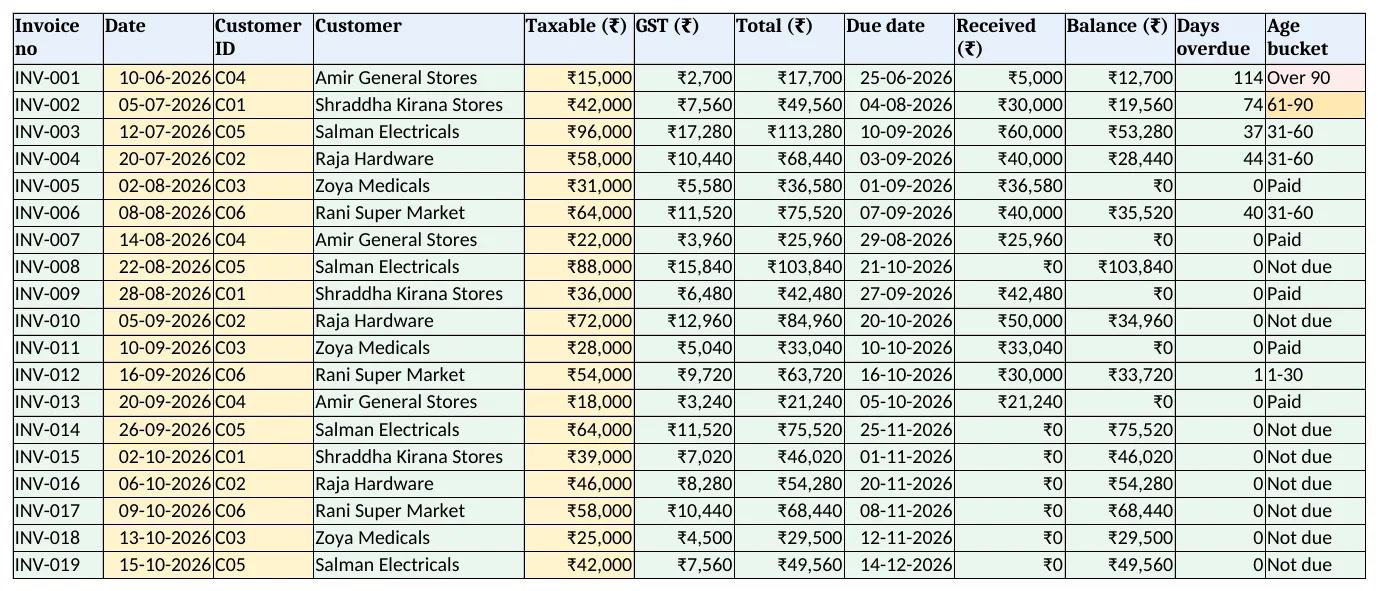
Figure 2. Invoices: total, due date, received, balance, days overdue and age bucket
Step 4. Receipts and Ageing
- Receipts: Date, Invoice no, Amount. Part payments are fine; each is its own row.
- Ageing C5
=SUMIFS(Invoices!$J$5:$J$3000,Invoices!$C$5:$C$3000,$B5,Invoices!$L$5:$L$3000,C$4). Mixed references fill the customer × bucket grid; compare with the khata book.
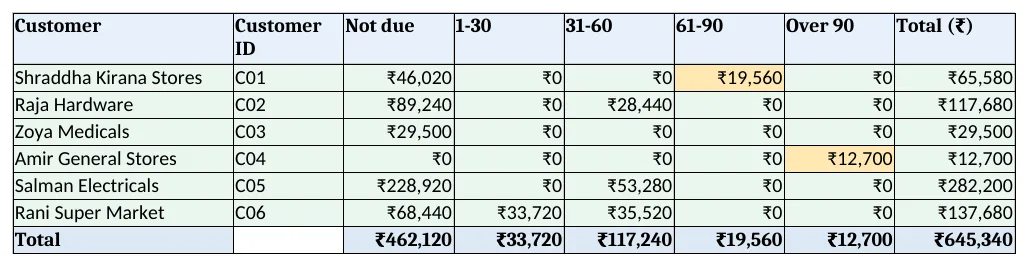
Figure 3. Ageing: balance by customer and age bucket with a two-condition SUMIFS
Step 5. Statement and Dashboard
- Statement: type a customer ID in B4; invoiced, received, balance, overdue, oldest overdue days with MAXIFS and open invoices. Set the print area.
- KPI cards: total outstanding, overdue, over 60 days, invoiced and received in October, customers over limit. Charts: by age bucket and by customer.
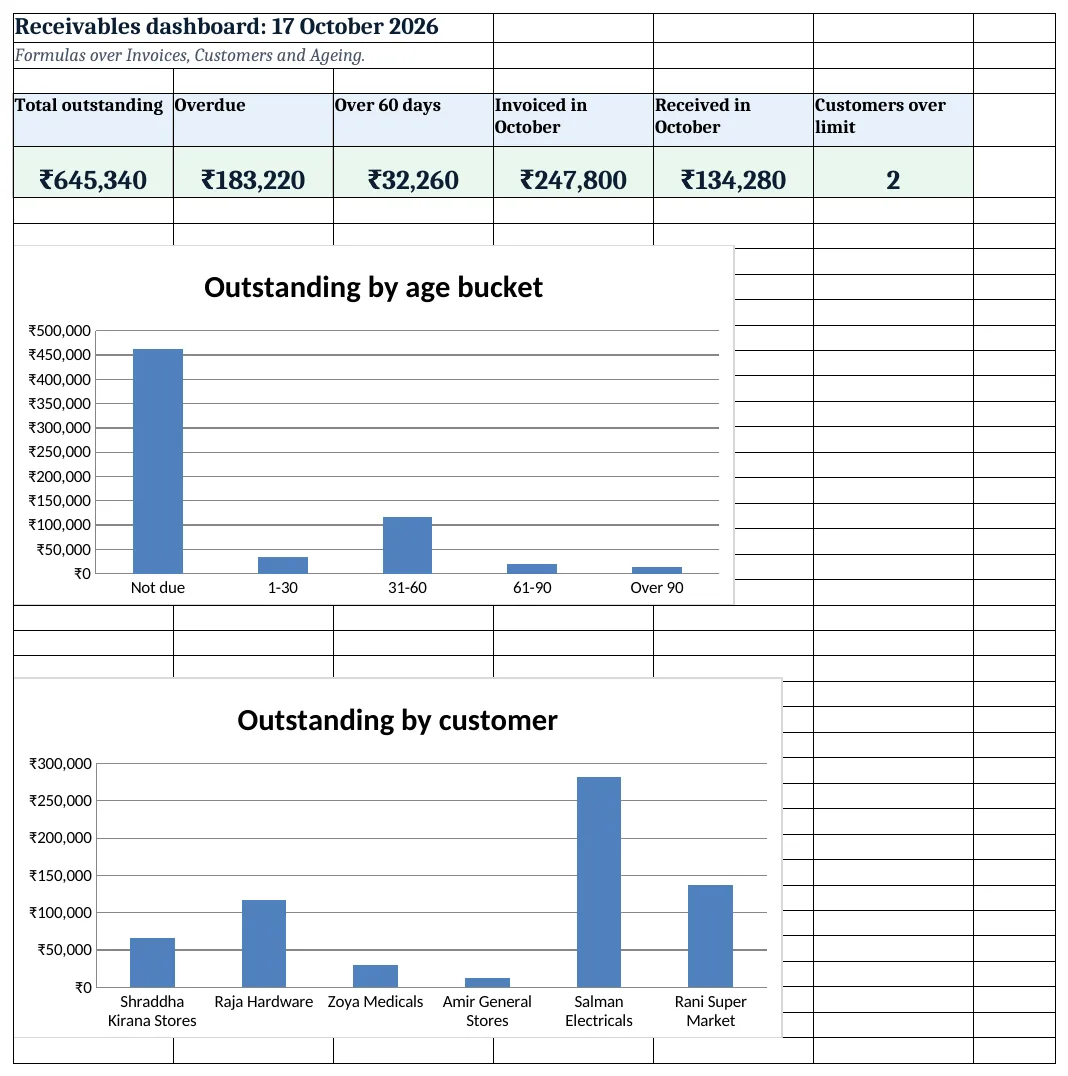
Figure 4. Receivables dashboard: outstanding, overdue, over 60 days, October invoiced and received, customers over limit
Ravindra Bagale's Tip
Call Over 90 and 61-90 customers every Monday, oldest first. The longer a bill waits, the less of it comes back.
Ravindra Bagale's Tip – मराठी
दर सोमवारी Over 90 आणि 61-90 ग्राहकांना फोन करा, सर्वात जुने आधी. बिल जितके जुने तितकी वसुली कमी.
Ravindra Bagale's Tip – हिंदी
हर सोमवार Over 90 और 61-90 ग्राहकों को फोन करें, सबसे पुराना पहले. बिल जितना पुराना, वसूली उतनी कम.
3. Formulas used
| Cell | Formula | What it does |
|---|---|---|
| Customers!E5 | =SUMIFS(Invoices!$J$5:$J$3000,Invoices!$C$5:$C$3000,A5) |
Outstanding per customer |
| Customers!F5 | =IF(E5>D5,"Over limit","OK") |
Credit limit check |
| Invoices!F5 | =ROUND(E5*Setup!$B$4,0) |
GST |
| Invoices!H5 | =B5+XLOOKUP(C5,Customers!$A$5:$A$500,Customers!$C$5:$C$500,0) |
Due date |
| Invoices!I5 | =SUMIFS(Receipts!$D$5:$D$5000,Receipts!$C$5:$C$5000,A5) |
Received |
| Invoices!J5 | =G5-I5 |
Balance |
| Invoices!K5 | =IF(J5<=0,0,MAX(0,Setup!$B$3-H5)) |
Days overdue |
| Invoices!L5 | =IF(J5<=0,"Paid",IF(K5=0,"Not due",IF(K5<=30,"1-30",IF(K5<=60,"31-60",IF(K5<=90,"61-90","Over 90"))))) |
Age bucket |
| Receipts!E5 | =XLOOKUP(XLOOKUP(C5,Invoices!$A$5:$A$3000,Invoices!$C$5:$C$3000,""),Customers!$A$5:$A$500,Customers!$B$5:$B$500,"Check invoice") |
Customer of the invoice |
| Ageing!C5 | =SUMIFS(Invoices!$J$5:$J$3000,Invoices!$C$5:$C$3000,$B5,Invoices!$L$5:$L$3000,C$4) |
Balance by customer and bucket |
| Statement!B10 | =B9-SUMIFS(Invoices!$J$5:$J$3000,Invoices!$C$5:$C$3000,$B$4,Invoices!$L$5:$L$3000,"Not due") |
Overdue on the statement |
| Statement!B11 | =MAXIFS(Invoices!$K$5:$K$3000,Invoices!$C$5:$C$3000,$B$4) |
Oldest overdue days |
| Dashboard!C5 | =Ageing!F11+Ageing!G11 |
Over 60 days |
Every formula above is written in the template, so you can click a cell and see it in the formula bar. All values on this page were recalculated in LibreOffice with zero errors.
4. Common mistakes
- Receipts not tied to an invoice. Book every receipt against an invoice number, or old invoices stay open forever.
- Ageing from the invoice date. Count days from the due date; a 60-day customer is not late on day 45.
- Credit limit checked once a year. Look at Customers column F before each new sale on credit.
- GST rounded differently on the bill. Use the same ROUND as your billing so totals match the invoice.
- Deleting paid invoices. Keep them as Paid; the statement and October totals need them.
Ravindra Bagale's Tip
Send the statement with every new invoice. Customers pay faster when they see the full balance.
Ravindra Bagale's Tip – मराठी
प्रत्येक नवीन बिलासोबत statement पाठवा. पूर्ण बाकी दिसली की ग्राहक लवकर भरतात.
Ravindra Bagale's Tip – हिंदी
हर नए बिल के साथ statement भेजें. पूरा बकाया दिखे तो ग्राहक जल्दी चुकाते हैं.
5. More real examples
Example 1: Payables. Turn it round for suppliers: bills, payments made and what you owe by age.
Example 2: Service firm. Invoices for fees with retainers; credit days per client.
Example 3: Distributor with salesmen. Add a salesman column and collect overdue by salesman, like the hardware store system.
Quick revision cards
Quick revision
Each card shows formulas from this page, each with an example and its answer from the template. Scan the QR code on a card to open this lesson. All names and numbers are made up for practice.
झटपट उजळणी
प्रत्येक card वर या page मधले formulas, त्यांचं example आणि template मधलं उत्तर आहे. Card वरचा QR code scan केला की हा lesson उघडतो. सगळी नावं आणि आकडे सरावासाठी काल्पनिक आहेत.
झटपट दोहराई
हर card पर इस page के formulas, उनका example और template का उत्तर है. Card का QR code scan करें तो यह lesson खुलेगा. सभी नाम और आंकड़े अभ्यास के लिए काल्पनिक हैं.
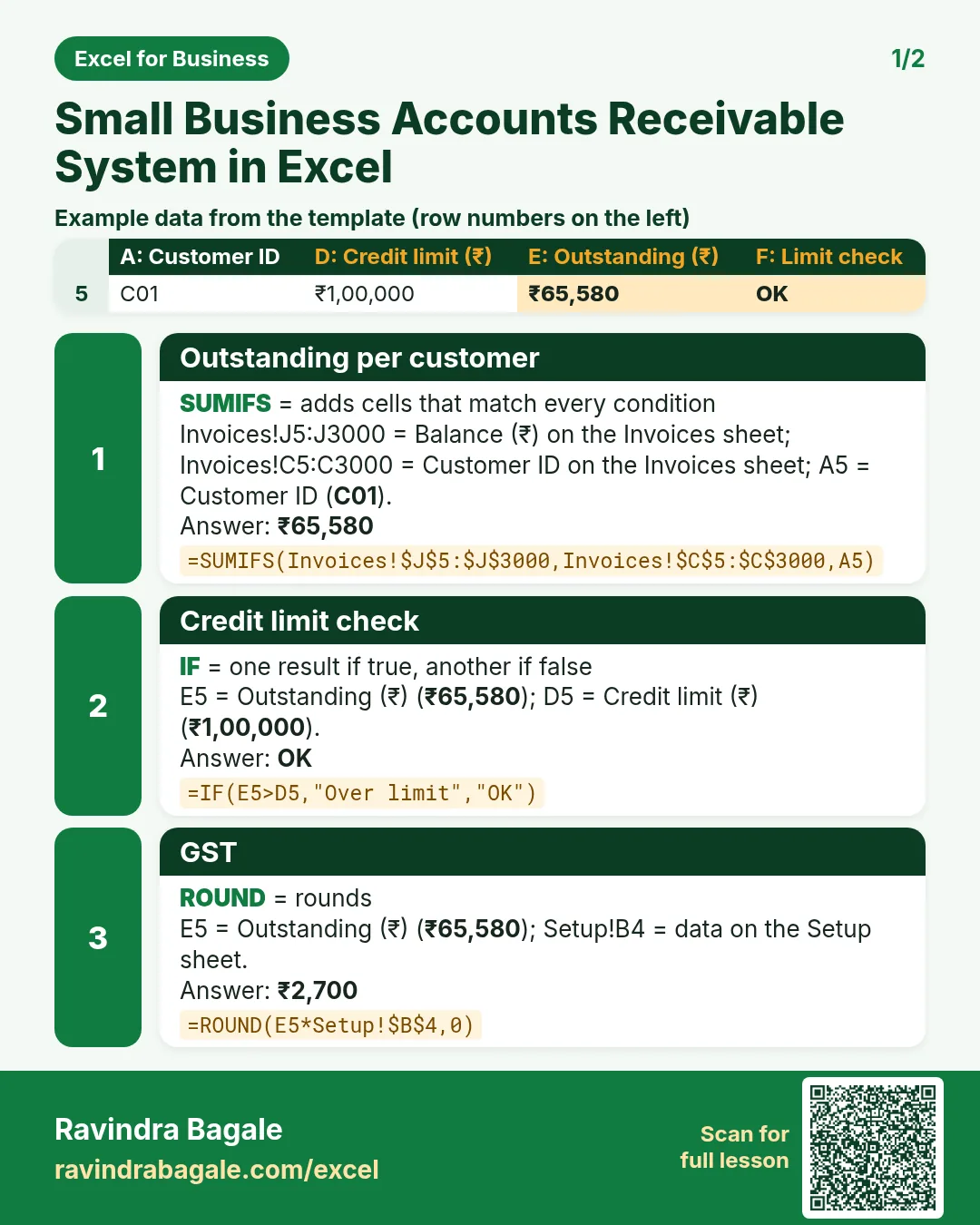

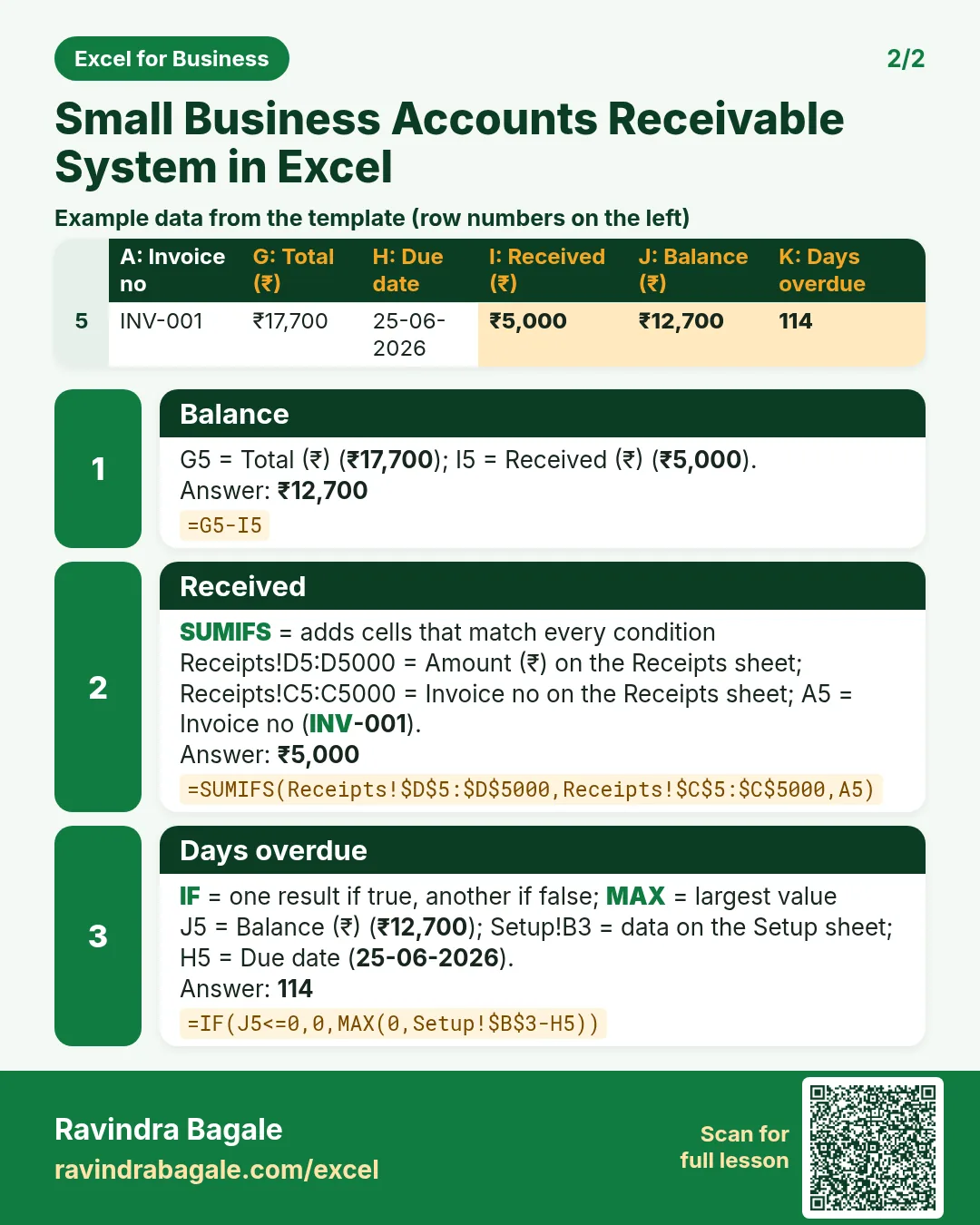

More cards: Ravi Sir's Cards.
6. Frequently asked questions
How do I make an ageing report in Excel?
Work out days overdue and a bucket per invoice, then SUMIFS balance by customer and bucket.
How do I calculate days overdue?
Today − due date, not below zero, and zero once the invoice is paid.
How do I handle part payments?
One receipt row per payment against the invoice no; SUMIFS adds them.
How do I find the oldest overdue invoice of a customer?
MAXIFS days overdue where the customer matches.
What GST rate should I use?
The rate for your goods or services. Keep it on Setup; confirm with your accountant.
7. Quick quiz
Ten questions on this page. Sign in to save your score.
Loading practice tasks...
- Total invoices (Easy): Add up Invoices in D2:D11. (sheet "Data")
- Average amount (Easy): Average of E2:E11, rounded to 2 decimals. (sheet "Data")
- Rows in Admin (Easy): How many rows have Department "Admin"? (sheet "Data")
- Largest invoices (Easy): The largest value in D2:D11. (sheet "Data")
- Days taken (Easy): C2 minus B2. (sheet "Dates")
- Start year (Easy): Year of B3. (sheet "Dates")
- Due month (Easy): Month number of C3. (sheet "Dates")
- Earliest start (Easy): Earliest date in B2:B9 (as a date number). (sheet "Dates")
- Invoices for Admin (Medium): Total of D2:D11 where B is "Admin". (sheet "Data")
- Admin in Berlin (Medium): Total of D2:D11 where B is "Admin" and C is "Berlin". (sheet "Data")
- Working days (Medium): Working days from B2 to C2. (sheet "Dates")
- Weekday of due (Medium): Weekday number of C4 (Sunday = 1). (sheet "Dates")