Photography Studio Management System in Excel: Packages, Bookings, Date Clash Check, Delivery Tracking and Dashboard
Shahrukh Studio in Pune shoots weddings, pre-wedding, birthdays, maternity and product photos with three photographers. Twice a photographer was booked for two jobs on one day, and clients called asking where their photos were. This page builds a 7-sheet Excel system: packages and add-ons are priced once, every booking works out its total, balance and delivery due date, and a clash check warns before a date is double-booked.
What you'll learn on this page
- Keep packages with price and delivery days, and add-on prices
- Price a booking with albums, extra photographers and a discount
- Add GST and collect payments with SUMIFS
- Work out the delivery due date and the status
- Flag a photographer booked twice on one date with COUNTIFS
- Report bookings and revenue per photographer and package
- Print a quotation and confirmation
Download the template: photography-studio-management-system-template.xlsx: a 7-sheet system with example data and real formulas (Read me, Setup, Bookings, Payments, Report, Quotation, Dashboard). Yellow cells are inputs you can type over; green cells hold formulas; blue rows are headers and totals. Replace the example data with your own and every report and the dashboard recalculate.
Made-up data: every name, amount, business and date on this page is made up for practice. Cities are used only to make the examples feel real.
1. The business story
Shahrukh Studio, Pune, as of 17 October 2026 (made-up data). Album ₹8,000; extra photographer ₹7,000 a day; GST 18% (an input; confirm with your accountant).
| Question | Where the system answers it |
|---|---|
| Is anyone double-booked? | Clash?: Zoya has two shoots on 25 October |
| Which delivery is late? | PS-006, Amir Sayyed's maternity shoot, due 12 October |
| What is coming up? | 5 upcoming shoots, including two weddings on 22 November |
| What does Salman Shaikh's wedding cost? | Quotation PS-008: ₹83,000 + GST ₹14,940 = ₹97,940, ₹40,000 paid |
12 bookings bring ₹4,48,500 before GST; ₹2,16,850 is still to collect.
Figure 1. Setup holds packages and add-ons; Bookings and Payments are the entry sheets; Report, Quotation and Dashboard read from them.
2. Build it sheet by sheet
Step 1. Setup: packages and add-ons
- B4 GST, B5 album price (₹8,000), B6 extra photographer per day (₹7,000).
- Packages in A9:C13 with price and delivery days; photographers in E9:E11.
Step 2. Bookings: price and payments
- A5
="PS-"&TEXT(ROW()-4,"000"). Type client, package, shoot date and photographer from drop-downs, albums, extra photographers and any discount. - J5 taxable:
=XLOOKUP(D5,Setup!$A$9:$A$13,Setup!$B$9:$B$13,0)+G5*Setup!$B$5+H5*Setup!$B$6-I5. - K5 GST, L5 total, M5 paid with SUMIFS from Payments and N5 balance.
Step 3. Bookings: delivery status and clashes
- O5 delivery due
=E5+XLOOKUP(D5,Setup!$A$9:$A$13,Setup!$C$9:$C$13,0). - Q5:
=IF(E5>Setup!$B$3,"Upcoming",IF(P5<>"","Delivered",IF(O5<Setup!$B$3,"Overdue","Editing"))). - R5 clash check:
=IF(COUNTIFS($F$5:$F$500,F5,$E$5:$E$500,E5)>1,"Clash","")(COUNTIFS). Check it before you confirm a date.
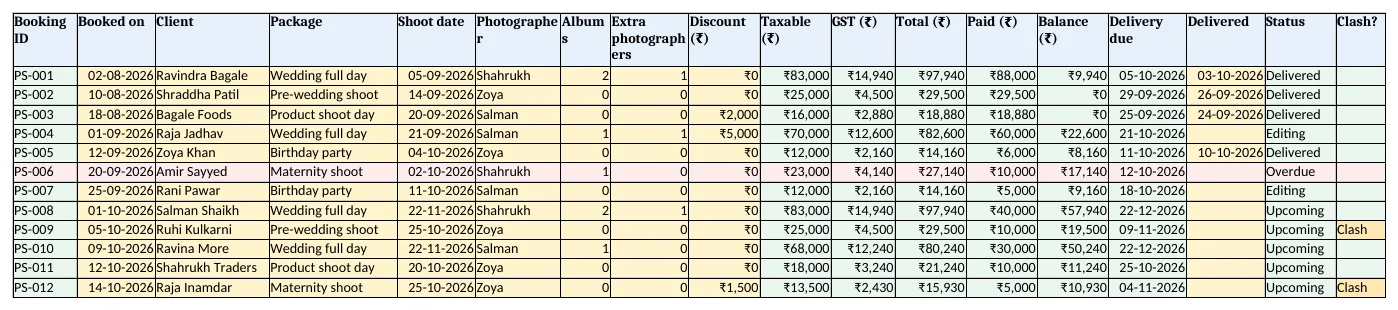
Figure 2. Bookings: totals, balance, delivery due date, status and clash check
Step 4. Report and Quotation
- Report per photographer: bookings, upcoming, editing or overdue, and revenue; rows 11 to 15 per package.
- Quotation: type a booking ID in B4; rows 6 to 16 bring package, date, add-ons, totals and balance. Set the print area.
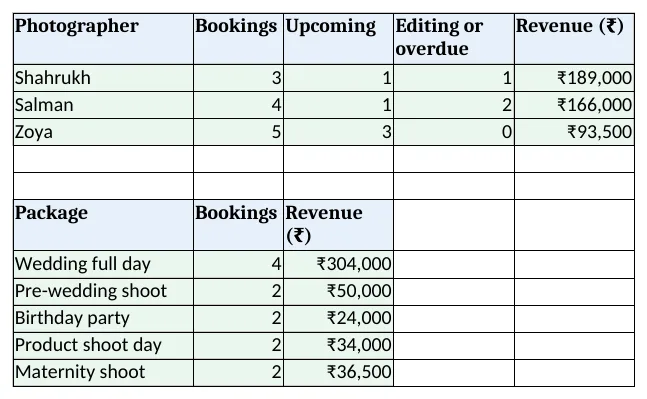
Figure 3. Report: bookings, upcoming, editing and revenue per photographer and per package
Step 5. Dashboard
- KPI cards: bookings, upcoming shoots, revenue before GST, balance, delivery overdue and date clashes.
- Charts: revenue by package and work by photographer.
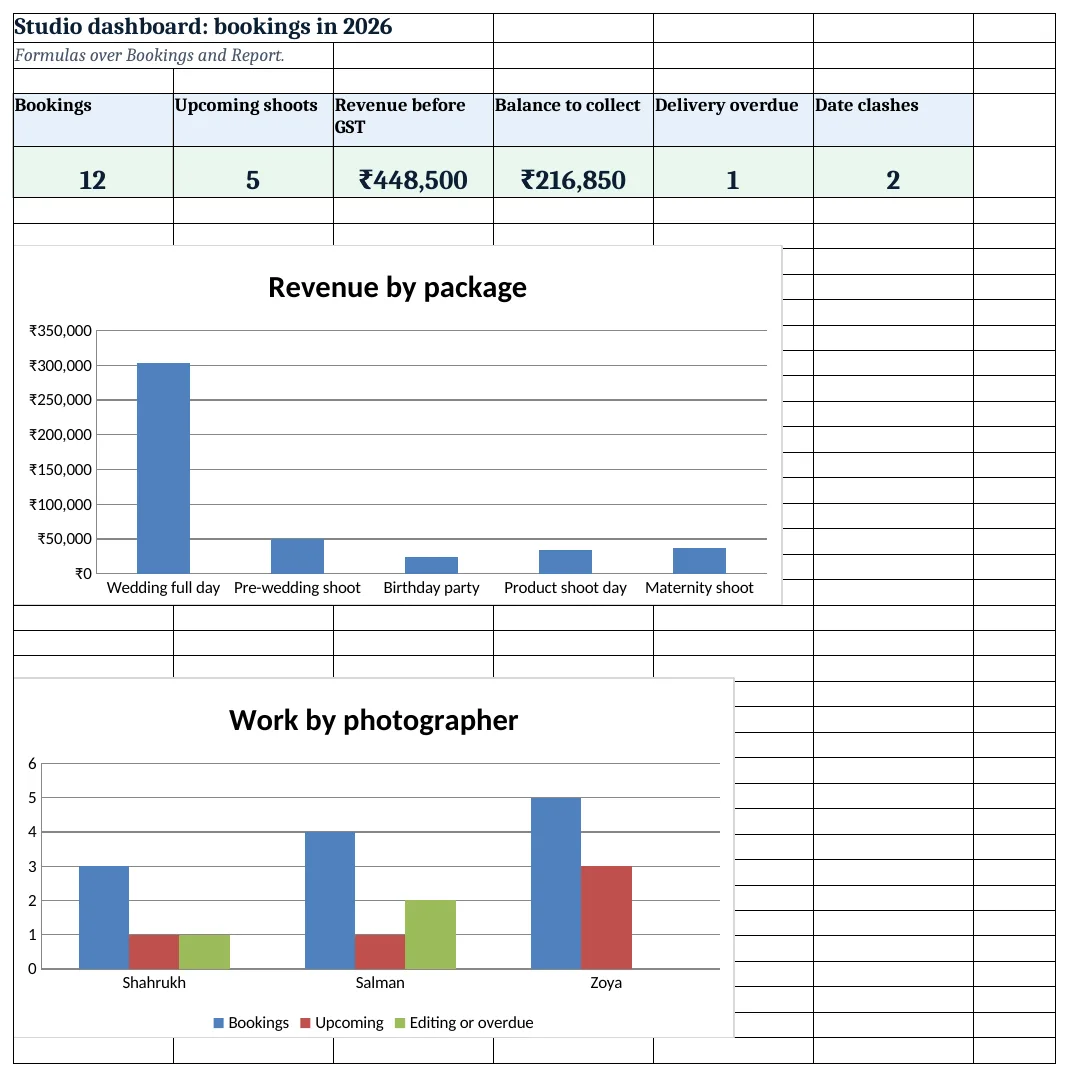
Figure 4. Studio dashboard: bookings, upcoming shoots, revenue, balance, overdue and clashes
Ravindra Bagale's Tip
Look at the Clash? column before saying yes on the phone. A double booking costs a client and your name.
Ravindra Bagale's Tip – मराठी
फोनवर हो म्हणण्याआधी Clash? column पहा. double booking मुळे ग्राहक आणि नाव दोन्ही जातात.
Ravindra Bagale's Tip – हिंदी
फोन पर हां कहने से पहले Clash? column देखें. double booking से ग्राहक और नाम दोनों जाते हैं.
3. Formulas used
| Cell | Formula | What it does |
|---|---|---|
| Bookings!A5 | ="PS-"&TEXT(ROW()-4,"000") |
Booking ID |
| Bookings!J5 | =XLOOKUP(D5,Setup!$A$9:$A$13,Setup!$B$9:$B$13,0)+G5*Setup!$B$5+H5*Setup!$B$6-I5 |
Taxable value |
| Bookings!K5 | =ROUND(J5*Setup!$B$4,0) |
GST |
| Bookings!L5 | =J5+K5 |
Total |
| Bookings!M5 | =SUMIFS(Payments!$C$5:$C$2000,Payments!$B$5:$B$2000,A5) |
Paid so far |
| Bookings!N5 | =L5-M5 |
Balance |
| Bookings!O5 | =E5+XLOOKUP(D5,Setup!$A$9:$A$13,Setup!$C$9:$C$13,0) |
Delivery due date |
| Bookings!Q5 | =IF(E5>Setup!$B$3,"Upcoming",IF(P5<>"","Delivered",IF(O5<Setup!$B$3,"Overdue","Editing"))) |
Booking status |
| Bookings!R5 | =IF(COUNTIFS($F$5:$F$500,F5,$E$5:$E$500,E5)>1,"Clash","") |
Date clash check |
| Report!B5 | =COUNTIF(Bookings!$F$5:$F$500,A5) |
Bookings per photographer |
| Report!E5 | =SUMIFS(Bookings!$J$5:$J$500,Bookings!$F$5:$F$500,A5) |
Revenue per photographer |
| Quotation!B6 | =XLOOKUP($B$4,Bookings!$A$5:$A$500,Bookings!$C$5:$C$500,"Not found") |
Client on the quotation |
| Dashboard!F5 | =COUNTIF(Bookings!$R$5:$R$500,"Clash") |
Number of clashing bookings |
Every formula above is written in the template, so you can click a cell and see it in the formula bar. All values on this page were recalculated in LibreOffice with zero errors.
4. Common mistakes
- Checking clashes by memory. COUNTIFS on photographer and date finds every double booking instantly.
- Delivery days from the booking date. Editing starts after the shoot. Count from the shoot date.
- Albums priced inside the package. Keep add-ons separate so a client can add or drop an album.
- Delivered date not typed. Without it the job shows Overdue. Type it the day the client gets the photos.
- Discount after GST. Subtract the discount from the taxable value, then work out GST.
Ravindra Bagale's Tip
Share a few edited photos within a week of a wedding. Clients wait more happily for the full album.
Ravindra Bagale's Tip – मराठी
लग्नानंतर आठवडाभरात काही edited फोटो पाठवा. पूर्ण album साठी ग्राहक आनंदाने थांबतात.
Ravindra Bagale's Tip – हिंदी
शादी के हफ्ते भर में कुछ edited फोटो भेजें. पूरे album के लिए ग्राहक खुशी से रुकते हैं.
5. More real examples
Example 1: Video production. Add an Edit days column per package and track the first cut and final cut separately.
Example 2: School and office ID photos. Price per person: count × rate, with a delivery date per lot no.
Example 3: Equipment rental. Rent cameras and lenses by the day with a return-date status like the delivery status.
Quick revision cards
Quick revision
Each card shows formulas from this page, each with an example and its answer from the template. Scan the QR code on a card to open this lesson. All names and numbers are made up for practice.
झटपट उजळणी
प्रत्येक card वर या page मधले formulas, त्यांचं example आणि template मधलं उत्तर आहे. Card वरचा QR code scan केला की हा lesson उघडतो. सगळी नावं आणि आकडे सरावासाठी काल्पनिक आहेत.
झटपट दोहराई
हर card पर इस page के formulas, उनका example और template का उत्तर है. Card का QR code scan करें तो यह lesson खुलेगा. सभी नाम और आंकड़े अभ्यास के लिए काल्पनिक हैं.
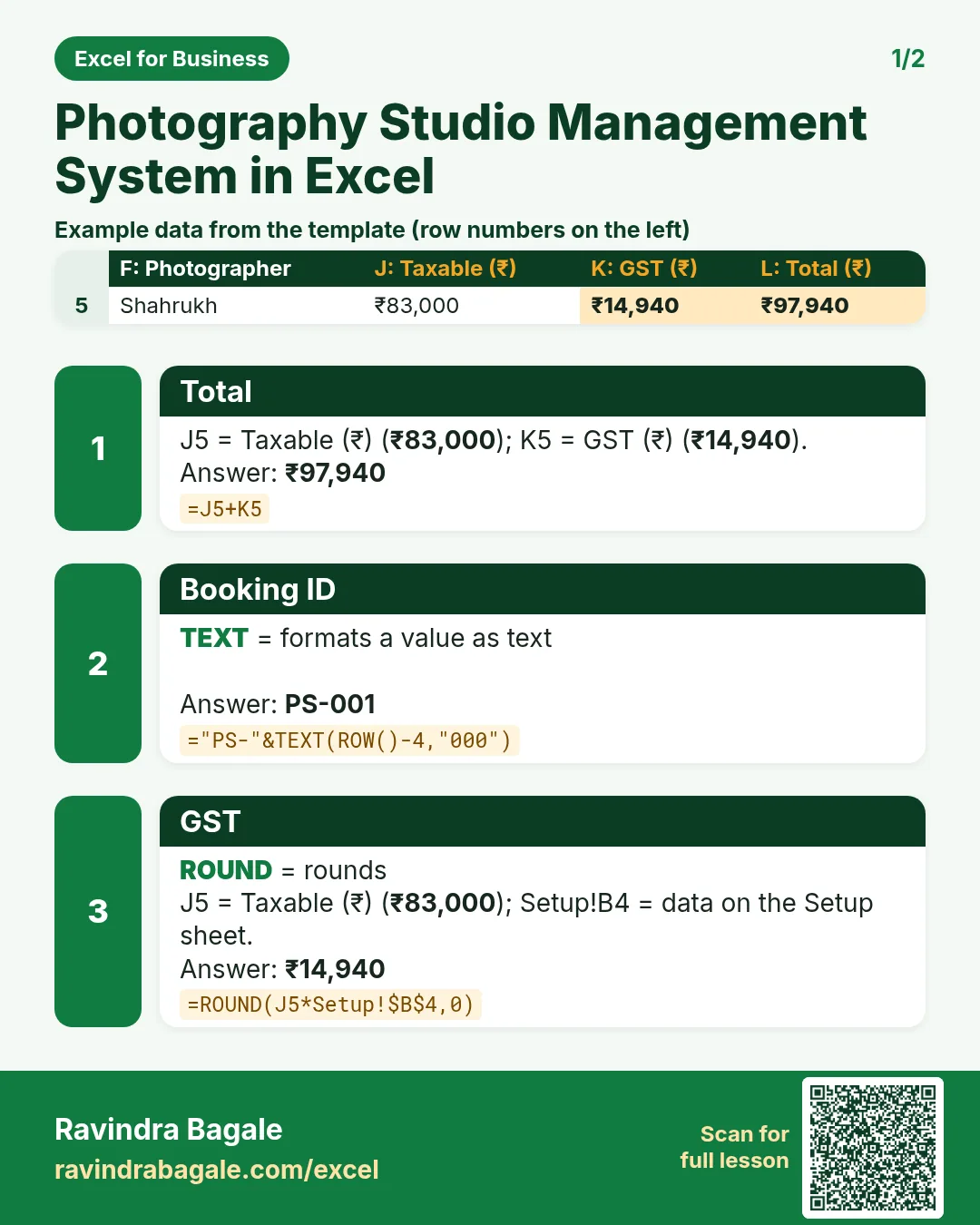

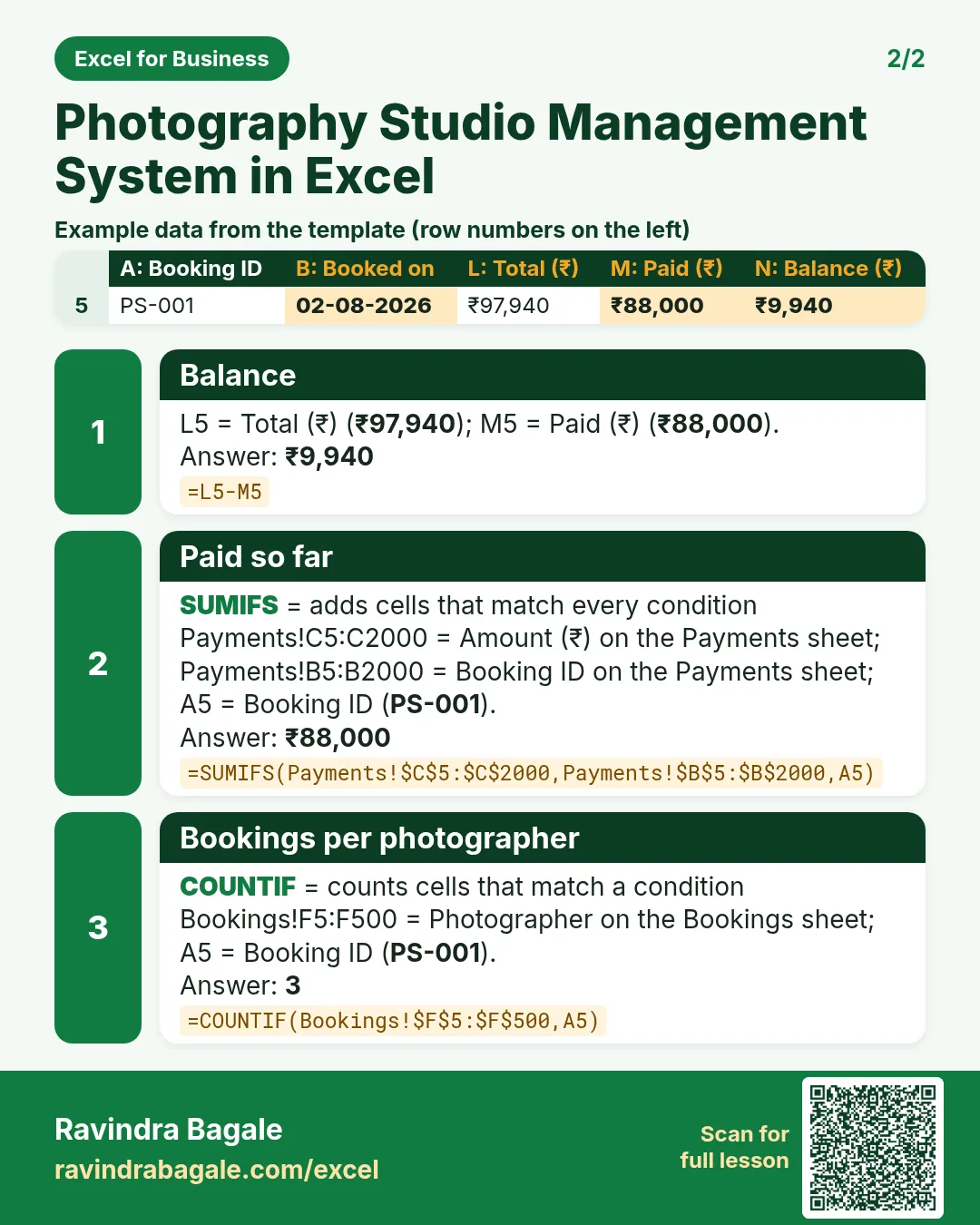

More cards: Ravi Sir's Cards.
6. Frequently asked questions
How do I check double bookings in Excel?
=IF(COUNTIFS(photographer_col,F5,date_col,E5)>1,"Clash","").
How do I work out a delivery due date?
Shoot date + delivery days of the package, looked up with XLOOKUP.
What GST applies to photography?
Photography services are generally taxed at 18%. Keep it as an input and confirm with your accountant.
How do I show which edits are late?
After the shoot, no delivered date and due date before today means Overdue.
How do I price add-ons?
Package price + albums × album price + extra photographers × day rate − discount.
7. Quick quiz
Ten questions on this page. Sign in to save your score.
Loading practice tasks...
- Total parcels (Easy): Add up Parcels in D2:D11. (sheet "Data")
- Average cost (Easy): Average of E2:E11, rounded to 2 decimals. (sheet "Data")
- Rows in Royal Mail (Easy): How many rows have Carrier "Royal Mail"? (sheet "Data")
- Largest parcels (Easy): The largest value in D2:D11. (sheet "Data")
- Days taken (Easy): C2 minus B2. (sheet "Dates")
- Start year (Easy): Year of B3. (sheet "Dates")
- Due month (Easy): Month number of C3. (sheet "Dates")
- Earliest start (Easy): Earliest date in B2:B9 (as a date number). (sheet "Dates")
- Parcels for Royal Mail (Medium): Total of D2:D11 where B is "Royal Mail". (sheet "Data")
- Royal Mail in Manchester (Medium): Total of D2:D11 where B is "Royal Mail" and C is "Manchester". (sheet "Data")
- Working days (Medium): Working days from B2 to C2. (sheet "Dates")
- Weekday of due (Medium): Weekday number of C4 (Sunday = 1). (sheet "Dates")