Housing Society Maintenance System in Excel: Quarterly Bills, Sinking Fund, Interest on Arrears, Receipts, Expenses and Dashboard
Shraddha Co-operative Housing Society in Kolhapur has 12 flats. The treasurer made quarterly bills on a calculator, wrote receipts in a book and never knew the collection figure until the committee meeting. This page builds a 10-sheet Excel system: rates are typed once, every flat's bill works itself out from its area, receipts and expenses are one row each, and the dashboard shows collection and defaulters at a glance.
What you'll learn on this page
- Keep maintenance, sinking fund, parking and interest rates on Setup
- Bill each flat for the quarter from its area in sq ft
- Charge simple interest on arrears for 3 months
- Record receipts and work out each member's outstanding
- Flag Overdue after the bill due date
- Add expenses by head with SUMIFS
- Print a member bill and show collection % on a dashboard
Download the template: housing-society-maintenance-management-system-template.xlsx: a 10-sheet system with example data and real formulas (Read me, Setup, Flats, Bills, Receipts, Ledger, Expenses, Report, Bill print, Dashboard). Yellow cells are inputs you can type over; green cells hold formulas; blue rows are headers and totals. Replace the example data with your own and every report and the dashboard recalculate.
Made-up data: every name, amount, business and date on this page is made up for practice. Cities are used only to make the examples feel real.
1. The business story
Shraddha Co-operative Housing Society, Kolhapur, October to December 2026 quarter, as of 17 October (made-up data). Maintenance ₹3.50 and sinking fund ₹0.25 per sq ft a month, parking ₹300 a month, interest on arrears 21% a year, bills due 15 October.
| Question | Where the system answers it |
|---|---|
| What is flat A-201's bill? | Bill print: ₹10,789 for the quarter plus ₹6,200 arrears = ₹16,989 |
| Who is overdue? | Ledger: A-201, A-302, B-202 and B-302, ₹55,156 in all |
| How much have we collected? | ₹86,004 of ₹1,41,160, 60.9% |
| Where does the money go? | Report: security ₹36,000 of ₹77,820 spent so far |
The interest rate and charges must follow your bye-laws and general body decisions; the sheet only applies them.
Figure 1. Setup and Flats hold rates and areas; Receipts and Expenses are the entry sheets; Bills, Ledger and Report read from them.
2. Build it sheet by sheet
Step 1. Setup and Flats
- B4 quarter start, B5 maintenance per sq ft per month (₹3.50), B6 sinking fund (₹0.25), B7 parking per month, B8 interest on arrears per year, B9 bill due date.
- The model bye-laws for Maharashtra housing societies allow simple interest of up to 21% a year on arrears; type the rate your bye-laws set.
- Flats: Flat, Member, Area (sq ft), Parking?, Arrears brought forward.
Step 2. Bills: quarter charges and interest
- C5 maintenance
=ROUND(Flats!C5*Setup!$B$5*3,0): 850 sq ft × ₹3.50 × 3 = ₹8,925 for A-201. - D5 sinking fund the same way, E5 parking
=IF(Flats!D5="Yes",Setup!$B$7*3,0). - F5 interest:
=ROUND(Flats!E5*Setup!$B$8*3/12,0), simple interest for 3 months; ₹6,200 arrears give ₹326. - G5 quarter charges
=SUM(C5:F5), H5 arrears and I5 total due=G5+H5(ROUND).
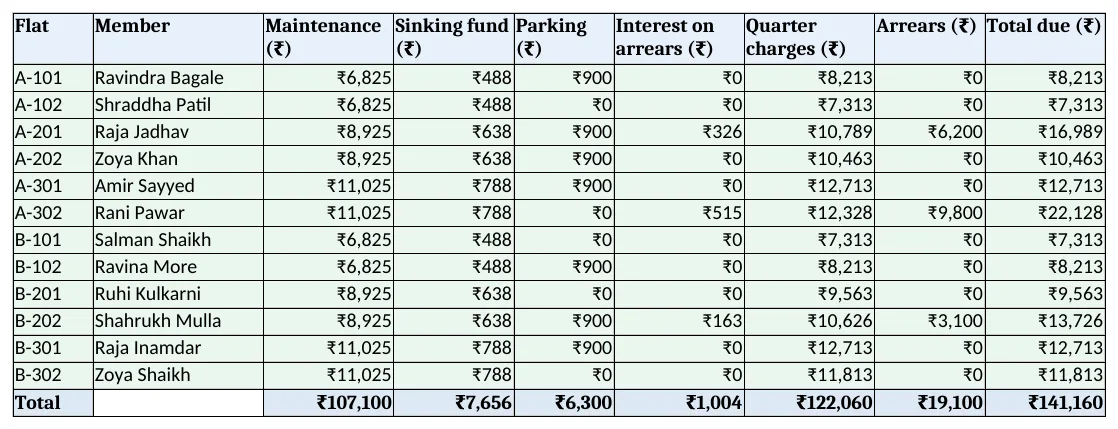
Figure 2. Bills: maintenance, sinking fund, parking, interest, arrears and total due per flat
Step 3. Receipts and Ledger
- Receipts: Receipt no, Date, Flat, Member, Amount, Mode. A5
="SR-"&TEXT(ROW()-4,"000"). - Ledger D5 paid this quarter:
=SUMIFS(Receipts!$E$5:$E$2000,Receipts!$C$5:$C$2000,A5,Receipts!$B$5:$B$2000,">="&Setup!$B$4)(SUMIFS), E5 outstanding=C5-D5. - F5 status:
=IF(E5<=0,"Clear",IF(Setup!$B$3>Setup!$B$9,"Overdue","Due")), coloured with conditional formatting.
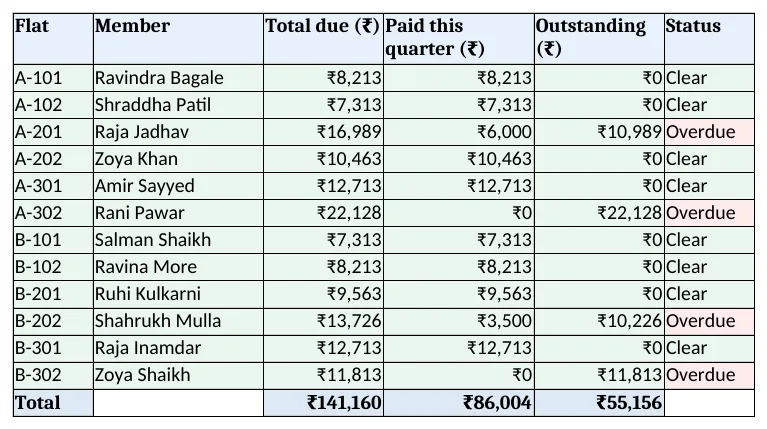
Figure 3. Ledger: total due, paid this quarter, outstanding and status
Step 4. Expenses and Report
- Expenses: Date, Head, Amount, Paid to, with the head from a drop-down.
- Report B5
=SUMIFS(Expenses!$C$5:$C$2000,Expenses!$B$5:$B$2000,A5,Expenses!$A$5:$A$2000,">="&Setup!$B$4)and C5 share. - Rows 14 to 17: total due, collected, collection % and collected minus expenses.
Step 5. Bill print and Dashboard
- Bill print: type a flat in B4; rows 6 to 12 look up each charge from Bills and B14 shows the due date. Set the print area.
- KPI cards: total due, collected, collection %, outstanding, flats overdue and expenses. Charts: expenses by head and outstanding by flat.
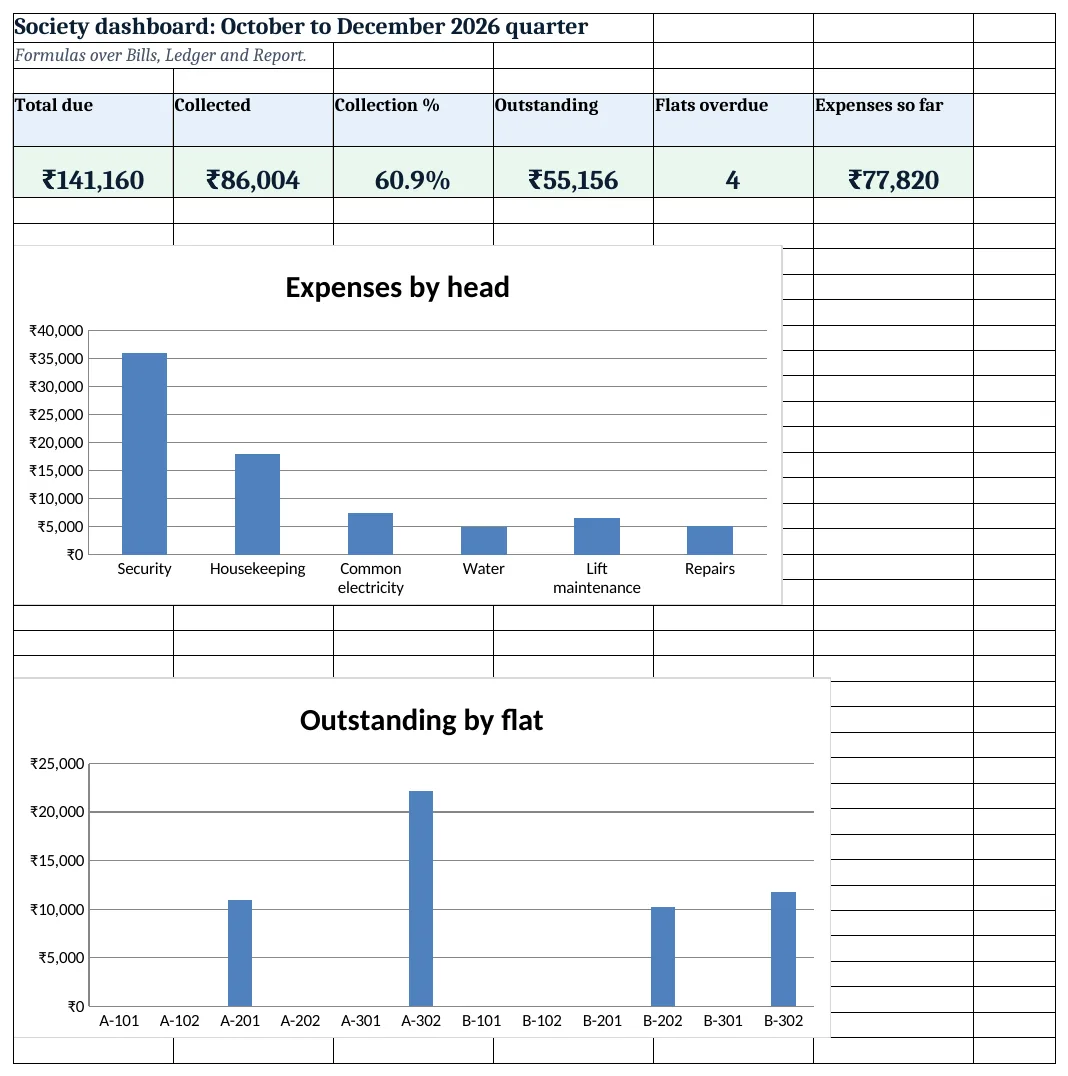
Figure 4. Society dashboard: due, collected, collection %, outstanding, overdue flats and expenses
Ravindra Bagale's Tip
Share the Ledger with the committee every month, not just at the AGM. Overdue amounts shrink when members know they are visible.
Ravindra Bagale's Tip – मराठी
Ledger फक्त AGM ला नाही, दर महिन्याला committee ला दाखवा. थकबाकी दिसते हे कळले की ती कमी होते.
Ravindra Bagale's Tip – हिंदी
Ledger सिर्फ AGM पर नहीं, हर महीने committee को दिखाएं. बकाया दिखता है यह पता चले तो घटता है.
3. Formulas used
| Cell | Formula | What it does |
|---|---|---|
| Bills!C5 | =ROUND(Flats!C5*Setup!$B$5*3,0) |
Maintenance for the quarter |
| Bills!D5 | =ROUND(Flats!C5*Setup!$B$6*3,0) |
Sinking fund for the quarter |
| Bills!E5 | =IF(Flats!D5="Yes",Setup!$B$7*3,0) |
Parking for the quarter |
| Bills!F5 | =ROUND(Flats!E5*Setup!$B$8*3/12,0) |
Simple interest on arrears |
| Bills!I5 | =G5+H5 |
Total due |
| Receipts!A5 | ="SR-"&TEXT(ROW()-4,"000") |
Receipt number |
| Ledger!D5 | =SUMIFS(Receipts!$E$5:$E$2000,Receipts!$C$5:$C$2000,A5,Receipts!$B$5:$B$2000,">="&Setup!$B$4) |
Paid this quarter |
| Ledger!E5 | =C5-D5 |
Outstanding |
| Ledger!F5 | =IF(E5<=0,"Clear",IF(Setup!$B$3>Setup!$B$9,"Overdue","Due")) |
Clear, Due or Overdue |
| Report!B5 | =SUMIFS(Expenses!$C$5:$C$2000,Expenses!$B$5:$B$2000,A5,Expenses!$A$5:$A$2000,">="&Setup!$B$4) |
Expenses by head |
| Report!C5 | =IFERROR(B5/$B$11,0) |
Share of expenses |
| Bill print!B6 | =XLOOKUP($B$4,Bills!$A$5:$A$200,Bills!$B$5:$B$200,"Not found") |
Member on the bill |
| Dashboard!C5 | =Report!B16 |
Collection % |
Every formula above is written in the template, so you can click a cell and see it in the formula bar. All values on this page were recalculated in LibreOffice with zero errors.
4. Common mistakes
- Compound interest on arrears. Charge simple interest on the arrears only, as the bye-laws describe, not interest on interest.
- Interest on the current bill. Interest applies to arrears brought forward, not to a bill that is not yet due.
- Forgetting to carry arrears forward. At quarter end, copy Ledger outstanding into Flats arrears before changing the quarter start.
- Receipts without a flat number. A payment without the flat cannot reach the ledger. Pick the flat from the drop-down.
- Mixing sinking fund with expenses. Sinking fund is set aside for major repairs. Keep it in its own bill column and bank account.
Ravindra Bagale's Tip
Put the bill due date on every bill and send it a week before. Members pay on time when they know the date.
Ravindra Bagale's Tip – मराठी
प्रत्येक bill वर due date लिहा आणि आठवडाभर आधी पाठवा. तारीख माहीत असली की सदस्य वेळेवर भरतात.
Ravindra Bagale's Tip – हिंदी
हर bill पर due date लिखें और हफ्ता भर पहले भेजें. तारीख पता हो तो सदस्य समय पर भरते हैं.
5. More real examples
Example 1: Apartment association. Use a flat amount per flat instead of per sq ft: replace the area formula with a fixed rate.
Example 2: Commercial complex. Add a Unit type column (shop or office) and a rate per type looked up from Setup.
Example 3: Row-house colony. Bill water and garden charges per plot with their own columns on Bills.
Quick revision cards
Quick revision
Each card shows formulas from this page, each with an example and its answer from the template. Scan the QR code on a card to open this lesson. All names and numbers are made up for practice.
झटपट उजळणी
प्रत्येक card वर या page मधले formulas, त्यांचं example आणि template मधलं उत्तर आहे. Card वरचा QR code scan केला की हा lesson उघडतो. सगळी नावं आणि आकडे सरावासाठी काल्पनिक आहेत.
झटपट दोहराई
हर card पर इस page के formulas, उनका example और template का उत्तर है. Card का QR code scan करें तो यह lesson खुलेगा. सभी नाम और आंकड़े अभ्यास के लिए काल्पनिक हैं.
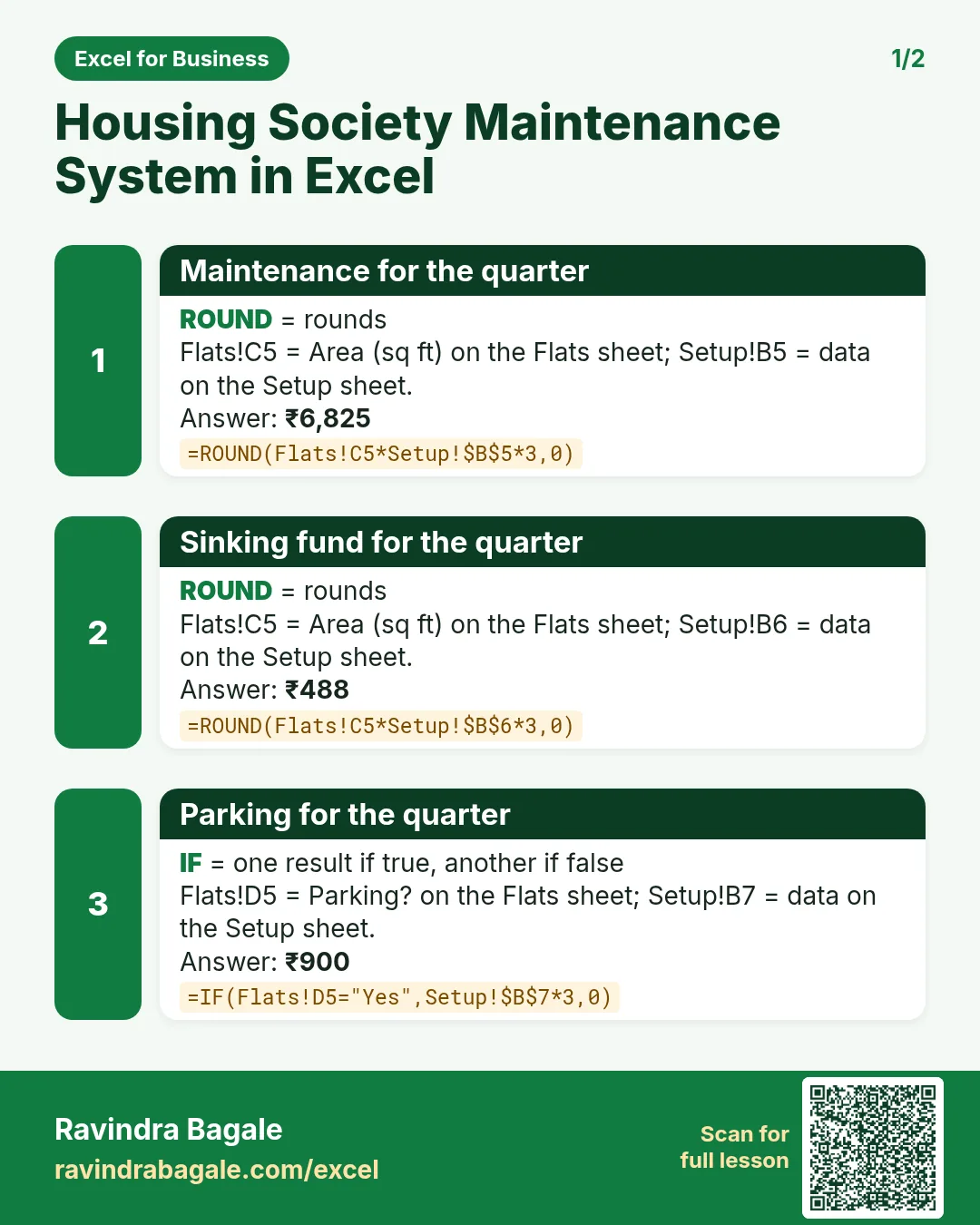

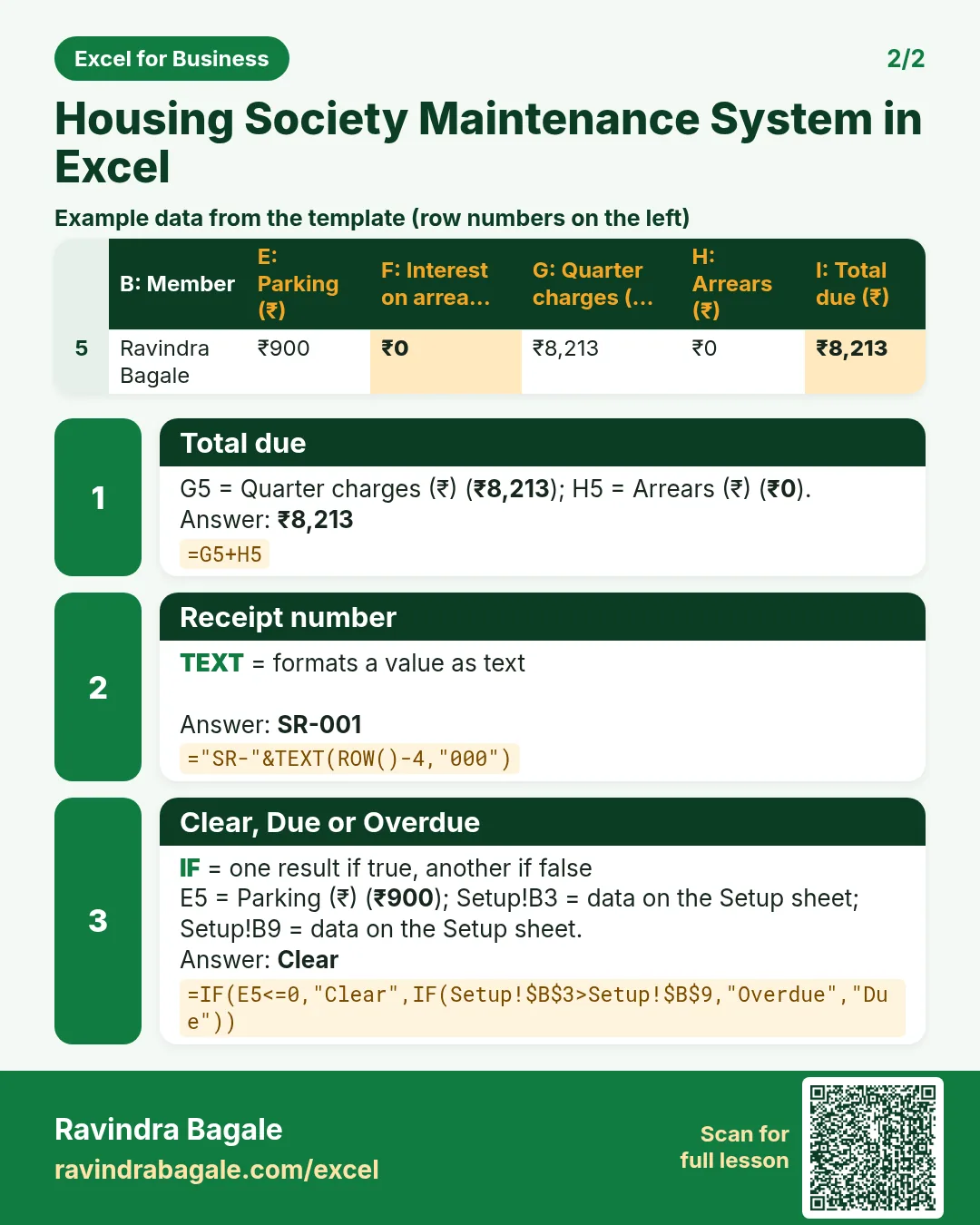

More cards: Ravi Sir's Cards.
6. Frequently asked questions
How do I calculate society maintenance per sq ft in Excel?
Area × rate × months: =ROUND(area*rate*3,0) for a quarter.
How do I calculate interest on arrears?
Simple interest: arrears × yearly rate × months ÷ 12, as in Bills F5.
What interest can a housing society charge?
In Maharashtra the model bye-laws allow up to 21% a year simple interest on arrears; your society's adopted bye-laws decide the actual rate.
How do I list defaulters?
Ledger status shows Overdue when anything is outstanding after the due date; filter that column.
How do I see collection %?
Collected ÷ total due, as in Report B16.
7. Quick quiz
Ten questions on this page. Sign in to save your score.
Loading practice tasks...
- Monthly rate (Easy): Yearly rate B3 divided by 12.
- Months (Easy): B4 times 12.
- Monthly EMI (Easy): EMI on amount B2 at B3 for B4 years, as a positive number, rounded to 2 decimals.
- Total repaid (Medium): Total paid over the loan, rounded to 0 decimals.
- Total interest (Medium): Total paid minus B2, rounded to 0 decimals.
- Processing fee (Medium): B2 times B6.
- Savings value (Medium): Value after B4 years of saving B5 each month at B3, positive, rounded to 0 decimals.
- Interest earned (Hard): Savings value minus B5 times months, rounded to 0 decimals.
- Months to repay at double EMI (Hard): Months to clear B2 at B3 paying twice the EMI, rounded up.
- Loan you can afford (Hard): Loan size for an EMI equal to B5 over B4 years at B3, positive, rounded to 0 decimals.
- Interest share (Hard): Total interest ÷ total paid, rounded to 3 decimals.