Excel for Banking: Every File, Formula and Report Banks Use (With Templates)
This guide is for people who work in Banking and use Excel every day. You will see every common file, the formulas people actually type, and downloadable templates with made-up Indian ₹ data. Related short lessons are linked — we do not re-teach them here.
What you'll learn
- Which roles use Excel in banking
- Every common Excel file type for this industry
- Sample tables with realistic ₹ examples (made-up names)
- Formulas: EMI, Interest part of EMI, Principal part of EMI, Days past due and more
- Ready templates you can download and reuse
Downloads: banking-kyc-account-opening.xlsx (KYC register + account opening tracker) · banking-loan-book-emi.xlsx (Loan book + one full EMI schedule + credit appraisal) · banking-npa-overdue-recon.xlsx (NPA/overdue tracker + bank reconciliation) · banking-cash-clearing-fd-mis.xlsx (Teller cash + cheque clearing + FD maturity + branch MIS)
Example data only
All names, amounts, rates and dates are made up for practice. They are not real bank, insurer or plant records. Follow your organisation's own circulars and software for live work.
In short
One industry → many Excel files. Each file is one clear list. Yellow cells are inputs; green cells are formulas. Start with the Roles table, then open the matching template.
थोडक्यात
एक industry → अनेक Excel files. प्रत्येक file = एक स्पष्ट यादी. Yellow = input; green = formula. Roles table पासून सुरू करा, नंतर matching template उघडा.
संक्षेप में
एक industry → कई Excel files. हर file = एक साफ सूची. Yellow = input; green = formula. Roles table से शुरू करें, फिर matching template खोलें.
Related chapters (already on this site)
Why
Some topics already have a focused lesson. Use those for depth; use this guide for the full industry picture.
What
| Chapter | What it covers |
|---|---|
| 22. KPI in All Industries (Banking KPIs) | Short KPI list for banks. This guide goes deeper into every file. |
| 27. 20 Industry Projects | Practice projects for banking and more. |
| Excel Dashboards gallery | Ready dashboards you can open and study. |
How
- Skim the link if you need that one skill.
- Come back here for the full file list and templates.
1. Who uses Excel
Why
A branch runs on lists: customers, cash, loans and daily totals. Excel is the first tool most staff open.
What
| Role | Typical Excel work |
|---|---|
| Branch teller / cashier | Cash in, cash out, denomination slip, day-end cash balance. |
| Customer service / KYC desk | Account opening tracker, KYC document checklist, incomplete KYC list. |
| Credit / loan officer | Loan book, EMI schedule, credit appraisal sheet, overdue follow-up. |
| Operations / clearing | Cheque inward/outward, clearing returns, CTS status. |
| Branch operations / accountant | Bank reconciliation, vault cash, branch daily MIS. |
| Relationship manager | FD/RD maturity list, renewals, cross-sell tracker. |
How
- Open the Roles table below.
- Match each role to the file that person updates.
- Download the templates and find the matching sheet name.
2. Every common Excel file
Why
If you only learn one dashboard, you miss the daily registers that feed it.
What
| File | What one row / sheet holds |
|---|---|
| Customer KYC register | One row per customer: name, Aadhaar/PAN status, address proof, KYC date, risk category, incomplete flag. |
| Account opening tracker | Account number, type (SB/CA/FD), open date, branch, RM name, status (Open / Pending / Rejected). |
| Loan book | Loan ID, customer, product (Home/Car/Personal), sanction, outstanding, rate, EMI, next due, DPD, NPA flag. |
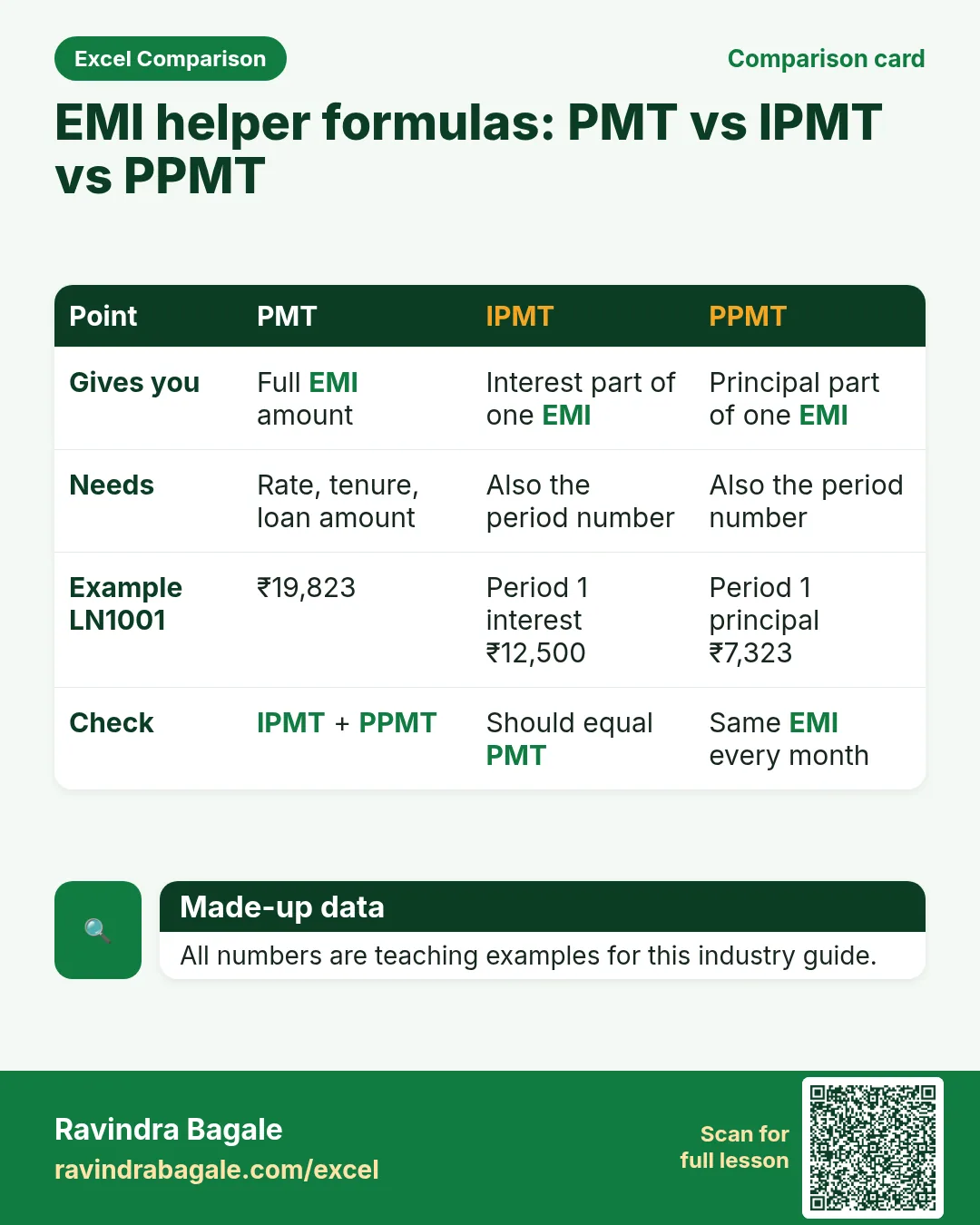
| EMI schedule | For one loan: period, due date, EMI, interest, principal, closing balance (PMT / IPMT / PPMT). |
| NPA / overdue tracker | Loans with DPD > 0; buckets 1–30, 31–60, 61–90, 90+; follow-up date and officer. |
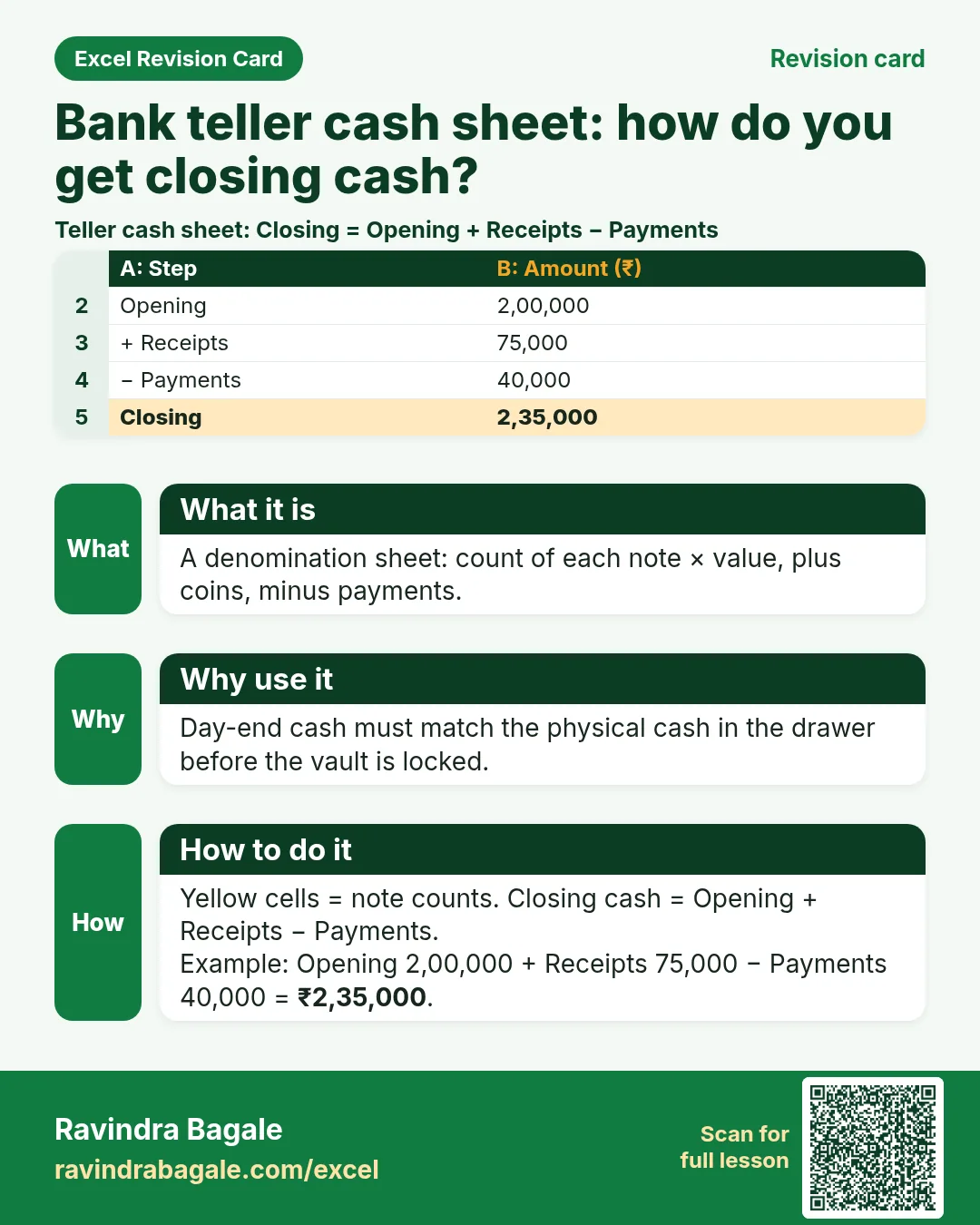
| Teller cash / vault | Denomination count, opening cash, receipts, payments, closing cash, difference. |
| Cheque clearing register | Cheque no, drawer, amount, inward/outward, clearing date, return reason. |
| Bank reconciliation | Passbook vs cash book: unmatched debits/credits, timing differences. |
| FD / RD maturity | Deposit no, customer, amount, rate, start, maturity, maturity amount, status. |
| Branch daily MIS | Deposits, advances, NPA %, cash, new accounts, complaints — one row per day. |
| Credit appraisal sheet | Income, obligations, FOIR, proposed EMI, LTV — decision helpers. |
How
- Pick the file that matches your role.
- Download the template that contains that sheet.
- Replace yellow sample rows with your practice data (still made-up if you share screenshots).
3. Formulas people use
Why
Typed numbers go stale. Formulas update when inputs change.
What
| Name | Formula | What it does |
|---|---|---|
| EMI | =PMT(rate/12, tenure_months, -principal) |
Monthly instalment for a loan. |
| Interest part of EMI | =IPMT(rate/12, period, tenure_months, -principal) |
Interest in one EMI. |
| Principal part of EMI | =PPMT(rate/12, period, tenure_months, -principal) |
Principal in one EMI. |
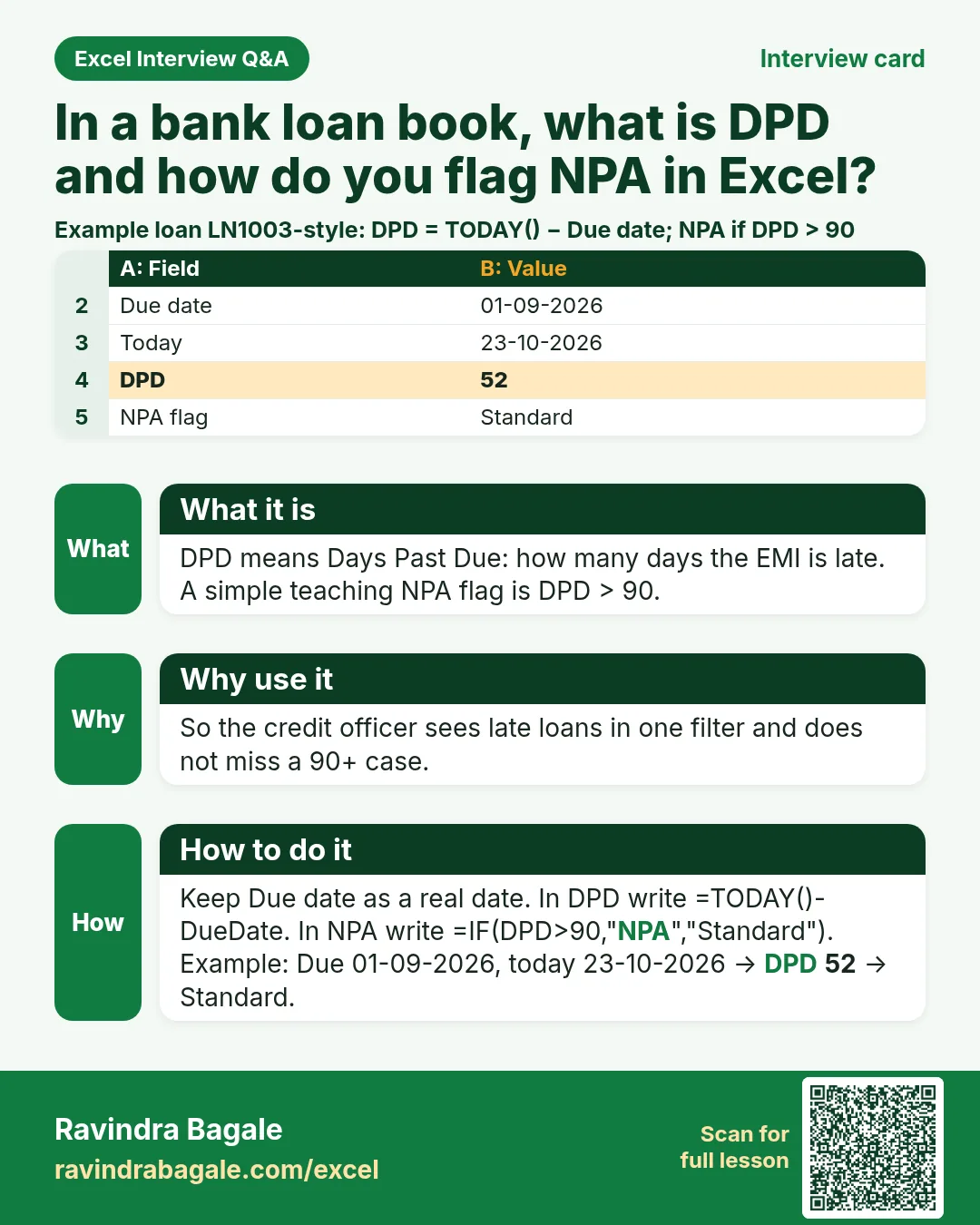
| Days past due | =TODAY()-due_date |
How many days the EMI is late. |
| NPA flag | =IF(DPD>90,"NPA","Standard") |
Simple teaching flag (real bank rules are more detailed). |
| Maturity amount (simple) | =principal*(1+rate*years) |
Simple interest FD example for teaching. |
| Sum of overdue | =SUMIF(status_range,"Overdue",amount_range) |
Total overdue amount. |
| Count pending KYC | =COUNTIF(kyc_status,"Pending") |
How many KYCs are still open. |
How
- Open the Formulas used sheet inside each template.
- Change only yellow cells.
- Watch green cells recalculate.
3. Customer KYC and account opening
Why
Without complete KYC the account cannot stay active. Staff need one clear list of what is missing.
What
A KYC register (one row per customer) and an account opening tracker (one row per account).
How
- Download banking-kyc-account-opening.xlsx.
- Yellow cells are inputs; green cells are formulas.
- Filter Status = Pending to see incomplete KYCs.
- Add a new customer in the next empty row; formulas fill Status automatically.
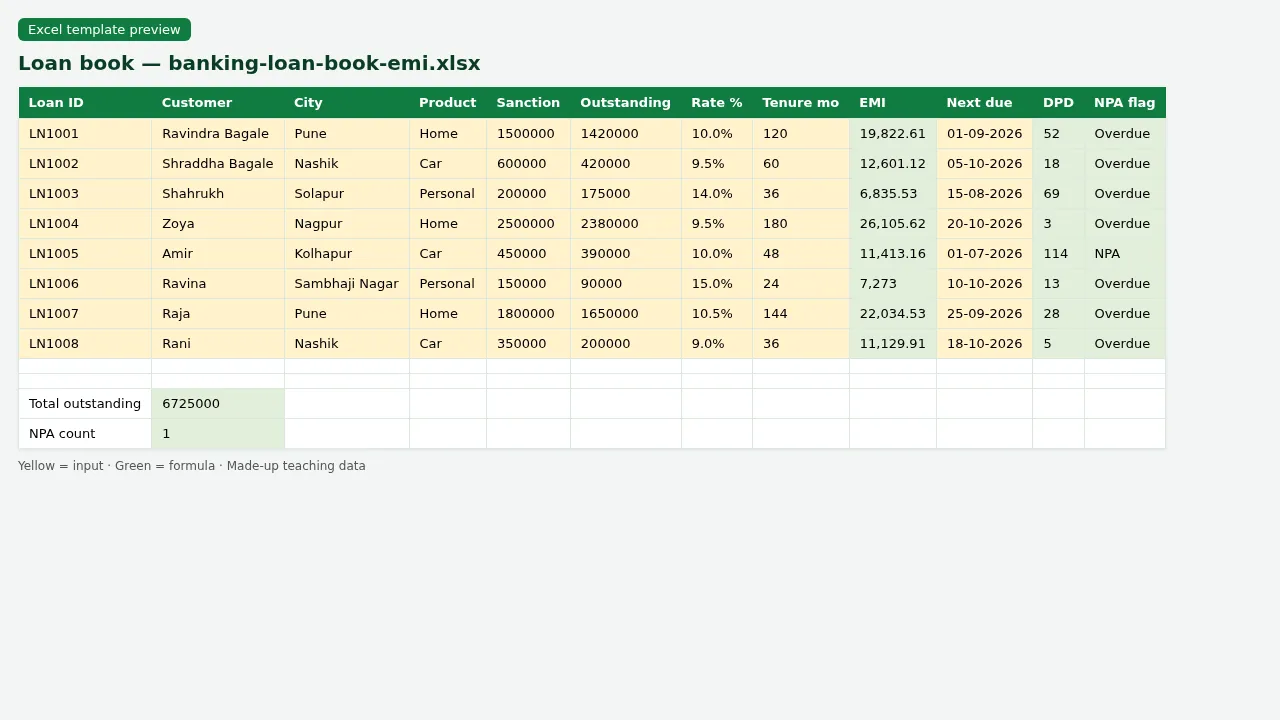
Figure. Loan book with EMI, DPD and NPA flag formulas.
4. Loan book, EMI and credit appraisal
Why
Credit officers must know outstanding, next EMI and whether the loan is late — from one sheet.
What
A loan book for many loans, plus one EMI schedule built with PMT, IPMT and PPMT for a single loan.
How
- Open banking-loan-book-emi.xlsx › sheet Loan book.
- Read Outstanding, EMI, DPD and NPA flag for each loan.
- Open sheet EMI schedule for loan LN1001 (Ravindra Bagale, home loan).
- Change the rate or tenure only in the yellow input cells; the schedule recalculates.
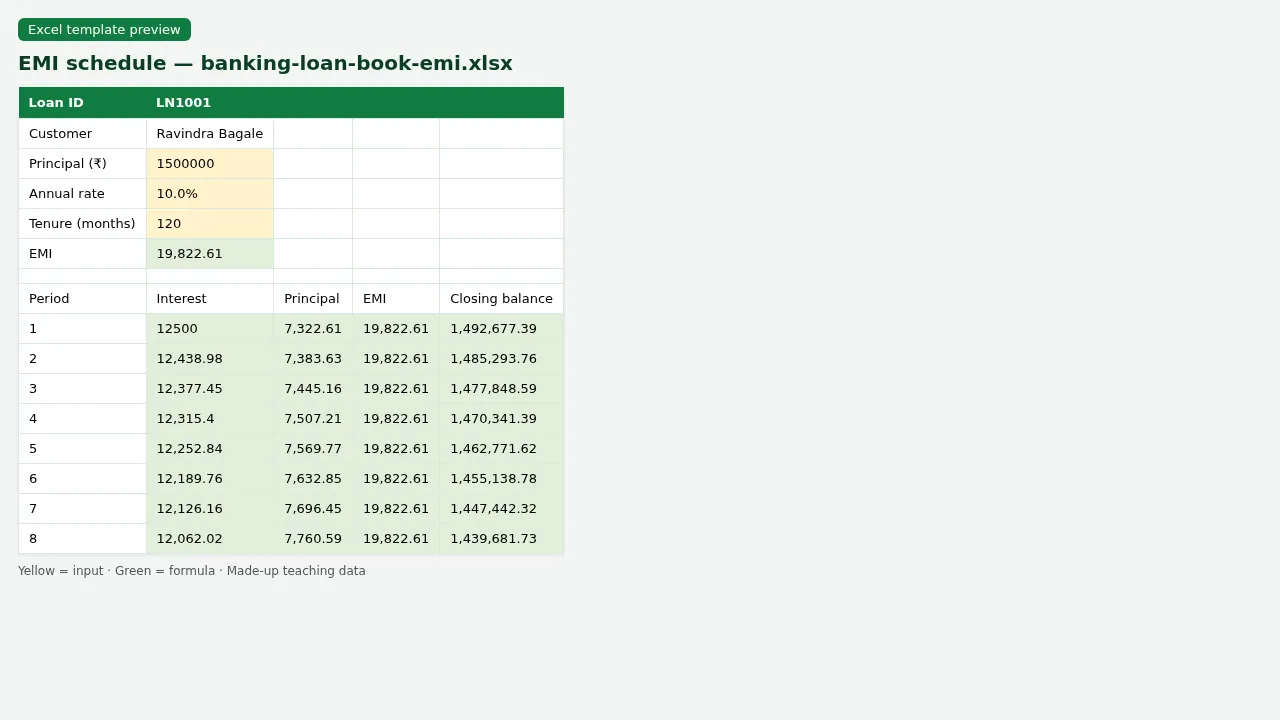
Figure. EMI schedule for LN1001 using PMT, IPMT and PPMT.
5. NPA, overdue and follow-up
Why
Late loans need follow-up by bucket. A wrong DPD wastes a call and hides risk.
What
An overdue tracker that buckets DPD and totals amount by bucket.
How
- Open banking-npa-overdue-recon.xlsx › Overdue.
- Check the bucket column (1–30, 31–60, 61–90, 90+).
- Read the MIS totals at the top: they use COUNTIF and SUMIF.
- Mark Follow-up done in the yellow column after a call.
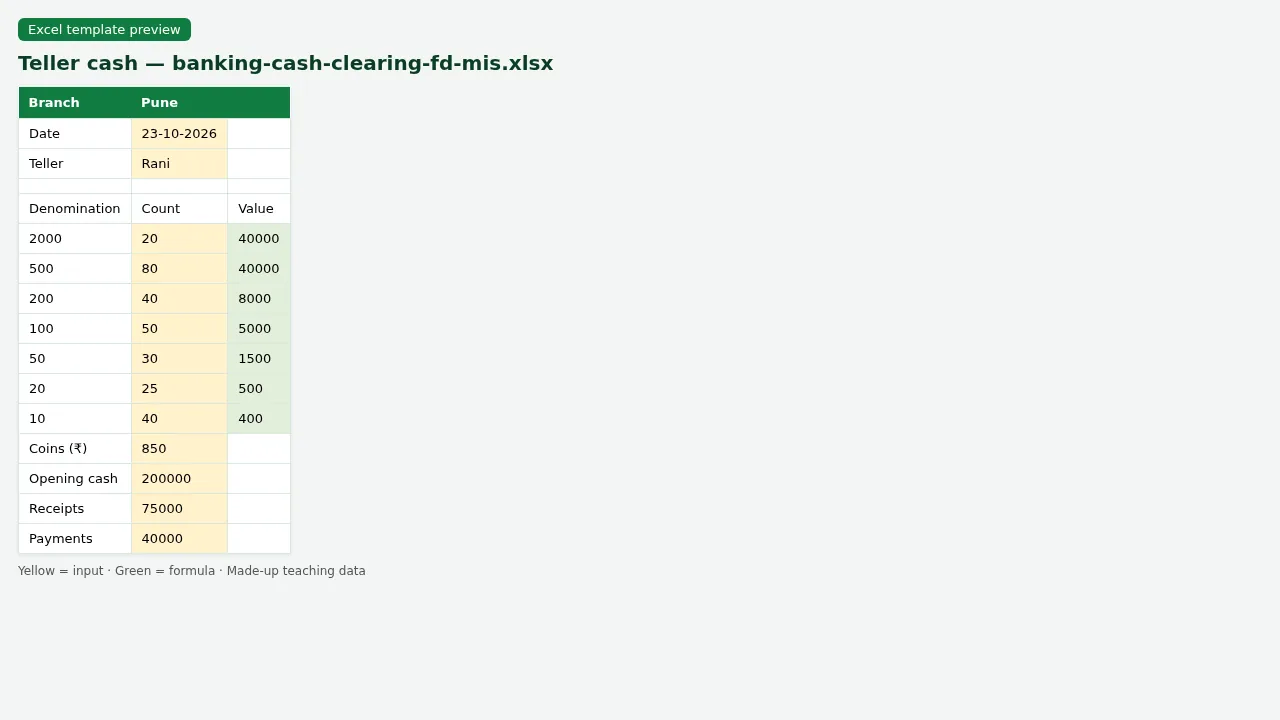
Figure. Teller cash — denomination counts and closing cash.
6. Teller cash, cheque clearing and bank reconciliation
Why
Cash must match at day end. Cheques and bank statement lines must be matched or explained.
What
A denomination cash sheet, a cheque register and a simple bank reconciliation.
How
- Open banking-cash-clearing-recon.xlsx.
- On Teller cash, enter note counts; Closing cash is a formula.
- On Cheques, filter Return reason that is not blank.
- On Bank recon, tick Matched = Yes for lines that appear on both sides; Difference uses SUMIF.
7. FD/RD maturity and branch daily MIS
Why
Managers need maturities this week and one daily snapshot of the branch.
What
An FD maturity list and a daily MIS with deposit, advance and NPA %.
How
- Open banking-fd-branch-mis.xlsx › FD maturity.
- Sort by Maturity date to see what falls due this month.
- Open Branch MIS and read the totals row.
- Link: for bank KPI definitions see chapter 22 (link in Related chapters).
8. Sheet previews
Why
See the layout before you open Excel.
What
Screenshots of the main sheets in the downloadable templates.
How
Scroll the figures, then download the matching .xlsx.
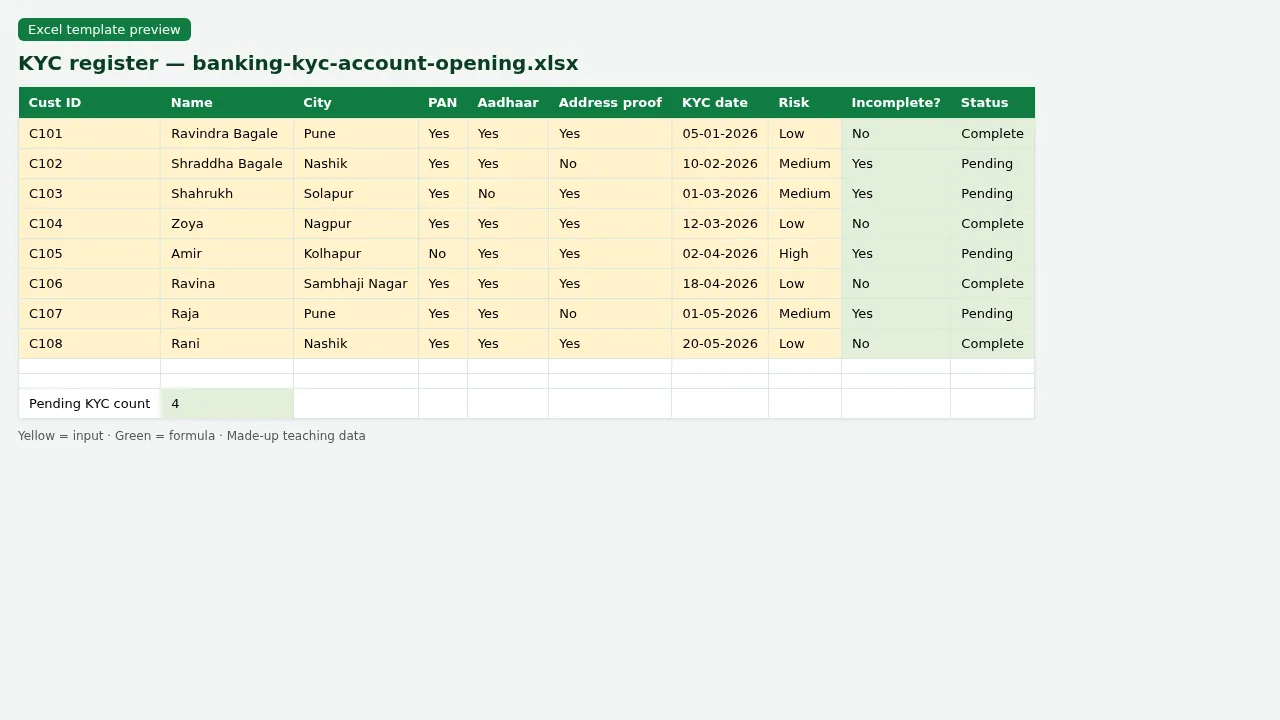
Figure. KYC register — yellow inputs, green Incomplete/Status formulas.
Figure. Loan book with EMI, DPD and NPA flag formulas.
Figure. EMI schedule for LN1001 using PMT, IPMT and PPMT.
Figure. Teller cash — denomination counts and closing cash.
9. Common mistakes
| Mistake | What goes wrong | Fix |
|---|---|---|
| Typing EMI as a fixed number | When rate or tenure changes, every row is wrong. | Use =PMT(...) in one cell and reference it. |
| DPD as text | Filters and NPA flags break. | Keep due date as a real Excel date; DPD = TODAY()-due_date. |
| Mixing cash denominations in one cell | Day-end difference cannot be checked. | One column per denomination; Closing = SUM of value. |
| Deleting rows with formulas | Totals go blank. | Clear inputs only; keep formula rows. |
| Using real customer data in practice files | Privacy risk. | These templates use made-up names only. |
10. FAQ
Are these RBI or bank circular rates?
No. Rates, fees and NPA rules here are made-up teaching examples. Always follow your bank’s circulars.
Can LibreOffice open the templates?
Yes. Files are checked in LibreOffice Calc with 0 formula errors.
Is PMT available in all Excel versions?
Yes in desktop Excel and in Excel for the web. LibreOffice uses the same PMT name.
What is DPD?
Days Past Due — how many days after the EMI due date the payment is still unpaid.
What is NPA in this file?
A simple teaching flag when DPD > 90. Real classification has more rules (security, agriculture, etc.).
11. Try at home
Try at home
- On the loan book, filter Product = Home. What is the total Outstanding? (Check the green total cell.)
- On EMI schedule for LN1001, what is the interest part of EMI number 1? (IPMT row.)
- On Overdue, how many loans are in bucket 90+?
- On Teller cash, change the count of ₹500 notes and confirm Closing cash changes.
Recap
In short
- 6 roles use Excel in this industry.
- 11 common file types are listed above.
- 4 downloadable templates with yellow inputs and green formulas.
- Rates and rules here are teaching examples only.
- Use Related chapters for focused skills (EDATE, KPIs, planning).
Quick revision cards
Quick revision
1 interview card, 1 comparison card and 1 revision card. Save on your phone or download as PNG. Numbers are made up for practice.
झटपट उजळणी
1 interview card, 1 comparison card आणि 1 revision card. Phone वर save करा किंवा PNG download करा. आकडे सरावासाठी काल्पनिक आहेत.
झटपट दोहराई
1 interview card, 1 comparison card और 1 revision card. Phone पर save करें या PNG download करें. आंकड़े अभ्यास के लिए काल्पनिक हैं.



Loading practice tasks...
- Total tenure months (Easy): Add up Tenure months in D2:D11.
- Average loan amount (Easy): Average of E2:E11, rounded to 2 decimals.
- Rows in Home (Easy): How many rows have Loan type "Home"?
- Largest tenure months (Easy): The largest value in D2:D11.
- Tenure months for Home (Medium): Total of D2:D11 where B is "Home".
- Home in Mumbai (Medium): Total of D2:D11 where B is "Home" and C is "Mumbai".
- Best in Home (Medium): Largest E2:E11 value where B is "Home".
- Value of row 2 (Medium): D2 times E2.
- Look up Ananya Nair (Medium): The Tenure months for "Ananya Nair" (use a lookup on column A).
- Total value (Hard): Sum of D times E for all rows.
- Share of Home (Hard): Share of D2:D11 that is "Home", rounded to 3 decimals.
- Rank of row 2 (Hard): Rank of D2 among D2:D11 (largest = 1).
- Above average? (Hard): "Above" if E2 is above the average of E2:E11, else "Below".