FD Calculator in Excel: Maturity Amount and Interest with Quarterly Compounding (Compare 3 Offers)
Ravindra Bagale in Kolhapur has ₹1,00,000 to put in a fixed deposit for 5 years. Three offers look almost the same: 7.00% compounded quarterly, 7.25% compounded yearly and 7.10% compounded monthly. Which one pays the most at the end? The rate alone does not tell you. How often the interest is added (the compounding) matters too, and Excel shows the answer in one row.
What you'll learn on this page
- The FD maturity formula and how FV does the same job
- Compounding: monthly, quarterly, half-yearly, yearly
- Interest earned and effective yearly yield
- The best of three offers with MAX
- A year-by-year balance table
Download the template: fd-maturity-calculator-template.xlsx: example data with real formulas. Yellow cells are inputs you can type over; green cells hold formulas; blue rows are headers and totals. Replace the example data with your own and everything recalculates.
Made-up data: every name, amount, shop and date on this page is made up for practice. Cities are used only to make the examples feel real.
1. The example
₹1,00,000 for 5 years in three made-up offers:
| Offer A | Offer B | Offer C | |
|---|---|---|---|
| Rate | 7.00% | 7.25% | 7.10% |
| Compounding | Quarterly | Yearly | Monthly |
| Maturity | ₹1,41,478 | ₹1,41,901 | ₹1,42,469 |
| Interest | ₹41,478 | ₹41,901 | ₹42,469 |
| Effective yield | 7.19% | 7.25% | 7.34% |
Offer C has a lower rate than B but pays ₹568 more, because interest is added 12 times a year instead of once. Offer A's figure, ₹1,41,478 for ₹1 lakh at 7% quarterly for 5 years, is the same as the worked example on SBI Securities' FD calculator page. SBI's own maturity calculator also says its interest is compounded quarterly.
The formula. Maturity = P × (1 + r/n)^(n × t), where P is the deposit, r the yearly rate, n the times interest is added per year and t the years. In Excel the same thing is =FV(r/n, n*t, 0, -P).
Figure 1. FD calculator: deposit, rate, years and compounding go in; FV with rate/n and n×years gives the maturity; the offer with the highest maturity (Offer C, ₹1,42,469) is marked Best.
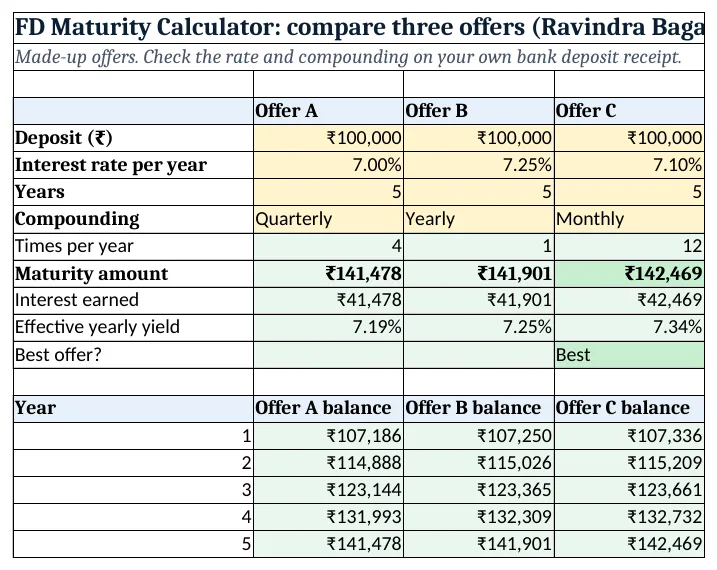
Figure 2. The template sheet, recalculated with its example data. Download it above and replace the yellow cells with your own numbers.
2. Build it step by step
Step 1. Type the offers
- In B4:D4 type Offer A, Offer B, Offer C.
- In A5:A8 type Deposit, Interest rate per year, Years, Compounding.
- Type the deposit, rate and years in B5:D7 (yellow).
- Select B8:D8 > Data > Data Validation > List:
Monthly,Quarterly,Half-yearly,Yearly(drop-down lists).
Step 2. Times per year
- In B9 type
=IF(B8="Monthly",12,IF(B8="Quarterly",4,IF(B8="Half-yearly",2,1)))(nested IF). - Copy B9 right to D9: 4, 1 and 12.
Step 3. Maturity amount
- In B10 type
=ROUND(FV(B6/B9,B9*B7,0,-B5),0): ₹1,41,478. - B6/B9 is the rate per compounding period (7%/4 = 1.75% a quarter) and B9*B7 is the number of periods (20 quarters).
- The 0 means no extra deposits; -B5 is the deposit paid out today. ROUND gives whole rupees (ROUND).
- Copy right: ₹1,41,901 and ₹1,42,469.
Step 4. Interest and effective yield
- In B11 type
=B10-B5: ₹41,478 interest. - In B12 type
=(1+B6/B9)^B9-1: 7.19%. This is the rate you really earn in one year after compounding, so offers with different compounding can be compared fairly.
Step 5. Pick the best
- In B13 type
=IF(B10=MAX($B$10:$D$10),"Best","")and copy right. Offer C shows Best. - Select B10:D10 > Home > Conditional Formatting > New Rule > Use a formula:
=B10=MAX($B$10:$D$10), green fill (formula rules).
Step 6. Year-by-year table
- In A16:A20 type 1 to 5.
- In B16 type
=ROUND(FV(B$6/B$9,B$9*$A16,0,-B$5),0): ₹1,07,186 after year 1. - Copy B16 to B16:D20. The mixed references keep each offer's inputs in rows 5 to 9 and the year in column A.
Ravindra Bagale's Tip
When two offers look close, look at row 12. The effective yield puts quarterly, monthly and yearly compounding on the same scale.
Ravindra Bagale's Tip – मराठी
दोन offers जवळपास सारखे वाटले तर row 12 बघा. Effective yield मुळे quarterly, monthly आणि yearly compounding एकाच तराजूत येतात.
Ravindra Bagale's Tip – हिंदी
दो offers लगभग एक जैसे लगें तो row 12 देखो. Effective yield से quarterly, monthly और yearly compounding एक ही तराज़ू पर आ जाते हैं.
3. Formulas used
| Cell | Formula | What it does |
|---|---|---|
| B9 | =IF(B8="Monthly",12,IF(B8="Quarterly",4,IF(B8="Half-yearly",2,1))) |
Times interest is added per year |
| B10 | =ROUND(FV(B6/B9,B9*B7,0,-B5),0) |
Maturity amount, rounded to rupees |
| B11 | =B10-B5 |
Interest earned |
| B12 | =(1+B6/B9)^B9-1 |
Effective yearly yield |
| B13 | =IF(B10=MAX($B$10:$D$10),"Best","") |
Marks the offer with the highest maturity |
| B16 | =ROUND(FV(B$6/B$9,B$9*$A16,0,-B$5),0) |
Balance after year 1 (copied to all years and offers) |
Every formula above is written in the template, so you can click a cell and see it in the formula bar. All values on this page were recalculated in the file.
4. Common mistakes
- Using the yearly rate for every period.
=FV(7%,20,0,-100000)treats 7% as the quarterly rate. Divide by the times per year: 7%/4. - Counting years instead of periods. For quarterly compounding, 5 years is 20 periods. Use
B9*B7. - Comparing only the rate. 7.25% yearly pays less than 7.10% monthly here. Compare the maturity amount or the effective yield.
- Expecting the receipt to match to the rupee. Banks may add simple interest for a part quarter and round differently, so the receipt can differ by a few rupees.
- Forgetting the minus sign. Without
-B5FV shows a minus maturity amount.
Ravindra Bagale's Tip
Keep the deposit receipt next to the sheet and type the exact rate and tenure from it. The sheet is a check, the receipt is the final word.
Ravindra Bagale's Tip – मराठी
Deposit receipt समोर ठेवा आणि त्यावरचा नेमका rate आणि tenure टाका. Sheet हा check आहे, अंतिम शब्द receipt चा.
Ravindra Bagale's Tip – हिंदी
Deposit receipt सामने रखो और उस पर लिखा सही rate और tenure डालो. Sheet एक check है, आखिरी बात receipt की.
5. More real examples
Example 1: Monthly-payout FD. If the interest is paid out every month, it does not compound. Monthly interest is then roughly =B5*B6/12; the deposit stays ₹1,00,000.
Example 2: FD ladder. Split ₹3,00,000 into three FDs of 1, 2 and 3 years. Put each in its own column so one matures every year.
Example 3: Recurring deposit vs FD. For a monthly deposit, use FV with a payment: see the SIP calculator for FV with pmt.
Quick revision cards
Quick revision
Each card shows formulas from this page, each with an example and its answer from the template. Scan the QR code on a card to open this lesson. All names and numbers are made up for practice.
झटपट उजळणी
प्रत्येक card वर या page मधले formulas, त्यांचं example आणि template मधलं उत्तर आहे. Card वरचा QR code scan केला की हा lesson उघडतो. सगळी नावं आणि आकडे सरावासाठी काल्पनिक आहेत.
झटपट दोहराई
हर card पर इस page के formulas, उनका example और template का उत्तर है. Card का QR code scan करें तो यह lesson खुलेगा. सभी नाम और आंकड़े अभ्यास के लिए काल्पनिक हैं.
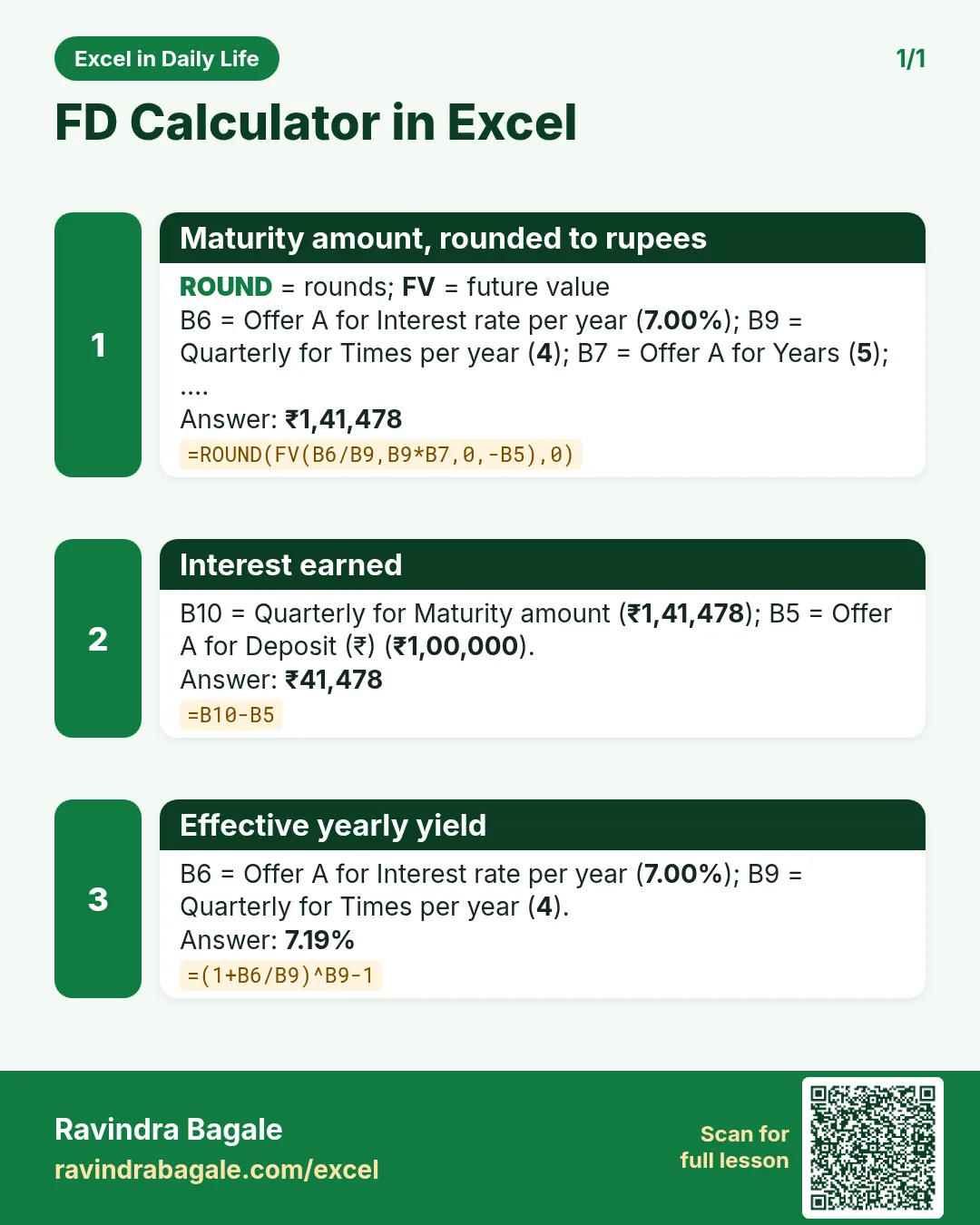

More cards: Ravi Sir's Cards.
6. Frequently asked questions
What is the formula for FD maturity in Excel?
=FV(rate/n, n*years, 0, -deposit), or =deposit*(1+rate/n)^(n*years). For quarterly compounding, n is 4.
How much is ₹1 lakh at 7% for 5 years compounded quarterly?
₹1,41,478, so the interest is ₹41,478.
Which is better: monthly or quarterly compounding?
At the same rate, monthly gives a little more because interest is added more often. Compare the effective yield in row 12.
Can I compare more than three offers?
Yes. Copy column D to E, F and so on, and widen $B$10:$D$10 in the MAX formula.
Is FD interest the same as the final amount?
No. The maturity amount includes your deposit; interest is maturity minus the deposit (row 11).
7. Quick quiz
Ten questions on this page. Sign in to save your score.
Loading practice tasks...
- Monthly rate (Easy): Yearly rate B3 divided by 12.
- Months (Easy): B4 times 12.
- Monthly EMI (Easy): EMI on amount B2 at B3 for B4 years, as a positive number, rounded to 2 decimals.
- Total repaid (Medium): Total paid over the loan, rounded to 0 decimals.
- Total interest (Medium): Total paid minus B2, rounded to 0 decimals.
- Processing fee (Medium): B2 times B6.
- Savings value (Medium): Value after B4 years of saving B5 each month at B3, positive, rounded to 0 decimals.
- Interest earned (Hard): Savings value minus B5 times months, rounded to 0 decimals.
- Months to repay at double EMI (Hard): Months to clear B2 at B3 paying twice the EMI, rounded up.
- Loan you can afford (Hard): Loan size for an EMI equal to B5 over B4 years at B3, positive, rounded to 0 decimals.
- Interest share (Hard): Total interest ÷ total paid, rounded to 3 decimals.