Cloud Kitchen Management System in Excel: Menu Costing, Orders, App Commission, Net Margin and Dashboard
Zoya's Kitchen in Pune sells biryani, thalis and misal through two food apps and direct phone orders. Orders were growing, yet the bank balance was not. This page builds a 7-sheet Excel system that takes every order through commission, food cost and packaging to a net figure, so Zoya can see which channel and which dish actually make money.
What you'll learn on this page
- Keep menu prices and food cost per plate, with food cost %
- Set GST, packaging and commission per channel on Setup
- Work out commission, food cost and net for every order
- Number orders automatically with ROW and TEXT
- Compare channels by net margin with SUMIFS
- Print an order slip with GST
- Build KPI cards and charts for orders and margin
Download the template: cloud-kitchen-management-system-template.xlsx: a 7-sheet system with example data and real formulas (Read me, Setup, Menu, Orders, Channel report, Order slip, Dashboard). Yellow cells are inputs you can type over; green cells hold formulas; blue rows are headers and totals. Replace the example data with your own and every report and the dashboard recalculate.
Made-up data: every name, amount, business and date on this page is made up for practice. Cities are used only to make the examples feel real.
1. The business story
Zoya's Kitchen, Pune, 1 to 17 October 2026 (made-up data). Six dishes, GST 5% on restaurant service, packaging ₹15 an order, commission App A 25%, App B 22%, Direct 0% (example rates; use your own agreements).
| Question | Where the system answers it |
|---|---|
| How much did the apps take? | Channel report: ₹22,308.80 of ₹1,12,760 |
| Which channel earns most per rupee? | Direct: 61.6% net margin against 35.6% on App A |
| Is food cost under control? | Dashboard: 34.8% of order value |
| Which dish costs the most to make? | Chicken thali, 40% food cost |
314 orders brought a net of ₹46,531.20 after commission, food and packaging. For the weekly sum-up practice, see the cloud kitchen practice sheet; the restaurant system covers a dine-in counter.
Figure 1. Setup and Menu hold rates and costs; Orders is the only entry sheet; the reports read from it.
2. Build it sheet by sheet
Step 1. Setup and Menu
- Setup B4 GST on food (5% for restaurant service), B5 packaging per order (₹15), and A8:B10 the commission per channel.
- Menu: Dish, Price, Food cost per plate, Food cost %. D5
=C5/B5. Chicken thali at ₹300 costs ₹120 to make, 40%.
Step 2. Orders: one row per order
- B5 numbers the order:
="Z"&TEXT(ROW()-4,"0000")gives Z0001. - Pick channel and dish from drop-downs; F5 value
=E5*XLOOKUP(D5,Menu!$A$5:$A$10,Menu!$B$5:$B$10,0)and G5 GST=ROUND(F5*Setup!$B$4,2). - H5 commission
=ROUND(F5*XLOOKUP(C5,Setup!$A$8:$A$10,Setup!$B$8:$B$10,0),2), I5 food cost, J5 packaging=Setup!$B$5. - K5 net
=F5-H5-I5-J5. GST is collected for the government, so it is not part of the net.
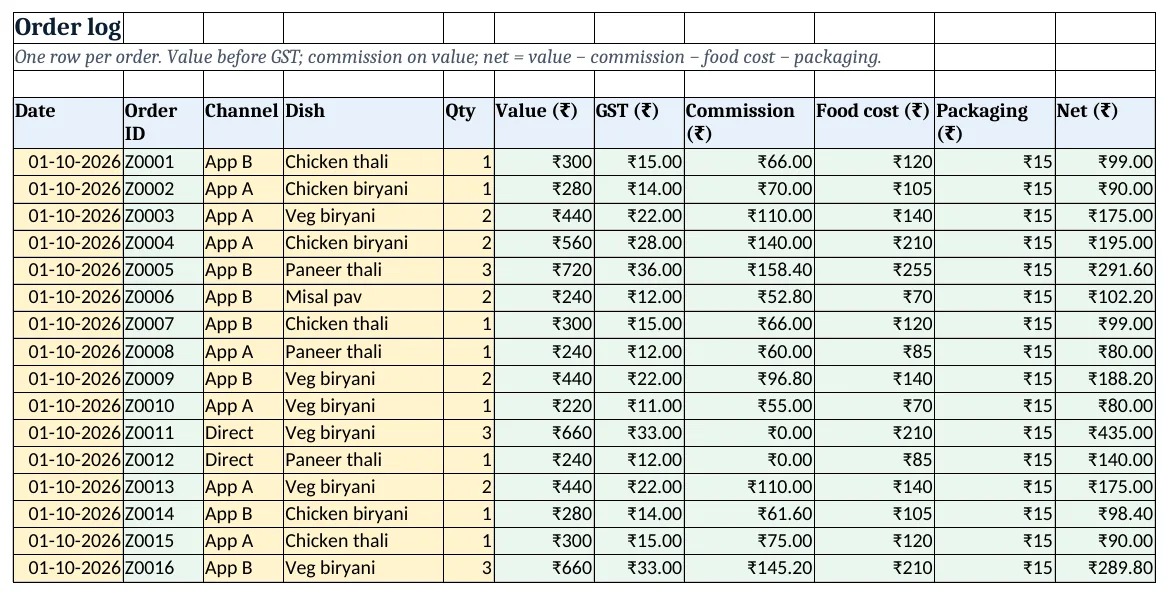
Figure 2. Orders: value, GST, commission, food cost, packaging and net for each order
Step 3. Channel report: where the money goes
- B5 orders
=COUNTIF(Orders!$C$5:$C$5000,A5), C5 value, D5 commission and E5 net with SUMIFS. - F5 net margin
=IFERROR(E5/C5,0)and G5 average order. - Rows 11 to 16 show plates, value and food cost % per dish, and rows 19 to 25 value per day.
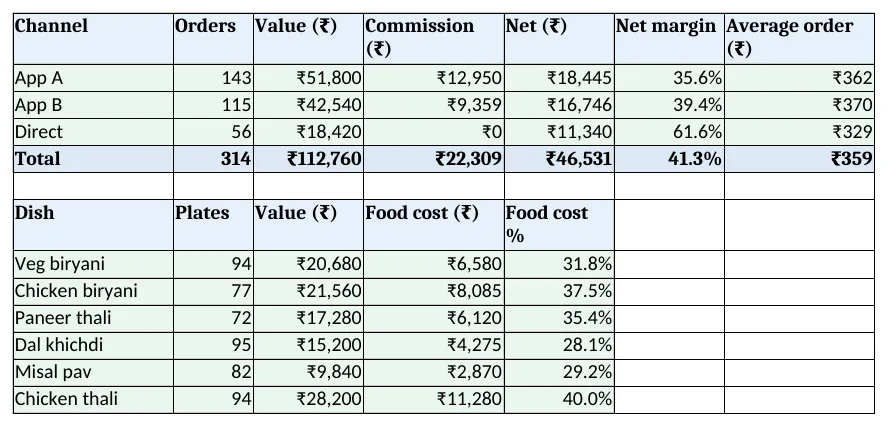
Figure 3. Channel report: orders, value, commission and net margin per channel and food cost per dish
Step 4. Order slip
- Type an order ID in B4; B6
=XLOOKUP($B$4,Orders!$B$5:$B$5000,Orders!$A$5:$A$5000,"Not found")and the rows below bring channel, dish, value and GST. - Z0007 shows a chicken thali on App B: ₹300 + ₹15 GST = ₹315. Set the print area.
Step 5. Dashboard
- KPI cards: orders, value, commission, food cost %
=SUM(Orders!$I$5:$I$5000)/SUM(Orders!$F$5:$F$5000), net and best channel by margin. - Charts: net by channel and order value over the last 7 days.
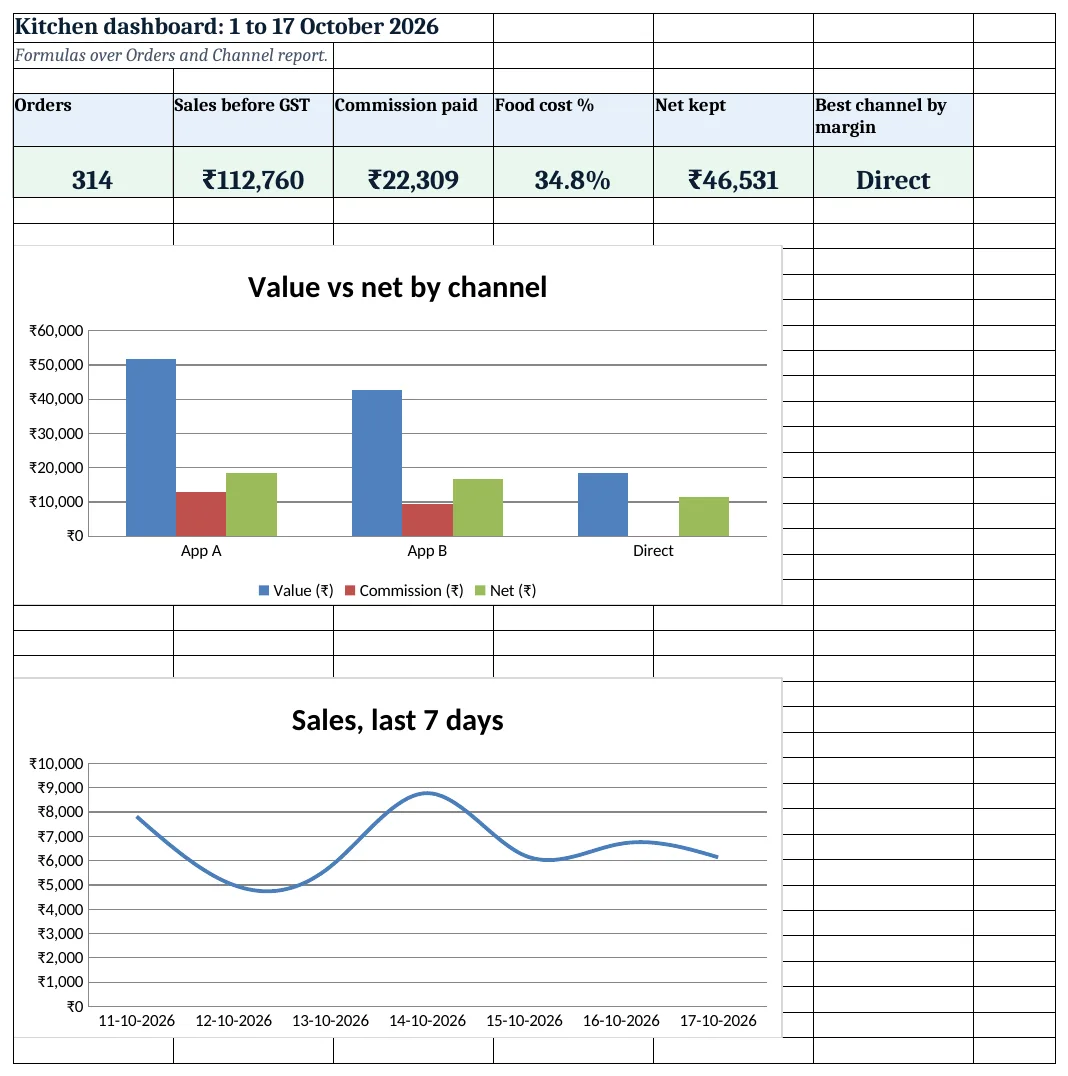
Figure 4. Cloud kitchen dashboard: orders, value, commission, food cost % and best channel
Ravindra Bagale's Tip
Push repeat customers to direct orders with a small offer. Even after a discount, a direct order keeps more than an app order.
Ravindra Bagale's Tip – मराठी
नेहमीच्या ग्राहकांना छोट्या offer ने direct order कडे वळवा. discount देऊनही direct order app पेक्षा जास्त कमवून देते.
Ravindra Bagale's Tip – हिंदी
नियमित ग्राहकों को छोटे offer से direct order पर लाएं. discount देकर भी direct order app से ज़्यादा कमाता है.
3. Formulas used
| Cell | Formula | What it does |
|---|---|---|
| Menu!D5 | =C5/B5 |
Food cost % |
| Orders!B5 | ="Z"&TEXT(ROW()-4,"0000") |
Automatic order ID |
| Orders!F5 | =E5*XLOOKUP(D5,Menu!$A$5:$A$10,Menu!$B$5:$B$10,0) |
Order value |
| Orders!G5 | =ROUND(F5*Setup!$B$4,2) |
GST on the order |
| Orders!H5 | =ROUND(F5*XLOOKUP(C5,Setup!$A$8:$A$10,Setup!$B$8:$B$10,0),2) |
App commission |
| Orders!K5 | =F5-H5-I5-J5 |
Net after commission, food and packaging |
| Channel report!B5 | =COUNTIF(Orders!$C$5:$C$5000,A5) |
Orders per channel |
| Channel report!E5 | =SUMIFS(Orders!$K$5:$K$5000,Orders!$C$5:$C$5000,A5) |
Net per channel |
| Channel report!F5 | =IFERROR(E5/C5,0) |
Net margin |
| Order slip!B6 | =XLOOKUP($B$4,Orders!$B$5:$B$5000,Orders!$A$5:$A$5000,"Not found") |
Order date |
| Dashboard!D5 | =SUM(Orders!$I$5:$I$5000)/SUM(Orders!$F$5:$F$5000) |
Food cost % of value |
| Dashboard!F5 | =INDEX('Channel report'!A5:A7,MATCH(MAX('Channel report'!F5:F7),'Channel report'!F5:F7,0)) |
Best channel by margin |
Every formula above is written in the template, so you can click a cell and see it in the formula bar. All values on this page were recalculated in LibreOffice with zero errors.
4. Common mistakes
- Counting GST as income. GST is passed on to the government. Keep it in its own column and out of the net.
- Forgetting packaging. ₹15 a box over 314 orders is ₹4,710. Leave it out and every margin is too high.
- One commission rate for all apps. Rates differ by app and by agreement. Keep one row per channel on Setup.
- Food cost from memory. Cost a plate from the recipe once, as in the recipe cost calculator, and update it when prices move.
- Judging a channel by orders alone. App A brings the most orders but Direct keeps the most per rupee. Compare net margin.
Ravindra Bagale's Tip
Check food cost % per dish each month. A dish above 40% needs a price change, a smaller portion or a cheaper input.
Ravindra Bagale's Tip – मराठी
दर महिन्याला प्रत्येक dish चा food cost % पहा. 40% पेक्षा जास्त असेल तर किंमत, portion किंवा input बदला.
Ravindra Bagale's Tip – हिंदी
हर महीने हर dish का food cost % देखें. 40% से ऊपर हो तो कीमत, portion या input बदलें.
5. More real examples
Example 1: Tiffin service. Monthly plans instead of single orders: one row per customer per month and a plan price on Menu.
Example 2: Bakery orders online. Same channels, with bakery items on Menu; link costs to the bakery system.
Example 3: Discount days. Add a Discount column on Orders and subtract it before commission to see what offers really cost.
Quick revision cards
Quick revision
Each card shows formulas from this page, each with an example and its answer from the template. Scan the QR code on a card to open this lesson. All names and numbers are made up for practice.
झटपट उजळणी
प्रत्येक card वर या page मधले formulas, त्यांचं example आणि template मधलं उत्तर आहे. Card वरचा QR code scan केला की हा lesson उघडतो. सगळी नावं आणि आकडे सरावासाठी काल्पनिक आहेत.
झटपट दोहराई
हर card पर इस page के formulas, उनका example और template का उत्तर है. Card का QR code scan करें तो यह lesson खुलेगा. सभी नाम और आंकड़े अभ्यास के लिए काल्पनिक हैं.
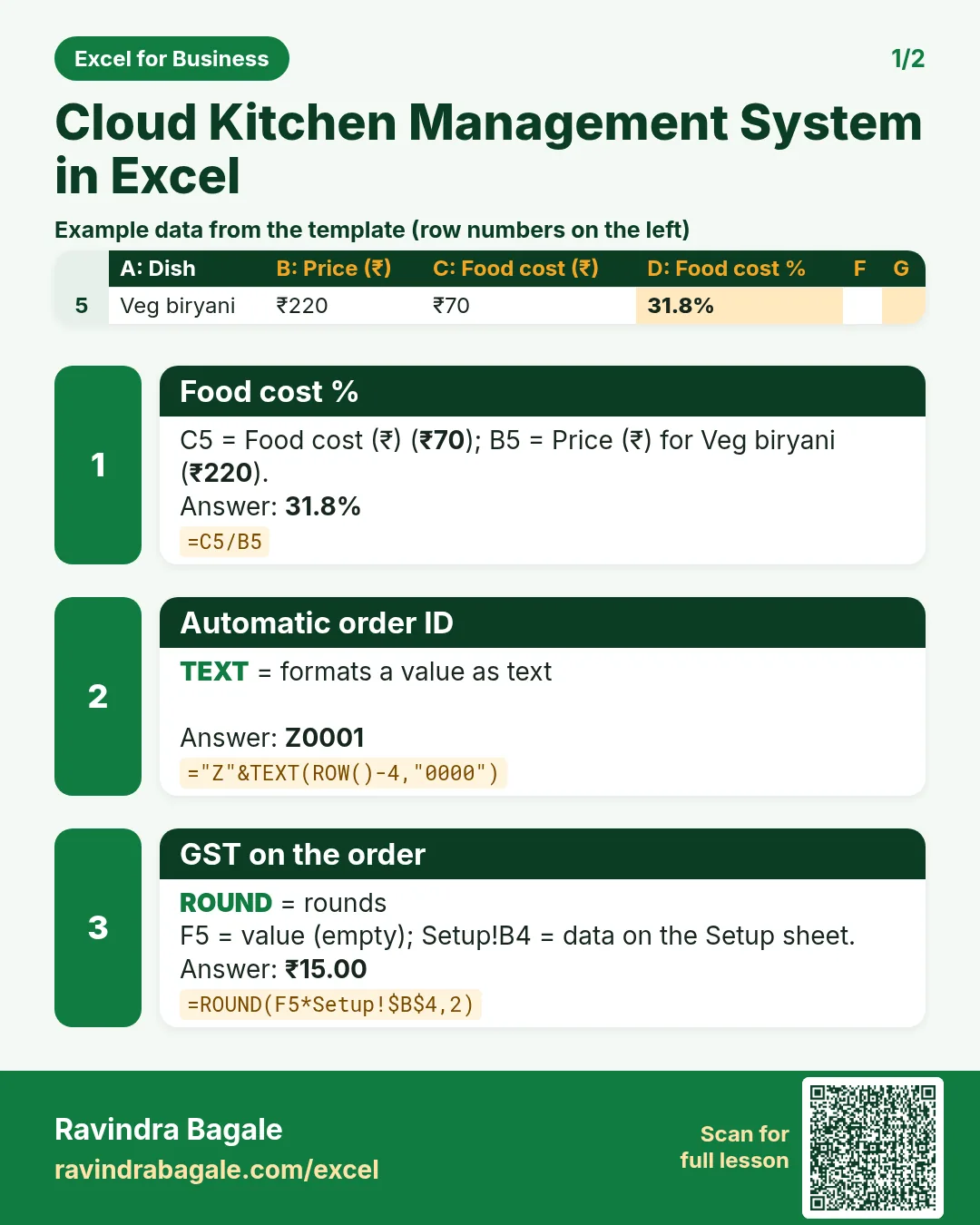

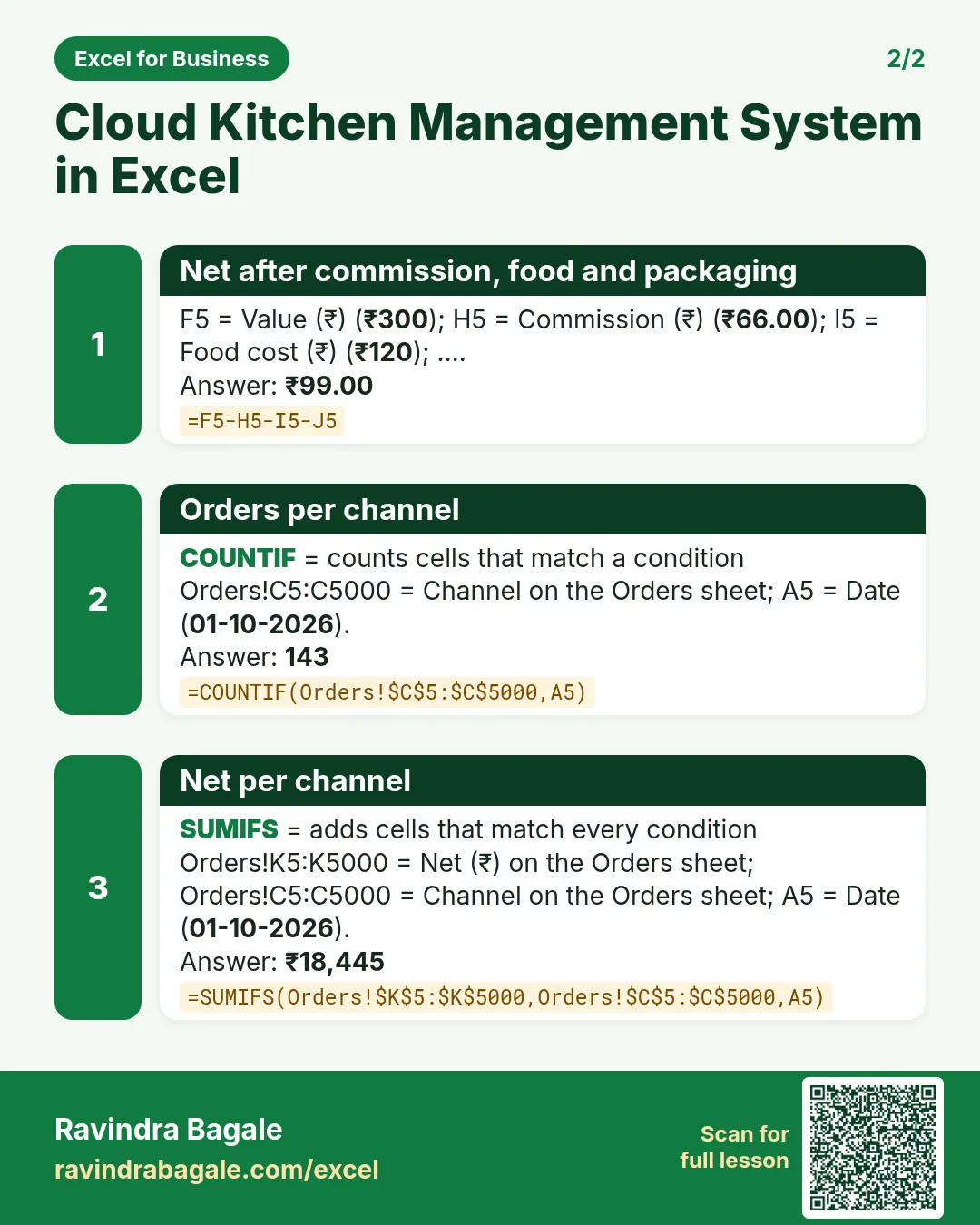

More cards: Ravi Sir's Cards.
6. Frequently asked questions
How do I calculate food app commission in Excel?
Look up the channel rate with XLOOKUP and multiply by the order value: =ROUND(F5*XLOOKUP(C5,channels,rates,0),2).
What GST rate applies to a cloud kitchen?
Restaurant service is generally 5% without input tax credit. Food delivered through an app has the GST paid by the app under section 9(5), so check your returns with your accountant.
What is a good food cost %?
It depends on the menu. Track it per dish; here it ranges from 28% for dal khichdi to 40% for chicken thali.
How do I number orders automatically?
="Z"&TEXT(ROW()-4,"0000") gives Z0001 in row 5, Z0002 in row 6 and so on.
How do I compare channels?
SUMIFS value and net by channel, then net ÷ value gives net margin.
7. Quick quiz
Ten questions on this page. Sign in to save your score.
Loading practice tasks...
- Total nights (Easy): Add up Nights in D2:D11.
- Average rate per night (Easy): Average of E2:E11, rounded to 2 decimals.
- Rows in Standard (Easy): How many rows have Room type "Standard"?
- Largest nights (Easy): The largest value in D2:D11.
- Nights for Standard (Medium): Total of D2:D11 where B is "Standard".
- Standard in London (Medium): Total of D2:D11 where B is "Standard" and C is "London".
- Best in Standard (Medium): Largest E2:E11 value where B is "Standard".
- Value of row 2 (Medium): D2 times E2.
- Look up Priya Kulkarni (Medium): The Nights for "Priya Kulkarni" (use a lookup on column A).
- Total value (Hard): Sum of D times E for all rows.
- Share of Standard (Hard): Share of D2:D11 that is "Standard", rounded to 3 decimals.
- Rank of row 2 (Hard): Rank of D2 among D2:D11 (largest = 1).
- Above average? (Hard): "Above" if E2 is above the average of E2:E11, else "Below".