Clinic Patient Management System in Excel: Patient Register, Visits, Fees, Follow-up Reminders and Receipts
Bagale Clinic in Nashik is a one-doctor practice. The front desk writes visits in a register and the doctor asks patients to come back in a week. Some do, some do not, and nobody notices until the patient returns worse. This 7-sheet system keeps a patient register, logs each visit with fee and payment, works out the follow-up date, and tells you which follow-ups are due this week and which may have been missed. Any visit prints a receipt. It tracks visits and money only, not medical notes.
What you'll learn on this page
- Keep fees by visit type in Setup
- Log visits with fee, paid and balance
- Compute follow-up dates and their status with COUNTIFS
- Summarise each patient with COUNTIF, MAXIFS and SUMIFS
- Print a receipt for any visit
- Report by visit type and payment mode
Download the template: clinic-patient-management-system-template.xlsx: a 7-sheet system with example data and real formulas (Read me, Setup, Patients, Visits, Receipt, Report, Dashboard). Yellow cells are inputs you can type over; green cells hold formulas; blue rows are headers and totals. Replace the example data with your own and every report and the dashboard recalculate.
Made-up data: every name, amount, business and date on this page is made up for practice. Cities are used only to make the examples feel real.
1. The business story
Bagale Clinic, 1 to 17 October 2026 (made-up patients and fees).
| What | Value |
|---|---|
| Visits | 15 |
| Billed | ₹9,300 |
| Collected | ₹8,100 |
| Dues pending | ₹1,200 |
| Follow-ups due in the next 7 days | 6 |
| Follow-ups possibly missed | 1 (Ravina, due 11 October) |
A follow-up is Done when the same patient has any later visit, Missed? when its date has passed without one, Due when it falls within the next 7 days. For patients tracking their own readings at home, see the blood pressure log; the hospital view is in 27.7 healthcare: revenue and length of stay.
Figure 1. Fees and the follow-up window in Setup; Visits is the entry log; Patients, Receipt, Report and Dashboard read it.
2. Build it sheet by sheet
Step 1. Setup and Patients
- On Setup, type the as-of date in B3, the clinic in B4 and the follow-up window (7 days) in B5. From row 8: visit types and fees (New consultation ₹500, Follow-up ₹300, Dressing ₹200, Procedure ₹1,500).
- On Patients, type ID, name, gender and age. Visits E5
=COUNTIF(Visits!$C$5:$C$300,A5), last visit F5=MAXIFS(Visits!$B$5:$B$300,Visits!$C$5:$C$300,A5), billed, paid and due with SUMIFS (SUMIFS).
Step 2. Visits: fee, balance and follow-up date
- On Visits, type visit no, date, patient ID, visit type, paid, payment mode and follow-up days. Patient D5:
=XLOOKUP(C5,Patients!$A$5:$A$40,Patients!$B$5:$B$40,"Check ID")(XLOOKUP). - Fee F5:
=XLOOKUP(E5,Setup!$A$8:$A$11,Setup!$B$8:$B$11,0)and balance H5=F5-G5(red when above 0). - Follow-up date K5:
=IF(J5="","",B5+J5): blank when no follow-up was advised.
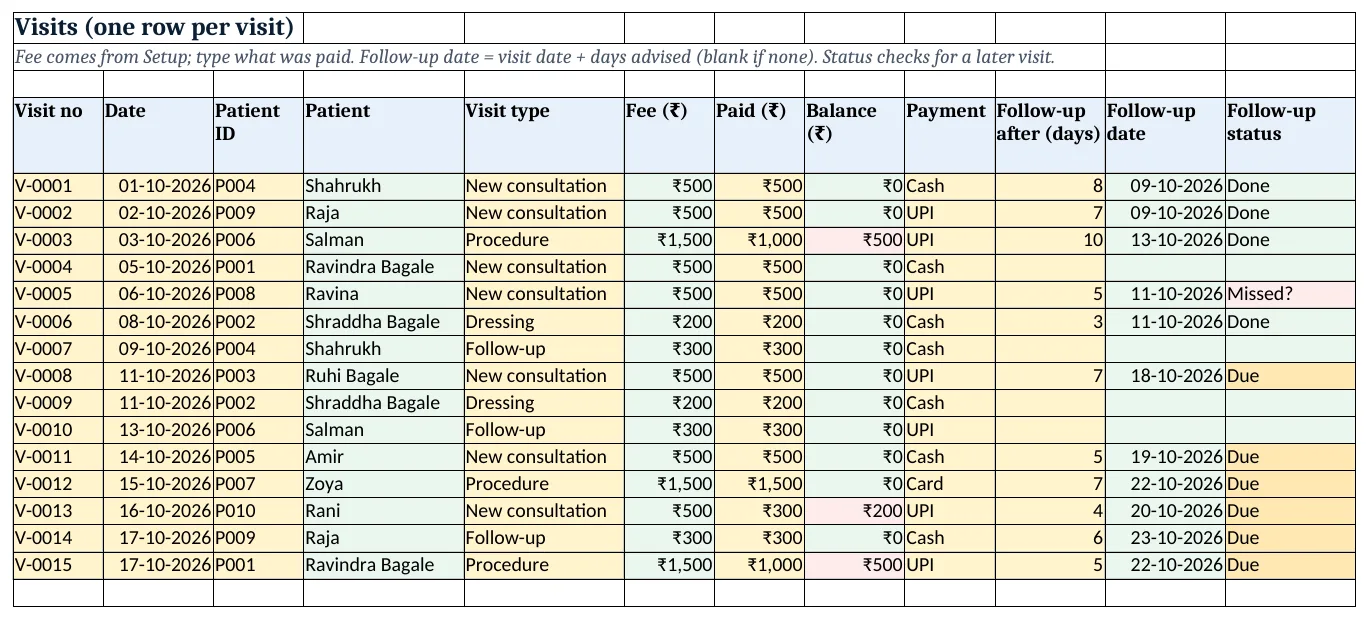
Figure 2. The visit log: fee from Setup, balance, follow-up date and status (Due in amber, Missed? in red)
Step 3. Visits: follow-up status
- Status L5:
=IF(K5="","",IF(COUNTIFS($C$5:$C$300,C5,$B$5:$B$300,">"&B5)>0,"Done",IF(K5<Setup!$B$3,"Missed?",IF(K5<=Setup!$B$3+Setup!$B$5,"Due","Later")))). - Read it from the inside: has this patient visited after this date? Then Done. Otherwise, is the date past? Missed?. Within the window? Due. Else Later (nested IF, COUNTIFS).
- Colour Due amber and Missed? red. Ravina (V-0005) was due on 11 October with no later visit: Missed?.
Step 4. Receipt
- On Receipt, pick the visit in B4. Each line is
=XLOOKUP($B$4,Visits!$A$5:$A$300,Visits!$B$5:$B$300)with the right column: date, patient, visit type, fee, paid, balance, payment mode. - Next visit B14:
=IF(XLOOKUP(...K...)="","Not advised",XLOOKUP(...K...)). Set the print area A1:D16 (print area).
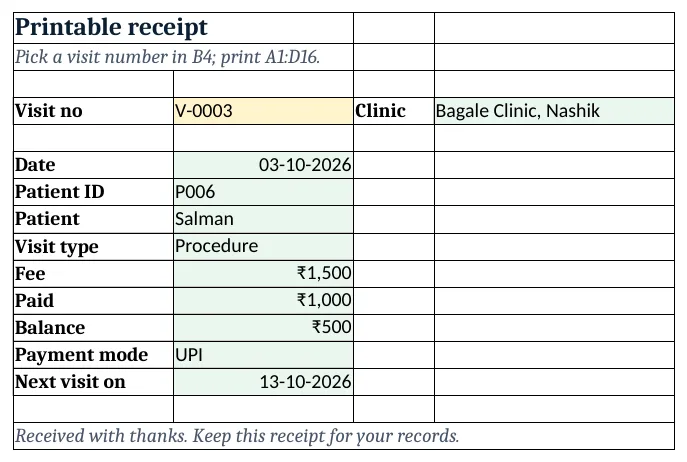
Figure 3. The printable receipt for visit V-0003
Step 5. Report and Dashboard
- On Report, per visit type: visits
=COUNTIF(Visits!$E$5:$E$300,A5), billed and collected with SUMIFS; per payment mode: collected. - On Dashboard, KPI cards: visits, billed
=SUM(Visits!$F$5:$F$300), collected, dues=B5-C5, follow-ups due=COUNTIF(Visits!$L$5:$L$300,"Due")and possibly missed (KPI cards).
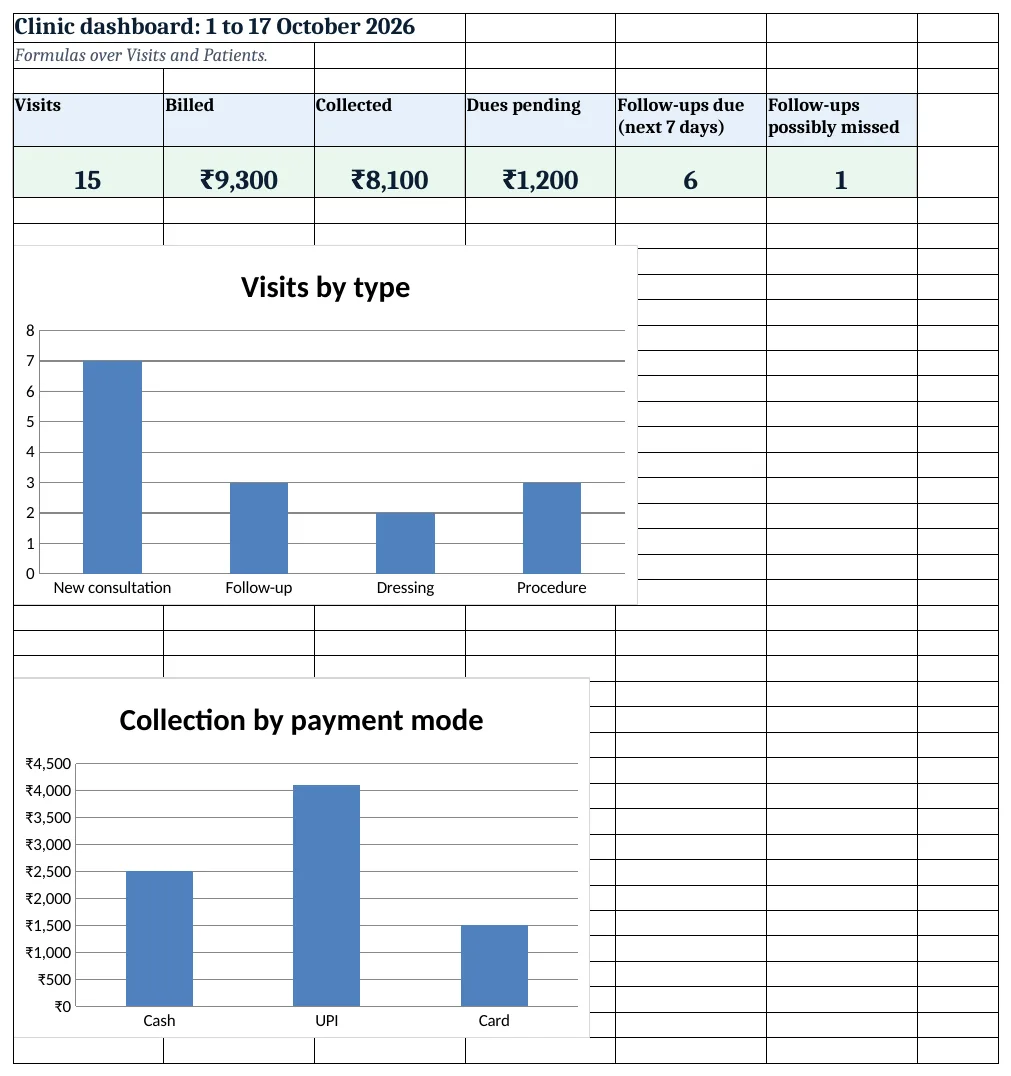
Figure 4. The clinic dashboard: visits, billed, collected, dues, follow-ups due and possibly missed
Ravindra Bagale's Tip
Each morning, filter Visits on Due and Missed? and give the list to the front desk to call. Ten calls a day bring back patients who would have been lost.
Ravindra Bagale's Tip – मराठी
दर सकाळी Visits वर Due आणि Missed? filter करा आणि list front desk ला फोनसाठी द्या. दिवसाचे दहा फोन हरवू शकणारे patients परत आणतात.
Ravindra Bagale's Tip – हिंदी
हर सुबह Visits पर Due और Missed? filter करो और list front desk को फ़ोन के लिए दो. दिन के दस फ़ोन खो सकने वाले patients वापस लाते हैं.
3. Formulas used
| Cell | Formula | What it does |
|---|---|---|
| Visits!D5 | =XLOOKUP(C5,Patients!$A$5:$A$40,Patients!$B$5:$B$40,"Check ID") |
Patient name from the ID |
| Visits!F5 | =XLOOKUP(E5,Setup!$A$8:$A$11,Setup!$B$8:$B$11,0) |
Fee by visit type |
| Visits!H5 | =F5-G5 |
Balance |
| Visits!K5 | =IF(J5="","",B5+J5) |
Follow-up date |
| Visits!L5 | =IF(K5="","",IF(COUNTIFS($C$5:$C$300,C5,$B$5:$B$300,">"&B5)>0,"Done",IF(K5<Setup!$B$3,"Missed?",IF(K5<=Setup!$B$3+Setup!$B$5,"Due","Later")))) |
Follow-up status |
| Patients!E5 | =COUNTIF(Visits!$C$5:$C$300,A5) |
Visits per patient |
| Patients!F5 | =MAXIFS(Visits!$B$5:$B$300,Visits!$C$5:$C$300,A5) |
Last visit |
| Patients!G5 | =SUMIFS(Visits!$F$5:$F$300,Visits!$C$5:$C$300,A5) |
Billed to the patient |
| Patients!I5 | =G5-H5 |
Due from the patient |
| Receipt!B6 | =XLOOKUP($B$4,Visits!$A$5:$A$300,Visits!$B$5:$B$300) |
Visit date for the picked visit |
| Receipt!B14 | =IF(XLOOKUP($B$4,Visits!$A$5:$A$300,Visits!$K$5:$K$300)="","Not advised",XLOOKUP($B$4,Visits!$A$5:$A$300,Visits!$K$5:$K$300)) |
Next visit date or Not advised |
| Report!B5 | =COUNTIF(Visits!$E$5:$E$300,A5) |
Visits by type |
| Report!D5 | =SUMIFS(Visits!$G$5:$G$300,Visits!$E$5:$E$300,A5) |
Collected by type |
| Report!B11 | =SUMIFS(Visits!$G$5:$G$300,Visits!$I$5:$I$300,A11) |
Collected by payment mode |
| Dashboard!D5 | =B5-C5 |
Dues pending |
| Dashboard!E5 | =COUNTIF(Visits!$L$5:$L$300,"Due") |
Follow-ups due |
| Dashboard!F5 | =COUNTIF(Visits!$L$5:$L$300,"Missed?") |
Follow-ups possibly missed |
Every formula above is written in the template, so you can click a cell and see it in the formula bar. All values on this page were recalculated in LibreOffice with zero errors.
4. Common mistakes
- Typing patient names instead of IDs. Two patients can share a name. Use the patient ID; the name is looked up.
- Treating "Missed?" as certain. The patient may have visited another doctor or recovered. It is a list of people to call, not a verdict.
- Changing the fee on old visits when fees go up. Fees are looked up from Setup. When fees change, add the new fee from that date, or paste old fees as values first.
- Writing medical notes in this file. Keep clinical notes in your clinical record. This file has names and money, so protect it with a password.
- Leaving follow-up days blank when advised. If the doctor said "come after 7 days", type 7. A blank means no follow-up was advised.
Ravindra Bagale's Tip
Protect the file with File > Info > Protect Workbook > Encrypt with Password. Patient names and phone numbers deserve a lock.
Ravindra Bagale's Tip – मराठी
File > Info > Protect Workbook > Encrypt with Password ने file सुरक्षित करा. Patients ची नावे आणि नंबर कुलपास पात्र आहेत.
Ravindra Bagale's Tip – हिंदी
File > Info > Protect Workbook > Encrypt with Password से file सुरक्षित करो. Patients के नाम और नंबर ताले के हकदार हैं.
5. More real examples
Example 1: Physiotherapy centre. Visit type Session; follow-up days 2 or 3; a Patients column counts sessions against the number prescribed.
Example 2: Dental clinic with treatment plans. Add a Plan amount per patient and track paid against the plan with SUMIFS.
Example 3: Vaccination reminders. Use follow-up days for the next dose; the Due list becomes the week's call list.
Quick revision cards
Quick revision
Each card shows formulas from this page, each with an example and its answer from the template. Scan the QR code on a card to open this lesson. All names and numbers are made up for practice.
झटपट उजळणी
प्रत्येक card वर या page मधले formulas, त्यांचं example आणि template मधलं उत्तर आहे. Card वरचा QR code scan केला की हा lesson उघडतो. सगळी नावं आणि आकडे सरावासाठी काल्पनिक आहेत.
झटपट दोहराई
हर card पर इस page के formulas, उनका example और template का उत्तर है. Card का QR code scan करें तो यह lesson खुलेगा. सभी नाम और आंकड़े अभ्यास के लिए काल्पनिक हैं.
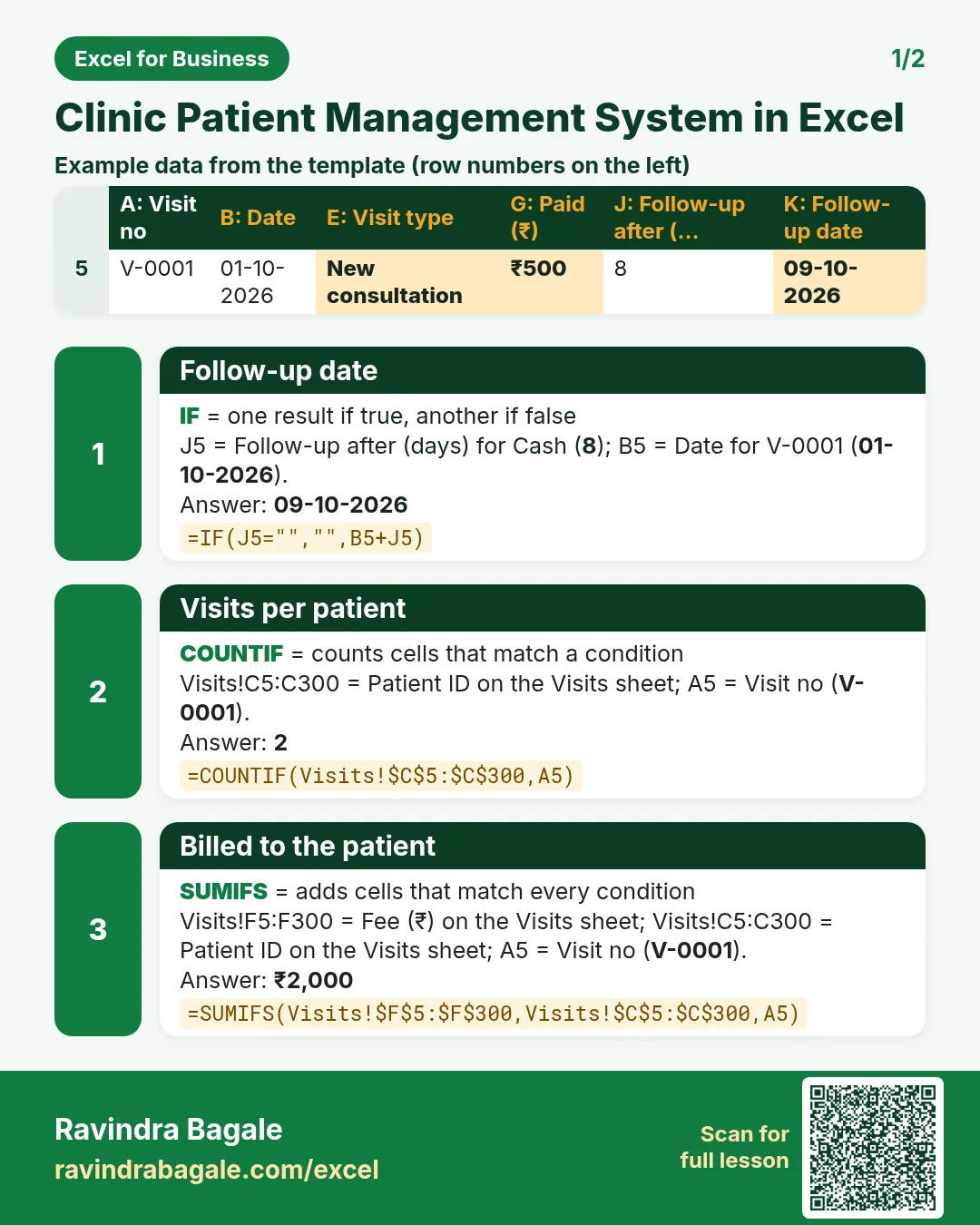

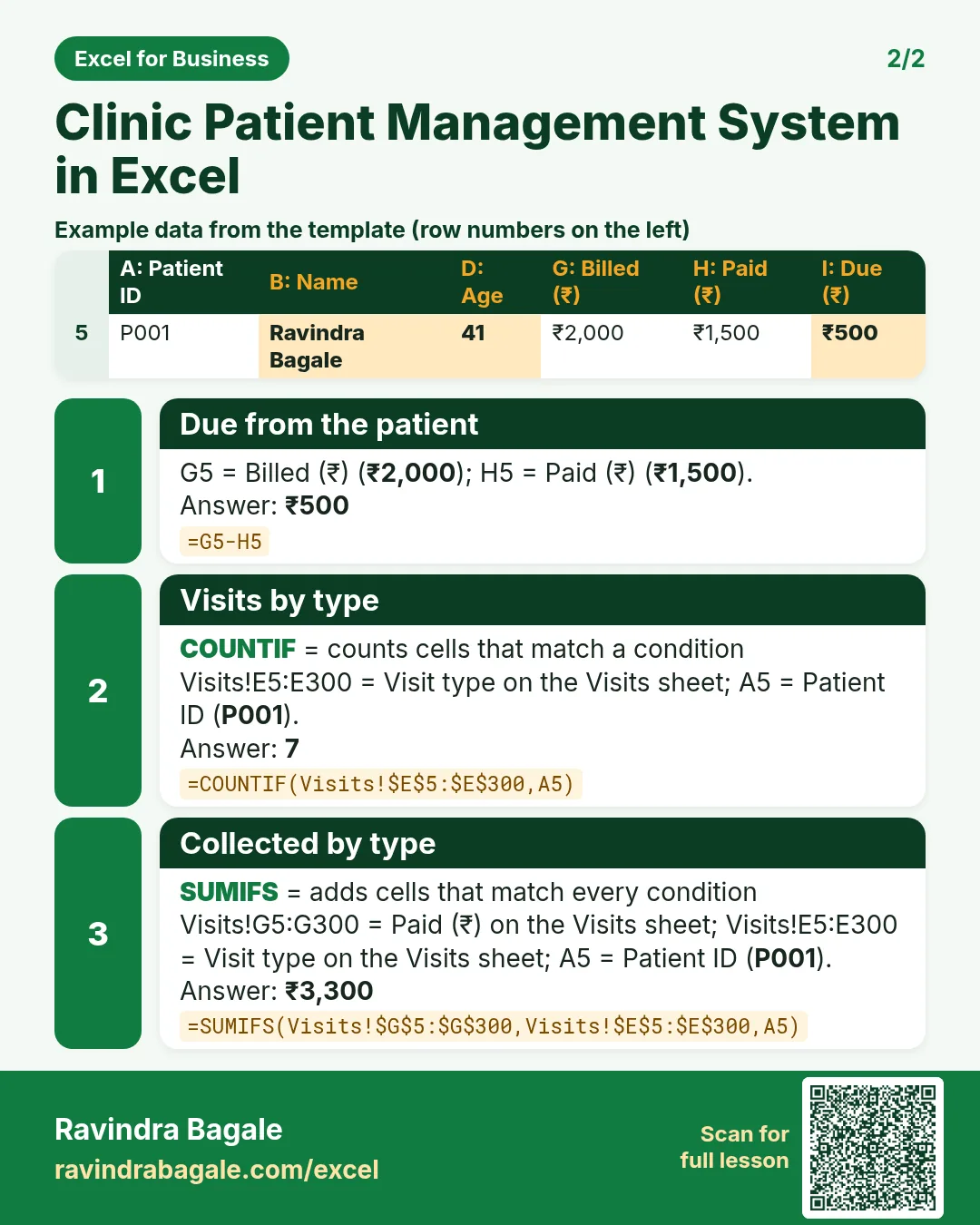

More cards: Ravi Sir's Cards.
6. Frequently asked questions
How do I make a patient register in Excel?
One row per patient with an ID, and a Visits sheet with one row per visit. Totals per patient come from COUNTIF, MAXIFS and SUMIFS.
How can Excel remind me of follow-ups?
Compute follow-up date = visit date + days advised, and a status that checks for a later visit with COUNTIFS and compares with today.
How do I know if a patient came back?
COUNTIFS(patient column, this patient, date column, ">"&this date) > 0 means there is a later visit.
How do I print a receipt?
Pick the visit number in a cell, look up each detail with XLOOKUP and set the print area to the receipt.
Is it safe to keep patient data in Excel?
Keep only what you need, protect the file with a password, and do not share it. Medical notes belong in your clinical record.
7. Quick quiz
Ten questions on this page. Sign in to save your score.
Loading practice tasks...
- Monthly rate (Easy): Yearly rate B3 divided by 12. (sheet "Plan")
- Months (Easy): B4 times 12. (sheet "Plan")
- Monthly EMI (Easy): EMI on amount B2 at B3 for B4 years, as a positive number, rounded to 2 decimals. (sheet "Plan")
- Days taken (Easy): C2 minus B2. (sheet "Dates")
- Start year (Easy): Year of B3. (sheet "Dates")
- Due month (Easy): Month number of C3. (sheet "Dates")
- Earliest start (Easy): Earliest date in B2:B9 (as a date number). (sheet "Dates")
- Total repaid (Medium): Total paid over the loan, rounded to 0 decimals. (sheet "Plan")
- Total interest (Medium): Total paid minus B2, rounded to 0 decimals. (sheet "Plan")
- Processing fee (Medium): B2 times B6. (sheet "Plan")
- Working days (Medium): Working days from B2 to C2. (sheet "Dates")
- Weekday of due (Medium): Weekday number of C4 (Sunday = 1). (sheet "Dates")