Blood Pressure Log in Excel: Morning and Evening Averages and High Readings Flagged
Amir in Kolhapur was asked by his doctor to check his blood pressure twice a day for a week and bring the readings. Numbers scribbled on paper are hard to read at a glance. In Excel each reading is one row, the high ones turn red, and the summary shows something useful: his morning readings run higher than his evening ones.
What you'll learn on this page
- One row per reading with date, time of day, systolic, diastolic and pulse
- A High / OK flag with IF and OR
- Limits in cells, so you can use the numbers your doctor gives
- Morning and evening averages with AVERAGEIFS
- Count and share of high readings
- Red highlights and a line chart
Download the template: blood-pressure-log-template.xlsx: example data with real formulas. Yellow cells are inputs you can type over; green cells hold formulas; blue rows are headers and totals. Replace the example data with your own and everything recalculates.
Made-up data: every name, amount, shop and date on this page is made up for practice. Cities are used only to make the examples feel real.
1. The example
Amir's readings from 10 to 15 October 2026, morning and evening (made-up values; limits 130 / 80):
| Systolic (upper) | Diastolic (lower) | |
|---|---|---|
| Average (all 12) | 126.9 | 80.5 |
| Morning average | 130.8 | 82.8 |
| Evening average | 123.0 | 78.2 |
| Highest | 136 (12-10, morning) | 88 |
6 of the 12 readings (50%) are flagged High, and 4 of those 6 are morning readings. The overall average hides this; the morning and evening split shows it. Average pulse: 74.4.
The 2017 American College of Cardiology / American Heart Association guideline puts stage 1 high blood pressure at 130-139 systolic or 80-89 diastolic. That is why the example uses 130 and 80, but use the limits your own doctor gives you.
Figure 1. Each reading is checked against the limits in B3 and B4 with IF and OR; AVERAGEIFS splits morning and evening; COUNTIF counts the High flags.
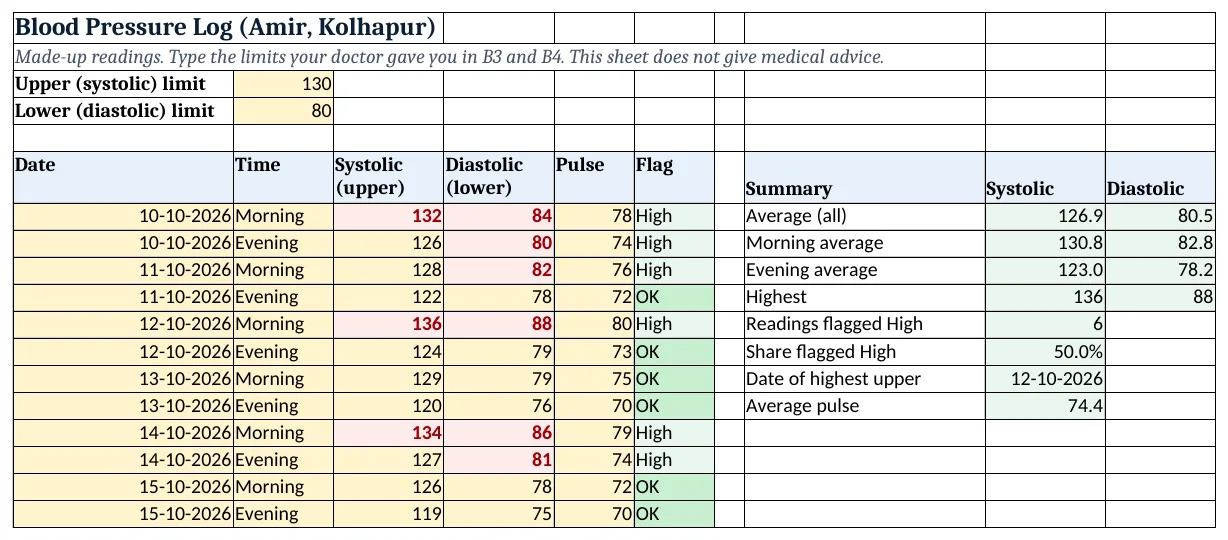
Figure 2. The template sheet, recalculated with its example data. Download it above and replace the yellow cells with your own numbers.
2. Build it step by step
Step 1. Limits
- In B3 type the upper (systolic) limit and in B4 the lower (diastolic) limit your doctor gave you. The example uses 130 and 80.
Step 2. Readings
- In A6:F6 type Date, Time, Systolic, Diastolic, Pulse, Flag. One row per reading.
- Select B7:B200 > Data Validation > List:
Morning,Evening(drop-down lists).
Step 3. High or OK
- In F7 type
=IF(OR(C7>=$B$3,D7>=$B$4),"High","OK")and copy down. OR is TRUE if either number is at or above its limit (AND, OR).
Step 4. Averages
- In I7 type
=AVERAGE(C7:C18)and in J7=AVERAGE(D7:D18): 126.9 and 80.5. - In I8 type
=AVERAGEIFS(C7:C18,B7:B18,"Morning"): 130.8. Do the same for diastolic in J8 and for "Evening" in row 9 (AVERAGEIFS).
Step 5. Counts and highest
- In I11 type
=COUNTIF(F7:F18,"High"): 6. In I12 type=I11/COUNT(C7:C18)as %: 50%. - In I13 type
=INDEX(A7:A18,MATCH(MAX(C7:C18),C7:C18,0)): 12-10-2026 (INDEX and MATCH).
Step 6. Colours and chart
- Select C7:C200 > Highlight Cells Rules > Greater Than or Equal To
=$B$3, red. Do the same for D7:D200 with=$B$4(highlight rules). - Select A6:A18 and C6:D18 > Insert > Line for two lines (line charts).
Ravindra Bagale's Tip
Measure at the same two times each day, sitting, after a few quiet minutes. Then the numbers can be compared.
Ravindra Bagale's Tip – मराठी
रोज त्याच दोन वेळा, बसून, थोडा वेळ शांत राहून मोजा. मग आकडे एकमेकांशी compare करता येतात.
Ravindra Bagale's Tip – हिंदी
रोज़ उन्हीं दो समय पर, बैठकर, कुछ मिनट शांत रहकर नापो. तभी आंकड़े आपस में compare होंगे.
3. Formulas used
| Cell | Formula | What it does |
|---|---|---|
| F7 | =IF(OR(C7>=$B$3,D7>=$B$4),"High","OK") |
Flag |
| I7 | =AVERAGE(C7:C18) |
Average systolic |
| J7 | =AVERAGE(D7:D18) |
Average diastolic |
| I8 | =AVERAGEIFS(C7:C18,B7:B18,"Morning") |
Morning systolic average |
| I9 | =AVERAGEIFS(C7:C18,B7:B18,"Evening") |
Evening systolic average |
| I11 | =COUNTIF(F7:F18,"High") |
Readings flagged High |
| I12 | =I11/COUNT(C7:C18) |
Share flagged High |
| I13 | =INDEX(A7:A18,MATCH(MAX(C7:C18),C7:C18,0)) |
Date of highest upper |
| I14 | =AVERAGE(E7:E18) |
Average pulse |
Every formula above is written in the template, so you can click a cell and see it in the formula bar. All values on this page were recalculated in the file.
4. Common mistakes
- Using AND instead of OR. AND flags a reading only if both numbers are high. A reading of 128 / 86 is high on the lower number alone.
- Typing the limits inside the formula. Keep them in B3 and B4, so when the doctor changes them you change two cells, not every row.
- Measuring right after tea or a walk. Readings taken after activity or caffeine can run higher. Sit quietly first and measure at similar times.
- Looking only at the overall average. Split by morning and evening. Here the morning average is 7.8 points higher.
- Treating the sheet as a diagnosis. The sheet only sorts numbers. Decisions about health belong to your doctor.
Ravindra Bagale's Tip
Print the summary block and the chart before the doctor visit. One page says more than a week of loose notes.
Ravindra Bagale's Tip – मराठी
Doctor कडे जायच्या आधी summary आणि chart print करा. आठवडाभराच्या चिठ्ठ्यांपेक्षा एक पान जास्त सांगतं.
Ravindra Bagale's Tip – हिंदी
Doctor के पास जाने से पहले summary और chart print करो. हफ्ते भर की पर्चियों से एक पन्ना ज़्यादा बताता है.
5. More real examples
Example 1: Blood sugar. Use the same layout with Fasting and After meal in column B and one limit for each.
Example 2: Rani and Amir together. Add a Person column and use AVERAGEIFS with two conditions: person and time of day.
Example 3: Weekly summary for the doctor. Add a Week column and use AVERAGEIFS by week to print one line per week.
Quick revision cards
Quick revision
Each card shows formulas from this page, each with an example and its answer from the template. Scan the QR code on a card to open this lesson. All names and numbers are made up for practice.
झटपट उजळणी
प्रत्येक card वर या page मधले formulas, त्यांचं example आणि template मधलं उत्तर आहे. Card वरचा QR code scan केला की हा lesson उघडतो. सगळी नावं आणि आकडे सरावासाठी काल्पनिक आहेत.
झटपट दोहराई
हर card पर इस page के formulas, उनका example और template का उत्तर है. Card का QR code scan करें तो यह lesson खुलेगा. सभी नाम और आंकड़े अभ्यास के लिए काल्पनिक हैं.
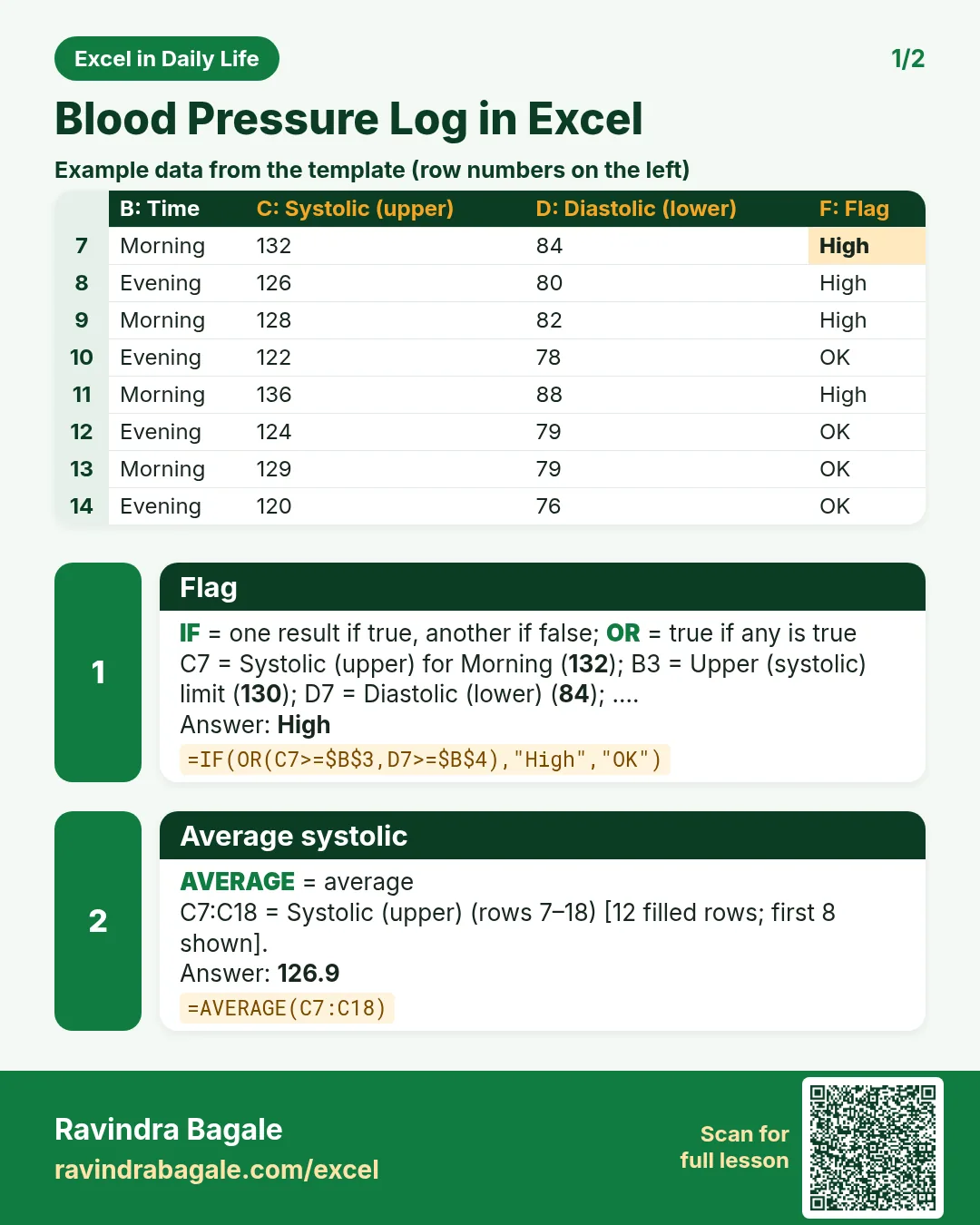

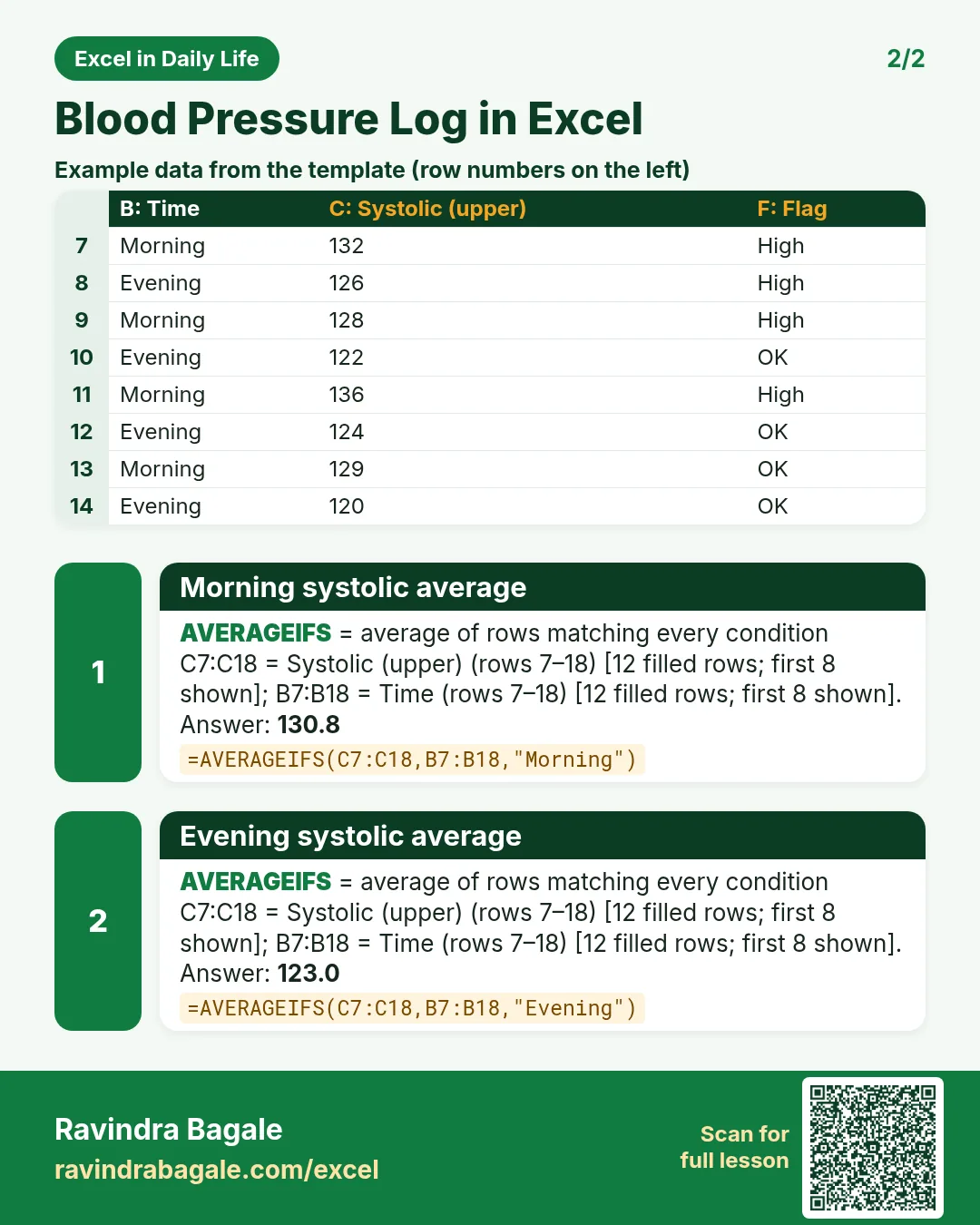

More cards: Ravi Sir's Cards.
6. Frequently asked questions
How do I flag high blood pressure readings in Excel?
Use =IF(OR(C7>=$B$3,D7>=$B$4),"High","OK") with your limits in B3 and B4.
How do I average morning readings only?
Use =AVERAGEIFS(C7:C18,B7:B18,"Morning").
What counts as high blood pressure?
The 2017 ACC/AHA guideline defines stage 1 as 130-139 systolic or 80-89 diastolic. Your doctor will tell you the limits that apply to you.
How do I show the high cells in red?
Use Highlight Cells Rules > Greater Than or Equal To and point at the limit cell, for example =$B$3.
Can I chart systolic and diastolic together?
Yes. Select the dates and both columns and insert a line chart; each column becomes a line.
7. Quick quiz
Ten questions on this page. Sign in to save your score.
Loading practice tasks...
- Pass or fail (Easy): "Pass" if B2 is at least 40, else "Fail".
- Total (Easy): B2 plus C2.
- Passed score 1 (Easy): How many in B2:B11 are 40 or more?
- Passed both (Medium): TRUE if B3 and C3 are both at least 40.
- Passed either (Medium): TRUE if B4 or C4 is at least 75.
- Grade (Medium): Grade for the average of B2:C2: "A" 75+, "B" 60+, "C" 40+, else "F".
- Eligible (Medium): "Eligible" if D5 is at least 75 and B5 at least 40, else "Not eligible".
- Count passed both (Hard): How many have both scores at least 40?
- Pass percentage (Hard): Share passing score 1, rounded to 2 decimals.
- Nested IF band (Hard): "High" if C6 ≥ 75, "Mid" if ≥ 50, else "Low", using nested IF.
- Top scorer (Hard): Name with the highest score 1.