21.11 Salary Slip Creation
Example first. Shahrukh in HR has the employee master and the November attendance from 21.4 HR Attendance and Payroll Sheet. He wants one printable salary slip: pick an Emp ID from a drop-down and the whole slip fills itself. For Salman (EMP-103) the net pay is ₹11,568.
Illustrative rates, not legal advice
The PF rate (12% of basic, on basic up to ₹25,000), the professional tax (₹200 when gross is above ₹10,000) and the salary split used here are practice inputs for this class only. Statutory rules change and differ by state and company. Always take the current rates from your HR, payroll or CA team before you pay anyone.
Salary slip with XLOOKUP — in 30 seconds
What: A salary slip is a one-page layout. One drop-down cell holds the Emp ID, and every other line is an XLOOKUP into the master and attendance Tables plus a little arithmetic.
Why: Typing 50 slips by hand guarantees mistakes. One template with lookups gives the same layout every month, and printing a slip is just choosing an Emp ID.
Tiny example: Choose EMP-103 in C4. Paid days 22 of 26. Basic earned =ROUND(7800*22/26,0) = ₹6,600. Gross ₹13,560 − deductions ₹1,992 = net ₹11,568.
Salary slip with XLOOKUP — 30 सेकंदात
काय: Salary slip म्हणजे एका पानाचा layout. एका drop-down cell मध्ये Emp ID असतो, आणि बाकी प्रत्येक line म्हणजे master आणि attendance Tables मधला XLOOKUP आणि थोडं गणित.
का: 50 slips हाताने type केल्या तर चुका नक्की. Lookups वाला एकच template दर महिन्याला तसाच layout देतो, आणि slip print करणं म्हणजे फक्त Emp ID निवडणं.
छोटं उदाहरण: C4 मध्ये EMP-103 निवडा. Paid days 26 पैकी 22. Basic earned =ROUND(7800*22/26,0) = ₹6,600. Gross ₹13,560 − deductions ₹1,992 = net ₹11,568.
Salary slip with XLOOKUP — 30 सेकंड में
क्या: Salary slip यानी एक पन्ने का layout. एक drop-down cell में Emp ID होता है, और बाकी हर line master और attendance Tables से XLOOKUP और थोड़ा गणित है.
क्यों: 50 slips हाथ से type करेंगे तो गलतियाँ पक्की. Lookups वाला एक template हर महीने वही layout देता है, और slip print करना बस Emp ID चुनना है.
छोटा उदाहरण: C4 में EMP-103 चुनें. Paid days 26 में से 22. Basic earned =ROUND(7800*22/26,0) = ₹6,600. Gross ₹13,560 − deductions ₹1,992 = net ₹11,568.
First look at the data (before → after):
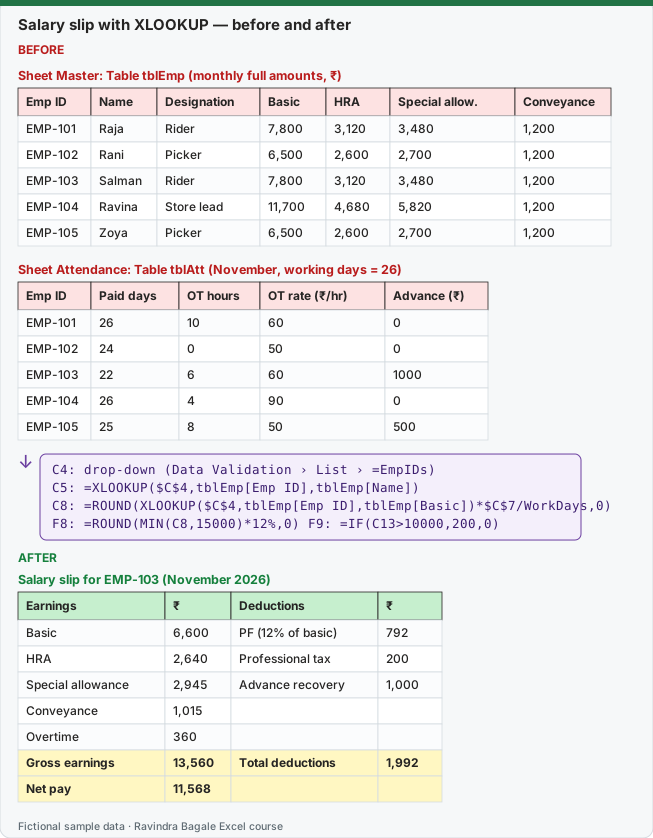
Expected result — Salary slip for EMP-103 (November 2026)
| Earnings | ₹ | Deductions | ₹ |
|---|---|---|---|
| Basic | 6,600 | PF (12% of basic) | 792 |
| HRA | 2,640 | Professional tax | 200 |
| Special allowance | 2,945 | Advance recovery | 1,000 |
| Conveyance | 1,015 | — | — |
| Overtime | 360 | — | — |
| Gross earnings | 13,560 | Total deductions | 1,992 |
| Net pay | 11,568 | — | — |
Before table and formula as text
Before — Sheet Master: Table tblEmp (monthly full amounts, ₹)
| Emp ID | Name | Designation | Basic | HRA | Special allow. | Conveyance |
|---|---|---|---|---|---|---|
| EMP-101 | Raja | Rider | 7,800 | 3,120 | 3,480 | 1,200 |
| EMP-102 | Rani | Picker | 6,500 | 2,600 | 2,700 | 1,200 |
| EMP-103 | Salman | Rider | 7,800 | 3,120 | 3,480 | 1,200 |
| EMP-104 | Ravina | Store lead | 11,700 | 4,680 | 5,820 | 1,200 |
| EMP-105 | Zoya | Picker | 6,500 | 2,600 | 2,700 | 1,200 |
Before — Sheet Attendance: Table tblAtt (November, working days = 26)
| Emp ID | Paid days | OT hours | OT rate (₹/hr) | Advance (₹) |
|---|---|---|---|---|
| EMP-101 | 26 | 10 | 60 | 0 |
| EMP-102 | 24 | 0 | 50 | 0 |
| EMP-103 | 22 | 6 | 60 | 1000 |
| EMP-104 | 26 | 4 | 90 | 0 |
| EMP-105 | 25 | 8 | 50 | 500 |
Formula / click path
C4: drop-down (Data Validation › List › =EmpIDs)
C5: =XLOOKUP($C$4,tblEmp[Emp ID],tblEmp[Name])
C8: =ROUND(XLOOKUP($C$4,tblEmp[Emp ID],tblEmp[Basic])*$C$7/WorkDays,0)
F8: =ROUND(MIN(C8,25000)*12%,0)   F9: =IF(C13>10000,200,0)
Do it step by step:
- Put the master in a Table
tblEmpand the attendance in a TabletblAtt. - Name cell Settings!B1 (value 26)
WorkDays, and name the Emp ID column: Formulas › Name Manager › New, NameEmpIDs, Refers to=tblEmp[Emp ID]. - On the Slip sheet, select C4 and add Data › Data Validation › List with Source
=EmpIDs. - In C5 type
=XLOOKUP($C$4,tblEmp[Emp ID],tblEmp[Name]). Do the same for Designation and Paid days. - In C8 type
=ROUND(XLOOKUP($C$4,tblEmp[Emp ID],tblEmp[Basic])*$C$7/WorkDays,0)and repeat for HRA, Special allowance and Conveyance. - Add the deductions, then Net pay
=C13-F13. Choose another Emp ID in C4 and check that every line changes.
स्टेप बाय स्टेप करून बघा:
- Master
tblEmpTable मध्ये आणि attendancetblAttTable मध्ये ठेवा. - Settings!B1 (value 26) cell ला
WorkDaysनाव द्या, आणि Emp ID column ला नाव द्या: Formulas › Name Manager › New, NameEmpIDs, Refers to=tblEmp[Emp ID]. - Slip sheet वर C4 select करा आणि Source
=EmpIDsदेऊन Data › Data Validation › List लावा. - C5 मध्ये
=XLOOKUP($C$4,tblEmp[Emp ID],tblEmp[Name])type करा. Designation आणि Paid days साठी असंच करा. - C8 मध्ये
=ROUND(XLOOKUP($C$4,tblEmp[Emp ID],tblEmp[Basic])*$C$7/WorkDays,0)type करा आणि HRA, Special allowance, Conveyance साठी repeat करा. - Deductions जोडा, मग Net pay
=C13-F13. C4 मध्ये दुसरा Emp ID निवडा आणि प्रत्येक line बदलते का ते check करा.
स्टेप बाय स्टेप करके देखें:
- Master को
tblEmpTable में और attendance कोtblAttTable में रखें. - Settings!B1 (value 26) cell को
WorkDaysनाम दें, और Emp ID column को नाम दें: Formulas › Name Manager › New, NameEmpIDs, Refers to=tblEmp[Emp ID]. - Slip sheet पर C4 select करें और Source
=EmpIDsदेकर Data › Data Validation › List लगाएँ. - C5 में
=XLOOKUP($C$4,tblEmp[Emp ID],tblEmp[Name])type करें. Designation और Paid days के लिए भी ऐसा ही करें. - C8 में
=ROUND(XLOOKUP($C$4,tblEmp[Emp ID],tblEmp[Basic])*$C$7/WorkDays,0)type करें और HRA, Special allowance, Conveyance के लिए repeat करें. - Deductions जोड़ें, फिर Net pay
=C13-F13. C4 में दूसरा Emp ID चुनें और check करें कि हर line बदलती है.
The slip layout (sheet Slip)
| Cell | Label | Formula |
|---|---|---|
| C4 | Emp ID | drop-down, Source =EmpIDs |
| C5 | Name | =XLOOKUP($C$4,tblEmp[Emp ID],tblEmp[Name]) |
| C6 | Designation | =XLOOKUP($C$4,tblEmp[Emp ID],tblEmp[Designation]) |
| C7 | Paid days | =XLOOKUP($C$4,tblAtt[Emp ID],tblAtt[Paid days]) |
| C8 | Basic | =ROUND(XLOOKUP($C$4,tblEmp[Emp ID],tblEmp[Basic])*$C$7/WorkDays,0) |
| C9 | HRA | =ROUND(XLOOKUP($C$4,tblEmp[Emp ID],tblEmp[HRA])*$C$7/WorkDays,0) |
| C10 | Special allowance | =ROUND(XLOOKUP($C$4,tblEmp[Emp ID],tblEmp[Special allow.])*$C$7/WorkDays,0) |
| C11 | Conveyance | =ROUND(XLOOKUP($C$4,tblEmp[Emp ID],tblEmp[Conveyance])*$C$7/WorkDays,0) |
| C12 | Overtime | =XLOOKUP($C$4,tblAtt[Emp ID],tblAtt[OT hours])*XLOOKUP($C$4,tblAtt[Emp ID],tblAtt[OT rate (₹/hr)]) |
| C13 | Gross earnings | =SUM(C8:C12) |
| F8 | PF (illustrative 12% of basic, basic capped at ₹25,000) | =ROUND(MIN(C8,25000)*12%,0) |
| F9 | Professional tax (illustrative) | =IF(C13>10000,200,0) |
| F10 | Advance recovery | =XLOOKUP($C$4,tblAtt[Emp ID],tblAtt[Advance (₹)]) |
| F13 | Total deductions | =SUM(F8:F10) |
| C15 | Net pay | =C13-F13 |
Net pay for every employee (check your slip by changing C4):
| Emp ID | Name | Paid days | Gross (₹) | PF (₹) | Prof. tax (₹) | Advance (₹) | Net pay (₹) |
|---|---|---|---|---|---|---|---|
| EMP-101 | Raja | 26 | 16,200 | 936 | 200 | 0 | 15,064 |
| EMP-102 | Rani | 24 | 12,000 | 720 | 200 | 0 | 11,080 |
| EMP-103 | Salman | 22 | 13,560 | 792 | 200 | 1,000 | 11,568 |
| EMP-104 | Ravina | 26 | 23,760 | 1,404 | 200 | 0 | 22,156 |
| EMP-105 | Zoya | 25 | 12,900 | 750 | 200 | 500 | 11,450 |
Total net pay for the five slips: ₹71,318.
Make it print well (one slip per page)
- Select the slip area, for example B2:F17, and click Page Layout › Print Area › Set Print Area.
- Click Page Layout › Orientation › Portrait and Page Layout › Size › A4.
- In Page Layout › Scale to Fit, set Width: 1 page and Height: 1 page.
- Open Page Layout › Margins › Custom Margins and tick Center on page: Horizontally.
- Add the company name and "Salary slip for November 2026 (practice)" in Insert › Header & Footer.
- Click View › Page Break Preview to check that the slip is on one page, then File › Print to see the preview.
To print all five slips, change C4 and print each one. In Module 12 you can record a small macro that loops through EmpIDs and prints each slip.
Practice task (try it before you open the answer):
- Build the master, attendance and slip sheets above.
- Choose EMP-105 (Zoya) in C4.
- Read gross, PF, professional tax, advance and net pay.
- Change Zoya's paid days to 26 in tblAtt and read the net pay again.
Answer
EMP-105 with 25 paid days: gross ₹12,900, PF ₹750, professional tax ₹200, advance ₹500, net pay ₹11,450. With 26 paid days the gross becomes ₹13,400 and the net pay ₹11,920.
Ravindra Bagale's Tip
Never type a person's name on the slip. Only the Emp ID is chosen; everything else is looked up. Two people with the same name is the most common payroll mix-up.
Ravindra Bagale's Tip – मराठी
Slip वर कधीच व्यक्तीचं नाव type करू नका. फक्त Emp ID निवडायचा; बाकी सगळं lookup ने यायला हवं. एकाच नावाची दोन माणसं ही payroll मधली सगळ्यात common गडबड आहे.
Ravindra Bagale's Tip – हिंदी
Slip पर कभी किसी का नाम type न करें. सिर्फ़ Emp ID चुनना है; बाकी सब lookup से आए. एक ही नाम के दो लोग payroll की सबसे आम गड़बड़ी है.
Quick recap
- Read the ask twice and list the deliverables before you type a formula.
- Put raw data in a Table, calculations in new columns, and the answer on a separate sheet.
- Totals of ratios are always SUM ÷ SUM, never the average of percentages.
- Write the checks down and do them every month; they are part of the deliverable.
Loading practice tasks...
- Total leave days (Easy): Add up Leave days in D2:D11.
- Average salary (Easy): Average of E2:E11, rounded to 2 decimals.
- Rows in Sales (Easy): How many rows have Department "Sales"?
- Largest leave days (Easy): The largest value in D2:D11.
- Leave days for Sales (Medium): Total of D2:D11 where B is "Sales".
- Sales in Denver (Medium): Total of D2:D11 where B is "Sales" and C is "Denver".
- Best in Sales (Medium): Largest E2:E11 value where B is "Sales".
- Value of row 2 (Medium): D2 times E2.
- Look up Noah Wilson (Medium): The Leave days for "Noah Wilson" (use a lookup on column A).
- Total value (Hard): Sum of D times E for all rows.
- Share of Sales (Hard): Share of D2:D11 that is "Sales", rounded to 3 decimals.
- Rank of row 2 (Hard): Rank of D2 among D2:D11 (largest = 1).
- Above average? (Hard): "Above" if E2 is above the average of E2:E11, else "Below".