Savings Goal Calculator in Excel: How Much to Save Each Month (PMT, NPER and Goal Seek)
Salman in Kolhapur has four goals: a ₹1,50,000 bike in two years, a ₹3 lakh emergency fund, a ₹60,000 Goa trip and an ₹85,000 laptop. He already has some money saved for each. His questions are simple: how much must he put aside every month, and is his current plan enough? Three finance functions answer these: PMT, NPER and FV.
What you'll learn on this page
- PMT, NPER and FV for savings (a short intro)
- The sign rule: money you put in is negative
- Monthly saving needed for each goal
- How many months a fixed plan takes
- What a plan grows to by the deadline
- Progress bars, red warnings and Goal Seek
Download the template: savings-goal-calculator-template.xlsx: example data with real formulas. Yellow cells are inputs you can type over; green cells hold formulas; blue rows are headers and totals. Replace the example data with your own and everything recalculates.
Made-up data: every name, amount, shop and date on this page is made up for practice. Cities are used only to make the examples feel real.
1. The example
New functions in one line each (all use the monthly rate = yearly rate / 12):
PMT(rate, nper, pv, fv)gives the saving needed each month.NPER(rate, pmt, pv, fv)gives how many months it takes.FV(rate, nper, pmt, pv)gives what you will have at the end.
The sign rule: money you put in (the deposit, what is saved so far) is negative; the target you get back is positive.
Salman's bike (made-up): target ₹1,50,000, saved ₹20,000, 24 months, 6% a year.
- Without any return he would need (1,50,000 − 20,000) / 24 = ₹5,416.67 a month.
- With 6% a year,
=-PMT(6%/12,24,-20000,150000)= ₹5,011.68 a month, because his money earns while it waits. - His plan is ₹5,000 a month.
=NPER(6%/12,-5000,-20000,150000)= 24.05 months, just over the deadline. =FV(6%/12,24,-5000,-20000)= ₹1,49,703 after 24 months: ₹297 short. Saving ₹12 more a month fixes it.
| Goal | Target | Saved | Months | Need / month | Plan | Months at plan |
|---|---|---|---|---|---|---|
| New bike | ₹1,50,000 | ₹20,000 | 24 | ₹5,012 | ₹5,000 | 24.1 |
| Emergency fund | ₹3,00,000 | ₹1,10,000 | 18 | ₹9,482 | ₹10,000 | 17.2 |
| Goa trip | ₹60,000 | ₹8,000 | 10 | ₹5,070 | ₹5,000 | 10.1 |
| Laptop | ₹85,000 | ₹15,000 | 12 | ₹5,619 | ₹6,000 | 11.3 |
Figure 1. Three questions, three functions: PMT gives the monthly saving needed (bike ₹5,011.68), NPER the months a plan takes (24.05), FV what a plan grows to (₹1,49,703).
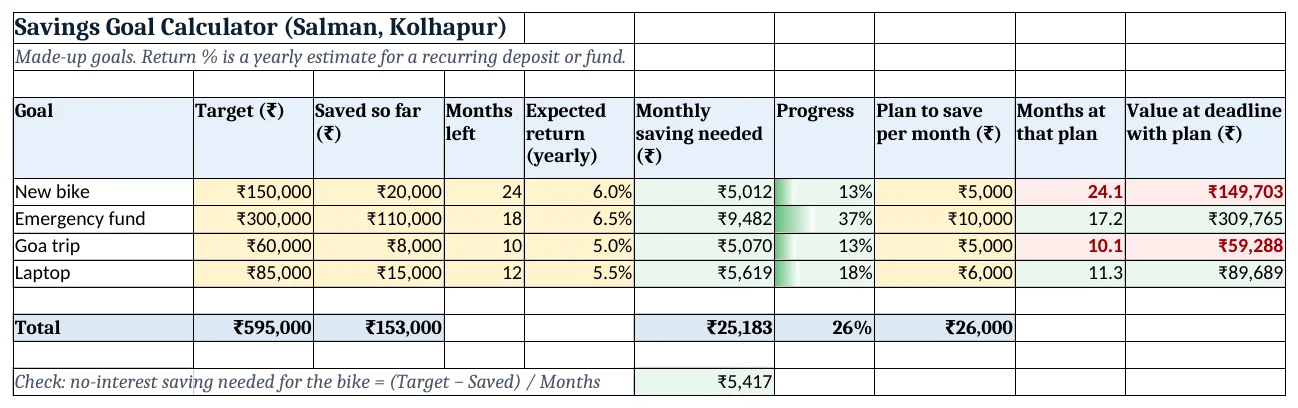
Figure 2. The template sheet, recalculated with its example data. Download it above and replace the yellow cells with your own numbers.
2. Build it step by step
Step 1. Goal table
- In A4:J4 type Goal, Target, Saved so far, Months left, Expected return (yearly), Monthly saving needed, Progress, Plan to save per month, Months at that plan, Value at deadline with plan.
- Type the four goals in rows 5 to 8 (yellow cells: B to E and H).
Step 2. Saving needed with PMT
- In F5 type
=-PMT(E5/12,D5,-C5,B5): ₹5,011.68. - The minus inside (-C5) is money already put in; the minus in front makes the answer positive.
Step 3. Progress bar
- In G5 type
=C5/B5and format as %: 13%. - Select G5:G8 > Conditional Formatting > Data Bars (minimum 0, maximum 1) (data bars).
Step 4. Months with NPER
- In I5 type
=NPER(E5/12,-H5,-C5,B5): 24.05 months. - Add a formula rule on I5:I8:
=$I5>$D5, red fill: the plan is behind the deadline.
Step 5. Value at deadline with FV
- In J5 type
=FV(E5/12,D5,-H5,-C5): ₹1,49,703. - Add a rule on J5:J8:
=$J5<$B5, red fill. - Copy F5:J5 down to row 8.
Step 6. Totals and a check
- In B10, C10, F10 and H10 type SUMs of the column; in G10
=C10/B10(26% of all targets saved). - In F12 type
=(B5-C5)/D5: ₹5,416.67, the no-interest check for the bike.
Step 7. Exact plan with Goal Seek
- Data > What-If Analysis > Goal Seek: Set cell J5, To value 150000, By changing H5 (Goal Seek).
- H5 becomes about ₹5,011.68, the same as PMT gave in F5.
Ravindra Bagale's Tip
Set up an automatic transfer on salary day for the F10 total. Money that leaves on the 1st is not available to spend on the 20th.
Ravindra Bagale's Tip – मराठी
पगाराच्या दिवशी F10 total इतकी auto transfer लावून टाका. 1 तारखेला बाजूला गेलेले पैसे 20 तारखेला खर्चायला हातात नसतात.
Ravindra Bagale's Tip – हिंदी
सैलरी के दिन F10 total जितना auto transfer लगा दो. 1 तारीख को हटे पैसे 20 तारीख को खर्च के लिए हाथ में नहीं होते.
3. Formulas used
| Cell | Formula | What it does |
|---|---|---|
| F5 | =-PMT(E5/12,D5,-C5,B5) |
Monthly saving needed |
| G5 | =C5/B5 |
Progress so far |
| I5 | =NPER(E5/12,-H5,-C5,B5) |
Months the plan takes |
| J5 | =FV(E5/12,D5,-H5,-C5) |
Value at the deadline with the plan |
| F10 | =SUM(F5:F8) |
Saving needed for all goals |
| G10 | =C10/B10 |
Overall progress |
| F12 | =(B5-C5)/D5 |
No-interest check |
Every formula above is written in the template, so you can click a cell and see it in the formula bar. All values on this page were recalculated in the file.
4. Common mistakes
- Using the yearly rate. Divide by 12 for monthly saving, as in
E5/12. - Wrong signs. Saved money and deposits are negative, the target positive. If NPER shows #NUM!, a sign is usually wrong.
- Expecting a fixed return from shares. PMT assumes the same return every month. Use a careful rate and treat the result as a plan, not a promise.
- Months vs years. D5 is months. Two years is 24.
- Forgetting what is already saved. Leaving C5 out makes the monthly saving look bigger than it is.
Ravindra Bagale's Tip
Fill the emergency fund before the trip and the gadgets. A job gap or a hospital bill should not turn into a credit card loan.
Ravindra Bagale's Tip – मराठी
Trip आणि gadgets च्या आधी emergency fund भरा. नोकरीत gap आला किंवा hospital चं bill आलं तर ते credit card loan व्हायला नको.
Ravindra Bagale's Tip – हिंदी
Trip और gadgets से पहले emergency fund भरो. नौकरी में gap या hospital का bill credit card loan नहीं बनना चाहिए.
5. More real examples
Example 1: Child's school fees. Target the next year's fees, months left until June, and a recurring-deposit rate.
Example 2: Down payment for a flat. Target 20% of the flat price; then use the EMI calculator for the loan part.
Example 3: Wedding fund. Several goals (jewellery, venue, travel) as rows; F10 gives the total monthly saving.
Quick revision cards
Quick revision
Each card shows formulas from this page, each with an example and its answer from the template. Scan the QR code on a card to open this lesson. All names and numbers are made up for practice.
झटपट उजळणी
प्रत्येक card वर या page मधले formulas, त्यांचं example आणि template मधलं उत्तर आहे. Card वरचा QR code scan केला की हा lesson उघडतो. सगळी नावं आणि आकडे सरावासाठी काल्पनिक आहेत.
झटपट दोहराई
हर card पर इस page के formulas, उनका example और template का उत्तर है. Card का QR code scan करें तो यह lesson खुलेगा. सभी नाम और आंकड़े अभ्यास के लिए काल्पनिक हैं.
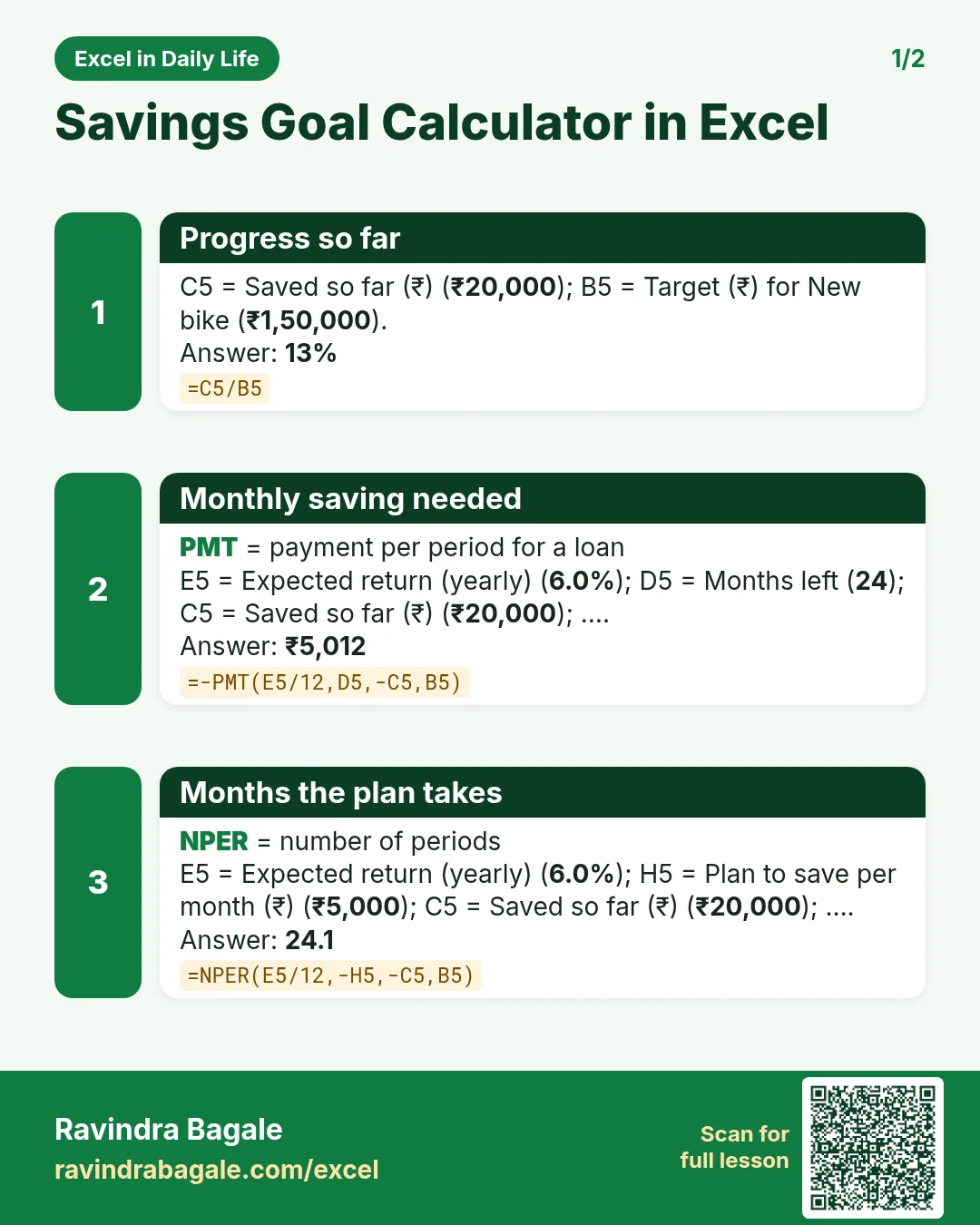

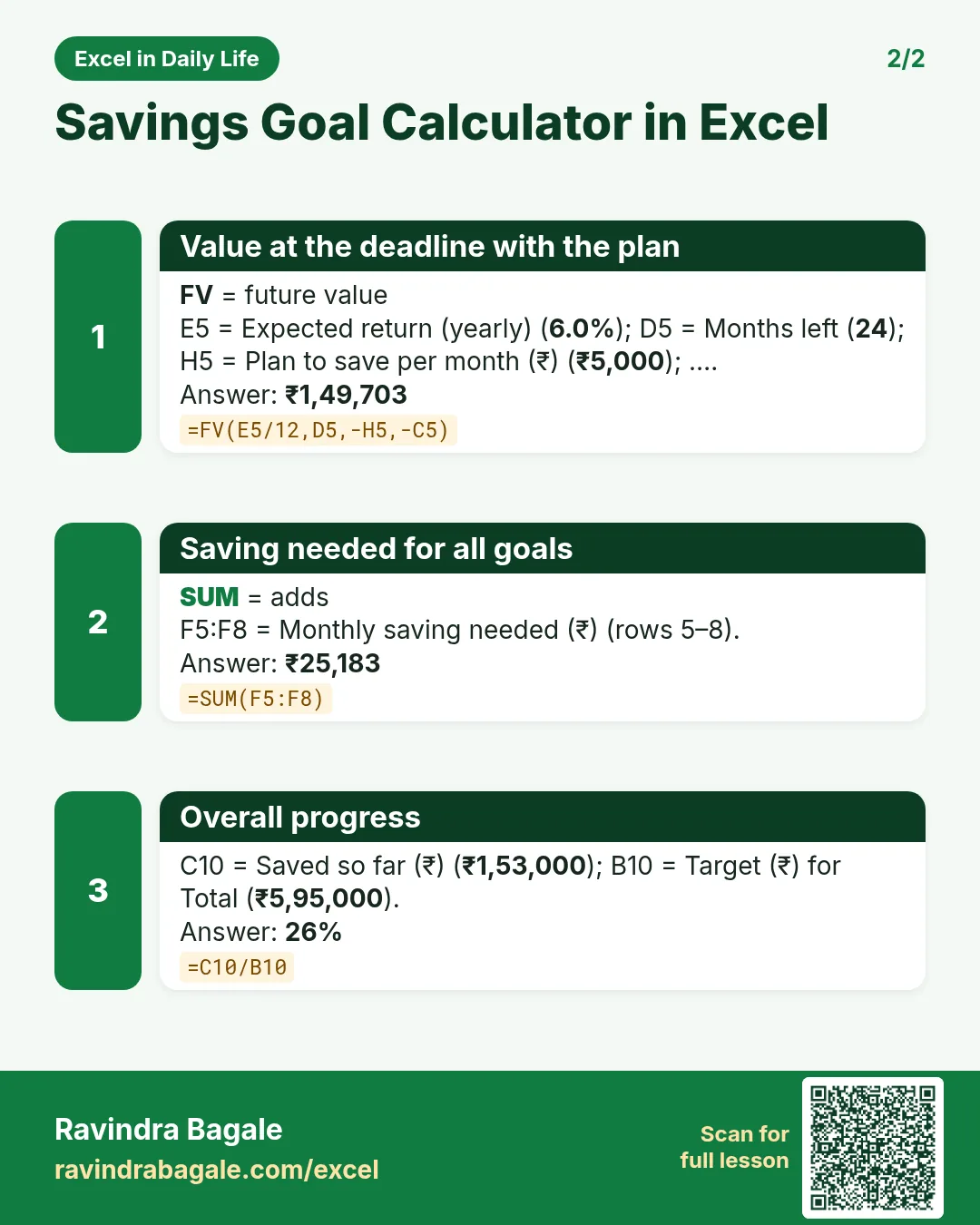

More cards: Ravi Sir's Cards.
6. Frequently asked questions
How do I calculate monthly savings for a goal in Excel?
=-PMT(rate/12, months, -saved, target). For ₹1,50,000 in 24 months with ₹20,000 saved at 6%: ₹5,011.68.
How long will it take to reach my savings goal?
=NPER(rate/12, -monthly, -saved, target) returns months.
What will my monthly saving grow to?
=FV(rate/12, months, -monthly, -saved).
Why do PMT and NPER give #NUM! or negative answers?
Usually a sign problem: keep deposits negative and the target positive, as in the template.
Can I do it without the finance functions?
Yes, roughly: (Target − Saved) / Months, ignoring interest. The template shows this check in F12.
7. Quick quiz
Ten questions on this page. Sign in to save your score.
Loading practice tasks...
- Monthly rate (Easy): Yearly rate B3 divided by 12.
- Months (Easy): B4 times 12.
- Monthly EMI (Easy): EMI on amount B2 at B3 for B4 years, as a positive number, rounded to 2 decimals.
- Total repaid (Medium): Total paid over the loan, rounded to 0 decimals.
- Total interest (Medium): Total paid minus B2, rounded to 0 decimals.
- Processing fee (Medium): B2 times B6.
- Savings value (Medium): Value after B4 years of saving B5 each month at B3, positive, rounded to 0 decimals.
- Interest earned (Hard): Savings value minus B5 times months, rounded to 0 decimals.
- Months to repay at double EMI (Hard): Months to clear B2 at B3 paying twice the EMI, rounded up.
- Loan you can afford (Hard): Loan size for an EMI equal to B5 over B4 years at B3, positive, rounded to 0 decimals.
- Interest share (Hard): Total interest ÷ total paid, rounded to 3 decimals.