Rental Property Management System in Excel: Units, Rent Roll, Arrears, Lease Expiry, Receipts and Net Yield
Ravina Properties in Pune lets 4 flats and 2 shops. Ravina had a notebook for rent, a file for leases and no idea of her real return after society charges and repairs. This page builds a 9-sheet system: rent billed and received per unit since July, arrears, leases that need renewal, this month's rent roll, a printable receipt and a net yield figure.
What you'll learn on this page
- Hold units, tenants, rent, deposit and lease dates in one sheet
- Count rent months inside the lease and the tracking window
- Work out arrears as rent billed − rent received
- Flag leases ending within 60 days
- Build this month's rent roll with status and days overdue
- Print a rent receipt from a receipt number
- Report net income and annualised yield
Download the template: rental-property-management-system-template.xlsx: a 9-sheet system with example data and real formulas (Read me, Setup, Units, Payments, Expenses, Rent roll, Rent receipt, Report, Dashboard). Yellow cells are inputs you can type over; green cells hold formulas; blue rows are headers and totals. Replace the example data with your own and every report and the dashboard recalculate.
Made-up data: every name, amount, business and date on this page is made up for practice. Cities are used only to make the examples feel real.
1. The business story
Ravina Properties, Pune, tracking from 1 July 2026, as of 17 October 2026 (made-up data). 6 units: four flats in Shivaji Nagar and two shops in Kothrud. Rent is due on the 5th.
| Question | Where the system answers it |
|---|---|
| Who has not paid October rent? | Rent roll: Raja Jadhav unpaid, Amir Sayyed part paid ₹9,000 short |
| What is owed in total? | Units, Arrears: ₹57,000 (A-201 ₹38,000, Shop 2 ₹10,000, A-202 ₹9,000) |
| Which leases need attention? | 2 leases end within 60 days: A-101 in 14 days, A-201 in 59 |
| What am I really earning? | Report: net income ₹3,06,000 for Jul to Oct, a 3.06% annualised yield on an example ₹3 crore value |
October collection is ₹92,500 of ₹1,20,500 due (76.8%). For a single-building list of tenants, the rent collection tracker is simpler; this page adds leases, expenses and yield.
Figure 1. Units holds leases; Payments and Expenses are logs; Units, Rent roll and Report work out arrears, status and income.
2. Build it sheet by sheet
Step 1. Setup
- B3 as-of date, B4 tracking start (01-07-2026), B6 rent due day (5), B7 lease warning days (60).
- B5 current month:
=DATE(YEAR(B3),MONTH(B3),1). B8 months tracked=(YEAR(B5)-YEAR(B4))*12+MONTH(B5)-MONTH(B4)+1(4). - Expense types in D3:D6 and payment modes in E3:E6.
Step 2. Units: leases and arrears
- Row 4: Unit, Property, Tenant, Monthly rent, Deposit, Lease start, Lease end, Months billed, Rent billed, Rent received, Arrears, Lease days left, Lease flag.
- H5 months billed counts months from the later of lease start and tracking start up to the current month, minus any months after the lease ended. A-202 started in August, so 3.
- I5
=D5*H5, J5 received=SUMIFS(Payments!$E$5:$E$500,Payments!$B$5:$B$500,A5), K5 arrears=I5-J5. - L5
=G5-Setup!$B$3and M5=IF(L5<0,"Expired",IF(L5<=Setup!$B$7,"Renew soon","OK")). Arrears above 0 turn red, Renew soon amber.
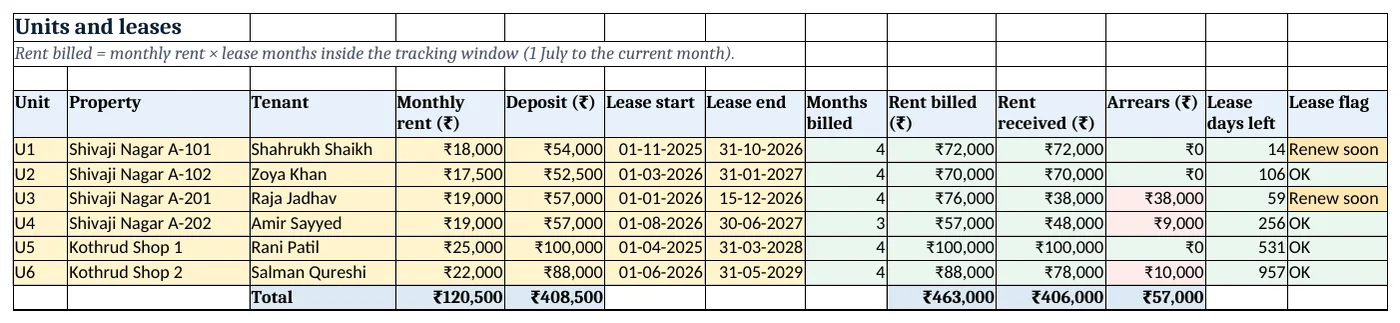
Figure 2. Units: months billed, rent billed and received, arrears and lease flag
Step 3. Payments and Expenses
- Payments: Date paid, Unit, Tenant, Rent month, Amount, Mode, Receipt no, Days late. Rent month is the 1st of the month the rent is for.
- G5 receipt number
="RR-"&TEXT(ROW()-4,"000")and H5 days late=MAX(0,A5-(D5+Setup!$B$6-1)). - Expenses: Date, Unit, Type, Amount, Month. E5
=DATE(YEAR(A5),MONTH(A5),1)so expenses group by month.
Step 4. Rent roll for the month
- C5 due this month only if the lease covers it:
=IF(AND(Units!F5<=EOMONTH(Setup!$B$5,0),Units!G5>=Setup!$B$5),Units!D5,0). - D5 paid for that month
=SUMIFS(Payments!$E$5:$E$500,Payments!$B$5:$B$500,A5,Payments!$D$5:$D$500,Setup!$B$5), E5 balance. - F5
=IF(E5<=0,"Paid",IF(D5>0,"Part paid","Unpaid"))and G5 days overdue after the 5th (12 on 17 October).
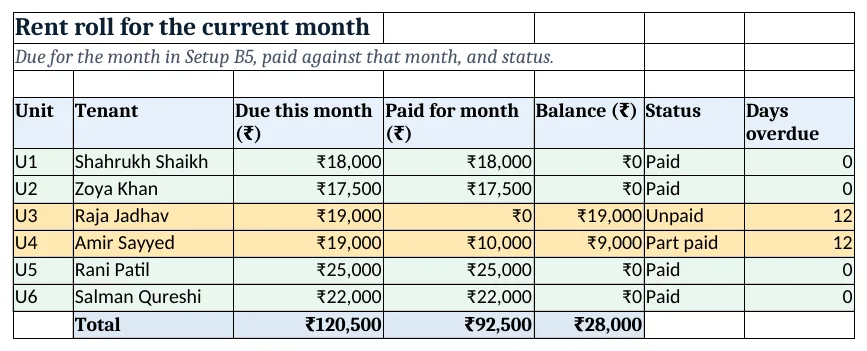
Figure 3. October rent roll: due, paid, balance, status and days overdue
Step 5. Rent receipt
- Type a receipt number in B4 (RR-019). Rows 6 to 11 pull date, unit, tenant, rent month, amount and mode with XLOOKUP.
- B12 shows the month's remaining balance from the Rent roll (₹9,000 for Amir Sayyed). Print A1:D16.
Step 6. Report and dashboard
- Report rows 5 to 8: month (
=EDATE(Setup!$B$4,0)and so on), rent received by rent month, expenses by month, net income. - B11 annual rent roll, B12 net income annualised
=D9/Setup!B8*12, B13 property value (example), B14 net yield=B12/B13. - Dashboard cards: due this month, collected, collection rate, arrears, leases to renew, net yield. Charts: received vs expenses by month at A8, arrears by unit at A25.
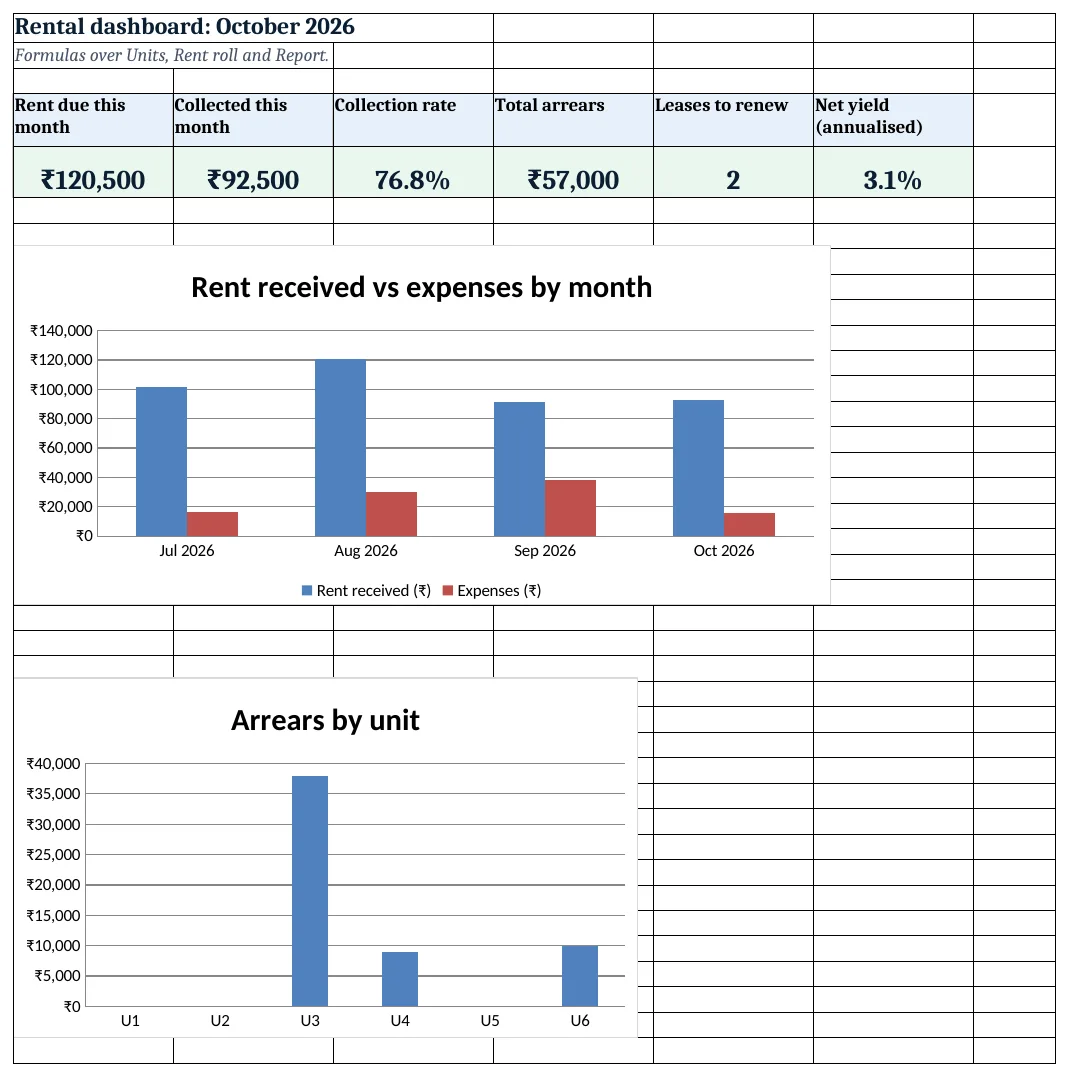
Figure 4. Rental dashboard: KPI cards and charts
Ravindra Bagale's Tip
Open the rent roll on the 6th, not at the month end. A friendly reminder one day after the due date gets most rents in that week.
Ravindra Bagale's Tip – मराठी
6 तारखेला rent roll उघडा, महिन्याच्या शेवटी नाही. due date नंतर एका दिवसाची आठवण बहुतेक भाडी त्याच आठवड्यात आणते.
Ravindra Bagale's Tip – हिंदी
6 तारीख को rent roll खोलो, महीने के अंत में नहीं. due date के एक दिन बाद की याद ज़्यादातर किराया उसी हफ्ते ले आती है.
3. Formulas used
| Cell | Formula | What it does |
|---|---|---|
| Setup!B5 | =DATE(YEAR(B3),MONTH(B3),1) |
First day of the current month |
| Setup!B8 | =(YEAR(B5)-YEAR(B4))*12+MONTH(B5)-MONTH(B4)+1 |
Months tracked |
| Units!H5 | =MAX(0,MIN(Setup!$B$8,(YEAR(Setup!$B$5)-YEAR(MAX(F5,Setup!$B$4)))*12+MONTH(Setup!$B$5)-MONTH(MAX(F5,Setup!$B$4))+1)-MAX(0,(YEAR(Setup!$B$5)-YEAR(G5))*12+MONTH(Setup!$B$5)-MONTH(G5))) |
Lease months inside the tracking window |
| Units!J5 | =SUMIFS(Payments!$E$5:$E$500,Payments!$B$5:$B$500,A5) |
Rent received |
| Units!K5 | =I5-J5 |
Arrears |
| Units!L5 | =G5-Setup!$B$3 |
Days to lease end |
| Units!M5 | =IF(L5<0,"Expired",IF(L5<=Setup!$B$7,"Renew soon","OK")) |
Expired, Renew soon or OK |
| Payments!G5 | ="RR-"&TEXT(ROW()-4,"000") |
Receipt number |
| Payments!H5 | =MAX(0,A5-(D5+Setup!$B$6-1)) |
Days paid after the due day |
| Rent roll!C5 | =IF(AND(Units!F5<=EOMONTH(Setup!$B$5,0),Units!G5>=Setup!$B$5),Units!D5,0) |
Rent due if the lease covers the month |
| Rent roll!D5 | =SUMIFS(Payments!$E$5:$E$500,Payments!$B$5:$B$500,A5,Payments!$D$5:$D$500,Setup!$B$5) |
Paid for this month |
| Rent roll!F5 | =IF(E5<=0,"Paid",IF(D5>0,"Part paid","Unpaid")) |
Paid, Part paid or Unpaid |
| Rent receipt!B12 | =XLOOKUP(B7,'Rent roll'!$A$5:$A$10,'Rent roll'!$E$5:$E$10,0) |
Balance for the month |
| Report!B5 | =SUMIFS(Payments!$E$5:$E$500,Payments!$D$5:$D$500,A5) |
Rent received for the month |
| Report!B14 | =B12/B13 |
Net yield |
| Dashboard!C5 | ='Rent roll'!D11/'Rent roll'!C11 |
Collection rate this month |
Every formula above is written in the template, so you can click a cell and see it in the formula bar. All values on this page were recalculated in LibreOffice with zero errors.
4. Common mistakes
- Using the payment date as the rent month. September rent paid on 2 October belongs to September. Keep a separate Rent month column.
- Counting the deposit as income. A deposit is returned at the end of the lease. Keep it in its own column, out of income and yield.
- Billing rent after a lease ended. Months billed must stop at the lease end, or arrears grow for an empty flat.
- Ignoring expenses in the return. Gross rent ÷ value looks better than it is. Yield should use rent after society charges, repairs and tax.
- Renewing late. A lease that lapses leaves the tenant without a valid agreement. Act on Renew soon, not Expired.
Ravindra Bagale's Tip
Start renewal talks 60 days before a lease ends. It gives both sides time to agree the new rent and register the agreement.
Ravindra Bagale's Tip – मराठी
Lease संपण्याच्या 60 दिवस आधी renewal ची बोलणी सुरू करा. नवीन भाडे ठरवायला आणि करार नोंदवायला दोघांना वेळ मिळतो.
Ravindra Bagale's Tip – हिंदी
Lease खत्म होने से 60 दिन पहले renewal की बात शुरू करो. नया किराया तय करने और agreement register कराने का समय मिलता है.
5. More real examples
Example 1: PG or hostel rooms. Units become beds; add a Food charge column and bill it with rent in the rent roll.
Example 2: Yearly rent increase. Add an Increase % and Increase month on Units and use =D5*(1+increase) once that month is reached.
Example 3: Shop with maintenance charges. Add a maintenance column billed with rent; the rent roll adds both and the receipt shows them separately.
Quick revision cards
Quick revision
Each card shows formulas from this page, each with an example and its answer from the template. Scan the QR code on a card to open this lesson. All names and numbers are made up for practice.
झटपट उजळणी
प्रत्येक card वर या page मधले formulas, त्यांचं example आणि template मधलं उत्तर आहे. Card वरचा QR code scan केला की हा lesson उघडतो. सगळी नावं आणि आकडे सरावासाठी काल्पनिक आहेत.
झटपट दोहराई
हर card पर इस page के formulas, उनका example और template का उत्तर है. Card का QR code scan करें तो यह lesson खुलेगा. सभी नाम और आंकड़े अभ्यास के लिए काल्पनिक हैं.
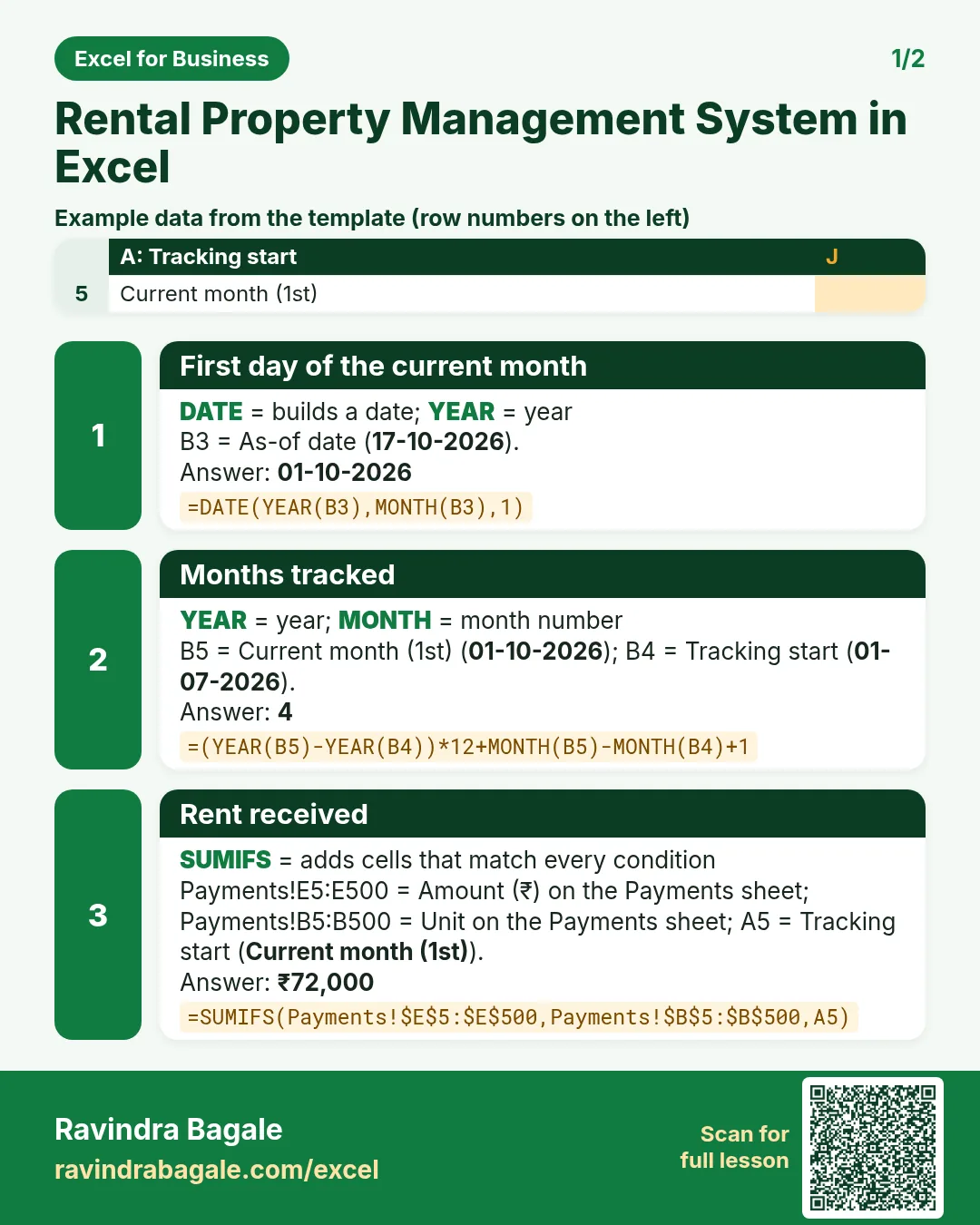

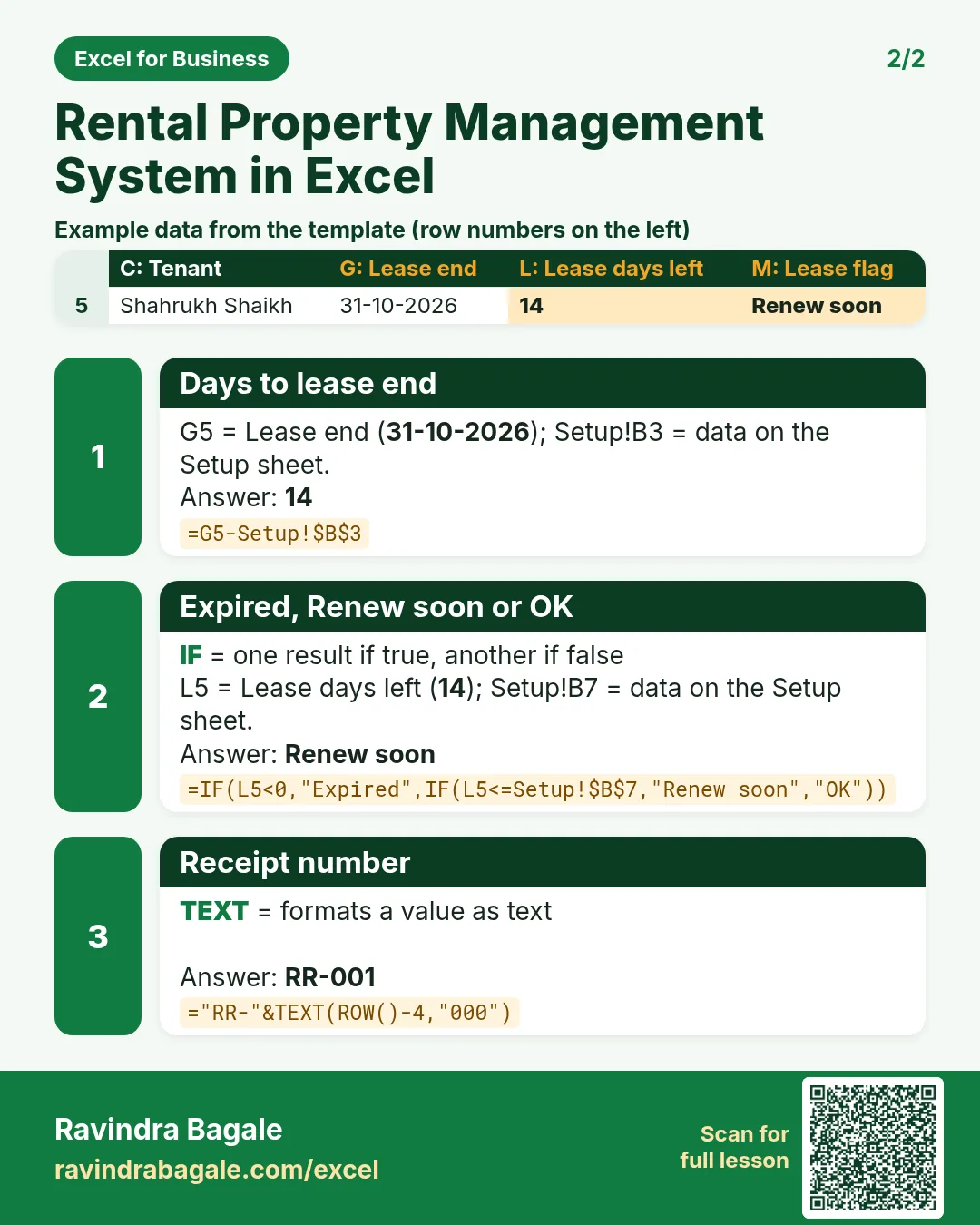

More cards: Ravi Sir's Cards.
6. Frequently asked questions
How do I calculate rent arrears in Excel?
Rent billed (rent × months inside the lease) minus everything received for that unit: =I5-J5.
How do I flag leases expiring soon?
Days left = lease end − today. Show Renew soon when it is 60 or less and colour it amber.
What is a rent roll?
A list of every unit with this month's rent due, paid, balance and status. It is the first sheet to open on the 6th of the month.
How do I calculate rental yield?
Net yield = yearly net income ÷ property value. The example annualises 4 months of net income; use a full year when you have it.
Is TDS on rent included?
No. If a tenant deducts TDS, record the gross rent and the TDS amount as two columns and check the rules with your accountant.
7. Quick quiz
Ten questions on this page. Sign in to save your score.
Loading practice tasks...
- Total area sq ft (Easy): Add up Area sq ft in D2:D11.
- Average price per sq ft (Easy): Average of E2:E11, rounded to 2 decimals.
- Rows in Tower 1 (Easy): How many rows have Tower "Tower 1"?
- Largest area sq ft (Easy): The largest value in D2:D11.
- Area sq ft for Tower 1 (Medium): Total of D2:D11 where B is "Tower 1".
- Tower 1 in Mumbai (Medium): Total of D2:D11 where B is "Tower 1" and C is "Mumbai".
- Best in Tower 1 (Medium): Largest E2:E11 value where B is "Tower 1".
- Value of row 2 (Medium): D2 times E2.
- Look up James Carter (Medium): The Area sq ft for "James Carter" (use a lookup on column A).
- Total value (Hard): Sum of D times E for all rows.
- Share of Tower 1 (Hard): Share of D2:D11 that is "Tower 1", rounded to 3 decimals.
- Rank of row 2 (Hard): Rank of D2 among D2:D11 (largest = 1).
- Above average? (Hard): "Above" if E2 is above the average of E2:E11, else "Below".