Recipe Cost Calculator in Excel: Scale a Recipe for More Guests and Find the Cost per Plate
Zoya in Sambhaji Nagar makes a veg pulao for 4 that everyone loves, and now she has to make it for 25 guests. How much rice? How many packets of paneer? What will it cost per plate? Multiplying every line by hand is where mistakes creep in. A recipe calculator in Excel scales every ingredient at once and works out the cost.
What you'll learn on this page
- Ingredient cost from pack size and pack price
- A scale factor from servings
- Quantities needed for the guests
- Whole packs to buy with ROUNDUP
- Gas and extras %, cost per plate
- The real shop bill with SUMPRODUCT
Download the template: recipe-cost-scaling-calculator-template.xlsx: example data with real formulas. Yellow cells are inputs you can type over; green cells hold formulas; blue rows are headers and totals. Replace the example data with your own and everything recalculates.
Made-up data: every name, amount, shop and date on this page is made up for practice. Cities are used only to make the examples feel real.
1. The example
Veg pulao for 4, scaled to 25 (scale factor 6.25), made-up prices:
| Ingredient | For 4 | For 25 | Packs to buy | Cost for 25 |
|---|---|---|---|---|
| Basmati rice (1 kg ₹140) | 400 g | 2,500 g | 3 | ₹350 |
| Paneer (200 g ₹90) | 150 g | 938 g | 5 | ₹421.88 |
| Cashews (250 g ₹280) | 30 g | 188 g | 1 | ₹210 |
All 8 ingredients cost ₹256.50 for 4 and ₹1,603.13 for 25. With 8% for gas and extras, the cost per plate is ₹69.26 either way, because the recipe scales evenly. But the shop bill is ₹2,120, since you buy whole packs and some is left over for the kitchen. Paneer is the costliest ingredient.
Figure 1. Pack size and price give each ingredient's cost; the scale factor 25 ÷ 4 = 6.25 multiplies every quantity; ROUNDUP gives whole packs (shop bill ₹2,120); cost per plate stays ₹69.26.
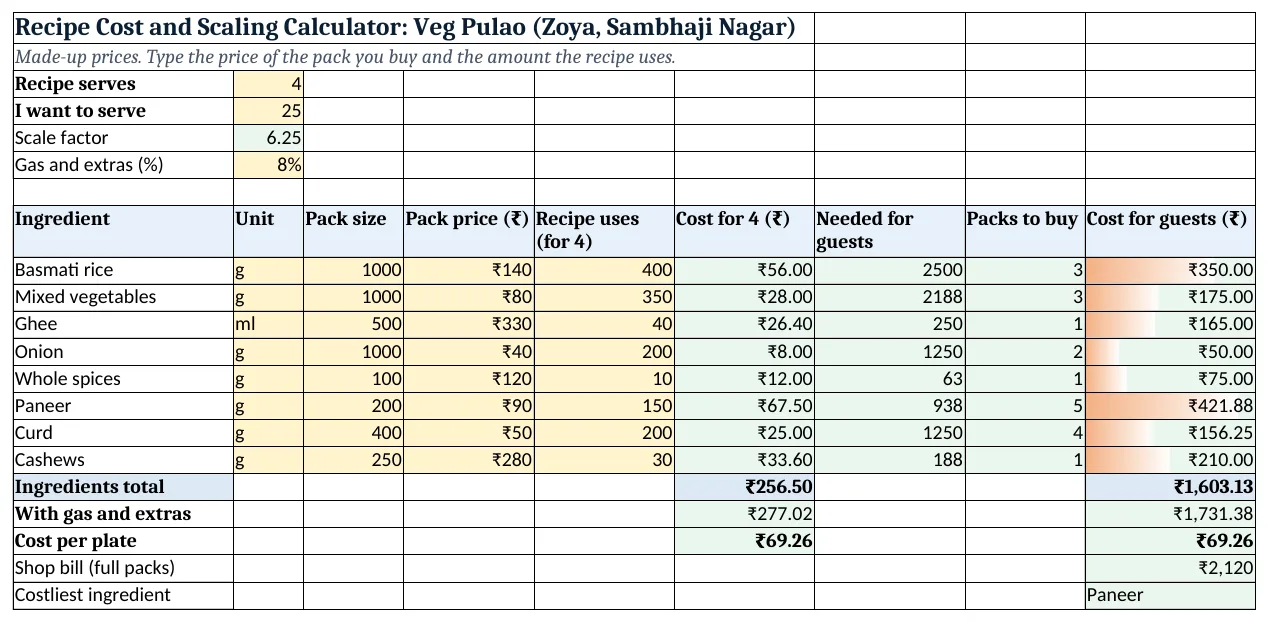
Figure 2. The template sheet, recalculated with its example data. Download it above and replace the yellow cells with your own numbers.
2. Build it step by step
Step 1. Servings
- In B3 type how many the recipe serves (4) and in B4 how many you want to serve (25).
- In B5 type
=B4/B3: 6.25. In B6 type the gas and extras % (8%).
Step 2. Ingredients
- In A8:I8 type the headers. For each ingredient type the unit, pack size, pack price and the amount the recipe uses (yellow).
- Select B9:B100 > Data Validation > List:
g,kg,ml,l,pcs(drop-down lists). Keep pack size and recipe amount in the same unit.
Step 3. Cost for the original recipe
- In F9 type
=E9/C9*D9: 400 g of a 1,000 g pack at ₹140 = ₹56. - Copy down. In F17 type
=SUM(F9:F16): ₹256.50.
Step 4. Scale up
- In G9 type
=E9*$B$5: 2,500 g of rice. - In H9 type
=ROUNDUP(G9/C9,0): 3 packs (ROUNDUP). - In I9 type
=G9/C9*D9: ₹350. Copy G9:I9 down; I17=SUM(I9:I16): ₹1,603.13.
Step 5. Cost per plate and shop bill
- In F18 type
=F17*(1+$B$6)and in F19=F18/B3: ₹69.26 per plate. Same in column I with B4. - In I20 type
=SUMPRODUCT(H9:H16,D9:D16): packs × pack price = ₹2,120 to pay at the shop (SUMPRODUCT). - In I21 type
=INDEX(A9:A16,MATCH(MAX(I9:I16),I9:I16,0)): Paneer.
Step 6. Data bars
- Select I9:I16 > Conditional Formatting > Data Bars to see which ingredients drive the cost (data bars).
Ravindra Bagale's Tip
Update pack prices from your last grocery bill once a month. Vegetables and paneer change price often.
Ravindra Bagale's Tip – मराठी
महिन्यातून एकदा शेवटच्या grocery bill वरून pack prices अपडेट करा. भाज्या आणि paneer चे भाव सारखे बदलतात.
Ravindra Bagale's Tip – हिंदी
महीने में एक बार आखिरी grocery bill से pack prices अपडेट करो. सब्ज़ी और paneer के भाव बार-बार बदलते हैं.
3. Formulas used
| Cell | Formula | What it does |
|---|---|---|
| B5 | =B4/B3 |
Scale factor |
| F9 | =E9/C9*D9 |
Ingredient cost for the original recipe |
| G9 | =E9*$B$5 |
Quantity needed for the guests |
| H9 | =ROUNDUP(G9/C9,0) |
Whole packs to buy |
| I9 | =G9/C9*D9 |
Ingredient cost for the guests |
| I17 | =SUM(I9:I16) |
Ingredients total for the guests |
| I18 | =I17*(1+$B$6) |
With gas and extras |
| I19 | =I18/B4 |
Cost per plate |
| I20 | =SUMPRODUCT(H9:H16,D9:D16) |
Shop bill for whole packs |
| I21 | =INDEX(A9:A16,MATCH(MAX(I9:I16),I9:I16,0)) |
Costliest ingredient |
Every formula above is written in the template, so you can click a cell and see it in the formula bar. All values on this page were recalculated in the file.
4. Common mistakes
- Mixing units. A 1 kg pack typed as 1 with a recipe of 400 g gives a cost 1,000 times too high. Type the pack as 1000 g.
- Forgetting $ on the scale factor.
=E9*B5moves down to B6, B7 … when copied. Use$B$5. - Cost per plate from the shop bill. The shop bill includes leftovers. Cost per plate should use what the recipe actually uses (I17).
- ROUND for packs. 2.19 packs of vegetables means buying 3; ROUND would give 2.
- Scaling spices exactly. Salt and strong spices often need a little less than straight scaling. Taste and adjust; the cost difference is tiny.
Ravindra Bagale's Tip
Look at the data bars before cutting costs. Changing the costliest ingredient matters more than saving on spices.
Ravindra Bagale's Tip – मराठी
खर्च कमी करायच्या आधी data bars बघा. मसाल्यांवर बचत करण्यापेक्षा सगळ्यात महाग ingredient बदलणं जास्त फरक पाडतं.
Ravindra Bagale's Tip – हिंदी
खर्च घटाने से पहले data bars देखो. मसालों पर बचत से ज़्यादा फ़र्क सबसे महंगा ingredient बदलने से पड़ता है.
5. More real examples
Example 1: Tiffin pricing. If the cost per plate is ₹69.26, a selling price can be set with a margin, for example =I19*1.5.
Example 2: Festival sweets. Scale a laddoo recipe from 20 pieces to 150 and see how much ghee and sugar to buy.
Example 3: Halving a recipe. Type 2 in B4: the scale factor becomes 0.5 and every quantity halves.
Quick revision cards
Quick revision
Each card shows formulas from this page, each with an example and its answer from the template. Scan the QR code on a card to open this lesson. All names and numbers are made up for practice.
झटपट उजळणी
प्रत्येक card वर या page मधले formulas, त्यांचं example आणि template मधलं उत्तर आहे. Card वरचा QR code scan केला की हा lesson उघडतो. सगळी नावं आणि आकडे सरावासाठी काल्पनिक आहेत.
झटपट दोहराई
हर card पर इस page के formulas, उनका example और template का उत्तर है. Card का QR code scan करें तो यह lesson खुलेगा. सभी नाम और आंकड़े अभ्यास के लिए काल्पनिक हैं.
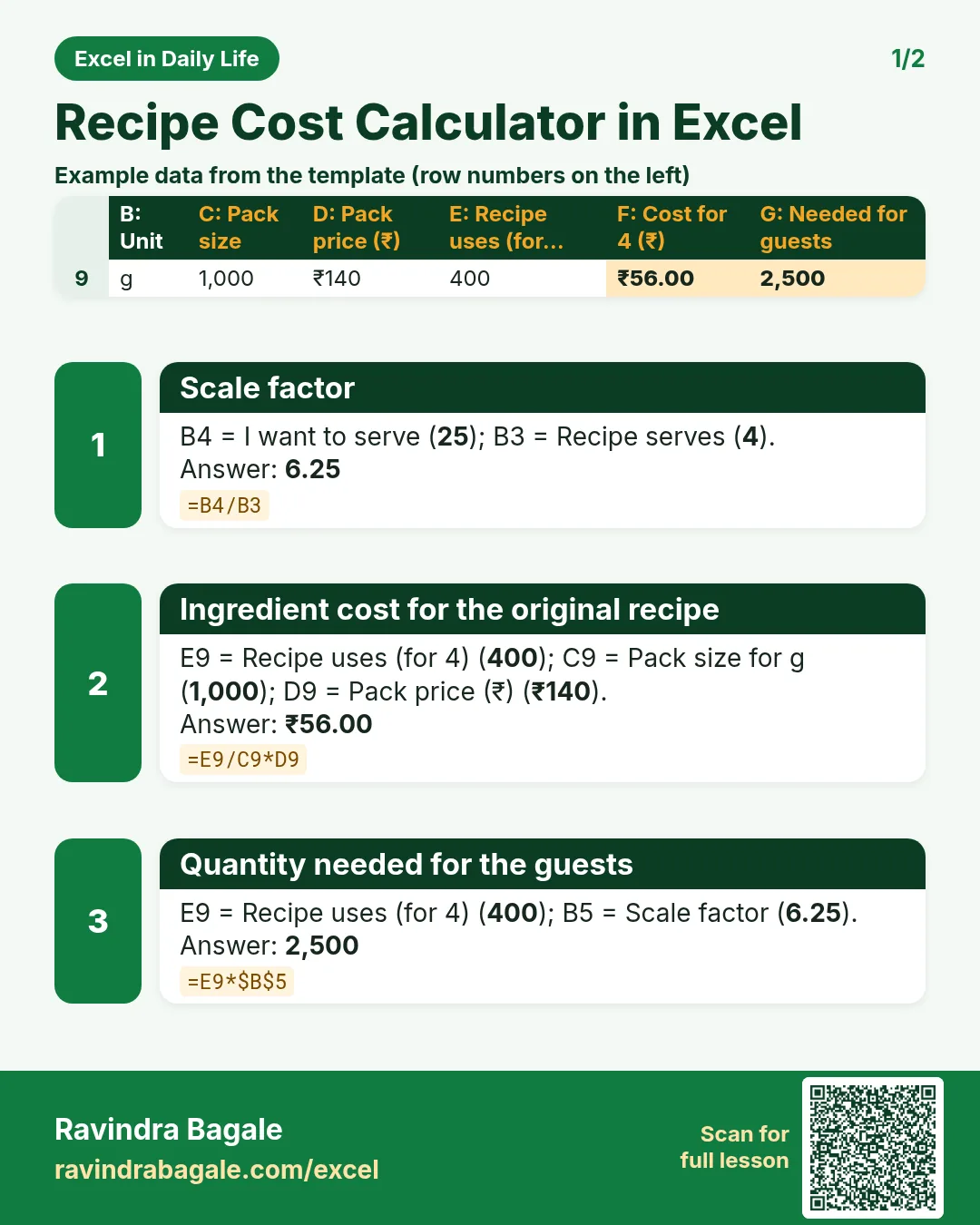

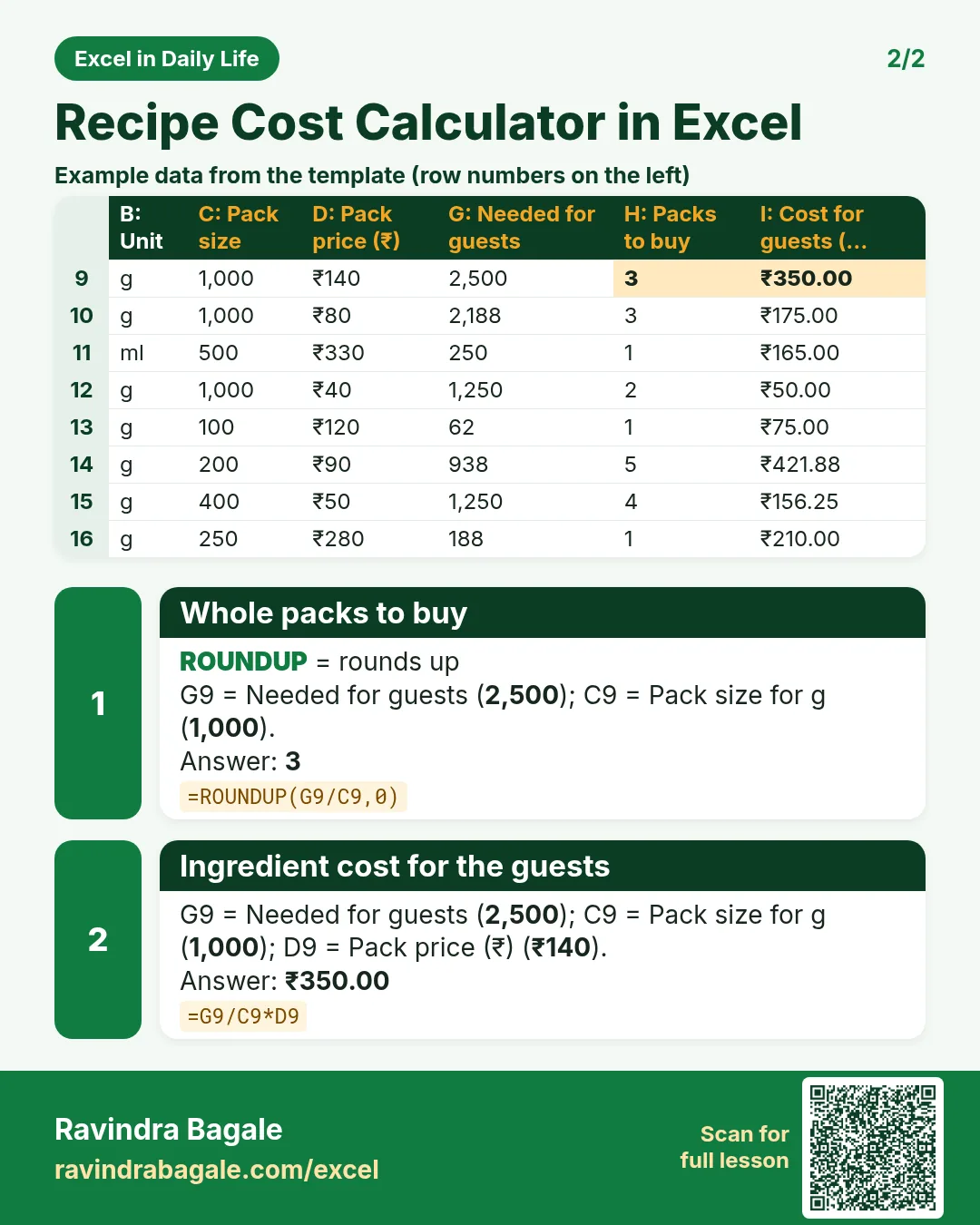

More cards: Ravi Sir's Cards.
6. Frequently asked questions
How do I scale a recipe in Excel?
Scale factor = servings wanted ÷ recipe servings; multiply each quantity by it with $B$5.
How do I calculate ingredient cost?
Amount used ÷ pack size × pack price: =E9/C9*D9.
How do I find the cost per plate?
Total ingredient cost × (1 + extras %) ÷ servings.
Why is the shop bill higher than the recipe cost?
You buy whole packs; ROUNDUP and SUMPRODUCT give the real bill, and the rest stays in the kitchen.
Can I use it for any recipe?
Yes. Replace the ingredients and pack prices; keep units consistent.
7. Quick quiz
Ten questions on this page. Sign in to save your score.
Loading practice tasks...
- Total seats (Easy): Add up Seats in D2:D11.
- Average price per seat (Easy): Average of E2:E11, rounded to 2 decimals.
- Rows in Basic (Easy): How many rows have Plan "Basic"?
- Largest seats (Easy): The largest value in D2:D11.
- Seats for Basic (Medium): Total of D2:D11 where B is "Basic".
- Basic in Seattle (Medium): Total of D2:D11 where B is "Basic" and C is "Seattle".
- Best in Basic (Medium): Largest E2:E11 value where B is "Basic".
- Value of row 2 (Medium): D2 times E2.
- Look up Neha Gupta (Medium): The Seats for "Neha Gupta" (use a lookup on column A).
- Total value (Hard): Sum of D times E for all rows.
- Share of Basic (Hard): Share of D2:D11 that is "Basic", rounded to 3 decimals.
- Rank of row 2 (Hard): Rank of D2 among D2:D11 (largest = 1).
- Above average? (Hard): "Above" if E2 is above the average of E2:E11, else "Below".