Excel for Accountants and Finance Teams: GST, P&L, Balance Sheet and Budgets (With Templates)
This guide is for people in the accountants profession who use Excel every day. You will see every common file, the formulas people actually type, and downloadable templates with made-up Indian ₹ data. Related short lessons are linked — we do not re-teach them here.
What you'll learn
- Which roles use Excel in accountants
- Every common Excel file type for this profession
- Sample tables with realistic ₹ examples (made-up names)
- Formulas: GST on taxable, Running balance, Variance ₹, Variance % and more
- Ready templates you can download and reuse
Downloads: accountants-gst-pnl-budget.xlsx (GST sales/purchase + P&L + balance sheet + budget vs actual + debtors ageing) · accountants-cash-bank-recon.xlsx (Cash book + bank book + bank reconciliation)
Example data only
All names, amounts, rates and dates are made up for practice. They are not real client or employer records. Follow your organisation's own rules and software for live work.
In short
One profession → many Excel files. Each file is one clear list. Yellow cells are inputs; green cells are formulas. Start with the Roles table, then open the matching template.
थोडक्यात
एक profession → अनेक Excel files. प्रत्येक file = एक स्पष्ट यादी. Yellow = input; green = formula. Roles table पासून सुरू करा, नंतर matching template उघडा.
संक्षेप में
एक profession → कई Excel files. हर file = एक साफ सूची. Yellow = input; green = formula. Roles table से शुरू करें, फिर matching template खोलें.
Related chapters (already on this site)
Why
Some topics already have a focused lesson. Use those for depth; use this guide for the full profession picture.
What
| Chapter | What it covers |
|---|---|
| 22. KPI in All Industries | Finance and cost KPIs. |
| Home Budget (Daily Life) | Simple P&L style for home — same idea as business. |
| Excel Dashboards gallery | Ready finance-style dashboards. |
How
- Skim the link if you need that one skill.
- Come back here for the full file list and templates.
1. Who uses Excel
Why
Books start as lists. Excel is where vouchers become reports.
What
| Role | Typical Excel work |
|---|---|
| Junior accountant | Voucher entry, cash book, GST invoice register. |
| Accounts executive | Bank recon, vendor bills, debtor ageing. |
| Finance analyst | Budget vs actual, variance, MIS pack. |
| CA / audit support | Trial balance extract, lead schedules, sample checks. |
How
- Open the Roles table.
- Match your job to one file.
- Download the matching template.
2. Every common Excel file
Why
If you only learn one dashboard, you miss the daily registers that feed it.
What
| File | What one row / sheet holds |
|---|---|
| GST sales / purchase register | Invoice no, party, taxable value, CGST, SGST, IGST, invoice date. |
| Cash / bank book | Date, narration, debit, credit, running balance. |
| Bank reconciliation | Book vs statement; unmatched lines; difference. |
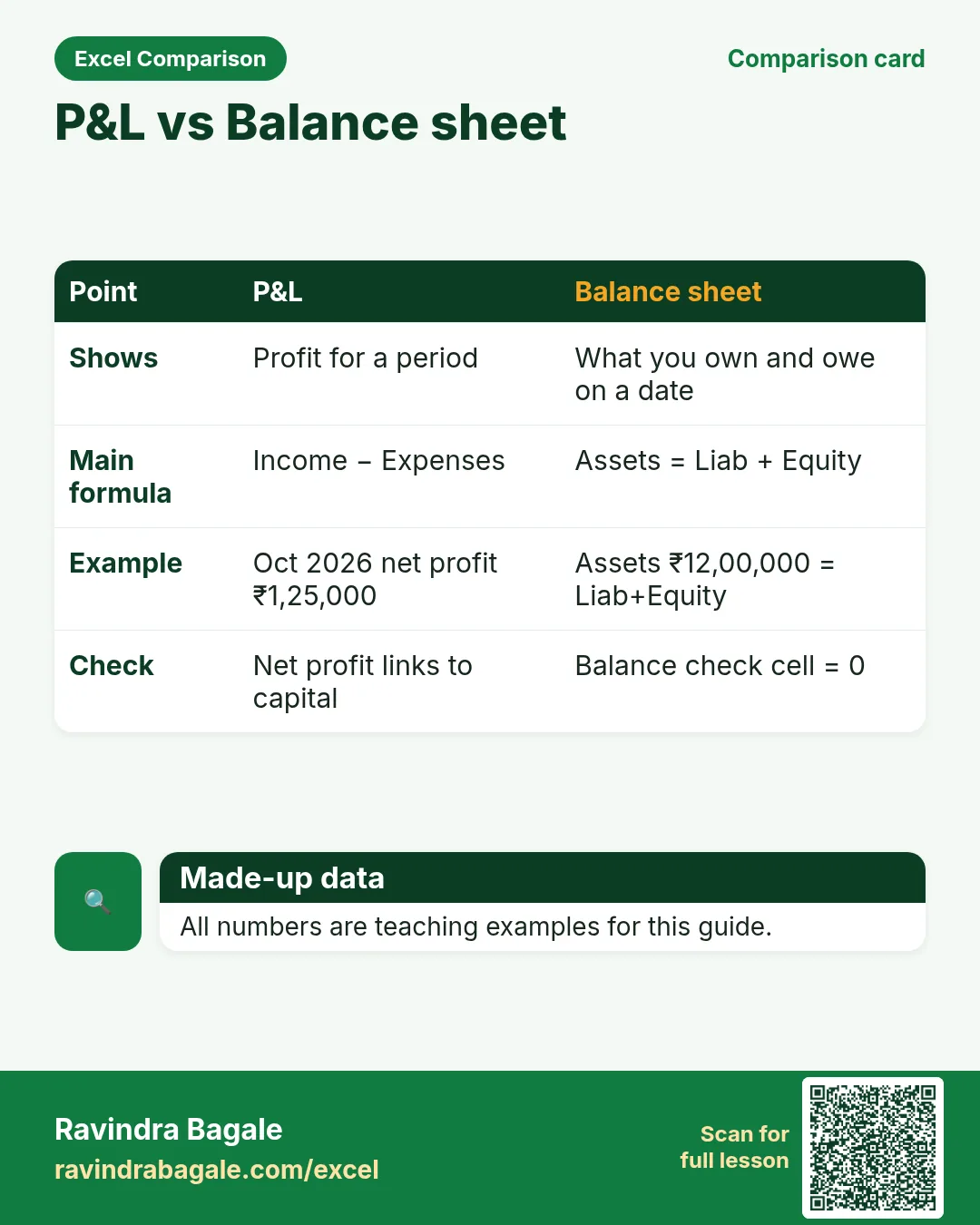
| Profit & Loss (monthly) | Income and expense heads; gross and net profit. |
| Balance sheet (snapshot) | Assets, liabilities, equity; check Assets = Liabilities + Equity. |
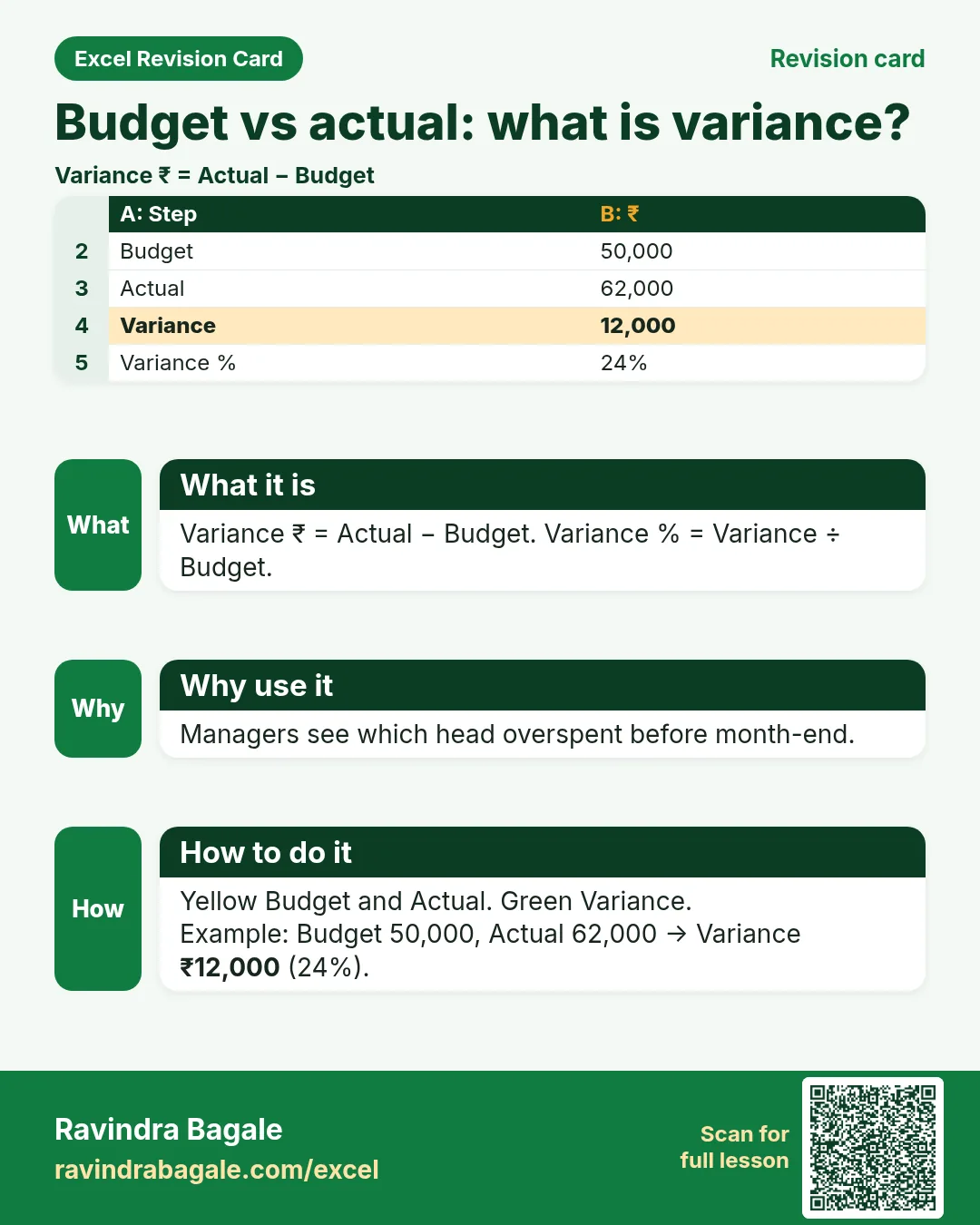
| Budget vs actual | Budget, actual, variance ₹ and % by head. |
| Debtor / creditor ageing | 0–30, 31–60, 61–90, 90+ buckets. |
| Fixed asset register | Asset, cost, dep %, WDV, location. |
How
- Pick the file that matches your role.
- Download the template that contains that sheet.
- Replace yellow sample rows with your practice data (still made-up if you share screenshots).
3. Formulas people use
Why
Typed numbers go stale. Formulas update when inputs change.
What
| Name | Formula | What it does |
|---|---|---|
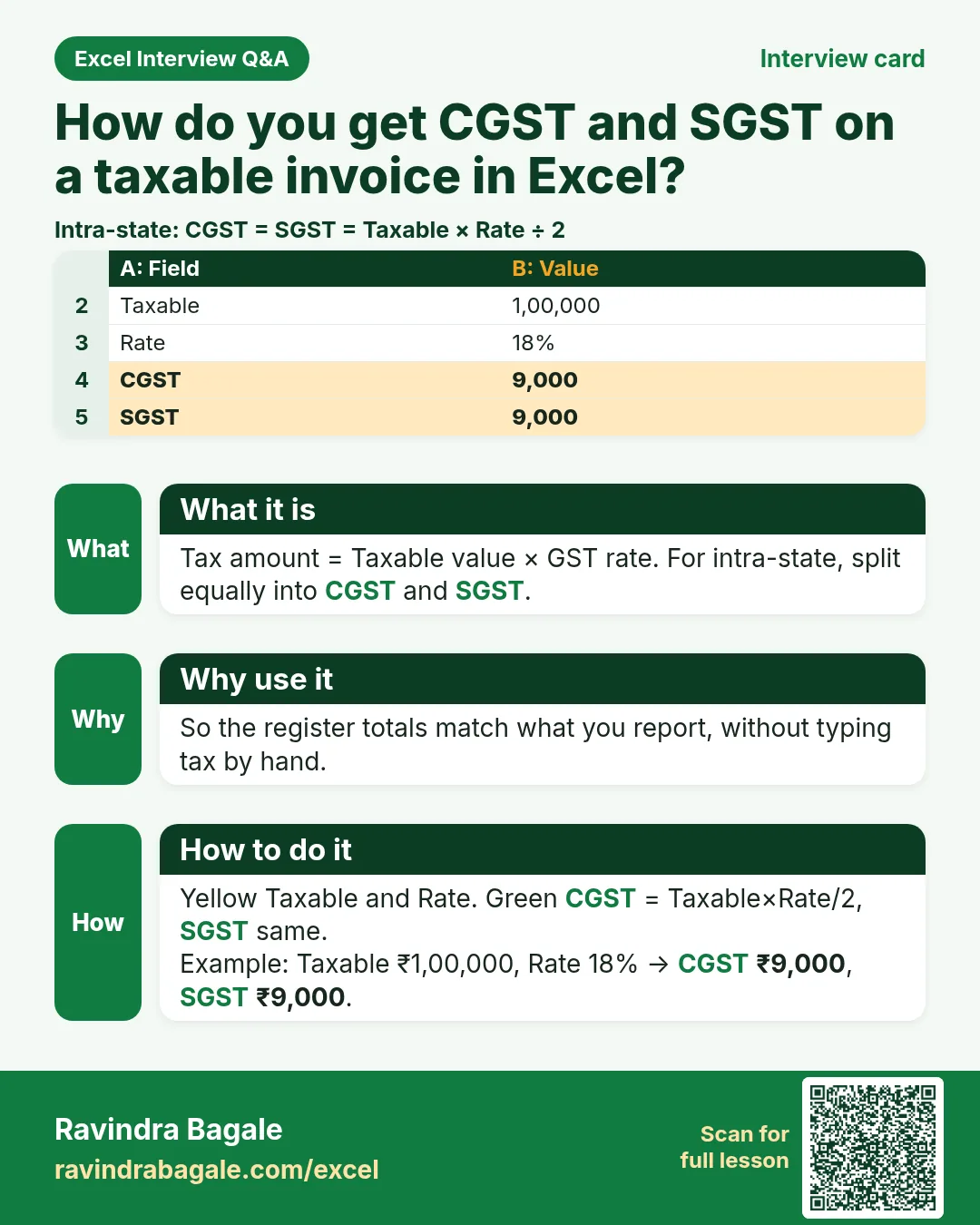
| GST on taxable | =taxable*rate |
CGST/SGST or IGST amount. |
| Running balance | =prev+debit-credit |
Cash/bank book balance. |
| Variance ₹ | =actual-budget |
Over or under budget. |
| Variance % | =variance/budget |
Percent over/under. |
| Ageing bucket | =IF(days<=30,"0-30",IF(days<=60,"31-60",IF(days<=90,"61-90","90+"))) |
Debtors days past invoice. |
| Depreciation (SLM simple) | =cost*rate |
Simple teaching dep for the year. |
| SUMIF by head | =SUMIF(head_range,head,amount_range) |
Total one expense head. |
| Balance check | =assets-(liab+equity) |
Must be 0 on a clean sheet. |
How
- Open the Formulas used sheet inside each template.
- Change only yellow cells.
- Watch green cells recalculate.
3. GST invoice register
Why
Without a clean register, GSTR filing and ITC checks become slow.
What
One sales sheet and one purchase sheet with tax columns.
How
- Download accountants-gst-pnl-budget.xlsx › GST sales.
- Yellow = party, taxable, rate. Green = tax amounts.
- Filter IGST rows for inter-state invoices.
- Read the totals row: Taxable and tax sums.
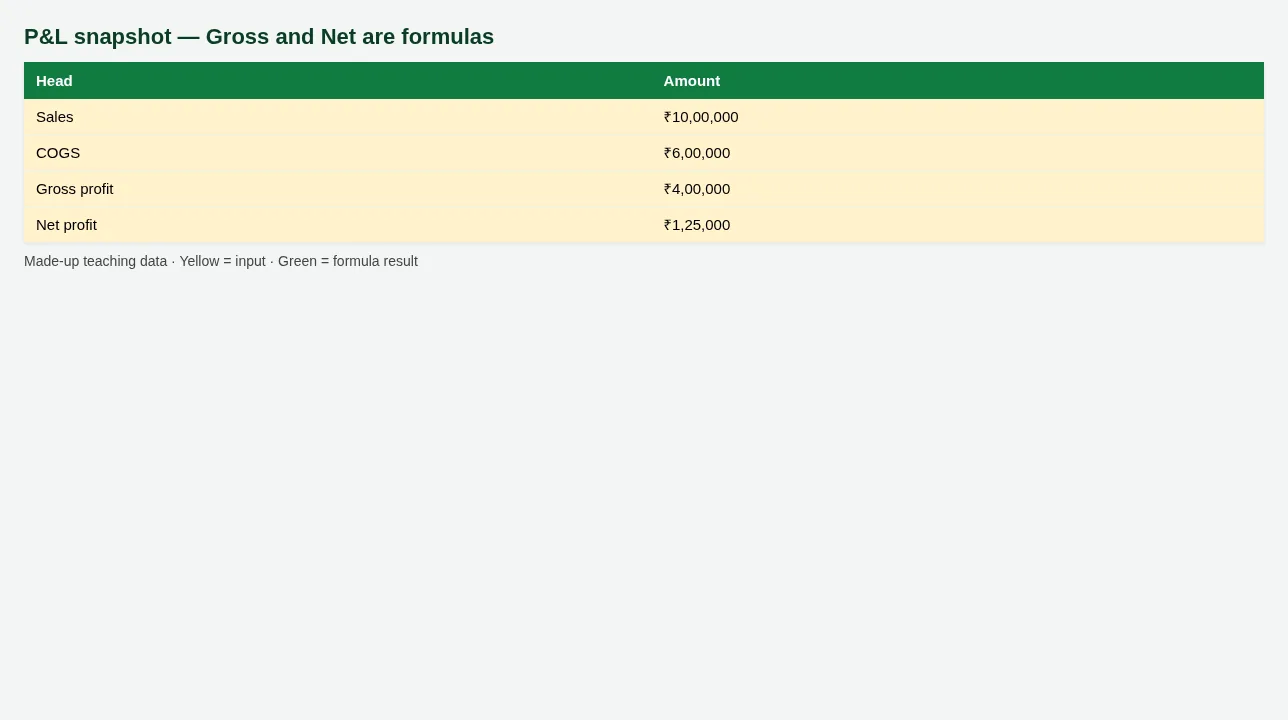
Figure. P&L snapshot — Gross and Net are formulas
4. P&L and balance sheet
Why
Owners ask: did we make profit, and what do we own vs owe?
What
A monthly P&L and a simple balance sheet with a balance check cell.
How
- Open sheet P&L. Income minus expenses = Net profit (green).
- Open Balance sheet. Assets must equal Liabilities + Equity.
- If Balance check is not 0, find the mistyped yellow cell.
5. Budget vs actual and ageing
Why
Budget without actuals is a wish list. Ageing shows who is late to pay.
What
Budget vs actual with variance, plus debtor ageing buckets.
How
- Open Budget vs actual. Change one Actual (yellow); Variance updates.
- Open Debtors ageing. Days late drives the bucket formula.
- Sort 90+ first for follow-up calls.
6. Sheet previews
Why
See the layout before you open Excel.
What
Screenshots of the main sheets in the downloadable templates.
How
Scroll the figures, then download the matching .xlsx.
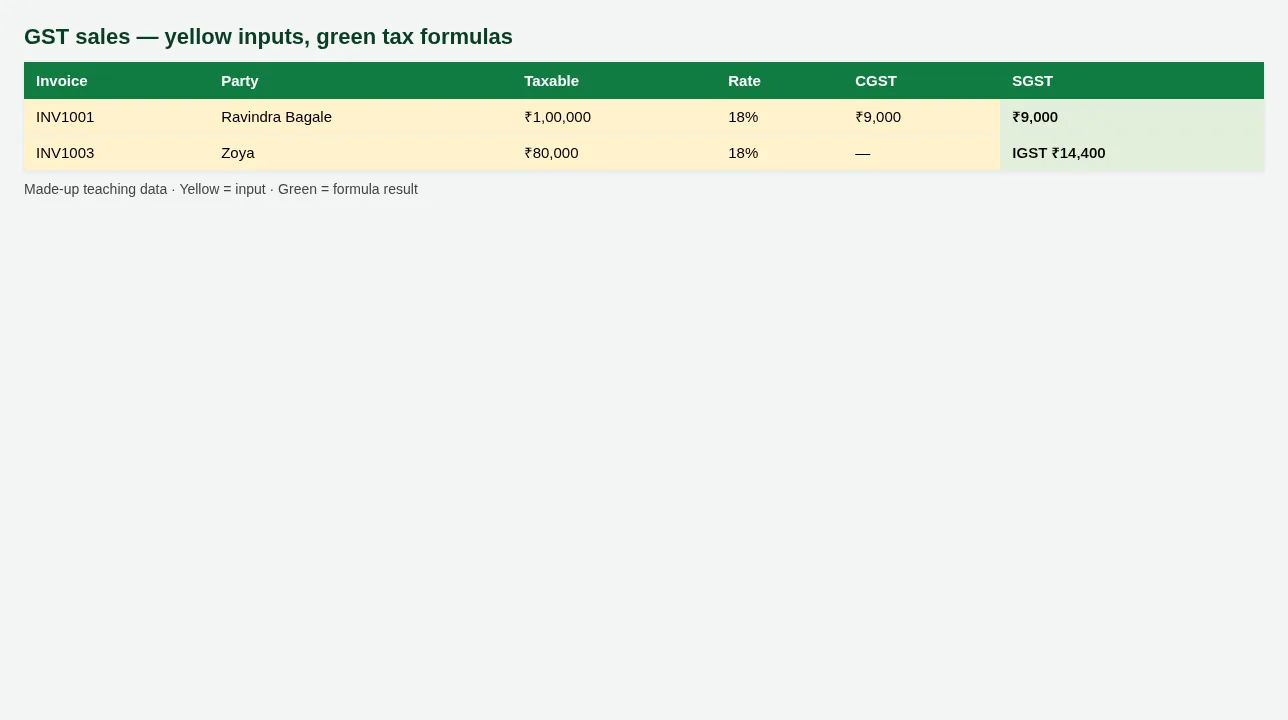
Figure. GST sales — yellow inputs, green tax formulas
Figure. P&L snapshot — Gross and Net are formulas
7. Common mistakes
| Mistake | What goes wrong | Fix |
|---|---|---|
| Typing tax as a fixed number | Rate change breaks every row. | Tax = Taxable × Rate in green cells. |
| Mixing CGST+SGST with IGST on one invoice | Wrong GSTR picture. | Use IGST only for inter-state; else CGST+SGST. |
| Deleting formula rows on P&L | Net profit goes blank. | Clear yellow inputs only. |
| Using real client PAN in practice files | Privacy risk. | These templates use made-up names only. |
8. FAQ
Are GST rates here official?
Rates in the file are teaching examples. Confirm live rates from GST portal / your CA.
Can LibreOffice open these?
Yes — checked with 0 formula errors.
Is this a full tally replacement?
No. It teaches the Excel files accountants still keep beside Tally/ERP.
9. Try at home
Try at home
- On GST sales, change Taxable for INV1001; confirm CGST and SGST change.
- On P&L, what is Net profit? (green total)
- On Debtors, how many invoices are in bucket 90+?
Recap
In short
- 4 roles use Excel in this profession.
- 8 common file types are listed above.
- 2 downloadable templates with yellow inputs and green formulas.
- Rates and rules here are teaching examples only.
- Use Related chapters for focused skills.
Quick revision cards
Quick revision
1 interview card, 1 comparison card and 1 revision card. Save on your phone or download as PNG. Numbers are made up for practice.
झटपट उजळणी
1 interview card, 1 comparison card आणि 1 revision card. Phone वर save करा किंवा PNG download करा. आकडे सरावासाठी काल्पनिक आहेत.
झटपट दोहराई
1 interview card, 1 comparison card और 1 revision card. Phone पर save करें या PNG download करें. आंकड़े अभ्यास के लिए काल्पनिक हैं.