Event Management System in Excel: Budget vs Actual, Vendor Expenses, Task List, Quotation and Profit
Zoya Events in Kolhapur is planning a wedding reception for 400 guests on 20 November 2026. Zoya quotes the client a price per category, pays vendors in advances and has a dozen tasks with deadlines. One overrun or one forgotten task eats the margin. This page builds a 9-sheet system for one event: budget, expenses, tasks, a printable quotation and a profit and cash report.
What you'll learn on this page
- Plan a category budget and add a margin for the client price
- Log vendor advances and compare spent with estimate
- Flag categories over budget with data bars and red cells
- Track tasks with days left and an Overdue flag
- Print a quotation with GST from the budget
- Work out expected profit and cash in hand
- Build an event dashboard with countdown
Download the template: event-management-system-template.xlsx: a 9-sheet system with example data and real formulas (Read me, Setup, Budget, Expenses, Tasks, Quotation, Client payments, Report, Dashboard). Yellow cells are inputs you can type over; green cells hold formulas; blue rows are headers and totals. Replace the example data with your own and every report and the dashboard recalculate.
Made-up data: every name, amount, business and date on this page is made up for practice. Cities are used only to make the examples feel real.
1. The business story
Zoya Events, Kolhapur, as of 17 October 2026 (made-up data). Client: Ravina and Raja Patil. 400 guests, 34 days to go, margin 15% on cost and GST at the rate set in Setup (18% in the example; confirm the rate for your service).
| Question | Where the system answers it |
|---|---|
| What did we quote? | Quotation: ₹9,29,200 + GST ₹1,67,256 = ₹10,96,456 |
| Where are we overspending? | Budget: Invitations at 119% (₹21,500 against ₹18,000) |
| What is late? | Tasks: 3 overdue (final menu, decor sketch, sound check) |
| Will we make money? | Report: expected profit ₹1,17,700, 12.7% of the quote |
So far ₹3,75,500 is spent (46.5% of the budget) and ₹5,50,000 received, leaving ₹1,74,500 cash in hand for this event. For the host's own guest list and catering count, see the function guest list; this page is the planner's file.
Figure 1. Setup holds the event and rates; Budget is the plan; Expenses, Tasks and Client payments are logs; Quotation, Report and Dashboard read.
2. Build it sheet by sheet
Step 1. Setup
- B3 as-of date, B4 client, B5 event date, B6 guests, B7 margin (15%), B8 GST rate (an input; confirm it).
- B9 days to event
=B5-B3(34). Status values and owners go in D3:D5 and E3:E6 for drop-downs.
Step 2. Budget: estimate, client price and spent
- Row 4: Category, Estimate, Client price, Spent, Remaining, % used, Cost to plan. Type the estimate per category.
- C5 client price
=ROUND(B5*(1+Setup!$B$7),0). D5 spent=SUMIFS(Expenses!$D$5:$D$500,Expenses!$B$5:$B$500,A5). - F5 % used
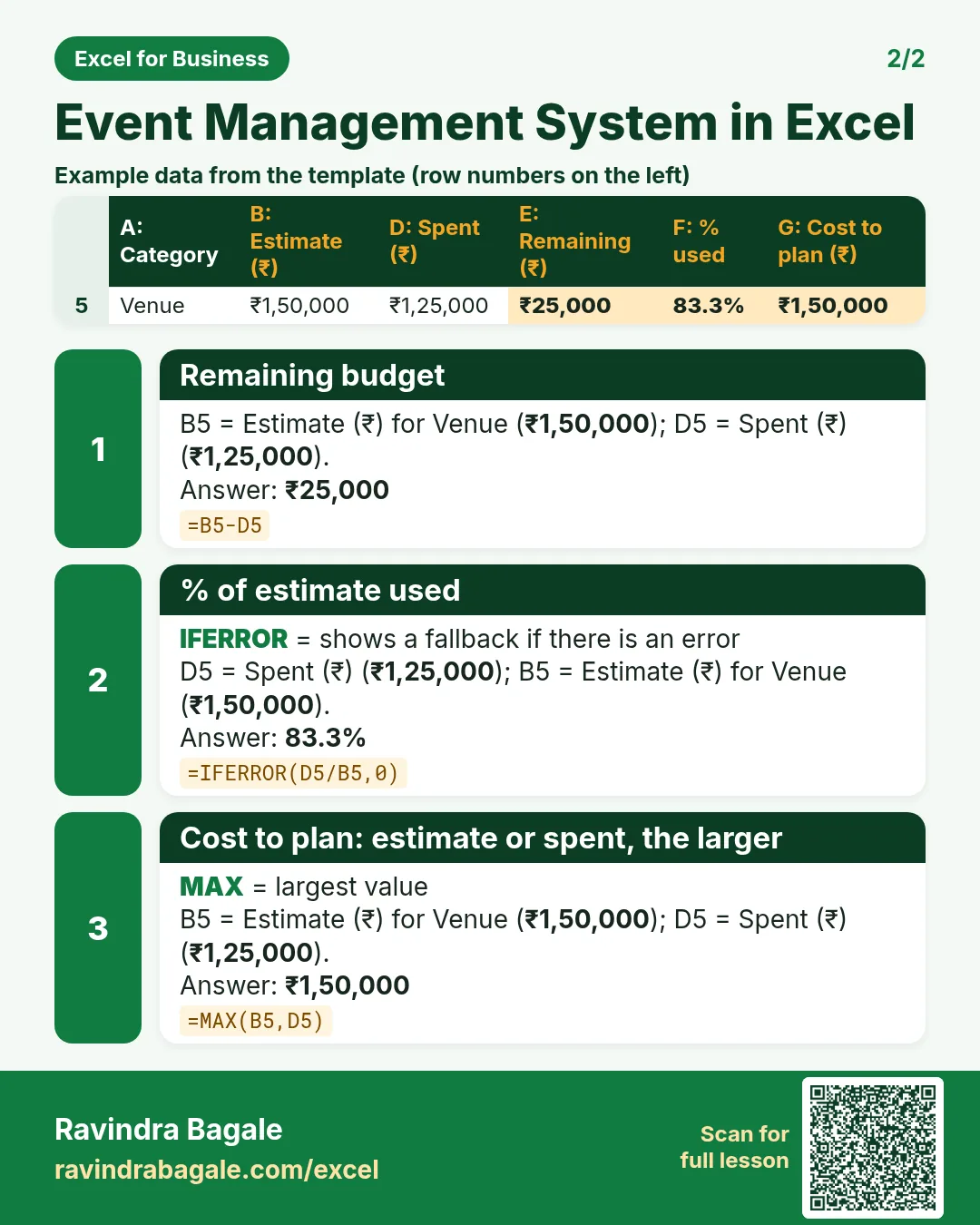
=IFERROR(D5/B5,0)with data bars and red above 100%. G5 cost to plan=MAX(B5,D5): once you overspend, the overspend is the new cost.
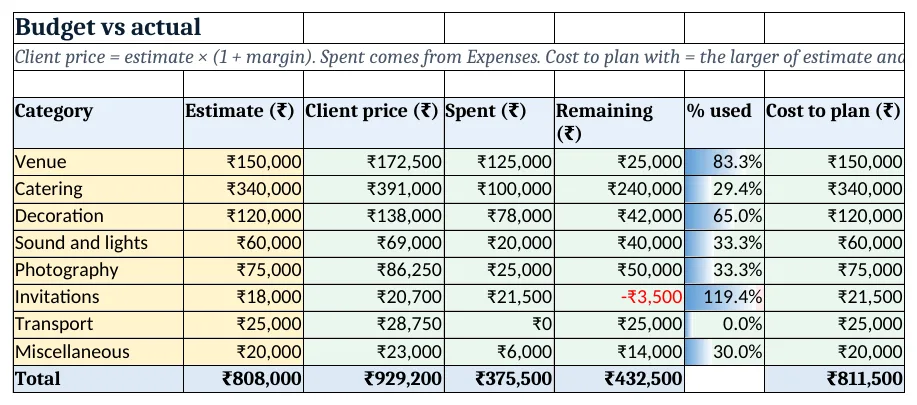
Figure 2. Budget vs actual: estimate, client price, spent, remaining and % used
Step 3. Expenses and client payments
- Expenses: Date, Category, Detail, Amount. Category is a drop-down from the Budget list, so a typo cannot create a new category.
- Client payments: Date, Detail, Amount, Mode. Advance ₹3,00,000 on 1 October and ₹2,50,000 on 15 October.
Step 4. Tasks
- Row 4: Task, Owner, Due, Status, Days left, Flag. E5
=C5-Setup!$B$3. - F5
=IF(D5="Done","Done",IF(E5<0,"Overdue",IF(E5<=7,"Due this week","Planned")))(nested IF). Overdue rows go red, Due this week amber. - For a personal to-do list with checkboxes see the to-do list; here every task has an owner.
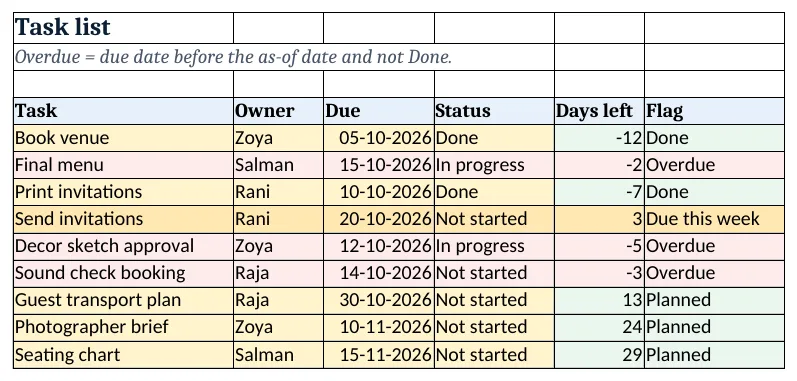
Figure 3. Tasks: days left with Overdue and Due this week flags
Step 5. Quotation
- A6:B13 pull each category and its client price from Budget. B14 subtotal, B15 GST
=ROUND(B14*Setup!B8,0), B16 total. - Print A1:D18 (print area). The note in A18 holds validity and advance terms.
Step 6. Report and dashboard
- Report: quoted before GST, cost to plan, expected profit
=B4-B5, margin, received, balance due from client with GST, spent so far and cash in hand. - Dashboard cards: quotation total, balance due from client, budget used, categories over budget
=COUNTIF(Budget!F5:F12,">1"), overdue tasks and days to event. - Chart 1 at A8: estimate vs spent by category. Chart 2 at A25: received, balance and spent.
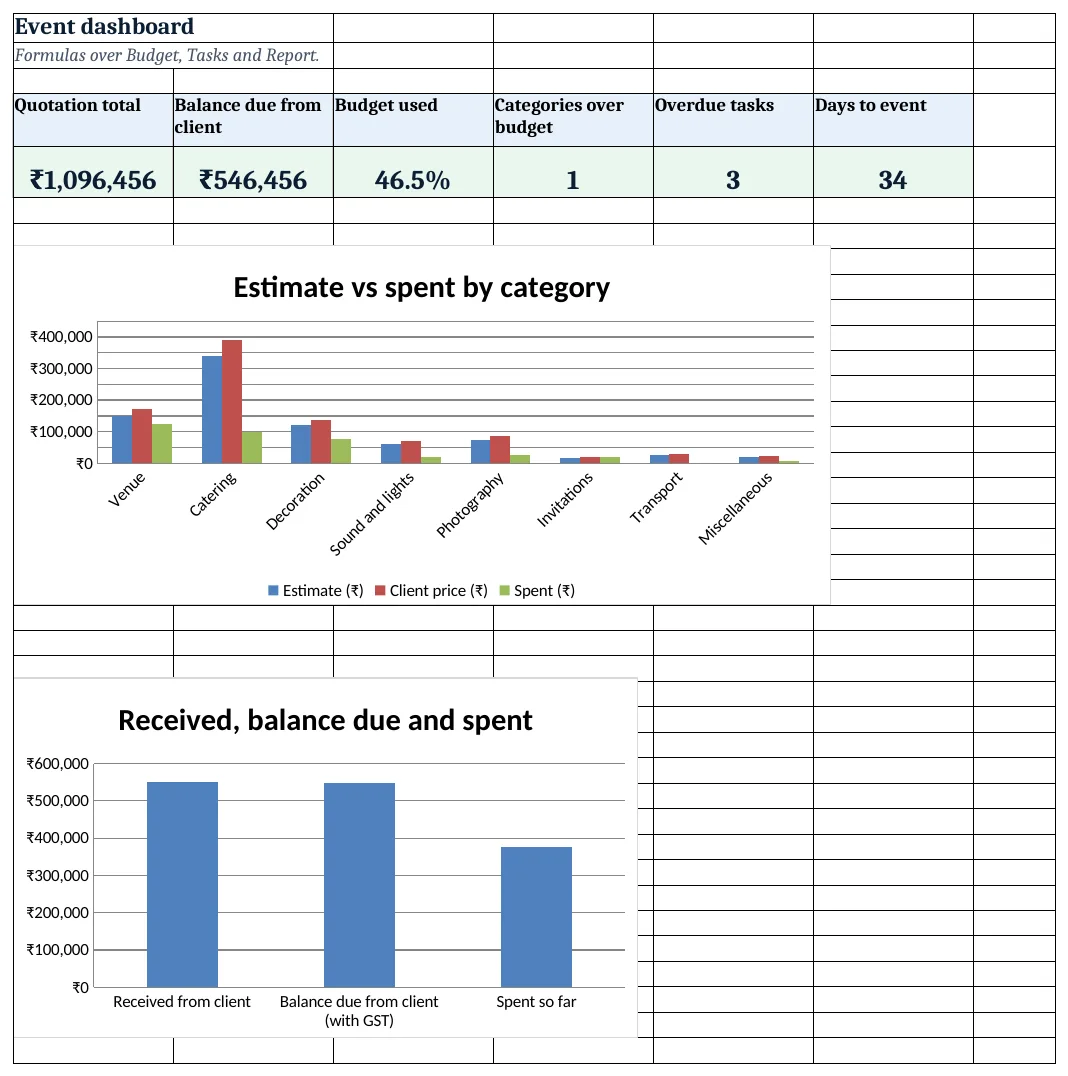
Figure 4. Event dashboard: KPI cards and charts
Ravindra Bagale's Tip
Take the client advance before you pay any vendor advance. In the example ₹5,50,000 came in before ₹3,75,500 went out, so the event never used your own money.
Ravindra Bagale's Tip – मराठी
कोणत्याही vendor ला advance देण्याआधी client कडून advance घ्या. उदाहरणात ₹5,50,000 आले आणि मग ₹3,75,500 गेले, त्यामुळे स्वतःचे पैसे कधीच लागले नाहीत.
Ravindra Bagale's Tip – हिंदी
किसी vendor को advance देने से पहले client से advance लो. उदाहरण में ₹5,50,000 आए और फिर ₹3,75,500 गए, इसलिए अपना पैसा कभी नहीं लगा.
3. Formulas used
| Cell | Formula | What it does |
|---|---|---|
| Setup!B9 | =B5-B3 |
Days to the event |
| Budget!C5 | =ROUND(B5*(1+Setup!$B$7),0) |
Client price with margin |
| Budget!D5 | =SUMIFS(Expenses!$D$5:$D$500,Expenses!$B$5:$B$500,A5) |
Spent from Expenses |
| Budget!E5 | =B5-D5 |
Remaining budget |
| Budget!F5 | =IFERROR(D5/B5,0) |
% of estimate used |
| Budget!G5 | =MAX(B5,D5) |
Cost to plan: estimate or spent, the larger |
| Tasks!E5 | =C5-Setup!$B$3 |
Days left to the due date |
| Tasks!F5 | =IF(D5="Done","Done",IF(E5<0,"Overdue",IF(E5<=7,"Due this week","Planned"))) |
Task flag |
| Quotation!B15 | =ROUND(B14*Setup!B8,0) |
GST on the subtotal |
| Quotation!B16 | =B14+B15 |
Quotation total |
| Report!B6 | =B4-B5 |
Expected profit |
| Report!B9 | =Quotation!B16-B8 |
Balance due from the client |
| Report!B11 | =B8-B10 |
Cash in hand for the event |
| Dashboard!D5 | =COUNTIF(Budget!F5:F12,">1") |
Categories over budget |
| Dashboard!E5 | =COUNTIF(Tasks!F5:F13,"Overdue") |
Overdue tasks |
Every formula above is written in the template, so you can click a cell and see it in the formula bar. All values on this page were recalculated in LibreOffice with zero errors.
4. Common mistakes
- Quoting from memory. Build the quote from the budget sheet so every rupee of the quote has a cost behind it.
- Working out profit on estimates only. When a category overruns, the estimate is no longer the cost. MAX(estimate, spent) keeps profit honest.
- Logging vendor advances later. An advance not logged makes the budget look healthy. Log it the day you pay.
- Tasks without owners. A task nobody owns is a task nobody does. Every row needs one name.
- Mixing GST into the margin. Margin is on cost; GST is charged on top of the price and paid to the government. Keep them separate.
Ravindra Bagale's Tip
Review the task list every Monday with the whole crew. Overdue items get a new date and an owner on the spot.
Ravindra Bagale's Tip – मराठी
दर सोमवारी पूर्ण crew सोबत task list पहा. Overdue कामांना तिथेच नवी तारीख आणि owner द्या.
Ravindra Bagale's Tip – हिंदी
हर सोमवार पूरी crew के साथ task list देखो. Overdue कामों को वहीं नई तारीख और owner दो.
5. More real examples
Example 1: Corporate conference. Add a Per head column: client price ÷ guests, so the client sees cost per delegate.
Example 2: Birthday party package. Fix three packages in Setup (Silver, Gold, Platinum) and pick one; Budget reads the package estimates with XLOOKUP.
Example 3: Several events a month. Add an Event ID to Expenses, Tasks and Client payments and filter every report by event with SUMIFS.
Quick revision cards
Quick revision
Each card shows formulas from this page, each with an example and its answer from the template. Scan the QR code on a card to open this lesson. All names and numbers are made up for practice.
झटपट उजळणी
प्रत्येक card वर या page मधले formulas, त्यांचं example आणि template मधलं उत्तर आहे. Card वरचा QR code scan केला की हा lesson उघडतो. सगळी नावं आणि आकडे सरावासाठी काल्पनिक आहेत.
झटपट दोहराई
हर card पर इस page के formulas, उनका example और template का उत्तर है. Card का QR code scan करें तो यह lesson खुलेगा. सभी नाम और आंकड़े अभ्यास के लिए काल्पनिक हैं.
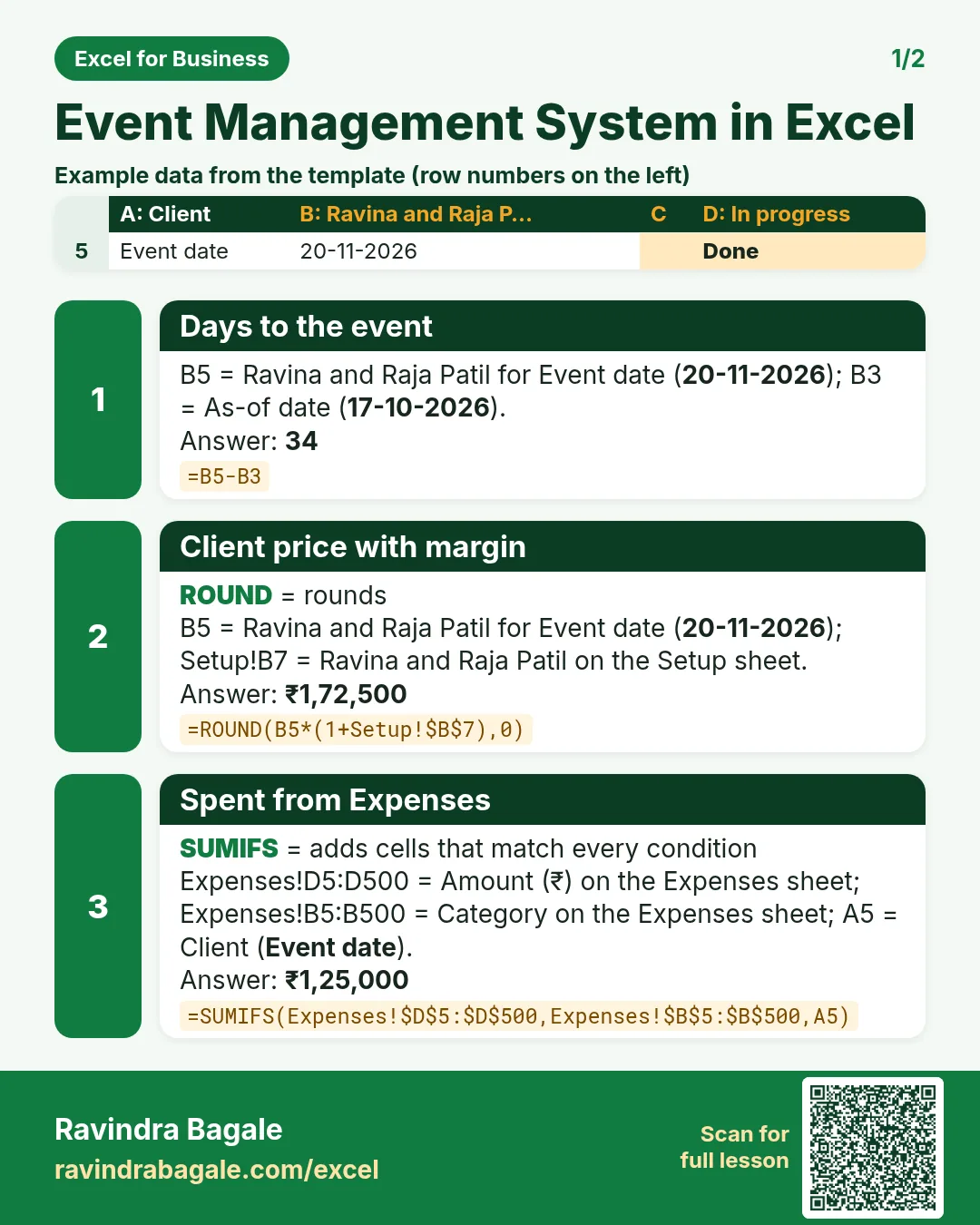


More cards: Ravi Sir's Cards.
6. Frequently asked questions
How do I make a budget vs actual sheet for an event?
Type the estimate per category, add spent with SUMIFS from an expenses log, then remaining = estimate − spent and % used = spent ÷ estimate.
How do I add a margin to the quotation?
Client price = estimate × (1 + margin): =ROUND(B5*(1+Setup!$B$7),0).
What GST rate applies to event management?
Use the rate that applies to your service and registration; the template keeps it as an input in Setup B8 so you can change it. Confirm with your accountant.
How do I flag overdue tasks?
Days left = due − today; IF it is negative and the status is not Done, show Overdue and colour the row red.
How do I see cash in hand for an event?
Received from the client − spent so far. It tells you whether the next vendor advance can be paid from this event's money.
7. Quick quiz
Ten questions on this page. Sign in to save your score.
Loading practice tasks...
- Total times (Easy): Add up Times in D2:D11.
- Average amount (Easy): Average of E2:E11, rounded to 2 decimals.
- Rows in Food (Easy): How many rows have Category "Food"?
- Largest times (Easy): The largest value in D2:D11.
- Times for Food (Medium): Total of D2:D11 where B is "Food".
- Food in Bengaluru (Medium): Total of D2:D11 where B is "Food" and C is "Bengaluru".
- Best in Food (Medium): Largest E2:E11 value where B is "Food".
- Value of row 2 (Medium): D2 times E2.
- Look up Ananya Nair (Medium): The Times for "Ananya Nair" (use a lookup on column A).
- Total value (Hard): Sum of D times E for all rows.
- Share of Food (Hard): Share of D2:D11 that is "Food", rounded to 3 decimals.
- Rank of row 2 (Hard): Rank of D2 among D2:D11 (largest = 1).
- Above average? (Hard): "Above" if E2 is above the average of E2:E11, else "Below".