Cricket Batting Stats in Excel: Batting Average, Strike Rate and Player Rank
Every Sunday the society team in Pune plays a tennis-ball match, and every Sunday there is an argument about who the best batter is. Shahrukh scores the most runs; Zoya scores fastest; Raja is hardly ever out. Excel settles it with the two numbers cricket itself uses: batting average and strike rate.
What you'll learn on this page
- Season figures per player
- Batting average = runs ÷ times out
- Handling a player who was never out
- Strike rate = runs per 100 balls
- Runs from boundaries %
- RANK by runs, top scorer and a colour scale
Download the template: cricket-batting-stats-template.xlsx: example data with real formulas. Yellow cells are inputs you can type over; green cells hold formulas; blue rows are headers and totals. Replace the example data with your own and everything recalculates.
Made-up data: every name, amount, shop and date on this page is made up for practice. Cities are used only to make the examples feel real.
1. The example
Season figures (made-up values):
| Player | Innings | Not outs | Runs | Balls | Average | Strike rate | Rank |
|---|---|---|---|---|---|---|---|
| Shahrukh | 8 | 1 | 312 | 260 | 44.57 | 120.0 | 1 |
| Salman | 7 | 2 | 205 | 190 | 41.00 | 107.9 | 2 |
| Amir | 7 | 0 | 180 | 210 | 25.71 | 85.7 | 3 |
| Raja | 6 | 3 | 96 | 80 | 32.00 | 120.0 | 4 |
| Ravindra | 5 | 0 | 72 | 95 | 14.40 | 75.8 | 5 |
| Zoya | 4 | 4 | 38 | 30 | - | 126.7 | 6 |
Team: 903 runs off 865 balls (strike rate 104.4) with 19 sixes. Shahrukh is the top scorer and has the best average. Zoya has the best strike rate, but she has never been out, so she has no average yet.
Figure 1. Runs ÷ (innings − not outs) gives the batting average (IF shows "-" when never out); runs ÷ balls × 100 gives the strike rate; RANK and INDEX/MATCH find the leaders.
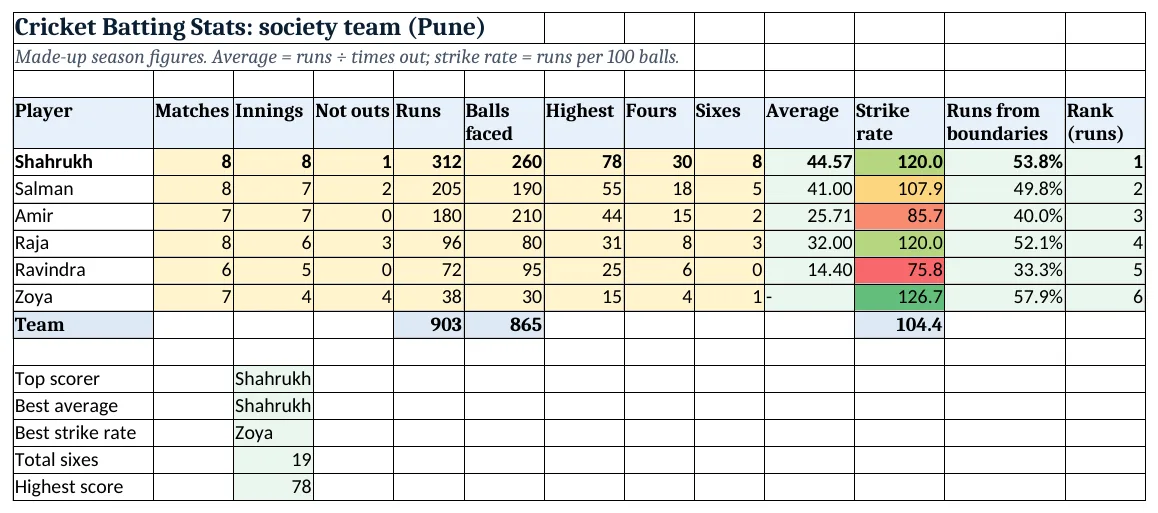
Figure 2. The template sheet, recalculated with its example data. Download it above and replace the yellow cells with your own numbers.
2. Build it step by step
Step 1. Season figures
- In A4:M4 type Player, Matches, Innings, Not outs, Runs, Balls faced, Highest, Fours, Sixes, Average, Strike rate, Runs from boundaries, Rank.
- Update the yellow columns after every match.
Step 2. Batting average
- A batting average is runs ÷ number of times out, and times out = innings − not outs.
- In J5 type
=IF(C5-D5=0,"-",E5/(C5-D5)). The IF avoids a #DIV/0! error for a player never out (IF, error types).
Step 3. Strike rate and boundaries
- In K5 type
=E5/F5*100: runs per 100 balls. Shahrukh: 312 ÷ 260 × 100 = 120.0. - In L5 type
=(H5*4+I5*6)/E5as %: the share of runs from fours and sixes.
Step 4. Rank
- In M5 type
=RANK(E5,$E$5:$E$10): without a third argument, the highest runs get rank 1 (RANK).
Step 5. Team and leaders
- In E11 and F11 type
=SUM(...), and in K11=E11/F11*100for the team strike rate. - In C13 type
=INDEX(A5:A10,MATCH(MAX(E5:E10),E5:E10,0))for the top scorer, and the same with columns J and K for best average and best strike rate (INDEX and MATCH). MAX ignores the "-" text.
Step 6. Colours and chart
- Select K5:K10 > Conditional Formatting > Color Scales (red-yellow-green) (color scales).
- Select A5:A10 and E5:E10 > Insert > Column (column charts).
Ravindra Bagale's Tip
Update the sheet right after the match while the scorebook is in hand. Next week nobody remembers the balls faced.
Ravindra Bagale's Tip – मराठी
Match संपल्यावर scorebook हातात असतानाच sheet update करा. पुढच्या आठवड्यात balls कोणाला आठवत नाहीत.
Ravindra Bagale's Tip – हिंदी
Match खत्म होते ही, scorebook हाथ में रहते sheet update करो. अगले हफ्ते balls किसी को याद नहीं रहते.
3. Formulas used
| Cell | Formula | What it does |
|---|---|---|
| J5 | =IF(C5-D5=0,"-",E5/(C5-D5)) |
Batting average |
| J10 | =IF(C10-D10=0,"-",E10/(C10-D10)) |
Never out |
| K5 | =E5/F5*100 |
Strike rate |
| L5 | =(H5*4+I5*6)/E5 |
Runs from boundaries |
| M5 | =RANK(E5,$E$5:$E$10) |
Rank by runs |
| K11 | =E11/F11*100 |
Team strike rate |
| C13 | =INDEX(A5:A10,MATCH(MAX(E5:E10),E5:E10,0)) |
Top scorer |
| C14 | =INDEX(A5:A10,MATCH(MAX(J5:J10),J5:J10,0)) |
Best average |
| C15 | =INDEX(A5:A10,MATCH(MAX(K5:K10),K5:K10,0)) |
Best strike rate |
Every formula above is written in the template, so you can click a cell and see it in the formula bar. All values on this page were recalculated in the file.
4. Common mistakes
- Dividing runs by innings. Average uses times out, not innings. Not outs do not count as dismissals.
- Leaving #DIV/0! for never-out players. Wrap the average in IF and show "-" when times out is 0.
- Strike rate without ×100. 312 ÷ 260 = 1.2; strike rate is per 100 balls, so ×100 gives 120.
- Ranking with ascending order. For runs, leave out the third argument so the highest runs get rank 1.
- Judging by one number. Shahrukh has the runs, Zoya the fastest scoring. Look at average and strike rate together.
Ravindra Bagale's Tip
Pick the batting order with both numbers: high average at the top, high strike rate for the last overs.
Ravindra Bagale's Tip – मराठी
Batting order दोन्ही आकड्यांवरून ठरवा: जास्त average वर, जास्त strike rate शेवटच्या overs साठी.
Ravindra Bagale's Tip – हिंदी
Batting order दोनों आंकड़ों से तय करो: ज़्यादा average ऊपर, ज़्यादा strike rate आखिरी overs के लिए.
5. More real examples
Example 1: Bowling figures. Overs, runs given and wickets: economy = runs ÷ overs and bowling average = runs ÷ wickets.
Example 2: Office league. Add a Team column and SUMIF runs by team for the points table.
Example 3: Kids' summer camp matches. Same sheet for Ruhi's friends, with simpler columns: runs and balls only.
Quick revision cards
Quick revision
Each card shows formulas from this page, each with an example and its answer from the template. Scan the QR code on a card to open this lesson. All names and numbers are made up for practice.
झटपट उजळणी
प्रत्येक card वर या page मधले formulas, त्यांचं example आणि template मधलं उत्तर आहे. Card वरचा QR code scan केला की हा lesson उघडतो. सगळी नावं आणि आकडे सरावासाठी काल्पनिक आहेत.
झटपट दोहराई
हर card पर इस page के formulas, उनका example और template का उत्तर है. Card का QR code scan करें तो यह lesson खुलेगा. सभी नाम और आंकड़े अभ्यास के लिए काल्पनिक हैं.
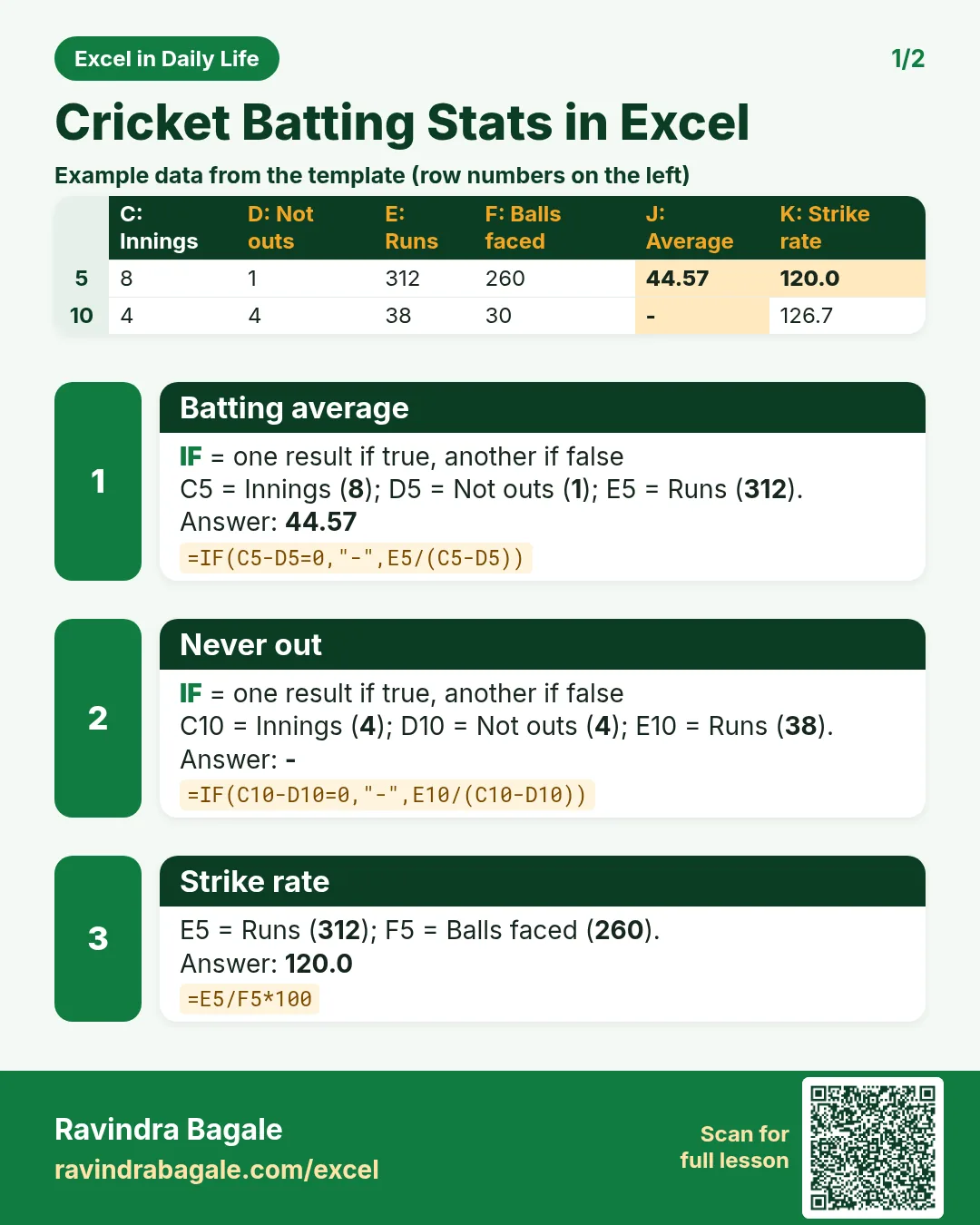

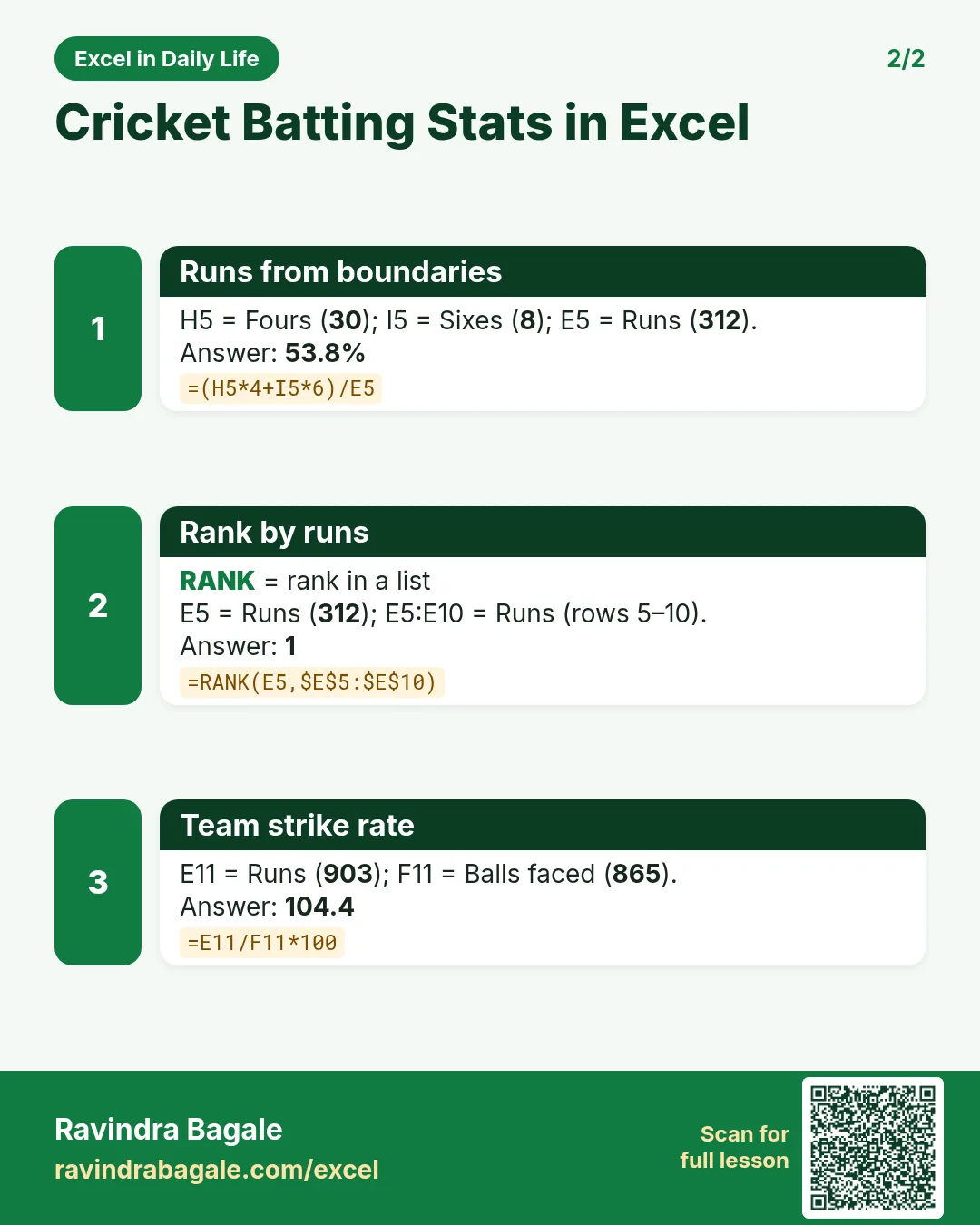

More cards: Ravi Sir's Cards.
6. Frequently asked questions
How do I calculate a batting average in Excel?
Runs ÷ (innings − not outs): =E5/(C5-D5), wrapped in IF for never-out players.
How do I calculate strike rate?
Runs ÷ balls faced × 100: =E5/F5*100.
What if a player was never out?
The average cannot be worked out (division by zero). Show "-" with IF.
How do I rank players by runs?
=RANK(E5,$E$5:$E$10) gives 1 to the highest score.
Does MAX work if a cell has "-"?
Yes. MAX ignores text in a range, so the best average is still found.
7. Quick quiz
Ten questions on this page. Sign in to save your score.
Loading practice tasks...
- Total deals won (Easy): Add up Deals won in D2:D11.
- Average avg deal value (Easy): Average of E2:E11, rounded to 2 decimals.
- Rows in North (Easy): How many rows have Region "North"?
- Largest deals won (Easy): The largest value in D2:D11.
- Deals won for North (Medium): Total of D2:D11 where B is "North".
- North in Manchester (Medium): Total of D2:D11 where B is "North" and C is "Manchester".
- Best in North (Medium): Largest E2:E11 value where B is "North".
- Value of row 2 (Medium): D2 times E2.
- Look up Noah Wilson (Medium): The Deals won for "Noah Wilson" (use a lookup on column A).
- Total value (Hard): Sum of D times E for all rows.
- Share of North (Hard): Share of D2:D11 that is "North", rounded to 3 decimals.
- Rank of row 2 (Hard): Rank of D2 among D2:D11 (largest = 1).
- Above average? (Hard): "Above" if E2 is above the average of E2:E11, else "Below".