Appliance Electricity Cost Calculator in Excel: Watts to Units (kWh) and Monthly Cost
The Bagale home in Pune got a bigger electricity bill in summer, and everyone blamed someone else. Was it the AC, the water heater, or the fans running all day? Every appliance label shows its watts. Multiply by hours of use and Excel turns that into units and rupees, and the answer is clear: the AC alone is more than half the bill.
What you'll learn on this page
- Watts, quantity, hours per day and days per month
- Units (kWh) = watts × quantity × hours × days ÷ 1000
- Monthly cost at your average rate per unit
- Each appliance's share of the bill
- The biggest user with INDEX and MATCH
- A what-if saving from cutting AC hours
Download the template: appliance-electricity-cost-calculator-template.xlsx: example data with real formulas. Yellow cells are inputs you can type over; green cells hold formulas; blue rows are headers and totals. Replace the example data with your own and everything recalculates.
Made-up data: every name, amount, shop and date on this page is made up for practice. Cities are used only to make the examples feel real.
1. The example
The Bagale home in a summer month (made-up wattages and hours; average ₹8 per unit):
| Appliance | Watts × qty | Hours/day | Days | Units | Cost | Share |
|---|---|---|---|---|---|---|
| Air conditioner | 1,500 × 1 | 6 | 30 | 270.0 | ₹2,160.00 | 53.8% |
| Fridge (compressor hours) | 150 × 1 | 10 | 30 | 45.0 | ₹360.00 | 9.0% |
| Ceiling fans | 75 × 4 | 10 | 30 | 90.0 | ₹720.00 | 17.9% |
| LED lights | 10 × 8 | 6 | 30 | 14.4 | ₹115.20 | 2.9% |
| TV | 100 × 1 | 5 | 30 | 15.0 | ₹120.00 | 3.0% |
| Washing machine | 500 × 1 | 1 | 12 | 6.0 | ₹48.00 | 1.2% |
| Water heater | 2,000 × 1 | 0.5 | 30 | 30.0 | ₹240.00 | 6.0% |
| Water pump | 750 × 1 | 0.5 | 30 | 11.3 | ₹90.00 | 2.2% |
| Laptops | 65 × 2 | 6 | 26 | 20.3 | ₹162.24 | 4.0% |
Total: 501.9 units, ₹4,015.44 a month (about ₹48,185 a year). One hour of AC costs ₹12. Cutting AC use by 1 hour a day saves ₹360 a month, ₹4,320 a year.
Figure 1. Watts × quantity × hours per day × days ÷ 1000 gives units (kWh); units × rate gives the cost; each appliance's share of the total shows the biggest user; a what-if cell shows the saving from fewer AC hours.
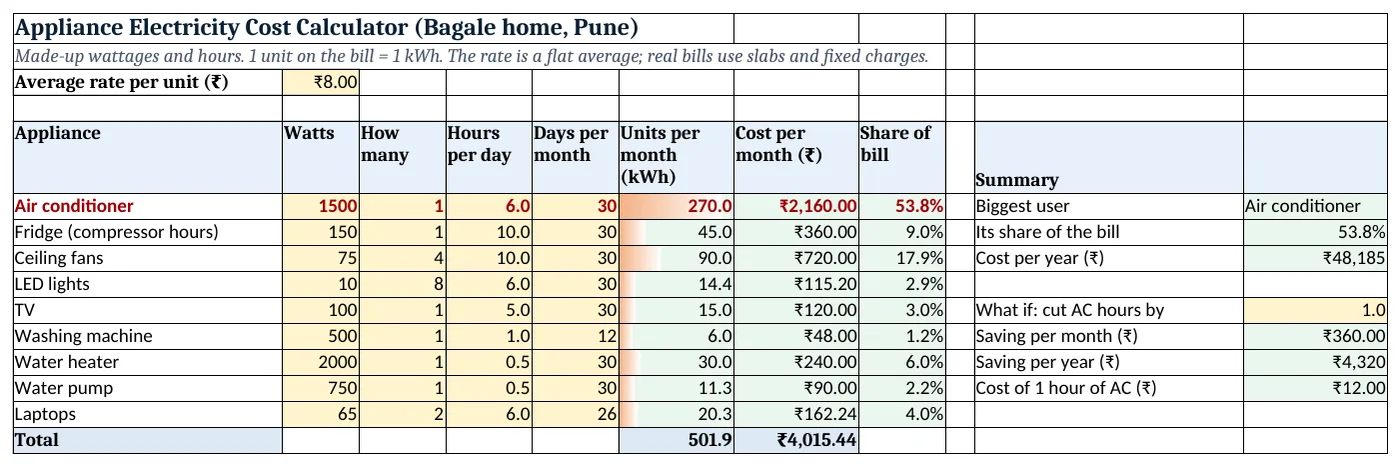
Figure 2. The template sheet, recalculated with its example data. Download it above and replace the yellow cells with your own numbers.
2. Build it step by step
Step 1. Rate and appliances
- In B3 type your average rate per unit. 1 unit on the bill = 1 kWh (1,000 watts for 1 hour).
- In A5:H5 type Appliance, Watts, How many, Hours per day, Days per month, Units per month, Cost per month, Share of bill.
Step 2. Units per month
- In F6 type
=B6*C6*D6*E6/1000: 1,500 × 1 × 6 × 30 ÷ 1,000 = 270 units.
Step 3. Cost and share
- In G6 type
=F6*$B$3: ₹2,160. - In F15 type
=SUM(F6:F14), then in H6 type=F6/$F$15as %. Copy F6:H6 down.
Step 4. Biggest user
- In K6 type
=INDEX(A6:A14,MATCH(MAX(F6:F14),F6:F14,0)): Air conditioner (INDEX and MATCH). - In K7 type
=MAX(H6:H14): 53.8%. In K8 type=G15*12for the year.
Step 5. What if
- In K10 type the AC hours to cut per day (1). In K11 type
=B6*C6*K10*E6/1000*B3: ₹360 a month. - In K13 type
=B6/1000*B3: one hour of AC costs ₹12.
Step 6. Colours and chart
- Add data bars on F6:F14 (data bars) and a formula rule
=$H6>=0.25with red bold text (formula rules). - Select A6:A14 and F6:F14 > Insert > Pie (pie charts).
Ravindra Bagale's Tip
Set the AC one or two degrees higher and use the fan with it. Fewer compressor hours means fewer units.
Ravindra Bagale's Tip – मराठी
AC एक-दोन degree जास्त ठेवा आणि सोबत पंखा लावा. Compressor कमी चालला की units कमी.
Ravindra Bagale's Tip – हिंदी
AC एक-दो degree ज़्यादा रखो और साथ में पंखा चलाओ. Compressor कम चले तो units कम.
3. Formulas used
| Cell | Formula | What it does |
|---|---|---|
| F6 | =B6*C6*D6*E6/1000 |
Units per month |
| G6 | =F6*$B$3 |
Cost per month |
| H6 | =F6/$F$15 |
Share of bill |
| F15 | =SUM(F6:F14) |
Total units |
| G15 | =SUM(G6:G14) |
Total cost |
| K6 | =INDEX(A6:A14,MATCH(MAX(F6:F14),F6:F14,0)) |
Biggest user |
| K8 | =G15*12 |
Cost per year |
| K11 | =B6*C6*K10*E6/1000*B3 |
Saving per month |
| K13 | =B6/1000*B3 |
Cost of 1 hour of AC |
Every formula above is written in the template, so you can click a cell and see it in the formula bar. All values on this page were recalculated in the file.
4. Common mistakes
- Forgetting ÷ 1000. Watts × hours gives watt-hours. Divide by 1,000 for units (kWh).
- Fridge at 24 hours. The compressor switches on and off. Use the hours it actually runs, or the fridge looks far too costly.
- Using the label maximum for an inverter AC. Inverter ACs often draw less than the label once the room is cool. Treat the result as an upper estimate.
- A flat rate for a slab bill. Real bills use slabs and fixed charges. Use your bill total ÷ units as the average rate.
- Forgetting standby. Set-top boxes and chargers left on add a little every day.
Ravindra Bagale's Tip
Read the meter on two days a week apart. Units used ÷ 7 is your real daily use, to check this sheet.
Ravindra Bagale's Tip – मराठी
आठवड्याच्या अंतराने दोन दिवस meter वाचा. वापरलेले units ÷ 7 म्हणजे खरा रोजचा वापर, sheet check करायला.
Ravindra Bagale's Tip – हिंदी
हफ्ते भर के अंतर पर दो दिन meter पढ़ो. इस्तेमाल हुए units ÷ 7 असली रोज़ का इस्तेमाल है, sheet check करने को.
5. More real examples
Example 1: Winter vs summer. Copy the sheet: no AC, more water heater. Compare the two totals.
Example 2: Buying a new appliance. Compare a 5-star and a 3-star model by their yearly units on the label × your rate.
Example 3: Small office. Add computers, printer and lights to see the monthly running cost.
Quick revision cards
Quick revision
Each card shows formulas from this page, each with an example and its answer from the template. Scan the QR code on a card to open this lesson. All names and numbers are made up for practice.
झटपट उजळणी
प्रत्येक card वर या page मधले formulas, त्यांचं example आणि template मधलं उत्तर आहे. Card वरचा QR code scan केला की हा lesson उघडतो. सगळी नावं आणि आकडे सरावासाठी काल्पनिक आहेत.
झटपट दोहराई
हर card पर इस page के formulas, उनका example और template का उत्तर है. Card का QR code scan करें तो यह lesson खुलेगा. सभी नाम और आंकड़े अभ्यास के लिए काल्पनिक हैं.
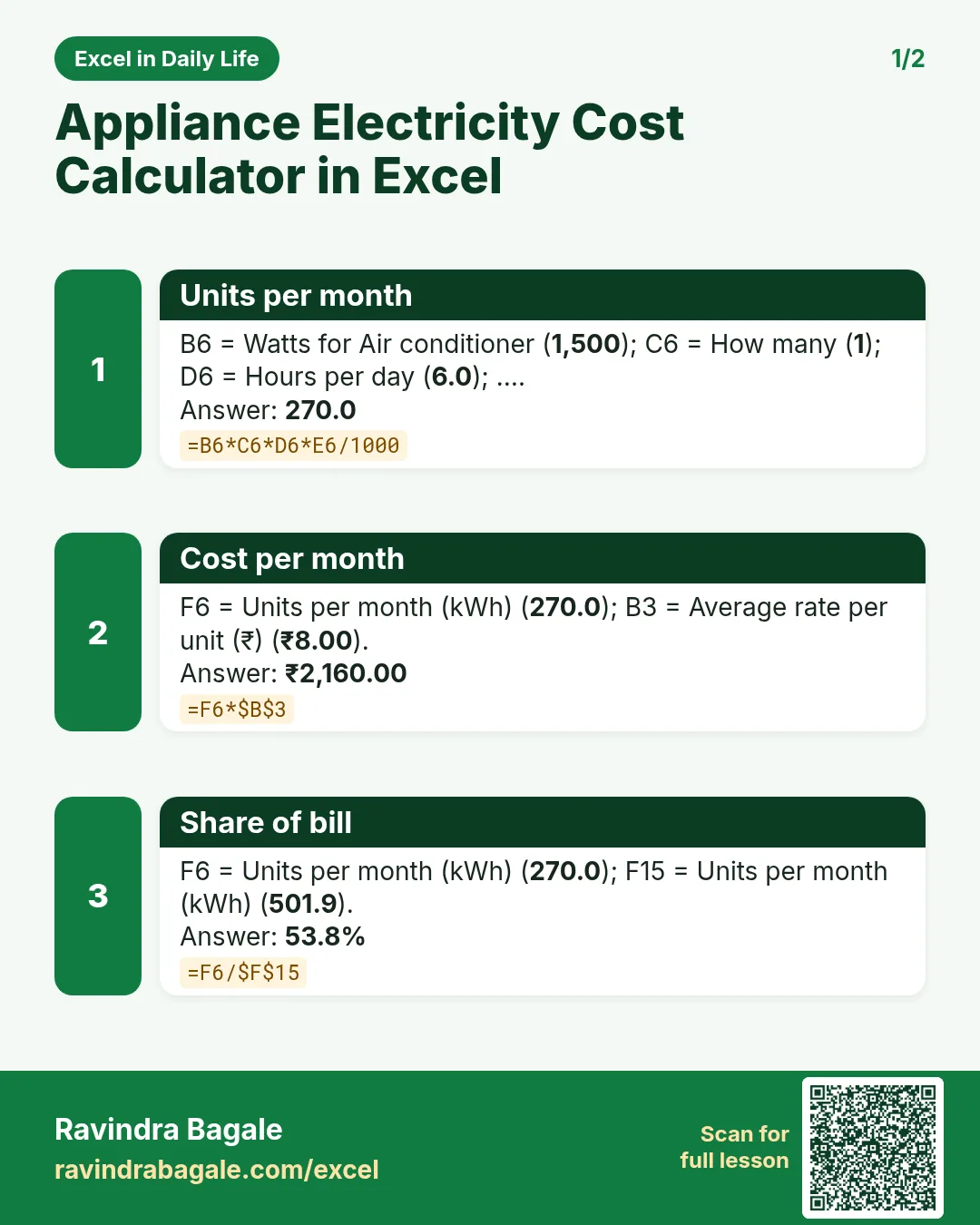

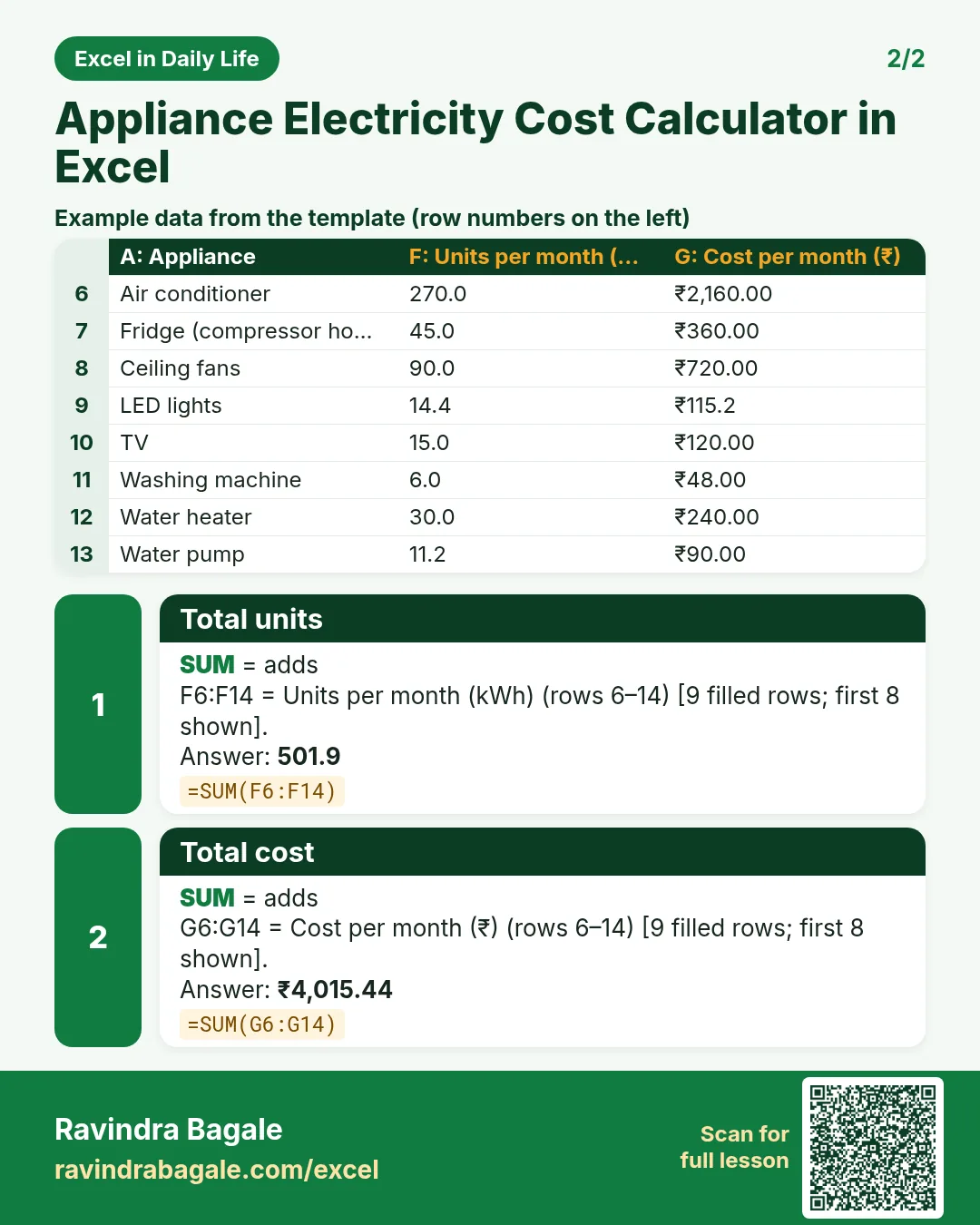

More cards: Ravi Sir's Cards.
6. Frequently asked questions
How do I convert watts to units in Excel?
Units (kWh) = watts × hours ÷ 1,000. For a month: watts × quantity × hours per day × days ÷ 1,000.
What is 1 unit of electricity?
1 kWh: a 1,000-watt appliance running for one hour.
How much does a 1.5 kW AC cost per hour?
1.5 units per hour × your rate. At ₹8 a unit, ₹12 an hour.
Why is my bill different from this sheet?
Hours are estimates, and real bills add slabs, fixed charges and taxes. Use your bill to adjust the rate.
Which appliance uses the most?
Usually the ones with high watts and long hours: AC, water heater, geyser, pumps.
7. Quick quiz
Ten questions on this page. Sign in to save your score.
Loading practice tasks...
- Total invoices (Easy): Add up Invoices in D2:D11. (sheet "Data")
- Average amount (Easy): Average of E2:E11, rounded to 2 decimals. (sheet "Data")
- Rows in Admin (Easy): How many rows have Department "Admin"? (sheet "Data")
- Largest invoices (Easy): The largest value in D2:D11. (sheet "Data")
- Days taken (Easy): C2 minus B2. (sheet "Dates")
- Start year (Easy): Year of B3. (sheet "Dates")
- Due month (Easy): Month number of C3. (sheet "Dates")
- Earliest start (Easy): Earliest date in B2:B9 (as a date number). (sheet "Dates")
- Invoices for Admin (Medium): Total of D2:D11 where B is "Admin". (sheet "Data")
- Admin in Berlin (Medium): Total of D2:D11 where B is "Admin" and C is "Berlin". (sheet "Data")
- Working days (Medium): Working days from B2 to C2. (sheet "Dates")
- Weekday of due (Medium): Weekday number of C4 (Sunday = 1). (sheet "Dates")