Vegetable Stall Profit Tracker in Excel: Daily Profit, Margin, Waste % and Break-even Price
Raja runs a vegetable stall in Nashik. He buys from the wholesale market at dawn and sells through the day. Some days feel good but the cash box says otherwise, because spinach wilts and tomatoes get squashed. This sheet shows the real profit of every vegetable, how much was wasted and the lowest price he can sell at without losing money.
What you'll learn on this page
- Cost, sold kg and sales per vegetable
- Profit and margin %
- Waste % with an alert above a limit
- Break-even price per kg
- Money lost to waste with SUMPRODUCT
- The most profitable item and the best margin
Download the template: vegetable-vendor-profit-tracker-template.xlsx: example data with real formulas. Yellow cells are inputs you can type over; green cells hold formulas; blue rows are headers and totals. Replace the example data with your own and everything recalculates.
Made-up data: every name, amount, shop and date on this page is made up for practice. Cities are used only to make the examples feel real.
1. The example
One market day (made-up values):
| Vegetable | Bought | Cost/kg | Wasted | Sold | Price/kg | Profit | Margin | Waste % | Break-even |
|---|---|---|---|---|---|---|---|---|---|
| Tomato | 40 kg | ₹18 | 4 kg | 36 kg | ₹30 | ₹360 | 33.3% | 10.0% | ₹20.00 |
| Onion | 50 kg | ₹22 | 1 kg | 49 kg | ₹30 | ₹370 | 25.2% | 2.0% | ₹22.45 |
| Potato | 50 kg | ₹16 | 1 kg | 49 kg | ₹24 | ₹376 | 32.0% | 2.0% | ₹16.33 |
| Spinach | 15 kg | ₹20 | 3 kg | 12 kg | ₹40 | ₹180 | 37.5% | 20.0% | ₹25.00 |
| Cauliflower | 20 kg | ₹25 | 2 kg | 18 kg | ₹40 | ₹220 | 30.6% | 10.0% | ₹27.78 |
| Green chilli | 8 kg | ₹40 | 1 kg | 7 kg | ₹80 | ₹240 | 42.9% | 12.5% | ₹45.71 |
Total cost ₹3,740, sales ₹5,486, profit ₹1,746 (31.8% margin). Waste was 12 of 183 kg (6.6%), costing ₹260. Spinach and green chilli are above the 10% waste alert.
Figure 1. Cost = bought kg × cost per kg; sales = (bought − wasted) × selling price; profit and margin follow; cost ÷ sold kg gives the break-even price; SUMPRODUCT adds money lost to waste.
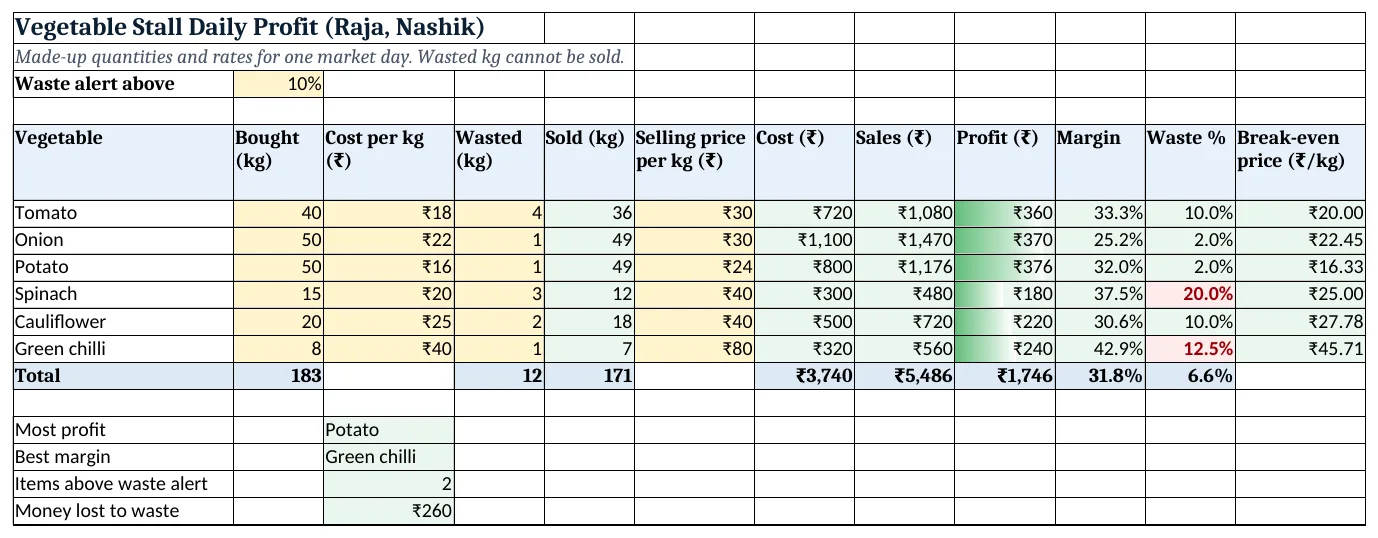
Figure 2. The template sheet, recalculated with its example data. Download it above and replace the yellow cells with your own numbers.
2. Build it step by step
Step 1. Inputs
- In B3 type the waste alert limit (10%).
- In A5:L5 type the headers. Type bought kg, cost per kg, wasted kg and selling price (yellow).
Step 2. Sold, cost and sales
- In E6 type
=B6-D6for kg sold. - In G6 type
=B6*C6(cost) and in H6=E6*F6(sales). You pay for everything bought, but earn only on what is sold.
Step 3. Profit and margin
- In I6 type
=H6-G6and in J6=I6/H6as %: tomato 33.3%.
Step 4. Waste and break-even
- In K6 type
=D6/B6as %. - In L6 type
=G6/E6: the lowest price per kg that still covers the cost of everything bought. Tomato: ₹720 ÷ 36 kg = ₹20.
Step 5. Totals and summary
- In row 12 use
=SUM(...)for kg and rupees, and=I12/H12for the overall margin. - In C14 type
=INDEX(A6:A11,MATCH(MAX(I6:I11),I6:I11,0)): Potato (INDEX and MATCH). - In C17 type
=SUMPRODUCT(D6:D11,C6:C11): ₹260 lost to waste (SUMPRODUCT). - In C16 type
=COUNTIF(K6:K11,">"&B3): 2 items above the alert (COUNTIF).
Step 6. Colours
- Select K6:K11 > Highlight Cells Rules > Greater Than
=$B$3, red (highlight rules). Add data bars on I6:I11.
Ravindra Bagale's Tip
Buy less of the items that cross the waste alert two days in a row. Leafy greens are the usual ones.
Ravindra Bagale's Tip – मराठी
जे items सलग दोन दिवस waste alert च्या वर जातात ते कमी आणा. पालेभाज्या बहुतेक वेळा असतात.
Ravindra Bagale's Tip – हिंदी
जो items लगातार दो दिन waste alert के ऊपर जाएं, वो कम लाओ. पत्तेदार सब्ज़ियां अक्सर होती हैं.
3. Formulas used
| Cell | Formula | What it does |
|---|---|---|
| E6 | =B6-D6 |
Sold (kg) |
| G6 | =B6*C6 |
Cost |
| H6 | =E6*F6 |
Sales |
| I6 | =H6-G6 |
Profit |
| J6 | =I6/H6 |
Margin |
| K9 | =D9/B9 |
Waste % (spinach) |
| L6 | =G6/E6 |
Break-even price |
| J12 | =I12/H12 |
Overall margin |
| C14 | =INDEX(A6:A11,MATCH(MAX(I6:I11),I6:I11,0)) |
Most profit |
| C17 | =SUMPRODUCT(D6:D11,C6:C11) |
Money lost to waste |
Every formula above is written in the template, so you can click a cell and see it in the formula bar. All values on this page were recalculated in the file.
4. Common mistakes
- Working out sales on kg bought. Wasted kg is never sold. Sales = sold kg × price.
- Confusing margin with markup. Margin = profit ÷ sales (31.8%). Markup = profit ÷ cost, which is a bigger number.
- Ignoring transport and stall rent. Add a row for daily costs like transport and the stall fee, or the profit looks too good.
- Break-even on bought kg. Divide cost by kg sold, not bought; waste raises the break-even price.
- One day is not a pattern. Copy the sheet for each day and compare a week before changing what you buy.
Ravindra Bagale's Tip
In the evening, sell leftover stock near the break-even price rather than throwing it away.
Ravindra Bagale's Tip – मराठी
संध्याकाळी उरलेला माल break-even price च्या जवळ विका, फेकून देण्यापेक्षा ते बरं.
Ravindra Bagale's Tip – हिंदी
शाम को बचा माल break-even price के पास बेच दो, फेंकने से अच्छा है.
5. More real examples
Example 1: Fruit stall. Same columns; bananas by dozen instead of kg.
Example 2: Flower stall at a festival. Waste is high after the festival day; the waste alert shows when to buy less.
Example 3: Home bakery. Items made, items sold, cost per item and selling price give the same profit and waste numbers.
Quick revision cards
Quick revision
Each card shows formulas from this page, each with an example and its answer from the template. Scan the QR code on a card to open this lesson. All names and numbers are made up for practice.
झटपट उजळणी
प्रत्येक card वर या page मधले formulas, त्यांचं example आणि template मधलं उत्तर आहे. Card वरचा QR code scan केला की हा lesson उघडतो. सगळी नावं आणि आकडे सरावासाठी काल्पनिक आहेत.
झटपट दोहराई
हर card पर इस page के formulas, उनका example और template का उत्तर है. Card का QR code scan करें तो यह lesson खुलेगा. सभी नाम और आंकड़े अभ्यास के लिए काल्पनिक हैं.
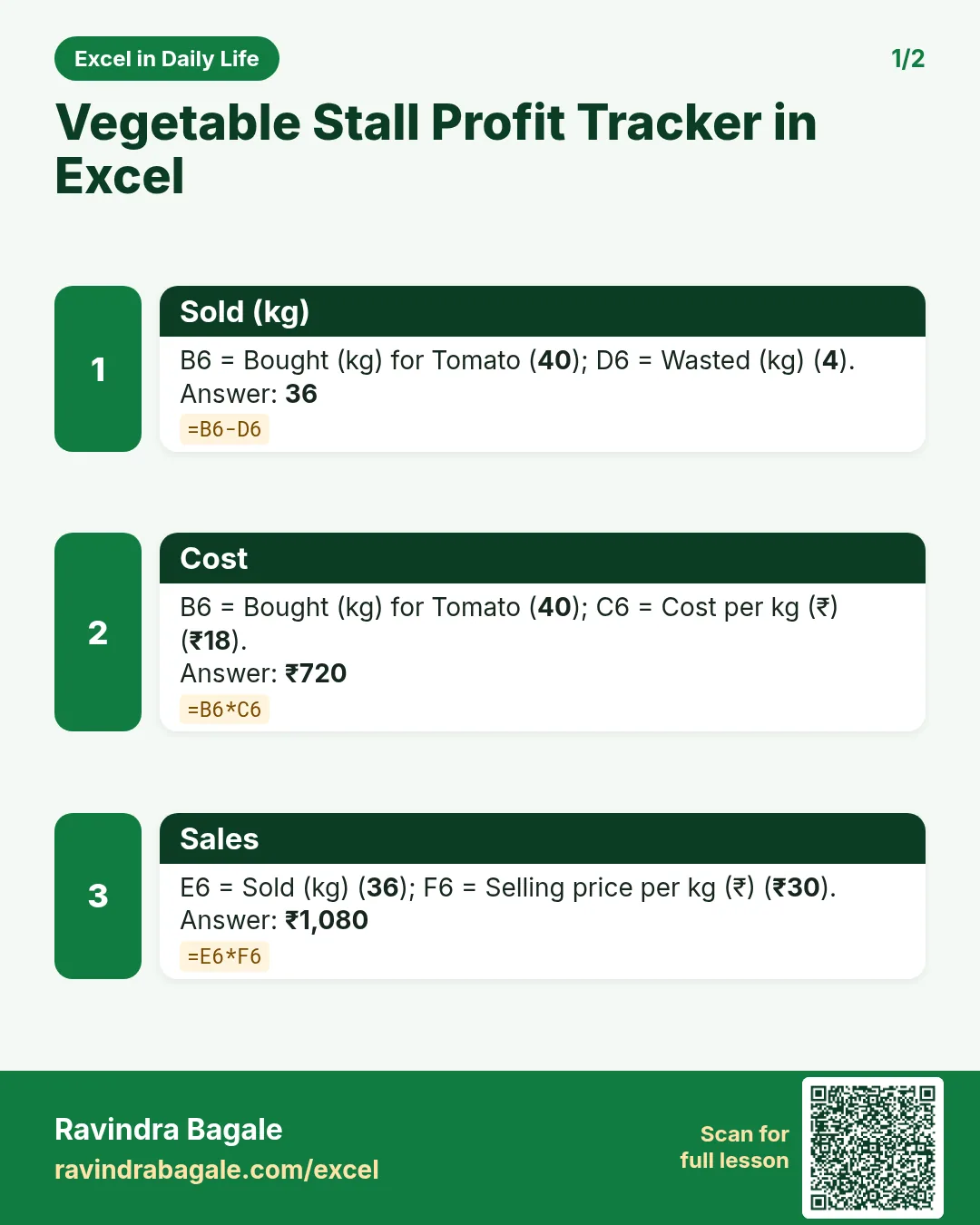

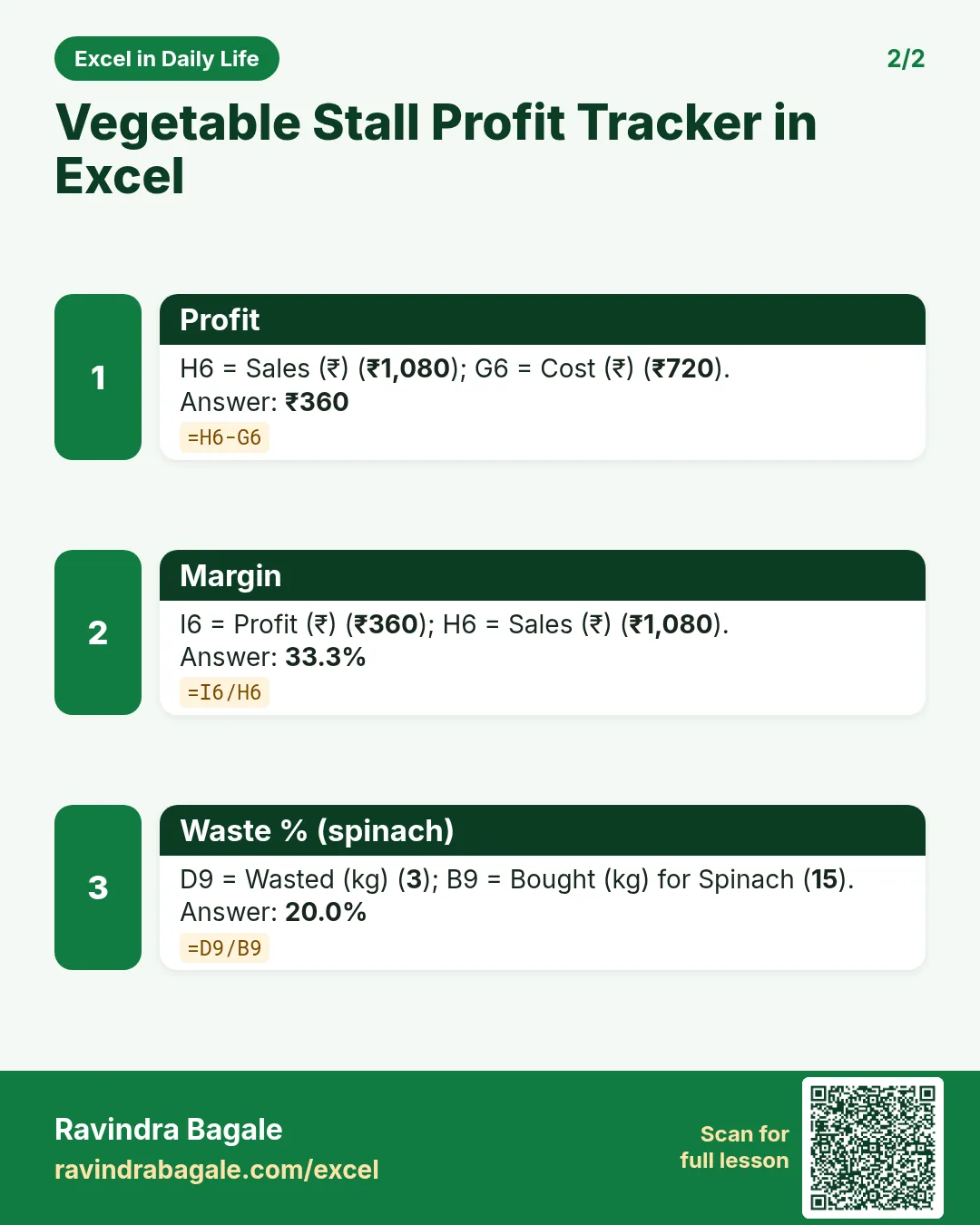

More cards: Ravi Sir's Cards.
6. Frequently asked questions
How do I calculate profit margin in Excel?
Margin = (sales − cost) ÷ sales: =I6/H6, formatted as %.
How do I include waste in profit?
Cost uses kg bought; sales use kg sold (bought − wasted).
What is the break-even price?
Total cost ÷ kg sold. Selling below it loses money.
How do I add up money lost to waste?
=SUMPRODUCT(wasted_kg, cost_per_kg).
How do I flag high waste?
Put the limit in a cell and use Highlight Cells Rules > Greater Than pointing at it.
7. Quick quiz
Ten questions on this page. Sign in to save your score.
Loading practice tasks...
- Total quantity (Easy): Add up Quantity in D2:D11.
- Average unit price (Easy): Average of E2:E11, rounded to 2 decimals.
- Rows in Website (Easy): How many rows have Channel "Website"?
- Largest quantity (Easy): The largest value in D2:D11.
- Quantity for Website (Medium): Total of D2:D11 where B is "Website".
- Website in Boston (Medium): Total of D2:D11 where B is "Website" and C is "Boston".
- Best in Website (Medium): Largest E2:E11 value where B is "Website".
- Value of row 2 (Medium): D2 times E2.
- Look up Sophie Martin (Medium): The Quantity for "Sophie Martin" (use a lookup on column A).
- Total value (Hard): Sum of D times E for all rows.
- Share of Website (Hard): Share of D2:D11 that is "Website", rounded to 3 decimals.
- Rank of row 2 (Hard): Rank of D2 among D2:D11 (largest = 1).
- Above average? (Hard): "Above" if E2 is above the average of E2:E11, else "Below".