Hardware Store Management System in Excel: GST Invoices, Contractor Credit, Ageing, Stock and Dashboard
Amir Hardware in Sambhaji Nagar sells pipes, paint, wire and fittings, much of it on credit to contractors. Amir knew roughly who owed money, but not how old the dues were or who had crossed their limit. This page builds a 10-sheet Excel system: every invoice line carries its GST, payments are one row each, and the Ledger splits each contractor's outstanding into age buckets.
What you'll learn on this page
- Keep items with cost, price, GST rate and reorder level
- Bill invoice lines with taxable value, GST and cost
- Record contractor payments and work out outstanding
- Split outstanding into 0-30, 31-60 and over 60 days with MIN and SUMIFS
- Flag over-limit and old dues
- Show stock, reorder and margin per item
- Print a tax invoice with CGST and SGST
Download the template: hardware-store-management-system-template.xlsx: a 10-sheet system with example data and real formulas (Read me, Setup, Items, Customers, Invoices, Payments, Ledger, Stock, Tax invoice, Dashboard). Yellow cells are inputs you can type over; green cells hold formulas; blue rows are headers and totals. Replace the example data with your own and every report and the dashboard recalculate.
Made-up data: every name, amount, business and date on this page is made up for practice. Cities are used only to make the examples feel real.
1. The business story
Amir Hardware, Sambhaji Nagar, August to October 2026 (made-up data). Six items, three contractors and cash sales. GST rates are inputs; confirm each item's rate.
| Question | Where the system answers it |
|---|---|
| Who owes the most? | Ledger: Salman Builders ₹43,912.10 |
| How old are the dues? | Salman Builders has ₹730 over 60 days, flagged |
| Total on credit? | ₹91,267.90 outstanding across contractors |
| What should I order? | Stock: wall paint, 13 tins left against a level of 15 |
Sales before GST are ₹2,14,445 (₹73,185 in October) with a gross margin of ₹42,240. For a simple shop counter, see the shop billing system; for one ledger without GST, the khata book.
Figure 1. Items and Customers are masters; Invoices and Payments are the entry sheets; Ledger, Stock and Tax invoice read from them.
2. Build it sheet by sheet
Step 1. Items and Customers
- Items: Code, Item, Unit, Cost, Price, GST rate, Opening, Reorder level. Keep each GST rate as an input and check it against the current rate list.
- Customers: ID, Name, Phone, Credit limit, Type. Cash customer has a limit of 0.
Step 2. Invoices: one row per line
- Headers: Date, Invoice no, Customer ID, Code, Item, Qty, Price, Taxable, GST, Total, Cost, Key. E5 fills the item with XLOOKUP.
- H5 taxable
=F5*G5, I5 GST=ROUND(H5*XLOOKUP(D5,Items!$A$5:$A$10,Items!$F$5:$F$10,0),2), J5 total=H5+I5. - K5 cost of goods and L5 the key
=B5&"-"&COUNTIF($B$5:B5,B5)for the printable invoice.
Step 3. Ledger: outstanding and ageing
- C5 billed
=SUMIFS(Invoices!$J$5:$J$3000,Invoices!$C$5:$C$3000,A5), D5 paid from Payments, E5 outstanding=C5-D5. - F5 0-30 days:
=MIN(E5,SUMIFS(…,Invoices!$A$5:$A$3000,">="&(Setup!$B$3-30))). MIN keeps a bucket from showing more than is owed, since payments clear the oldest bills first. - G5 31-60 days the same way with MIN(E5−F5,…), and H5 the rest, over 60 days.
- J5 flag:
=IF(AND(I5>0,E5>I5),"Over limit",IF(H5>0,"Over 60 days","OK")).

Figure 2. Ledger: billed, paid, outstanding, age buckets and flags per customer
Step 4. Stock and Tax invoice
- Stock: D5 sold with SUMIFS, E5 closing, F5 order
=IF(E5<=Items!H5,"Yes","No")(reorder sheet), H5 gross margin and I5 margin %. - Tax invoice: type the invoice no in B4; B8
=XLOOKUP($B$4&"-"&A8,Invoices!$L$5:$L$3000,Invoices!$E$5:$E$3000,""). - Totals split GST half and half into CGST and SGST for a sale inside Maharashtra. AH-026 for Salman Builders: taxable ₹9,100, CGST ₹819, SGST ₹819, total ₹10,738.
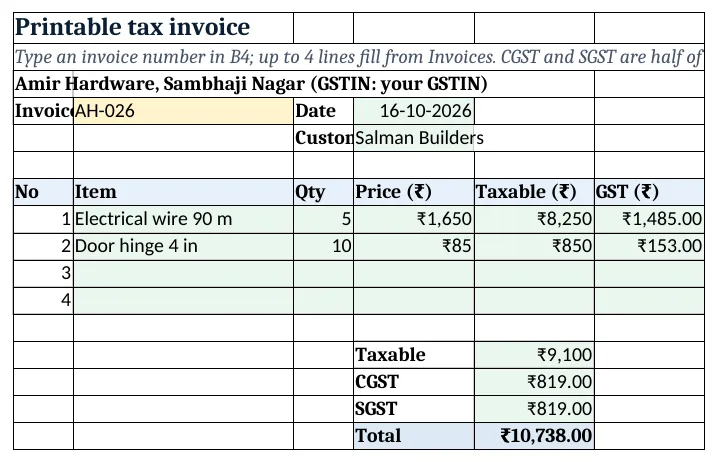
Figure 3. Tax invoice: lines with taxable value and GST split into CGST and SGST
Step 5. Dashboard
- KPI cards: sales before GST, October sales
=SUMIFS(Invoices!$H$5:$H$3000,Invoices!$A$5:$A$3000,">="&DATE(2026,10,1)), margin %, outstanding, over 60 days and flagged customers. - Charts: outstanding by customer and sales by item. For a full GST register, see 21.5.
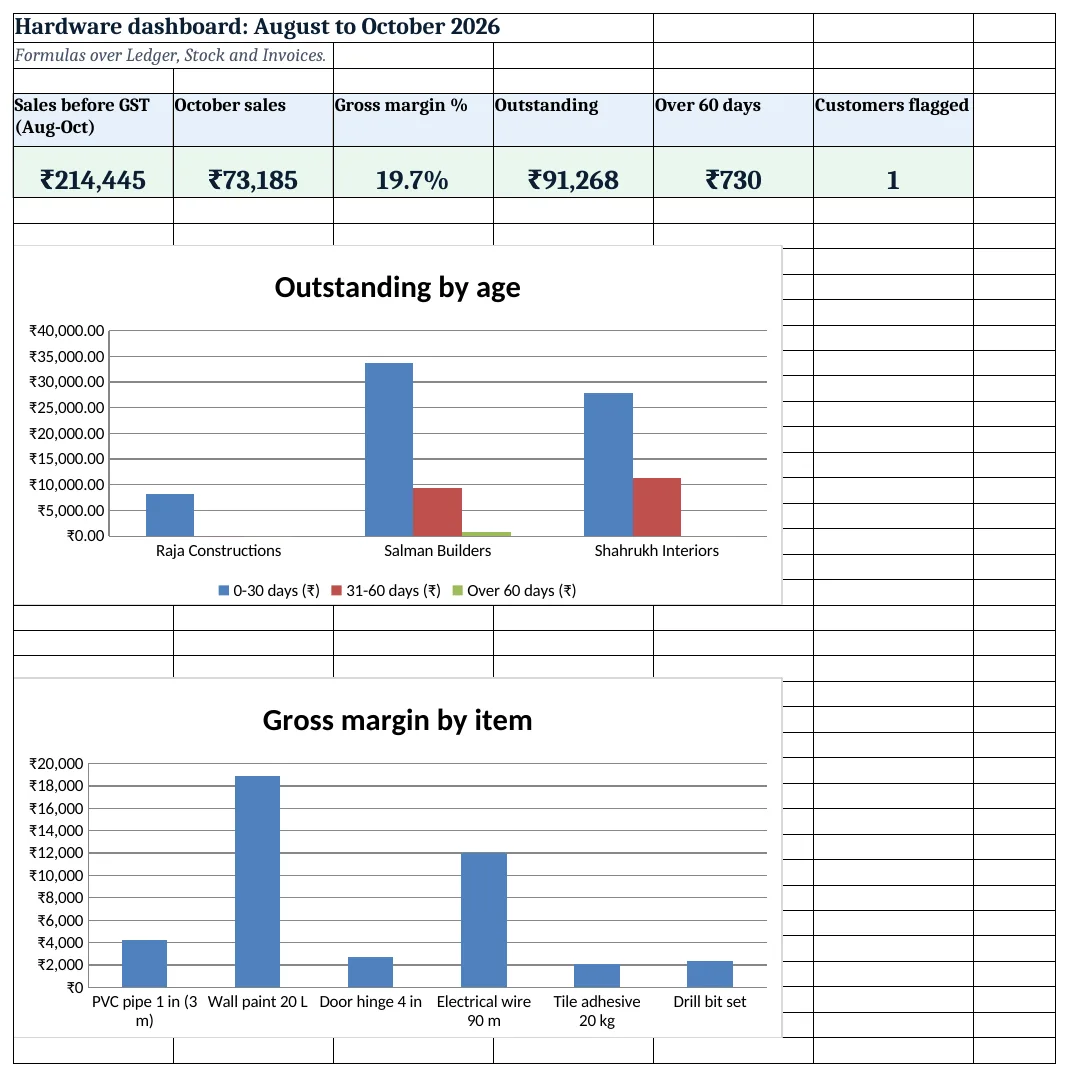
Figure 4. Hardware dashboard: sales, margin, outstanding and dues over 60 days
Ravindra Bagale's Tip
Call contractors in the 31-60 column before they reach 60 days. Old dues are the hardest to recover.
Ravindra Bagale's Tip – मराठी
31-60 column मधील contractors ना 60 दिवस होण्याआधी फोन करा. जुनी थकबाकी वसूल करणे सर्वात कठीण.
Ravindra Bagale's Tip – हिंदी
31-60 column वाले contractors को 60 दिन से पहले फोन करें. पुराना बकाया वसूलना सबसे कठिन है.
3. Formulas used
| Cell | Formula | What it does |
|---|---|---|
| Invoices!E5 | =XLOOKUP(D5,Items!$A$5:$A$10,Items!$B$5:$B$10,"Check code") |
Item name from the code |
| Invoices!H5 | =F5*G5 |
Taxable value |
| Invoices!I5 | =ROUND(H5*XLOOKUP(D5,Items!$A$5:$A$10,Items!$F$5:$F$10,0),2) |
GST on the line |
| Invoices!J5 | =H5+I5 |
Line total with GST |
| Invoices!L5 | =B5&"-"&COUNTIF($B$5:B5,B5) |
Invoice line key |
| Ledger!C5 | =SUMIFS(Invoices!$J$5:$J$3000,Invoices!$C$5:$C$3000,A5) |
Billed to the customer |
| Ledger!E5 | =C5-D5 |
Outstanding |
| Ledger!F5 | =MIN(E5,SUMIFS(Invoices!$J$5:$J$3000,Invoices!$C$5:$C$3000,A5,Invoices!$A$5:$A$3000,">="&(Setup!$B$3-30))) |
Due from the last 30 days |
| Ledger!H5 | =E5-F5-G5 |
Over 60 days |
| Ledger!J5 | =IF(AND(I5>0,E5>I5),"Over limit",IF(H5>0,"Over 60 days","OK")) |
Credit flag |
| Stock!F5 | =IF(E5<=Items!H5,"Yes","No") |
Order this item? |
| Stock!I5 | =IFERROR(H5/G5,0) |
Margin % |
| Tax invoice!B8 | =XLOOKUP($B$4&"-"&A8,Invoices!$L$5:$L$3000,Invoices!$E$5:$E$3000,"") |
First line on the invoice |
| Dashboard!B5 | =SUMIFS(Invoices!$H$5:$H$3000,Invoices!$A$5:$A$3000,">="&DATE(2026,10,1)) |
October sales before GST |
Every formula above is written in the template, so you can click a cell and see it in the formula bar. All values on this page were recalculated in LibreOffice with zero errors.
4. Common mistakes
- Ageing without MIN. If a contractor paid most dues, the last 30 days of bills may be more than what is owed. MIN caps each bucket at the balance.
- One GST rate for every item. Pipes, paint and tools can have different rates. Keep the rate per item and confirm it.
- Typing payments on the invoice row. Payments often cover several bills. One Payments row per receipt keeps the ledger right.
- Cash sales left out. Bill them to a Cash customer so stock and sales stay complete.
- IGST for a sale inside the state. Inside Maharashtra the GST splits into CGST and SGST; IGST applies to sales to another state.
Ravindra Bagale's Tip
Review credit limits every quarter. A contractor who always pays on time can get more; one who drifts past 60 days should get less.
Ravindra Bagale's Tip – मराठी
दर तिमाहीला credit limit तपासा. वेळेवर पैसे देणाऱ्याला वाढवा; 60 दिवसांपलीकडे जाणाऱ्याला कमी करा.
Ravindra Bagale's Tip – हिंदी
हर तिमाही credit limit जांचें. समय पर देने वाले को बढ़ाएं; 60 दिन पार करने वाले को घटाएं.
5. More real examples
Example 1: Electrical shop. Same layout with wires, switches and fittings; add a Size and rating column for wires and switches.
Example 2: Building material supplier. Add a Site column on Invoices and a site-wise report, as in the construction site system.
Example 3: Paint dealer. Add a Shade column and track tinting charges as a separate item.
Quick revision cards
Quick revision
Each card shows formulas from this page, each with an example and its answer from the template. Scan the QR code on a card to open this lesson. All names and numbers are made up for practice.
झटपट उजळणी
प्रत्येक card वर या page मधले formulas, त्यांचं example आणि template मधलं उत्तर आहे. Card वरचा QR code scan केला की हा lesson उघडतो. सगळी नावं आणि आकडे सरावासाठी काल्पनिक आहेत.
झटपट दोहराई
हर card पर इस page के formulas, उनका example और template का उत्तर है. Card का QR code scan करें तो यह lesson खुलेगा. सभी नाम और आंकड़े अभ्यास के लिए काल्पनिक हैं.
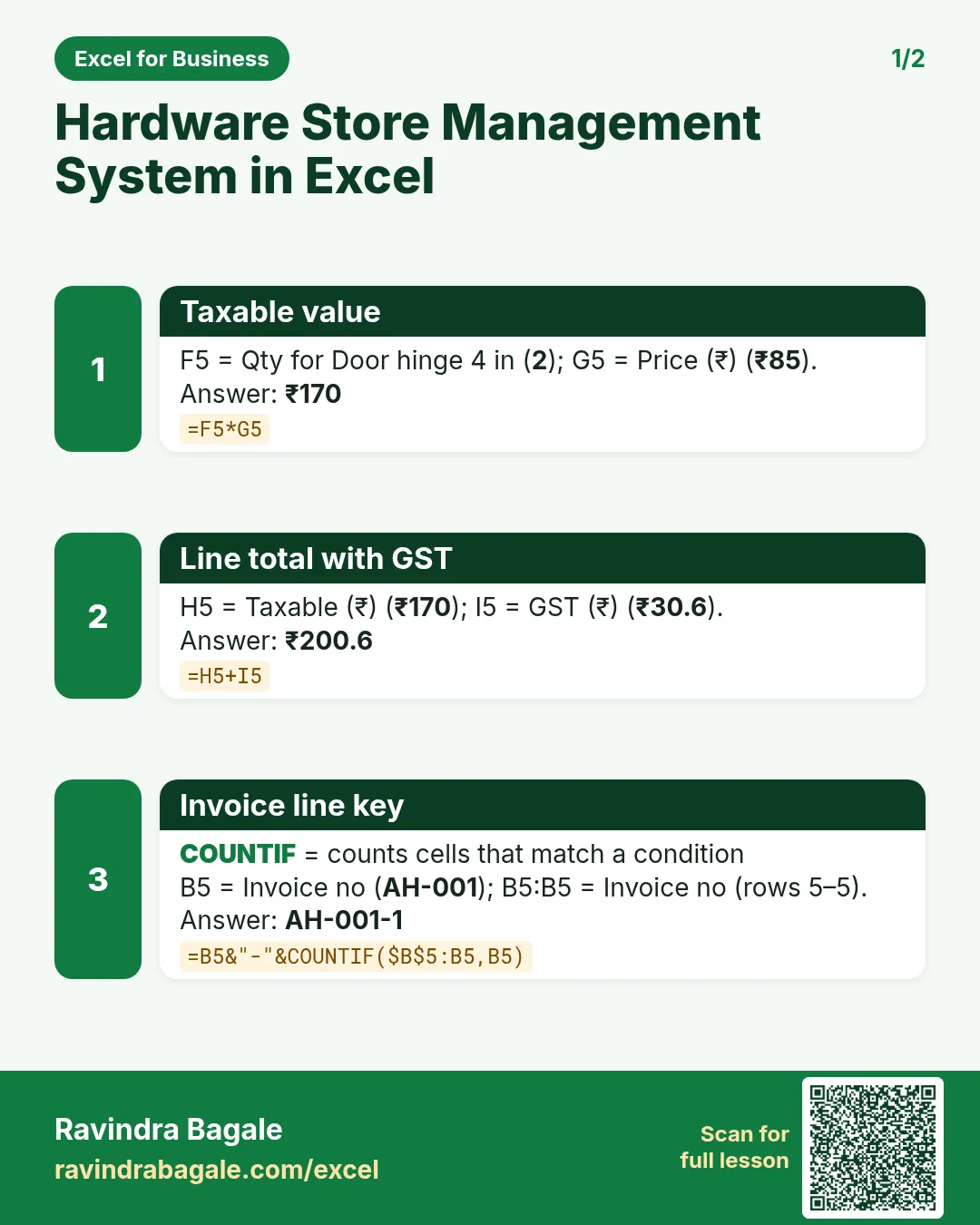

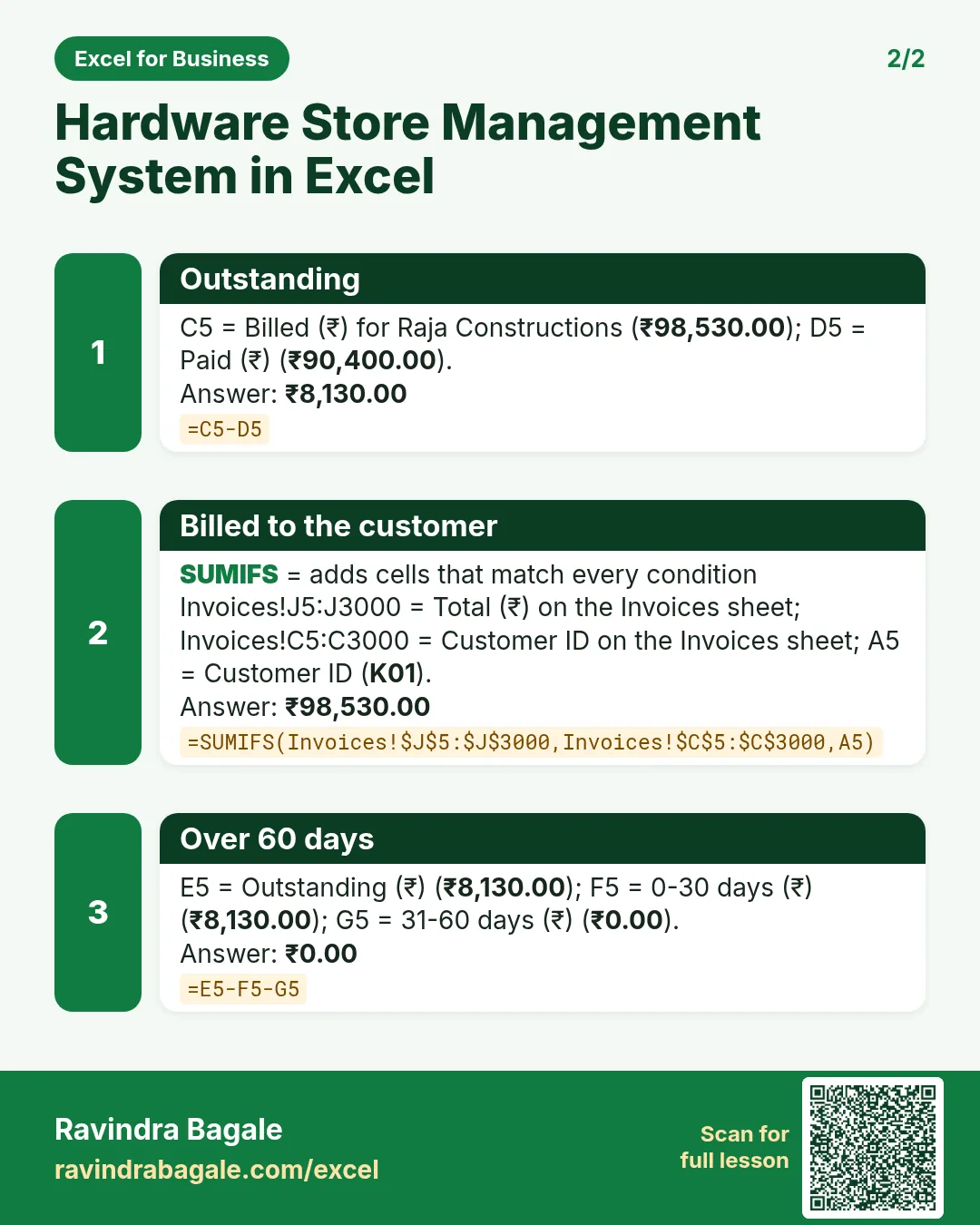

More cards: Ravi Sir's Cards.
6. Frequently asked questions
How do I make an ageing report in Excel?
SUMIFS bills by date band (last 30 days, 31 to 60, older), and cap each band with MIN so the buckets add up to the outstanding.
How do I split GST into CGST and SGST?
For a sale inside the state, half the GST is CGST and half is SGST: ₹1,638 becomes ₹819 + ₹819.
How do I flag customers over their credit limit?
=IF(AND(limit>0,outstanding>limit),"Over limit",…), as in Ledger J5.
Are the GST rates in the template current?
They are example inputs. Check the rate for each item with your accountant and type it on Items.
How do I show sales for one month?
SUMIFS with a date condition, for example ">="&DATE(2026,10,1).
7. Quick quiz
Ten questions on this page. Sign in to save your score.
Loading practice tasks...
- Total invoices (Easy): Add up Invoices in D2:D11. (sheet "Data")
- Average amount (Easy): Average of E2:E11, rounded to 2 decimals. (sheet "Data")
- Rows in Admin (Easy): How many rows have Department "Admin"? (sheet "Data")
- Largest invoices (Easy): The largest value in D2:D11. (sheet "Data")
- Days taken (Easy): C2 minus B2. (sheet "Dates")
- Start year (Easy): Year of B3. (sheet "Dates")
- Due month (Easy): Month number of C3. (sheet "Dates")
- Earliest start (Easy): Earliest date in B2:B9 (as a date number). (sheet "Dates")
- Invoices for Admin (Medium): Total of D2:D11 where B is "Admin". (sheet "Data")
- Admin in Paris (Medium): Total of D2:D11 where B is "Admin" and C is "Paris". (sheet "Data")
- Working days (Medium): Working days from B2 to C2. (sheet "Dates")
- Weekday of due (Medium): Weekday number of C4 (Sunday = 1). (sheet "Dates")