Construction Site Management System in Excel: BOQ, Progress, Materials, Labour, Budget vs Actual and RA Bill
Bagale Constructions in Kolhapur is building a G+1 row house for Shraddha Bagale. Every month the site engineer measures work done, the office raises a running account (RA) bill, and the owner wonders why cement costs more than planned. This page builds an 8-sheet system: a BOQ with progress, materials and labour logs, budget vs actual, and an RA bill that subtracts earlier bills and works out retention, GST and TDS.
What you'll learn on this page
- Set up a BOQ with quantity, rate and amount
- Record measured cumulative quantity and work out % done
- Get this bill's quantity by subtracting earlier bills
- Log materials and daily labour by trade
- Compare budget with actual by cost head
- Prepare an RA bill with retention, GST and TDS
- Track progress and cost on a dashboard
Download the template: construction-site-management-system-template.xlsx: a 8-sheet system with example data and real formulas (Read me, Setup, BOQ, Materials, Labour, Cost report, RA bill, Dashboard). Yellow cells are inputs you can type over; green cells hold formulas; blue rows are headers and totals. Replace the example data with your own and every report and the dashboard recalculate.
Made-up data: every name, amount, business and date on this page is made up for practice. Cities are used only to make the examples feel real.
1. The business story
Bagale Constructions, Kolhapur, as of 17 October 2026 (made-up data). Contract value ₹25,70,300 across 8 BOQ items. This is RA bill 3. Retention 5% is only an example: use what your contract says. GST is an input at 18% and TDS at 2% (section 194C rate for a contractor that is a firm or company; 1% for an individual or HUF).
| Question | Where the system answers it |
|---|---|
| How much work is done? | BOQ: ₹12,13,800, which is 47.2% of the contract |
| What do we bill this time? | RA bill: gross ₹6,44,400, net payable ₹7,15,284 |
| Where is cost running over? | Cost report: materials ₹86,250 over, equipment ₹6,000 over |
| How many man-days went in? | Cost report: masons 44, helpers 84, carpenters 18, bar benders 22 |
October cost is ₹6,86,350 against a ₹6,25,000 budget (109.8%). The general budget-vs-actual method is in 21.2 budget vs actual.
Figure 1. BOQ holds quantities and progress; Materials and Labour are daily logs; Cost report and RA bill work out cost and billing.
2. Build it sheet by sheet
Step 1. Setup
- B3 as-of date, B4 project, B5 client.
- B6 retention (5%, as per contract), B7 GST rate, B8 TDS rate, B9 RA bill number. All are inputs because they depend on the contract and the parties.
- Cost heads in D3:D6 and trades in E3:E6 for drop-downs.
Step 2. BOQ: quantities and progress
- Row 4: Code, Item, Unit, BOQ qty, Rate, Amount, Done qty (cumulative), Billed qty (previous), % done, This bill qty, This bill, Done value.
- F5
=D5*E5. Type G5 from the engineer's measurement book: total done so far, not this month's. - I5
=IFERROR(G5/D5,0)with green data bars; a red rule flags G5 above D5 (more than BOQ needs a variation order). - J5
=G5-H5, K5=J5*E5, L5=G5*E5. Row 13 totals; I13=L13/F13is overall progress.
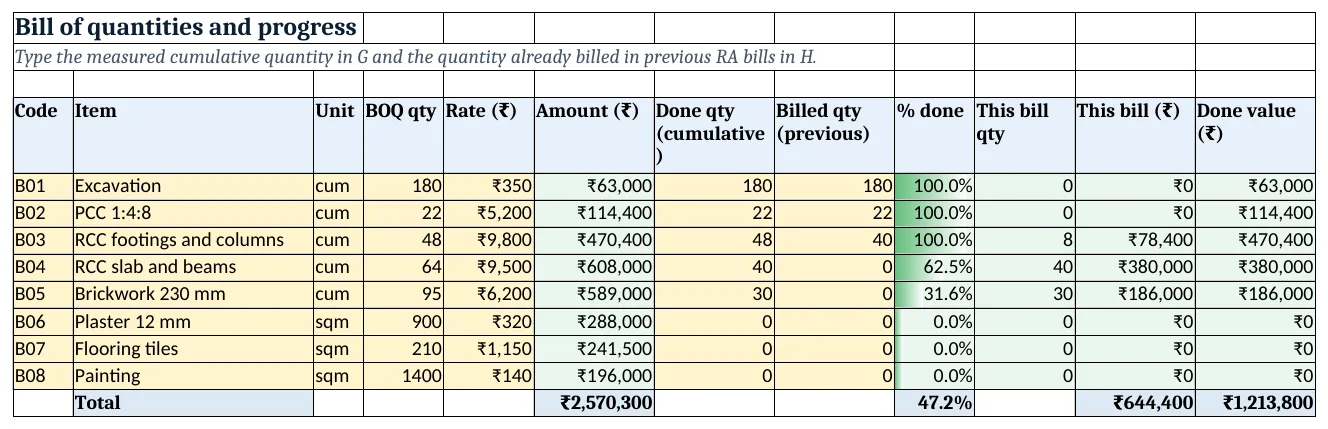
Figure 2. BOQ: amount, cumulative done, billed earlier, % done and this bill
Step 3. Materials and Labour
- Materials: Date, Item, Cost head, Qty, Rate, Amount. F5
=D5*E5. Shuttering and mixer hire go under Equipment. - Labour: Date, Trade, Workers, Daily rate, Amount, one row per trade per day. E5
=C5*D5.
Step 4. Cost report: budget vs actual
- Row 4: Cost head, Budget, Actual, Variance, % used. C5
=SUMIFS(Materials!$F$5:$F$500,Materials!$C$5:$C$500,A5); the Labour row adds+SUM(Labour!$E$5:$E$1000). - D5
=B5-C5(negative = over budget, red), E5=IFERROR(C5/B5,0). - Rows 12 to 15 count man-days and amount per trade with SUMIFS on Labour.
Step 5. RA bill
- B8 work done to date
=BOQ!L13, B9 billed earlier, B10 gross this bill=BOQ!K13. - B11 retention
=ROUND(B10*Setup!B6,0), B12 GST=ROUND(B10*Setup!B7,0), B13 TDS=ROUND(B10*Setup!B8,0). - B14 net payable
=B10-B11+B12-B13. TDS is worked out on the amount before GST when GST is shown separately on the bill. Print A1:C18.
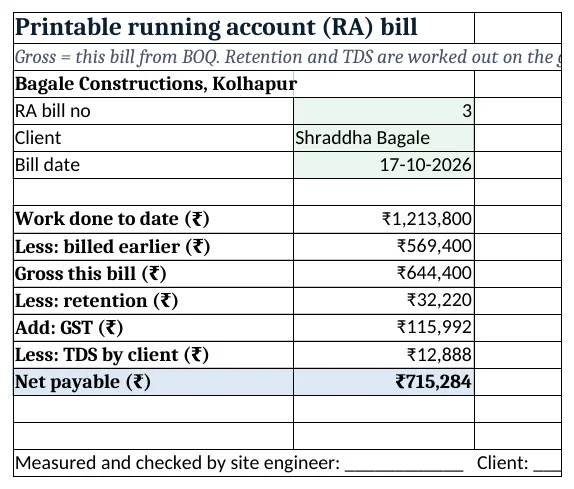
Figure 3. RA bill: gross, retention, GST, TDS and net payable
Step 6. Dashboard
- Cards: contract value, work done %, RA bill net payable, October cost, budget used, heads over budget
=COUNTIF('Cost report'!D5:D8,"<0"). - Chart 1 at A8: % done by BOQ item. Chart 2 at A25: budget vs actual by cost head.
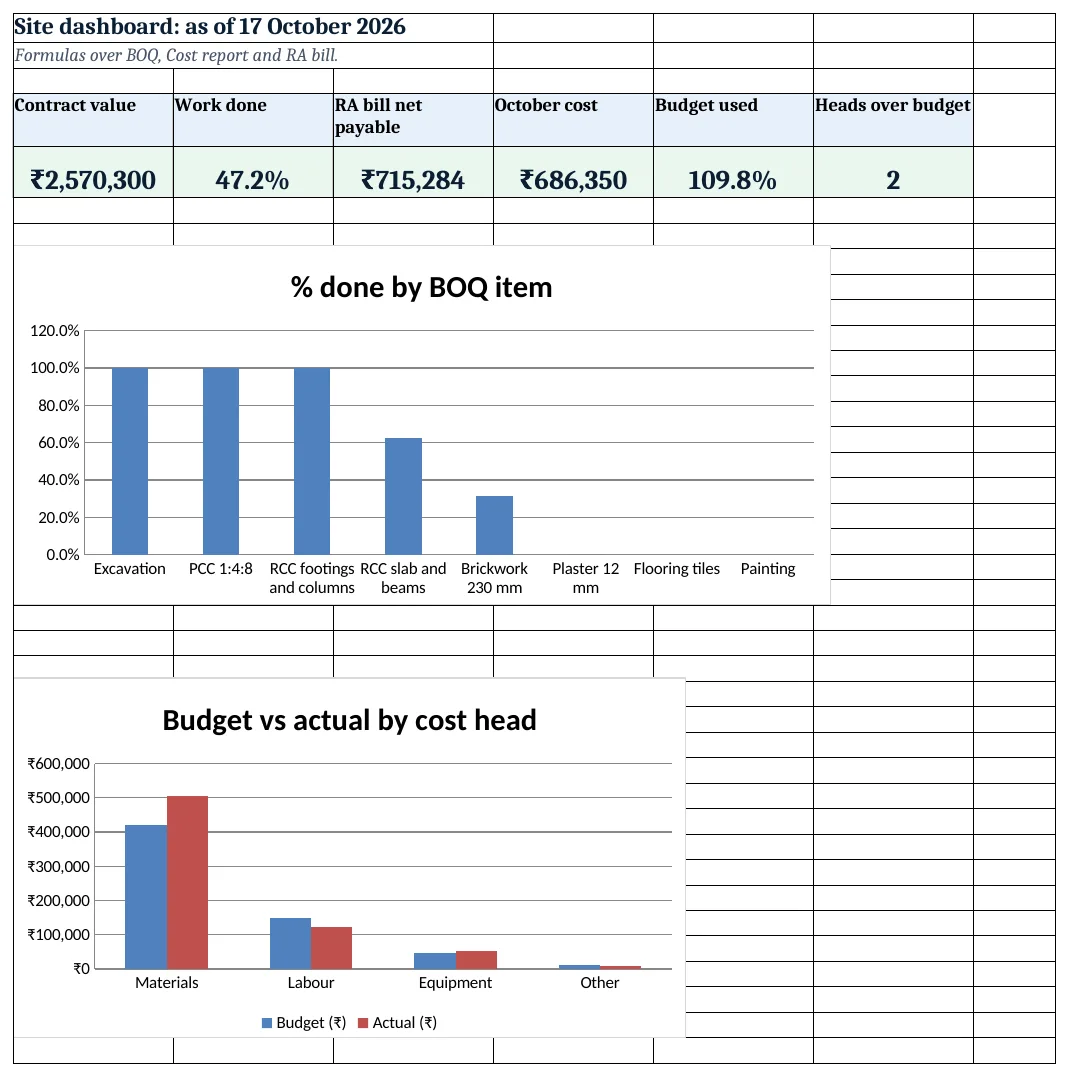
Figure 4. Site dashboard: KPI cards and charts
Ravindra Bagale's Tip
Measure and bill on the same day every month. A fixed RA bill date keeps cash coming and gives the client no reason to delay.
Ravindra Bagale's Tip – मराठी
दर महिन्याला एकाच तारखेला measurement आणि bill करा. ठराविक RA bill तारीख पैसा नियमित आणते आणि client ला उशीर करायचे कारण राहत नाही.
Ravindra Bagale's Tip – हिंदी
हर महीने एक ही तारीख को measurement और bill करो. तय RA bill तारीख से पैसा नियमित आता है और client को देरी का बहाना नहीं मिलता.
3. Formulas used
| Cell | Formula | What it does |
|---|---|---|
| BOQ!F5 | =D5*E5 |
BOQ amount |
| BOQ!I5 | =IFERROR(G5/D5,0) |
% done |
| BOQ!J5 | =G5-H5 |
Quantity for this bill |
| BOQ!K5 | =J5*E5 |
Value for this bill |
| BOQ!L5 | =G5*E5 |
Value done to date |
| BOQ!I13 | =L13/F13 |
Overall progress |
| Materials!F5 | =D5*E5 |
Material amount |
| Labour!E5 | =C5*D5 |
Labour amount |
| Cost report!C6 | =SUMIFS(Materials!$F$5:$F$500,Materials!$C$5:$C$500,A6)+SUM(Labour!$E$5:$E$1000) |
Actual labour cost |
| Cost report!D5 | =B5-C5 |
Variance |
| Cost report!B12 | =SUMIFS(Labour!$C$5:$C$1000,Labour!$B$5:$B$1000,A12) |
Mason man-days |
| RA bill!B11 | =ROUND(B10*Setup!B6,0) |
Retention |
| RA bill!B13 | =ROUND(B10*Setup!B8,0) |
TDS on the gross |
| RA bill!B14 | =B10-B11+B12-B13 |
Net payable |
| Dashboard!F5 | =COUNTIF('Cost report'!D5:D8,"<0") |
Cost heads over budget |
Every formula above is written in the template, so you can click a cell and see it in the formula bar. All values on this page were recalculated in LibreOffice with zero errors.
4. Common mistakes
- Typing this month's quantity in Done qty. Done qty is cumulative. The sheet subtracts earlier bills; typing monthly quantity bills the same work twice or not at all.
- Treating retention as a discount. Retention is held back and released after the defect period. Track it as money due to you.
- Working out TDS on the GST-inclusive amount. When GST is shown separately, TDS is on the amount before GST.
- Mixing hire into materials. Shuttering and mixer hire are equipment. Mixing them hides where the overrun is.
- No measurement record. Every Done qty should match the measurement book signed on site; the client checks that first.
Ravindra Bagale's Tip
Track retention due on a separate list with the release date. Small firms forget retention and lose money they already earned.
Ravindra Bagale's Tip – मराठी
Retention वेगळ्या यादीत release तारखेसह ठेवा. छोट्या firms retention विसरतात आणि कमावलेले पैसे गमावतात.
Ravindra Bagale's Tip – हिंदी
Retention अलग सूची में release तारीख के साथ रखो. छोटी firms retention भूल जाती हैं और कमाया पैसा खो देती हैं.
5. More real examples
Example 1: Interior fit-out contractor. BOQ items become carpentry, false ceiling and painting in sqft; the RA bill works the same.
Example 2: Road work with several chainages. Add a Chainage column on BOQ and progress by stretch with SUMIFS.
Example 3: Owner-built house. Drop the RA bill; keep BOQ as the plan and Cost report to see where money goes against each stage.
Quick revision cards
Quick revision
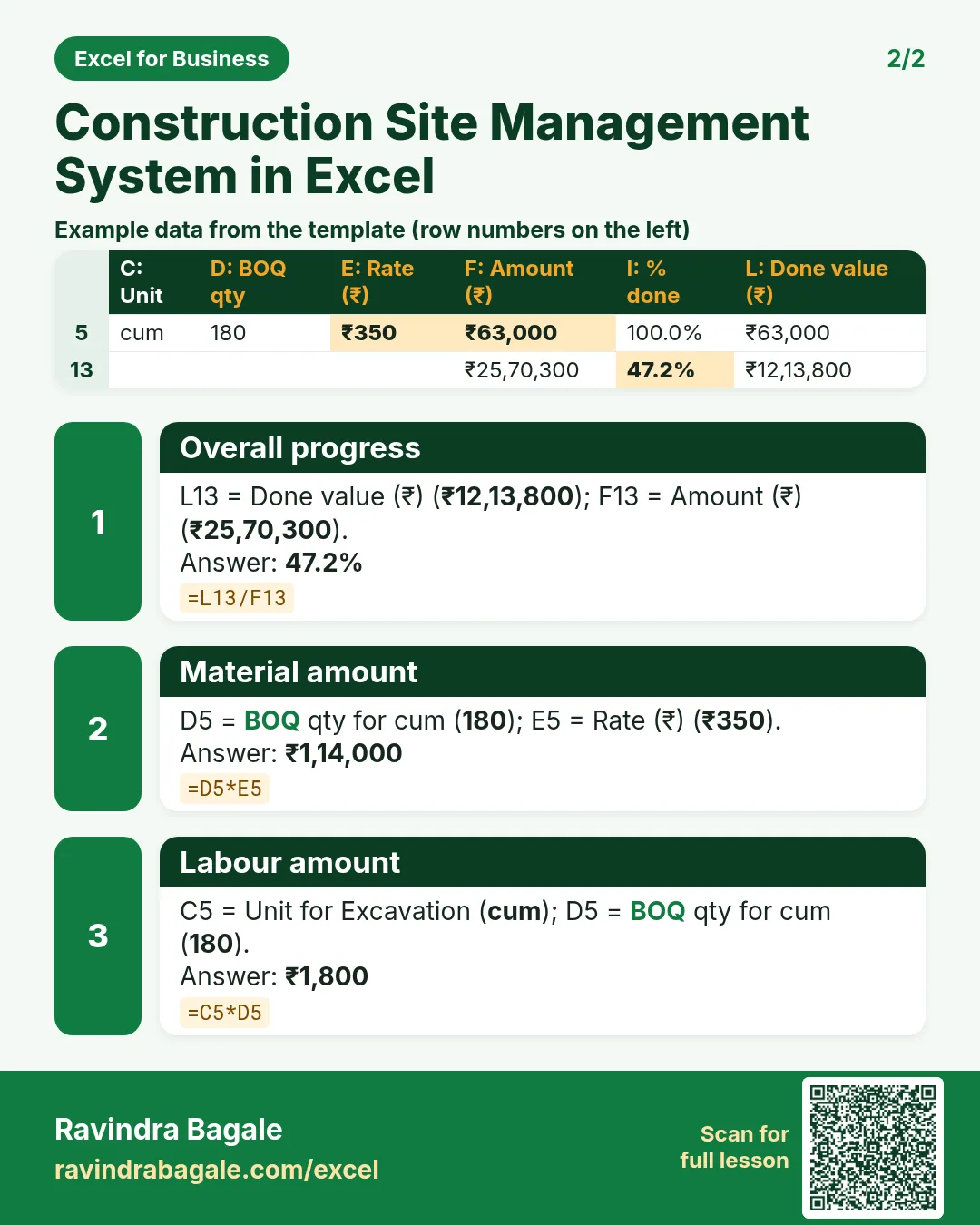
Each card shows formulas from this page, each with an example and its answer from the template. Scan the QR code on a card to open this lesson. All names and numbers are made up for practice.
झटपट उजळणी
प्रत्येक card वर या page मधले formulas, त्यांचं example आणि template मधलं उत्तर आहे. Card वरचा QR code scan केला की हा lesson उघडतो. सगळी नावं आणि आकडे सरावासाठी काल्पनिक आहेत.
झटपट दोहराई
हर card पर इस page के formulas, उनका example और template का उत्तर है. Card का QR code scan करें तो यह lesson खुलेगा. सभी नाम और आंकड़े अभ्यास के लिए काल्पनिक हैं.
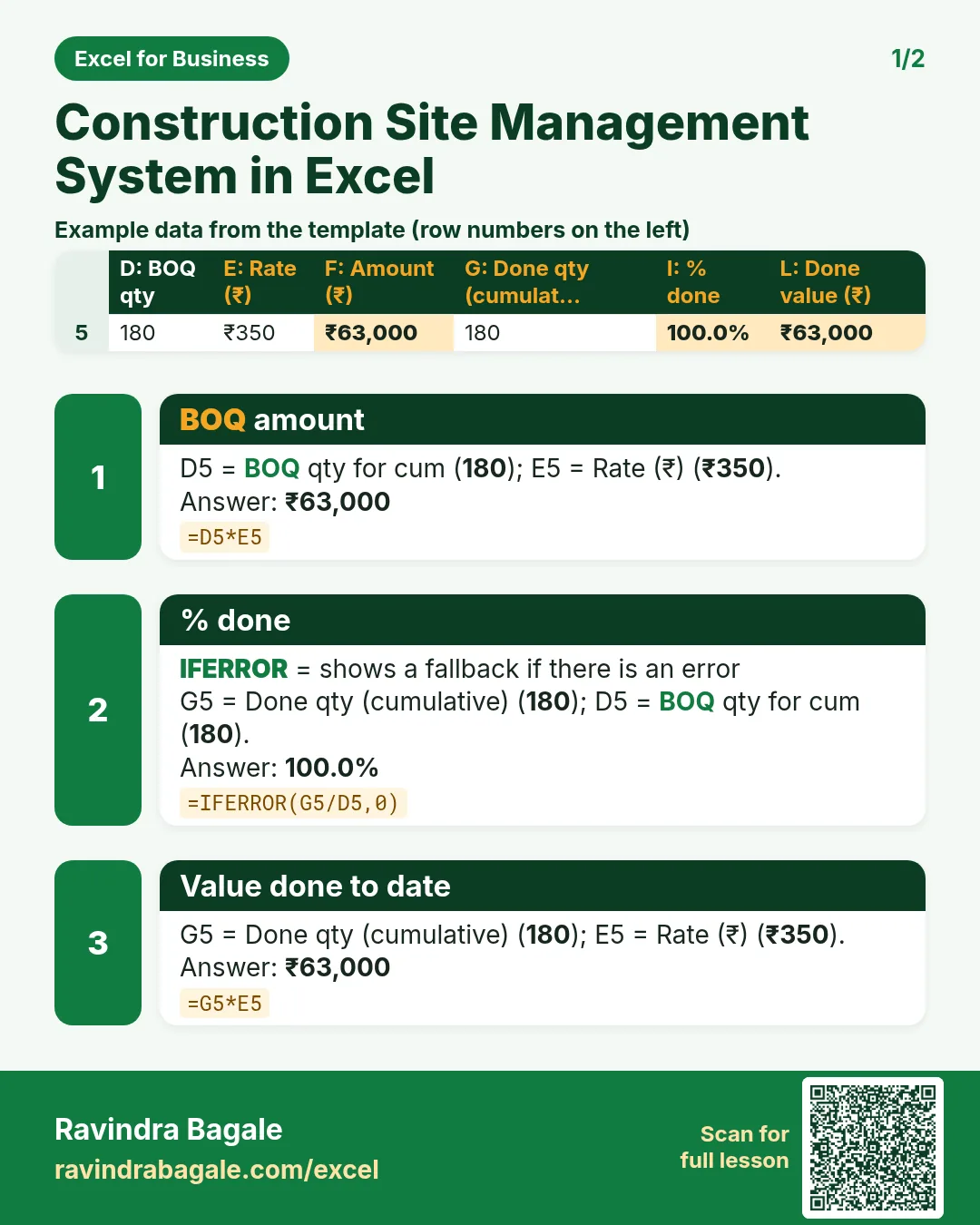


More cards: Ravi Sir's Cards.
6. Frequently asked questions
What is an RA bill in construction?
A running account bill raised during the work for the value done since the last bill: value done to date − value billed earlier.
How do I calculate retention in Excel?
Retention = gross this bill × the contract retention %: =ROUND(B10*Setup!B6,0). The rate comes from your contract, not a law.
What TDS rate applies on contractor payments?
Under section 194C it is 1% when the contractor is an individual or HUF and 2% for others such as firms and companies. The template keeps it as an input.
Is GST on works contracts always 18%?
Not always; some works carry different rates. Keep it as an input and confirm the rate for your contract with your accountant.
How do I track material overruns?
Log every bill with its cost head, total by head with SUMIFS and compare with the budget; red variance means over.
7. Quick quiz
Ten questions on this page. Sign in to save your score.
Loading practice tasks...
- Total times (Easy): Add up Times in D2:D11.
- Average amount (Easy): Average of E2:E11, rounded to 2 decimals.
- Rows in Food (Easy): How many rows have Category "Food"?
- Largest times (Easy): The largest value in D2:D11.
- Times for Food (Medium): Total of D2:D11 where B is "Food".
- Food in Bengaluru (Medium): Total of D2:D11 where B is "Food" and C is "Bengaluru".
- Best in Food (Medium): Largest E2:E11 value where B is "Food".
- Value of row 2 (Medium): D2 times E2.
- Look up Olivia Brown (Medium): The Times for "Olivia Brown" (use a lookup on column A).
- Total value (Hard): Sum of D times E for all rows.
- Share of Food (Hard): Share of D2:D11 that is "Food", rounded to 3 decimals.
- Rank of row 2 (Hard): Rank of D2 among D2:D11 (largest = 1).
- Above average? (Hard): "Above" if E2 is above the average of E2:E11, else "Below".