Ravi Sir's Cards › Excel
Weekly Meal Planner in Excel (card 2 of 2)
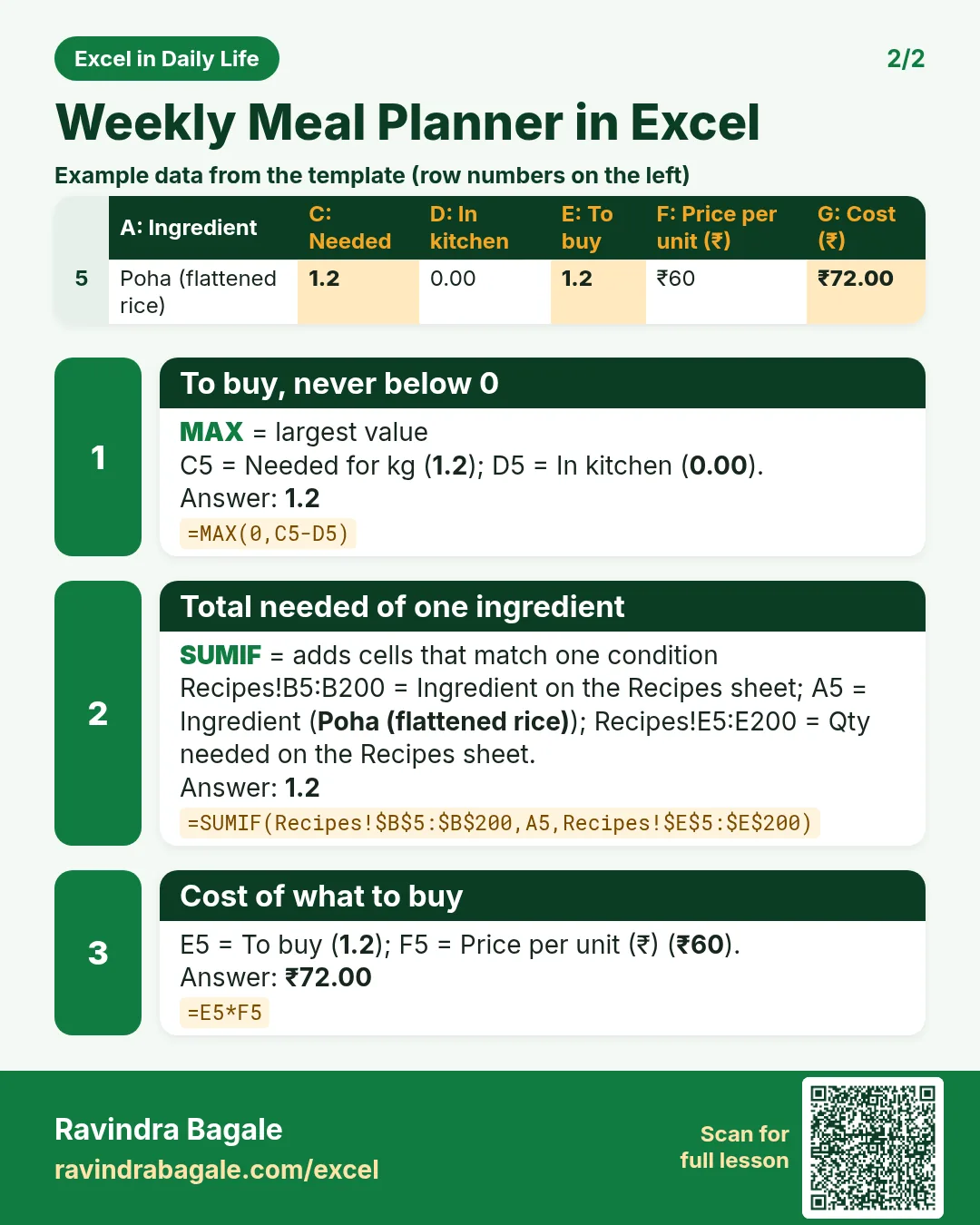
Revision card 2 for Weekly Meal Planner in Excel: To buy, never below 0: =MAX(0,C5-D5) gives 1.2; Total needed of one ingredient: =SUMIF(Recipes!$B$5:$B$200,A5,Recipes!$E$5:$E$200) gives 1.2; Cost of what to buy: =E5*F5 gives ₹72.00. Includes an example data table.
Read card text
What this card says
2 for Weekly Meal Planner in Excel: To buy, never below 0: =MAX(0,C5-D5) gives 1.2
Total needed of one ingredient: =SUMIF(Recipes!$B$5:$B$200,A5,Recipes!$E$5:$E$200) gives 1.2
Cost of what to buy: =E5*F5 gives ₹72.00. Includes an
Example
data table
Learn this in the lesson: Weekly Meal Planner in Excel That Builds Your Shopping List Automatically (No Macros)