Ravi Sir's Cards › Excel
Software Project Management System in Excel (card 1 of 2)
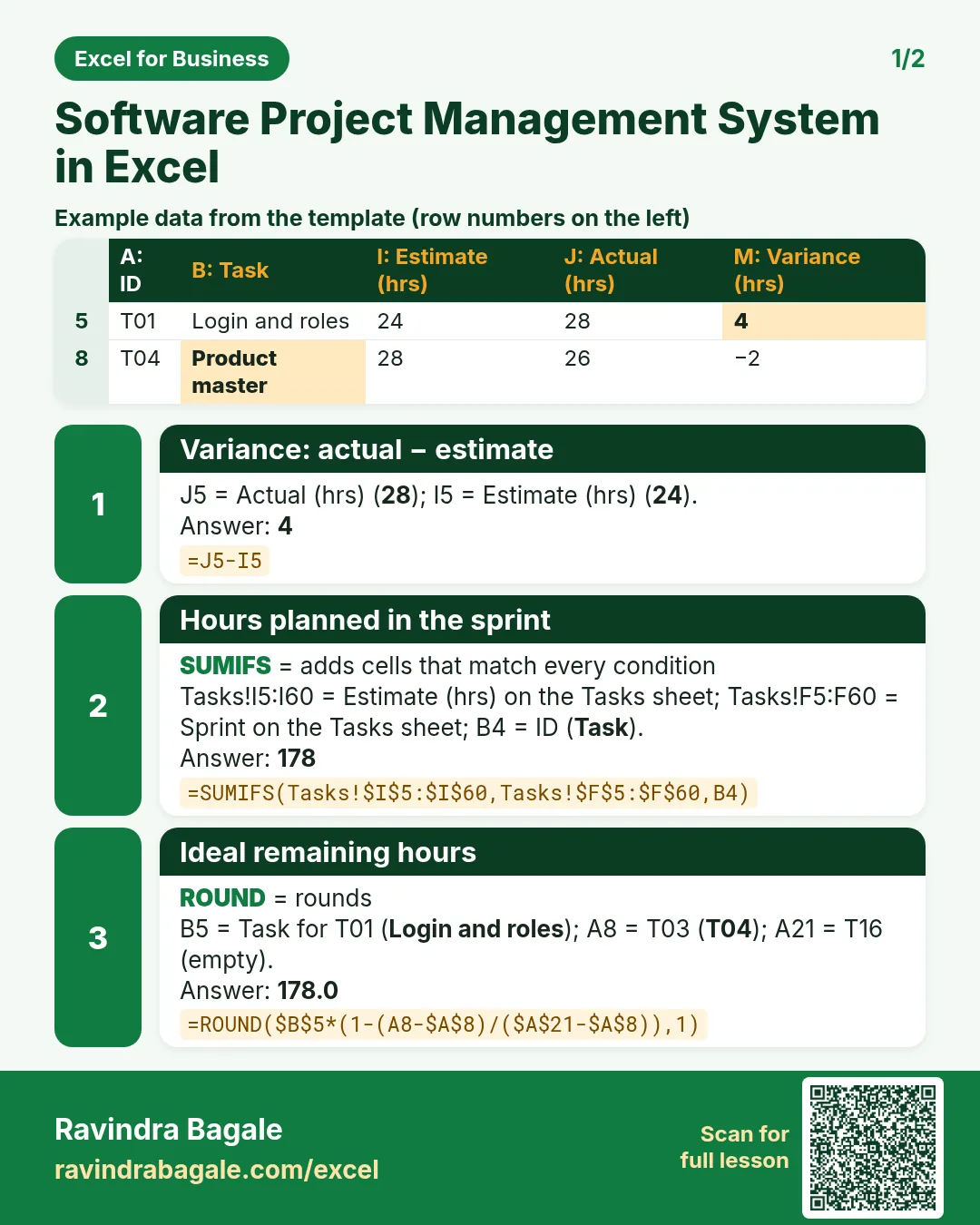
Revision card 1 for Software Project Management System in Excel: Variance: actual − estimate: =J5-I5 gives 4; Hours planned in the sprint: =SUMIFS(Tasks!$I$5:$I$60,Tasks!$F$5:$F$60,B4) gives 178; Ideal remaining hours: =ROUND($B$5*(1-(A8-$A$8)/($A$21-$A$8)),1) gives 178.0. Includes an example data table.
Read card text
What this card says
1 for Software Project Management System in Excel: Variance: actual − estimate: =J5-I5 gives 4
Hours planned in the sprint: =SUMIFS(Tasks!$I$5:$I$60,Tasks!$F$5:$F$60,B4) gives 178
Ideal remaining hours: =ROUND($B$5*(1-(A8-$A$8)/($A$21-$A$8)),1) gives 178.0. Includes an
Example
data table
Learn this in the lesson: Software Project Management System in Excel: Task Tracker, Sprint Burndown, Risk Register and Project Dashboard