13. DAX: Data Analysis Expressions
13.7 IF, SWITCH and DIVIDE in Power BI DAX with Example
Quick answer: the short, self-contained version of this lesson is the guide DAX IF and SWITCH Measures.
IF and SWITCH in Power BI DAX with example — in 30 seconds
What: IF picks one of two answers. SWITCH(TRUE(), …) checks rules from top to bottom and stops at the first TRUE.
Why: Managers want words like "Within 10 min", not raw minutes.
Tiny example: 8 min, then Within 10 min. 14, then 11-20 min. 25, then Over 20 min. Blank, then Not delivered.
IF and SWITCH in Power BI DAX with example — 30 सेकंदात
काय: IF दोनपैकी एक उत्तर निवडतो. SWITCH(TRUE(), …) वरून खाली नियम तपासतो आणि पहिल्या TRUE वर थांबतो.
का: Managers ना नुसती minutes नकोत, "Within 10 min" सारखे शब्द हवेत.
छोटं उदाहरण: 8 min, then Within 10 min. 14, then 11-20 min. 25, then Over 20 min. Blank, then Not delivered.
IF and SWITCH in Power BI DAX with example — 30 सेकंड में
क्या: IF दो में से एक जवाब चुनता है. SWITCH(TRUE(), …) ऊपर से नीचे नियम जाँचता है और पहले TRUE पर रुकता है.
क्यों: Managers को सिर्फ़ minutes नहीं, "Within 10 min" जैसे शब्द चाहिए.
छोटा उदाहरण: 8 min, then Within 10 min. 14, then 11-20 min. 25, then Over 20 min. Blank, then Not delivered.
First look at the data (before, then after):
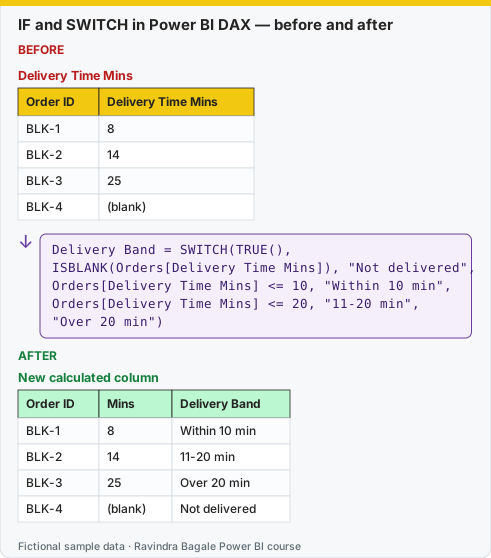
Same before / after tables as text
Before — Delivery Time Mins
| Order ID | Delivery Time Mins |
|---|---|
| BLK-1 | 8 |
| BLK-2 | 14 |
| BLK-3 | 25 |
| BLK-4 | (blank) |
About this data: This table uses columns: Order ID, Delivery Time Mins. This table uses columns: Order ID, Mins, Delivery Band. Values shown are the lesson examples already on this page (not a new dataset).
Formula / click path
Delivery Band = SWITCH(TRUE(),
  ISBLANK(Orders[Delivery Time Mins]), "Not delivered",
  Orders[Delivery Time Mins] <= 10, "Within 10 min",
  Orders[Delivery Time Mins] <= 20, "11-20 min",
  "Over 20 min")
After — New calculated column
| Order ID | Mins | Delivery Band |
|---|---|---|
| BLK-1 | 8 | Within 10 min |
| BLK-2 | 14 | 11-20 min |
| BLK-3 | 25 | Over 20 min |
| BLK-4 | (blank) | Not delivered |
Do it step by step:
- Select the Orders table. Click Table tools › New column.
- Type the SWITCH formula. Put the ISBLANK line first.
- Press Enter. Open Table view and check the four rows.
- Use Delivery Band in a slicer or a bar chart.
एक-एक step करून बघा:
- Orders table निवडा. Table tools › New column वर click करा.
- SWITCH formula type करा. ISBLANK ची line सगळ्यात आधी ठेवा.
- Enter दाबा. Table view उघडा आणि चारही rows तपासा.
- Delivery Band slicer किंवा bar chart मध्ये वापरा.
एक-एक step करके देखिए:
- Orders table चुनिए. Table tools › New column पर click कीजिए.
- SWITCH formula type कीजिए. ISBLANK वाली line सबसे पहले रखिए.
- Enter दबाइए. Table view खोलिए और चारों rows जाँचिए.
- Delivery Band को slicer या bar chart में इस्तेमाल कीजिए.
IF
Delivery Target Status =
IF([% Orders Delivered Under 10 Mins] >= 0.8, "On Target", "Below Target")

-- Calculated column in Orders
Has Discount = IF(Orders[Discount] > 0, "Yes", "No")
If the third argument is omitted, IF returns BLANK when the condition is false. (The 80% target above is only an example value.)
AND, OR, NOT
AND() and OR() accept exactly two arguments; for more conditions use the operators && and ||.
-- Calculated columns in Orders
Late Cash Order =
IF(AND(Orders[Delivery Time Mins] > 20, Orders[Payment Mode] = "Cash on Delivery"), "Yes", "No")

Big Basket Flag = IF(Orders[Quantity] >= 5 || Orders[Amount] >= 500, "Big", "Normal")
SWITCH
SWITCH replaces long nested IFs.
-- Simple form: compare one expression to values
Payment Group = SWITCH(Orders[Payment Mode],
    "UPI", "Digital",
    "Card", "Digital",
    "Wallet", "Digital",
    "Cash on Delivery", "Cash",
    "Other")

-- SWITCH(TRUE()) pattern: first condition that is TRUE wins
Delivery Band = SWITCH(TRUE(),
    ISBLANK(Orders[Delivery Time Mins]), "Not delivered",
    Orders[Delivery Time Mins] <= 10, "Within 10 min",
    Orders[Delivery Time Mins] <= 20, "11-20 min",
    "Over 20 min")

-- Time-of-day slot from the Order Hour column
Day Part = SWITCH(TRUE(),
    Orders[Order Hour] < 6, "Late Night",
    Orders[Order Hour] < 12, "Morning",
    Orders[Order Hour] < 17, "Afternoon",
    Orders[Order Hour] < 21, "Evening",
    "Night")
DIVIDE
Lakshat theva, always use DIVIDE for division in measures. It handles division by zero safely and returns BLANK (or an alternate result) instead of an error.
AOV (Average Order Value) = DIVIDE([Total Sales], [Delivered Orders])

Discount % = DIVIDE([Total Discount], [Total Sales] + [Total Discount], 0)
Ravindra Bagale's Tip
Friends, many students write [Total Sales] / [Total Orders] and get errors or infinity when a city has no orders. Use DIVIDE(numerator, denominator), which returns blank (or an alternate value) when the denominator is zero. Prefer SWITCH(TRUE(), …) over deeply nested IFs for readability. Never forget this.
Ravindra Bagale's Tip – मराठी
मित्रांनो, बरेच students [Total Sales] / [Total Orders] लिहितात आणि एखाद्या city मध्ये orders नसतील तर errors किंवा infinity मिळवतात. DIVIDE(numerator, denominator) वापरा, जो denominator zero असताना blank (किंवा पर्यायी value) देतो. वाचायला सोपं जावं म्हणून खूप nested IFs ऐवजी SWITCH(TRUE(), …) वापरा. हे अजिबात विसरू नका.
Ravindra Bagale's Tip – हिंदी
दोस्तों, बहुत से students [Total Sales] / [Total Orders] लिखते हैं और किसी city में orders न होने पर errors या infinity पाते हैं. DIVIDE(numerator, denominator) इस्तेमाल करो, जो denominator zero होने पर blank (या दूसरी value) देता है. पढ़ने में आसानी के लिए बहुत nested IFs की जगह SWITCH(TRUE(), …) इस्तेमाल करो. यह बिल्कुल मत भूलना.
Loading DAX practice tasks...
- Big deal flag (Easy): Calculated column on Subscriptions: Big Deal = IF Seats is 25 or more then "Yes" else "No".
- Is it churned? (Easy): Column on Subscriptions: Lost = IF Status = "Churned" then 1 else 0.
- MRR status (Easy): Measure MRR Status = "On track" if [MRR] is above 5000, else "Below".
- Plan level number (Medium): Column: Plan Level = 1 for "Basic", 2 for "Pro", 3 for "Enterprise".
- Seat band with SWITCH(TRUE()) (Medium): Column Seat Band: "Large" if Seats >= 50, "Mid" if Seats >= 20, else "Small".
- Active Pro MRR (AND) (Medium): Measure Active Pro MRR = [MRR] for rows where Status = "Active" AND Plan = "Pro". Use FILTER with &&.
- Needs attention (OR) (Medium): Column Attention = TRUE if Tickets >= 3 OR Status = "Churned".
- Not churned seats (NOT) (Hard): Measure Live Seats = SUM of Seats for rows where NOT (Status = "Churned").
- Health label by country (Hard): Row per Accounts Country. Measure Health = "Good" if [MRR] >= 1000, "Low" if it is less, and BLANK() when there is no MRR.
- Count of risky subscriptions (Hard): Measure Risky = number of Subscriptions rows with Tickets >= 3 and Plan is not "Basic".
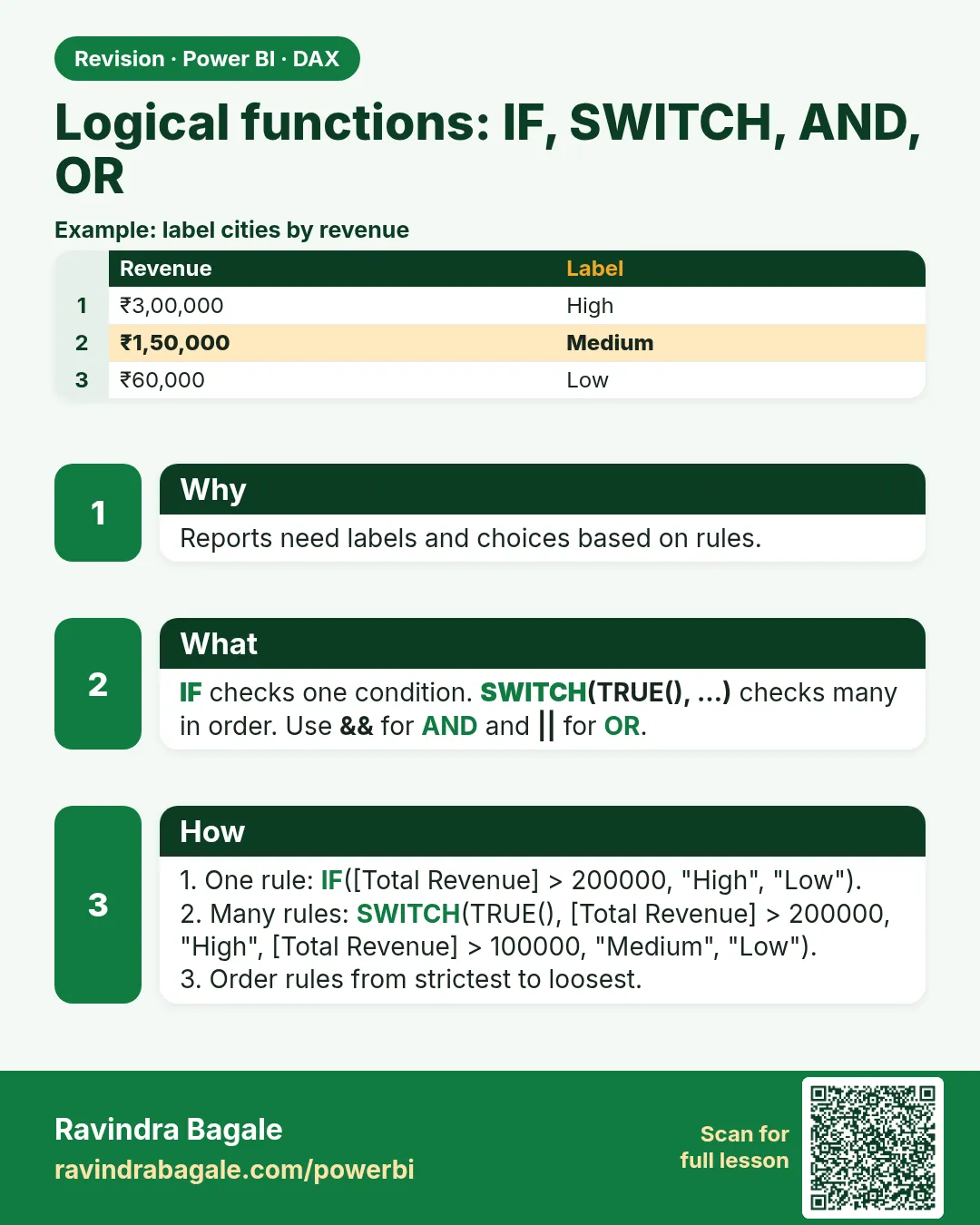 Revision card