13. DAX: Data Analysis Expressions
13.22 LOOKUPVALUE, TREATAS and CROSSFILTER
TREATAS in DAX with example — in 30 seconds
What: TREATAS uses the values of one column as a filter on another table that has no relationship.
Why: City targets come from a separate Excel sheet. There is no relationship, so every city shows the full target.
Tiny example: Without TREATAS every city shows ₹3,000. With TREATAS, Pune shows its own ₹1,500.
TREATAS in DAX with example — 30 सेकंदात
काय: TREATAS एका column च्या values relationship नसलेल्या दुसऱ्या table वर filter म्हणून लावतो.
का: City targets एका वेगळ्या Excel sheet मधून येतात. Relationship नाही, म्हणून प्रत्येक शहराला पूर्ण target दिसतो.
छोटं उदाहरण: TREATAS शिवाय प्रत्येक शहराला ₹3,000. TREATAS सोबत Pune ला स्वतःचा ₹1,500.
TREATAS in DAX with example — 30 सेकंड में
क्या: TREATAS एक column की values को बिना relationship वाली दूसरी table पर filter के रूप में लगाता है.
क्यों: City targets एक अलग Excel sheet से आते हैं. Relationship नहीं है, इसलिए हर शहर में पूरा target दिखता है.
छोटा उदाहरण: TREATAS के बिना हर शहर में ₹3,000. TREATAS के साथ Pune में अपना ₹1,500.
First look at the data (before → after):
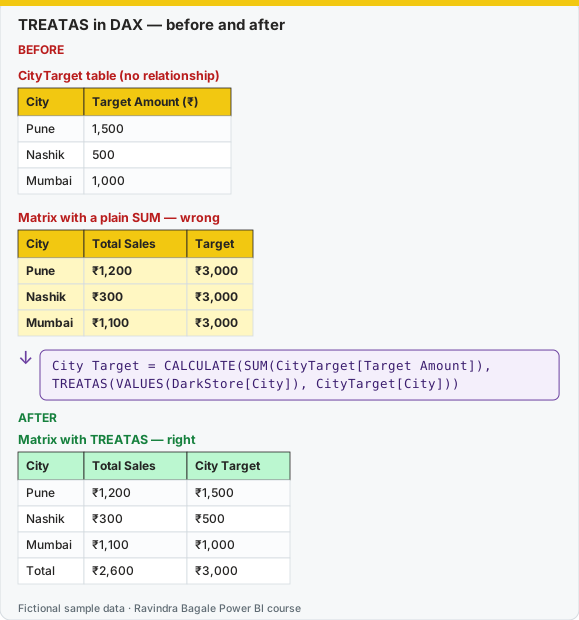
Same before / after tables as text
Before — CityTarget table (no relationship)
| City | Target Amount (₹) |
|---|---|
| Pune | 1,500 |
| Nashik | 500 |
| Mumbai | 1,000 |
Before — Matrix with a plain SUM — wrong
| City | Total Sales | Target |
|---|---|---|
| Pune | ₹1,200 | ₹3,000 |
| Nashik | ₹300 | ₹3,000 |
| Mumbai | ₹1,100 | ₹3,000 |
Formula / click path
City Target = CALCULATE(SUM(CityTarget[Target Amount]),
                TREATAS(VALUES(DarkStore[City]), CityTarget[City]))
After — Matrix with TREATAS — right
| City | Total Sales | City Target |
|---|---|---|
| Pune | ₹1,200 | ₹1,500 |
| Nashik | ₹300 | ₹500 |
| Mumbai | ₹1,100 | ₹1,000 |
| Total | ₹2,600 | ₹3,000 |
Do it step by step:
- Load CityTarget with Home › Enter data. Do not create a relationship.
- Build a matrix. Rows = DarkStore[City]. Add a plain sum of Target Amount. Every row shows ₹3,000.
- Click Home › New measure. Type the City Target formula.
- Replace the plain sum with City Target.
- Check: Pune ₹1,500, Nashik ₹500, Mumbai ₹1,000, Total ₹3,000.
- Check the spelling. "Pune" must be written the same way in both tables.
एक-एक step करून बघा:
- Home › Enter data ने CityTarget load करा. Relationship बनवू नका.
- Matrix बनवा. Rows = DarkStore[City]. Target Amount चा साधा sum टाका. प्रत्येक row ₹3,000 दाखवते.
- Home › New measure वर click करा. City Target formula type करा.
- साध्या sum च्या जागी City Target टाका.
- तपासा: Pune ₹1,500, Nashik ₹500, Mumbai ₹1,000, Total ₹3,000.
- Spelling तपासा. दोन्ही tables मध्ये "Pune" अगदी सारखंच लिहिलेलं पाहिजे.
एक-एक step करके देखिए:
- Home › Enter data से CityTarget load कीजिए. Relationship मत बनाइए.
- Matrix बनाइए. Rows = DarkStore[City]. Target Amount का सादा sum डालिए. हर row ₹3,000 दिखाती है.
- Home › New measure पर click कीजिए. City Target formula type कीजिए.
- सादे sum की जगह City Target डालिए.
- जाँचिए: Pune ₹1,500, Nashik ₹500, Mumbai ₹1,000, Total ₹3,000.
- Spelling जाँचिए. दोनों tables में "Pune" बिल्कुल एक जैसा लिखा होना चाहिए.
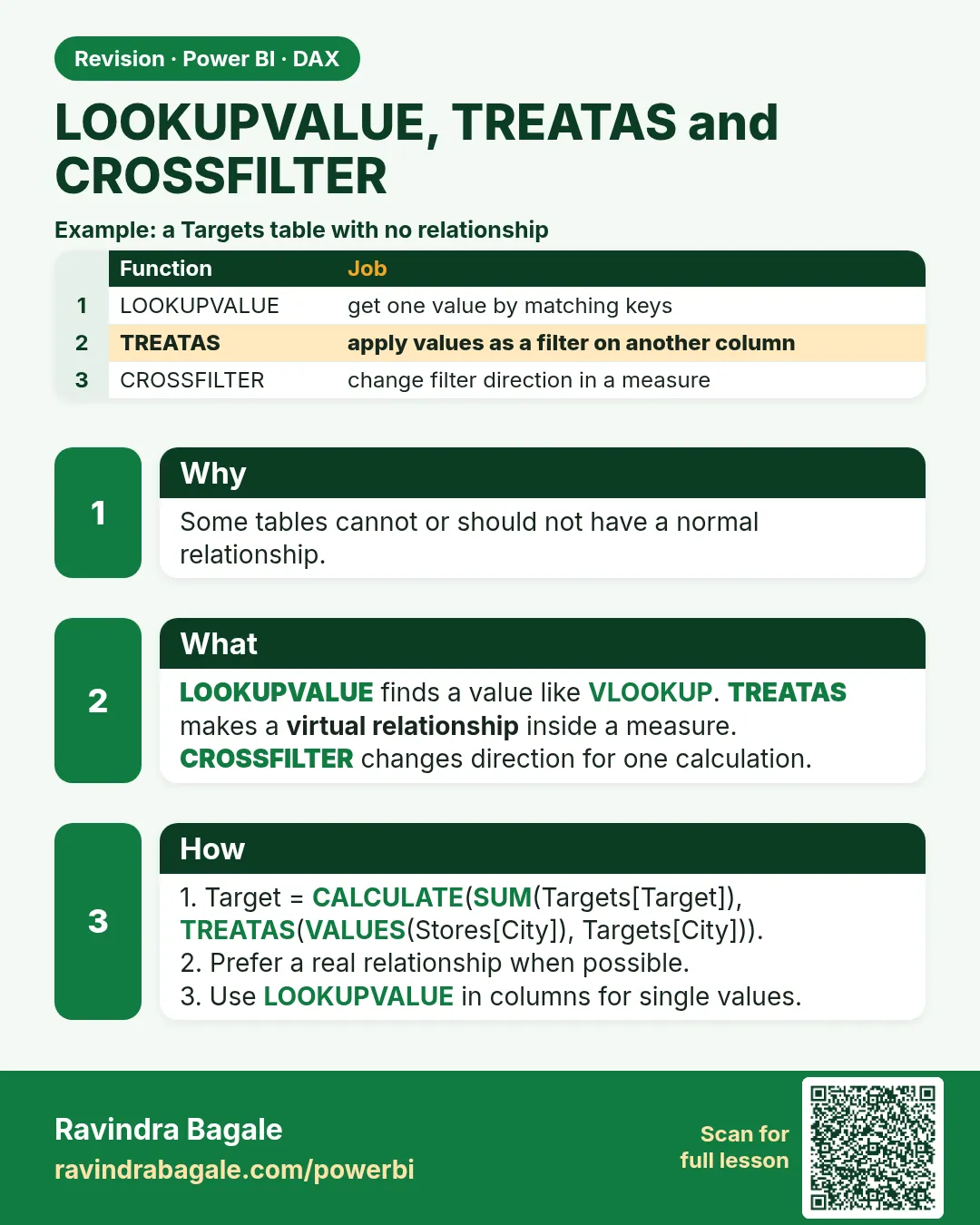
RELATED needs a relationship. These three functions are used when there is no relationship, or when you want to change the direction for just one measure.
RELATED ला relationship लागते. हे तीन functions तेव्हा वापरतात जेव्हा relationship नाही, किंवा फक्त एका measure साठी direction बदलायची आहे.
RELATED को relationship चाहिए. ये तीन functions तब इस्तेमाल होते हैं जब relationship नहीं है, या सिर्फ़ एक measure के लिए direction बदलनी है.
LOOKUPVALUE searches a column without a relationship. It returns an error if several rows match, and blank if none match. It is fine for a small, stable lookup. It is slower and less safe than RELATED on a real relationship.
Store Pin =
LOOKUPVALUE(
    DarkStore[PIN],
    DarkStore[Store ID], Orders[Store ID]
)
Use that as a calculated column only if you cannot relate the tables. If the store id repeats, fix the dimension; do not wrap the error.
TREATAS (treat as) builds a filter from a column of values and applies it to another column that is not related. The columns must mean the same thing (both city names, both stored the same way).
City Target =
CALCULATE(
    SUM(CityTarget[Target Amount]),
    TREATAS(VALUES(DarkStore[City]), CityTarget[City])
)
CROSSFILTER changes the relationship direction for one calculation. The model relationship can stay single.
Customers With Orders =
CALCULATE(
    DISTINCTCOUNT(Customer[Customer ID]),
    CROSSFILTER(Orders[Customer ID], Customer[Customer ID], BOTH)
)
BOTH here lets the fact table filter the customer table for this measure only. Leaving the model on Both would do that for every visual.
Worked example, fictional targets (not a company plan):
| City | Target Amount |
|---|---|
| Pune | 10000 |
| Mumbai | 4000 |
There is no relationship from CityTarget to DarkStore. A card filtered to Pune should show ₹10000. TREATAS passes the visible city "Pune" onto CityTarget[City]. If the target table says "pune" in a different case, you get blank. Clean the text in Power Query first. LOOKUPVALUE(CityTarget[Target Amount], CityTarget[City], "Pune") is the one-city version and will not follow a multi-select slicer. TREATAS will.
Ravindra Bagale's Tip
Many students use TREATAS to hide a missing relationship, then wonder why totals ignore typos. TREATAS is an exact filter, not a fuzzy match. If the same city list is used everywhere, build the relationship instead. Do not keep CROSSFILTER(..., BOTH) on the whole model; keep it only inside that one measure. Don't forget this.
Ravindra Bagale's Tip – मराठी
बरेच students नसलेली relationship लपवायला TREATAS वापरतात, आणि मग totals typos का ignore करतात असा प्रश्न पडतो. TREATAS exact filter आहे, fuzzy match नाही. तीच city list सगळीकडे वापरली जात असेल तर relationship बनवा. CROSSFILTER(..., BOTH) पूर्ण model वर ठेवू नका; फक्त त्याच measure मध्ये ठेवा. अजिबात विसरू नका.
Ravindra Bagale's Tip – हिंदी
बहुत से students ग़ायब relationship छिपाने के लिए TREATAS इस्तेमाल करते हैं, फिर सोचते हैं कि totals typos को ignore क्यों करते हैं. TREATAS exact filter है, fuzzy match नहीं. वही city list हर जगह इस्तेमाल होती हो तो relationship बनाओ. CROSSFILTER(..., BOTH) पूरे model पर मत रखो; सिर्फ़ उसी measure में रखो. बिल्कुल मत भूलो.
Loading DAX practice tasks...
- Target on each store (Easy): Calculated column on Store: Target = the Target from CityTarget for the store City.
- Product name on each order (Easy): Calculated column on Orders: Product Name = ProductName from Product for the row ProductID.
- Target for the customer city (Easy): Calculated column on Customer: City Target = Target from CityTarget for the customer City.
- Pune target as a measure (Medium): Measure: Pune Target = the Target in CityTarget where City is "Pune".
- Why the plain SUM fails (Medium): Shown per Store City. Measure: All Targets = SUM of CityTarget[Target].
- Target per city with TREATAS (Medium): Shown per Store City. Measure: City Target = SUM of Target, filtered by the cities in the row through TREATAS.
- Target for two picked cities (Medium): Slicer: Store City = Pune and Mumbai. Measure: City Target = target total through TREATAS.
- Gap to target (Hard): Shown per Store City. Measure: Target Gap = [Total Sales] − the TREATAS target.
- Target achieved % (Hard): Shown per Store City. Measure: Achieved = [Total Sales] ÷ the TREATAS target. Use DIVIDE.
- Line cost by lookup (Hard): Calculated column on Orders: Line Cost = Qty × the CostPrice looked up from Product.
 Revision card