How to Change Card Color and Text Dynamically in Power BI (Above or Below Target with DAX IF)
A card that says ₹1,38,457 is a number. A card that turns green because it beat the target, or red because it missed, is an answer. The second use of measures, after totals, is exactly this: dynamic colour and dynamic text. In this chapter you set a revenue target of ₹1,00,000, write one measure that returns "Green" or "Red", plug it into the card's colour through the fx button, test it with a state filter, and add a title that reads "Above Target" or "Below Target" on its own.
What you'll learn in this chapter
- A text measure with IF that returns a colour
- fx › Format style Field value
- Testing with Filters on this page
- Reusing one measure for the title colour
- A target text measure on the title
- Hex codes, colour conventions and the common fx mistake
Practice file: blinkit-sales-2025-measures.csv (700 order lines), with the total revenue measure from the previous chapter.
Made-up data: fictional Blinkit-style sales, for practice only. Amounts are in ₹ and dates are DD-MM-YYYY.
1. The problem
The manager's rule is simple: revenue of ₹1,00,000 or more is on target. The card should show that without anyone reading the number, and it should still be right when someone filters to one state or three.
2. The idea in simple words
Many formatting settings have an fx button next to them. Click it and the setting can come from a measure instead of a fixed choice. So if a measure returns the text "Green" or "Red", the card's colour follows the data.
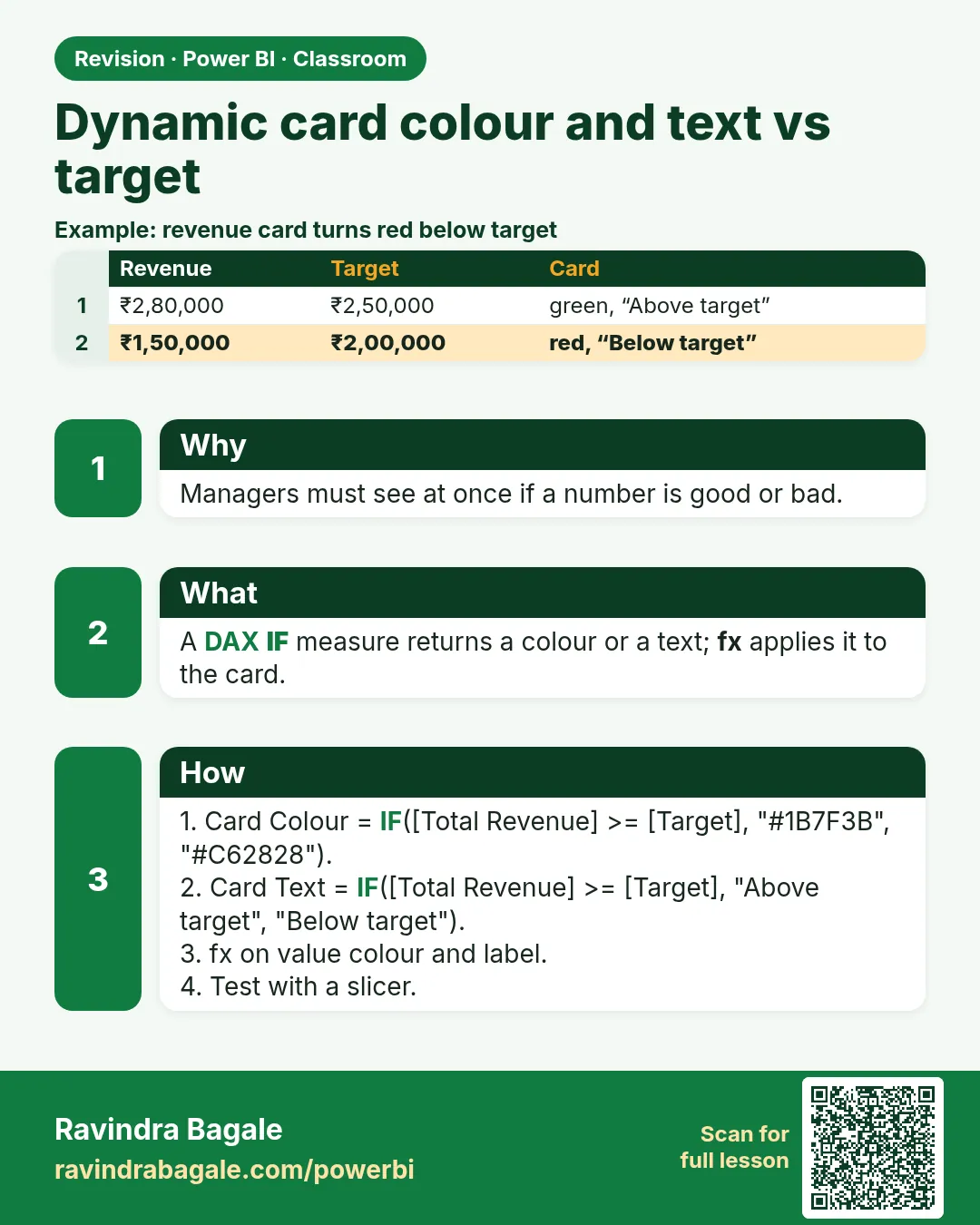
target color = IF([total revenue] >= 100000, "Green", "Red")
The IF reads: if total revenue is at least 1,00,000, return "Green", otherwise "Red". It uses the existing [total revenue] measure, so the SUM is written in only one place.
Classroom line
If it is more than one lakh, it should show in green; if less, in red.
Class मधलं वाक्य
एक लाखापेक्षा जास्त असेल तर green रंगात यायला हवं, कमी असेल तर red.
Classroom line – हिंदी
"Agar one lakh se jyada hua to green color me aana chahiye, agar kam ho to red."
3. The data
Revenue by state from blinkit-sales-2025-measures.csv:
| State | Revenue (₹) |
|---|---|
| Maharashtra | 52,518 |
| Karnataka | 28,413 |
| Telangana | 22,572 |
| Tamil Nadu | 21,830 |
| Gujarat | 13,124 |
| Total | 1,38,457 |
Target: ₹1,00,000.
4. Step by step
The colour measure
- Data pane › three dots on sales › New measure ›
target color = IF([total revenue] >= 100000, "Green", "Red"). Enter.
Apply it to the card
- Select the total revenue card › Format visual › Callout value › next to Color, click fx.
- Format style: Field value. What field should we base this on?: target color. OK.
- With no filter, the card turns green (₹1,38,457).
Test with a filter
- In the Filters pane, drag state to Filters on this page. Tick only Maharashtra: ₹52,518, red.
- Add Karnataka: ₹80,931, still red. Add Telangana: ₹1,03,503, green.
Title colour and text
- Format visual › General › Title › On. Size 15, bold, centred. Subtitle off.
- Title › Text color › fx › Field value › target color. The same measure now colours the title.
- New measure:
target text = IF([total revenue] >= 100000, "Above Target", "Below Target"). - Title › Text › fx › Field value › target text. With Maharashtra only, the card reads Below Target in red; with three states, Above Target in green.
Figure 1. One text measure drives the colour through fx › Field value (illustration).
Classroom line
Wherever you see fx in Format, you can make that setting dynamic.
Class मधलं वाक्य
Format मध्ये जिथे जिथे fx दिसतोय, त्या सगळ्या गोष्टी तुम्ही dynamic करू शकता.
Classroom line – हिंदी
"Format ke andar jaha jaha pe FX dikh raha hai, un sabhi chizon ko aap dynamic bana sakte ho."
5. Your result should look like this
Figure 2. Maharashtra alone: ₹52,518, Below Target in red. Maharashtra, Karnataka and Telangana: ₹1,03,503, Above Target in green (illustration).
| Filter | total revenue | Title | Colour |
|---|---|---|---|
| None | ₹1,38,457 | Above Target | Green |
| Maharashtra | ₹52,518 | Below Target | Red |
| Maharashtra + Karnataka | ₹80,931 | Below Target | Red |
| + Telangana | ₹1,03,503 | Above Target | Green |
6. What happened
- Each time the filter changes, [total revenue] recalculates, and so do target color and target text.
- The fx Field value style takes the text the measure returns and uses it as the colour (or the title).
- One measure drives two settings: the callout colour and the title colour.
Classroom line
Write one measure, and it is reusable.
Class मधलं वाक्य
एक measure लिहिला, आणि तो reusable आहे.
Classroom line – हिंदी
"Ek measure likha, aur ye measure reusable hai."
7. Explore further
- Hex codes. Instead of "Green" and "Red", return hex codes for exact shades:
IF([total revenue] >= 100000, "#1E8E3E", "#D93025"). - Any words. The text in quotes can be anything: "Profit"/"Loss", "On track"/"Behind".
- Convention. Green is used for good (profit, on target), red for bad (loss, below target). Stick to it so nobody has to think.
- Three levels. For green / amber / red, use SWITCH(TRUE()):
target color 3 =
  SWITCH(TRUE(),
      [total revenue] >= 100000, "Green",
      [total revenue] >= 75000, "Orange",
      "Red")
Maharashtra + Karnataka (₹80,931) now shows orange. - More fx. Background colour, data colours in charts and titles all take fx. The main course lessons The fx Button, KPI-Based Colouring in Charts and Cards and Logical Functions cover them in depth.
Classroom line
You can also use colour codes, hex codes.
Class मधलं वाक्य
तुम्ही color code सुद्धा वापरू शकता, hex code.
Classroom line – हिंदी
"Aap log color code bhi use kar sakte ho... hexa code."
Classroom line
Generally, green is used to show profit and red to show loss.
Class मधलं वाक्य
"Generally dashboard वर profit दाखवायचा असेल तर green, loss दाखवायचा असेल तर red वापरतात."
Generally profit दाखवायचा असेल तर green, loss दाखवायचा असेल तर red वापरतात.
Classroom line
Generally, green is used to show profit and red to show loss.
8. Common mistakes
| Wrong result | Reason | Fix |
|---|---|---|
| Measure greyed out in the fx list | It returns a number; the colour fx needs text | Return text: "Green", "Red" or a hex code |
| Colour goes back to the default | A text measure that is not a colour (e.g. target text) was picked | Pick target color; valid values are colour names or hex |
| Colour never changes | Static colour chosen, fx not used | Color › fx › Field value |
| Title fx not found | It lives under General › Title (layout differs by version) | Format visual › General › Title › Text |
| Threshold off by one | > used instead of >= | >= 100000 if exactly 1,00,000 counts |
The colour fx checks only the data type. Number measures are greyed out (This field can't be used here because a matching data type is required); any text measure is accepted, and if its text is not a valid colour, the default colour is used without an error.
Ravindra Bagale's Tip
Name colour measures so they say what they return: target color, profit color. When the fx list shows ten measures, the word "color" in the name stops you from picking target text by mistake.
Ravindra Bagale's Tip – मराठी
Color measures ना ते काय देतात हे सांगणारी नावं द्या: target color, profit color. fx list मध्ये दहा measures दिसतात तेव्हा नावातला "color" शब्द तुम्हाला चुकून target text निवडण्यापासून वाचवतो.
Ravindra Bagale's Tip – हिंदी
Color measures को ऐसे नाम दें जो बताएँ कि वे क्या लौटाते हैं: target color, profit color. जब fx list में दस measures दिखें, तो नाम में "color" शब्द आपको गलती से target text चुनने से बचाता है.
Classroom line
If you pick the wrong measure and put text where a colour is needed, it won't work.
Class मधलं वाक्य
"Measure चुकलात, color च्या इथे text लिहिलात, तर नाही होणार."
Measure चुकलात, color च्या जागी text दिलात, तर होणार नाही.
Classroom line
If you pick the wrong measure and put text where a colour is needed, it won't work.
9. Practise on your own
Practice task
Using blinkit-sales-2025-measures.csv and a target of ₹25,000 per state:
- Write
state colorreturning "Green" at ₹25,000 or more, else "Red". - Write
state textreturning "Profit" or "Loss" the same way. - Make a table of state and total revenue, and colour the revenue font with state color (Cell elements › Font color › fx). Which states are green?
- What does a card show for Tamil Nadu alone?
Show solution
state color = IF([total revenue] >= 25000, "Green", "Red").state text = IF([total revenue] >= 25000, "Profit", "Loss").- Maharashtra (₹52,518) and Karnataka (₹28,413) are green; Telangana, Tamil Nadu and Gujarat are red.
- ₹21,830, red, Loss.
10. Think like a professional
- Business view. Colour answers "are we OK?" faster than any number; keep the number visible too.
- One rule, one measure. Put the target in one measure (or a target measure) and reuse it for colour, text and titles.
- Test the edges. Filter to just below and just above the target before sharing.
- Accessibility. Pair colour with text (Above/Below Target) so the meaning is clear without colour.
Interview questions
- How do you make a card's colour depend on data? Write a text measure that returns a colour and apply it with fx › Field value.
- Why is a measure greyed out in the colour fx? It returns a number; the colour fx needs text.
- What happens with a text measure that is not a colour? The default colour is used.
- How do you handle three colour levels? SWITCH(TRUE(), condition1, "Green", condition2, "Orange", "Red").
Recap
In short
target color = IF([total revenue] >= 100000, "Green", "Red").- Callout value › Color › fx › Field value › target color.
- Test with Filters on this page: one state red, three states green.
- Reuse the measure for the title colour; target text for the title.
- The colour fx needs text; colour names or hex codes work.
 Revision card