Power BI मध्ये Card चा Color आणि Text dynamic कसा बदलायचा (Target च्या वर की खाली, DAX IF ने)
₹1,38,457 दाखवणारा card फक्त एक number आहे. Target पार केला म्हणून green होणारा, किंवा चुकला म्हणून red होणारा card हे उत्तर आहे. Totals नंतर measures चा दुसरा उपयोग नेमका हाच: dynamic color आणि dynamic text. या chapter मध्ये तुम्ही ₹1,00,000 चा revenue target ठेवाल, "Green" किंवा "Red" देणारा एक measure लिहाल, तो fx button ने card च्या color मध्ये लावाल, state filter ने test कराल, आणि आपोआप "Above Target" किंवा "Below Target" दाखवणारा title add कराल.
या chapter मध्ये तुम्ही काय शिकाल
- IF वापरून color देणारा text measure
- fx › Format style Field value
- Filters on this page ने test करणे
- Title color साठी तोच measure reuse करणे
- Title वर target text measure
- Hex codes, color conventions आणि fx मधली नेहमीची चूक
Practice file: blinkit-sales-2025-measures.csv (700 order lines), मागच्या chapter मधल्या total revenue measure सकट.
काल्पनिक data: Blinkit सारखी काल्पनिक sales, फक्त practice साठी. Amounts ₹ मध्ये आणि dates DD-MM-YYYY.
1. Problem
Manager चा rule सोपा आहे: ₹1,00,000 किंवा जास्त revenue म्हणजे target पूर्ण. Number न वाचता card ने हे दाखवायला हवं, आणि कुणी एक किंवा तीन states filter केले तरी ते बरोबर राहायला हवं.
2. सोप्या शब्दात idea
बऱ्याच formatting settings शेजारी fx button असतो. त्यावर click केलं की setting fixed choice ऐवजी measure मधून येऊ शकते. म्हणजे measure ने "Green" किंवा "Red" text दिला, तर card चा color data नुसार बदलतो.
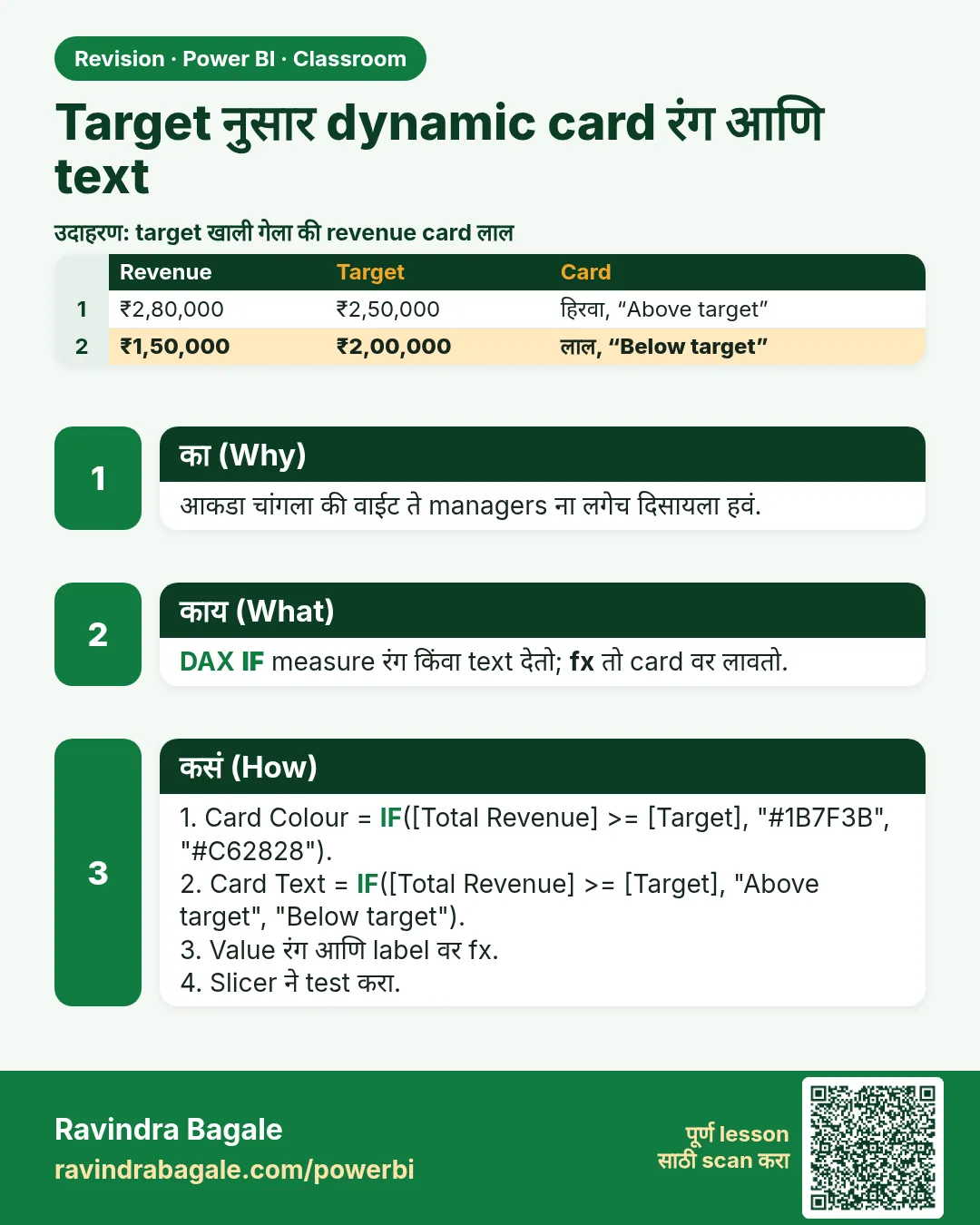
target color = IF([total revenue] >= 100000, "Green", "Red")
IF असं वाचा: total revenue किमान 1,00,000 असेल तर "Green", नाहीतर "Red". तो आधीचा [total revenue] measure वापरतो, म्हणजे SUM एकाच जागी लिहिलेला राहतो.
Classroom line
If it is more than one lakh, it should show in green; if less, in red.
Class मधलं वाक्य
एक लाखापेक्षा जास्त असेल तर green रंगात यायला हवं, कमी असेल तर red.
Classroom line – हिंदी
"Agar one lakh se jyada hua to green color me aana chahiye, agar kam ho to red."
3. Data
blinkit-sales-2025-measures.csv मधला state नुसार revenue:
| State | Revenue (₹) |
|---|---|
| Maharashtra | 52,518 |
| Karnataka | 28,413 |
| Telangana | 22,572 |
| Tamil Nadu | 21,830 |
| Gujarat | 13,124 |
| Total | 1,38,457 |
Target: ₹1,00,000.
4. Step by step
Color measure
- Data pane › sales वरचे three dots › New measure ›
target color = IF([total revenue] >= 100000, "Green", "Red"). Enter.
Card ला apply करा
- total revenue card select करा › Format visual › Callout value › Color शेजारी fx वर click.
- Format style: Field value. What field should we base this on?: target color. OK.
- Filter नसताना card green होतो (₹1,38,457).
Filter ने test करा
- Filters pane मध्ये state ला Filters on this page मध्ये drag करा. फक्त Maharashtra tick करा: ₹52,518, red.
- Karnataka add करा: ₹80,931, अजून red. Telangana add करा: ₹1,03,503, green.
Title color आणि text
- Format visual › General › Title › On. Size 15, bold, centre. Subtitle off.
- Title › Text color › fx › Field value › target color. तोच measure आता title ला color देतो.
- नवीन measure:
target text = IF([total revenue] >= 100000, "Above Target", "Below Target"). - Title › Text › fx › Field value › target text. फक्त Maharashtra असताना card वर red मध्ये Below Target; तीन states असताना green मध्ये Above Target.
आकृती 1. एक text measure fx › Field value ने color चालवतो (illustration).
Classroom line
Wherever you see fx in Format, you can make that setting dynamic.
Class मधलं वाक्य
Format मध्ये जिथे जिथे fx दिसतोय, त्या सगळ्या गोष्टी तुम्ही dynamic करू शकता.
Classroom line – हिंदी
"Format ke andar jaha jaha pe FX dikh raha hai, un sabhi chizon ko aap dynamic bana sakte ho."
5. तुमचा result असा दिसायला हवा
आकृती 2. फक्त Maharashtra: ₹52,518, red मध्ये Below Target. Maharashtra, Karnataka आणि Telangana: ₹1,03,503, green मध्ये Above Target (illustration).
| Filter | total revenue | Title | Color |
|---|---|---|---|
| काही नाही | ₹1,38,457 | Above Target | Green |
| Maharashtra | ₹52,518 | Below Target | Red |
| Maharashtra + Karnataka | ₹80,931 | Below Target | Red |
| + Telangana | ₹1,03,503 | Above Target | Green |
6. काय झालं
- Filter बदलला की प्रत्येक वेळी [total revenue] पुन्हा calculate होतो, आणि त्याबरोबर target color आणि target text पण.
- fx चा Field value style measure ने दिलेला text घेऊन तो color (किंवा title) म्हणून वापरतो.
- एक measure दोन settings चालवतो: callout color आणि title color.
Classroom line
Write one measure, and it is reusable.
Class मधलं वाक्य
एक measure लिहिला, आणि तो reusable आहे.
Classroom line – हिंदी
"Ek measure likha, aur ye measure reusable hai."
7. अजून explore करा
- Hex codes. "Green" आणि "Red" ऐवजी नेमक्या shades साठी hex codes द्या:
IF([total revenue] >= 100000, "#1E8E3E", "#D93025"). - कुठलेही शब्द. Quotes मधला text काहीही असू शकतो: "Profit"/"Loss", "On track"/"Behind".
- Convention. चांगल्यासाठी (profit, target पूर्ण) green, वाईटासाठी (loss, target खाली) red. हेच पाळा, म्हणजे कुणाला विचार करावा लागत नाही.
- तीन levels. Green / amber / red साठी SWITCH(TRUE()) वापरा:
target color 3 =
  SWITCH(TRUE(),
      [total revenue] >= 100000, "Green",
      [total revenue] >= 75000, "Orange",
      "Red")
Maharashtra + Karnataka (₹80,931) आता orange दिसतं. - अजून fx. Background color, charts मधले data colors आणि titles सगळे fx घेतात. Main course मधले The fx Button, KPI-Based Colouring in Charts and Cards आणि Logical Functions हे lessons सविस्तर सांगतात.
Classroom line
You can also use colour codes, hex codes.
Class मधलं वाक्य
तुम्ही color code सुद्धा वापरू शकता, hex code.
Classroom line – हिंदी
"Aap log color code bhi use kar sakte ho... hexa code."
Classroom line
Generally, green is used to show profit and red to show loss.
Class मधलं वाक्य
"Generally dashboard वर profit दाखवायचा असेल तर green, loss दाखवायचा असेल तर red वापरतात."
Generally profit दाखवायचा असेल तर green, loss दाखवायचा असेल तर red वापरतात.
Classroom line
Generally, green is used to show profit and red to show loss.
8. नेहमीच्या चुका
| चुकीचा result | कारण | उपाय |
|---|---|---|
| fx list मध्ये measure greyed out | तो number देतो; color fx ला text लागतो | Text द्या: "Green", "Red" किंवा hex code |
| Color परत default होतो | Color नसलेला text measure (उदा. target text) निवडला | target color निवडा; valid values म्हणजे color names किंवा hex |
| Color कधीच बदलत नाही | Static color निवडला, fx वापरला नाही | Color › fx › Field value |
| Title fx सापडत नाही | तो General › Title खाली असतो (version नुसार layout बदलतो) | Format visual › General › Title › Text |
| Threshold वर एकाचा फरक | >= ऐवजी > वापरलं | बरोबर 1,00,000 पण चालणार असेल तर >= 100000 |
Color fx फक्त data type check करतो. Number measures greyed out असतात (This field can't be used here because a matching data type is required); कुठलाही text measure चालतो, आणि त्याचा text valid color नसेल तर error न येता default color वापरला जातो.
Ravindra Bagale's Tip
Color measures ना ते काय देतात हे सांगणारी नावं द्या: target color, profit color. fx list मध्ये दहा measures दिसतात तेव्हा नावातला "color" शब्द तुम्हाला चुकून target text निवडण्यापासून वाचवतो.
Ravindra Bagale's Tip – मराठी
Color measures ना ते काय देतात हे सांगणारी नावं द्या: target color, profit color. fx list मध्ये दहा measures दिसतात तेव्हा नावातला "color" शब्द तुम्हाला चुकून target text निवडण्यापासून वाचवतो.
Ravindra Bagale's Tip – हिंदी
Color measures को ऐसे नाम दें जो बताएँ कि वे क्या लौटाते हैं: target color, profit color. जब fx list में दस measures दिखें, तो नाम में "color" शब्द आपको गलती से target text चुनने से बचाता है.
Classroom line
If you pick the wrong measure and put text where a colour is needed, it won't work.
Class मधलं वाक्य
"Measure चुकलात, color च्या इथे text लिहिलात, तर नाही होणार."
Measure चुकलात, color च्या जागी text दिलात, तर होणार नाही.
Classroom line
If you pick the wrong measure and put text where a colour is needed, it won't work.
9. स्वतः practice करा
Practice task
blinkit-sales-2025-measures.csv आणि प्रत्येक state साठी ₹25,000 target वापरून:
- ₹25,000 किंवा जास्त असेल तर "Green", नाहीतर "Red" देणारा
state colorलिहा. - त्याच पद्धतीने "Profit" किंवा "Loss" देणारा
state textलिहा. - State आणि total revenue चा table बनवा, आणि revenue चा font state color ने रंगवा (Cell elements › Font color › fx). कोणती states green आहेत?
- फक्त Tamil Nadu साठी card काय दाखवतो?
Solution दाखवा
state color = IF([total revenue] >= 25000, "Green", "Red").state text = IF([total revenue] >= 25000, "Profit", "Loss").- Maharashtra (₹52,518) आणि Karnataka (₹28,413) green; Telangana, Tamil Nadu आणि Gujarat red.
- ₹21,830, red, Loss.
10. Professional सारखा विचार करा
- Business दृष्टी. "आपण ठीक आहोत का?" याचं उत्तर color कुठल्याही number पेक्षा लवकर देतो; number पण दिसू द्या.
- एक rule, एक measure. Target एका measure मध्ये ठेवा आणि color, text आणि titles साठी reuse करा.
- Edges test करा. Share करण्याआधी target च्या थोडं खाली आणि थोडं वर filter करून बघा.
- Accessibility. Color सोबत text (Above/Below Target) द्या, म्हणजे color शिवायही अर्थ कळतो.
Interview questions
- Card चा color data वर अवलंबून कसा करायचा? Color देणारा text measure लिहा आणि fx › Field value ने apply करा.
- Color fx मध्ये measure greyed out का? तो number देतो; color fx ला text लागतो.
- Color नसलेला text measure दिला तर काय होतं? Default color वापरला जातो.
- तीन color levels कसे करायचे? SWITCH(TRUE(), condition1, "Green", condition2, "Orange", "Red").
Recap
थोडक्यात
target color = IF([total revenue] >= 100000, "Green", "Red").- Callout value › Color › fx › Field value › target color.
- Filters on this page ने test: एक state red, तीन states green.
- Title color साठी तोच measure; title साठी target text.
- Color fx ला text लागतो; color names किंवा hex codes चालतात.
 उजळणी card