Power BI मध्ये tables merge करण्याऐवजी relationships कसे बनवायचे (One-to-Many)
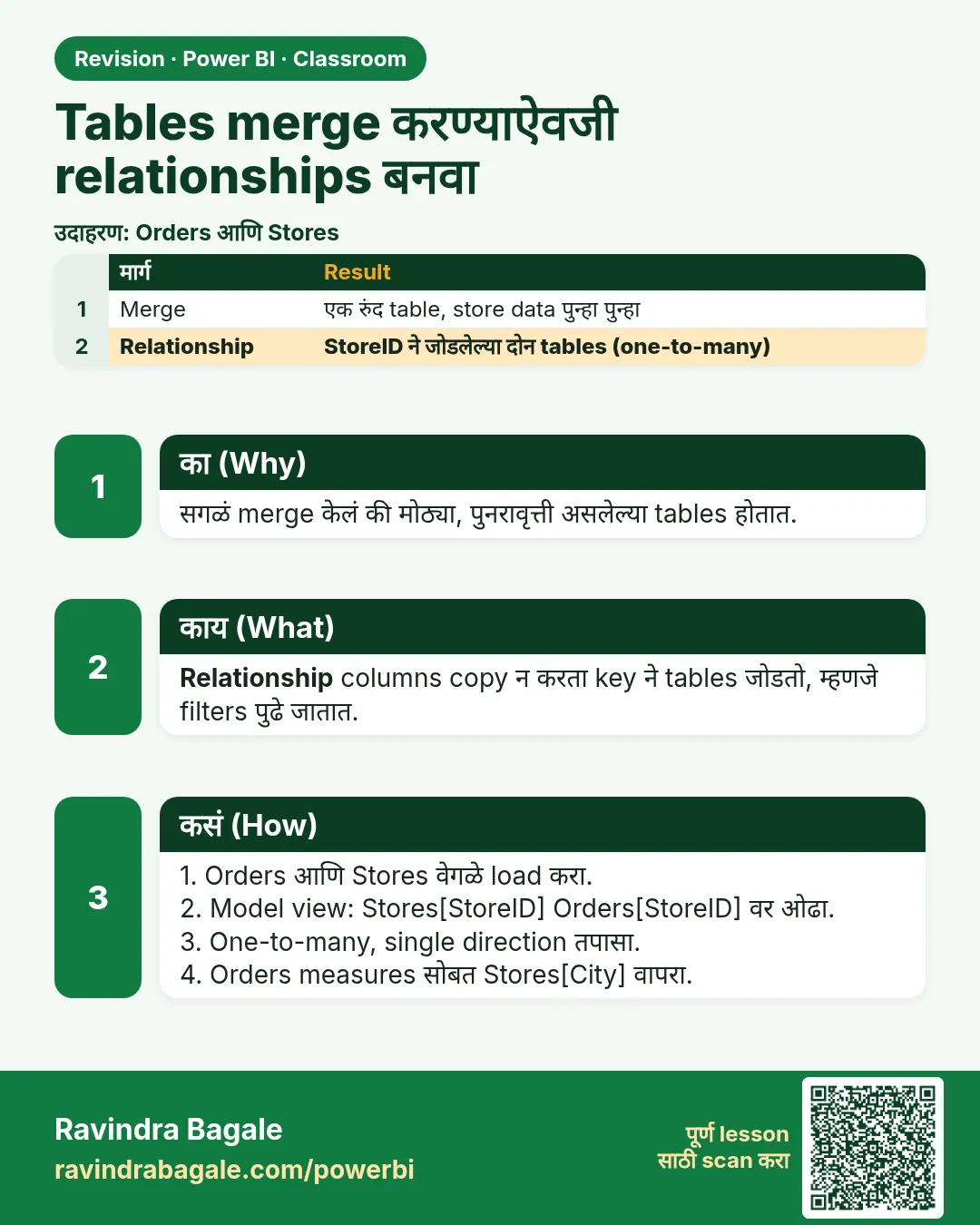
Product table आणि store table sales मध्ये merge करणं सोयीचं वाटतं: एकच table, सगळे columns एका जागी. 900 rows ला हे चालतं. काही लाख rows झाले की तेच product नाव आणि तेच state प्रत्येक sales row वर परत परत store होतं, model वाढतं, आणि Power BI अडखळायला लागतो. Power BI उलट्या पद्धतीने काम करण्यासाठी बनलाय: प्रत्येक table छोटं आणि वेगळं ठेवा, आणि relationships ने जोडा. या chapter मध्ये आपण merges ऐवजी relationships वापरणार आणि one-to-many वाचायला शिकणार.
या chapter मध्ये काय शिकणार
- एका merged table ने model का वाढतं
- Fact आणि lookup tables (star schema)
- Merge steps काढा आणि Enable load परत on करा
- Model view मध्ये relationships बनवा
- One-to-many: 1: आणि :1
- Same-height bars test
- Fix this ने broken visuals दुरुस्त करा
Practice files: blinkit-sales-2025-stores.csv (900 orders), blinkit-product-hierarchy.csv (14 products) आणि blinkit-store-cities-clean.csv (10 stores).
Made-up data: 2025 मधले काल्पनिक Blinkit-style orders, products आणि stores, फक्त practice साठी. Amounts ₹ मध्ये.
1. Problem काय आहे
झटपट मार्ग म्हणजे Power Query मध्ये सगळं sales मध्ये merge करणं:
- producthierarchy ला sales मध्ये product_id वर merge करा (Left Outer) आणि product, category, sub_category expand करा.
- store_cities ला sales मध्ये store_id वर merge करा (Left Outer) आणि state, state_abr, city expand करा.
- producthierarchy आणि store_cities वरचं Enable load untick करा, म्हणजे report पर्यंत एकच table पोचतं.
प्रत्येक chart चालतो. पण sales table आता काय store करतंय ते बघा: "Maharashtra" 371 वेळा, प्रत्येक dairy order वर "Dairy & Bakery", सगळ्या 900 rows वर पूर्ण product नाव. Lookup tables मध्ये 14 आणि 10 rows होते; त्यांचा text आता 900 rows वर copy झालाय. खऱ्या data मध्ये याच्या लाखो copies, मोठं model आणि slow report.
2. सोप्या भाषेत idea
- Fact table घटना नोंदवतं: प्रत्येक sale, त्याचा product_id, store_id, units आणि revenue. ते लांबलचक असतं.
- Lookup (dimension) table गोष्टींचं वर्णन करतं: प्रत्येक product साठी एक row, प्रत्येक store साठी एक row. ते छोटं असतं.
- Relationship त्यांना एका key column वर जोडतो. मग chart category producthierarchy मधून आणि revenue sales मधून घेऊ शकतो, आणि Power BI matching rows स्वतः शोधतो. काहीही copy होत नाही.
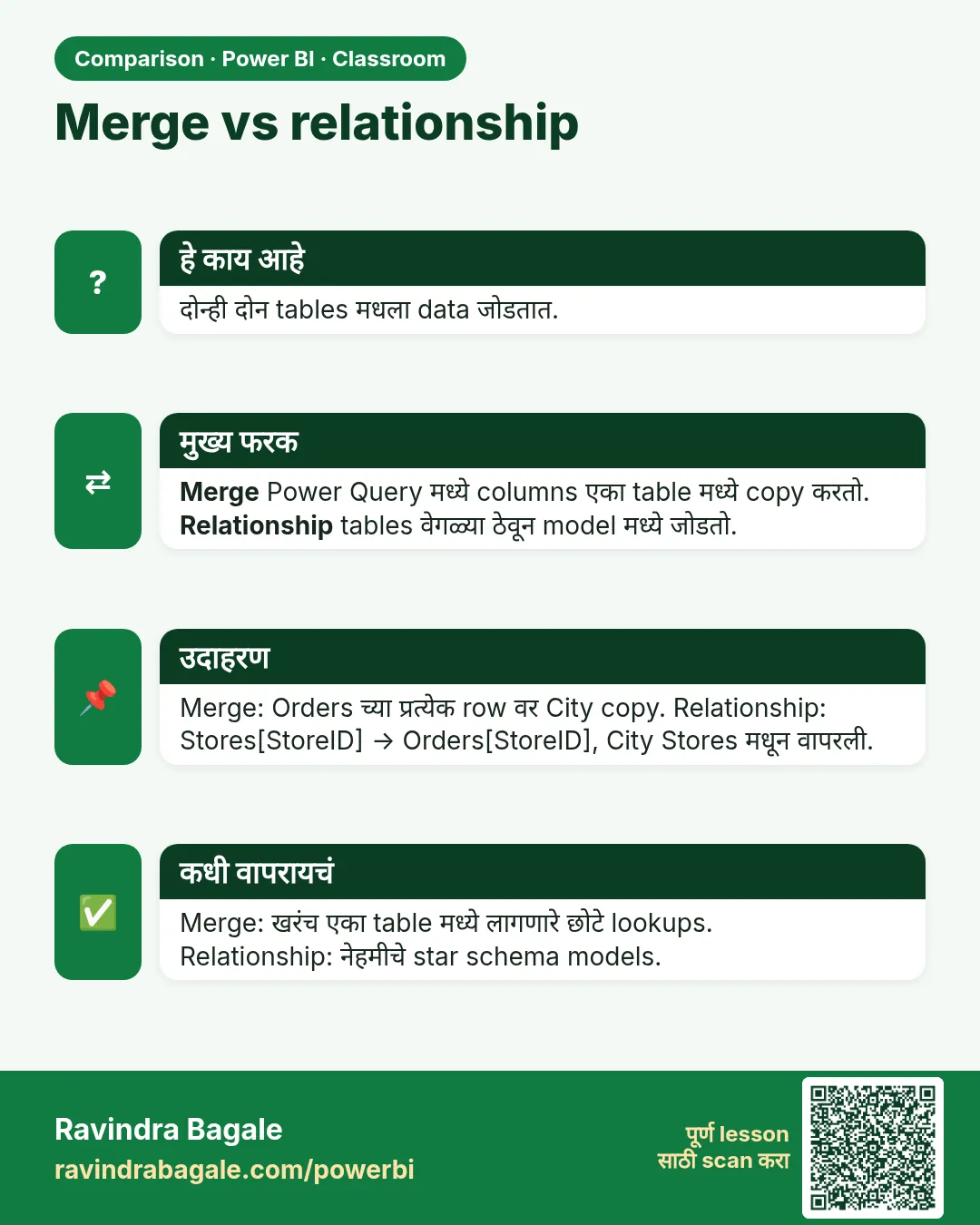
मध्ये एक fact table आणि भोवती lookup tables, या layout ला star schema म्हणतात. Relationships ही Power BI मध्ये काम करायची नेहमीची पद्धत आहे, extra feature नाही; खरंच एका table मध्ये columns हवे असतील तेव्हा merge हेच बरोबर tool आहे. Append वेगळं आहे आणि लागतंच: ते 2023, 2024 आणि 2025 चे sales एका fact table मध्ये एकाखाली एक लावतं (Power BI Power Query मध्ये अनेक वर्षांचा sales data append कसा करायचा).
आकृती 1. Merged: store आणि product चा text प्रत्येक sales row वर repeat. Model: relationships ने जोडलेली तीन tables, प्रत्येक fact एकदाच store (चित्र).
Classroom line
After merging, the same data repeats many times for no reason.
Class मधलं वाक्य
"Merge केल्यानंतर same data उगीचच भरपूर वेळा repeat होतो."
Merge केल्यानंतर same data उगीचच भरपूर वेळा repeat होतो.
Classroom line
After merging, the same data repeats many times for no reason.
3. Data
| Table | Rows | Key | काम |
|---|---|---|---|
| sales | 900 | product_id, store_id | fact |
| producthierarchy | 14 | product_id (प्रत्येक एकदाच) | lookup |
| store_cities | 10 | store_id (प्रत्येक एकदाच) | lookup |
Category नुसार revenue: Dairy & Bakery 58,683, Snacks & Branded Foods 46,750, Staples 41,090, Beverages 33,015; total ₹1,79,538. Product P208 (ghee 1 l) producthierarchy मध्ये एकदा आणि sales मध्ये 28 rows वर आहे.
4. Step by step
Merges undo करा
- Transform data › sales select करा. Applied Steps मध्ये खालून वर delete करा: Expanded store_cities, Merged Queries1, Expanded producthierarchy, Merged Queries (प्रत्येकाच्या शेजारचा ✕ click करा). Sales परत त्याच्या 6 columns वर येतं.
- Queries pane मध्ये producthierarchy वर right-click › Enable load tick करा. store_cities साठी पण तेच करा.
- Close & Apply. Data pane मध्ये आता तीन tables दिसतात.
Relationships बनवा
- Model view उघडा (डावीकडचा तिसरा icon). Power BI ने आधीच lines काढल्या असतील तर प्रत्येकीवर double-click करून तपासा; नाहीतर तीन वेगवेगळे boxes दिसतात.
- sales मधला product_id producthierarchy मधल्या product_id वर drag करा. Dialog मध्ये तपासा: Cardinality Many to one (*:1), Cross filter direction Single, Make this relationship active tick. OK.
- store_cities मधला store_id sales मधल्या store_id वर drag करा. Cardinality: One to many (1:*), Single. OK.
- प्रत्येक line वर lookup table कडे 1 आणि sales कडे * दिसतो.
Visuals दुरुस्त करा
- Report view मध्ये परत गेल्यावर, merged sales table मधला state किंवा category वापरणारे charts "Something's wrong with one or more fields" दाखवतात. Fix this वर click करा.
- Red मध्ये दाखवलेला field काढा, मग तोच column त्याच्या स्वतःच्या table मधून drag करा: state store_cities मधून, category producthierarchy मधून. revenue sales मधूनच ठेवा.
- काढलेल्या field वर लावलेला filter परत लावा, उदा. state वरचा Top N 5 filter.
Relationship test करा
- नवीन page वर column chart बनवा: category producthierarchy मधून, revenue sales मधून. चार वेगवेगळे bars येतात.
- Model view मध्ये product_id line वर right-click › Delete › Yes. Report मध्ये आता प्रत्येक bar 1,79,538 दाखवतो.
- product_id परत drag करा (sales → producthierarchy, *:1, Single). खऱ्या values परत येतात.
आकृती 2. Relationship नसताना प्रत्येक category grand total 1,79,538 दाखवते; product_id relationship ने प्रत्येक category तिचा स्वतःचा revenue दाखवते (चित्र).
Classroom line
Take category from the product table and revenue from the sales table.
Class मधलं वाक्य
"Category product table मधनं select करा, आणि revenue sales table मधनं."
Category product table मधून select करा, आणि revenue sales table मधून.
Classroom line
Take category from the product table and revenue from the sales table.
5. Result असा दिसायला हवा
- Model view: producthierarchy 1 —— * sales * —— 1 store_cities.
- Category नुसार revenue: Dairy & Bakery 58,683 · Snacks & Branded Foods 46,750 · Staples 41,090 · Beverages 33,015.
- State नुसार revenue (state store_cities मधून): Maharashtra 76,450 · Karnataka 40,271 · Telangana 17,998 · Gujarat 16,770 · Tamil Nadu 14,261 · Madhya Pradesh 8,980 · Rajasthan 2,277 · (Blank) 2,531.
- Numbers merged table सारखेच आहेत, पण sales table मध्ये फक्त त्याचे स्वतःचे 6 columns आहेत.
6. काय झालं
- Relationship मुळे filter one side कडून many side कडे जातो. producthierarchy मध्ये "Dairy & Bakery" निवडलं की त्याचे products सापडतात, आणि product_id मधून त्यांचे sales rows.
- Relationship नसेल तर producthierarchy sales ला filter करूच शकत नाही, म्हणून प्रत्येक category ला पूर्ण revenue मिळतो: same-height bars.
- State chart मधलं (Blank) म्हणजे store 111: त्याच्या sales rows ना matching store नाही, म्हणून Power BI त्यांना drop न करता blank state खाली ठेवतो, Left Outer सारखंच.
- Visual fix करणं म्हणजे त्याला अस्तित्वात असलेल्या column कडे वळवणं. Red field जुन्या merged sales table चा column होता.
आकृती 3. One-to-many: P208 producthierarchy मध्ये एकदा आणि sales मध्ये 28 वेळा; एका बाजूने 1:* म्हणजेच दुसऱ्या बाजूने *:1 (चित्र).
Classroom line
Without a relationship, all the bars would have looked the same height.
Class मधलं वाक्य
"Relationship नसला असता, तर सगळे same height चे दिसले असते."
Relationship नसता, तर सगळे bars same height चे दिसले असते.
Classroom line
Without a relationship, all the bars would have looked the same height.
7. अजून थोडं खोलात
- 1: की :1? एकच relationship, उलट्या बाजूंनी बघितलेला. sales वरून producthierarchy कडे drag केलं की dialog :1 म्हणतो, आणि store_cities वरून sales कडे drag केलं की 1:: पहिल्यांदा कुठलं table लिहिलंय त्यावर label ठरतो.
- One-to-one (दोन्ही बाजूंना key एकदाच) क्वचित असतो; बहुतेक वेळा ती दोन tables एकच होऊ शकतात. Many-to-many तेव्हा येतो जेव्हा key दोन्ही बाजूंना repeat होते; आधी lookup table मध्ये duplicate keys आहेत का ते बघा.
- Data types match व्हायला हवे. store_id दोन्ही tables मध्ये same type हवा (दोन्ही Whole Number किंवा दोन्ही Text), नाहीतर relationship बनत नाही.
- Enable load आणि "Possible Data Loss". Enable load off केलं की warning येते. Visuals आधीच त्या table चे columns वापरत असतील तरच फरक पडतो; ते तुटतील.
- Model size. Power BI प्रत्येक column compress करतो. छोटं lookup table आणि sales मधला एक key column, हे प्रत्येक sales row वर repeat होणाऱ्या text पेक्षा खूप कमी memory घेतात.
- Slicers साठी lookup columns. प्रत्येक visual आणि slicer मध्ये category, state आणि city lookup tables मधूनच घ्या; मग एक slicer सगळं filter करतो.
Classroom line
You may lose data, but when? Only if you have used those columns in the reports.
Class मधलं वाक्य
"Data loss वगैरे होईल, पण कधी? जर आपण reports वरती त्या columns वापरले असतील तर."
Data loss वगैरे होईल, पण कधी? जर आपण reports वरती ते columns वापरले असतील तर.
Classroom line
You may lose data, but when? Only if you have used those columns in the reports.
8. नेहमीच्या चुका
| चुकीचा result | कारण | Fix |
|---|---|---|
| प्रत्येक bar 1,79,538 दाखवतो | Relationship नाही (किंवा delete झाला) | Model view मध्ये product_id relationship बनवा |
| Data pane मध्ये एकच table | Lookup tables चं Enable load अजून off | Query वर right-click › Enable load |
| "Something's wrong with one or more fields" | Visual ने merge बरोबर गेलेला column वापरला होता | Fix this › red field काढा › lookup table मधून drag करा |
| Relationship dialog Many to many दाखवतो | Lookup table मध्ये duplicate keys | producthierarchy किंवा store_cities मधले duplicates काढा |
| Relationship बनतच नाही | दोन keys चे data types वेगळे | दोन्ही Whole Number किंवा दोन्ही Text करा |
| Slicer काहीच filter करत नाही | Slicer चा field sales मधून आणि chart lookup table मधून, किंवा उलटं | Slicers मध्ये lookup-table columns वापरा |
Ravindra Bagale's Tip
Same-height bars test ची सवय लावा. Model बनवल्यावर एक lookup column आणि एक sales measure एकाच chart वर टाका. Bars वेगळे: relationship चालतोय. Bars same: थांबा आणि पुढचं काही बनवण्याआधी Model view उघडा.
Ravindra Bagale's Tip – मराठी
Same-height bars test ची सवय लावा. Model बनवल्यावर एक lookup column आणि एक sales measure एकाच chart वर टाका. Bars वेगळे: relationship चालतोय. Bars same: थांबा आणि पुढचं काही बनवण्याआधी Model view उघडा.
Ravindra Bagale's Tip – हिंदी
Same-height bars test की आदत डालिए. Model बनाने के बाद एक lookup column और एक sales measure एक ही chart पर डालिए. Bars अलग: relationship चल रहा है. Bars same: रुकिए और आगे कुछ बनाने से पहले Model view खोलिए.
Classroom line
Which table is written first matters.
Class मधलं वाक्य
"पहिल्यांदा कुठलं table लिहिलंय ते matter करतं."
पहिल्यांदा कुठलं table लिहिलंय ते matter करतं.
Classroom line
Which table is written first matters.
9. स्वतः practice करा
Practice task
तीन practice files वेगवेगळ्या tables म्हणून load करा आणि दोन्ही relationships बनवा.
- storetype_id (store_cities मधून) नुसार revenue किती?
- Slicer मध्ये state = Maharashtra (store_cities मधून) असताना category नुसार revenue किती?
- P208 sales मध्ये किती वेळा आहे, आणि producthierarchy मध्ये किती वेळा?
- तुम्ही store_id relationship delete केला. Revenue-by-city chart चा प्रत्येक bar काय दाखवेल?
Solution बघा
- Type 1 87,530, type 2 51,840, type 3 25,888, type 4 11,749, आणि store 111 साठी (Blank) 2,531.
- Dairy & Bakery 27,644, Snacks & Branded Foods 18,980, Beverages 15,426, Staples 14,400 (total 76,450).
- sales मध्ये 28 वेळा, producthierarchy मध्ये एकदा: one-to-many.
- प्रत्येक city वर 1,79,538, grand total.
10. Professional सारखा विचार करा
- Business view. Star model data वाढला तरी fast राहतं, आणि प्रत्येक नवीन fact table (returns, targets) तीच product आणि store tables परत वापरू शकतं.
- Shape साठी merge, analysis साठी relate. Table ला खरंच दुसऱ्या table चा column हवा असेल तेव्हा merge; एक table दुसऱ्याने फक्त slice करायचं असेल तेव्हा relationship.
- Keys hide करा. sales मधले product_id आणि store_id hide करा (right-click › Hide in report view), म्हणजे report users ते lookup tables मधूनच घेतील.
- Visuals आधी model तपासा. "Number चुकीचा" problems बहुतेक missing किंवा चुकीच्या relationships मुळे असतात.
Interview questions
- प्रत्येक lookup table fact table मध्ये merge का करू नये? Lookup text प्रत्येक fact row वर repeat होतो, model वाढतं आणि report slow होतो; relationships प्रत्येक value एकदाच store करतात.
- Star schema म्हणजे काय? मध्ये एक fact table, भोवतीच्या lookup (dimension) tables शी related.
- 1: आणि :1 मध्ये फरक? अर्थात काहीच नाही; तोच one-to-many relationship उलट्या बाजूंनी वाचलेला.
- प्रत्येक bar same value का दाखवतो? Axis वरचा column ज्या table मधून आहे, त्या table चा value च्या table शी relationship नाही.
Recap
थोडक्यात
- Lookups sales मध्ये merge केल्याने त्यांचा text प्रत्येक row वर repeat होतो आणि model वाढतं.
- sales (fact), producthierarchy आणि store_cities (lookups) वेगळे ठेवा.
- Merge steps delete करा, Enable load परत on करा, Close & Apply.
- Model view: product_id आणि store_id drag करा; lookup side 1, sales *.
- Same-height bars म्हणजे missing relationship.
- Fix this: red field ऐवजी lookup table मधला column टाका.
 उजळणी card
 तुलना card