Power Query मध्ये Custom Columns कसे add करायचे: GST, Final Price आणि Discount formulas
तुमच्या price list मध्ये tax शिवायच्या prices आहेत. Finance ला 18% GST आणि final price हवी; marketing ला बघायचंय की 10% discount दिला तर काय होईल. इथे Column From Examples कामाला येत नाही, कारण तो तुमचं स्वतःचं गणित करत नाही. Custom Column करतो: एकदा छोटा formula लिहा, Power Query तो प्रत्येक row ला लावतो. या chapter मध्ये आपण gst, final price आणि discounted price बनवणार, आणि चुकीचे totals टाळणाऱ्या तीन गोष्टी शिकणार: missing prices चं काय करायचं, column remove केल्यावर त्यावरून बनलेले columns का तुटत नाहीत, आणि पैशांसाठी कुठला data type.
या chapter मध्ये काय शिकणार
- Column विरुद्ध measure: row by row की एक total
- Column From Examples गणित का करू शकत नाही
- gst आणि final price, Custom Columns म्हणून
- एका step चा formula: [price] * 1.18
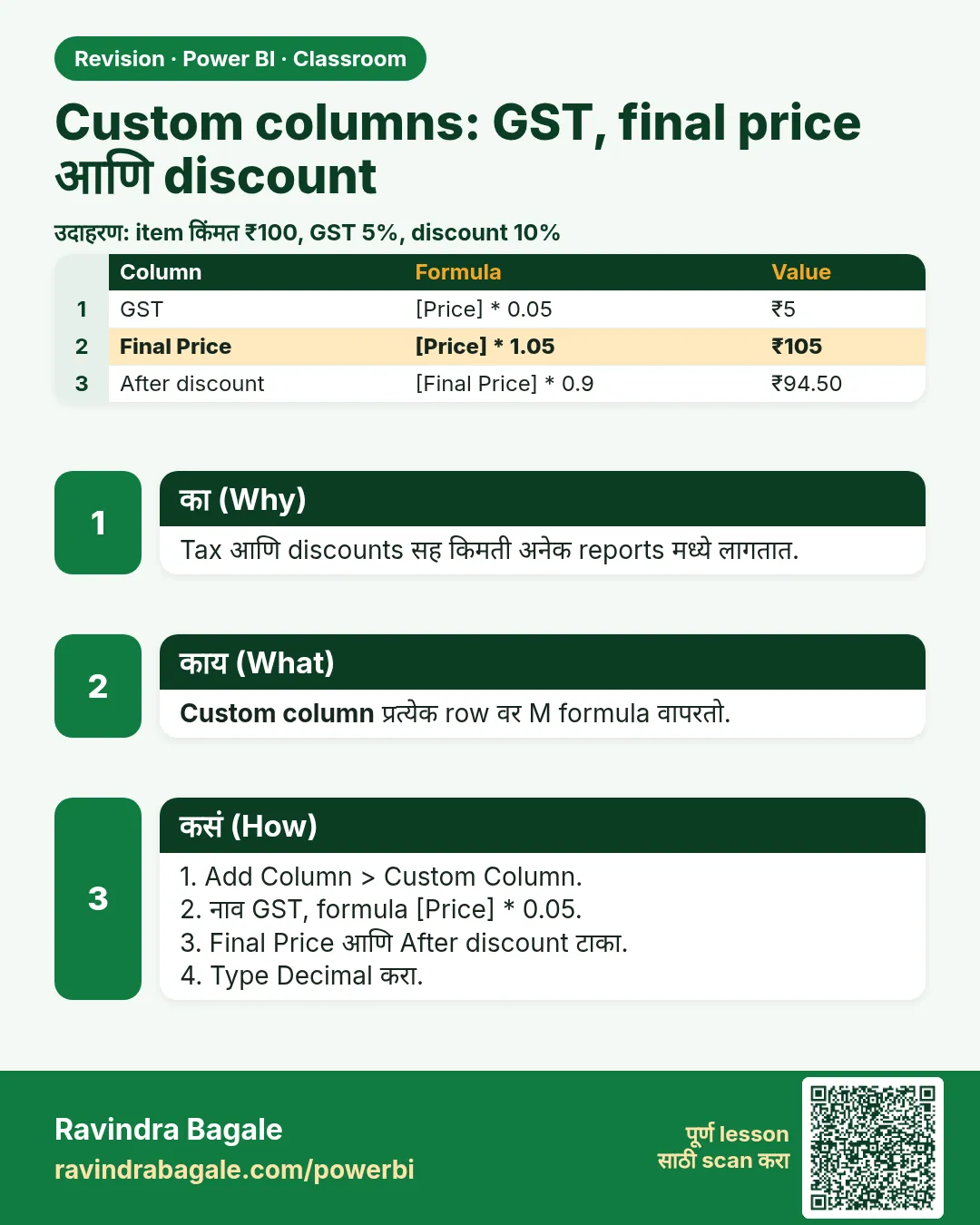
- 10% discount: [price] * 0.9
- Null prices null च, कधीच 0 नाही
- Step order, Fixed decimal number आणि ₹ format
Practice files: blinkit-sales-2025-days-small.csv (8 orders, एकाला price नाही) आणि blinkit-sales-2025-days.csv (1,200 orders, 11 ना price नाही).
Made-up data: 2025 मधले काल्पनिक Blinkit-style orders, फक्त practice साठी. Prices ₹ मध्ये, GST शिवाय.
1. Problem काय आहे
प्रत्येक order साठी price शेजारी अजून तीन numbers हवेत:
- gst: price च्या 18%,
- final price: price अधिक GST,
- discounted price: 10% सूट दिल्यानंतरची price.
एका order ला (BLK12032) price च नाही. त्याचा gst आणि final price ₹0 असल्याचं नाटक करता कामा नये.
2. सोप्या भाषेत idea
- Column प्रत्येक row साठी एक value देतो आणि model मध्ये store होतो: प्रत्येक order चा gst.
- Measure screen वर जे आहे त्याचा एक number देतो, उदा. एका महिन्याचा Total GST. Totals measures म्हणून चांगले; प्रत्येक row ची value column म्हणून ठीक.
- 18% = 0.18. GST म्हणजे price × 0.18. Final price म्हणजे price + GST, म्हणजेच price × 1.18.
- 10% सूट म्हणजे तुम्ही 90% भरता: price × 0.9. ₹10 ची वस्तू ₹1 वाचवते आणि ₹9 ला पडते.
- null म्हणजे 0 नाही. Missing price माहीत नाही. Power Query मध्ये null × 0.18 = null, म्हणून त्या order चा gst null च राहतो, आणि ते बरोबर आहे.
आकृती 1. price → gst → final price, प्रत्येकी एक Custom Column; null price ने gst आणि final price पण null (चित्र).
Classroom line
With a calculated column we create a new column, and its value is stored row by row.
Class मधलं वाक्य
"Calculated column ने आपण नवीन column तयार करतो आणि ... value store होते row by row."
Calculated column ने आपण नवीन column तयार करतो, आणि value row by row store होते.
Classroom line
With a calculated column we create a new column, and its value is stored row by row.
3. Data
| order_id | product_id | price (₹) |
|---|---|---|
| BLK12001 | P206 | 66 |
| BLK12002 | P201 | 110 |
| BLK12006 | P214 | 99 |
| BLK12009 | P201 | 110 |
| BLK12013 | P211 | 190 |
| BLK12019 | P209 | 160 |
| BLK12024 | P212 | 150 |
| BLK12032 | P206 | null |
7 माहीत असलेल्या prices ची average ₹126.43.
4. Step by step
Price column तपासा
blinkit-sales-2025-days-small.csvload करा › Transform data. price ला Fixed decimal number करा (header मधल्या type icon वर click). BLK12032 वर null दिसतो. तो तसाच ठेवा.
gst
- Add Column › Custom Column.
- New column name:
gst. Formula:[price] * 0.18.[price]type करण्याऐवजी Available columns मधल्या price वर double-click करा. OK. - gst चा type Fixed decimal number करा.
final price
- Add Column › Custom Column. Name:
final price(नावात space चालतो). Formula:[price] + [gst]. OK. Type Fixed decimal number.
एका step चा मार्ग
- परत Custom Column. Name:
with GST, formula[price] + [price] * 0.18. final price सारखेच numbers येतात.[price] * 1.18हा त्याच idea चा सगळ्यात छोटा form.
10% discount
- Custom Column. Name:
discounted price, formula[price] - [price] * 0.10, किंवा सरळ[price] * 0.9. Type Fixed decimal number. - एका ओळीचा formula गोंधळात टाकत असेल तर step by step जा: आधी
discountcolumn ([price] * 0.10), मग[price] - [discount].
Report मध्ये पैशांचा format
- Close & Apply. Table view मध्ये final price select › Column tools › Format: Currency, मग ₹ symbol निवडा. gst आणि discounted price साठी पण तेच करा.
Classroom line
If you are asked for 18%, multiply that number by 0.18.
Class मधलं वाक्य
"18% काढायला सांगितले, त्या number ला 0.18 ने multiply करा."
18% काढायला सांगितलं, तर त्या number ला 0.18 ने multiply करा.
Classroom line
If you are asked for 18%, multiply that number by 0.18.
5. Result असा दिसायला हवा
| order_id | price | gst | final price | discounted price |
|---|---|---|---|---|
| BLK12001 | 66 | 11.88 | 77.88 | 59.40 |
| BLK12002 | 110 | 19.80 | 129.80 | 99.00 |
| BLK12006 | 99 | 17.82 | 116.82 | 89.10 |
| BLK12009 | 110 | 19.80 | 129.80 | 99.00 |
| BLK12013 | 190 | 34.20 | 224.20 | 171.00 |
| BLK12019 | 160 | 28.80 | 188.80 | 144.00 |
| BLK12024 | 150 | 27.00 | 177.00 | 135.00 |
| BLK12032 | null | null | null | null |
1,200-row file ने: 1,189 price असलेल्या rows वर price total ₹1,92,182, gst total ₹34,592.76, final price total ₹2,26,774.76, discounted price total ₹1,72,963.80.
6. काय झालं
- प्रत्येक Custom Column ने त्या row ची price वापरून प्रत्येक row वर formula चालवला.
- BLK12032 ला price नाही, म्हणून त्यावरच्या प्रत्येक formula ने null दिला. Totals त्याला सरळ सोडून देतात; वस्तू फुकट होती असं कोणी भासवत नाही.
- null ऐवजी 0 टाकलं असतं, तर 8 orders ची average price ₹126.43 वरून ₹110.62 वर आली असती, आणि मोठ्या file मध्ये ₹161.63 वरून ₹160.15 वर: खोटा zero प्रत्येक average खाली ओढतो.
- final price ने gst वापरला, म्हणून gst आधी असायला हवा होता. Power Query Applied Steps वरून खाली क्रमाने चालवतो.
आकृती 2. Column मध्ये प्रत्येक row ची एक value (प्रत्येक order चा gst, price नसेल तिथे null); measure जे filter आहे त्याचा एक total देतो (चित्र).
Classroom line
If you need one single value, you have to create measures.
Class मधलं वाक्य
"जर एकच single value पाहिजे तर ... measures तयार करावे लागतात."
जर एकच single value पाहिजे असेल, तर measures तयार करावे लागतात.
Classroom line
If you need one single value, you have to create measures.
7. अजून थोडं खोलात
- gst remove करणं. gst select › Remove Columns. final price चालूच राहतो, कारण Removed Columns step final price calculate करणाऱ्या step च्या नंतर येतो. पण gst बनवणारा step (Added Custom) delete केला, तर final price Error दाखवतो: त्याचा formula आता कधीच न बनलेल्या column कडे बघतो. Steps जपून delete करा, आणि gst परत हवा असेल तर Removed Columns step delete करा.
- Examples का फसतात. Column From Examples मध्ये
6.5*0.18type केलं तर ते text समजलं जातं, calculation नाही. Suggestions मध्ये काही तयार गणित मिळतं, पण तुमचा स्वतःचा formula Custom Column मध्येच. - Fixed decimal number म्हणजे currency नाही. हा 4 decimal places वाला number type आहे, पैशांसाठी चांगला कारण छोट्या rounding चुका टाळतो. ₹ sign फक्त model मध्ये लावलेला display format आहे (step 9).
- Display साठी rounding. Data मध्ये 4 decimals ठेवा; report मध्ये 2 दाखवा (Column tools › Decimal places 2).
- Total साठी measure. Report मध्ये
Total GST = SUM(sales[gst])slicers नुसार बदलणारा एक number देतो. Measures पुढच्या एका chapter मध्ये. - Custom Column मध्ये if. Custom Column मध्ये logic पण लिहिता येतं (
if [price] = null then null else [price] * 0.18), पण if/else साठी Conditional Column dialog सोपा (पुढचा chapter).
Classroom line
Suppose an item costs ten rupees and you give a 10 percent discount. How much is the discount? One rupee.
Class मधलं वाक्य
"समजा दहा रुपयाला वस्तू आहे, 10 percent discount दिला, म्हणजे किती discount? एक रुपया."
समजा दहा रुपयाला वस्तू आहे, 10 percent discount दिला, म्हणजे किती discount? एक रुपया.
Classroom line
Suppose an item costs ten rupees and you give a 10 percent discount. How much is the discount? One rupee.
8. नेहमीच्या चुका
| चुकीचा result | कारण | Fix |
|---|---|---|
| gst price च्या 18 पट | Formula [price] * 18 |
18% साठी 0.18 वापरा |
| Average price खूप कमी | null prices ऐवजी 0 टाकले | null ठेवा; formulas त्यांच्यासाठी null देतात |
| final price Error दाखवतो | gst बनवणारा step delete झाला | तो step परत आणा (किंवा final price आधी gst परत बनवा) |
| Formula error: column not found | Type केलेलं नाव column च्या नावापेक्षा वेगळं | Available columns मध्ये column वर double-click करा |
| Values ₹ शिवाय 129.8 दिसतात | Fixed decimal हा number type आहे | Column tools › Format Currency, ₹ |
| Example column मध्ये text "6.5*0.18" | गणितासाठी Column From Examples वापरलं | Custom Column वापरा |
Ravindra Bagale's Tip
Formula column वर विश्वास ठेवण्याआधी एक row calculator ने तपासा: price 110, GST 19.80, final 129.80. एक row बरोबर तर सगळ्या rows बरोबर, कारण प्रत्येकावर तोच formula चालतो. एक row चुकीची असेल तर formula fix करा, row नाही.
Ravindra Bagale's Tip – मराठी
Formula column वर विश्वास ठेवण्याआधी एक row calculator ने तपासा: price 110, GST 19.80, final 129.80. एक row बरोबर तर सगळ्या rows बरोबर, कारण प्रत्येकावर तोच formula चालतो. एक row चुकीची असेल तर formula fix करा, row नाही.
Ravindra Bagale's Tip – हिंदी
Formula column पर भरोसा करने से पहले एक row calculator से जाँचिए: price 110, GST 19.80, final 129.80. एक row सही तो सारी rows सही, क्योंकि हर एक पर वही formula चलता है. एक row गलत हो तो formula ठीक कीजिए, row नहीं.
Classroom line
If a column name has two words, just put a space between them.
Class मधलं वाक्य
"Column च्या नावात दोन words असतील तर सरळ space द्यायचा."
Column च्या नावात दोन words असतील, तर सरळ space द्यायचा.
Classroom line
If a column name has two words, just put a space between them.
9. स्वतः practice करा
Practice task
blinkit-sales-2025-days.csv load करा आणि gst, final price आणि discounted price add करा.
- किती rows ची price null आहे?
- gst चा total किती?
- final price चा total किती, आणि तो price total × 1.18 इतका आहे का?
- nulls ठेवून average price किती, आणि nulls ऐवजी 0 टाकलं तर किती झाली असती?
- 20% discount column चा formula काय असेल?
Solution बघा
- 11 rows.
- ₹34,592.76.
- ₹2,26,774.76; हो, 1,92,182 × 1.18 = 2,26,774.76.
- nulls ठेवून ₹161.63; 0 टाकले तर ₹160.15 (चुकीचं).
[price] * 0.8(किंवा[price] - [price] * 0.20).
10. Professional सारखा विचार करा
- Business view. GST आणि discount columns "customer किती भरतो?" आणि "offer आपल्याला किती पडतो?" याची उत्तरं देतात.
- Missing पण माहितीच आहे. Null prices मोजा आणि report करा; zeros मागे लपवू नका.
- Columns ना लोकांसाठी नावं द्या. Chart वर fp किंवा dp पेक्षा "final price" आणि "discounted price" नीट वाचता येतं.
- Rows साठी columns, totals साठी measures. Row-level prices columns; report page चे totals आणि averages measures.
Interview questions
- Power Query मध्ये 18% GST कसा add करायचा? Custom Column
[price] * 0.18, किंवा GST सकट price साठी[price] * 1.18. - Custom Column formula मध्ये null चं काय होतं? Arithmetic मध्ये null, null च देतो.
- Missing price ऐवजी 0 का टाकू नये? 0 ही खरी price आहे; averages कमी करते आणि वस्तू फुकट दिसतात.
- Fixed decimal number हा currency type आहे का? नाही. तो 4-decimal number type आहे; ₹ हा display format.
Recap
थोडक्यात
- Columns मध्ये प्रत्येक row ची एक value; measures एक total देतात.
- gst = [price] * 0.18; final price = [price] + [gst] = [price] * 1.18.
- 10% discount = [price] * 0.9.
- Null prices null च ठेवा; formulas त्यांच्यासाठी null देतात.
- Steps क्रमाने चालतात: gst remove करणं safe, तो बनवणारा step delete करणं नाही.
- पैशांसाठी Fixed decimal number; ₹ हा model मध्ये लावायचा format.
 उजळणी card