Power Query मध्ये store location data clean कसा करायचा: units काढणं, columns split करणं आणि Capitalize Each Word
Sales data सांगतो कुठल्या store ने काय विकलं, पण store कुठे आहे ते सांगत नाही. ते store table मध्ये असतं, आणि store tables बहुतेक हाताने बनवलेली असतात: size "120 sqm" असं typed, state, त्याचा code आणि city एकाच column मध्ये कोंबलेले, latitude आणि longitude slash ने जोडलेले, आणि नावं वाटेल त्या casing मध्ये. या chapter मध्ये आपण ते table map visual ला वापरता येतील अशा clean columns मध्ये बदलणार.
या chapter मध्ये काय शिकणार
- Units काढा: Extract › Text Before Delimiter
- एक column state, state_abr आणि city मध्ये split करा
- lat / long दोन Decimal Number columns मध्ये split करा
- Negative coordinates का बरोबर असतात
- Trim, Clean, Capitalize Each Word, UPPERCASE
- State code map visuals ना का मदत करतो
Practice files: blinkit-store-cities-raw.csv (10 stores, export जसं आलं तसं) आणि blinkit-store-cities-clean.csv (result, तुमचं काम तपासायला).
Made-up data: काल्पनिक Blinkit-style stores, फक्त practice साठी. Sizes square metres मध्ये.
1. Problem काय आहे
Store table असं दिसतं (10 पैकी 4 rows):
| store_id | storetype_id | store_size | city_id | state - state_abr - city | lat / long |
|---|---|---|---|---|---|
| 101 | 1 | 120 sqm | 11 | Maharashtra - MH - Pune | 18.5204 / 73.8567 |
| 102 | 2 | 95 m2 | 12 | maharashtra - mh - mumbai | 19.0760 / 72.8777 |
| 106 | 2 | 110 sqm | 31 | GUJARAT - GJ - AHMEDABAD | 23.0225 / 72.5714 |
| 108 | 3 | 380 m2 | 51 | tamil nadu - tn - chennai | 13.0827 / 80.2707 |
store_size ची sum करता येत नाही (तो text आहे), state map वर टाकता येत नाही (तो city ला चिकटलाय), आणि manager समोर "maharashtra" शेजारी "GUJARAT" निष्काळजी दिसतं.
2. सोप्या भाषेत idea
प्रत्येक column मध्ये एक fact, एका type मध्ये असायला हवा:
- store_size number हवा. "sqm" आणि "m2" दोन्हीचा अर्थ square metres (m²), म्हणजे unit काही सांगत नाही: space च्या आधीचा number तेवढा ठेवा.
- state - state_abr - city मध्ये तीन facts आहेत. " - " separator वर split करून state, state_abr आणि city करा.
- lat / long मध्ये दोन numbers आहेत. " / " वर split करा आणि दोन्ही Decimal Number करा.
- Casing: Trim आणि Clean उगाचच्या spaces आणि लपलेले characters काढतात. मग नावांसाठी Capitalize Each Word (Pune, Tamil Nadu) आणि codes साठी UPPERCASE (MH). Lowercase compulsory नाही; keys match करताना फक्त त्याचा उपयोग होतो.
हा chapter store table बद्दल आहे. Text cleaning चा general भाग (Trim, Clean, product names split करणं) इथे आहे: Power Query मध्ये Split, Trim, Clean आणि lowercase ने text columns clean कसे करायचे.
आकृती 1. एक store row clean करण्याआधी आणि नंतर: units गेले, location state, state_abr आणि city मध्ये split, coordinates lat आणि long मध्ये split (चित्र).
Classroom line
Even if we give only the state abbreviation, the map can draw it.
Class मधलं वाक्य
"Map varti aapan nusta state abbreviation lila tari te map varti draw hou shakte."
Map वर आपण फक्त state abbreviation दिलं तरी ते map वर draw होऊ शकतं.
Classroom line
Even if we give only the state abbreviation, the map can draw it.
3. Data
Clean केल्यानंतर सगळे 10 stores:
| store_id | storetype_id | store_size | state | state_abr | city | lat | long |
|---|---|---|---|---|---|---|---|
| 101 | 1 | 120 | Maharashtra | MH | Pune | 18.5204 | 73.8567 |
| 102 | 2 | 95 | Maharashtra | MH | Mumbai | 19.076 | 72.8777 |
| 103 | 3 | 400 | Maharashtra | MH | Nagpur | 21.1458 | 79.0882 |
| 104 | 1 | 150 | Karnataka | KA | Bengaluru | 12.9716 | 77.5946 |
| 105 | 4 | 60 | Karnataka | KA | Mysuru | 12.2958 | 76.6394 |
| 106 | 2 | 110 | Gujarat | GJ | Ahmedabad | 23.0225 | 72.5714 |
| 107 | 1 | 140 | Telangana | TS | Hyderabad | 17.385 | 78.4867 |
| 108 | 3 | 380 | Tamil Nadu | TN | Chennai | 13.0827 | 80.2707 |
| 109 | 4 | 70 | Rajasthan | RJ | Jaipur | 26.9124 | 75.7873 |
| 110 | 2 | 90 | Madhya Pradesh | MP | Indore | 22.7196 | 75.8577 |
storetype_id हा store च्या प्रकाराचा code आहे (उदा. super store, dark store, warehouse). तो तसाच ठेवा. एकूण store area: 1,615 square metres.
4. Step by step
Load करा आणि तपासा
- Get data › Text/CSV ›
blinkit-store-cities-raw.csv› Transform data. Query चं नावstore_citiesकरा. - Column names Column1, Column2… असे दिसत असतील तर Use First Row as Headers (Home ribbon) click करा.
- प्रत्येक column चा filter arrow उघडून (null) किंवा (blank) आहे का ते बघा. या file मध्ये नाही.
Units काढा
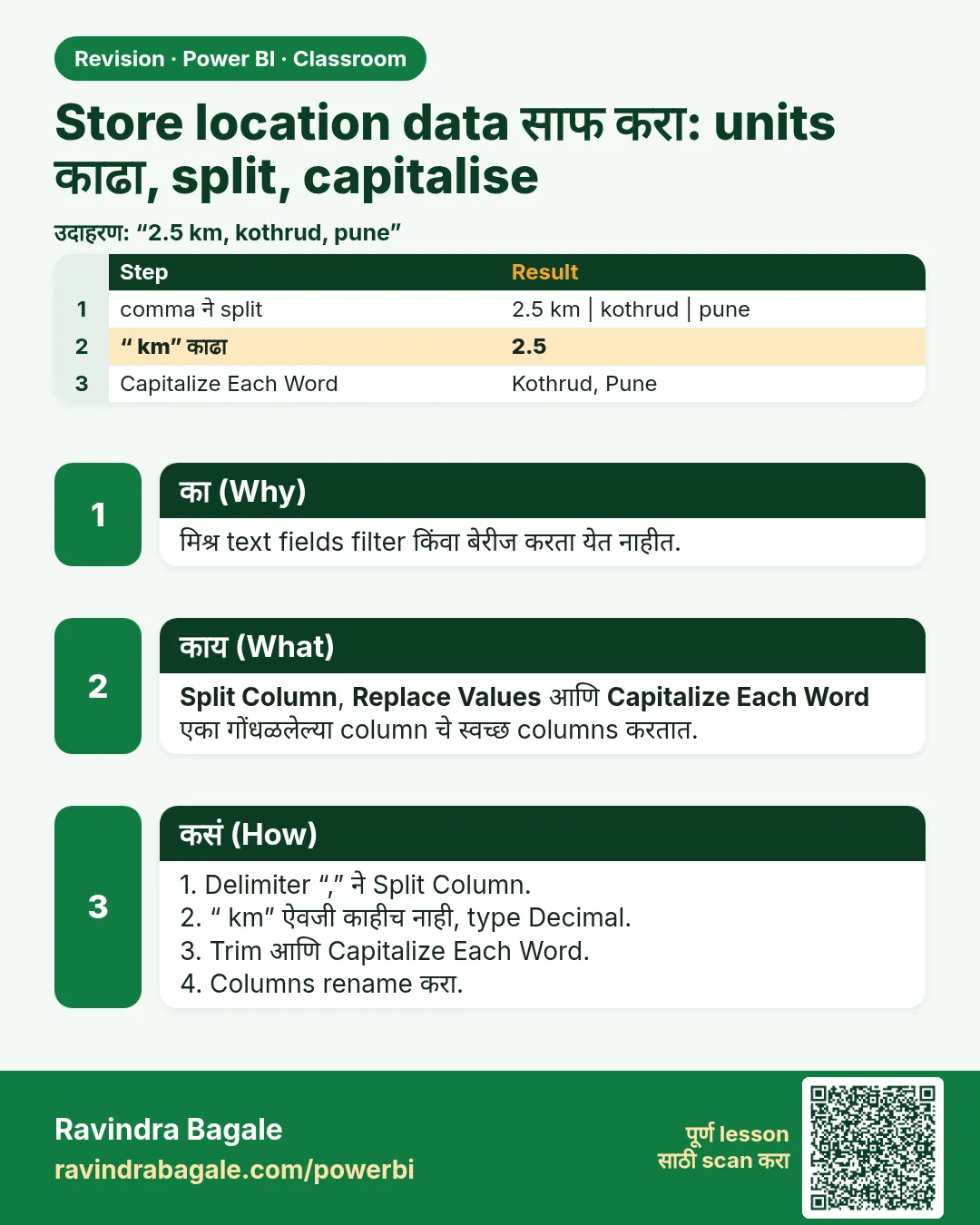
- store_size select करा. Transform › Extract › Text Before Delimiter. Delimiter: एक space. OK. "120 sqm" चं "120" होतं.
- Header मधल्या ABC icon वर click › Whole Number.
State, code आणि city split करा
- state - state_abr - city select करा. Home › Split Column › By Delimiter.
- --Custom-- निवडा आणि space, hyphen, space टाइप करा:
-. Split at: Each occurrence of the delimiter. OK. - पहिल्या row वरून order बघा (Maharashtra, MH, Pune) आणि तीन columns ना state, state_abr आणि city नाव द्या. Power Query ने दुसरा type घेतला असेल तर Text करा.
Text नीट करा
- state, state_abr आणि city select करा (Ctrl+click). Transform › Format › Trim, मग Format › Clean.
- state आणि city select करा. Format › Capitalize Each Word. " maharashtra" आता "Maharashtra", "AHMEDABAD" आता "Ahmedabad".
- state_abr select करा. Format › UPPERCASE. "mh" चं "MH" होतं.
Latitude आणि longitude split करा
- lat / long select करा. Split Column › By Delimiter › Custom
/› Each occurrence. Columns ना lat आणि long नाव द्या. - दोन्ही Decimal Number करा. 19.0760 हे 19.076 दिसतं; value बदललेली नाही.
- Home › Close & Apply.
आकृती 2. Custom delimiter ने split: " - " एका location column चे state, state_abr आणि city करतो; " / " lat / long चे दोन numbers करतो (चित्र).
Classroom line
The state with the most sales should look darker.
Class मधलं वाक्य
"Jya state madhe jast sale hot asel, te jast dark disayla pahije."
ज्या state मध्ये जास्त sale होत असेल, ते जास्त dark दिसायला पाहिजे.
Classroom line
The state with the most sales should look darker.
5. Result असा दिसायला हवा
- 10 rows, 9 columns: store_id, storetype_id, store_size, city_id, state, state_abr, city, lat, long.
- store_size whole number आहे: Sum of store_size = 1,615.
- 7 states: Maharashtra (3 stores), Karnataka (2), Gujarat, Telangana, Tamil Nadu, Rajasthan, Madhya Pradesh (प्रत्येकी 1).
- प्रत्येक state आणि city capital letter ने सुरू होतो; प्रत्येक state_abr दोन capital letters.
- lat 12.2958 (Mysuru) पासून 26.9124 (Jaipur) पर्यंत.
6. काय झालं
- Text Before Delimiter ने पहिल्या space च्या आधीचं सगळं ठेवलं, म्हणून "120 sqm" आणि "95 m2" दोघांचे units गेले. कुठला unit लिहिलाय याने फरक पडला नाही.
- " - " ने split प्रत्येक separator वर कापलं, आणि तीन columns आले. Delimiter मध्ये spaces घेतल्याने कडेला extra spaces राहत नाहीत.
- Trim ने " maharashtra" च्या सुरुवातीच्या spaces आणि "nagpur " ची शेवटची space काढली; Clean line breaks सारखे लपलेले characters काढतो.
- Capitalize Each Word ने मूळ casing कसंही असलं तरी प्रत्येक शब्द capital ने सुरू केला.
- Coordinates खरे numbers झाले, map visuals ना तेच लागतं.
Classroom line
What do latitude and longitude tell you? The exact spot.
Class मधलं वाक्य
"Latitude longitude काय सांगतं? Exact spot सांगतं."
Latitude longitude काय सांगतं? Exact spot सांगतं.
Classroom line
What do latitude and longitude tell you? The exact spot.
7. अजून थोडं खोलात
- Negative coordinates बरोबर असतात. Equator च्या दक्षिणेला latitude negative असतो आणि Greenwich च्या पश्चिमेला longitude negative. Sydney किंवा New York मधल्या store ला minus sign असतो; cleaning करताना तो कधीच काढू नका. इथले 10 stores भारतात आहेत, म्हणून सगळ्या values positive आहेत.
- state_abr का ठेवायचा. Map visual state नावावरून किंवा code वरून ठेवू शकतो. Codes छोटे असतात आणि एकाच प्रकारे लिहिले जातात, त्यामुळे "Tamilnadu" विरुद्ध "Tamil Nadu" असा घोळ होत नाही. मग filled map जास्त revenue वाले states जास्त dark दाखवतो. Housing आणि car companies पण आपले customers कुठे आहेत ते याच idea ने map करतात.
- Data category. Table view मध्ये lat select करून Column tools › Data category › Latitude करा (long साठी Longitude, state साठी State or Province). मग Power BI ला कळतं ते कसं draw करायचं.
- Lowercase कधी उपयोगी. City name सारख्या text key वर दोन tables merge करत असाल, तर आधी दोन्ही बाजू lowercase करा, म्हणजे "Pune" आणि "pune" match होतील. लोक जे वाचतात त्यासाठी proper casing ठेवा.
- Space नसलेला unit. Size "120sqm" असा space शिवाय typed असेल, तर Text Before Delimiter पूर्ण text परत देतो. तेव्हा Replace Values ने "sqm" आणि "m2" काढा.
Classroom line
If investors see state names in lowercase, it looks odd.
Class मधलं वाक्य
"Investors ahet... state cha naav small madhe disla tar kasatari vattay."
Investors आहेत... state चं नाव small मध्ये दिसलं तर कसंतरीच वाटतं.
Classroom line
If investors see state names in lowercase, it looks odd.
8. नेहमीच्या चुका
| चुकीचा result | कारण | Fix |
|---|---|---|
| Whole Number केल्यावर store_size मध्ये Error | Unit तसाच होता | आधी Extract › Text Before Delimiter, मग type बदला |
| Split नंतर "Maharashtra " शेवटी space सकट | Spaces शिवाय "-" वर split | Delimiter " - " घ्या, किंवा नंतर Trim करा |
| lat आणि long text च आहेत | Split नंतर type बदलला नाही | दोन्ही Decimal Number करा |
| Map store दुसऱ्याच देशात दाखवतो | Minus sign काढला, किंवा lat आणि long उलटे | Signs ठेवा; "lat / long" मधला पहिला number lat |
| सगळं lowercase | Display साठी lowercase वापरलं | नावांसाठी Capitalize Each Word, codes साठी UPPERCASE |
Ravindra Bagale's Tip
प्रत्येक split नंतर पहिल्या तीन rows मोठ्याने वाचा: "state Maharashtra, code MH, city Pune". वाक्य चुकीचं वाटलं तर column names चुकीच्या order मध्ये आहेत. नाव आत्ता बदलायला एक सेकंद लागतो; उलट्या columns वर बनवलेला map fix करायला अख्खी दुपार जाते.
Ravindra Bagale's Tip – मराठी
प्रत्येक split नंतर पहिल्या तीन rows मोठ्याने वाचा: "state Maharashtra, code MH, city Pune". वाक्य चुकीचं वाटलं तर column names चुकीच्या order मध्ये आहेत. नाव आत्ता बदलायला एक सेकंद लागतो; उलट्या columns वर बनवलेला map fix करायला अख्खी दुपार जाते.
Ravindra Bagale's Tip – हिंदी
हर split के बाद पहली तीन rows ज़ोर से पढ़िए: "state Maharashtra, code MH, city Pune". वाक्य गलत लगे तो column names गलत order में हैं. नाम अभी बदलने में एक सेकंड लगता है; उलटे columns पर बना map ठीक करने में पूरी दोपहर जाती है.
Classroom line
People's names should start with a capital letter.
Class मधलं वाक्य
"माणसाची नावं, पहिला letter capital असायला पाहिजे."
माणसाची नावं, पहिला letter capital असायला पाहिजे.
Classroom line
People's names should start with a capital letter.
9. स्वतः practice करा
Practice task
blinkit-store-cities-raw.csv या chapter प्रमाणे clean करा आणि blinkit-store-cities-clean.csv शी compare करा.
- सगळ्यात मोठा store कुठला, आणि कुठल्या city मध्ये?
- प्रत्येक storetype_id चे किती stores आहेत?
- सगळ्यात दक्षिणेला कुठला store आहे?
- Average store_size किती?
Solution बघा
- 400 square metres, Nagpur मधला store 103.
- Type 1: 3, type 2: 3, type 3: 2, type 4: 2.
- Mysuru (lat 12.2958, सगळ्यात कमी latitude).
- 161.5 square metres (1,615 ÷ 10).
10. Professional सारखा विचार करा
- Business view. Clean store table "कुठे" चं उत्तर देतं: state नुसार, city नुसार, map वर revenue.
- एका column मध्ये एक fact. एकत्र केलेले columns Excel मध्ये नीटनेटके दिसतात, पण प्रत्येक filter आणि chart अडवतात.
- Unit column च्या नावात ठेवा. store_size चं नाव
store_size_sqmकरा, म्हणजे कोणाला अंदाज लावावा लागणार नाही. - Source वरच fix करा. Store list हाताने maintain होत असेल, तर ती maintain करणाऱ्या team ला clean layout द्या.
Interview questions
- Power Query मध्ये "120 sqm" मधून "sqm" कसं काढायचं? Space वर Extract › Text Before Delimiter, मग type Whole Number.
- "Maharashtra - MH - Pune" तीन columns मध्ये कसं split करायचं? Split Column › By Delimiter › Custom " - " › Each occurrence.
- Latitude किंवा longitude negative असू शकतो का? हो: equator च्या दक्षिणेला आणि Greenwich च्या पश्चिमेला.
- Text नेहमी lowercase हवा का? नाही. Display साठी proper casing; lowercase फक्त keys match करताना उपयोगी.
Recap
थोडक्यात
- एका column मध्ये एक fact, योग्य type मध्ये.
- Units: Extract › Text Before Delimiter (space), मग Whole Number. sqm = m² = square metres.
- "state - state_abr - city" " - " ने split करा; "lat / long" " / " ने split करा.
- lat आणि long: Decimal Number; minus signs ठेवा.
- Trim आणि Clean, मग नावांसाठी Capitalize Each Word आणि codes साठी UPPERCASE.
- State codes मुळे map visuals सोपे होतात.
 उजळणी card