Power Query मध्ये Using Locale ने US dates fix करणं, ID columns Text ठेवणं आणि Fixed decimal number वापरणं
Type बद्दलचे तीन छोटे निर्णय खूप चुकीचे reports बनवतात. 9/3/2024 सारखी date US मध्ये 3 September आणि India मध्ये 9 March असते, आणि Power BI गुपचूप एक निवडतो. Store ID 0101 चा number 101 होतो आणि तो त्याच्या city table शी match होत नाही. आणि साध्या decimal म्हणून ठेवलेले पैसे खूप मोठ्या totals मध्ये छोटे rounding उरलेले आकडे घेऊन जाऊ शकतात. या chapter मध्ये US system मधून export झालेल्या file वर हे तिन्ही fix करणार, आणि ज्या order ला product ID नाही, पण त्याचा sale गमवायचा नाही, त्याचं काय करायचं ते शिकणार.
या chapter मध्ये काय शिकणार
- 8/18/2024 मुळे DataFormat.Error का येतो
- Using Locale › English (United States)
- IDs Text म्हणून, numbers नाही
- Column profile: Count, Distinct, Unique
- Unknown ID की row delete
- "2 sales" चा number
- पैशांसाठी Fixed decimal number
Practice files: blinkit-orders-us-small.csv (या page वरचे 8 rows), blinkit-orders-us.csv (1,001 rows, practice task साठी) आणि blinkit-store-cities.csv. Basic cleaning steps (headers, blank आणि duplicate IDs, NA ऐवजी null) Power BI Power Query मध्ये messy sales data clean कसा करायचा मध्ये आहेत; हा chapter त्यात नसलेलं add करतो.
Made-up data: US date format मध्ये export झालेले काल्पनिक Blinkit-style orders, फक्त practice साठी. Amounts ₹ मध्ये.
1. Problem काय आहे
File blinkit-orders-us-small.csv:
| order_id | order_date | store_id | product_id | sales | price | revenue |
|---|---|---|---|---|---|---|
| BLK8001 | 8/18/2024 | 0101 | P101 | 2 sales | 120 | 240 |
| BLK8002 | 9/3/2024 | 0102 | P102 | 1 sales | 450 | 450 |
| BLK8003 | 9/3/2024 | 0101 | (blank) | 3 sales | 90 | 270 |
| BLK8004 | 10/12/2024 | 0205 | P105 | 1 sales | 999 | 999 |
| BLK8004 | 10/12/2024 | 0205 | P105 | 1 sales | 999 | 999 |
| BLK8005 | 11/5/2024 | 0102 | P106 | 3 sales | 26.66667 | 80 |
| BLK8006 | 12/1/2024 | 0205 | P101 | 4 sales | 120 | 480 |
| BLK8007 | 12/24/2024 | 0303 | P104 | 2 sales | 60 | 120 |
English (India) (day/month/year) वर set असलेल्या laptop वर order_date चा type Date केला की:
- 8/18/2024 आणि 12/24/2024 साठी Error: महिना 18 किंवा 24 नसतो.
- 9/3, 10/12, 11/5 आणि 12/1 साठी error शिवाय चुकीच्या dates: त्या 9 March, 10 December, 11 May आणि 12 January होतात.
आणि: store_id 0101 चा 101 होतो, BLK8004 दोनदा आहे, एका order ला product_id नाही, आणि sales "2 sales" सारखा text आहे.
2. सोप्या भाषेत idea
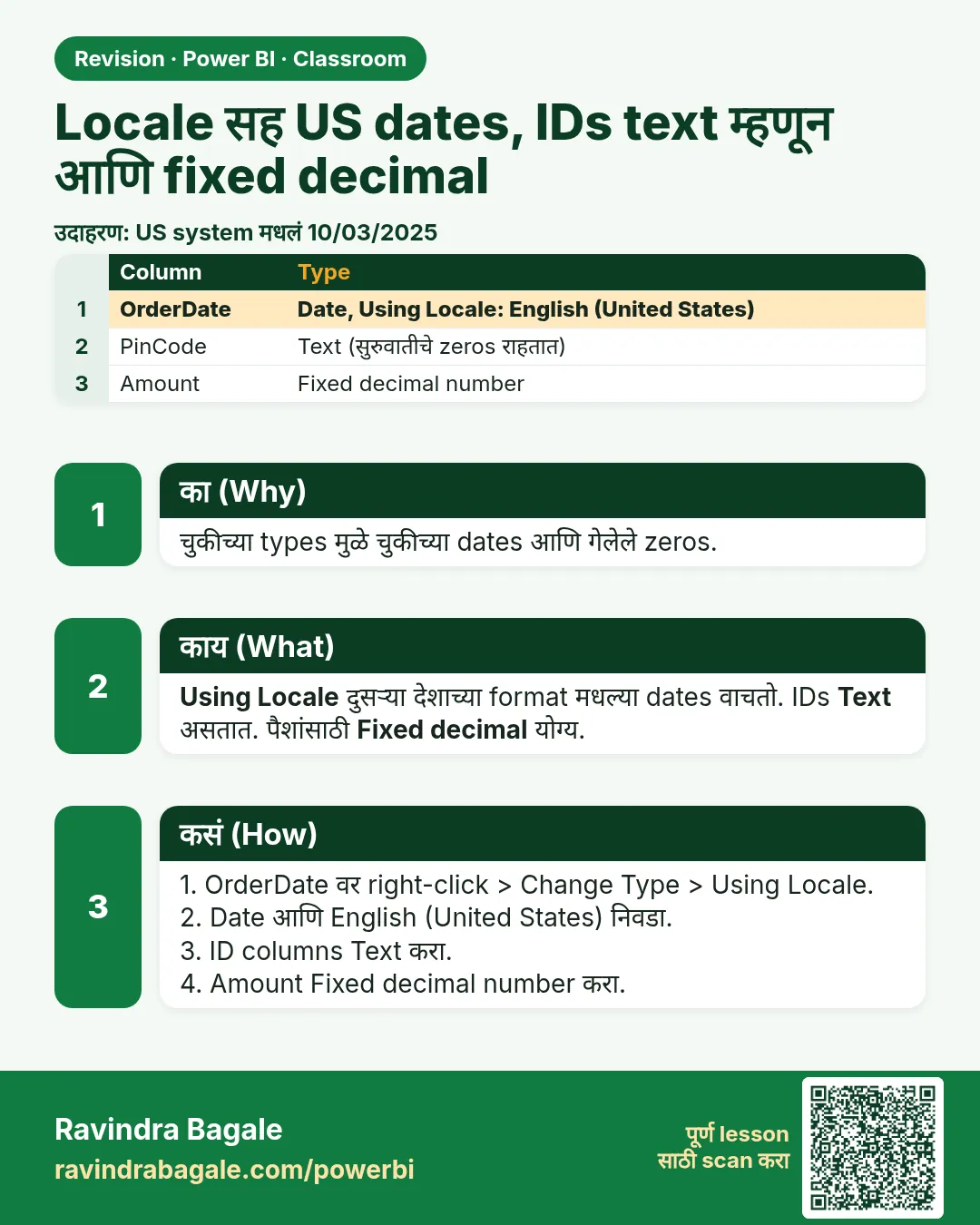
- Date ला locale असतो. File US मध्ये लिहिली गेली (month/day/year). Change Type › Using Locale… › Date › English (United States) ने Power Query ला हे सांगा. मग तुमच्या laptop ची setting काहीही असो, तो 9/3/2024 ला 3 September वाचतो.
- IDs म्हणजे नावं, amounts नाहीत. order_id, store_id आणि product_id मध्ये digits असू शकतात, पण त्यांची बेरीज कधीच करत नाही. ते Text ठेवा: सुरुवातीचे zeros टिकतात (0101 तसाच राहतो) आणि Power BI "Sum of store_id" offer करत नाही.
- Unique म्हणजे unique. Column profile column साठी Count (values), Distinct (वेगवेगळ्या values) आणि Unique (फक्त एकदाच येणाऱ्या values) दाखवतो. Primary ID साठी तिन्ही same हवेत.
- Blank ID मुळे पैसे गमावू नका. product_id blank आहे म्हणून BLK8003 चा row delete केला, तर त्याचे ₹270 revenue मधून गायब होतात. UNKNOWN product ID लिहिला की sale राहतो आणि product missing आहे हे स्पष्ट दिसतं.
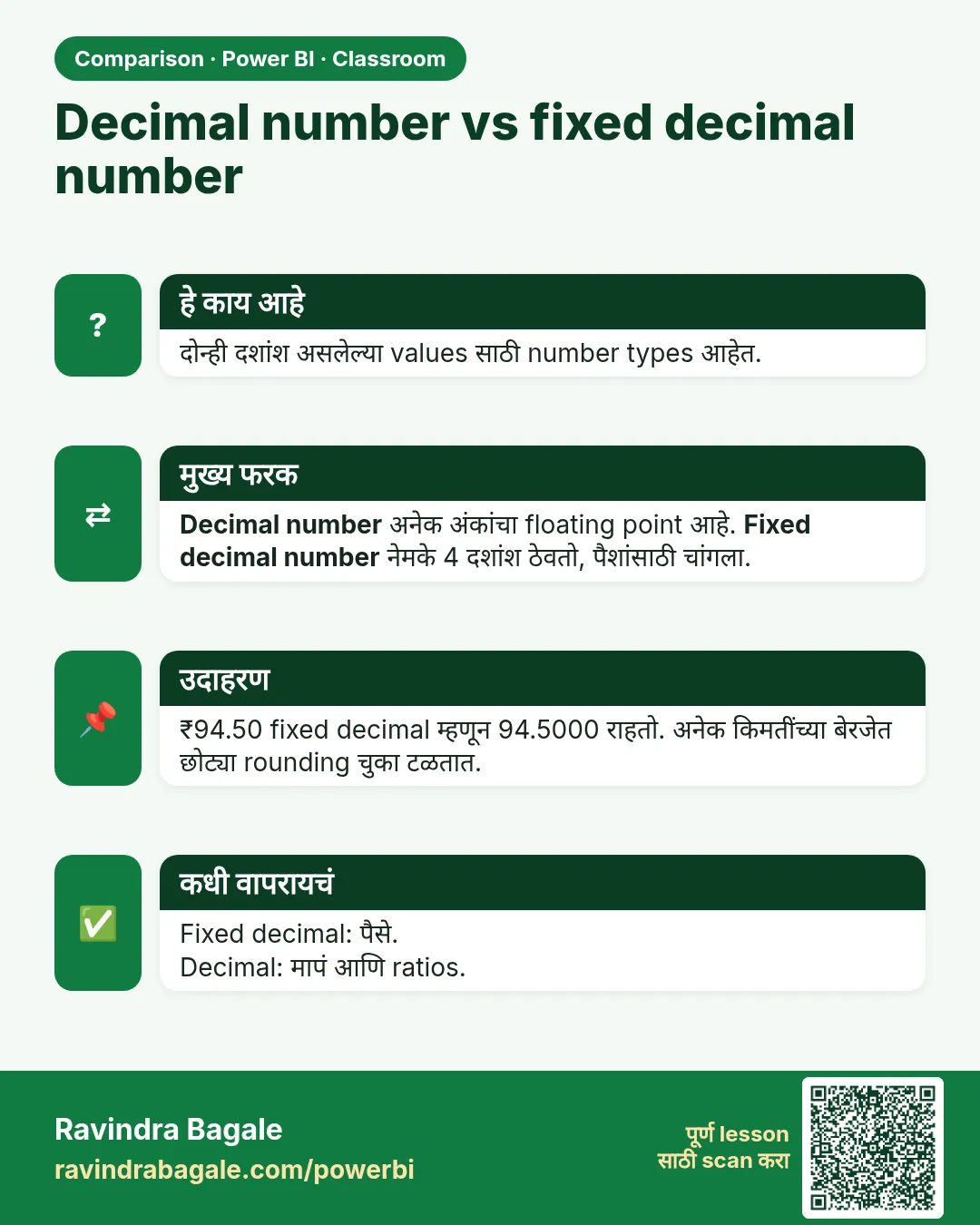
- पैशांना fixed scale हवा. Fixed decimal number decimal point नंतर नेमके 4 digits ठेवतो. मग पैशांची बेरीज नेमकी येते, साध्या Decimal Number मध्ये येऊ शकणाऱ्या छोट्या floating-point उरलेल्या आकड्यांशिवाय.
Figure 1. एकच text दोन locales मध्ये: 9/3/2024 म्हणजे 3 September (US) किंवा 9 March (India); India locale मध्ये 8/18/2024 error (चित्र).
Classroom line
Where is the data from? From the US, and our laptop's date setting is English (India).
Class मधलं वाक्य
"Data kutla ahe? US madhla ahe... aani aplaya laptop cha date setting English India ahe."
Data कुठला आहे? US मधला आहे, आणि आपल्या laptop चं date setting English India आहे.
Classroom line
Where is the data from? From the US, and our laptop's date setting is English (India).
3. Data
प्रत्येक order date खरी काय आहे, आणि India locale तिचं काय करतो:
| Text | खरी date (US) | English (India) म्हणून वाचली |
|---|---|---|
| 8/18/2024 | 18-08-2024 | Error |
| 9/3/2024 | 03-09-2024 | 09-03-2024 (चूक) |
| 10/12/2024 | 12-10-2024 | 10-12-2024 (चूक) |
| 11/5/2024 | 05-11-2024 | 11-05-2024 (चूक) |
| 12/1/2024 | 01-12-2024 | 12-01-2024 (चूक) |
| 12/24/2024 | 24-12-2024 | Error |
Cleaning आधी order_id चा Column profile: Count 8, Distinct 7, Unique 6 (BLK8004 दोनदा).
Duplicate काढल्यावर 7 orders, 16 units आणि revenue ₹2,639. Blank-product row delete केला असता तर 6 orders आणि ₹2,369: ₹270 कमी.
4. Step by step
Load करा आणि बघा
- Home › Get data › Text/CSV ›
blinkit-orders-us-small.csv› Transform Data. - Power Query ने Changed Type step add केली असेल, तर तिच्या ✕ वर click करून delete करा: तिने store_id चे numbers आणि dates चे errors केले असू शकतात.
- View › Column quality, Column distribution आणि Column profile tick करा. order_id header वर click करा: Count 8, Distinct 7, Unique 6.
IDs Text आणि unique
- order_id, store_id आणि product_id Ctrl+click करा › Transform › Data Type › Text. store_id 0101 च राहतो.
- order_id वर right-click › Remove Duplicates. Column profile आता Count 7, Distinct 7, Unique 7 दाखवतो.
- Editor fast राहावा म्हणून Column profile परत बंद करा (View › untick).
Unknown product ID
- BLK8003 च्या product_id cell वर click करा. ती empty text असेल तर product_id वर right-click › Replace Values › Value To Find रिकामं › Replace With
UNKNOWN› OK. (त्याऐवजी null दिसत असेल, तर Value To Find मध्येnulltype करा.)
US dates
- order_date वर right-click › Change Type › Using Locale… › Data Type Date, Locale English (United States) › OK.
- Check करा: BLK8001 18-08-2024 आणि BLK8002 03-09-2024 दाखवतो (तुमचा laptop त्याच्या date format मध्ये दाखवेल).
Numbers आणि पैसे
- sales निवडा › Transform › Extract › Text Before Delimiter, एक space type करा, OK. "2 sales" चा 2 होतो. Type Whole Number करा.
- price आणि revenue Ctrl+click करा › Data Type › Fixed decimal number (Power Query मध्ये तो $ icon सोबत Currency असा दिसू शकतो; त्यामुळे तुमच्या numbers चा ₹ अर्थ बदलत नाही).
- Home › Close & Apply. Table view मध्ये 7 rows check करा.
Figure 2. Remove Duplicates च्या आधी आणि नंतर order_id चा Column profile: Count 8, Distinct 7, Unique 6 चे 7, 7, 7 होतात (चित्र).
5. Result असा दिसायला हवा
| order_id | order_date | store_id | product_id | sales | price | revenue |
|---|---|---|---|---|---|---|
| BLK8001 | 18-08-2024 | 0101 | P101 | 2 | 120.0000 | 240 |
| BLK8002 | 03-09-2024 | 0102 | P102 | 1 | 450.0000 | 450 |
| BLK8003 | 03-09-2024 | 0101 | UNKNOWN | 3 | 90.0000 | 270 |
| BLK8004 | 12-10-2024 | 0205 | P105 | 1 | 999.0000 | 999 |
| BLK8005 | 05-11-2024 | 0102 | P106 | 3 | 26.6667 | 80 |
| BLK8006 | 01-12-2024 | 0205 | P101 | 4 | 120.0000 | 480 |
| BLK8007 | 24-12-2024 | 0303 | P104 | 2 | 60.0000 | 120 |
Checks: 7 rows, sales 16, revenue ₹2,639, order_date मध्ये Error नाही, store_id अजूनही 4 characters चा. Store नुसार revenue: 0205 1,479, 0102 530, 0101 510, 0303 120.
6. काय झालं
- Automatic Changed Type step delete केल्यामुळे तुम्ही ठरवण्याआधी Power Query चा अंदाज थांबला.
- Text type ने IDs जसे लिहिले तसेच ठेवले, म्हणून 0101 नंतर store table शी match होऊ शकतो.
- order_id वरच्या Remove Duplicates ने पहिला BLK8004 ठेवला आणि copy काढली.
- UNKNOWN ने BLK8003 चे ₹270 प्रत्येक total मध्ये ठेवले आणि missing product शोधायला सोपा केला.
- Using Locale ने प्रत्येक date month/day/year म्हणून वाचली; store झालेली value खरी date आहे, तुमच्या format मध्ये दिसते.
- Fixed decimal number ने 26.66667 चं 26.6667 केलं आणि प्रत्येक price नेमक्या 4 decimals सोबत ठेवते.
Classroom line
Even if an ID column has numbers in it, we keep its data type as text.
Class मधलं वाक्य
"ID column madhe bhalehi number astil, pan aapan data type text thevaycha tyacha."
ID column मध्ये भलेही numbers असतील, पण आपण त्याचा data type text ठेवायचा.
Classroom line
Even if an ID column has numbers in it, we keep its data type as text.
7. अजून थोडं खोलात
- Error आधी का आला. Power BI फक्त अशक्य dates साठी Error दाखवतो. शांत चुका (9/3 चं 9 March) जास्त वाईट, कारण काहीच warning मिळत नाही. तुम्हाला माहीत असलेली एक date नेहमी check करा.
- Error? आधी step delete करा. Change Type step मुळे errors आले, तर ती step delete करा आणि Using Locale ने परत करा; वरून अजून एक type change लावू नका. हाच नियम Power Query मधला DataFormat.Error We Couldn't Convert to Number कसा fix करायचा मध्ये समजावलाय.
- सुरुवातीचे zeros आणि lookups.
salesमध्ये store_id 101 झाला पणblinkit-store-cities.csvमध्ये 0101 च राहिला, तर store_id वर merge किंवा relationship ला काहीच सापडत नाही. - Unknown ID की delete? messy sales data clean chapter practice सोपी ठेवायला blank product ID चे rows काढतो. पैसे finance च्या total शी match व्हायलाच हवेत तेव्हा row UNKNOWN ID सोबत ठेवा, आणि किती आहेत ते report करा. Blank product names साठी हीच idea Power Query मध्ये Split, Trim, Clean आणि lowercase ने text columns clean कसे करायचे मध्ये आहे.
- Fixed decimal किती अचूक? तो 4 decimal places ठेवतो. जास्त digits असलेल्या values round होतात (26.66667 → 26.6667). एका row मागे फक्त 1 paisa चा rounding फरक 1 crore rows वर ₹1,00,000 होईल, म्हणूनच पैशांच्या columns ना fixed scale हवा.
- Column profile default ने पहिले 1,000 rows वाचतो; 1,001 rows असलेल्या practice file साठी editor च्या तळाशी Column profiling based on entire data set वर switch करा.
Classroom line
If an error comes, don't go straight to changing the data type again; first remove the error step, then change the type.
Class मधलं वाक्य
"Error aala asel directly parat data type change karayla jaycha nahi pehlyanda te error step la remove kara mag tyacha data type change kara."
Error आला असेल तर directly परत data type change करायला जायचं नाही; पहिल्यांदा तो error step remove करा, मग त्याचा data type change करा.
Classroom line
If an error comes, don't go straight to changing the data type again; first remove the error step, then change the type.
8. नेहमीच्या चुका
| चुकीचा result | कारण | उपाय |
|---|---|---|
| 8/18/2024 साठी order_date मध्ये Error | साध्या Change Type ने laptop चा English (India) locale वापरला | Step delete करा; Using Locale › English (United States) |
| BLK8002 ची date 9 March | तेच, पण day आणि month दोन्ही ≤ 12 असल्यामुळे error नाही | तोच उपाय; माहीत असलेली date check करा |
| store_id 101 दाखवतो | तो number म्हणून set झाला (किंवा अंदाज लागला) | store_id Text करा |
| Card "Sum of order_id" दाखवतं | order_id number आहे | IDs Text करा |
| Revenue ₹2,639 ऐवजी ₹2,369 | Blank-product row delete झाला | Blank ऐवजी UNKNOWN टाका |
| Revenue ₹3,638 | Duplicate BLK8004 काढला नाही | order_id वर Remove Duplicates |
| sales मध्ये Error | "sales" text काढण्याआधी type set केला | Step delete करा, Extract Text Before Delimiter (space), मग Whole Number |
Ravindra Bagale's Tip
Whenever you receive a file from another country, ask one question before you touch it: which date format does it use? Then open three rows, including one with a day above 12, and check them after the type change.
Ravindra Bagale's Tip – मराठी
दुसऱ्या देशातून file आली की हात लावण्याआधी एकच प्रश्न विचारा: ती कोणता date format वापरते? मग 12 पेक्षा जास्त day असलेल्या एका row सकट तीन rows उघडा आणि type change नंतर check करा.
Ravindra Bagale's Tip – हिंदी
किसी दूसरे देश से file आए तो छूने से पहले एक सवाल पूछिए: वह कौन सा date format इस्तेमाल करती है? फिर 12 से बड़े day वाली एक row समेत तीन rows खोलिए और type change के बाद check कीजिए.
Classroom line
What will you do with the sum of order IDs? What do we get from it? Nothing.
Class मधलं वाक्य
"Sum of order ID gheun kay karanar ahe? Kay milnar ahe aplayla? Kahi ch nahi."
Sum of order ID घेऊन काय करणार आहे? काय मिळणार आहे आपल्याला? काहीच नाही.
Classroom line
What will you do with the sum of order IDs? What do we get from it? Nothing.
9. स्वतः practice करा
Practice task
blinkit-orders-us.csv याच पद्धतीने clean करा.
- Remove Duplicates च्या आधी order_id साठी Column profile काय दाखवतो (entire data set वर profiling वापरा)?
- English (India) laptop वर साधा Change Type वापरला तर किती order_date values Error देतात?
- किती rows मध्ये product_id blank आहे, आणि त्यांचा revenue किती?
- UNKNOWN IDs सोबत total revenue आणि units किती, आणि ते rows delete केले असते तर revenue किती?
Solution बघा
- Count 1,001, Distinct 1,000, Unique 999 (एक order दोनदा).
- 1,000 पैकी 581 orders (day 12 पेक्षा जास्त). अजून 378 शांतपणे चुकीच्या येतील.
- 12 rows, ₹7,585.
- Revenue ₹6,29,982, units 2,873. ते 12 rows delete केले असते तर 988 rows वर ₹6,22,397.
10. Professional सारखा विचार करा
- Business view. चुकीच्या वाचलेल्या dates वर बनलेला month-wise report September चा sale March मध्ये टाकतो. Date checks स्वस्त; चुकीचे monthly numbers महाग.
- IDs वर एकमत. प्रत्येक table मध्ये keys चा type आणि format same हवा (सगळे Text, same सुरुवातीचे zeros), नाहीतर merges आणि relationships शांतपणे fail होतात.
- पैसे reconcile करा. तुमचा total source system च्या total शी compare करा. UNKNOWN IDs आणि Fixed decimal number ते match व्हायला मदत करतात.
- Interviewers ना dates आवडतात. Locale, M/D/Y आणि D/M/Y, आणि काही dates error का देतात तर काही शांतपणे चुकीच्या का येतात, हे समजावून सांगायला तयार रहा.
Interview questions
- Indian-locale laptop वर US dates कशा convert करता? Change Type › Using Locale › Date › English (United States).
- IDs Text का ठेवायचे? ते labels आहेत: बेरीज नाही, सुरुवातीचे zeros राहतात, tables मध्ये keys match होतात.
- Column profile मध्ये Count, Distinct आणि Unique म्हणजे काय? Values, वेगवेगळ्या values, फक्त एकदा येणाऱ्या values.
- Fixed decimal number आणि Decimal Number? Fixed decimal नेमके 4 decimal places ठेवतो, पैशांसाठी चांगला; Decimal Number floating point आहे.
Recap
थोडक्यात
- Automatic Changed Type step delete करा; types स्वतः ठरवा.
- US dates: Using Locale › English (United States).
- IDs Text; primary ID साठी Count = Distinct = Unique check करा.
- Blank product ID: UNKNOWN पैसे ठेवतो; delete केलं तर जातात.
- "2 sales": Text Before Delimiter (space), मग Whole Number.
- पैसे: Fixed decimal number (4 decimals).
 उजळणी card
 तुलना card