Power Query मध्ये Split, Trim, Clean आणि lowercase ने text columns clean कसे करायचे
Dataset मध्ये numbers फक्त अर्धा भाग असतात. उरलेला अर्धा text असतो: product names, brands, categories. Text screen वर ठीक दिसतो तरी गोष्टी बिघडवतो: Power BI साठी "Ghee" आणि " GHEE" दोन वेगळे products आहेत, एक लपलेला tab character match थांबवतो, आणि "Name (Brand)" असलेला एकच column brand ने filter करता येत नाही. या chapter मध्ये आपण चार tools ने product table clean करणार, Split, Clean, Trim आणि lowercase, आणि नाव नसलेल्या product चं काय करायचं ते शिकणार.
या chapter मध्ये काय शिकणार
- Delimiter ने एक column दोन columns मध्ये split करणं
- "(" ऐवजी " (" ने split का
- ")" च्या आधीचा text extract करणं
- Clean, Trim आणि lowercase: text च्या तीन steps
- Column quality, distribution आणि profile
- Blanks delete न करता unknown label
- Null cells शोधा: Replace Values मध्ये null type करा
Practice file: blinkit-products.csv: खाली दाखवलेल्या गोंधळासह 9 काल्पनिक products. हाच table Power BI Power Query मध्ये tables merge कसे करायचे मध्ये वापरलाय.
Made-up data: products आणि brands (Sahyadri Foods, Krishna Dairy, Godavari Mills, Mauli Sweets) practice साठी बनवलेले आहेत. ते Maharashtra मधल्या quick-commerce product list सारखे आहेत; कोणतीही खरी company नाही.
1. Problem काय आहे
Product file जशी येते तशी (space ·, tab → ने दाखवलाय):
| product_id_ | product (brand) | category || sub_category | size (L x D x W cm) |
|---|---|---|---|
| P101 | Masala Chai Biscuit (Sahyadri Foods)·· | Snacks || Biscuits | 20 x 5 x 8 |
| P102 | ··GHEE 1 L (Krishna Dairy) | Dairy || Ghee | 10 x 10 x 22 |
| P103 | Poha 500 g (Godavari Mills)→ | Staples || Poha | 12 x 5 x 18 |
| P104 | (blank) | Snacks || Namkeen | 15 x 6 |
| P105 | Kaju Katli 250 g (Mauli Sweets) | Sweets || Mithai | 18 x 4 x 12 |
| P106 | toor dal 1 kg (Godavari Mills) | Staples || Dal | 25 x 6 x 15 |
| P107 | Shrikhand 500 g (Krishna Dairy)· | DAIRY || Shrikhand | 14 x 8 x 14 |
| P108 | Bhakarwadi 200 g (Mauli Sweets) | Snacks || Namkeen | 16 x 5 x 10 |
| P110 | Jowar Atta 1 kg (Sahyadri Foods) | Staples || Atta | 22 x 7 x 14 |
Brand product च्या text मध्ये अडकलाय, म्हणून "revenue by brand" chart बनवता येत नाही. "Dairy" आणि "DAIRY" दोन categories म्हणून दिसतील. P104 ला नावच नाही. (Size column merge च्या chapter मध्ये बघू.)
2. सोप्या भाषेत idea
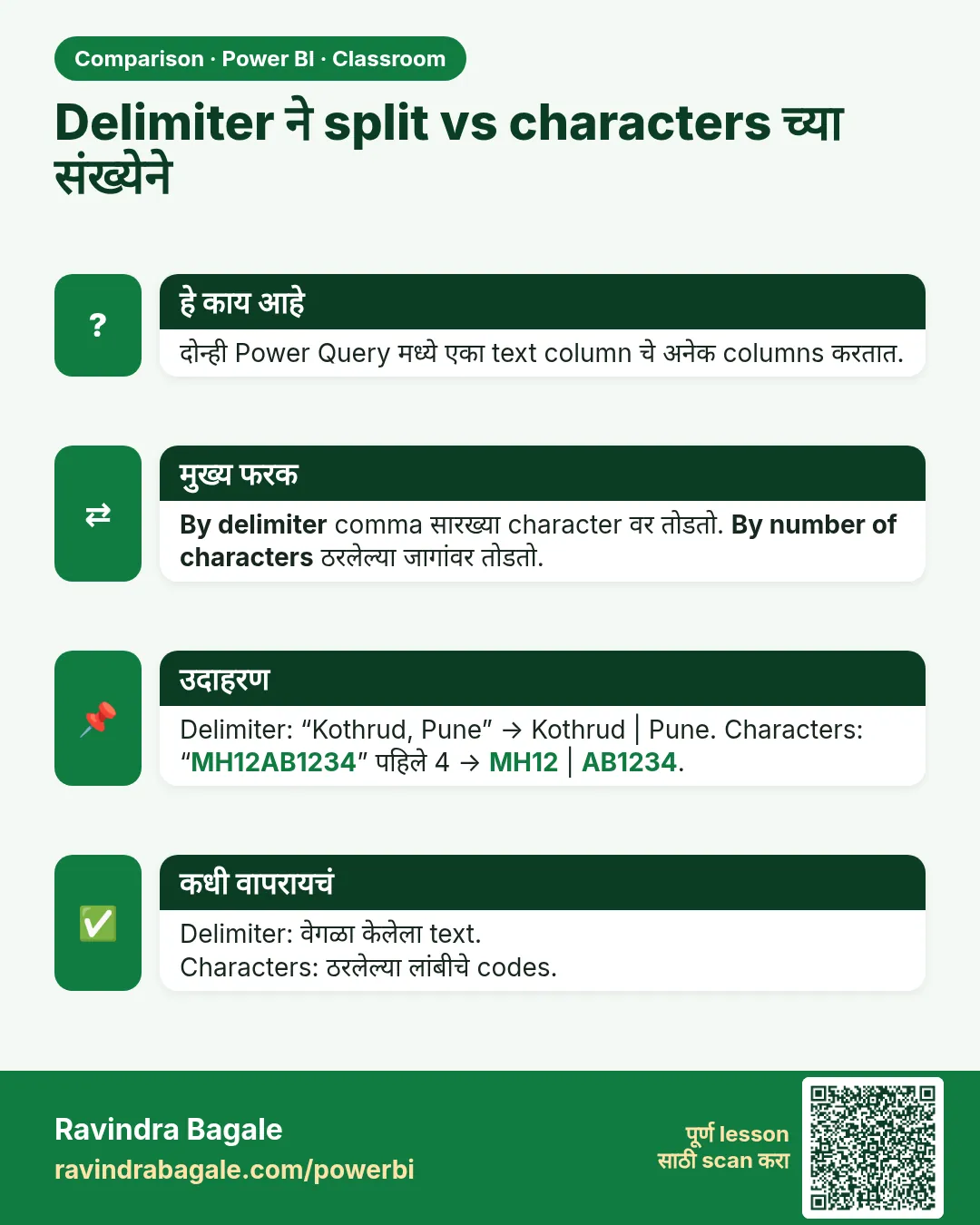
- Split Column एका column ला delimiter वर दोन भागांत कापतो; delimiter म्हणजे भाग वेगळे करणारा text. "Masala Chai Biscuit (Sahyadri Foods)" " (" वर split केलं की "Masala Chai Biscuit" आणि "Sahyadri Foods)" मिळतात.
- फक्त "(" ने नाही, " (" (space आणि bracket) ने split करा. नाहीतर product च्या शेवटी एक space राहतो.
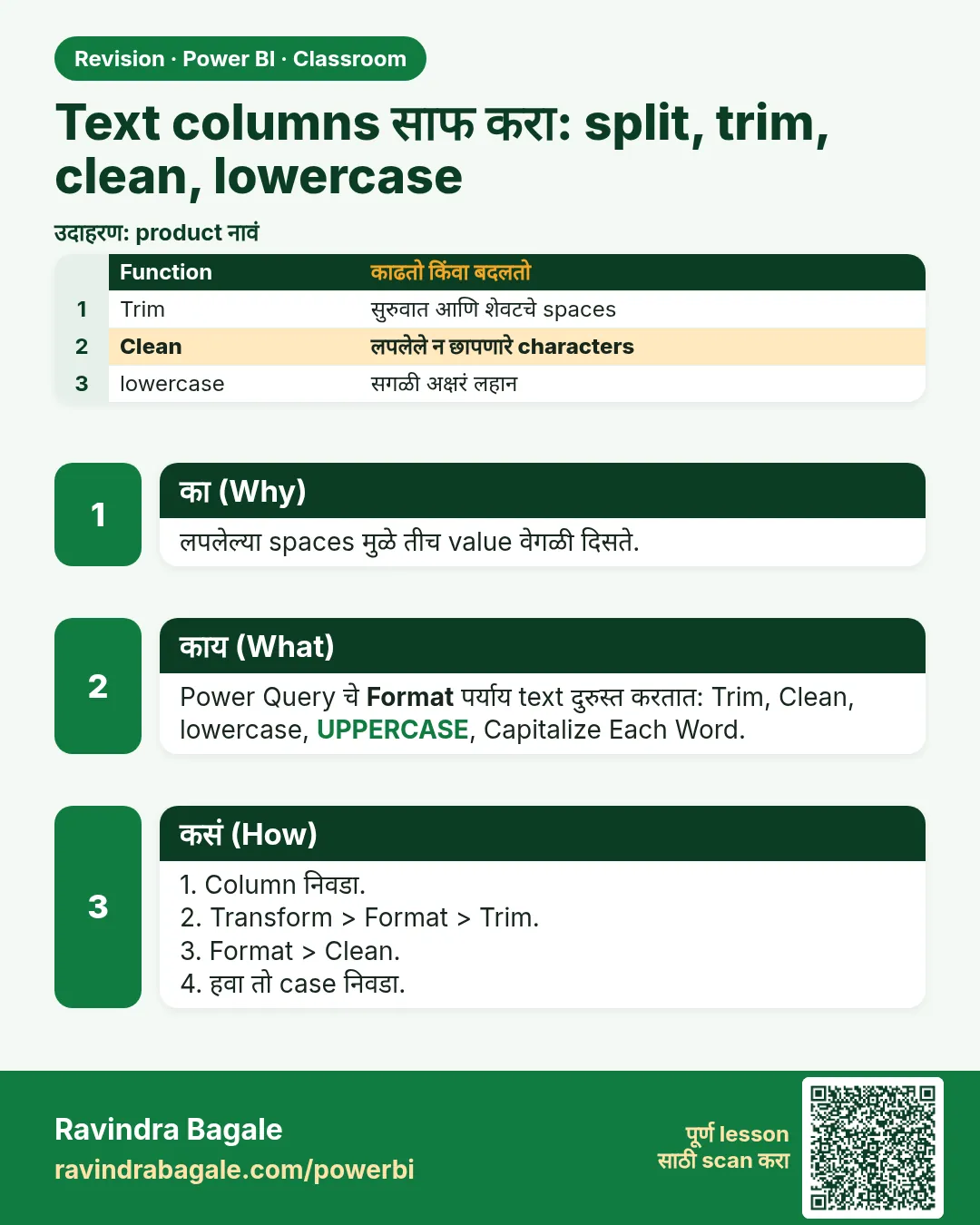
- Clean न दिसणारे characters काढतो, जसे tabs आणि line breaks. Trim सुरुवातीचे आणि शेवटचे spaces काढतो. lowercase मुळे "GHEE" आणि "Ghee" same होतात. ज्या text column वर filter, group किंवा match करणार, त्या प्रत्येकावर या तीन चालवा.
- Blank product पण लोक order करतात असा product आहे. Row delete करू नका; त्याला "unknown product" सारखं स्पष्ट label द्या, म्हणजे त्याचे orders प्रत्येक total मध्ये राहतात.
Figure 1. "Masala Chai Biscuit (Sahyadri Foods)" " (" वर split: product आणि brand; मग brand वर Extract Text Before ")" (चित्र).
3. Data
9 rows चा अपेक्षित result, डोळ्यांनी check करता येईल असा:
| product_id_ | product | brand | category | sub_category |
|---|---|---|---|---|
| P101 | masala chai biscuit | sahyadri foods | snacks | biscuits |
| P102 | ghee 1 l | krishna dairy | dairy | ghee |
| P103 | poha 500 g | godavari mills | staples | poha |
| P104 | unknown product | unknown brand | snacks | namkeen |
| P105 | kaju katli 250 g | mauli sweets | sweets | mithai |
| P106 | toor dal 1 kg | godavari mills | staples | dal |
| P107 | shrikhand 500 g | krishna dairy | dairy | shrikhand |
| P108 | bhakarwadi 200 g | mauli sweets | snacks | namkeen |
| P110 | jowar atta 1 kg | sahyadri foods | staples | atta |
Cleaning नंतर distinct values: 4 brands आणि "unknown brand", 4 categories (snacks, dairy, staples, sweets).
4. Step by step
Load
- Home › New Source › Text/CSV ›
blinkit-products.csv› OK. Query चं नावproductsकरा. - Headers row 1 मध्ये असतील (type detection बंद), तर Home › Use First Row as Headers.
Product आणि brand split करा
- product (brand) निवडा. Home › Split Column › By Delimiter.
- --Custom-- निवडा आणि
(type करा (एक space, मग उघडा bracket). Split at: Left-most delimiter. Advanced options उघडा, Quote Character: None. OK. - नवीन दोन columns rename करा: product (brand).1 →
product, product (brand).2 →brand. - brand निवडा. Transform › Extract › Text Before Delimiter,
)type करा, OK. "Sahyadri Foods)··" चं "Sahyadri Foods" होतं.
Category split करा
- category || sub_category निवडा. Split Column › By Delimiter › Custom
||(space, दोन bars, space) › Each occurrence of the delimiter › Quote Character None › OK. - भागांचं नाव
categoryआणिsub_categoryकरा.
Text च्या तीन steps
- product, brand, category आणि sub_category Ctrl+click करा.
- Transform › Format › Clean. "Godavari Mills" नंतरचा tab गेला.
- Transform › Format › Trim. सुरुवातीचे आणि शेवटचे spaces गेले.
- Transform › Format › lowercase.
Blank product शोधा आणि label करा
- View › Column quality, Column distribution आणि Column profile tick करा. product आणि brand खाली एक Empty value दिसते.
- P104 च्या product cell वर click करा. ती empty text असेल तर product वर right-click › Replace Values, Value To Find रिकामं ठेवा, Replace With
unknown product, OK. - P104 चा brand cell italics मध्ये null दाखवतो. brand वर right-click › Replace Values › Value To Find:
nulltype करा › Replace Withunknown brand› OK. (रिकामं Value To Find null cells ना match होत नाही.)
Figure 2. एक value तीन text steps मधून: Clean tab काढतो, Trim बाहेरचे spaces काढतो, lowercase case same करतो (चित्र).
5. Result असा दिसायला हवा
products query section 3 मधल्या table सारखी: 9 rows, product, brand, category किंवा sub_category मध्ये एकही Empty value नाही (Column quality 100% Valid दाखवतो), आणि प्रत्येक text value lowercase मध्ये, unknown labels सुद्धा.
brand चं Column distribution: 5 distinct values (sahyadri foods, krishna dairy, godavari mills, mauli sweets, unknown brand). category साठी: 4 distinct.
6. काय झालं
- " (" ने split केल्यामुळे प्रत्येक value bracket च्या आधीच्या space वर कापली गेली, म्हणून product च्या शेवटी space नाही आणि brand brand च्या पहिल्या अक्षराने सुरू होतो.
- Extract Text Before ")" ने bracket आणि त्यानंतरचं सगळं काढलं, P101 आणि P103 च्या शेवटचे spaces आणि tab सुद्धा.
- Clean ने लपलेला tab काढला; Trim ने "GHEE" च्या आधीचे आणि "Shrikhand 500 g (Krishna Dairy)" नंतरचे spaces काढले; lowercase ने "DAIRY" चं "dairy" केलं, म्हणून ते "dairy" सोबत group होतं.
- P104 साठी split ला कापायला काहीच नव्हतं: product empty text झाला आणि brand null, म्हणून दोन Replace Values steps ना वेगवेगळे Value To Find लागले.
- Row count 9 च राहिला: तुम्ही values fix केल्या आणि प्रत्येक product ठेवला.
Classroom line
Three compulsory steps for text: lowercase, Trim and Clean.
Class मधलं वाक्य
"Compulsory teen step: lower case, trim, clean."
Text साठी तीन compulsory steps: lowercase, Trim आणि Clean.
Classroom line
Three compulsory steps for text: lowercase, Trim and Clean.
7. अजून थोडं खोलात
- Left-most आणि each occurrence. Left-most एकदाच, दोन columns मध्ये split करतो; product name मध्ये दुसरा bracket असू शकत असेल तर हेच safe. Each occurrence प्रत्येक delimiter वर split करतो आणि जास्त columns बनवू शकतो.
- Quote Character None. Default (") असेल तर quotes मधला delimiter ignore होतो. Inch marks असलेली product names मग split होत नाहीत; None प्रत्येक character सारखाच मानतो.
- Capitalize Each Word ऐवजी lowercase का? Matching साठी कोणताही एक consistent case चालतो. Lowercase सगळ्यात safe, कारण तो शब्द कुठे सुरू होतो यावर अवलंबून नाही. Display साठी labels नंतर format करता येतात.
- Clean आणि Trim. Clean text मध्ये कुठेही असलेले non-printable characters काढतो; Trim फक्त सुरुवातीचे आणि शेवटचे spaces काढतो, शब्दांमधले नाही.
- Column profile default ने पहिल्या 1,000 rows वर असतो. मोठ्या tables साठी editor च्या तळाशी Column profiling based on entire data set वर switch करा.
- Blank product मागे किती orders लपलेत? Append chapters मधल्या 401-order practice data मध्ये P104 चे 43 orders आहेत, ₹5,340 चे. तो delete केला तर ते सगळे जातात.
Classroom line
To remove all the non-printable characters, you have to run Clean.
Class मधलं वाक्य
"Non-printable jevade bi characters aahet te clean karun ghenyasaathi clean karava lagel"
जेवढे पण non-printable characters आहेत, ते काढून टाकण्यासाठी Clean करावं लागेल.
Classroom line
To remove all the non-printable characters, you have to run Clean.
8. नेहमीच्या चुका
| चुकीचा result | कारण | उपाय |
|---|---|---|
| product values च्या शेवटी space, म्हणून merges fail | Space शिवाय "(" ने split केलं | " (" ने split करा, किंवा split नंतर Trim चालवा |
| brand मध्ये "Sahyadri Foods)" | Extract Text Before ")" राहून गेलं | brand वर ते चालवा |
| दोन categories, "dairy" आणि "DAIRY" | lowercase लावला नाही | category वर lowercase चालवा |
| Merge मध्ये "Godavari Mills" match होत नाही | लपलेला tab अजून आहे | Clean, मग Trim चालवा |
| P104 साठी brand मध्ये Replace Values ला काहीच सापडत नाही | Value To Find रिकामं ठेवलं, पण cell null आहे | Value To Find मध्ये null type करा |
| P104 चा row delete झाला | Blank product filter out केला | Row ठेवा; unknown product / unknown brand label द्या |
Ravindra Bagale's Tip
After every text clean-up, open Column distribution and count the distinct values. If you expect 4 categories and see 5, one of them still has a space, a tab or a capital letter.
Ravindra Bagale's Tip – मराठी
प्रत्येक text clean-up नंतर Column distribution उघडा आणि distinct values मोजा. 4 categories अपेक्षित असताना 5 दिसल्या, तर एकात अजून space, tab किंवा capital letter आहे.
Ravindra Bagale's Tip – हिंदी
हर text clean-up के बाद Column distribution खोलिए और distinct values गिनिए. 4 categories की उम्मीद हो और 5 दिखें, तो किसी एक में अभी भी space, tab या capital letter है.
9. स्वतः practice करा
Practice task
blinkit-products.csv वापरून:
- Cleaning नंतर snacks category मध्ये किती products आहेत?
- कोणत्या brand चे सगळ्यात जास्त products आहेत?
- "··GHEE 1 L (Krishna Dairy)" चं product आणि brand मध्ये काय होतं?
- कोणती sub_category दोनदा येते?
Hints: lowercase नंतर मोजा, म्हणजे "Snacks" आणि "snacks" एकच value.
Solution बघा
- 3 (P101, P104, P108).
- Tie: sahyadri foods, krishna dairy, godavari mills आणि mauli sweets प्रत्येकाचे 2 products; unknown brand चा 1.
- product ghee 1 l, brand krishna dairy.
- namkeen (P104 आणि P108).
10. Professional सारखा विचार करा
- Business view. Brand किंवा category column तेव्हाच उपयोगी जेव्हा त्याचं प्रत्येक spelling एकच value असतं. तीन text steps मुळेच "revenue by brand" बरोबर येतो.
- Performance. Clean text म्हणजे कमी distinct values, जे model मध्ये चांगलं compress होतं.
- Maintenance. Text steps एकत्र ठेवा आणि नाव द्या ("Text clean: Clean, Trim, lowercase"). पुढच्या महिन्याची file नवीन spaces घेऊन आली, तरी याच steps fix करतात.
- Unknowns म्हणजे to-do list. Unknown products ची list product master सांभाळणाऱ्या team ला द्या, म्हणजे source मध्येच नावं भरली जातील.
Interview questions
- Trim आणि Clean मध्ये फरक काय? Trim सुरुवातीचे आणि शेवटचे spaces काढतो; Clean tabs आणि line breaks सारखे non-printable characters काढतो.
- "Name (Brand)" दोन columns मध्ये कसं split करता? Custom delimiter " (" ने Split Column, मग दुसऱ्या भागावर Extract Text Before ")".
- Blank product name असलेले rows delete का करायचे नाहीत? त्यांचे orders प्रत्येक total मधून गायब होतील; त्याऐवजी unknown label द्या.
- Replace Values ने null cells कसे replace करता? Value To Find मध्ये null type करा.
Recap
थोडक्यात
- "Name (Brand)" " (" ने split करा, मग Extract Text Before ")".
- "category || sub_category" " || " ने split करा.
- ज्या text columns वर filter किंवा match करता, त्यांवर Clean, Trim आणि lowercase.
- Blanks आणि extra values साठी Column quality आणि distribution बघा.
- Blanks ना unknown label द्या; null cells साठी Value To Find मध्ये null type करा.
 उजळणी card
 तुलना card