13. DAX: Data Analysis Expressions
13.19 Other Useful Functions
Quick answer: the short, self-contained version of this lesson is the guide DAX CALCULATETABLE vs FILTER.
COALESCE and ISBLANK in DAX with example — in 30 seconds
What: COALESCE returns the first value that is not blank. ISBLANK tells you if a value is blank.
Why: Kolhapur had no orders last year. Its "Sales LY" cell is empty, and the manager thinks the report is broken.
Tiny example: Sales LY for Kolhapur is blank. COALESCE([Sales LY], 0) shows ₹0, and a status measure says "New".
COALESCE and ISBLANK in DAX with example — 30 सेकंदात
काय: COALESCE पहिली blank नसलेली value परत देतो. ISBLANK value blank आहे का ते सांगतो.
का: Kolhapur मध्ये गेल्या वर्षी orders नव्हत्या. त्याचा "Sales LY" cell रिकामा आहे, आणि manager ला वाटतं report बिघडलाय.
छोटं उदाहरण: Kolhapur चा Sales LY blank आहे. COALESCE([Sales LY], 0) ₹0 दाखवतो, आणि एक status measure "New" म्हणतो.
COALESCE and ISBLANK in DAX with example — 30 सेकंड में
क्या: COALESCE पहली non-blank value लौटाता है. ISBLANK बताता है कि value blank है या नहीं.
क्यों: Kolhapur में पिछले साल orders नहीं थे. उसका "Sales LY" cell ख़ाली है, और manager को लगता है report टूट गई है.
छोटा उदाहरण: Kolhapur का Sales LY blank है. COALESCE([Sales LY], 0) ₹0 दिखाता है, और एक status measure "New" कहता है.
First look at the data (before → after):
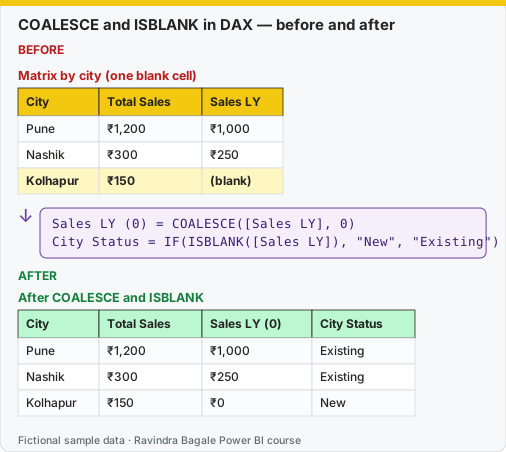
Same before / after tables as text
Before — Matrix by city (one blank cell)
| City | Total Sales | Sales LY |
|---|---|---|
| Pune | ₹1,200 | ₹1,000 |
| Nashik | ₹300 | ₹250 |
| Kolhapur | ₹150 | (blank) |
About this data: This table uses columns: City, Total Sales, Sales LY. This table uses columns: City, Total Sales, Sales LY (0), City Status. This table uses columns: Function, Purpose, Example. Values shown are the lesson examples already on this page (not a new dataset).
Formula / click path
Sales LY (0) = COALESCE([Sales LY], 0)
City Status  = IF(ISBLANK([Sales LY]), "New", "Existing")
After — After COALESCE and ISBLANK
| City | Total Sales | Sales LY (0) | City Status |
|---|---|---|---|
| Pune | ₹1,200 | ₹1,000 | Existing |
| Nashik | ₹300 | ₹250 | Existing |
| Kolhapur | ₹150 | ₹0 | New |
Do it step by step:
- Make sure
[Sales LY]exists (section 13.16). - Click Home › New measure. Type
Sales LY (0) = COALESCE([Sales LY], 0). - Click New measure again. Type the City Status formula.
- Build a matrix. Rows = DarkStore[City]. Add the three measures.
- Check Kolhapur: ₹0 and "New".
- Do not add
+ 0to every measure. Use COALESCE only where zero has a real meaning.
एक-एक step करून बघा:
[Sales LY]आहे ना ते तपासा (section 13.16).- Home › New measure वर click करा.
Sales LY (0) = COALESCE([Sales LY], 0)type करा. - पुन्हा New measure वर click करा. City Status formula type करा.
- Matrix बनवा. Rows = DarkStore[City]. तिन्ही measures टाका.
- Kolhapur तपासा: ₹0 आणि "New".
- प्रत्येक measure ला
+ 0जोडू नका. Zero ला खरा अर्थ असेल तिथेच COALESCE वापरा.
एक-एक step करके देखिए:
[Sales LY]है या नहीं, जाँचिए (section 13.16).- Home › New measure पर click कीजिए.
Sales LY (0) = COALESCE([Sales LY], 0)type कीजिए. - फिर New measure पर click कीजिए. City Status formula type कीजिए.
- Matrix बनाइए. Rows = DarkStore[City]. तीनों measures डालिए.
- Kolhapur जाँचिए: ₹0 और "New".
- हर measure में
+ 0मत जोड़िए. Zero का असली मतलब हो वहीं COALESCE इस्तेमाल कीजिए.
| Function | Purpose | Example |
|---|---|---|
ISBLANK |
Tests for blank | IF(ISBLANK([Sales LY]), "New", "Existing") |
COALESCE |
First non-blank value | COALESCE([Total Sales], 0) |
BLANK() |
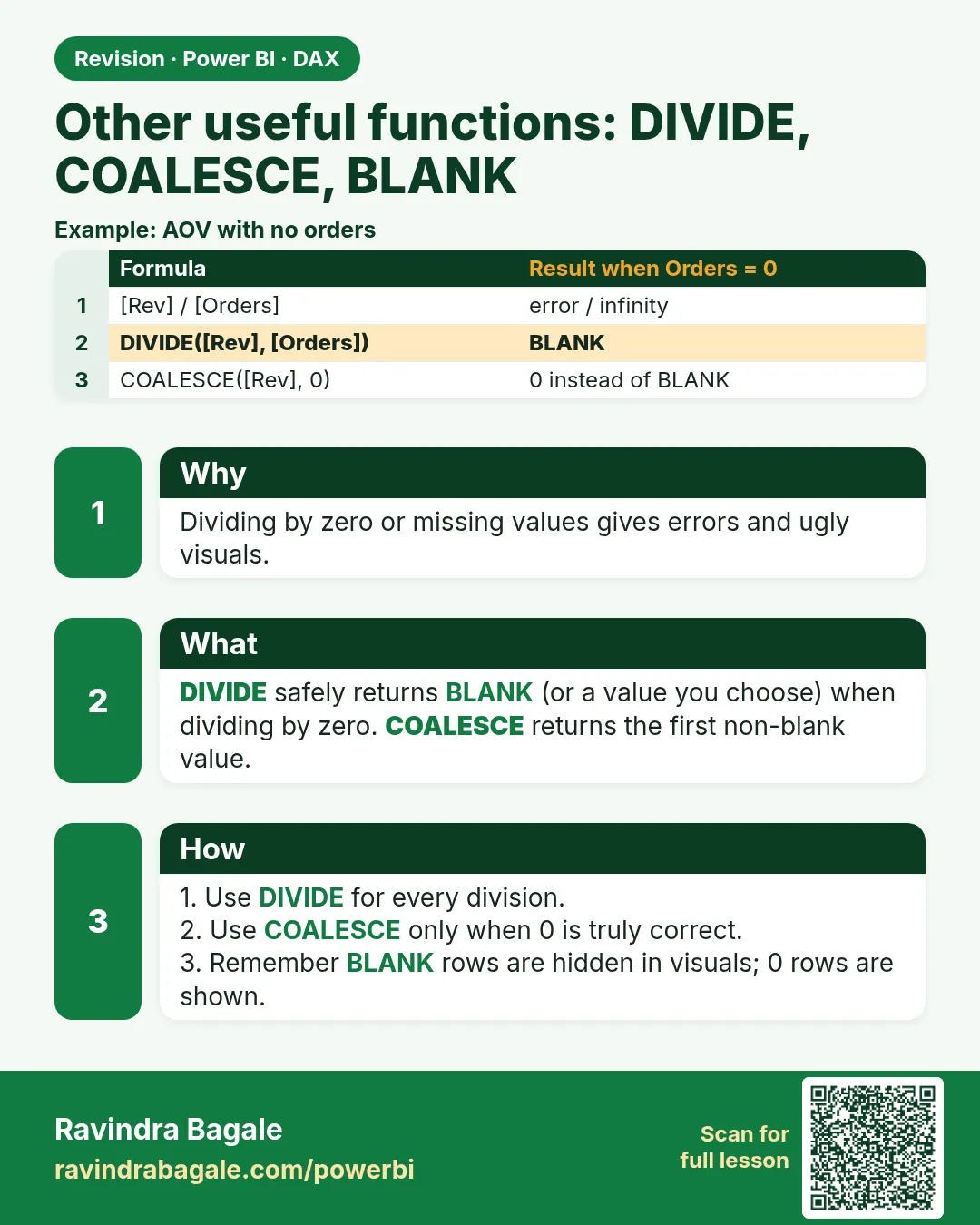
Returns blank | IF([Total Orders] = 0, BLANK(), [Total Orders]) |
SUMMARIZE |
Group-by table | SUMMARIZE(Orders, DarkStore[City]) |
ADDCOLUMNS |
Adds calculated columns to a table expression | see Top 10 Stores above |
CALCULATETABLE |
CALCULATE that returns a table | CALCULATETABLE(Orders, 'Date'[Year] = 2025) |
CROSSFILTER |
Changes relationship direction for one calculation | CALCULATE([Total Orders], CROSSFILTER(Orders[Customer ID], Customer[Customer ID], BOTH)) |
ISINSCOPE |
TRUE when a column is the current level in a hierarchy | used for level-specific measures in matrices |
ROUND |
Rounds a number | ROUND([Avg Delivery Time (mins)], 1) |
DAX formatting tip
Keep one argument per line for long formulas, indent nested functions, and give measures clear names such as Sales LY or Cancellation Rate. Free online formatters such as DAX Formatter by SQLBI can tidy your code automatically.
Ravindra Bagale's Tip
Friends, many students forget blank handling and get confusing results when they combine functions like COALESCE, ISBLANK and "+ 0". Adding 0 to a measure shows zeros for every combination and can explode the size of a table visual. Use it only where zero really has meaning. This matters for both exams and interviews.
Ravindra Bagale's Tip – मराठी
मित्रांनो, बरेच students blank handling विसरतात आणि COALESCE, ISBLANK आणि "+ 0" सारखी functions एकत्र वापरताना गोंधळात टाकणारे results मिळवतात. Measure मध्ये 0 जोडला तर प्रत्येक combination साठी zero दिसतो आणि table visual चा आकार प्रचंड वाढू शकतो. जिथे zero ला खरंच अर्थ आहे तिथेच तो वापरा. हे exam आणि interview दोन्हीसाठी important आहे.
Ravindra Bagale's Tip – हिंदी
दोस्तों, बहुत से students blank handling भूल जाते हैं और COALESCE, ISBLANK और "+ 0" जैसी functions मिलाकर उलझाने वाले results पाते हैं. Measure में 0 जोड़ने से हर combination के लिए zero दिखता है और table visual का size बहुत बढ़ सकता है. इसे वहीं इस्तेमाल करो जहाँ zero का सच में मतलब हो. यह exam और interview दोनों के लिए ज़रूरी है.
Loading DAX practice tasks...
- Rounded order value (Easy): Measure: AOV Rounded = [Total Sales] ÷ [Total Orders], rounded to 0 decimals.
- Whole minutes (Easy): Measure: Avg Mins Whole = the average DeliveryMins with decimals cut off.
- Margin per product (Easy): Calculated column on Product: Margin = MRP − CostPrice.
- Even quantity flag (Medium): Calculated column on Orders: Even Qty = TRUE when Qty is even.
- Show 0 not blank (Medium): Slicer: Platform = Zepto. Shown per Store City. Measure: Sales or 0 = [Total Sales], or 0 when blank.
- Has sales? (Medium): Slicer: Platform = Zepto. Shown per Store City. Measure: Sales Status = "No sales" if [Total Sales] is blank, else "Has sales".
- Sales as text (Medium): Measure: Sales Text = [Total Sales] formatted with the pattern "#,0".
- Discount rate rounded (Hard): Measure: Disc Rate = SUM of Discount ÷ [Total Sales], rounded to 3 decimals.
- Speed band per city (Hard): Shown per Store City. Measure: Speed = "Fast" if average DeliveryMins ≤ 15, "OK" if ≤ 25, else "Slow".
- Category list (Hard): Measure: Categories = all different Product Category values joined with ", " in A to Z order.
 Revision card